
TherapyNotes vs Case Management Hub: Which Is the Best Software for Therapists, Counselors, and Behavioral Health Teams?
Choosing the right software for your practice or organization is one of the most important decisions you will make. Whether you are a therapist, counselor, social worker, or part of a behavioral health team, your system directly affects efficiency, client outcomes, compliance, and long-term growth.
In this comparison, we examine TherapyNotes vs Case Management Hub, review core features, explore common frustrations with TherapyNotes, and explain why many practices and behavioral health teams are looking for a more flexible alternative.

What Is TherapyNotes?
TherapyNotes is a therapy practice management and EHR platform primarily used by mental health professionals. It is often considered by solo therapists, counselors, psychologists, and smaller behavioral health practices that want a system for documentation, scheduling, and billing.
Its core functionality typically includes calendar management, progress notes, treatment planning, billing workflows, and client record management. For practices with straightforward needs, it can serve as a starting point. However, many organizations eventually need more advanced case management software, stronger customization, better collaboration tools, and broader reporting capabilities.
What Is Case Management Hub?
Case Management Hub is an all-in-one case management platform designed for therapists, counselors, social workers, case managers, behavioral health teams, nonprofits, attorneys, legal teams, clinicians, ABAs, and human services organizations. It is built to centralize and simplify client management, streamline documentation, support team collaboration, and improve reporting across programs and services.
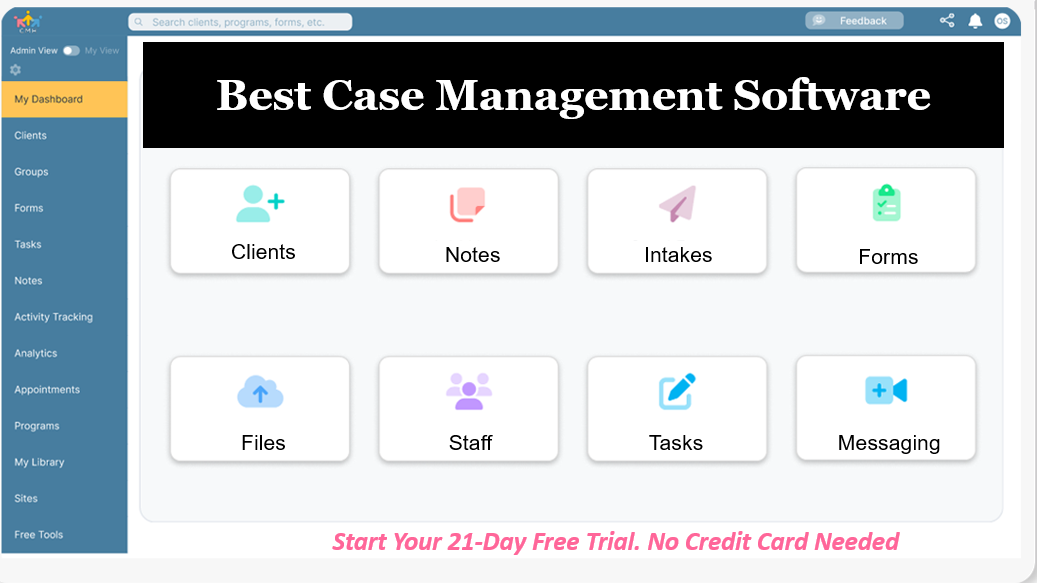
Unlike tools that focus mainly on therapy documentation, Case Management Hub brings together intake forms, assessments, progress notes, task management, referrals, reporting, file storage, client portals, and workflow customization in one platform. This makes it especially attractive for organizations that need more than a basic EHR.
All-in-One Case Management Software
Sign Up Today, Free. No credit card needed!
|
Do You Have a Team? |
||
TherapyNotes Review: Pros, Cons, and What Buyers Should Know
Searches such as TherapyNotes review, review of TherapyNotes, is TherapyNotes legit, is TherapyNotes safe, and TherapyNotes issues reflect how many buyers evaluate the platform before making a decision. TherapyNotes is a legitimate and recognized platform in the mental health software space, but legitimacy alone does not mean it is the best fit for every practice or behavioral health team.
Common strengths of TherapyNotes
- Works well for basic therapy documentation
- Includes billing and scheduling tools
- Familiar to many private practice clinicians
- Useful for simple workflows with limited operational complexity
Common limitations buyers should consider
- Limited flexibility for organizations that need broader case management workflows
- Less ideal for multi-program teams or interdisciplinary service models
- Can feel restrictive when custom forms, custom data fields, or advanced reporting are required
- May not meet the needs of organizations that want a centralized platform for notes, referrals, tasks, outcomes, and collaboration
Pain Point Keywords Driving Interest in a TherapyNotes Alternative
High-intent search behavior often reveals what buyers are actually struggling with. Many users comparing TherapyNotes vs Case Management Hub are not simply looking for a software review. They are looking for a better solution to real workflow problems.
Common TherapyNotes pain points
- TherapyNotes pricing too expensive
- TherapyNotes limitations and missing features
- TherapyNotes customer support issues
- TherapyNotes not suitable for case management workflows
- Need for a TherapyNotes alternative for therapists
- Need for therapy software with integrated case management
These pain points are especially common among growing practices, behavioral health organizations, and teams that have moved beyond simple note-taking and billing. When professionals need stronger reporting, more customization, better teamwork, and scalable client management, they often begin searching for the best TherapyNotes alternative for group practices and care teams.
TherapyNotes vs Case Management Hub Comparison Table
The biggest difference between these platforms is scope. TherapyNotes is primarily a therapy EHR and practice management solution. Case Management Hub is a broader case management and behavioral health platform designed to support more complex workflows.
Below is a clear side-by-side comparison of the two platforms.
| Feature | TherapyNotes | Case Management Hub |
|---|---|---|
| Core Focus | Therapy EHR | Full Case Management + EHR |
| Customization | Limited | Fully customizable fields, forms, workflows |
| Case Management | Basic | Advanced, built for multi-service workflows |
| Reporting & Analytics | Basic | Real-time, customizable reporting |
| Client Portal | Available | Advanced portal with forms, tasks, messaging |
| Collaboration | Limited | Built for teams, programs, and organizations |
| Intake & Forms | Standard | Fully customizable with automation |
| Goal Tracking | Minimal | Built-in goal tracking and outcomes reporting |
| Scalability | Best for small practices | Scales from solo to enterprise |
| Ease of Setup | Moderate | Fast, simple, immediate onboarding |
| Pricing Flexibility | Fixed tiers | Affordable and flexible options |
| Multi-Program Support | Limited | Full support for programs and locations |
Comparison
- Core focus: TherapyNotes focuses on therapy EHR functions, while Case Management Hub supports full case management plus documentation and reporting.
- Customization: TherapyNotes is more limited, while Case Management Hub allows extensive customization of forms, fields, workflows, and notes.
- Case management: TherapyNotes is better for standard clinical workflows, while Case Management Hub is built for broader case coordination, referrals, programs, and service tracking.
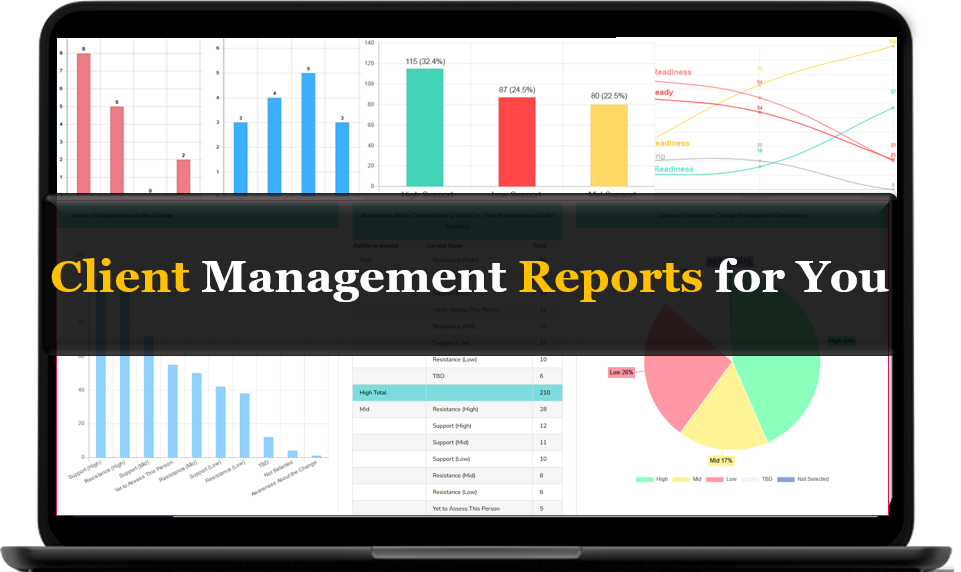
- Reporting and analytics: TherapyNotes supports basic reporting, while Case Management Hub offers more flexible and customizable reporting for outcomes, programs, and operations.
- Team collaboration: TherapyNotes can support internal workflows, but Case Management Hub is better suited to larger teams, shared caseloads, and multi-role collaboration.
- Scalability: TherapyNotes can work well for smaller therapy practices, while Case Management Hub is designed to scale from solo providers to large behavioral health or nonprofit organizations.
- Centralization: Case Management Hub offers a more centralized approach for client data, forms, notes, tasks, files, and reporting in one place.
Why Case Management Hub Is a Better Alternative for Many Teams
For many therapists, counselors, and behavioral health organizations, the question is not whether TherapyNotes works. The real question is whether it works well enough for current and future needs. Case Management Hub positions itself as the stronger alternative because it solves problems that many growing organizations face once they outgrow basic therapy software.
1. Broader functionality in one system
Case Management Hub centralizes intake, assessments, notes, tasks, referrals, client profiles, files, reporting, and communication. This reduces the need to juggle spreadsheets, paper files, disconnected forms, and multiple software tools.
2. Better fit for complex workflows
Behavioral health teams often need to coordinate care, track referrals, document services, manage goals, and measure outcomes. Case Management Hub is better suited for these real-world needs than a platform built primarily for standard therapy practice workflows.
3. Stronger customization
Organizations rarely operate the same way. Case Management Hub provides customizable forms, note templates, client fields, and reporting options so the system can reflect the way your team actually works.
4. Easier support for scaling
As organizations grow, they need software that supports more users, locations, programs, and data requirements. Case Management Hub is better positioned for scale than software designed mainly for individual therapy practices.
Key Features That Make Case Management Hub Stand Out
When evaluating the best behavioral health EHR software comparison or therapy practice management software comparison content, buyers should focus on practical business impact, not just feature lists. Case Management Hub stands out because its features are designed to improve workflows and reduce administrative friction.
Core platform strengths
- Customizable digital intake forms and assessments
- Flexible progress notes and documentation templates
- Real-time reporting and exportable analytics
- Client portal access for forms, tasks, and shared information
- Task management and reminders
- Referral tracking and service coordination
- Secure file storage and centralized document handling
- Role-based permissions and team access controls
- Support for multiple programs, teams, and locations
These capabilities make Case Management Hub especially relevant for therapists, counselors, social workers, care coordinators, nonprofit teams, and behavioral health organizations that need both structure and flexibility.
All-in-One Case Management Software
Sign Up Today, Free. No credit card needed!
|
Do You Have a Team? |
||
Who Should Choose TherapyNotes?
TherapyNotes may still be a reasonable option in certain situations. It can be a practical fit for professionals who want a straightforward therapy EHR without the need for extensive customization or broad case management functionality.
TherapyNotes may fit best if you:
- Run a solo therapy practice
- Need basic scheduling, notes, and billing
- Do not require complex reporting or team collaboration
- Do not need a highly customizable case management system
If your needs are relatively simple and unlikely to expand significantly, TherapyNotes may be enough. However, many organizations find that their software needs change as they grow, add staff, expand services, or need stronger reporting and accountability.
Who Should Choose Case Management Hub?
Case Management Hub is the stronger choice for practices and organizations that need more flexibility, more coordination, and more room to grow. It is particularly well suited for professionals and teams who want to replace fragmented systems with one centralized platform.
Case Management Hub may fit best if you:
- Need a TherapyNotes alternative for therapists with more customization
- Manage interdisciplinary or multi-service behavioral health workflows
- Want therapy software with integrated case management
- Need customizable forms, notes, and reporting
- Want stronger collaboration across staff, programs, or locations
- Need a scalable platform for growth
This makes it a compelling option for group practices, behavioral health teams, nonprofits, clinics, schools, social services providers, and multi-program organizations that need more than a basic mental health EHR.
Practical Evaluation Checklist for Buyers
If you are comparing TherapyNotes competitors for small practices or evaluating the best EHR for therapists and counselors, use the checklist below to make a more informed decision.
Questions to ask before choosing a platform
- Do we only need therapy documentation and billing, or do we also need broader case management tools?
- How important are custom forms, note templates, and custom reports?
- Will multiple staff members need to collaborate in the same system?
- Do we need to track referrals, goals, tasks, or outcomes?
- Are we likely to add programs, services, or locations in the future?
- Do we want a system that can grow with us without forcing a migration later?
These questions help clarify whether your organization needs a simple therapy platform or a more robust case management software solution.
Final Verdict: TherapyNotes vs Case Management Hub
If your organization only needs a basic therapy EHR with scheduling, notes, and billing, TherapyNotes may still meet your needs. It is a recognized platform and may work well for solo practitioners with simple workflows.
But if you need a more complete system that supports customization, collaboration, reporting, client management, and broader behavioral health workflows, Case Management Hub is the better alternative. It is designed for modern therapists, counselors, and behavioral health teams that want a centralized platform built for real operational needs.
For organizations searching terms like TherapyNotes alternative, best behavioral health EHR software comparison, or therapy software with integrated case management, the value proposition is clear. Case Management Hub delivers more flexibility, stronger case management functionality, and better long-term scalability.
Conclusion
The software market for therapists, counselors, and behavioral health teams is evolving. Buyers are no longer satisfied with rigid systems that only address one part of the workflow. They want software that supports documentation, collaboration, service tracking, reporting, and growth in one place.
That is why many organizations comparing TherapyNotes vs Case Management Hub ultimately see Case Management Hub as the better fit. It offers a more practical and scalable answer for teams that need more than a basic EHR. For practices and organizations looking to improve efficiency, centralize operations, and support better outcomes, Case Management Hub stands out as a smarter long-term choice.
Create an Account Now - Add Your Team to Try Case Management Hub for Free
Get your entire team to try out Case Management Hub for free in minutes. Work smarter, not harder - free for 21 days. No credit card needed. If you decide to move forward is when you can subscribe.Follow These 5 Simple Steps:
Step 1: Create your free trial account here: Create Account.
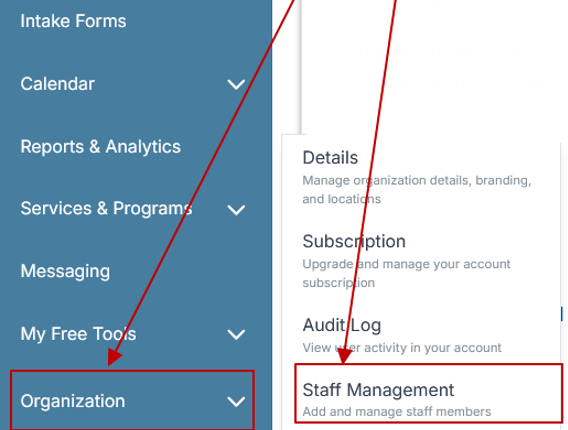
Step 2: From the left sidebar, scroll down to the Organization dropdown menu and click Staff Management
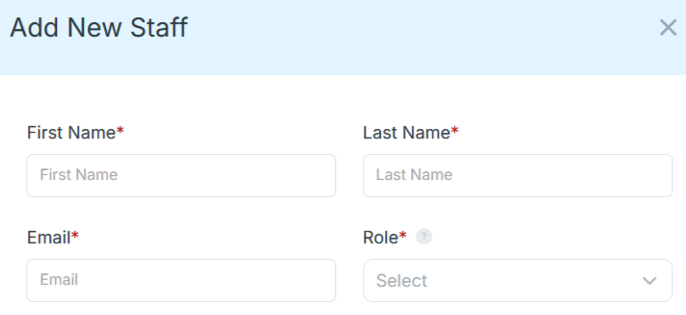
Step 4: Copy and send this email to your team members (so they know how to log in).
⚠️ Important: Ask your team members not to create new accounts. They should log in using the details you create for them.
Email Template to Send Your Team
Subject: You’ve been added to our new All-in-One Case Management tool!
Hi Team,
I've set up a free trial account for our team with the Case Management Hub software, an all-in-one case management software. I've already added you to the account, so you can start exploring immediately.
Please don't create a new account. Instead, use the login details I've shared with you to access the platform here: https://app.casemanagementhub.org/
This platform centralizes and improves everything we do, from case management, standardized assessment forms, client care, scheduling & appointments, reporting & analytics, and more all in one secure, collaborative tool. We have 21 days to test it out for free and see how it fits our needs.
Learn more about the platform here: Explore Features
Looking forward to exploring this together.
Best,
[Your Name/Signature]
Step 5: Request a customized discounted quote.
Find the Right Case Management Solution for Your Organization: All-in-One Case Management Resource Center.
Note: Content on this casemanagementhub.org site is copyrighted and protected under applicable copyright laws. Read Terms of Use.
Disclaimer: Case Management Hub is an educational resource and software provider site. Our content is not medical advice. Use of this site does not create a provider-patient relationship. Read our full disclaimer here: Case Management Hub Disclaimer.