
Watch Our Demos
- Client Profile Overview
- Form Builder – Basic Tutorial
- Working with Programs and Groups
- Add a Client and Send Forms
- Add a Client Using an Online Form
- How to Add Case Notes
- Creating and Tracking Client Goals
- How to Track Time, Cost, and More
- Simple File Management (for Client and Organization Files)
- Managing Client Referrals
- Reports & Analytics
- Quick & Easy Custom Reports
- Working with Letters
- Tracking a Client’s Program History
- Merging Duplicate Client Profiles
- Managing Staff & Permissions
- Client Card View & Form Categories
- How to Create a Zip Code or Geographical Report
Would you like to schedule a live demo? Schedule here
Do you have questions or feedback about our demos? If so, contact us, we would love to hear from you.
Client Profile Overview
The client profile in our top case management software makes any caseworker’s workflow simple. The page is customizable with your own sections and fields to keep everything organized. You can also use the built-in widgets to do things like add notes, tasks, send forms, and more … all without needing to navigate to a different page.
Collect the data you need and see it the way you like! Our case management system is flexible to customize to your workflow.
Form Builder – Basic Tutorial
Learn how easy it is to build intake forms and assessments in the Case Management Hub platform. Use drag and drop to build your form in minutes! Collect form data seamlessly and have it flow through to the client profile and reporting automatically.
Working with Programs and Groups
The programs and groups modules in the Case Management Hub are flexible and simple to use. Learn the different between programs and groups, and how to use them to manage different offerings of your non-profit or social services organization.
This best case management application enables you to track goals for all program and group participants, report on program outcomes, and add group notes and tasks.

Do you have questions or feedback about our demos? If so, contact us, we would love to hear from you.
Add a Client and Send Forms
The process of sending intake or assessment forms to clients is a must-have in any top case management system. Sending forms digitally is quick and easy in the Case Management Hub. Add a client and in the same workflow, invite them to sign up for a free client account to fill out your forms.
The Case Management Hub software works on any device, so they can quickly complete and submit a form back to you on their phone in just a few minutes.
Do you have questions or feedback about our demos? If so, contact us, we would love to hear from you.
Add a Client Using an Online Form
Learn how easy it is to add a new client from a Case Management Hub online form. Online forms can be accessed from a link, and a person does not need to be logged into a client account to fill them out. This makes them great to use for referral or service request forms you link from your website.
You can also automate things like adding the person that submits the form to a case worker, program, or designated referral partner.
Do you have questions or feedback about our demos? If so, contact us, we would love to hear from you.
How to Add Case Notes
Case notes are a vital part of any best case management tools. Learn how easy it is to add case notes in the Case Management Hub software, as well as include things like tracking, and custom note types.
Creating and Tracking Client Goals
Learn how to track client, program, and group goals easily and effectively. Plus, you can quickly report on progress and outcomes, all in our best case management software.
Questions or feedback? Contact us
How to Track Time, Cost, and More
The tracking feature in our Case Management Hub software is as easy to use as it is powerful. You can track and reports on things like time, costs, or iterations of an action.
For example, you can use the case management tool to track staff time for payroll or volunteer hours. Use the cost tracking to track how much financial assistance is provided to a client and which grant it is related to. Use other tracking to track the number of iPads/gifts given out at a charity event.
In this case management tool tutorial, you’ll learn how to leverage tracking to report on the things that matter most to your organization.
Questions or feedback? Contact us
Simple File Management (for Client and Organization Files)
Learn how easy it is to manage and organize client files with auto-generated folders that directs all uploaded client files into a single place. Add folders, documents, and more quickly.
Do you have questions or feedback about our case management software demos? If so, contact us, we would love to hear from you.
Managing Client Referrals
Any great case management software includes the ability to handle incoming and outgoing client referrals. In this tutorial, you’ll learn how to track your referrals, build your referral partner list, and share client records with your referral partners.
Do you have questions or feedback about our case management software demos? If so, contact us, we would love to hear from you.
Reports & Analytics
Running reports for grants, funders, and programs doesn’t have to be time-consuming. In this tutorial you’ll learn how the Case Management Hub platform helps you quickly generate the reports you need with just a few clicks.
Do you have questions or feedback about our case management software demos? If so, contact us, we would love to hear from you.
Quick & Easy Custom Reports
Case Management Hub’s Custom Reports take you beyond standard reporting. Learn how to quickly create tailored reports focused on the programs, services, and outcomes that matter most to your organization.
Do you have questions or feedback about our case management software demos? If so, contact us, we would love to hear from you.
Working with Letters
Are you looking for a faster way to manage client correspondence? Learn how our Case Management software helps you create personalized letters in minutes. With customizable templates and built-in mail merge you’ll see how you can quickly send letters to one or more clients.
Do you have questions or feedback about our case management software demos? If so, contact us, we would love to hear from you.
Tracking a Client’s Program History
How do you track a client’s journey in your social services or non-profit organization over the years? Case Management Hub’s Program History feature records entrance and exit dates, helping staff understand past services and support at a glance.
Do you have questions or feedback about our case management software demos? If so, contact us, we would love to hear from you.
Merging Duplicate Client Profiles
Need to clean up duplicate client records? Duplicates make it difficult to maintain accurate data. With Case Management Hub’s Merge Duplicates feature, you can combine records in just a few clicks while preserving valuable historical data.
Do you have questions or feedback about our case management software demos? If so, contact us, we would love to hear from you.
Managing Staff & Permissions
How do you balance teamwork with client confidentiality? Learn how Staff and Permissions Management in Case Management Hub helps organizations collaborate effectively while maintaining control over client records.
Do you have questions or feedback about our case management software demos? If so, contact us, we would love to hear from you.
Client Card View & Form Categories
We’ve added some awesome upgrades to the Case Management Hub software. In this video, we break down the Client Card View and Form Categories. Here is a quick look at how these updates will streamline your data organization and keep your workflow moving faster than ever.
Do you have questions or feedback about our case management software demos? If so, contact us, we would love to hear from you.
How to Create a Zip Code or Geographical Report
One of the best things about the Case Management Hub platform is just how flexible it is to meet your reporting needs. In this quick tutorial, we’re going to look at how you can bypass the default text fields – like Postal Code or County – and easily put together powerful & accurate, custom location reports.
Do you have questions or feedback about our case management software demos? If so, contact us, we would love to hear from you.
Image sources: https://stock.adobe.com/images
Create an Account Now - Add Your Team to Try Case Management Hub for Free
Get your entire team to try out Case Management Hub for free in minutes. Work smarter, not harder - free for 21 days. No credit card needed. If you decide to move forward is when you can subscribe.Follow These 5 Simple Steps:
Step 1: Create your free trial account here: Create Account.
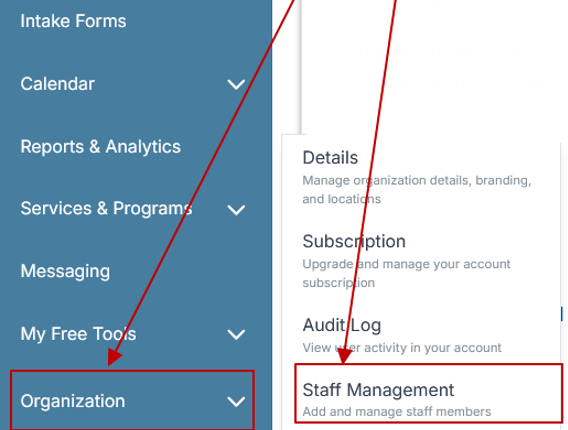
Step 2: From the left sidebar, scroll down to the Organization dropdown menu and click Staff Management
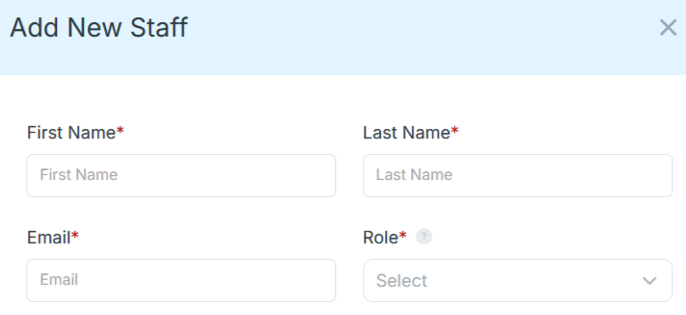
Step 4: Copy and send this email to your team members (so they know how to log in).
⚠️ Important: Ask your team members not to create new accounts. They should log in using the details you create for them.
Email Template to Send Your Team
Subject: You’ve been added to our new All-in-One Case Management tool!
Hi Team,
I've set up a free trial account for our team with the Case Management Hub software, an all-in-one case management software. I've already added you to the account, so you can start exploring immediately.
Please don't create a new account. Instead, use the login details I've shared with you to access the platform here: https://app.casemanagementhub.org/
This platform centralizes and improves everything we do, from case management, standardized assessment forms, client care, scheduling & appointments, reporting & analytics, and more all in one secure, collaborative tool. We have 21 days to test it out for free and see how it fits our needs.
Learn more about the platform here: Explore Features
Looking forward to exploring this together.
Best,
[Your Name/Signature]
Step 5: Request a customized discounted quote.