
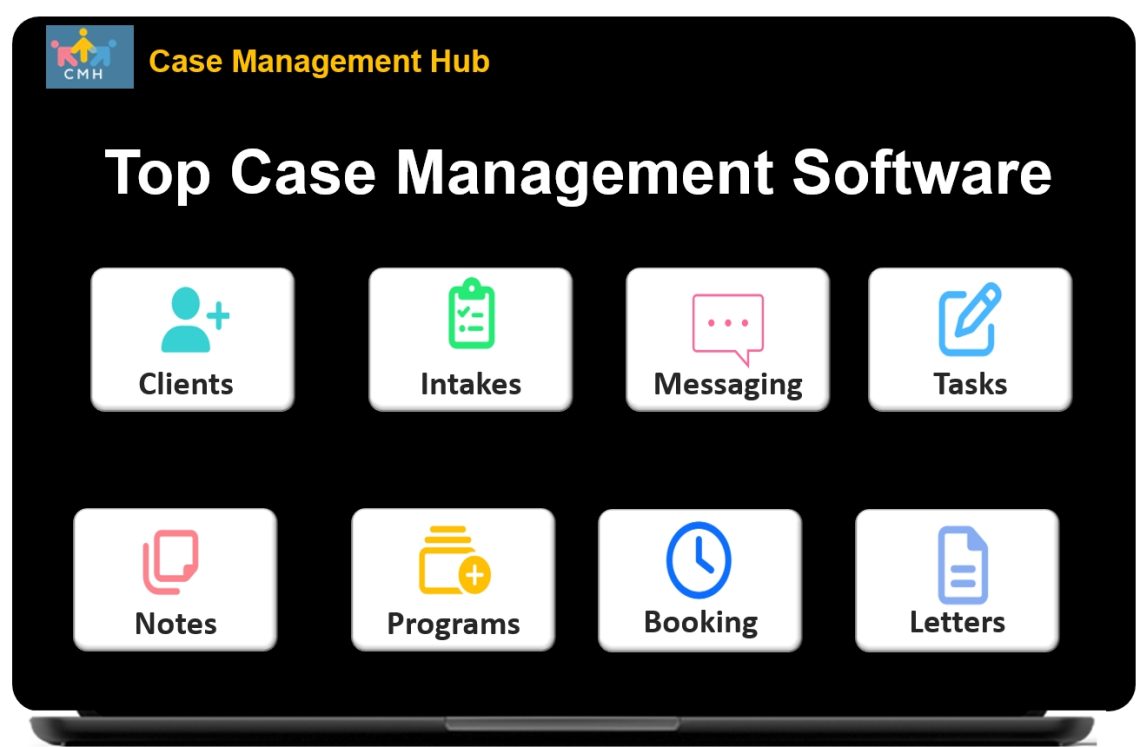
Best All-in-One Case Management Software
Case Management Software Built to Improve Client Outcomes, Save Time, and Simplify Service Delivery
The Case Management Hub is an all-in-one case management software platform designed for social workers, case managers, therapists, counselors, nonprofits, human services agencies, clinics, private practices, community organizations, and behavioral health professionals who need a better way to manage client services.
Instead of relying on spreadsheets, paper files, disconnected forms, and outdated tools, organizations can centralize client records, automate key workflows, improve team coordination, and track measurable outcomes in one secure system.
For organizations that want to reduce administrative burden while improving care quality, compliance, and reporting, the Case Management Hub delivers a practical and scalable solution.
Why Organizations Need Modern Case Management Software
Many organizations still manage clients through a mix of paper forms, Word documents, Excel files, emails, and shared drives. While those methods may seem workable at first, they often create major operational problems as caseloads grow. Staff spend too much time tracking down information, entering the same data in multiple places, and building reports manually. Leaders struggle to get timely visibility into program performance, service delivery, and client progress.
Common Problems with Outdated Case Management Processes
- Client records are spread across multiple tools and departments
- Notes, forms, files, and appointments are difficult to connect
- Reporting takes too long and often lacks accuracy
- Staff collaboration is limited by disconnected systems
- Leadership lacks real-time visibility into outcomes and performance
- Manual processes increase the risk of missed follow-ups and compliance issues
The Case Management Hub was built to address these exact pain points with a user-friendly, cloud-based case management platform that supports real-world service delivery.
Who the Platform Is Built For
- Social workers and case managers
- Nonprofits and NGOs
- Social services and human services agencies
- Mental health and behavioral health providers
- Therapists, counselors, and psychologists
- Clinics and private practices
- Schools, educational programs, and youth organizations
- Community agencies and multi-program service organizations
Create an Account Now - Add Your Team to Try Case Management Hub for Free
Get your entire team to try out Case Management Hub for free in minutes. Work smarter, not harder - free for 21 days. No credit card needed. If you decide to move forward is when you can subscribe.Follow These 5 Simple Steps:
Step 1: Create your free trial account here: Create Account.
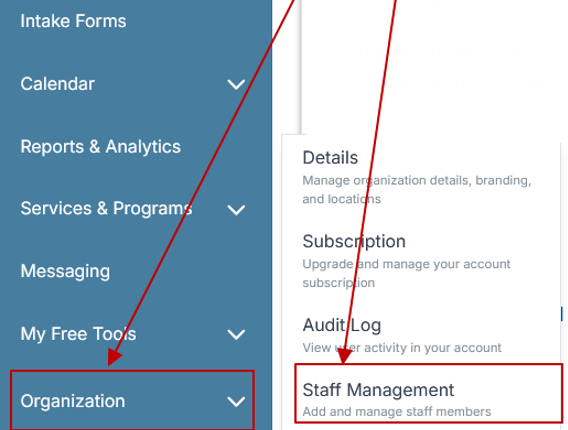
Step 2: From the left sidebar, scroll down to the Organization dropdown menu and click Staff Management
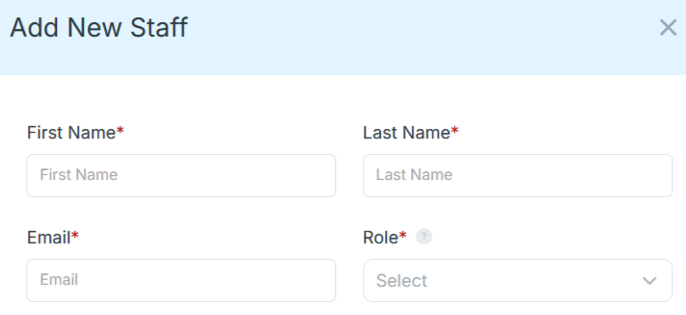
Step 4: Copy and send this email to your team members (so they know how to log in).
⚠️ Important: Ask your team members not to create new accounts. They should log in using the details you create for them.
Email Template to Send Your Team
Subject: You’ve been added to our new All-in-One Case Management tool!
Hi Team,
I've set up a free trial account for our team with the Case Management Hub software, an all-in-one case management software. I've already added you to the account, so you can start exploring immediately.
Please don't create a new account. Instead, use the login details I've shared with you to access the platform here: https://app.casemanagementhub.org/
This platform centralizes and improves everything we do, from case management, standardized assessment forms, client care, scheduling & appointments, reporting & analytics, and more all in one secure, collaborative tool. We have 21 days to test it out for free and see how it fits our needs.
Learn more about the platform here: Explore Features
Looking forward to exploring this together.
Best,
[Your Name/Signature]
Step 5: Request a customized discounted quote.
Key Benefits of the Case Management Hub
The strongest case for adopting a platform like the Case Management Hub is not just the feature list. It is the operational and client-facing results that the platform makes possible. Organizations do not simply need more software. They need a system that saves time, improves service delivery, strengthens accountability, and helps teams prove outcomes more easily.
1. Centralize Everything in One Place
The Case Management Hub gives organizations a single platform for client records, case notes, assessments, forms, files, tasks, appointments, referrals, and reports. Centralization reduces confusion, eliminates duplicate work, and makes it easier for staff to find what they need quickly.
2. Reduce Administrative Burden
Teams can use digital intake forms, prebuilt templates, customizable note types, recurring tasks, automated reminders, and mapped fields to reduce manual work. Staff spend less time on repetitive admin and more time supporting clients.
3. Improve Client Outcomes
When client information is structured, accessible, and connected across the full service journey, staff can identify needs faster, respond more consistently, and track progress more effectively. Better visibility supports better decisions and stronger outcomes.
4. Strengthen Reporting and Accountability
The platform makes it easier to track service delivery, program performance, goal progress, demographics, referrals, funding, and other critical metrics. Custom reports and exports help organizations meet stakeholder, grant, compliance, and leadership reporting requirements.
5. Scale More Efficiently
As organizations grow, manual systems become harder to maintain. The Case Management Hub supports multiple programs, multiple locations, multiple staff roles, and large volumes of client records without forcing organizations into disconnected workarounds.
What Is the Case Management Hub?
The Case Management Hub is a comprehensive case management software solution built for professionals and organizations that support people through clinical care, social services, behavioral health, education, housing, community outreach, and human services programs. It combines client management, digital forms, case notes, scheduling, reporting, tasks, file storage, referrals, goal tracking, and communications into one centralized platform.
Because it is cloud-based, teams can securely access the system from desktop computers, tablets, and mobile devices. This makes it especially useful for organizations with field staff, multiple locations, or hybrid service models. Teams can work faster, stay aligned, and maintain a complete picture of every client interaction without switching between multiple tools.
All-in-One Case Management Software
Sign Up Today, Free. No credit card needed!
|
Do You Have a Team? |
||
Core Features That Support Better Service Delivery
The Case Management Hub includes the practical tools organizations need to manage services from intake through reporting. The platform is designed for usability, flexibility, and operational clarity.
Client Profiles and Records
Each client profile can store demographics, case notes, custom fields, uploaded files, referrals, forms, goals, program participation, and more. Profiles can be customized to reflect each organization’s service model and reporting needs.
Digital Intake Forms and Assessments
Organizations can send intake forms and assessments digitally, collect signatures, gather uploads, and map form responses directly into client records. This reduces data re-entry and speeds up onboarding.
Case Notes and Documentation
Teams can create progress notes, custom note templates, and group notes that connect directly to the client record. Notes can be filtered, exported, and organized for easier documentation and follow-up.
Tasks, Reminders, and Workflows
Staff can assign tasks to team members or clients, create reminders, and manage recurring responsibilities. These tools help organizations stay on top of deadlines, follow-ups, and routine workflows.
Calendar and Appointment Scheduling
The built-in calendar supports appointment scheduling, notifications, reminders, and visibility into upcoming activities. This improves coordination for staff and clients alike.
Custom Reports and Data Exports
Organizations can build reports around the data they actually track, including custom fields, forms, programs, notes, services, and outcomes. Data can also be exported to Excel or PDF for analysis and external reporting.
How the Case Management Hub Improves Outcomes
Outcome-driven organizations need more than a place to store information. They need tools that help them understand whether services are effective, where gaps exist, and what actions need to happen next. The Case Management Hub supports this by connecting operational data with client progress and program performance.
Better Visibility into Client Progress
When goals, assessments, notes, services, and appointments are all connected, staff can see a clearer picture of how each client is progressing. This makes it easier to intervene early, adjust service plans, and document measurable change.
Improved Team Coordination
Shared visibility across staff reduces communication breakdowns and improves continuity of care. Teams can work from the same record, see updates faster, and avoid information silos.
Stronger Program Monitoring
Leaders can monitor key indicators such as referral sources, services delivered, goal completion, client demographics, attendance, discharges, and date-based performance trends. This helps organizations make better strategic decisions and improve program performance over time.
Better Reporting for Funders and Stakeholders
The ability to export clear, structured reports supports grant reporting, board updates, audit readiness, and compliance requirements. Instead of pulling data from several sources, teams can generate more reliable reports from one system.
Case Management Hub for Nonprofits, Social Services, and Behavioral Health
Different organizations have different workflows, but many share the same operational challenges. Nonprofits need better grant reporting and service tracking. Social services agencies need more efficient case documentation and referrals. Behavioral health providers need secure records, structured notes, and better follow-up management. The Case Management Hub is flexible enough to support all of these use cases within one platform.
For Nonprofits
- Track services, funding, and client engagement more effectively
- Improve reporting for donors, grants, and leadership
- Manage multiple programs and sites in one platform
For Social Services and Human Services Agencies
- Keep all notes, referrals, tasks, and client documentation connected
- Streamline intake, follow-up, and case coordination
- Improve visibility across staff and caseloads
For Therapists, Counselors, and Behavioral Health Teams
- Maintain organized client records and progress documentation
- Use structured forms, assessments, and goal tracking
- Support secure and compliant client management workflows
Why Ease of Use Matters in Case Management Software
One of the biggest reasons organizations delay adopting case management software is the fear of complexity. Many platforms are difficult to configure, take too long to implement, and require extensive training before staff can use them effectively. That slows adoption and reduces return on investment.
The Case Management Hub is built for real teams, including staff members who are not highly technical. The interface is designed to be intuitive, practical, and easy to navigate. This lowers the barrier to adoption and helps organizations start seeing value sooner.
Practical Advantages of a User-Friendly Platform
- Less time spent training new staff
- Faster implementation and onboarding
- More consistent system usage across teams
- Lower frustration and better staff buy-in
- Improved data quality because staff actually use the system correctly
Security, Compliance, and Access Control
For organizations handling sensitive client information, security and privacy are essential. The Case Management Hub supports secure, cloud-based case management with encryption, role-based permissions, audit logging, and compliance-focused protections. Teams can control access based on staff role, assignment, or responsibility level, helping reduce unnecessary exposure to sensitive data.
This is especially important for healthcare, behavioral health, human services, nonprofit, and educational environments where privacy standards and internal accountability matter. Secure access, audit trails, and protected client accounts help organizations operate with greater confidence.
Security and Compliance Considerations
- HIPAA-compliant case management workflows
- Encrypted data handling and secure cloud access
- Role-based permissions for staff visibility and editing rights
- Audit logs that support accountability and review
- Protected client portal access with user authentication
How to Choose the Right Case Management Platform
Choosing the best case management software is not just about comparing features. The right system should match your service model, support your reporting requirements, and be practical for daily use. Organizations should evaluate software based on both operational fit and long-term scalability.
Questions to Ask Before Selecting a Platform
- Can the platform centralize client records, forms, notes, files, and reporting?
- Is it easy enough for staff to use consistently?
- Can it be customized for your programs, workflows, and data points?
- Does it support outcome tracking and measurable reporting?
- Can it scale across multiple users, locations, or service lines?
- Does it provide the privacy, permissions, and compliance features you need?
- Can you import existing data and export reports easily?
The Case Management Hub stands out because it addresses all of these areas while keeping usability and flexibility at the center of the experience.
All-in-One Case Management Software
Sign Up Today, Free. No credit card needed!
|
Do You Have a Team? |
||
Getting Started with the Case Management Hub
For organizations that want to modernize service delivery, improve data visibility, and eliminate disconnected workflows, the Case Management Hub provides a strong next step. The platform is designed to help teams move away from manual processes and toward a more efficient, outcome-driven model of case management.
Whether your organization needs better social work case management software, nonprofit case management software, behavioral health case management software, or a more flexible client management platform for human services, the Case Management Hub offers a practical path forward. With tools for intake, notes, assessments, scheduling, reporting, communication, and secure documentation, it gives teams what they need to work smarter and serve clients more effectively.
What You Can Expect
- Faster onboarding and easier adoption
- Less time spent on admin and reporting
- Stronger coordination across staff and programs
- Better data for measuring outcomes and improving services
- A scalable foundation for long-term growth
The result is not just a better system. It is a better way to run your organization, support your staff, and improve outcomes for the people you serve.
All-in-One Case Management Hub
Sign Up Today, Free. No credit card needed!
In today’s fast-paced world, relying on spreadsheets, handwritten notes, Google Sheets, Excel, or outdated case management tools can drain your time and energy. These scattered systems make it harder to stay organized, keep track of clients, and deliver the level of care your clients deserve.
But imagine having one powerful solution, a platform designed to simplify your entire case management process, boost your productivity, and improve client outcomes. That’s exactly what our top-ranked case management software delivers.
Built for Professionals
- Non-Profits
- Social Services agencies
- Human services agencies
- Private Practices
- NGOs
- Educators & Human Service Agencies
- Social Workers, Counselors & Therapists
- Mental Health & Behavioral Specialists
- Clinicians & Psychologists
No matter your role, our all-in-one case management system helps you focus less on paperwork and more on what truly matters, your clients.
Streamline Every Step of Your Workflow
With our intuitive, easy-to-use platform, you can:
- Add and assign new clients in seconds
- Conduct structured assessments with ready-to-use templates
- Build personalized client care and treatment plans
- Manage your entire caseload in one secure place
- Send standardized client correspondence letters effortlessly
- Track progress, appointments, and reporting analytics with ease
Why Choose Our Case Management Software?
Unlike clunky or outdated tools, our platform is built specifically for social workers, case managers, and human service professionals. With centralized client data, customizable forms, and streamlined reporting, you’ll save hours each week while delivering higher-quality care.
✔ Organize and track client information effortlessly
✔ Improve team collaboration and efficiency
✔ Strengthen outcomes for the people and communities you serve
Your clients rely on you. Let us help you rely on a system that works as hard as you do.
Why Case Management Tools Are a Game-Changer for Your Work
Case management isn’t just a task — it’s the backbone of delivering personalized and effective services.
Case management tools do more than store data. They provide structure, insights, and automation, helping social workers, therapists, non-profits, coaches, tutors, educators, mental health practitioners, human services professionals, case managers, and other clinicians improve outcomes while reducing burnout. Here’s how they can revolutionize your work:
✅ Centralized Information Hub: No more hunting for files. Access case histories, assessments, and progress notes from one platform.
✅ Automated Reminders & Alerts: Stay on top of deadlines, meetings, and follow-ups without stress.
✅ Enhanced Collaboration: Seamlessly share notes and updates across departments while maintaining data privacy.
✅ Data-Driven Decisions: Track performance, generate reports, and identify patterns that lead to better interventions.
✅ Customizable Workflows: Tailor the system to fit your unique practice needs, whether you manage individual cases or large caseloads.
Key Features of the Best Case Management Tools
When choosing a case management system, it’s essential to find one that ticks all the right boxes. Here are features that make a difference:
| Feature | Why It Matters |
|---|---|
| Secure Cloud Storage | Access your files anytime, anywhere, with bank-grade security. |
| Client Portals | Empower clients to upload documents, complete forms, and view their progress. |
| Mobile-Friendly Access | Manage cases on the go with mobile apps designed for flexibility. |
| Integrated Case Notes | Write and organize notes directly within the platform, eliminating the need for separate docs. |
| Real-Time Analytics | Gain valuable insights from real-time reporting and data visualization. |
Pro Tip: Look for a platform that offers seamless integration with other tools, like email and calendar apps. This helps you further enhance productivity without switching between systems.
Benefits You Can’t Ignore
Adopting the right case management tool isn’t just about staying organized—it’s about transforming your effectiveness:
- Save Time on Admin Work Manual processes slow down your day. With automated task tracking and streamlined communication, you can spend more time with clients and less on paperwork.
- Improve Client Outcomes: By having instant access to a client’s history and notes, you can personalize your support and make informed decisions that drive better outcomes.
- Boost Compliance and Reporting: Case management systems are designed to help meet regulatory requirements with ease, whether you need audit-ready reports or secure record-keeping.
- Collaborate Effectively: Working in a team? Case management platforms allow for instant updates, ensuring everyone is aligned on progress, next steps, and client needs.
Pro Tip: Consistent documentation within the tool ensures you maintain accurate records for reporting and compliance audits.
Who Benefits From Case Management Tools?
Everyone, including:
- Social Workers: Manage individual cases or large caseloads with ease.
- Therapists and Counselors: Track sessions, goals, and treatment plans while staying organized.
- Nonprofits and NGOs: Collaborate across departments and programs for more efficient service delivery.
- Government Agencies: Improve accountability and service outcomes through real-time data tracking.
- Coaches, educational institutions, mental health specialists, and other professionals.
- And many more
These tools are built to support diverse professionals working in human services, mental health, and social work settings. By integrating a robust case management system, organizations can expand their impact and deliver high-quality services.
Choosing the Right Case Management Tool for You
When evaluating different platforms, consider these questions:
- Does it have built-in templates for case management notes and assessments?
- Is the interface user-friendly for both tech-savvy and non-technical staff?
- How customizable are the reporting and dashboard features?
- What level of data privacy and security does it provide?
At Case Management Hub, we recommend exploring systems that combine flexibility with scalability—ensuring they grow alongside your organization.
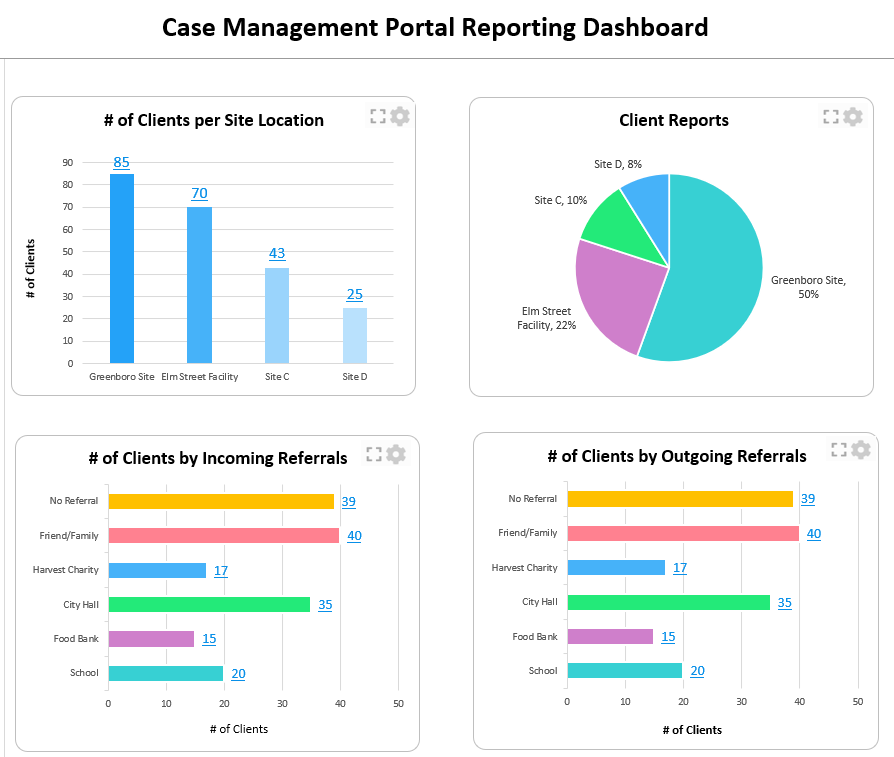
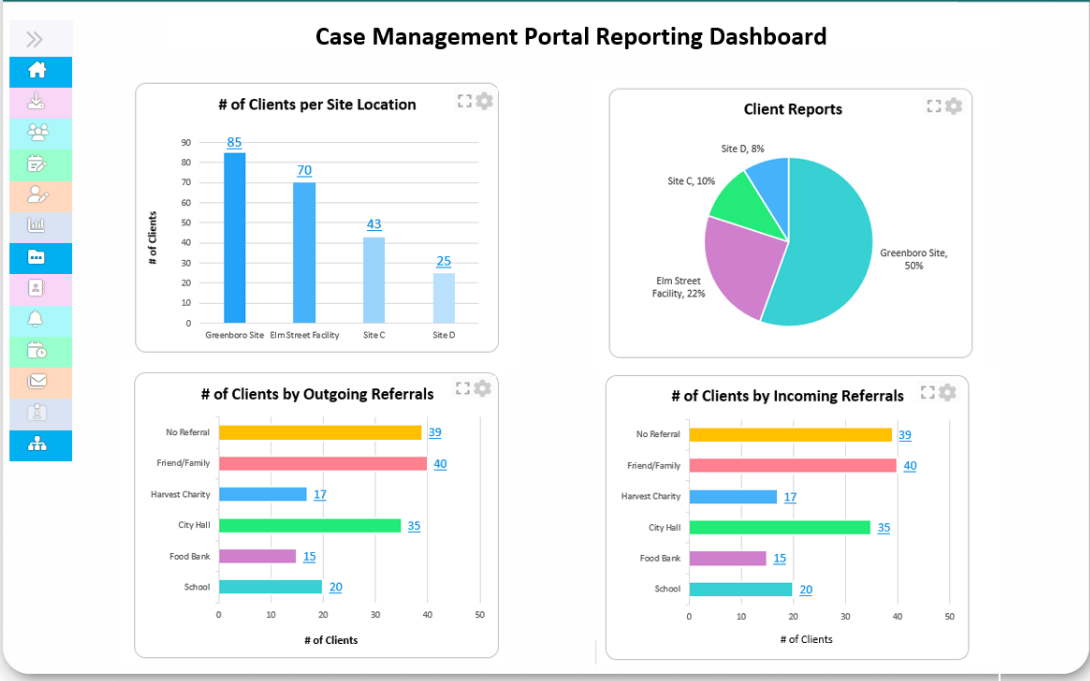
Visualizing Success with Our Case Management Software
Final Thoughts: Explore, Compare, and Choose the Best Case Management Tool
A great case management tool is more than a software purchase—it’s an investment in smoother processes, happier clients, and better outcomes. Whether you’re working in social work, mental health, or non-profit services, having the right platform will make all the difference.
At Case Management Hub, we’re dedicated to helping you discover tools that fit your unique requirements. Ready to explore your options?
Want to take the first step toward better case management? Browse our comprehensive reviews and comparisons at Case Management Hub, where we bring you insights, recommendations, and user experiences to help you choose the right solution.
Let’s help you streamline your caseload, simplify workflows, and improve outcomes—all with the right tool in hand.
Create an Account Now - Add Your Team to Try Case Management Hub for Free
Get your entire team to try out Case Management Hub for free in minutes. Work smarter, not harder - free for 21 days. No credit card needed. If you decide to move forward is when you can subscribe.Follow These 5 Simple Steps:
Step 1: Create your free trial account here: Create Account.
Step 2: From the left sidebar, scroll down to the Organization dropdown menu and click Staff Management
Step 4: Copy and send this email to your team members (so they know how to log in).
⚠️ Important: Ask your team members not to create new accounts. They should log in using the details you create for them.
Email Template to Send Your Team
Subject: You’ve been added to our new All-in-One Case Management tool!
Hi Team,
I've set up a free trial account for our team with the Case Management Hub software, an all-in-one case management software. I've already added you to the account, so you can start exploring immediately.
Please don't create a new account. Instead, use the login details I've shared with you to access the platform here: https://app.casemanagementhub.org/
This platform centralizes and improves everything we do, from case management, standardized assessment forms, client care, scheduling & appointments, reporting & analytics, and more all in one secure, collaborative tool. We have 21 days to test it out for free and see how it fits our needs.
Learn more about the platform here: Explore Features
Looking forward to exploring this together.
Best,
[Your Name/Signature]
Step 5: Request a customized discounted quote.
Frequently Asked Questions (FAQs)
Absolutely. Many platforms offer scalable options suitable for small teams, with features that grow as your organization expands.
Social work, mental health, education, nonprofits, government agencies, and human services all rely on these tools to enhance service delivery.
Yes, some platforms provide free plans with limited features, perfect for small teams or those just starting out.
Leading tools implement bank-grade security, including data encryption, multi-factor authentication, and regular security audits to ensure your data remains protected. Can case management tools be used by small teams?
What industries benefit most from case management tools?
Are there free versions of case management tools available?
How secure is the data stored in case management tools?