
SimplePractice vs Case Management Hub: Which One is Best for Your Organization?
Choosing between SimplePractice and Case Management Hub is about more than comparing features. It is about choosing the right foundation for how you and your organization deliver services, manage clients, support staff, and grow your organization.
While SimplePractice was traditionally viewed as a strong option for therapy-focused practice management, many teams eventually need a more robust and flexible all-in-one solution for their practice.
For organizations that require simplicity, easy to use, deeper reporting, customization to their use cases, better team collaboration, messaging with clients, and true case lifecycle tracking, Case Management Hub stands out as the better alternative. This guide breaks down the differences so you can make a confident, conversion-focused decision.
Quick Comparison: SimplePractice vs Case Management Hub
For directors, coordinators, or practice leads who are comparing case management vs practice management software, the fastest way to understand the difference is to look at how each platform performs across the features that matter most.
| Feature | SimplePractice | Case Management Hub |
|---|---|---|
| Best For | Solo therapists and small private practices | Nonprofits, social services teams, healthcare organizations, multi-program providers, solo therapists, clinicians, and small-mid-sized private practices |
| Core Focus | Practice management software | Full case management and practice management software |
| Client Management | Basic client profiles and records | Advanced client tracking with client lifecycle management |
| Customization | Limited | Highly customizable forms, fields, notes, and workflows |
| Reporting | Basic reporting | Advanced reporting, analytics, and export options |
| Team Collaboration | More limited for larger teams | Built for team coordination, multi-staff workflows, and shared visibility |
| Scalability | Best for smaller operations | Built for growing and complex organizations |
| Overall Value | Useful for simple practice workflows | Better fit for organizations that need a true case management platform |
If your needs are limited to scheduling, billing, and standard documentation, SimplePractice may be enough. If you need a centralized, scalable system for client tracking, intakes, assessments, client care, reporting, staff collaboration, and service delivery, Case Management Hub is the stronger choice.
All-in-One Case Management Software
Sign Up Today, Free. No credit card needed!
|
Do You Have a Team? |
||
What Is the Difference Between Case Management vs Practice Management Software?
Many buyers search for the best case management software without realizing that some platforms are actually built as practice management tools. While the two categories overlap in certain areas, they are not the same.
What practice management software is designed to do
Practice management software is typically designed for appointment-based providers who need to streamline day-to-day operations such as scheduling, invoicing, telehealth, and simple client documentation. This model works well for many solo practitioners and small therapy practices.
What case management software is designed to do
Case management software is built to support more complex service delivery. It helps organizations track the full client journey, manage forms and notes, monitor goals and outcomes, coordinate across staff, and generate reports that support operations, compliance, and funding requirements.
Why this difference matters
This distinction matters because many organizations eventually outgrow basic practice management tools. When reporting needs expand, staff collaboration becomes more important, and programs become more complex, a true case management platform becomes essential. That is why many buyers looking for a SimplePractice alternative end up choosing Case Management Hub.
SimplePractice Overview: Strengths and Limitations
SimplePractice is a well-known name in practice management software, especially among therapists and private practice professionals. It appeals to users who want a clean interface and core operational features in one place.
Where SimplePractice performs well
- Appointment scheduling and calendar management
- Billing and payment workflows
- Telehealth functionality
- Basic client portal and documentation tools
- Ease of use for independent providers
Where SimplePractice starts to fall short
For organizations with more advanced needs, SimplePractice can start to feel restrictive. This is where many searches for SimplePractice review terms, SimplePractice issues, and alternative to SimplePractice begin.
- Limited support for full case lifecycle management
- Less flexibility for nonprofits and multi-program service organizations
- Basic reporting for teams that need deeper operational visibility
- Restricted customization compared with a dedicated case management system
- Less ideal for growing organizations managing multiple roles, programs, or locations
These limitations do not make SimplePractice a poor platform. They simply show that it is optimized for a narrower use case. For teams that need more than practice management, Case Management Hub is the better fit.
Case Management Hub Overview: Why It Is the Better Alternative
Case Management Hub is built for organizations that need a true case management platform, not just a scheduling and billing system. It supports nonprofits, social workers, behavioral health providers, healthcare teams, legal services organizations, and other professionals who need to manage clients, services, documentation, staff workflows, and reporting in one place.
What makes Case Management Hub stand out
- Centralized client and case management
- Customizable forms, notes, assessments, and workflows
- Reporting and analytics designed for real-world operations
- Support for teams, programs, and multiple service lines
- A scalable structure that can grow with your organization
Why organizations switch to Case Management Hub
Organizations that are moving away from spreadsheets, disconnected tools, or practice management software often need something more flexible and more operationally aligned. Case Management Hub helps teams centralize data, improve workflow consistency, increase reporting visibility, and better manage the full client journey. That is why it is increasingly seen as one of the best SimplePractice alternatives for organizations with more complex needs.
Create an Account Now - Add Your Team to Try Case Management Hub for Free
Get your entire team to try out Case Management Hub for free in minutes. Work smarter, not harder - free for 21 days. No credit card needed. If you decide to move forward is when you can subscribe.Follow These 5 Simple Steps:
Step 1: Create your free trial account here: Create Account.
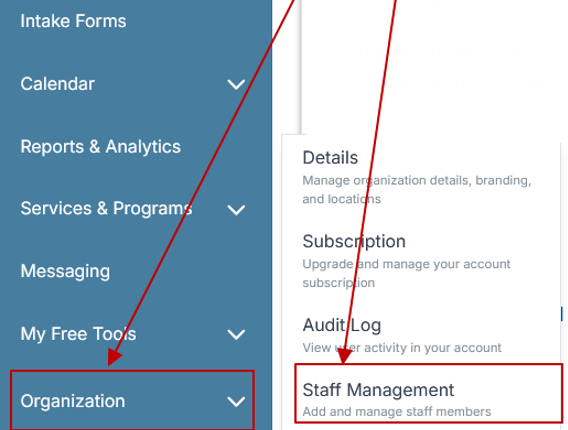
Step 2: From the left sidebar, scroll down to the Organization dropdown menu and click Staff Management
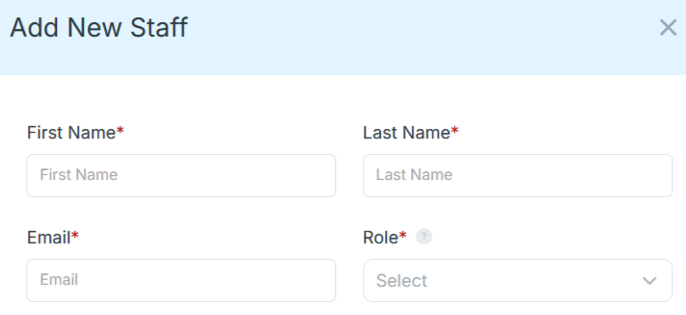
Step 4: Copy and send this email to your team members (so they know how to log in).
⚠️ Important: Ask your team members not to create new accounts. They should log in using the details you create for them.
Email Template to Send Your Team
Subject: You’ve been added to our new All-in-One Case Management tool!
Hi Team,
I've set up a free trial account for our team with the Case Management Hub software, an all-in-one case management software. I've already added you to the account, so you can start exploring immediately.
Please don't create a new account. Instead, use the login details I've shared with you to access the platform here: https://app.casemanagementhub.org/
This platform centralizes and improves everything we do, from case management, standardized assessment forms, client care, scheduling & appointments, reporting & analytics, and more all in one secure, collaborative tool. We have 21 days to test it out for free and see how it fits our needs.
Learn more about the platform here: Explore Features
Looking forward to exploring this together.
Best,
[Your Name/Signature]
Step 5: Request a customized discounted quote.
Feature-by-Feature Comparison
A direct feature comparison shows why Case Management Hub is the better option for organizations that need more than basic practice management software.
Client and case management
SimplePractice supports standard client records, but Case Management Hub goes further by helping organizations track clients across the full lifecycle of care or service. This includes notes, forms, goals, progress, referrals, and related workflows in one centralized system.
Documentation and notes
SimplePractice offers standard documentation tools that work well for straightforward practice needs. Case Management Hub offers a more flexible structure with customizable notes, assessments, templates, and document workflows that better support social services, behavioral health, nonprofit operations, and multidisciplinary teams.
Reporting and analytics
This is one of the biggest differences. SimplePractice may meet basic reporting needs, but many organizations require more advanced visibility. Case Management Hub is better suited for teams that need custom reports, outcome tracking, operational analytics, and exportable data for decision-making and external use.
Customization and flexibility
Organizations rarely fit into a rigid workflow. Case Management Hub offers more flexibility for custom fields, intake forms, assessments, client types, workflows, and reporting structures. That level of customization can make a major difference for organizations with specialized service models.
Team collaboration and scalability
SimplePractice is often best for smaller, individual-use environments. Case Management Hub is better for team-based environments where staff collaboration, role-based visibility, program coordination, and organizational scale are priorities.
Why Organizations Search for a SimplePractice Alternative
When organizations search for terms like SimplePractice alternatives, review of SimplePractice, or SimplePractice problems, they are usually trying to determine whether the platform still fits their current needs. In many cases, the answer depends on how complex their workflows have become.
Common reasons organizations want to switch
- They need more than therapy-focused practice management
- They want stronger reporting and analytics
- They need a platform that supports teams and programs, not just individual providers
- They want better customization for forms, notes, and workflows
- They are replacing spreadsheets, manual systems, or disconnected processes
For these organizations, Case Management Hub is often the more practical long-term solution because it was built with broader operational needs in mind.
All-in-One Case Management Software
Sign Up Today, Free. No credit card needed!
|
Do You Have a Team? |
||
SimplePractice Review Questions: Is It Legit, Safe, and Worth It?
Many organizations search for trust-related phrases such as SimplePractice review, is SimplePractice legit, is SimplePractice safe, and SimplePractice issues. These are important questions, especially for organizations managing sensitive client information.
Is SimplePractice legit?
Yes, SimplePractice is a legitimate and recognized software platform. It is widely used by therapists and private practices.
Is SimplePractice safe?
It is generally viewed as a secure option for its intended use case. However, safety alone does not determine whether a platform is the best choice for your workflow.
Is it worth it for every organization?
That is where the answer changes. If you are a solo practitioner with straightforward needs, SimplePractice may work well. If you are managing broader service delivery, outcome tracking, multi-staff coordination, or complex client journeys, Case Management Hub offers better overall value because it addresses more of the operational realities your team faces every day.
Who Should Choose SimplePractice and Who Should Choose Case Management Hub?
The right platform depends on the complexity of your workflow, the size of your team, and your growth goals.
SimplePractice may be a fit if you are
- A solo therapist or small private practice
- Primarily focused on appointments, billing, and standard documentation
- Looking for a straightforward practice management tool
Case Management Hub is the better choice if you are
- A nonprofit, agency, clinic, or multi-program organization
- Managing complex client workflows across teams
- Trying to centralize client data and replace manual systems
- Looking for more flexibility, stronger reporting, and better scalability
- Seeking the best case management software alternative to a practice management platform
For organizations with any level of operational complexity, Case Management Hub is the stronger strategic investment.
All-in-One Case Management Software
Sign Up Today, Free. No credit card needed!
|
Do You Have a Team? |
||
Pricing, Value, and Long-Term ROI
Price matters, but price alone is not the right way to evaluate software. The better question is whether the platform creates enough operational value to justify the investment.
What to consider beyond monthly cost
- How much time your staff saves with better workflows
- How much easier it becomes to report on outcomes and program performance
- How effectively the platform supports team growth and service expansion
- How much manual work, duplication, and confusion it eliminates
For smaller private practices, SimplePractice may feel cost-effective. For organizations that need stronger infrastructure, Case Management Hub often delivers better long-term ROI because it reduces fragmentation and supports more of the work in one place.
Final Verdict: Which Platform Is Better?
If you are choosing between SimplePractice vs Case Management Hub, the right answer comes down to what kind of software your organization truly needs.
SimplePractice is a solid option for solo practitioners and smaller therapy-focused practices that need basic practice management software. But for organizations that need deeper client tracking, customizable workflows, stronger reporting, and a platform designed for teams and growth, Case Management Hub is the better alternative.
In short, if your workflow is simple, SimplePractice may be enough. If your organization needs a more complete, flexible, and scalable solution, Case Management Hub is the smarter choice.
Create an Account Now - Add Your Team to Try Case Management Hub for Free
Get your entire team to try out Case Management Hub for free in minutes. Work smarter, not harder - free for 21 days. No credit card needed. If you decide to move forward is when you can subscribe.Follow These 5 Simple Steps:
Step 1: Create your free trial account here: Create Account.
Step 2: From the left sidebar, scroll down to the Organization dropdown menu and click Staff Management
Step 4: Copy and send this email to your team members (so they know how to log in).
⚠️ Important: Ask your team members not to create new accounts. They should log in using the details you create for them.
Email Template to Send Your Team
Subject: You’ve been added to our new All-in-One Case Management tool!
Hi Team,
I've set up a free trial account for our team with the Case Management Hub software, an all-in-one case management software. I've already added you to the account, so you can start exploring immediately.
Please don't create a new account. Instead, use the login details I've shared with you to access the platform here: https://app.casemanagementhub.org/
This platform centralizes and improves everything we do, from case management, standardized assessment forms, client care, scheduling & appointments, reporting & analytics, and more all in one secure, collaborative tool. We have 21 days to test it out for free and see how it fits our needs.
Learn more about the platform here: Explore Features
Looking forward to exploring this together.
Best,
[Your Name/Signature]
Step 5: Request a customized discounted quote.
Frequently Asked Questions – Case Management Hub or SimplePractice?
What is the best alternative to SimplePractice?
Case Management Hub is one of the best alternatives to SimplePractice for organizations that need true case management capabilities instead of only practice management features.
Is SimplePractice good for case management?
It can support limited case-related workflows, but it is primarily built as a practice management platform. Organizations with more complex service delivery needs often require a more robust case management system.
What is the difference between case management and practice management software?
Practice management software is focused more on scheduling, billing, and appointment-based workflows. Case management software is designed to support the full client journey, including notes, forms, goals, referrals, tasks, reporting, and team coordination.
Why do organizations switch from SimplePractice?
Organizations often switch when they need stronger reporting, better customization, broader team collaboration, or a platform that is better suited for nonprofits, social services, healthcare teams, or multi-program environments.
Why is Case Management Hub the better option for growing organizations?
Case Management Hub is built to centralize operations, support team-based workflows, improve visibility across programs, and scale with organizational complexity. That makes it a stronger long-term choice for many growing service providers.
FAQ: SimplePractice vs Case Management Hub
What is the difference between SimplePractice and Case Management Hub?
SimplePractice is primarily a practice management software designed for scheduling, billing, and basic client management, while Case Management Hub is a more comprehensive case management software built for organizations that need client tracking, reporting, customizable workflows, and team collaboration.
What is the best SimplePractice alternative for case management?
Case Management Hub is one of the best SimplePractice alternatives for case management because it offers more flexibility, stronger reporting, and better support for nonprofits, healthcare teams, social workers, and multi-program organizations.
Is SimplePractice good for nonprofits and case management teams?
SimplePractice can work for smaller practices with simple workflows, but many nonprofits and case management teams need a more robust platform. Case Management Hub is often a better fit because it is built for complex service delivery, team coordination, and outcome tracking.
Why do organizations switch from SimplePractice to Case Management Hub?
Organizations often switch from SimplePractice when they need better customization, more advanced reporting, stronger client tracking, and a platform that can support multiple staff, programs, and locations more effectively.
Which is the best case management vs practice management software for growing organizations?
For growing organizations, Case Management Hub is often the better choice because it goes beyond standard practice management software and provides the case management tools needed to scale operations, centralize data, and improve service delivery.
Find the Right Case Management Solution for Your Organization: All-in-One Case Management Resource Center.
Note: Content on this casemanagementhub.org site is copyrighted and protected under applicable copyright laws. Read Terms of Use.
Disclaimer: Case Management Hub is an educational resource and software provider site. Our content is not medical advice. Use of this site does not create a provider-patient relationship. Read our full disclaimer here: Case Management Hub Disclaimer.