
Best School Social Worker Caseload Management Software for Student Case Notes and Documentation
School social workers rarely struggle because they don’t know what needs to be documented. The bigger problem is keeping that documentation organized when one social worker may be supporting students across different grades, programs, or school locations while also managing referrals, family contacts, interventions, follow-ups, assessments, and day-to-day student needs.

Student case notes can end up in Word documents, spreadsheets, shared drives, email threads, paper files, or systems that weren’t designed around a social work caseload. The information exists, but finding a complete history of what has happened with a student can take more work than it should.
For a county public school system or school district with multiple social workers, the problem gets bigger. Each social worker may have developed a workable personal system, but supervisors and student services leaders still need a consistent way to understand caseloads, document services, track follow-up, and maintain continuity when several professionals are involved with the same student.
That is where school social worker caseload management software becomes useful. The right system should make student documentation easier without turning social workers into data-entry clerks. It should give the team one practical place to manage student records, case notes, services, goals, referrals, tasks, and progress while giving authorized leaders better visibility across the program.
💡All-in-one Case Management Software.
Everything in one place: clients, notes, forms, appointments, reports, and outcomes.
👉 Try it Free - No credit card needed
Why Student Case Notes Become Difficult to Manage Across a School District
A school social worker’s caseload isn’t static. A student may first appear because of an attendance concern, family situation, behavioral issue, referral, crisis, or request from another member of the student support team. That initial contact can lead to meetings, individual sessions, family communication, referrals to outside resources, interventions, follow-ups, and ongoing progress monitoring.
A simple spreadsheet can tell you that a student is on the caseload. It becomes much less useful when you need to understand the student’s history.
What happened during the last interaction? What intervention was provided? Was a referral made? Does someone need to contact the family again? What goal is the team working toward? Which social worker is responsible for the next action? Are there previous notes that would change how the current situation should be handled?
Those questions require more than a student list. They require a usable case history.
This is one reason school social work documentation can become fragmented. Teams often add another spreadsheet, another document, another folder, or another tracker each time they encounter a new requirement. Eventually the social worker has several places to check before getting the full picture.
The better approach is to organize documentation around the student and the case. A social worker should be able to open a student’s record and quickly review relevant notes, activities, goals, services, files, referrals, and follow-up history without reconstructing the story from several different systems.
The Real Problem Is Caseload Management, Not Just Note Taking
Case notes are often the immediate pain point, but buying software that only solves note taking can create another silo.
A school social worker doesn’t simply write notes. They manage an active caseload. Documentation needs to connect to the work surrounding each student.
A useful school social work caseload management system should help the team keep track of areas such as:
- Students assigned to each social worker
- Student case notes and interaction history
- Referrals and referral follow-up
- Student goals and progress
- Services and interventions provided
- Tasks, reminders, and upcoming actions
- Documents and forms associated with the student
- Case status and assigned staff
- Reporting on services, caseloads, and program activity
That distinction matters when evaluating software. A digital notebook can store notes. A spreadsheet can maintain a roster. A calendar can hold reminders. A shared drive can store documents. School social worker caseload management software should connect these parts of the workflow so staff don’t have to maintain a separate tool for each one.

👉 Try it Free - Free Case Management System
What School Social Workers Should Look for in Student Case Note Software
One Student Record With an Accessible Case History
Start here. If the software doesn’t make it easy to understand what has happened with a student, additional features won’t compensate for that weakness.
A student profile should serve as the central point for relevant case information. Instead of searching through files and separate trackers, an authorized social worker should be able to review the student’s case history and see the information needed to continue the work.
Fast, Structured Student Case Notes
Documentation needs to fit into the working day. If entering a case note requires too many screens, unnecessary fields, or a complicated workflow, staff will naturally put documentation off until later.
Look for software that allows social workers to create notes quickly while still capturing the information the school system wants documented.
Custom Case Note Templates
Free-form notes offer flexibility, but a countywide team may also need consistency. Custom note templates can help standardize documentation without forcing every type of student interaction into the same format.
For example, a team may want different templates for routine student contacts, family communication, follow-up activities, or other recurring services. The exact structure should reflect the district’s own documentation practices.
🔥Still using spreadsheets for case management?
Switch to an all-in-one case management platform.
👉 Try it Free - No credit card needed
Individual Caseload Visibility
Each social worker should be able to identify the students assigned to them without sorting through an organization-wide database. At the same time, authorized supervisors may need broader visibility into assignments and activity across the team.
This becomes especially useful in larger public school systems where social workers may serve different schools, programs, or student populations.
Tasks and Follow-Up Reminders
A case note documents what happened. Caseload management also needs to capture what should happen next.
Tasks and reminders can help social workers keep follow-up activities visible rather than relying on memory, handwritten lists, calendar entries, or another spreadsheet.
Role-Based Access
Student social work records can contain sensitive information. A school system should therefore look beyond whether software simply requires a username and password. Administrators need control over who can access information and what different users are allowed to see or do.
Role-based permissions become particularly important when a system is used by multiple social workers, supervisors, administrators, or programs.
Why Spreadsheets Start Breaking Down as the Caseload Grows
Spreadsheets aren’t inherently bad. For a small list of students or a basic tracker, they’re familiar, inexpensive, and flexible.
The trouble starts when a spreadsheet is asked to become a case management system.
One workbook may contain the student roster. Another tracks referrals. Case notes may live in Word documents. Follow-ups are in Outlook or a personal task list. Supporting documents sit in folders. A supervisor who needs program information may have to ask several social workers to update or combine separate files.
There is also a continuity problem. A personal tracking system can make perfect sense to the person who created it. It may be much harder for another staff member to understand if responsibilities change or a student needs support from someone else.
This is the point at which a school district should stop asking how to build a better spreadsheet and start asking whether the social work team needs a centralized student case management system.
 👉 Try it free today - No credit card needed
How Case Management Hub Supports School Social Work Caseloads
Case Management Hub is designed for case managers and service-based teams that need to manage people, documentation, services, activities, and follow-up in one centralized platform. Schools, educators, social workers, counselors, student support services, and public-sector organizations are among the types of teams the platform can support.
For a school social work department, the value is the ability to move beyond a collection of disconnected student trackers.
Centralized Student Profiles
Each student can have a centralized profile rather than being represented by a row spread across several spreadsheets. The team can keep relevant case information associated with the student and build a more usable history over time.
Standard and Custom Case Notes
Case Management Hub supports case notes as part of the student record. Teams can also create custom note templates when they need a more structured format for particular types of documentation.
This is useful for a county school system that wants staff to document consistently while still allowing different workflows to capture different information.
Caseload Assignments and Staff Access
Students can be associated with assigned staff so social workers can focus on their caseloads while administrators maintain appropriate oversight. Role-based permissions can also be used to control access based on staff responsibilities.

👉 Try it Free today - No credit card needed
Goals and Progress Tracking
Documentation is more useful when it connects to the reason services are being provided. Goals and progress tracking allow teams to maintain information about what they’re working toward rather than treating each case note as an isolated entry.
Tasks, Notifications, and Recurring Reminders
School social work includes a steady stream of next actions. Case Management Hub includes task and reminder functionality that can help teams keep those responsibilities connected to their case management workflow.
Document Management
Supporting files can be maintained alongside case information rather than requiring staff to remember which shared folder contains the document associated with a student.
Reporting Across the Program
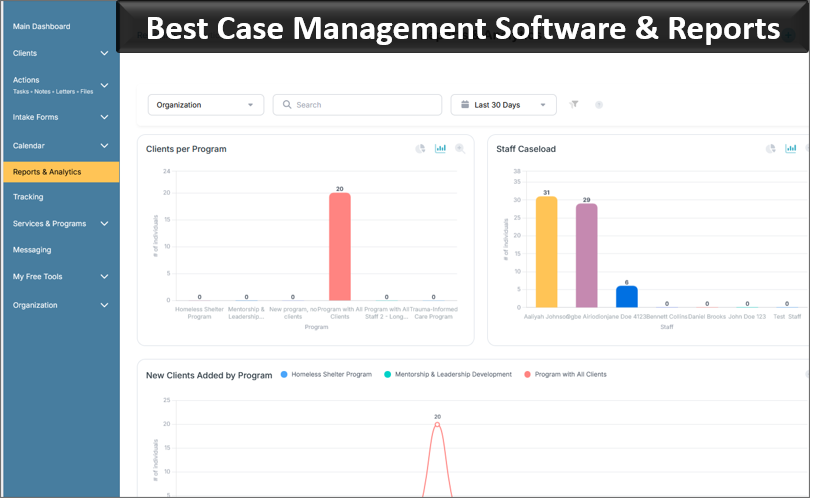
For supervisors and program leaders, reporting can be just as important as documentation. Case Management Hub supports reporting and custom reporting so organizations can use information captured through normal case management activity to better understand their programs.
That is a significant improvement over a process where leadership has to request spreadsheets from individual social workers and manually combine the information before it can be reviewed.
What a Better Student Case Note Workflow Can Look Like
Consider the workflow rather than the software feature list.
A student is referred to the school social work team. Instead of adding the student’s name to one spreadsheet and opening a separate document for notes, the social worker works from the student’s centralized case record.
The social worker documents the initial interaction, records relevant information, and identifies the next action. If follow-up is needed, a task or reminder can be created. Subsequent interactions become part of the same case history rather than separate documents that someone has to locate later.
If the student is working toward specific goals, progress can be tracked over time. Relevant files can remain associated with the case. If another authorized team member needs context, that person can review the existing history rather than starting with an incomplete handoff.
At the program level, administrators can use the information being captured through day-to-day work for reporting instead of asking staff to recreate activity data at the end of the month, quarter, semester, or school year.
👉 Try it free today - No credit card needed
The goal isn’t to make school social work more technical. It’s to reduce the administrative friction around the work that social workers are already doing.
County School Systems Need More Than an Individual Social Worker Organizer
There is a meaningful difference between a tool that works for one school social worker and software that works for a district or county social work team.
An individual social worker may be able to build an effective personal caseload tracker. A public school system has broader needs. It has to think about consistency, staff access, continuity, multiple locations, supervision, reporting, and what happens when cases or responsibilities move between employees.
That changes the software evaluation.
A countywide team should look for a system that can support multiple employees and locations while still giving individual social workers a practical day-to-day workspace. Administrators shouldn’t have to choose between local flexibility and organization-wide visibility.
The software should also be configurable enough to reflect the school system’s actual terminology and processes. A platform built around rigid workflows may technically contain many features while still creating unnecessary work for staff.
Usability deserves more attention than it often receives during software selection. A long feature list is of limited value if social workers find the system cumbersome and return to personal spreadsheets for their everyday work.
Questions to Ask Before Choosing School Social Work Caseload Management Software
Start the evaluation with the team’s current workflow, not a vendor’s feature checklist. Map where student information is stored today, where staff lose time, and which parts of documentation are hardest to maintain consistently.
Then ask prospective software providers practical questions:
- Can each social worker quickly see their assigned student caseload?
- Can staff maintain a chronological history of student case notes?
- Can our team create custom case note templates?
- Can notes be entered conveniently from phones or tablets when needed?
- Can we track goals, services, referrals, activities, and follow-up alongside case notes?
- Can supervisors see caseload assignments and relevant program activity?
- Can access be restricted according to staff roles and responsibilities?
- Can the platform support multiple schools, programs, or locations?
- Can administrators create reports without manually combining spreadsheets?
- Can existing student and case information be imported?
- Can case notes and other information be exported when necessary?
- How much training will social workers need before they can comfortably use the system?
💡All-in-one Case Management Software.
Everything in one place: clients, notes, forms, appointments, reports, and outcomes.
👉 Try it Free - No credit card needed
The answers reveal much more than a generic product demonstration. They show whether the software can realistically replace the collection of spreadsheets, documents, trackers, and reminders the team is using today.
Choosing a Better Way to Manage School Social Work Case Notes
For most school social work teams, the biggest opportunity isn’t finding a more sophisticated place to type notes. It’s connecting student case notes to the rest of caseload management.
A useful system should let a social worker move naturally from the student record to the latest case note, previous interactions, goals, services, tasks, documents, and follow-up activity. Supervisors should be able to understand caseload activity without creating a second reporting process that adds more administrative work for staff.
For county public school systems, this becomes especially valuable. A centralized approach can give individual social workers a clearer way to manage their assigned students while giving the broader social work or student services program a more consistent structure for documentation and case management across schools.
Case Management Hub brings student profiles, case notes, custom forms and templates, goals, tasks, reminders, files, staff assignments, role-based permissions, and reporting into a centralized case management platform. Instead of building another layer of spreadsheets around the team’s existing process, school systems can use one system to organize the ongoing work surrounding each student.
👉 Try it Free - Free Case Management System
For a school social work team that has reached the point where keeping up with student case notes is becoming a daily administrative problem, that is the standard worth looking for: less time hunting for information, a clearer student case history, and a caseload management process that still works when the team, program, or number of students grows.
FAQs About School Social Worker Caseload Management Software
What is school social worker caseload management software?
School social worker caseload management software is a digital system used to organize student records, case notes, referrals, services, goals, follow-ups, and other case activity. It gives social workers a centralized place to manage student caseloads instead of relying on separate spreadsheets, documents, and paper files.
What is the best software for managing school social worker case notes?
The best software for school social worker case notes should make documentation fast, keep notes connected to each student record, support custom case note templates, and provide secure access controls. Case Management Hub also supports caseload assignments, goals, tasks, reminders, documents, and reporting in one centralized platform.
How can school social workers keep track of large student caseloads?
School social workers can manage large student caseloads more effectively by using caseload management software that organizes assigned students, case notes, referrals, follow-ups, goals, and tasks in one system. This reduces the need to maintain multiple spreadsheets, calendars, and separate student trackers.
What should a school district look for in student case management software?
A school district should look for student case management software with centralized student profiles, case notes, custom forms and templates, caseload assignments, role-based access, task tracking, progress tracking, document management, and reporting. The system should also support multiple staff members, schools, programs, or locations.
Can Case Management Hub be used for student case notes and school social work documentation?
Yes. Case Management Hub can be used by school social work and student support teams to maintain student profiles, document case notes, create custom note templates, track goals and activities, manage follow-ups, store files, assign staff, and report on case management activity.
Find the Right Case Management Solution for Your Organization: All-in-One Case Management Resource Center.
Note: Content on this casemanagementhub.org site is copyrighted and protected under applicable copyright laws. Read Terms of Use.
Disclaimer: Case Management Hub is an educational resource and software provider site. Our content is not medical advice. Use of this site does not create a provider-patient relationship. Read our full disclaimer here: Case Management Hub Disclaimer.