
Salesforce Nonprofit Cloud vs Case Management Hub: Which Is the Best CRM for Your Organization?
Choosing the right platform for a nonprofit, social services agency, behavioral health team, or human services organization can directly affect efficiency, reporting, client outcomes, and team adoption.
Many organizations comparing Salesforce Nonprofit Cloud vs Case Management Hub are trying to decide whether they need a traditional CRM or a purpose-built case management software platform.
This guide provides a practical comparison to help decision-makers evaluate which solution is better for social services workflows, client tracking, documentation, reporting, and long-term organizational growth.
Quick Comparison: Salesforce Nonprofit Cloud vs Case Management Hub
For organizations that need a fast, practical overview, the comparison below highlights the most important differences between Salesforce Nonprofit Cloud and Case Management Hub. This section is especially useful for nonprofits, social workers, and service providers searching for the best CRM for social services organizations or the best case management software for nonprofits.
| Category | Salesforce Nonprofit Cloud | Case Management Hub |
|---|---|---|
| Primary Purpose | CRM focused on donor management, relationships, and broader nonprofit operations | Purpose-built case management software for nonprofits, social services, human services, and practices that provide care to clients |
| Ease of Use | Can be complex and often requires training | Simple, intuitive, and easy for teams to adopt quickly |
| Implementation Time | Often lengthy, especially when customized | Fast setup with quicker time to value |
| Case Management Features | May require significant customization or added tools | Built-in notes, intake forms, tracking, reporting, tasks, and workflow support |
| Reporting | Powerful but may be more technical to configure | Practical reporting and outcomes tracking designed for service organizations |
| Cost Structure | Can become expensive with customization, add-ons, and outside support | More affordable and better suited to organizations that need an all-in-one platform |
| Best Fit | Organizations prioritizing CRM functionality and ecosystem depth | Organizations prioritizing client services, case workflows, documentation, and ease of use |
If your organization primarily manages services, cases, client interactions, assessments, and outcomes, Case Management Hub is typically the stronger choice.
All-in-One Case Management Software
Sign Up Today, Free. No credit card needed!
|
Do You Have a Team? |
||
What Is Salesforce Nonprofit Cloud?
Salesforce Nonprofit Cloud is a nonprofit-focused version of the broader Salesforce ecosystem. It is designed to help organizations manage relationships, fundraising, communications, and organizational data. For nonprofits with complex donor engagement strategies or large-scale CRM requirements, it can be a strong option.
Where Salesforce Nonprofit Cloud Performs Well
- Relationship and contact management
- Fundraising and donor engagement workflows
- Integration opportunities across the Salesforce ecosystem
- Enterprise customization potential
Where It Can Be Less Effective for Social Services
The challenge for many service organizations is that Salesforce Nonprofit Cloud is still fundamentally a CRM. That means organizations needing social work case notes, assessments, client intake forms, service tracking, care coordination, and reporting on outcomes often need additional configuration. For teams searching for a nonprofit CRM vs case management system, this distinction matters because service delivery requires more than relationship tracking alone.
What Is Case Management Hub?
Case Management Hub is an all-in-one case management software platform designed specifically for social services, nonprofits, behavioral health teams, care coordinators, and other human services organizations. Rather than adapting a general CRM to fit service delivery needs, it is built to support the real workflows of organizations managing clients, documentation, programs, tasks, referrals, and outcomes.
Why It Fits Social Services Better
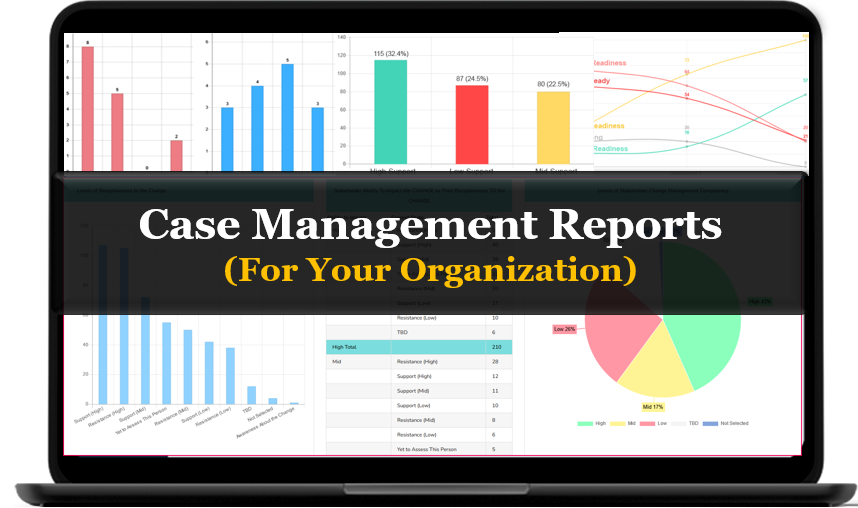
Organizations looking for the best case management software for nonprofits often need a centralized system that supports day-to-day service delivery without unnecessary complexity. Case Management Hub is built for that purpose. It helps teams keep everything in one place while making it easier to document services, track client progress, manage forms, and produce meaningful reports.
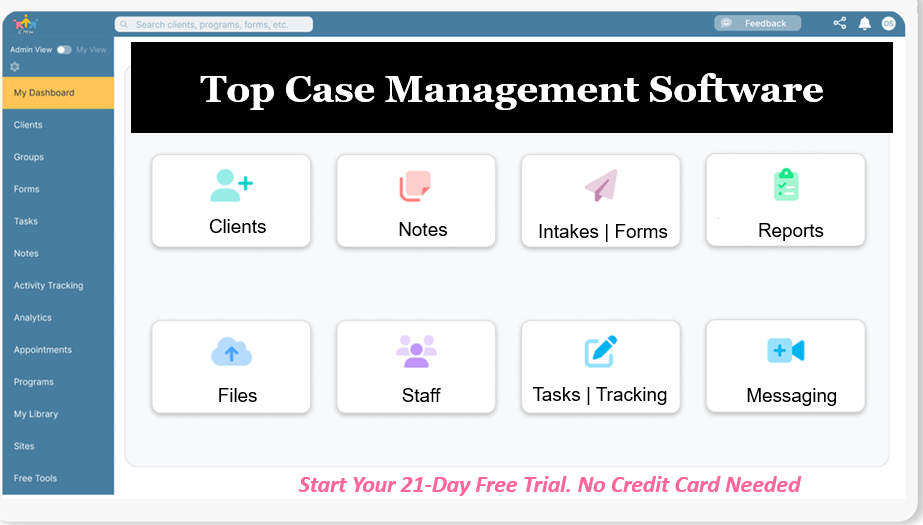
Core Capabilities
- Client profiles and client tracking
- Digital intake forms and assessments
- Progress notes and documentation
- Custom reports and outcomes tracking
- Task management and reminders
- Referral tracking and collaboration tools
For many nonprofits, social workers, and human services agencies, this makes Case Management Hub a better alternative because it aligns directly with how teams actually work.
CRM vs Case Management Software for Social Workers and Service Organizations
A common source of confusion is the difference between a CRM and case management software. Understanding that difference helps organizations avoid buying a platform that does not fully support their operational needs.
What a CRM Does Best
- Tracks relationships and interactions
- Supports donor management and communications
- Helps manage pipelines and stakeholder data
What Case Management Software Does Best
- Tracks clients and case progress
- Supports intake, notes, forms, tasks, and assessments
- Measures service delivery and outcomes
- Helps teams coordinate work across programs and staff
If your organization delivers direct services rather than simply managing contacts or donor relationships, a purpose-built case management platform is often the better investment. That is why Case Management Hub stands out in the conversation around the best CRM or case management software for social services.
Key Differences That Matter Most
When evaluating Salesforce Nonprofit Cloud comparison options, organizations should focus on the factors that influence adoption, efficiency, and long-term value. The differences below are often what drive final purchasing decisions.
Ease of Use
Many nonprofits and service organizations need a platform that staff, volunteers, and frontline case managers can learn quickly. Case Management Hub is designed to be simple, intuitive, and practical. Salesforce Nonprofit Cloud can be powerful, but it often comes with a steeper learning curve and more setup complexity.
Implementation and Time to Value
A long implementation process can slow down operations and delay results. For teams that need to replace spreadsheets, paper forms, or disconnected tools quickly, Case Management Hub offers a more direct path to getting started. That speed matters for organizations that cannot afford prolonged onboarding cycles.
Built-In Social Services Features
Case Management Hub includes the features that social services organizations need most, including progress notes, intake forms, assessments, client tracking and reporting software for human services, and customizable workflows. Salesforce often requires more adaptation to deliver the same practical functionality.
Cost and Operational Simplicity
Organizations often look for Salesforce Nonprofit Cloud alternatives because they want fewer moving parts, lower implementation burdens, and a solution that is easier to manage internally. Case Management Hub is a better fit for teams that want an affordable, centralized case management software for nonprofits without a heavy technical lift.
Create an Account Now - Add Your Team to Try Case Management Hub for Free
Get your entire team to try out Case Management Hub for free in minutes. Work smarter, not harder - free for 21 days. No credit card needed. If you decide to move forward is when you can subscribe.Follow These 5 Simple Steps:
Step 1: Create your free trial account here: Create Account.
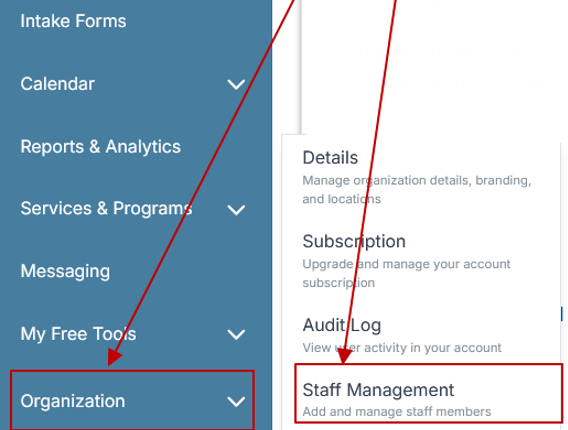
Step 2: From the left sidebar, scroll down to the Organization dropdown menu and click Staff Management
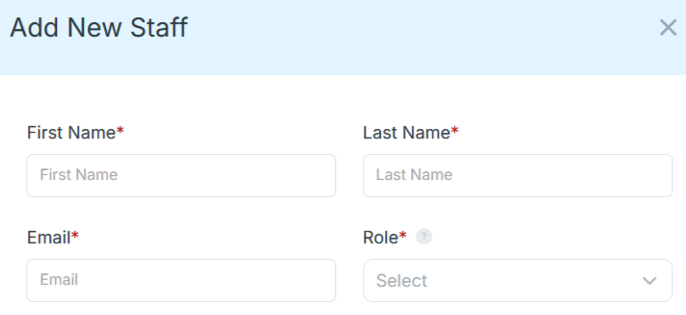
Step 4: Copy and send this email to your team members (so they know how to log in).
⚠️ Important: Ask your team members not to create new accounts. They should log in using the details you create for them.
Email Template to Send Your Team
Subject: You’ve been added to our new All-in-One Case Management tool!
Hi Team,
I've set up a free trial account for our team with the Case Management Hub software, an all-in-one case management software. I've already added you to the account, so you can start exploring immediately.
Please don't create a new account. Instead, use the login details I've shared with you to access the platform here: https://app.casemanagementhub.org/
This platform centralizes and improves everything we do, from case management, standardized assessment forms, client care, scheduling & appointments, reporting & analytics, and more all in one secure, collaborative tool. We have 21 days to test it out for free and see how it fits our needs.
Learn more about the platform here: Explore Features
Looking forward to exploring this together.
Best,
[Your Name/Signature]
Step 5: Request a customized discounted quote.
Salesforce Nonprofit Cloud Review: Pros, Cons, and Common Issues
Organizations searching for a Salesforce Nonprofit Cloud review or a review of Salesforce Nonprofit Cloud are usually trying to determine whether it is the right fit for their operational model. While it has strengths, it also has limitations that are especially important for service-based organizations.
Pros
- Strong CRM capabilities
- Broad ecosystem and integration options
- Scalability for organizations with complex technical needs
Cons
- Can be difficult for non-technical users
- May require extensive setup and configuration
- Not purpose-built for case management workflows
- Total costs can rise with customization and support needs
Common Switch-Intent Questions
People comparing platforms often search terms such as is Salesforce Nonprofit Cloud legit, is Salesforce Nonprofit Cloud safe, and Salesforce Nonprofit Cloud issues. These search patterns reveal a common concern: organizations want confidence that the platform they choose will be usable, secure, and operationally practical.
For teams whose success depends on daily casework, documentation, and reporting, the better question is whether the platform fits their workflow without unnecessary friction. In that comparison, Case Management Hub is often the more practical choice.
Why Many Organizations Are Looking for a Salesforce Nonprofit Cloud Alternative
The demand for a strong alternative to Salesforce Nonprofit Cloud often comes from organizations that want a simpler, more service-focused system. These are not necessarily organizations rejecting CRM technology. Instead, they are looking for a platform that better matches the realities of social work, case management, behavioral health, and nonprofit operations.
Common Reasons Organizations Want to Switch
- They need a system that staff can learn quickly
- They want to replace spreadsheets and disconnected tools
- They need built-in case notes, forms, tasks, and reporting
- They want faster implementation and lower overhead
- They need a platform built around service delivery, not just contact management
This is why Case Management Hub is frequently the stronger choice among Salesforce Nonprofit Cloud alternatives for nonprofits and human services teams.
Why Case Management Hub Is the Better Alternative for Social Services
When the goal is better case coordination, easier documentation, and improved service delivery, Case Management Hub provides a stronger functional fit than Salesforce Nonprofit Cloud. It is designed around the needs of service organizations, not adapted to them after the fact.
Advantages of Case Management Hub
- Purpose-built for social services, nonprofits, and human services
- Easier for teams to use without extensive technical support
- Better aligned with case notes, client intake, progress tracking, and reporting
- More practical for organizations that need an all-in-one case management software for human services
- A stronger option for organizations seeking easy-to-use case management software for social workers
For most service-based teams, the real decision is not which platform is more famous. It is which platform will help staff do their jobs more effectively every day. On that standard, Case Management Hub is the better alternative.
All-in-One Case Management Software
Sign Up Today, Free. No credit card needed!
|
Do You Have a Team? |
||
Which Platform Should You Choose?
The right choice depends on your organization’s priorities, staffing model, and workflows. The questions below can help guide the decision.
Choose Salesforce Nonprofit Cloud If
- Your primary focus is CRM management and donor engagement
- You have access to technical resources or consultants
- You need a broad ecosystem and high levels of enterprise customization
Choose Case Management Hub If
- You need true case management software, not just a CRM
- Your team manages clients, services, referrals, notes, and outcomes
- You want a centralized case management software for nonprofits
- You want an easier rollout, faster onboarding, and a more intuitive user experience
For nonprofits and social services organizations that prioritize service delivery, Case Management Hub is usually the better long-term choice.
Final Verdict: The Best CRM or Case Management Software for Social Services
Salesforce Nonprofit Cloud is a recognized CRM platform with strong capabilities for relationship management and organizational scale. However, for social services teams, nonprofits, and human services organizations that need direct support for case workflows, forms, reporting, client documentation, and outcomes tracking, Case Management Hub is the better fit.
If your organization is comparing Salesforce Nonprofit Cloud vs Case Management Hub, the key question is simple: do you need a CRM, or do you need a platform built specifically for case management? For most service-driven organizations, the answer points clearly toward Case Management Hub.
That is what makes it one of the best case management software options for nonprofits, social workers, behavioral health providers, and human services organizations looking for a more practical alternative to Salesforce Nonprofit Cloud.
Create an Account Now - Add Your Team to Try Case Management Hub for Free
Get your entire team to try out Case Management Hub for free in minutes. Work smarter, not harder - free for 21 days. No credit card needed. If you decide to move forward is when you can subscribe.Follow These 5 Simple Steps:
Step 1: Create your free trial account here: Create Account.
Step 2: From the left sidebar, scroll down to the Organization dropdown menu and click Staff Management
Step 4: Copy and send this email to your team members (so they know how to log in).
⚠️ Important: Ask your team members not to create new accounts. They should log in using the details you create for them.
Email Template to Send Your Team
Subject: You’ve been added to our new All-in-One Case Management tool!
Hi Team,
I've set up a free trial account for our team with the Case Management Hub software, an all-in-one case management software. I've already added you to the account, so you can start exploring immediately.
Please don't create a new account. Instead, use the login details I've shared with you to access the platform here: https://app.casemanagementhub.org/
This platform centralizes and improves everything we do, from case management, standardized assessment forms, client care, scheduling & appointments, reporting & analytics, and more all in one secure, collaborative tool. We have 21 days to test it out for free and see how it fits our needs.
Learn more about the platform here: Explore Features
Looking forward to exploring this together.
Best,
[Your Name/Signature]
Step 5: Request a customized discounted quote.
FAQ: Salesforce Nonprofit Cloud vs Case Management Hub
What is the difference between Salesforce Nonprofit Cloud and Case Management Hub?
Salesforce Nonprofit Cloud is primarily a CRM for managing donor, contact, and relationship data, while Case Management Hub is a purpose-built case management software for social services, nonprofits, and human services organizations that need client tracking, notes, forms, reporting, and workflow support.
Is Case Management Hub a better alternative to Salesforce Nonprofit Cloud for social services organizations?
Case Management Hub is often a better alternative for social services organizations because it is built specifically for case management workflows. It helps teams manage client records, intake forms, progress notes, tasks, and outcomes in one centralized platform without the complexity of a traditional CRM.
What is the best case management software for nonprofits comparing Salesforce alternatives?
For nonprofits that need a practical and easy-to-use system for client services, Case Management Hub is one of the best case management software options available. It is especially strong for organizations looking for Salesforce alternatives that support documentation, reporting, and service delivery.
Why do nonprofits switch from Salesforce Nonprofit Cloud to Case Management Hub?
Many nonprofits switch because they want a simpler platform that is easier to implement and better aligned with social services casework. Case Management Hub helps reduce complexity while improving client tracking, staff workflows, and reporting across programs.
Which platform is better for client tracking and reporting software for human services?
Case Management Hub is typically better for client tracking and reporting in human services because it is designed around direct service workflows. It gives organizations the tools to manage cases, document interactions, track progress, and generate reports without relying on extensive customization.
Find the Right Case Management Solution for Your Organization: All-in-One Case Management Resource Center.
Note: Content on this casemanagementhub.org site is copyrighted and protected under applicable copyright laws. Read Terms of Use.
Disclaimer: Case Management Hub is an educational resource and software provider site. Our content is not medical advice. Use of this site does not create a provider-patient relationship. Read our full disclaimer here: Case Management Hub Disclaimer.