
Top 6 Salesforce Nonprofit Cloud Alternatives for Social Service Organizations
Organizations searching for Salesforce Nonprofit Cloud alternatives are often trying to solve a deeper problem than software selection alone.
They want a platform that is easier to use, faster to implement, more affordable to maintain, and better aligned with how nonprofit teams, social service agencies, behavioral health programs, and community organizations actually work.
While Salesforce Nonprofit Cloud is a recognizable name in the market, many organizations discover that recognition does not always translate into simplicity, flexibility, or operational fit. This guide explores the best alternatives to Salesforce Nonprofit Cloud, explains what organizations should look for when comparing options, and shows why Case Management Hub stands out as a stronger choice for service-driven organizations that need more than donor management alone.
Why Organizations Are Looking for Salesforce Nonprofit Cloud Alternatives
The demand for affordable Salesforce Nonprofit Cloud alternatives is growing because many organizations want software that supports daily operations without forcing teams into long setup cycles, technical customization, or fragmented workflows. A platform may look powerful on paper, but if staff struggle to use it, the organization loses time, consistency, and visibility.
Nonprofits, healthcare teams, social service providers, educational programs, and advocacy organizations often need software that helps them do practical work every day. That includes tracking intakes, documenting services, managing client records, coordinating staff, generating reports, and monitoring outcomes. If a system feels too technical or too focused on fundraising alone, it may not match the full operational needs of the organization.
Common reasons organizations move away from Salesforce Nonprofit Cloud
- Complex implementation that may require consultants or internal technical support
- Higher total cost when setup, customization, training, and ongoing administration are included
- A steep learning curve for staff, volunteers, and program teams
- Limited out-of-the-box support for case management and service delivery workflows
- Disconnected processes that force organizations to rely on spreadsheets, email, and multiple tools
This shift has increased interest in phrases such as alternative to Salesforce Nonprofit Cloud, Salesforce Nonprofit Cloud competitors comparison, nonprofit software like Salesforce Nonprofit Cloud, and modern nonprofit software platforms replacing Salesforce. Organizations are not just looking for another CRM. They are looking for a better operational system.
The Top Salesforce Nonprofit Cloud Alternatives
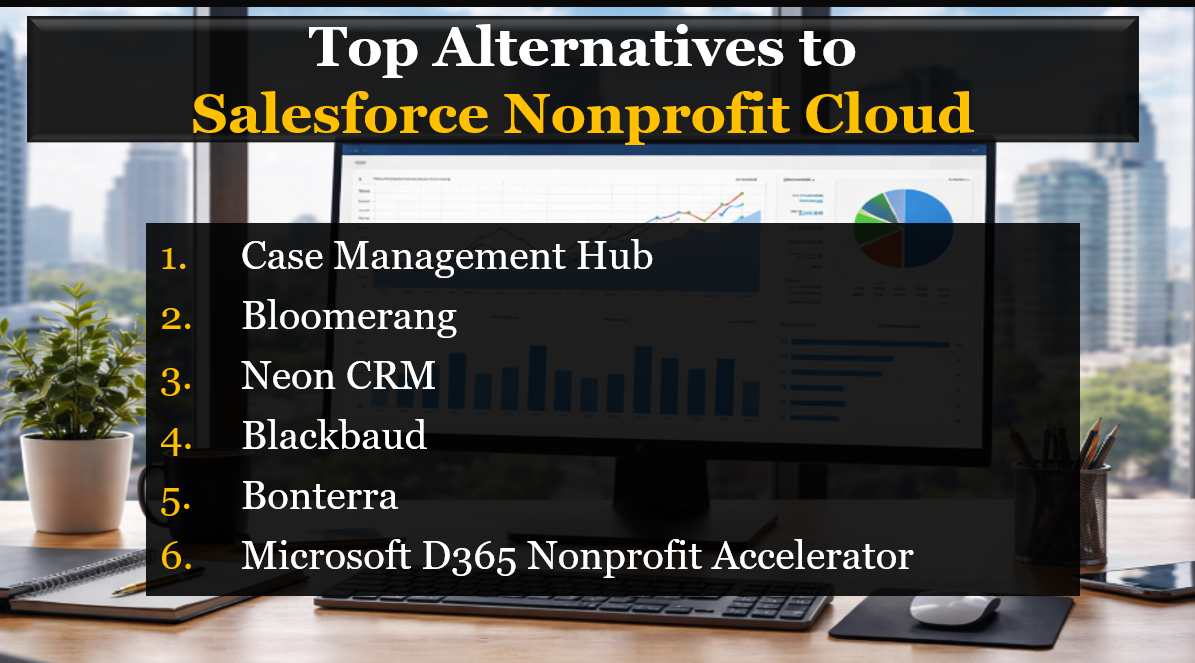
Organizations comparing Salesforce Nonprofit Cloud replacement solutions will find several well-known names in the market. Each platform has strengths, but they are not all built for the same type of organization. The right choice depends on whether your primary focus is fundraising, engagement, administration, or full case and program management.
1. Case Management Hub
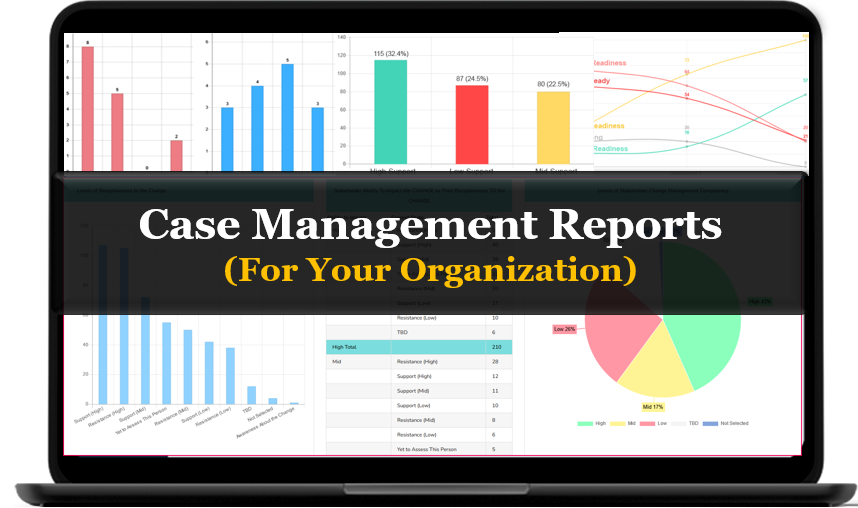
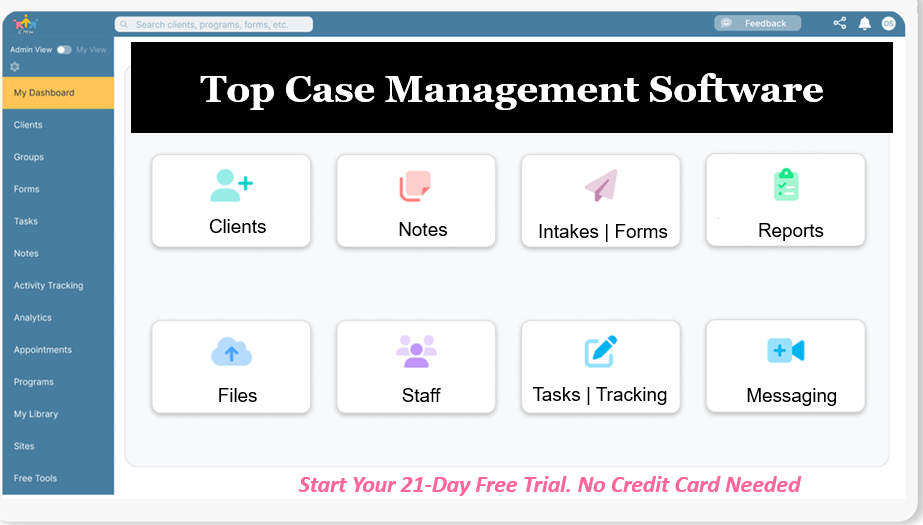
Case Management Hub is a modern all-in-one case management and CRM software platform built for nonprofits, social workers, human services teams, healthcare providers, schools, legal services organizations, and behavioral health programs. It combines client management, forms, notes, reporting, goals, tasks, scheduling, referrals, file storage, and workflow support in one centralized platform. For organizations that need a true operational system rather than only a donor database, it offers a stronger fit than many traditional nonprofit CRM alternatives to Salesforce.
All-in-One Case Management Software
Sign Up Today, Free. No credit card needed!
|
Do You Have a Team? |
||
2. Bloomerang
Bloomerang is a donor-focused nonprofit CRM known for fundraising, donor retention, and supporter engagement tools. It is often a good fit for organizations whose primary need is donor management and fundraising operations. However, it is less suited for teams that need advanced case management or service delivery workflows.
3. Neon CRM
Neon CRM provides a mix of donor management, event management, membership support, and general nonprofit administration tools. It can be attractive for smaller organizations seeking a more affordable CRM for nonprofits without Salesforce complexity, but it may not offer the same depth for client and case-focused operations.
4. Blackbaud
Blackbaud is a large nonprofit software provider with strong fundraising, analytics, and enterprise-grade capabilities. It can be a fit for larger organizations with significant budgets and specialized development needs. Still, many teams find it expensive, more complex to manage, and less practical for organizations that need a streamlined system for daily case and program work.
5. Bonterra
Bonterra is known for donor engagement, advocacy, and mission-driven campaign tools. It can be useful for organizations centered on outreach, advocacy, fundraising, and supporter engagement. However, organizations with heavy client service workflows may need more operational depth than a campaign-focused platform typically provides.
6. Microsoft Dynamics 365 Nonprofit Accelerator
Microsoft Dynamics 365 Nonprofit Accelerator offers flexibility and deeper integration for organizations already invested in the Microsoft ecosystem. It can be powerful, but it often requires technical resources, customization work, and careful implementation planning. For many organizations, that means a longer path to value compared with a purpose-built platform like Case Management Hub.
Comparison Table: Salesforce Nonprofit Cloud Alternatives
A direct Salesforce Nonprofit Cloud competitors comparison helps organizations quickly see which platforms are strongest for service delivery, case management, donor tools, usability, and customization. The most important distinction is whether the platform supports daily operational work or primarily focuses on donor and fundraising workflows.
| Platform | Ease of Use | Best Fit |
|---|---|---|
| Case Management Hub | Very high | Nonprofits, social services, healthcare, education, legal services, community programs |
| Bloomerang | High | Fundraising-focused nonprofits |
| Neon CRM | Moderate | Small to mid-sized nonprofits |
| Blackbaud | Low to moderate | Larger enterprise nonprofits |
| Bonterra | High | Advocacy and campaign-driven organizations |
| Microsoft Dynamics 365 Nonprofit Accelerator | Moderate | Organizations already using Microsoft tools |
In this comparison, Case Management Hub stands out because it combines user-friendly design with true case management depth. Instead of forcing organizations to patch together multiple systems for client records, forms, notes, reporting, scheduling, and collaboration, it brings those capabilities into one integrated platform.
Why Case Management Hub Is the Better Alternative
When organizations search for the best alternatives to Salesforce Nonprofit Cloud, they are often looking for a solution that is both easier and more complete. Case Management Hub meets that need by delivering the flexibility of a CRM with the operational power of a true case management platform. That distinction matters because many organizations do not just need to store contact records. They need to serve people, track progress, manage programs, and report on outcomes.
Built for service delivery, not just donor records
Case Management Hub is designed around the workflows organizations use every day. Teams can manage intakes, client profiles, notes, forms, files, referrals, tasks, goals, appointments, and reporting in one place. That makes it far more practical than platforms that focus mainly on fundraising or supporter engagement.
Easier to adopt across the whole organization
A major advantage of Case Management Hub is usability. Organizations do not benefit from a platform that only a few technical users can manage. Staff, case managers, clinicians, coordinators, and administrators need software that feels intuitive from the start. Case Management Hub reduces friction, shortens training time, and helps teams become productive faster.
Strong customization without technical overhead
Many nonprofit CRM alternatives to Salesforce promise flexibility, but that flexibility often depends on significant technical work. Case Management Hub gives organizations the ability to create custom fields, notes, forms, reports, and workflows without the same level of complexity. This makes it a more practical option for growing organizations that want control without ongoing dependency on consultants.
More value for organizations that need operational depth
Case Management Hub is especially strong for nonprofits and service organizations that need much more than a contact database. It supports real operational work, including documentation, client communication, scheduling, assessments, secure files, task tracking, and analytics. That broad coverage gives organizations more value from one platform and reduces the need for multiple disconnected systems.
Better alignment with measurable impact
Organizations are under constant pressure to show outcomes, improve reporting, and demonstrate value to leadership, funders, and stakeholders. Case Management Hub helps make that easier by supporting progress tracking, custom reports, service data, and structured records in one system. It is built for organizations that need visibility into both day-to-day work and long-term impact.
Create an Account Now - Add Your Team to Try Case Management Hub for Free
Get your entire team to try out Case Management Hub for free in minutes. Work smarter, not harder - free for 21 days. No credit card needed. If you decide to move forward is when you can subscribe.Follow These 5 Simple Steps:
Step 1: Create your free trial account here: Create Account.
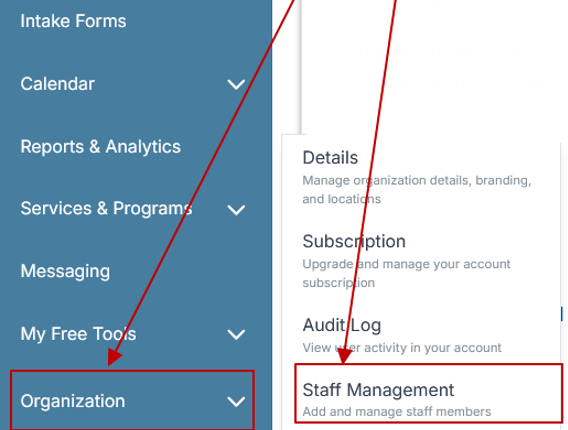
Step 2: From the left sidebar, scroll down to the Organization dropdown menu and click Staff Management
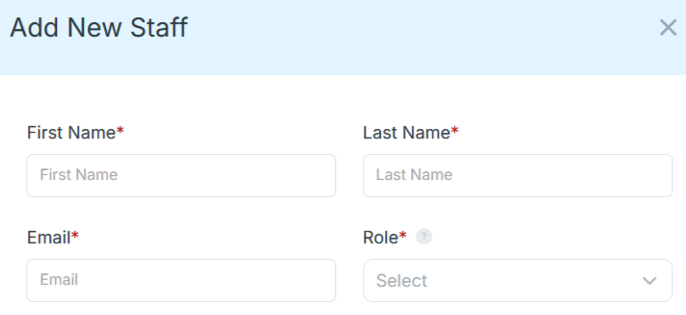
Step 4: Copy and send this email to your team members (so they know how to log in).
⚠️ Important: Ask your team members not to create new accounts. They should log in using the details you create for them.
Email Template to Send Your Team
Subject: You’ve been added to our new All-in-One Case Management tool!
Hi Team,
I've set up a free trial account for our team with the Case Management Hub software, an all-in-one case management software. I've already added you to the account, so you can start exploring immediately.
Please don't create a new account. Instead, use the login details I've shared with you to access the platform here: https://app.casemanagementhub.org/
This platform centralizes and improves everything we do, from case management, standardized assessment forms, client care, scheduling & appointments, reporting & analytics, and more all in one secure, collaborative tool. We have 21 days to test it out for free and see how it fits our needs.
Learn more about the platform here: Explore Features
Looking forward to exploring this together.
Best,
[Your Name/Signature]
Step 5: Request a customized discounted quote.
Where Case Management Hub Outperforms the Other Options
Every platform on this list can serve a certain type of organization, but Case Management Hub offers the strongest overall fit for teams that need both nonprofit CRM functionality and robust case management. Its advantage becomes even clearer when evaluated against the alternatives in practical terms.
Compared with Bloomerang
Bloomerang is valuable for donor engagement, but Case Management Hub is better for organizations that need to manage people, programs, cases, services, and outcomes in addition to relationships. If your work involves client records, service coordination, and progress documentation, Case Management Hub provides a much stronger operational foundation.
Compared with Neon CRM
Neon CRM can be attractive for general nonprofit administration, but Case Management Hub goes further for organizations with complex service workflows. Its deeper support for notes, forms, goals, scheduling, and client-specific reporting makes it the better alternative for social service agencies, behavioral health teams, and program-driven nonprofits.
Compared with Blackbaud
Blackbaud may appeal to large organizations seeking enterprise fundraising infrastructure, but many teams need a simpler and more accessible platform. Case Management Hub offers more practical usability, faster adoption, and stronger alignment with direct service operations without the burden of a more complex enterprise environment.
Compared with Bonterra
Bonterra is well suited to engagement and advocacy efforts, but organizations that need full client and case management will likely find it less comprehensive for day-to-day service work. Case Management Hub is better positioned for organizations that need to centralize records, workflows, notes, and operational reporting in one place.
Compared with Microsoft Dynamics 365 Nonprofit Accelerator
Microsoft Dynamics can offer flexibility, but that flexibility often comes with implementation effort and technical complexity. Case Management Hub gives organizations a more direct path to value by offering purpose-built tools in a platform that is easier to deploy and easier for staff to use.
All-in-One Case Management Software
Sign Up Today, Free. No credit card needed!
|
Do You Have a Team? |
||
Who Should Choose Case Management Hub
Case Management Hub is particularly well suited for organizations that need a system capable of handling both relationship management and service operations. It is a strong choice for teams that have outgrown spreadsheets, are frustrated by disconnected software, or need a more practical alternative to Salesforce Nonprofit Cloud.
Organizations that benefit most
- Nonprofits that provide direct services and need client management, notes, reporting, and outcomes tracking
- Social service agencies that need centralized case records and referral workflows
- Behavioral health, counseling, and clinical teams that need documentation and progress tracking
- Schools, youth programs, and community organizations managing student or participant support
- Legal and advocacy organizations that need structured case records and collaboration tools
- Growing organizations that want a scalable system without the complexity of enterprise CRM platforms
For organizations comparing case management vs practice management software, or CRM vs case management software, the fastest way to clarify the decision is to look at the work your team performs every day. If your staff must document services, track client progress, manage referrals, store forms, run reports, and coordinate internal workflows, then a case management-centered platform like Case Management Hub is the stronger long-term choice.
What Organizations Should Look for in a Better Alternative
When evaluating the best alternatives to Salesforce Nonprofit Cloud, organizations should move beyond feature checklists and focus on whether the platform supports real work across departments. The best system should help staff move faster, reduce administrative burden, improve reporting accuracy, and create a more organized experience across the entire organization.
The most important criteria
- Ease of use for administrators, frontline staff, and leadership
- Fast setup and onboarding without weeks of configuration
- Centralized client, case, and program data
- Strong reporting, analytics, and outcome tracking
- Custom fields, forms, templates, and workflows without heavy coding
- Scalability for multi-program, multi-site, or growing organizations
- Security, privacy, and role-based access controls
For service-based organizations, one additional requirement matters even more. The system must support case management, not just contact management. That means the platform should help teams manage notes, assessments, referrals, tasks, appointments, documentation, forms, and progress tracking in one place. This is where many traditional nonprofit CRMs fall short.
All-in-One Case Management Software
Sign Up Today, Free. No credit card needed!
|
Do You Have a Team? |
||
How to Evaluate the Right Salesforce Alternative for Your Organization
The best software decision comes from matching the platform to the actual operating model of the organization. A useful evaluation process should focus on current pain points, future needs, and the level of effort required to implement and maintain the platform successfully.
A practical evaluation checklist
- List the workflows your team uses every week, including intakes, notes, forms, scheduling, reporting, and communication.
- Identify whether your primary need is donor management, service delivery, or both.
- Assess how much technical support your organization can realistically provide for setup and customization.
- Review whether the platform can support staff adoption quickly across different roles.
- Confirm that reporting and outcome tracking align with leadership, funder, and compliance needs.
- Prioritize systems that reduce tool sprawl and centralize work in one place.
When organizations go through this process honestly, they often realize that a platform built specifically for operational case management offers a better fit than a traditional nonprofit CRM. That is where Case Management Hub continues to separate itself from other Salesforce Nonprofit Cloud alternatives.
Final Thoughts
There is no shortage of nonprofit CRM alternatives to Salesforce, but not all of them solve the same problem. Some are best for donor engagement. Some are best for advocacy. Some are best for enterprise data environments. For organizations that need to centralize client information, improve workflows, manage documentation, track outcomes, and support direct service delivery, Case Management Hub is the better alternative.
Among the leading Salesforce Nonprofit Cloud alternatives, Case Management Hub offers the strongest combination of usability, flexibility, operational depth, and practical value. It helps organizations move beyond complexity, reduce administrative friction, and manage work in a way that reflects how modern nonprofit and human service teams actually operate.
For organizations seeking a true Salesforce Nonprofit Cloud replacement solution, the most important question is not which platform has the biggest name. It is which platform will help your team work more effectively, report more clearly, and deliver better outcomes. For many organizations, that answer is Case Management Hub.
Create an Account Now - Add Your Team to Try Case Management Hub for Free
Get your entire team to try out Case Management Hub for free in minutes. Work smarter, not harder - free for 21 days. No credit card needed. If you decide to move forward is when you can subscribe.Follow These 5 Simple Steps:
Step 1: Create your free trial account here: Create Account.
Step 2: From the left sidebar, scroll down to the Organization dropdown menu and click Staff Management
Step 4: Copy and send this email to your team members (so they know how to log in).
⚠️ Important: Ask your team members not to create new accounts. They should log in using the details you create for them.
Email Template to Send Your Team
Subject: You’ve been added to our new All-in-One Case Management tool!
Hi Team,
I've set up a free trial account for our team with the Case Management Hub software, an all-in-one case management software. I've already added you to the account, so you can start exploring immediately.
Please don't create a new account. Instead, use the login details I've shared with you to access the platform here: https://app.casemanagementhub.org/
This platform centralizes and improves everything we do, from case management, standardized assessment forms, client care, scheduling & appointments, reporting & analytics, and more all in one secure, collaborative tool. We have 21 days to test it out for free and see how it fits our needs.
Learn more about the platform here: Explore Features
Looking forward to exploring this together.
Best,
[Your Name/Signature]
Step 5: Request a customized discounted quote.
FAQ: Salesforce Nonprofit Cloud Alternatives
What are the best Salesforce Nonprofit Cloud alternatives for nonprofits and service organizations?
The best Salesforce Nonprofit Cloud alternatives depend on your organization’s needs, but leading options include Case Management Hub, Bloomerang, Neon CRM, Blackbaud, Bonterra, and Microsoft Dynamics 365 Nonprofit Accelerator. For organizations that need both nonprofit CRM capabilities and strong case management tools, Case Management Hub stands out as the more complete solution.
Why do organizations look for an alternative to Salesforce Nonprofit Cloud?
Many organizations look for an alternative to Salesforce Nonprofit Cloud because they want a platform that is easier to use, faster to implement, and more affordable to maintain. They also need better support for case management, client tracking, reporting, and service delivery workflows.
What should organizations look for in nonprofit CRM alternatives to Salesforce?
Organizations should look for ease of use, strong reporting, customizable workflows, centralized client data, and reliable security when comparing nonprofit CRM alternatives to Salesforce. If the organization delivers direct services, it should also prioritize built-in case management, notes, forms, referrals, and outcome tracking.
Is Case Management Hub a better alternative to Salesforce Nonprofit Cloud?
Case Management Hub is a better alternative for many nonprofits, social services agencies, healthcare teams, and community organizations because it combines CRM functionality with true case management features in one platform. It offers a more practical solution for organizations that need to manage clients, documentation, workflows, and measurable outcomes without unnecessary complexity.
Which Salesforce Nonprofit Cloud replacement solution is best for case management and client tracking?
For organizations focused on case management and client tracking, Case Management Hub is one of the best Salesforce Nonprofit Cloud replacement solutions. It is designed to support intakes, client profiles, progress notes, forms, tasks, scheduling, reporting, and program outcomes in a single system.
Find the Right Case Management Solution for Your Organization: All-in-One Case Management Resource Center.
Note: Content on this casemanagementhub.org site is copyrighted and protected under applicable copyright laws. Read Terms of Use.
Disclaimer: Case Management Hub is an educational resource and software provider site. Our content is not medical advice. Use of this site does not create a provider-patient relationship. Read our full disclaimer here: Case Management Hub Disclaimer.