
Best Restorative Justice Case Management Software for Conflict Resolution and Mediation Programs
Restorative justice programs rarely fit neatly into a conventional case management model. A single referral may involve several participants, a facilitator or mediator, a school or community partner, multiple meetings, an agreement, follow-up activities, and outcomes that need to be documented long after the initial conflict has been addressed.
That creates a practical challenge for conflict resolution centers, community mediation organizations, restorative justice nonprofits, school-based programs, and other organizations advancing restorative practices. The software needs to organize cases without turning relationship-centered work into an overly rigid administrative process.

The best restorative justice case management software should support the actual path a case takes, from referral and participant intake through mediation, restorative conferences, agreements, follow-up, case closure, and outcome reporting. It should also make it easier to answer basic operational questions: Where did this referral come from? Who is involved? Who is responsible for follow-up? What happened? Were agreed actions completed? What outcomes are we seeing across the program?
For organizations still managing that information across spreadsheets, email, paper forms, shared folders, and individual staff records, those questions can become surprisingly difficult to answer.
💡All-in-one Case Management Software.
Everything in one place: clients, notes, forms, appointments, reports, and outcomes.
👉 Try it Free - No credit card needed
Why Restorative Justice Case Management Is Different
Many case management systems are built around a relatively straightforward structure: one client has a record, staff provide services, notes are documented, and the case eventually closes. Restorative justice and mediation work can be considerably more relational.
One case might involve a person who experienced harm, a person responsible for harm, parents or support people, a facilitator, a referring organization, and other affected participants. A community mediation matter might involve neighbors, family members, organizations, or several parties with different perspectives and needs.
That means restorative justice case management software needs to support more than a list of clients and case notes. Organizations may need to manage:
- Referrals from schools, courts, community partners, agencies, and individuals
- Multiple participants associated with a case or program
- Intake, eligibility, preparation, and assessment information
- Mediator or facilitator assignments
- Meetings, restorative conferences, circles, mediation sessions, and other activities
- Agreements, commitments, goals, and follow-up actions
- Case notes and supporting documents
- Program outcomes and case closure information
- Data needed for grants, funders, boards, program evaluation, and internal management
This distinction should shape the software selection process. A system can be excellent at conventional client case management and still be awkward for a restorative justice program if the organization can’t adapt its fields, forms, activities, programs, and reporting to the way its work is actually delivered.
The Spreadsheet Problem Gets Worse as Programs Grow
Spreadsheets can work when a program is small. A team may begin with one spreadsheet for referrals, another for active cases, shared documents for notes, and folders containing agreements and participant information. Staff know where everything is because the number of cases is manageable.
Growth exposes the weaknesses in that arrangement.
Someone updates the referral spreadsheet but forgets to update another tracker. A follow-up date lives in a staff member’s calendar. Participant documents sit in a shared folder. Program leadership wants to know how many cases resulted in an agreement, but the information is buried in individual records. A funder asks for outcomes by referral source or program, requiring someone to manually assemble the numbers.
The biggest problem isn’t simply that spreadsheets are manual. It’s that the organization loses the connection between information.
A useful restorative justice case management system connects the referral, participants, case activities, documentation, follow-ups, and outcomes so staff can understand the history of a case without reconstructing it from several sources.

👉 Try it Free - Free Case Management System
Watch for software that simply recreates the spreadsheet
Moving information into the cloud doesn’t automatically solve the underlying problem. Some systems provide a digital database but leave teams with the same fragmented workflow.
During a software evaluation, test an actual case from beginning to end. Enter a referral. Add the information your team normally collects. Document activities. Assign follow-up work. Record an outcome. Then try to report on it.
That exercise reveals much more than a polished product demonstration.
Start With Referral Management, Not the Feature List
Referral management is one of the areas restorative justice and mediation organizations should examine closely.
A conflict resolution center may receive cases from several sources. School-based programs may receive referrals from teachers, administrators, counselors, students, or families. Community programs can receive self-referrals or referrals from partner organizations. Justice-connected programs may have another set of referral pathways.
The software should allow the organization to capture the information that matters at referral without forcing every program into the same form.
Useful information may include referral source, referral date, program, location, type of conflict, assigned facilitator, current status, participants, eligibility, important dates, and disposition. What matters will vary by organization, which is why customizable fields and forms are more valuable than a long list of predetermined fields that staff never use.
Good referral tracking also improves reporting later. If referral sources are captured consistently at intake, leadership can examine where cases are coming from rather than manually reconstructing that information months later.
Multiple Participants Can Make or Break the System
This is one of the areas I would test carefully before selecting restorative justice software.
Traditional systems sometimes assume that a case revolves around one primary client. Conflict resolution and restorative processes may involve several people whose information needs to remain connected to the same matter while preserving appropriate distinctions between participants.
Before committing to a platform, map the participant relationships your organization encounters. Consider whether you need to distinguish between different participant roles, connect individuals with programs or groups, document separate contacts, and preserve the history of someone’s participation over time.
🔥Still using spreadsheets for case management?
Switch to an all-in-one case management platform.
👉 Try it Free - No credit card needed
The goal isn’t to force restorative practice into a complicated database model. It is to prevent staff from maintaining parallel records because the main system can’t represent what is happening in the case.
If your organization handles complex multi-party matters, ask vendors to demonstrate this workflow using a realistic example. Don’t settle for a verbal assurance that the system can be customized.
Documentation Should Support the Work, Not Dominate It
Restorative practitioners, mediators, program coordinators, and facilitators shouldn’t have to spend excessive time translating their work into a system designed for another profession.
A practical platform should allow organizations to create documentation that reflects their terminology and processes. That might include referral forms, intake forms, facilitator notes, preparation records, session documentation, agreements, follow-up forms, closure records, and participant surveys.
Customization matters here, but more customization isn’t automatically better. An organization can create so many fields and forms that documentation becomes harder rather than easier.
Start with the information staff genuinely need to deliver the program, maintain appropriate records, conduct follow-up, and report results. Add fields because they serve a clear purpose, not because the software makes it possible.
Confidentiality and access need deliberate attention
Conflict-related information can be sensitive. Organizations should therefore examine how permissions work, who can access participant and case information, how documents are stored, and whether different staff roles can be given different levels of access.
Don’t treat security as a checkbox on a software comparison sheet. Map who actually needs access to what. A program administrator, facilitator, supervisor, volunteer, intern, and external partner may not require the same level of visibility.
Agreements and Follow-Up Shouldn’t Disappear Into Case Notes
One common software mistake is documenting an agreement as text and considering the job finished.
If an agreement contains actions that need to happen after a restorative conference or mediation, the system should help staff manage those actions. Depending on the program, that could involve target dates, tasks, goals, reminders, completion statuses, additional meetings, or other follow-up activities.
 👉 Try it free today - No credit card needed
This is where task and goal tracking can become useful even if the software wasn’t originally designed specifically for restorative justice. The important question is whether the configuration matches the program’s practice.
A team should be able to distinguish between an agreement being reached and agreed actions actually being completed. Those are different pieces of information, and collapsing them into one outcome can make program reporting less useful.
Outcome Tracking Is Where Many Programs Need Better Tools
Restorative justice outcome tracking should begin long before someone opens the reporting dashboard.
If staff record information inconsistently during the life of a case, sophisticated reporting software won’t fix the underlying data problem.
Organizations should first decide which questions they need their data to answer. Depending on the program, those might include:
- How many referrals did we receive?
- Which organizations or sources referred cases?
- How many referrals progressed to a restorative process or mediation?
- How many participants were served?
- How many sessions or activities took place?
- Were agreements reached?
- Were follow-up actions completed?
- Why were cases closed or unable to proceed?
- How do outcomes differ across programs, locations, referral sources, or other relevant categories?
Not every organization should measure the same outcomes. Community mediation, school restorative practices, youth diversion, and institution-based programs may have very different definitions of success.
The better approach is to choose a case management system that allows reporting to reflect the organization’s program model instead of adopting whatever measures happen to be built into the software.
Reporting Has to Work for Program Staff and Leadership
Reporting needs tend to expand as a conflict resolution organization grows.
A program coordinator may need a list of open cases and overdue follow-ups. An executive director may want program-level outcomes. A board may need a higher-level view of reach and activity. A grant report may require information for a specific date range, population, program, or service.

👉 Try it Free today - No credit card needed
This is why custom reporting deserves more attention during software selection than attractive dashboards. A dashboard can look impressive while answering very few of the questions an organization actually gets asked.
During a trial or demonstration, bring a real reporting requirement. Ask the vendor to show how the system would produce it. If the answer involves exporting several datasets and manually rebuilding the report in spreadsheets every month, understand that limitation before purchasing.
What to Look for in Restorative Justice and Mediation Case Management Software
Feature comparisons are useful once the organization has mapped its workflow. They shouldn’t be the starting point.
For most restorative justice, conflict resolution, and mediation programs, I would put the following capabilities high on the evaluation list:
- Customizable referral and intake forms
- Flexible participant and case records
- Custom fields that reflect program terminology
- Case notes and document storage
- Program, group, or location tracking
- Tasks, reminders, goals, and follow-up tracking
- Activity and service tracking
- Custom case statuses and closure information
- Role-based permissions and appropriate security controls
- Custom reports and data exports
- Outcome and program-level reporting
- A user experience staff can learn without excessive training
Ease of use belongs near the top of that list. A highly configurable restorative justice case management system has limited value if facilitators and program staff avoid using it because routine documentation takes too long.
The best software is usually the system that captures enough structure to improve consistency and reporting without adding unnecessary administrative burden.
How Case Management Hub Can Support Restorative Justice Programs
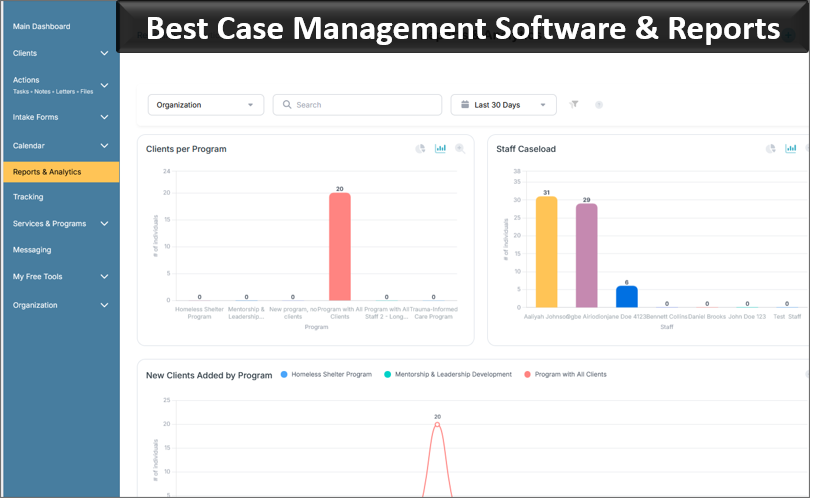
Case Management Hub is an all-in-one case management platform designed for organizations that need to manage people, cases, documentation, services, programs, activities, and outcomes in a centralized system.
For a restorative justice or conflict resolution organization, the value is in the platform’s flexibility. Instead of requiring the organization to adopt a highly clinical case structure, configurable forms, fields, programs, notes, tracking tools, goals, and reports can be used to support different workflows.
👉 Try it free today - No credit card needed
Build intake and referral processes around your programs
Organizations can use digital forms and customizable fields to capture the information needed during referral and intake. This can help replace separate paper forms, spreadsheets, and disconnected documents while making structured information available for reporting later.
Organize different restorative justice and mediation programs
A conflict center may run community mediation, school-based restorative practices, youth programs, training, circles, or other initiatives. Program and group tracking can help organizations organize those activities without maintaining a completely separate administrative system for each one.
Track activities, progress, and follow-up
Activity tracking, goals, tasks, target dates, and reminders can be configured around the organization’s process. The exact setup should reflect how the program defines progress rather than forcing every restorative matter into the same workflow.
Create reports from the information your organization collects
Custom fields become especially useful when they feed reporting. Organizations can structure the information they need to analyze program activity, referral sources, participant characteristics, services, case closure information, and other program-specific data.
This can reduce the need to maintain one system for day-to-day case management and another collection of spreadsheets solely for reporting.
Community Mediation Centers Should Test the Software Differently
Organizations evaluating mediation case management software should resist demonstrations built around generic client management.
Instead, ask the vendor to demonstrate a realistic mediation matter.
- Enter a new referral.
- Record the relevant participants and referral source.
- Assign the case to the appropriate staff member or mediator.
- Document contacts and preparation activities.
- Record a mediation session or other intervention.
- Document an agreement and any required follow-up.
- Close the case with a meaningful closure reason or outcome.
- Generate a report showing what happened.
If the system handles that process naturally, continue evaluating it. If staff need workarounds at almost every stage, the software is probably creating a future administrative problem.
School and Institutional Restorative Practices Need Flexible Program Tracking
School-based restorative practices introduce another layer of complexity. Programs may need to track students or other participants, referrals, incidents or concerns, interventions, circles, conferences, agreements, follow-up, attendance, and program outcomes.
💡All-in-one Case Management Software.
Everything in one place: clients, notes, forms, appointments, reports, and outcomes.
👉 Try it Free - No credit card needed
The software also needs to accommodate the fact that not every restorative activity is an individual case. Some organizations run groups, classes, circles, workshops, or recurring activities that need attendance and participation tracking alongside case-level work.
This is why organizations should evaluate both individual and group tracking. A platform that handles individual records well but cannot efficiently capture program participation may still leave staff maintaining separate spreadsheets.
For organizations working across several schools, communities, or institutions, location and program-level reporting can also become important. Leadership should be able to separate programs where needed while still examining organization-wide activity.
Don’t Buy Specialized Software Simply Because It Uses Restorative Justice Terminology
Purpose-built restorative justice software can be an excellent fit when its workflow closely matches the organization’s model. But specialized terminology alone doesn’t make a system the right choice.
The opposite is also true. A configurable case management platform shouldn’t be dismissed simply because every screen wasn’t originally labeled with restorative justice terminology.
The better test is operational.
Can the system represent your referrals, participants, programs, documentation, activities, agreements, follow-up, and outcomes without excessive workarounds? Can staff actually use it? Can administrators retrieve the data they need? Can the system accommodate changes as the program develops?
Those questions matter more than whether a vendor has preloaded a particular vocabulary.
A Better Way to Choose Restorative Justice Case Management Software
Before comparing products, document one real workflow from your organization. Start with a referral and follow it all the way through closure and reporting.
Identify every point where staff collect information, make a decision, create documentation, assign responsibility, conduct an activity, schedule follow-up, or record an outcome.
Then separate your requirements into three categories: what the system absolutely must do, what would meaningfully improve the work, and what would merely be convenient.
That prevents an organization from selecting software based on a long feature list while overlooking the handful of capabilities staff will depend on every day.
👉 Try it Free - Free Case Management System
For many conflict resolution centers, the priorities will come back to the same practical needs: getting referrals into one place, organizing participants and case information, documenting work without unnecessary burden, managing follow-up, protecting sensitive information, and producing credible program data.
If your organization is replacing spreadsheets, paper files, shared documents, or disconnected systems, don’t try to recreate every existing process exactly as it works today. Some of those processes exist because of the limitations of the tools you’re replacing.
Use the transition to decide what information truly needs to be collected, what staff need to see, what leadership needs to measure, and how a case should move from referral to resolution and follow-up.
That is ultimately what the best restorative justice case management software should provide: enough structure to keep cases, participants, activities, agreements, and outcomes organized, with enough flexibility to respect the way restorative justice and mediation programs actually work.
FAQs: Restorative Justice Case Management Software
What is restorative justice case management software?
Restorative justice case management software helps organizations manage referrals, participants, case documentation, mediation or restorative activities, agreements, follow-up, and outcomes in one centralized system. It can replace spreadsheets, paper files, and disconnected records while giving teams a clearer view of each case.
What features should restorative justice case management software include?
Restorative justice case management software should include customizable intake and referral forms, participant and case records, case notes, document storage, task and follow-up tracking, program management, role-based permissions, outcome tracking, and customizable reporting. The system should also be flexible enough to support different restorative justice and mediation workflows.
Can case management software be used for mediation and conflict resolution programs?
Yes. Flexible case management software can support community mediation and conflict resolution programs by tracking referrals, multiple participants, mediator assignments, sessions, agreements, follow-up activities, case closure, and program outcomes. Organizations should choose software that can adapt to multi-party cases rather than relying on a simple one-client case structure.
What is the best case management software for restorative justice and mediation programs?
Case Management Hub is a strong option for restorative justice, mediation, and conflict resolution programs that need customizable forms, referral tracking, participant records, program management, case notes, tasks, goals, activity tracking, permissions, and custom reporting. Its flexible structure allows organizations to configure the platform around their own programs and workflows.
How can restorative justice programs track outcomes and program impact?
Restorative justice programs can track outcomes by consistently recording referral sources, participants served, activities completed, agreements reached, follow-up actions, closure reasons, and program-specific results. Case management software makes this data easier to organize, analyze, and report across programs, locations, referral sources, and reporting periods.
Find the Right Case Management Solution for Your Organization: All-in-One Case Management Resource Center.
Note: Content on this casemanagementhub.org site is copyrighted and protected under applicable copyright laws. Read Terms of Use.
Disclaimer: Case Management Hub is an educational resource and software provider site. Our content is not medical advice. Use of this site does not create a provider-patient relationship. Read our full disclaimer here: Case Management Hub Disclaimer.