
We Outgrew Spreadsheets: How Growing Nonprofits Modernize Client Case Management
Spreadsheets often become part of a nonprofit’s operations for practical reasons. They are familiar, inexpensive, and easy to set up. A new program can create a client tracker in an afternoon, add columns as needs change, and share the file with staff.
That approach may work when the organization serves a limited number of clients and only a few employees need access to the information. It becomes far less effective as caseloads increase, programs expand, reporting requirements grow, and multiple staff members begin updating client records.
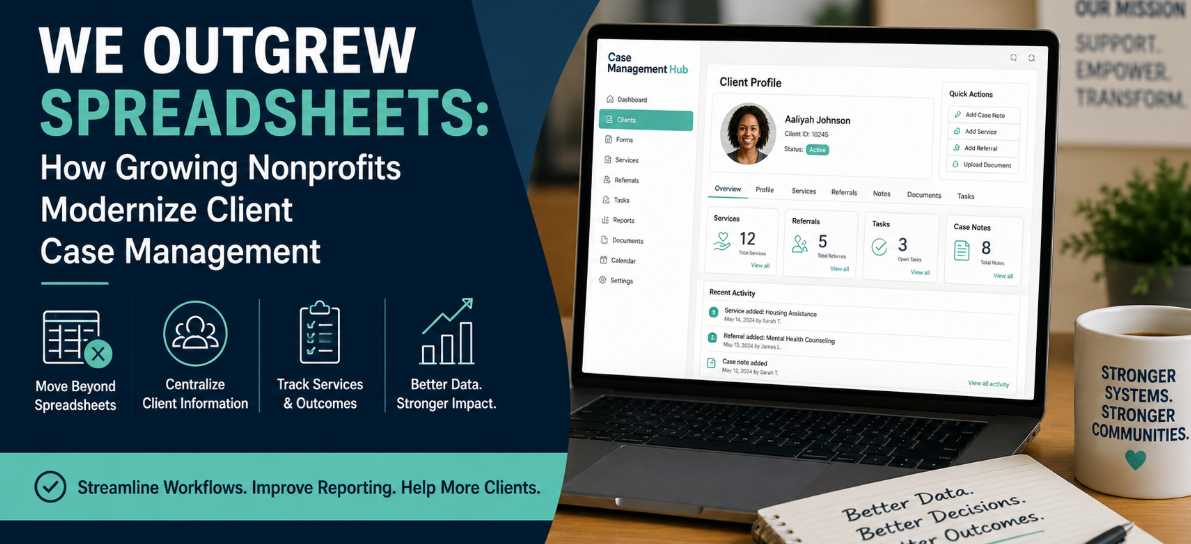
At that point, the organization has not necessarily managed its data poorly. It has simply outgrown the tools that supported an earlier stage of its development.
Modern nonprofit case management software helps organizations replace disconnected spreadsheets, documents, emails, and paper forms with a centralized system for managing client information. The goal is not to adopt technology for its own sake. The goal is to reduce administrative work, improve service coordination, strengthen reporting, and give staff more time to support clients.
💡All-in-one Case Management Software.
Everything in one place: clients, notes, forms, appointments, reports, and outcomes.
👉 Try it Free - No credit card needed
Why Nonprofits Start With Spreadsheets
Most nonprofits do not begin with a formal case management platform. They start with the tools already available to them.
A spreadsheet can quickly track names, phone numbers, enrollment dates, services received, and follow-up tasks. Staff can add fields without contacting a software provider or waiting for a system administrator. For a small team with a straightforward program, that flexibility is useful.
The problem is that spreadsheets are designed to organize rows and columns. They are not designed to manage the full history of a client relationship.
Case management work changes continuously. A client completes an intake form, receives an assessment, identifies goals, participates in services, receives referrals, uploads documents, misses appointments, and returns for follow-up support. Each interaction adds context that staff may need later.
As more information is added, one spreadsheet often becomes several. Separate files may be created for intake, case notes, referrals, attendance, service delivery, outcomes, and funder reporting. Staff may also store documents on shared drives or keep information in email threads.
The organization gradually moves from a simple client list to a network of disconnected records. That is usually when the limitations of spreadsheet-based case management become difficult to ignore.
Signs Your Nonprofit Has Outgrown Spreadsheets
The clearest warning sign is not the number of rows in a file. It is the amount of effort required to keep client information accurate, accessible, and useful.
A nonprofit may have outgrown spreadsheets when staff regularly experience problems such as:
- Client information is stored in multiple files or systems.
- Staff are unsure which spreadsheet contains the latest information.
- Different programs use inconsistent client names, categories, or service codes.
- Intake information must be entered manually after a client submits a form.
- Case notes are stored in Word documents, notebooks, or separate folders.
- Managers cannot easily review staff caseloads or overdue follow-ups.
- Preparing funder reports requires combining information from several sources.
- Staff create duplicate client records because they cannot find existing ones.
- New employees need extensive training to understand where records are stored.
- Leadership does not fully trust the accuracy of program data.
One or two of these problems may be manageable. When several appear at the same time, the organization is likely spending too much effort maintaining its tracking process.

👉 Try it Free - Free Case Management System
The Operational Cost of Spreadsheet-Based Case Management
Nonprofit leaders often compare the price of software with the apparent cost of continuing to use spreadsheets. The spreadsheet may look free, but the process surrounding it is not.
Staff Spend Time Searching and Re-Entering Information
When information is scattered across multiple files, staff must search for records before they can act. They may open several spreadsheets, review email threads, check a shared drive, and ask colleagues whether a document has been updated.
Manual data entry creates additional work. Information collected through paper forms, PDFs, email attachments, or basic online forms may need to be copied into a tracker. The same client details may be entered more than once for different programs or reports.
Reporting Becomes a Recurring Data Cleanup Project
Funders and leadership teams need accurate information about client participation, services provided, referrals completed, outcomes achieved, and unmet needs. Spreadsheet-based reporting often requires staff to combine files, remove duplicates, standardize categories, and verify missing fields before the data can be used.
This process may produce a report, but it does not create a reliable reporting system. The same cleanup work is repeated the next month, quarter, or grant cycle.
Follow-Ups Depend Too Heavily on Individual Memory
A spreadsheet can contain a follow-up date, but it does not always make that date visible at the moment staff need it. Employees may need to filter a file manually or review a separate task list.
As caseloads grow, relying on individuals to remember appointments, referrals, documentation deadlines, and outreach tasks creates unnecessary risk.
What Modern Nonprofit Case Management Looks Like
Modern case management begins with a centralized client record. Instead of treating each spreadsheet row as an isolated entry, the system organizes information around the person receiving services.
An effective client profile may include:
- Contact and demographic information
- Intake forms and enrollment details
- Assessments and identified needs
- Goals and service plans
- Case notes and interaction history
- Services delivered
- Referrals and referral outcomes
- Appointments and follow-up activities
- Uploaded documents and consent forms
- Progress measurements and program outcomes
Keeping this information together gives staff a more complete view of the client. It also reduces the need to move between separate tools during service delivery.
For an organization serving hundreds of clients, this centralized structure can change daily operations. Staff no longer need to ask which file contains a referral or whether a colleague updated a separate note. Authorized users work from the same record and see the same current information.
🔥Still using spreadsheets for case management?
Switch to an all-in-one case management platform.
👉 Try it Free - No credit card needed
How Centralized Client Profiles Improve Service Delivery
A well-designed client profile does more than store information. It helps staff understand what has happened, what is happening now, and what needs to happen next.
Consider a client who receives support from several programs. One staff member completes the intake. Another provides direct services. A supervisor reviews progress. An administrative employee prepares documentation for reporting.
Without a centralized system, each person may maintain a separate record. That creates gaps in communication and increases the chance that staff will repeat questions, overlook previous services, or miss an unresolved need.
With a shared client profile, authorized employees can review the client’s history before taking action. They can see recent notes, current needs, pending referrals, scheduled appointments, and completed services.
This is especially valuable for nonprofits that provide health services, housing support, behavioral health programs, family services, workforce development, youth programs, or other forms of coordinated care. Clients often have needs that cross program boundaries. The system should help staff see those connections rather than divide the client into separate spreadsheets.
Digital Intake and Flexible Forms Reduce Duplicate Work
Intake is one of the first processes nonprofits should examine when modernizing case management.
Many organizations still collect information through paper forms, emailed documents, or online forms that are not connected to the client database. Staff then review the submission and enter the same details into one or more spreadsheets.
A digital intake process allows information submitted through an online form or client portal to flow directly into the client record. Staff can review the information, complete required assessments, and begin service coordination without retyping basic details.
Flexible forms are important because nonprofit programs do not collect identical information. A sexual health organization may need to document different needs and services than a food assistance program. A youth development nonprofit may require guardian information, while a housing organization may track household composition and housing status.
The case management platform should allow the organization to create and adjust forms without rebuilding the entire system. Forms may be used for:
- Client intake
- Needs assessments
- Consent and authorization
- Program enrollment
- Service requests
- Progress reviews
- Client satisfaction surveys
- Program exit documentation
 👉 Try it free today - No credit card needed
Tracking Client Needs, Services, and Outcomes
Growing nonprofits need to know more than how many people are enrolled. They need to understand what clients need, what support was provided, and whether those needs were addressed.
Spreadsheets can record service activity, but they often make it difficult to connect needs, interventions, and outcomes across time.
A modern case management system can help staff document:
- The needs identified during intake or assessment
- The priority or urgency of each need
- Services delivered by the organization
- Referrals made to outside providers
- Whether the client successfully accessed the referred service
- Needs that remain open or unresolved
- Changes in the client’s situation over time
This level of tracking supports both direct service and program management. Case managers can see what still requires attention. Supervisors can review service patterns. Leadership can identify frequently requested resources, gaps in community support, and areas where additional funding may be needed.
The most useful systems make this information part of the normal case management workflow. Staff should not need to complete a separate reporting spreadsheet after documenting the work they already performed.
Better Reporting Without Rebuilding the Data Every Month
Reporting is one of the strongest reasons to replace spreadsheet-based client tracking.
In a disconnected process, reporting begins after services have already been delivered. Staff gather spreadsheets, reconcile categories, check formulas, remove duplicates, and contact employees for missing information.
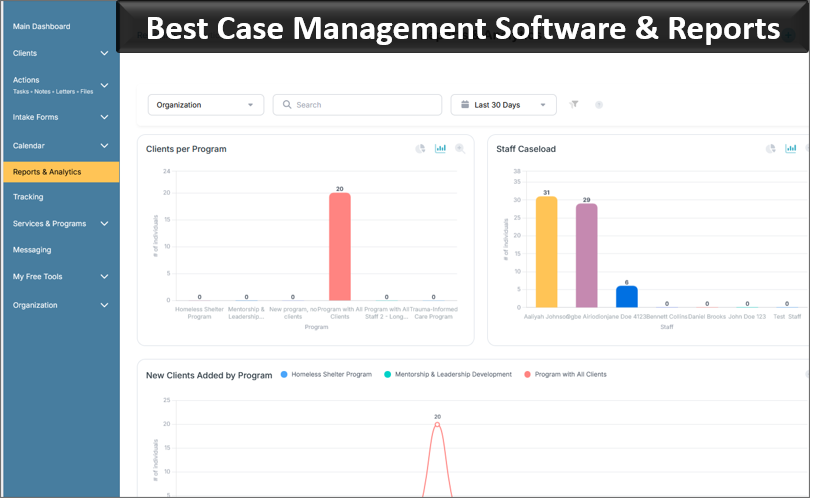
In a centralized case management system, reporting data is captured during the work itself. Intake forms create client records. Case notes document interactions. Service entries record assistance provided. Referral updates show whether outside services were accessed.
That does not eliminate the need for data quality controls. Staff still need clear definitions, consistent processes, and appropriate training. It does reduce the amount of manual reconstruction required to answer common questions.
Nonprofit leaders may be able to review information such as:
- Active and inactive client counts
- Clients served by program, location, or funding source
- Services requested and delivered
- Open and completed referrals
- Staff caseloads
- Client engagement and participation
- Program outcomes and unmet needs

👉 Try it Free today - No credit card needed
What to Look for in Nonprofit Case Management Software
Replacing spreadsheets does not automatically improve operations. The software must match the organization’s actual workflows, reporting requirements, staffing structure, and plans for growth.
During the evaluation process, nonprofits should consider the following capabilities.
A Complete Client Profile
Staff should be able to access the client’s core information, history, forms, notes, services, referrals, documents, and upcoming activities from one organized location.
Customizable Forms and Workflows
The system should adapt to the nonprofit’s programs rather than forcing every service into a rigid template. Organizations should be able to create fields, forms, assessments, and workflows that reflect how they operate.
Online Forms and Client Portal Options
Online intake and client-facing forms can reduce duplicate data entry. A client portal may also allow clients to submit information, complete forms, or access relevant resources securely.
Role-Based Access
Not every employee should see or edit every record. The platform should allow administrators to control access based on job responsibilities, programs, or organizational policies.
Reporting and Data Export
The software should support the reports the nonprofit regularly needs while also allowing authorized users to export data when appropriate.
Capacity to Grow
A scalable case management system should support additional clients, staff members, forms, programs, and reporting needs without requiring the nonprofit to start over with another platform.
How to Move From Spreadsheets to a Case Management System
A successful transition starts with process review, not software configuration. Organizations should first understand what they track, why they track it, and how staff use the information.
- Inventory existing files. Identify spreadsheets, forms, documents, and databases currently used for client management.
- Remove unnecessary fields. Do not migrate every column simply because it exists. Keep information that supports service delivery, compliance, reporting, or decision-making.
- Standardize data. Review inconsistent names, dates, service categories, and status labels before importing records.
- Map real workflows. Document how clients move from intake through assessment, service delivery, referral, follow-up, and program completion.
- Start with a manageable rollout. A pilot program can help the organization test forms, permissions, reports, and staff training before expanding.
- Train staff using realistic scenarios. Employees should practice completing intake, adding notes, recording services, updating referrals, and generating reports.
- Assign ownership. Designate responsibility for system administration, form updates, user access, and data quality review.
The transition should not recreate every spreadsheet inside a new tool. It is an opportunity to simplify processes, remove duplicate steps, and establish clearer standards.
👉 Try it free today - No credit card needed
Common Mistakes to Avoid During Modernization
Nonprofits can reduce implementation problems by avoiding several common mistakes.
Choosing Software Based Only on Price
Cost matters, but an inexpensive system that cannot support required workflows may create more work than it removes. Evaluate total fit, including configuration, training, data migration, reporting, security, and future growth.
Migrating Poor-Quality Data Without Review
Importing duplicate, incomplete, or inconsistent records transfers existing problems into the new platform. Data cleanup should be treated as part of implementation, not as an optional task.
Designing the System Without Frontline Staff
Case managers and program staff understand where current processes create delays. Their input is necessary when configuring forms, service categories, client statuses, and follow-up workflows.
Adding Too Many Required Fields
Collecting more data does not automatically produce better insight. Every required field adds work. Organizations should collect information they can explain, use, protect, and maintain.
Treating Training as a One-Time Event
Staff need support after the initial launch. Refresher training, documentation, workflow reviews, and onboarding materials help maintain consistent use as programs and teams change.
A Scalable System Should Support the Mission
Nonprofits do not replace spreadsheets because spreadsheets are inherently bad. They replace them because the organization’s work has become too complex for disconnected files.
Serving hundreds of clients, coordinating multiple services, managing referrals, documenting fulfilled needs, and preparing accurate reports require more than a collection of trackers. Staff need a dependable system that brings client information together and makes the next action clear.
The right nonprofit case management software should reduce duplicate entry, improve access to records, support flexible forms, strengthen collaboration, and provide useful reporting without forcing staff to rebuild the data each time leadership or a funder asks a question.
For growing organizations, modernization is not primarily about replacing Excel. It is about building an operational foundation that can support more clients, more programs, and more complex services without creating an equal increase in administrative burden.
A centralized case management system gives staff a clearer picture of each client, gives managers better visibility into program activity, and gives leadership more reliable information for planning and reporting.
That is the point at which technology begins to serve the mission rather than compete with it.
💡All-in-one Case Management Software.
Everything in one place: clients, notes, forms, appointments, reports, and outcomes.
👉 Try it Free - No credit card needed
Frequently Asked Questions About Nonprofit Case Management Software
What is nonprofit case management software?
Nonprofit case management software is a digital platform that helps organizations manage client records, intake forms, case notes, services, referrals, documents, and outcomes in one centralized system. It replaces disconnected spreadsheets and manual tracking processes.
When should a nonprofit replace spreadsheets with case management software?
A nonprofit should replace spreadsheets when client information is stored across multiple files, reporting requires extensive manual work, staff struggle to find current records, or growing caseloads make follow-ups and service tracking difficult to manage.
What features should nonprofit case management software include?
Nonprofit case management software should include centralized client profiles, customizable intake forms, case notes, service and referral tracking, document management, role-based access, reporting tools, online forms, and scalable workflows.
How does case management software improve nonprofit reporting?
Case management software improves nonprofit reporting by capturing client, service, referral, and outcome data during daily workflows. This reduces duplicate data entry and makes it easier to generate accurate program, funder, and leadership reports.
What is the best case management software for growing nonprofits?
Case Management Hub is a strong case management software option for growing nonprofits that need centralized client records, flexible forms, online intake, service tracking, reporting, and a scalable system that can replace spreadsheets.
Find the Right Case Management Solution for Your Organization: All-in-One Case Management Resource Center.
Note: Content on this casemanagementhub.org site is copyrighted and protected under applicable copyright laws. Read Terms of Use.
Disclaimer: Case Management Hub is an educational resource and software provider site. Our content is not medical advice. Use of this site does not create a provider-patient relationship. Read our full disclaimer here: Case Management Hub Disclaimer.