
Best HIPAA-Compliant EMR Software for Charting, Clinical Documentation & Patient Management
Organizations searching for HIPAA-compliant EMR software are often trying to solve a more practical problem than the term “EMR” suggests. They need a secure place to maintain patient or client records, complete clinical documentation, write progress notes, manage assessments and care plans, control staff access, and find information without jumping between spreadsheets, Word documents, paper files, and disconnected systems.
For some healthcare organizations, a traditional electronic medical records system is exactly what they need. For others, particularly behavioral health providers, human services organizations, nonprofit healthcare programs, counselors, therapists, social workers, community programs, and multidisciplinary care teams, a large medical EHR can introduce functionality and complexity that doesn’t match the way the organization actually works.

That distinction matters. The best HIPAA-compliant EMR software isn’t simply the platform with the longest feature list. It is the system that supports the organization’s real documentation and patient management requirements while protecting sensitive information and remaining practical enough for staff to use consistently.
This guide looks at what organizations should evaluate when they need HIPAA-compliant charting, clinical documentation, electronic records, and patient or client management, including situations where a flexible case management platform such as Case Management Hub may be a better fit than a conventional medical EHR.
💡All-in-one Case Management Software.
Everything in one place: clients, notes, forms, appointments, reports, and outcomes.
👉 Try it Free - No credit card needed
Start With the Work You Need the EMR to Handle
One of the most common software-selection mistakes is starting with the category rather than the workflow. A team decides it needs an “EMR,” begins comparing EMR software, and quickly finds itself evaluating dozens of features that may have little to do with its actual work.
A physician practice that needs electronic prescribing, laboratory integrations, insurance claims, medical coding, and revenue-cycle management has very different requirements from a counseling organization that primarily needs secure client records, assessments, progress notes, treatment or service plans, scheduling, document storage, and outcome reporting.
Before comparing systems, document what staff actually need to accomplish. For many organizations searching for EMR charting software, the core requirements look more like this:
- Create and maintain centralized electronic patient or client records.
- Complete digital intake forms and assessments.
- Document encounters, services, interventions, and progress notes.
- Maintain treatment plans, service plans, goals, and progress information.
- Upload medical records and other supporting documents.
- Restrict sensitive information based on staff roles and permissions.
- Schedule appointments and coordinate services.
- Generate reports for management, compliance, services, and outcomes.
If those are your priorities, you may need EMR-style clinical documentation and record management without needing every component of a traditional medical EHR.
HIPAA-Compliant Is More Meaningful Than “HIPAA-Approved”
Organizations frequently search for a “HIPAA-approved EMR” or “HIPAA-approved charting system.” The wording makes sense from a buyer’s perspective, but it can create the wrong expectation.
HIPAA does not operate as a general government approval program that awards compliant EMR products an official seal. The more useful question is whether the software and the way it is implemented support your organization’s HIPAA compliance obligations and appropriate safeguards for protected health information.
That means security should be evaluated as an operating requirement rather than a checkbox on a comparison chart. Depending on the organization and system, relevant controls can include encryption, secure hosting, user permissions, role-based access controls, audit capabilities, authentication, backups, and processes governing how protected health information is accessed and handled.
Pay particular attention to access
A centralized patient record is useful because authorized staff can get the information they need. That same centralization creates risk if everyone receives unrestricted access.
For multidisciplinary organizations, access controls become especially important. An administrator, clinician, case manager, intake specialist, supervisor, and program coordinator may not need identical access to every piece of information. Look for a system that lets the organization align permissions with actual responsibilities rather than forcing an all-or-nothing approach.

👉 Try it Free - Free Case Management System
Charting Should Make Documentation Easier, Not Create Another Administrative Burden
Clinical documentation software fails when completing the chart becomes harder than delivering the service.
This is why ease of use deserves more weight than it often receives during software selection. A sophisticated system may look impressive during a demonstration, but clinicians and frontline staff experience the product differently. They experience every extra click, every confusing field, every screen they have to search, and every workaround required to complete a note.
Good medical charting software should make routine documentation straightforward. Staff should be able to locate the correct client, review relevant information, enter a note, update progress, complete an assessment, or attach supporting documentation without learning a complicated technical process.
This matters even more for organizations where not every user is highly technical. A system that only works well for the implementation team can become a poor system once it reaches dozens of frontline users.
Customization matters, but uncontrolled customization can backfire
Organizations rarely document care in exactly the same way. Behavioral health programs, counseling practices, rehabilitation providers, community health programs, and human services agencies may all require different forms, assessments, notes, workflows, and terminology.
That makes customizable EMR software attractive. The goal, however, shouldn’t be customization for its own sake. Too many fields and forms can recreate the same complexity an organization was trying to eliminate.
A better approach is to customize around the information staff genuinely need to collect, the documentation required by the organization, and the reporting that management actually uses.
Case Management Hub for Organizations That Need HIPAA-Compliant Charting Without a Massive EHR
Case Management Hub is worth considering for organizations whose needs sit between basic clinical documentation software and a large traditional electronic health record system.
It is a cloud-based case management platform built around centralized client records and workflows. The platform supports client intake, assessments, notes, documentation, service planning, goals, progress tracking, referrals, scheduling, file management, reporting, and staff access within one system.
For organizations handling sensitive healthcare information, Case Management Hub includes HIPAA-compliant security protections, advanced encryption, secure cloud hosting, and role-based access controls. Medical records and scanned documents can also be uploaded and associated with client profiles, giving teams a centralized location for information that may previously have been distributed across several systems.
The distinction is that Case Management Hub is fundamentally a case management platform rather than a conventional physician-practice EHR. That can be an advantage for the right organization. A provider that requires highly specialized hospital functionality, e-prescribing, or a complete medical billing infrastructure should evaluate systems designed specifically around those requirements. An organization primarily looking for HIPAA-compliant electronic charting, clinical documentation, client records, service coordination, and reporting may find that a flexible case management system is closer to what staff actually need.
🔥Still using spreadsheets for case management?
Switch to an all-in-one case management platform.
👉 Try it Free - No credit card needed
Where Case Management Hub fits particularly well
The platform is designed for organizations and professionals such as counselors, therapists, social workers, mental health specialists, clinicians, healthcare providers, human services agencies, hospitals and outpatient providers, nonprofit organizations, and multidisciplinary teams.
That breadth is useful when an organization doesn’t operate like a conventional medical practice. A community program, for example, may need to document assessments and services while also managing referrals, goals, program participation, supporting documents, follow-ups, and outcome reporting. Those workflows can extend beyond the traditional patient-chart model.
A Centralized Patient Record Solves More Than a Storage Problem
Many organizations don’t move to electronic patient records because they lack information. They move because they have information everywhere.
One team member keeps an Excel tracker. Notes are stored in Word documents. Intake information arrives through forms or email. Scanned records sit in folders. Scheduling happens somewhere else. Managers build reports by pulling pieces of information together manually.
The immediate problem is inefficiency, but fragmented records create other problems too. Staff may struggle to determine which information is current. Duplicate client records can appear. Reporting becomes harder. Someone covering a case may not have the context they need. Supervisors can spend unnecessary time locating information instead of reviewing it.
A patient records management system should establish one dependable location for the information staff use to do their jobs. That doesn’t mean putting every piece of organizational data into a single record. It means connecting the information that belongs together so authorized users can follow the client’s history and current status.
Case Management Hub supports this centralized approach by bringing client profiles, notes, templates, referrals, documents, files, medical documentation, and other case information into the same platform. It also includes duplicate detection and record-merging capabilities, which can help organizations maintain cleaner records as their databases grow.
 👉 Try it free today - No credit card needed
Look Beyond Progress Notes When Comparing Clinical Documentation Software
Progress notes are an obvious part of electronic charting, but they’re only one point in a much larger documentation lifecycle.
A client may enter through an intake form, complete one or more assessments, receive a treatment or service plan, work toward defined goals, receive ongoing services, generate progress documentation, receive referrals, upload records, and eventually move through discharge or another program transition.
If the software handles notes well but makes everything around those notes difficult, the organization hasn’t solved much.
Evaluate how information moves through the entire workflow. Can an intake form feed the client record? Can staff create different types of notes? Can assessments and forms be customized? Can goals and progress be tracked over time? Can documents be uploaded directly to a client? Can managers report on the information being collected?
For organizations with more complex service models, this is one area where case management software can differ from simple charting software. The record isn’t treated only as a collection of clinical notes. It can support the broader work occurring around the client.
Don’t Underestimate Implementation and Staff Adoption
A feature comparison won’t tell you how disruptive implementation will be.
Before selecting an EMR or patient management system, ask what happens between signing up and having staff use it in real work. Some systems require lengthy configuration, multiple onboarding sessions, substantial training, or outside implementation support. That may be justified for a complex hospital environment. It may be excessive for a smaller clinic, nonprofit, counseling practice, or community program.
Case Management Hub takes a simpler approach. Default fields allow organizations to begin with an existing structure and customize from there. Standard accounts can begin using the platform quickly, while enterprise setup can be completed rapidly depending on the organization’s requirements. Training and ongoing technical support are also available.

👉 Try it Free today - No credit card needed
Data migration deserves attention at the same stage. If years of patient or client information currently live in spreadsheets, paper files, or another application, don’t wait until after purchasing software to ask how that information will move.
Organizations moving away from paper can also use Case Management Hub to replace physical forms with online cloud forms while retaining the ability to upload scanned documents. Teams outgrowing Excel or Google Sheets can move toward a centralized system where staff across locations can work with case information and reporting without maintaining separate spreadsheet versions.
Reporting Should Be Designed Into the Record, Not Added Later
Organizations often focus on how staff will enter data and give less attention to what management needs to get back out.
That can become expensive operationally. If leadership eventually discovers that essential information was entered as unstructured text, stored inconsistently, or never collected at all, producing meaningful reports may require manual cleanup.
Before choosing a clinical documentation or patient management system, identify the questions the organization routinely needs to answer. These might involve services delivered, client progress, demographics, referrals, caseloads, program activity, outcomes, or compliance-related information.
Then work backward. Determine which information needs to be structured, where it should be captured, who should enter it, and how managers need to filter or export it.
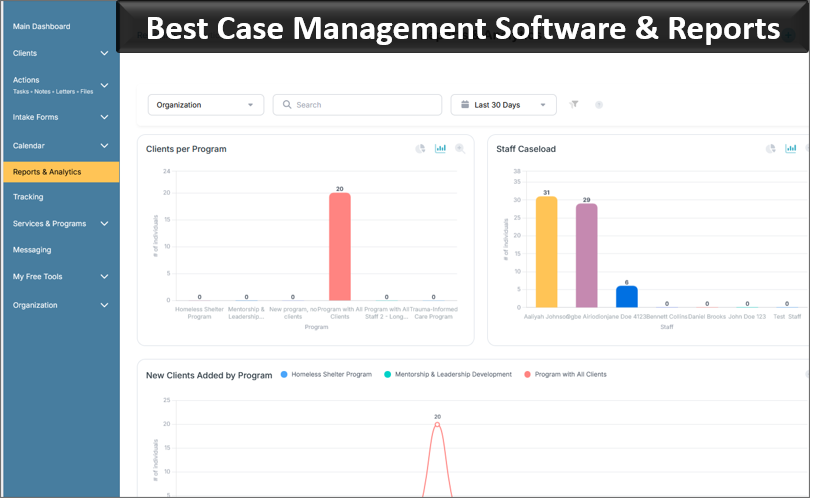
Case Management Hub includes customizable reports, analytics dashboards, filtering, and export capabilities. Administrators can also monitor client assignments and case activity through the platform. For nonprofits and human services organizations that need to demonstrate program activity or outcomes, these capabilities can be just as important as the chart itself.
What Actual Users Say About Case Management Hub
Feature lists are useful, but customer feedback is often more revealing because it shows where software is helping in day-to-day work.
Feedback from Case Management Hub users repeatedly centers on a few practical issues: replacing spreadsheets and disconnected notes, making documentation easier, organizing client information, customizing forms and assessments, improving reporting, and giving multidisciplinary teams a shared system.
A licensed counselor described moving from spreadsheets and disconnected notes to having intake and progress tracking organized in one system. A physical therapist highlighted easier documentation, progress tracking, and goal management. A behavioral health specialist specifically pointed to built-in assessments and customizable forms for intake and progress tracking.
👉 Try it free today - No credit card needed
The same pattern appears at the organizational level. A community health nonprofit reported moving away from Excel to a more structured, centralized system. A clinic coordinator cited improvements to scheduling, documentation, and care coordination. A behavioral services director described therapists, case managers, and coordinators collaborating within the same system.
That feedback is particularly relevant for organizations evaluating an EMR alternative. The recurring value isn’t a single medical feature. It is having clinical and case-related information organized in a way that supports the people responsible for delivering and coordinating services.
How to Compare HIPAA-Compliant EMR and Charting Systems
A useful software evaluation should test the platform against real work rather than relying on a generic checklist.
Ask vendors to show you how your most common workflow would operate. If your staff spend much of their time documenting services, have the vendor demonstrate the actual process for opening a client record, completing a note, reviewing prior documentation, updating a plan, and locating the information later.
The following areas deserve particular attention:
- HIPAA and security requirements: Understand how the system protects sensitive information, controls access, and supports your compliance requirements.
- Charting and clinical documentation: Test the workflows staff will use repeatedly, not only the administrator features.
- Customization: Determine whether forms, fields, notes, assessments, and workflows can reflect the way your organization operates.
- Patient and client record management: Look at how records, uploaded files, notes, plans, and related information are organized.
- Permissions: Confirm that different staff roles can receive appropriate levels of access.
- Reporting: Test whether the system can produce the operational and program information leadership actually needs.
- Migration: Understand how existing records will be moved from spreadsheets, paper processes, or another system.
- Usability: Include frontline staff in the evaluation. A system that looks easy to an implementation specialist may feel very different to someone documenting multiple clients every day.
- Implementation: Ask how long setup normally takes, what training is required, and what support is available after launch.
- Cost: Compare the total cost against the functions your organization will actually use rather than assuming the system with more features offers greater value.
💡All-in-one Case Management Software.
Everything in one place: clients, notes, forms, appointments, reports, and outcomes.
👉 Try it Free - No credit card needed
EMR Software vs. Case Management Software: Which One Do You Actually Need?
The answer depends less on terminology and more on your operating model.
Traditional EMR and EHR platforms are generally designed around medical records and clinical workflows. Depending on the product, that can include prescribing, laboratory information, billing, coding, claims, patient portals, clinical charting, and other healthcare-specific functions.
Case management software approaches the record from a different direction. It typically places more emphasis on the client’s broader journey, including intake, assessments, services, documentation, goals, referrals, follow-ups, coordination, program participation, and outcomes.
There is considerable overlap. Both types of systems can maintain electronic records and documentation. The practical question is which model better reflects the work your team performs.
If you operate a medical practice and need prescribing, complex medical billing, and deep clinical integrations, start with dedicated EHR and EMR platforms built for those requirements.
If your organization needs HIPAA-compliant client records, electronic charting, progress notes, assessments, service or care plans, goals, referrals, document management, scheduling, staff permissions, and reporting, a platform such as Case Management Hub may provide a better match without forcing the organization into a larger medical system than it needs.
Who Should Consider Case Management Hub?
Case Management Hub is particularly relevant for organizations that have reached the point where spreadsheets, Word documents, paper forms, email, and separate applications are no longer a workable way to maintain sensitive client information.
It is also a practical option for teams that have looked at traditional EMR software and concluded that they need secure clinical documentation and patient management capabilities without all the complexity surrounding a large healthcare EHR.
That can include behavioral health organizations, mental health programs, counseling and therapy practices, community health organizations, nonprofit healthcare programs, social service agencies, human services organizations, outpatient providers, multidisciplinary care teams, and other service organizations managing sensitive health or client information.
For these teams, the buying decision should center on fit. Can staff document their work quickly? Can the organization maintain the records it needs? Can access be appropriately controlled? Can managers find and report on information? Can the platform adapt to the organization’s forms and processes without turning customization into another implementation project?
👉 Try it Free - Free Case Management System
Case Management Hub addresses those requirements with centralized records, customizable forms and workflows, progress notes, assessments, service planning, document management, scheduling, reporting, mobile-responsive access, security controls, and tools for managing the broader client lifecycle.
For an organization seeking the best HIPAA-compliant EMR software, the smartest decision may therefore begin with a different question: what does your team actually need the system to do every day?
If the answer centers on secure charting, clinical documentation, patient or client records, service coordination, progress tracking, and reporting, compare Case Management Hub alongside the traditional EMR systems on your shortlist. The right platform is the one that supports the work your staff actually perform without making that work harder.
FAQs: Best HIPAA-Compliant EMR Software for Charting, Clinical Documentation & Patient Management
What is HIPAA-compliant EMR software?
HIPAA-compliant EMR software is an electronic medical records system designed to help healthcare and human services organizations securely manage patient or client records, clinical notes, assessments, treatment plans, and other protected health information. These systems typically include security controls such as encryption, user permissions, and role-based access.
What is the best HIPAA-compliant EMR software for charting and clinical documentation?
The best HIPAA-compliant EMR software should support secure charting, clinical documentation, progress notes, assessments, care plans, patient records, reporting, and staff permissions without adding unnecessary complexity. Case Management Hub is a strong option for organizations that need flexible documentation and patient or client management without a large traditional EHR.
What is the difference between EMR software and case management software?
EMR software primarily focuses on electronic medical records and clinical documentation, while case management software usually supports a broader client journey that can include intake, assessments, goals, services, referrals, follow-ups, documentation, and outcome tracking. Some organizations may benefit from a platform that combines both types of functionality.
Can HIPAA-compliant charting software replace spreadsheets and paper patient records?
Yes. HIPAA-compliant charting software can replace spreadsheets, paper forms, and disconnected documents by centralizing patient or client records, progress notes, assessments, uploaded files, and other documentation in a secure digital system. This can make records easier to locate, update, and report on.
What features should HIPAA-compliant patient management software include?
HIPAA-compliant patient management software should include secure patient records, clinical notes, assessments, customizable forms, document storage, role-based access controls, scheduling, reporting, and progress tracking. Organizations should also consider ease of use, data migration, customization, and how well the software fits existing workflows.
Find the Right Case Management Solution for Your Organization: All-in-One Case Management Resource Center.
Note: Content on this casemanagementhub.org site is copyrighted and protected under applicable copyright laws. Read Terms of Use.
Disclaimer: Case Management Hub is an educational resource and software provider site. Our content is not medical advice. Use of this site does not create a provider-patient relationship. Read our full disclaimer here: Case Management Hub Disclaimer.