
ETO Software vs Case Management Hub: Which Is the Best Platform for Nonprofits & Outcome Tracking?
Organizations comparing nonprofit case management software need more than a long feature list. They need a platform that helps staff work efficiently, improves outcome tracking, supports reporting, and makes it easier to manage client data in one place.
When evaluating ETO Software vs Case Management Hub, the key question is simple: which platform helps your organization move faster, track results more clearly, and scale without unnecessary complexity?
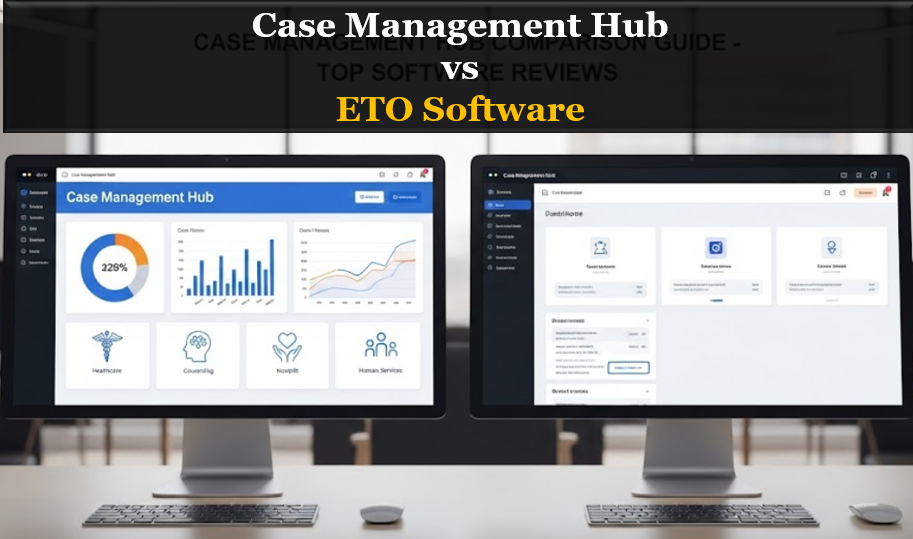
This comparison breaks down the differences in usability, setup, customization, reporting, and value so your team can choose the right platform with confidence.
Quick Comparison: ETO Software vs Case Management Hub
For organizations that want a fast snapshot, the table below highlights the major differences between ETO Software and Case Management Hub across the categories that matter most.
| Category | ETO Software | Case Management Hub |
|---|---|---|
| Ease of use | Often more complex and training-intensive | Simple, intuitive, and easier for teams to adopt |
| Setup time | Can require a longer implementation period | Fast setup with quicker time to value |
| Outcome tracking | Powerful, but often more involved to configure | Built to support outcome tracking in a more accessible way |
| Reporting | Robust, but can feel rigid for some teams | Flexible reporting with a more user-friendly experience |
| Customization | May require more support to adapt workflows | Custom forms, fields, and workflows are easier to manage |
| Pricing fit | Often better suited to organizations with larger budgets | A stronger fit for organizations looking for affordability and value |
For most nonprofits and social service teams, Case Management Hub stands out as the better alternative because it combines practical functionality with faster implementation and a smoother user experience.
All-in-One Case Management Software
Sign Up Today, Free. No credit card needed!
|
Do You Have a Team? |
||
What Is ETO Software?
ETO Software is a platform commonly used by nonprofits and human service organizations that need structured case management, data collection, and program outcome tracking. It is often considered by organizations that need detailed reporting and are prepared for a more involved implementation process.
For some teams, ETO Software can support complex workflows well. However, organizations researching an ETO Software review, review of ETO Software, or ETO Software issues are often trying to understand whether the platform is the right long-term fit for staff adoption, reporting efficiency, and overall ease of use.
Common reasons organizations consider ETO Software
- They want a structured system for nonprofit outcome tracking
- They need case management software with reporting capabilities
- They are looking for a platform with an established presence in the nonprofit sector
Common concerns organizations raise
- Longer setup and onboarding timelines
- A steeper learning curve for staff
- More effort required to configure reports and workflows
- Higher overall cost for organizations that need flexibility
That is why many nonprofits eventually search for an alternative to ETO Software or begin comparing ETO Software alternatives that offer a more modern and user-friendly experience.
What Is Case Management Hub?
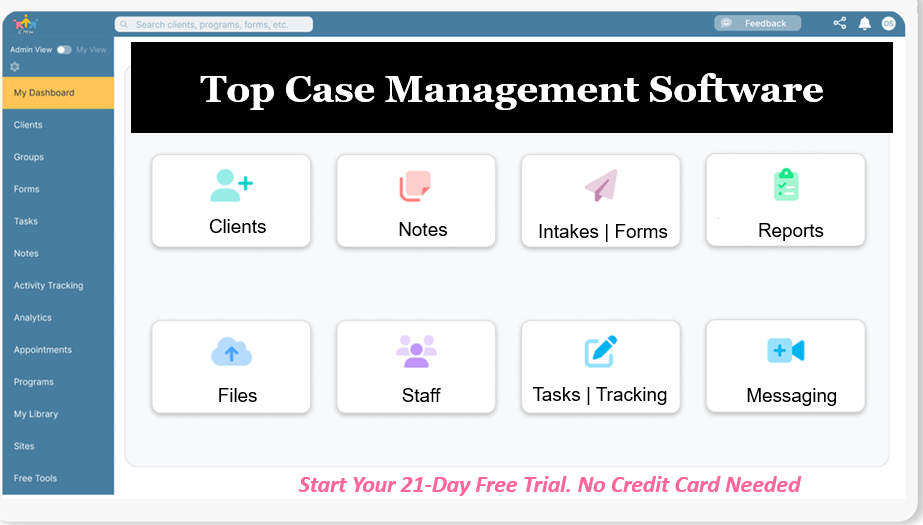
Case Management Hub is an all-in-one case management platform designed for nonprofits, social services teams, behavioral health providers, care coordinators, and other human service organizations. It helps organizations centralize client records, notes, forms, tasks, files, and reporting in one system.
For organizations that want the best case management software for nonprofits without the burden of a complicated rollout, Case Management Hub offers a more streamlined path. It is built to support outcome tracking, program reporting, documentation, and workflow customization in a way that is practical for everyday teams.
Why Case Management Hub is a stronger alternative
- Faster setup so organizations can start sooner
- Easier navigation for staff who need a simple interface
- Centralized client management and documentation
- Custom forms, notes, fields, and reports without unnecessary complexity
- Strong fit for nonprofits that need flexible outcome tracking software
For organizations comparing case management software for nonprofits, Case Management Hub offers the practical balance of functionality, speed, affordability, and ease of use that many teams need.
Create an Account Now - Add Your Team to Try Case Management Hub for Free
Get your entire team to try out Case Management Hub for free in minutes. Work smarter, not harder - free for 21 days. No credit card needed. If you decide to move forward is when you can subscribe.Follow These 5 Simple Steps:
Step 1: Create your free trial account here: Create Account.
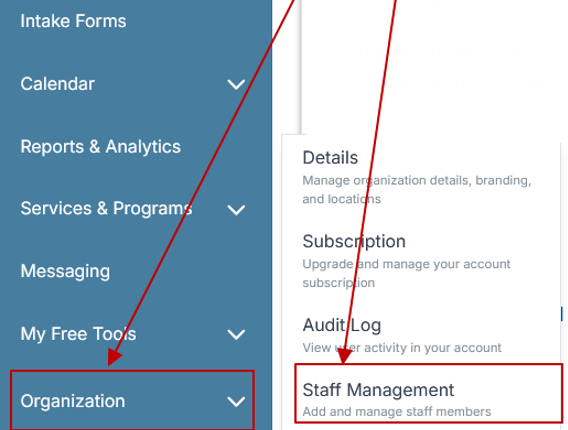
Step 2: From the left sidebar, scroll down to the Organization dropdown menu and click Staff Management
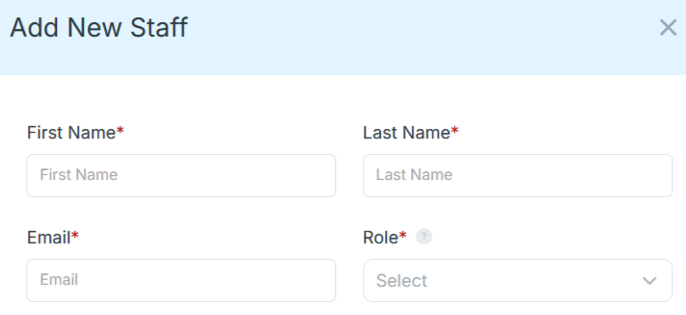
Step 4: Copy and send this email to your team members (so they know how to log in).
⚠️ Important: Ask your team members not to create new accounts. They should log in using the details you create for them.
Email Template to Send Your Team
Subject: You’ve been added to our new All-in-One Case Management tool!
Hi Team,
I've set up a free trial account for our team with the Case Management Hub software, an all-in-one case management software. I've already added you to the account, so you can start exploring immediately.
Please don't create a new account. Instead, use the login details I've shared with you to access the platform here: https://app.casemanagementhub.org/
This platform centralizes and improves everything we do, from case management, standardized assessment forms, client care, scheduling & appointments, reporting & analytics, and more all in one secure, collaborative tool. We have 21 days to test it out for free and see how it fits our needs.
Learn more about the platform here: Explore Features
Looking forward to exploring this together.
Best,
[Your Name/Signature]
Step 5: Request a customized discounted quote.
Ease of Use and Staff Adoption
One of the biggest differences in the ETO Software vs Case Management Hub comparison is usability. A platform can offer powerful features, but if staff find it difficult to learn or navigate, the organization loses time and momentum.
Where ETO Software can create friction
ETO Software is often viewed as a system that requires more training and a stronger internal process for implementation. For organizations with technical teams and the capacity to manage a more complex rollout, that may be acceptable. For many nonprofits, however, complexity slows adoption.
Why Case Management Hub has the advantage
Case Management Hub is better suited for organizations that need staff to get comfortable quickly. Its interface is more intuitive, which helps case managers, program staff, and administrators use the platform consistently. This can improve documentation quality, reduce training time, and make it easier to standardize workflows across the organization.
- Faster onboarding for new team members
- Less dependence on technical support
- More consistent staff usage across departments
Setup Time and Implementation Speed
Implementation speed matters because every week spent setting up software is a week your organization is not gaining full value from its case management system. This is especially important for nonprofits moving away from spreadsheets, paper files, or disconnected processes.
ETO Software is often associated with a more involved setup process. That can make sense for highly customized enterprise environments, but it is not always ideal for organizations that need a faster path to operational improvement.
Case Management Hub is the better alternative for organizations that want to get started quickly. Faster implementation means teams can begin centralizing client data, using forms, tracking services, and generating reports sooner.
Why faster setup matters
- Staff can transition to a better workflow without long delays
- Organizations can improve reporting sooner
- Leadership can realize value more quickly
- It reduces disruption during change management
Outcome Tracking and Reporting
Organizations looking for nonprofit reporting and impact tracking software need more than raw data. They need a system that makes it easier to capture the right information, monitor progress, and produce meaningful reports for leadership, funders, and stakeholders.
ETO Software is known for outcome tracking, but that strength can come with a tradeoff. Reporting and workflow setup may require more time, more training, and more internal management. For organizations that want a simpler way to track outcomes and goals, this can be a significant barrier.
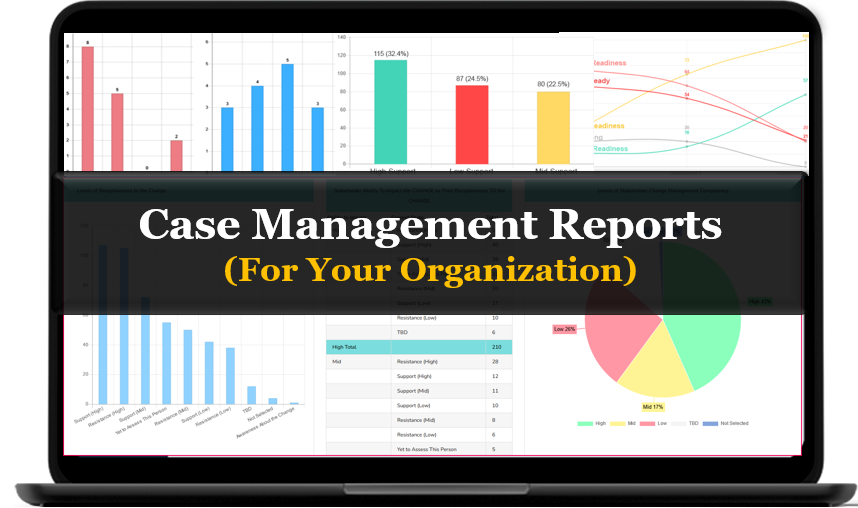
Case Management Hub offers a more practical approach. It supports case management software with outcome tracking, custom reporting, and easier day-to-day data management. That makes it a stronger choice for organizations that need to prove impact without creating extra administrative burden.
Key reporting advantages of Case Management Hub
- Track client goals, services, progress, and outcomes in one place
- Create flexible reports around the data your organization actually needs
- Reduce manual reporting work by centralizing records and documentation
- Support funder reporting and internal visibility more effectively
All-in-One Case Management Software
Sign Up Today, Free. No credit card needed!
|
Do You Have a Team? |
||
Customization and Workflow Flexibility
No two nonprofits operate exactly the same way. That is why flexibility matters when choosing client tracking software or social services case management tools. The right system should adapt to your workflow without forcing your team into a rigid process.
ETO Software can support customization, but for many organizations it may take more effort to configure and maintain. This can be manageable for larger teams with technical resources, but smaller and mid-sized organizations often want a faster and more direct way to adjust forms, fields, notes, and reporting structures.
Case Management Hub gives organizations greater practical flexibility. Teams can customize the platform to reflect their programs, services, and reporting requirements without needing an overly technical implementation process.
Customization areas that matter most
- Custom forms for intakes, assessments, and service tracking
- Custom fields for client profiles and program data
- Custom note structures for staff documentation
- Custom reporting for outcomes, services, and operational metrics
For organizations seeking software for tracking client outcomes and goals, this level of flexibility makes Case Management Hub the more actionable solution.
Centralized Data Management
Many organizations begin their search because they are dealing with scattered information across spreadsheets, paper files, email threads, and disconnected tools. That fragmentation makes it harder to serve clients well and harder to report on progress accurately.
Case Management Hub is especially strong as a centralized case management platform for nonprofits because it helps teams keep client records, notes, files, forms, referrals, and reporting connected in one environment. This creates a more complete operational picture and improves day-to-day efficiency.
While ETO Software also supports data management, organizations that prioritize simplicity and accessibility often find Case Management Hub easier to use as a centralized system.
Benefits of centralized case management software
- Fewer manual workarounds and duplicate records
- Better visibility into client history and progress
- Stronger collaboration across staff and programs
- Improved accuracy in reporting and documentation
All-in-One Case Management Software
Sign Up Today, Free. No credit card needed!
|
Do You Have a Team? |
||
Why Organizations Are Looking for an Alternative to ETO Software
Searches such as alternative to ETO Software, ETO Software alternatives, is ETO Software legit, is ETO Software safe, and ETO Software issues reveal that many organizations are trying to evaluate not just the platform itself, but whether it remains the best fit for their current needs.
In many cases, the issue is not whether ETO Software can perform advanced functions. The issue is whether the organization wants to keep investing time, money, and effort into a platform that may be harder to use and slower to adapt.
Typical switch-intent pain points
- The platform feels too complex for everyday staff
- Setup and changes take too long
- The organization wants a simpler reporting experience
- The cost does not align with the practical value received
- Teams want a more modern nonprofit case management platform
This is where Case Management Hub becomes a compelling answer. It gives organizations a better alternative to ETO Software by focusing on usability, flexibility, and impact-oriented functionality.
Best-Fit Use Cases for Case Management Hub
Case Management Hub is especially well suited for organizations that need strong functionality without the operational weight of a highly complex system. It works well for teams that need to centralize records, improve service delivery, and strengthen outcome tracking.
Use case 1: Nonprofits replacing spreadsheets
Organizations moving from spreadsheets often need a cloud-based case management system for nonprofits that is structured enough to improve reporting but simple enough to adopt quickly. Case Management Hub helps them make that transition with less friction.
Use case 2: Social services teams managing high caseloads
Case managers and social workers need quick access to notes, forms, tasks, goals, and client history. Case Management Hub supports these workflows in one system, making it easier to stay organized and responsive.
Use case 3: Multi-program organizations needing unified reporting
Organizations operating across multiple programs or locations need clearer visibility into services and outcomes. Case Management Hub helps unify reporting and centralize data, which supports better oversight and decision-making.
How to Choose the Right Platform for Your Organization
If your organization is comparing ETO Software vs Case Management Hub, focus on the practical questions that shape long-term success. The best decision usually comes from evaluating fit, not just feature lists.
- Assess how quickly your team needs to implement a new system
- Consider how much technical support your staff will realistically need
- Review how important flexible reporting and outcome tracking are for your programs
- Determine whether affordability and speed are priorities alongside functionality
- Choose the platform your team is most likely to use consistently
For many organizations, these questions lead to the same conclusion: Case Management Hub offers the better mix of usability, flexibility, implementation speed, and value.
Final Verdict: Which Platform Is Better?
ETO Software may appeal to organizations that want a highly structured platform and have the internal capacity to manage a more complex implementation. However, for many nonprofits and social service organizations, the better choice is the platform that helps staff work effectively without adding unnecessary barriers.
Case Management Hub is the stronger alternative for organizations that want an easier-to-use system, faster implementation, more accessible outcome tracking, and better overall value. It is particularly well positioned for nonprofits, care teams, and human services organizations that need a practical, centralized, and scalable case management solution.
If your team is exploring the best alternative to ETO Software, Case Management Hub deserves serious consideration as the more modern and conversion-ready nonprofit case management platform.
Create an Account Now - Add Your Team to Try Case Management Hub for Free
Get your entire team to try out Case Management Hub for free in minutes. Work smarter, not harder - free for 21 days. No credit card needed. If you decide to move forward is when you can subscribe.Follow These 5 Simple Steps:
Step 1: Create your free trial account here: Create Account.
Step 2: From the left sidebar, scroll down to the Organization dropdown menu and click Staff Management
Step 4: Copy and send this email to your team members (so they know how to log in).
⚠️ Important: Ask your team members not to create new accounts. They should log in using the details you create for them.
Email Template to Send Your Team
Subject: You’ve been added to our new All-in-One Case Management tool!
Hi Team,
I've set up a free trial account for our team with the Case Management Hub software, an all-in-one case management software. I've already added you to the account, so you can start exploring immediately.
Please don't create a new account. Instead, use the login details I've shared with you to access the platform here: https://app.casemanagementhub.org/
This platform centralizes and improves everything we do, from case management, standardized assessment forms, client care, scheduling & appointments, reporting & analytics, and more all in one secure, collaborative tool. We have 21 days to test it out for free and see how it fits our needs.
Learn more about the platform here: Explore Features
Looking forward to exploring this together.
Best,
[Your Name/Signature]
Step 5: Request a customized discounted quote.
FAQ: ETO Software vs Case Management Hub
What is the best alternative to ETO Software for nonprofits?
Case Management Hub is one of the best alternatives to ETO Software for nonprofits because it combines case management, outcome tracking, reporting, and documentation in one easy-to-use platform. It is a strong fit for organizations that want faster setup, simpler workflows, and better usability.
Is Case Management Hub better than ETO Software for outcome tracking?
Case Management Hub is a better option for many organizations that need outcome tracking software for nonprofits without added complexity. It helps teams track client progress, services, goals, and reports more easily in a centralized system.
Why are organizations looking for ETO Software alternatives?
Many organizations search for ETO Software alternatives because they want a platform that is easier to use, faster to implement, and more flexible for everyday case management. Common reasons include complexity, longer onboarding, and the need for a more affordable nonprofit case management software.
What should organizations look for in nonprofit case management software?
Organizations should look for nonprofit case management software that offers centralized client records, custom forms, outcome tracking, reporting, secure document management, and an intuitive interface. The best platform should also be flexible enough to support different programs and team workflows.
Is Case Management Hub a good case management software for nonprofits and social services?
Yes, Case Management Hub is a strong case management software for nonprofits and social services because it helps organizations manage client data, track outcomes, streamline documentation, and improve reporting in one system. It is especially valuable for teams replacing spreadsheets or disconnected tools.
Find the Right Case Management Solution for Your Organization: All-in-One Case Management Resource Center.
Note: Content on this casemanagementhub.org site is copyrighted and protected under applicable copyright laws. Read Terms of Use.
Disclaimer: Case Management Hub is an educational resource and software provider site. Our content is not medical advice. Use of this site does not create a provider-patient relationship. Read our full disclaimer here: Case Management Hub Disclaimer.