
CharityTracker Review vs Case Management Hub: Which is Best for Nonprofits in 2026?
If you are looking for a top case management software for nonprofits or seeking the best alternative to CharityTracker, you are likely trying to find a platform that is easier to use, faster to launch, and better equipped to support modern case management workflows.
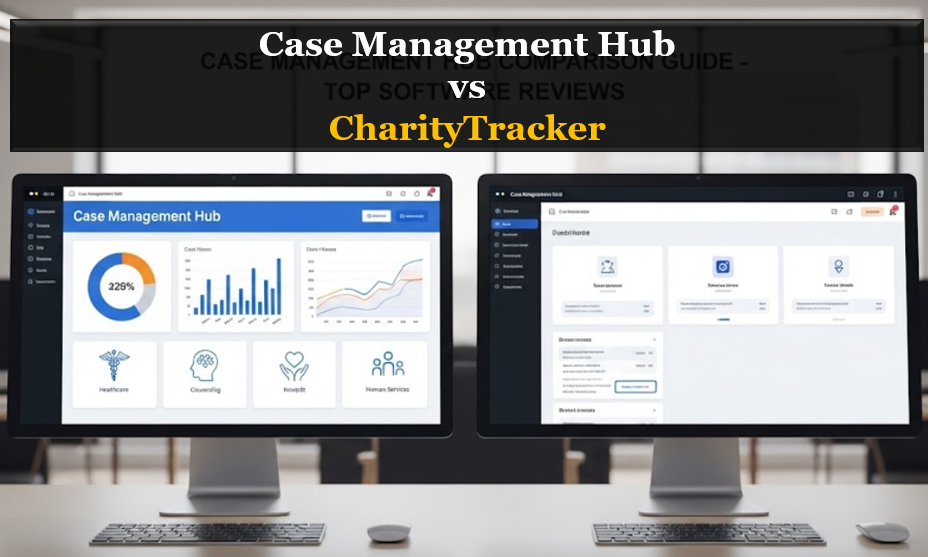
This guide provides a practical, side by side comparison to help nonprofits, social service organizations, and care teams make a confident software decision between CharityTracker and Case Management Hub. It explains why Case Management Hub stands out as a stronger long-term solution for nonprofit organizations that want more flexibility, better reporting, and a more streamlined experience for clients, referral partners, staff, and volunteers.
Comparison Table: CharityTracker vs Case Management Hub
The comparison below highlights the differences that matter most when evaluating a CharityTracker competitor comparison software option. For most modern organizations, the biggest advantages come down to speed, usability, flexibility, and reporting power.
| Category | CharityTracker | Case Management Hub |
|---|---|---|
| Ease of Use | Functional, but can feel more complex for daily users | Simple, intuitive interface designed for fast adoption |
| Setup Time | May require more time to configure and onboard | Fast setup with a lower barrier to getting started |
| Customization | More limited flexibility for specialized workflows | Strong customization for forms, fields, templates, and workflows |
| Reporting | Can support reporting, but may feel rigid | Dynamic, flexible reporting that better supports decision making |
| User Experience | More legacy in feel and workflow structure | Modern design built for usability and efficiency |
| All in One Capability | May still require workarounds or extra systems | Centralizes client management, notes, forms, reporting, and more |
| Scalability | Can become restrictive as needs expand | Better suited for growing programs and multi team use |
In category after category, Case Management Hub positions itself as the stronger option for organizations that want more than just basic tracking.
All-in-One Case Management Software
Sign Up Today, Free. No credit card needed!
|
Do You Have a Team? |
||
Quick Overview: CharityTracker vs Case Management Hub
At a high level, CharityTracker is often viewed as a legacy case management platform with core tracking capabilities, while Case Management Hub is a modern all in one system built for nonprofit organizations that need centralized workflows, adaptable reporting, and a more intuitive user experience.
- Choose CharityTracker if you want a familiar, established platform for basic nonprofit case tracking.
- Choose Case Management Hub if you want a more flexible, scalable, and user friendly alternative.
- For teams focused on ease of use, customization, and efficiency, Case Management Hub is the better fit.
CharityTracker Review: What It Does Well and Where It Falls Short
CharityTracker is designed to help nonprofits and service organizations track clients, services, and outcomes. It has been used by many agencies that need structured reporting and a system for managing client information. For organizations with simple tracking requirements, it can serve as a workable solution.
CharityTracker Strengths
- Recognized name in nonprofit case management software
- Supports basic client and service tracking
- Useful for organizations that need standardized reporting
CharityTracker Limitations
Many organizations searching for a review of CharityTracker are not just looking for validation. They are trying to determine whether the platform still meets their current operational needs. This is where several concerns tend to surface.
- The system can feel less intuitive for daily users
- Customization can be limited for growing or specialized programs
- Reporting may feel rigid for teams that need more flexible insights
- The user experience can feel dated compared with newer case management software
- Onboarding and adoption may take longer for organizations that need a fast rollout
These limitations are a major reason many decision makers begin looking for software better than CharityTracker.
Common CharityTracker Issues
Searches for CharityTracker issues, problems with CharityTracker software, and CharityTracker alternatives usually signal users that are actively evaluating whether to move to a better platform. The most common frustrations tend to fall into a few key categories.
- Usability challenges that make training harder for staff and volunteers
- Reporting tools that do not provide the level of customization needed
- Workflow limitations that make scaling more difficult
- A platform experience that feels less modern than competing solutions
- Longer implementation effort than organizations want or can afford
When agencies reach this point, they are not just comparing features. They are looking for a simpler, stronger, and more future ready system. That is where Case Management Hub becomes a compelling alternative to CharityTracker.
All-in-One Case Management Software
Sign Up Today, Free. No credit card needed!
|
Do You Have a Team? |
||
What Is Case Management Hub?
Case Management Hub is a modern, all in one case management platform built for nonprofits, social workers, behavioral health teams, healthcare providers, legal service organizations, and human services programs. It is designed to centralize operations, reduce administrative friction, and help teams manage the full client journey in one place.
Core Capabilities
- Centralized client profiles and records
- Custom forms, assessments, and note templates
- Real time reporting and analytics
- Task management, reminders, and workflow support
- Secure cloud based access with strong privacy controls
- A flexible system that adapts to different program models
Why It Appeals to Organizations Switching From CharityTracker
Case Management Hub is especially attractive to teams that want to replace rigid or fragmented processes with a platform that is easier to use and faster to implement. It is built for real workflows, not just data entry. That means organizations can move beyond basic tracking and operate more efficiently across intake, notes, tasks, reporting, referrals, forms, and documentation.
Why Case Management Hub Is the Better Alternative to CharityTracker
When organizations search for CharityTracker alternatives or the best CharityTracker replacement software, they usually want a platform that solves several problems at once. They want a system that is easier to learn, faster to implement, and better aligned with how their teams actually work. Case Management Hub addresses those needs more effectively.
Better for Ease of Use
Case Management Hub is built to reduce friction for both experienced staff and less technical users. That makes adoption easier across nonprofits, clinics, community programs, and social service agencies.
Better for Customization
Organizations rarely operate the same way. Case Management Hub supports custom fields, custom forms, custom notes, and tailored workflows, making it far more practical for teams with unique service models.
Better for Reporting and Visibility
A modern case management system should do more than store information. It should make information easier to analyze and act on. Case Management Hub gives organizations stronger reporting flexibility, helping teams track progress, outcomes, and operational performance more effectively.
Better for Long Term Growth
As organizations grow, legacy systems often become bottlenecks. Case Management Hub is better positioned for scale because it is built to support expanding programs, evolving workflows, and more complex operational needs.
Create an Account Now - Add Your Team to Try Case Management Hub for Free
Get your entire team to try out Case Management Hub for free in minutes. Work smarter, not harder - free for 21 days. No credit card needed. If you decide to move forward is when you can subscribe.Follow These 5 Simple Steps:
Step 1: Create your free trial account here: Create Account.
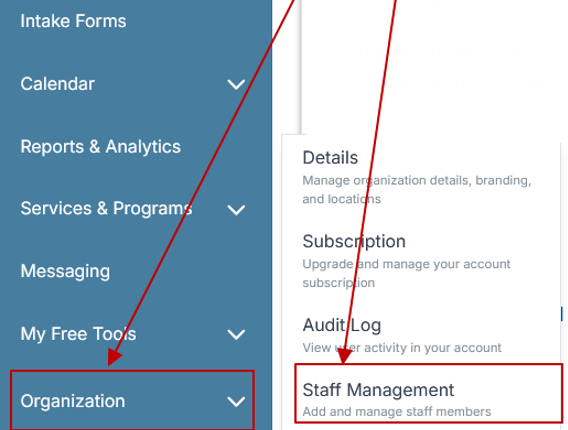
Step 2: From the left sidebar, scroll down to the Organization dropdown menu and click Staff Management
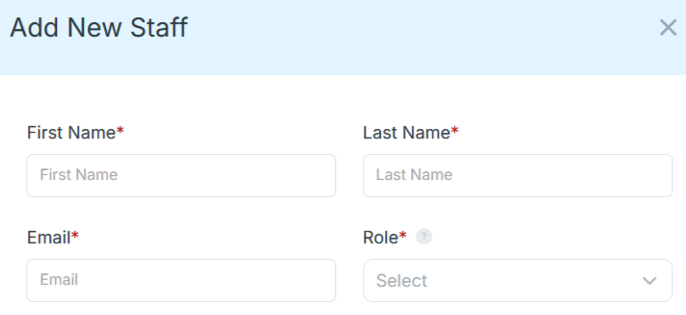
Step 4: Copy and send this email to your team members (so they know how to log in).
⚠️ Important: Ask your team members not to create new accounts. They should log in using the details you create for them.
Email Template to Send Your Team
Subject: You’ve been added to our new All-in-One Case Management tool!
Hi Team,
I've set up a free trial account for our team with the Case Management Hub software, an all-in-one case management software. I've already added you to the account, so you can start exploring immediately.
Please don't create a new account. Instead, use the login details I've shared with you to access the platform here: https://app.casemanagementhub.org/
This platform centralizes and improves everything we do, from case management, standardized assessment forms, client care, scheduling & appointments, reporting & analytics, and more all in one secure, collaborative tool. We have 21 days to test it out for free and see how it fits our needs.
Learn more about the platform here: Explore Features
Looking forward to exploring this together.
Best,
[Your Name/Signature]
Step 5: Request a customized discounted quote.
Who Should Choose Case Management Hub Over CharityTracker?
Case Management Hub is especially well suited for organizations that need more flexibility, stronger organization, and a platform that can support multiple workflows in one place.
- Nonprofits that have outgrown rigid legacy tools
- Social workers and case managers handling larger caseloads
- Programs moving away from spreadsheets, paper files, or disconnected systems
- Organizations that need custom forms, assessments, and reports
- Multi site and multi program teams that need centralized visibility
- Teams that want a more intuitive system for staff, volunteers, and administrators
If your organization has been asking whether there is software better than CharityTracker, this is the type of use case where Case Management Hub clearly stands out.
Is CharityTracker Legit and Safe?
A common search query is whether CharityTracker is legit or safe. The more useful question, however, is whether it remains the best fit for today’s case management needs. Legitimacy alone does not guarantee usability, flexibility, or long term value. Many organizations now evaluate platforms based not only on security and reliability, but also on how well the system supports staff efficiency, client service, and scalable operations.
That is why more buyers are shifting their attention toward modern solutions like Case Management Hub, especially when they need a platform that combines security, structure, and practical day to day usability.
Final Verdict: Case Management Hub vs CharityTracker
If your goal is simply to maintain basic tracking within an older system, CharityTracker may still appear serviceable. But if your organization wants stronger reporting, easier adoption, more customization, and a platform designed for current operational demands, Case Management Hub is the better choice.
For teams comparing CharityTracker vs modern case management software, the difference becomes clear quickly. Case Management Hub offers a more practical experience for organizations that want to improve efficiency, centralize client data, and reduce the friction that often comes with legacy systems.
- Better usability
- Better customization
- Better reporting flexibility
- Better support for growth and operational complexity
For most organizations actively searching for an alternative to CharityTracker, Case Management Hub is the stronger investment.
Ready to Switch From CharityTracker?
If your team is frustrated by CharityTracker issues, limited flexibility, or a platform that no longer fits your workflow, now is the right time to evaluate a better solution. Case Management Hub gives organizations a more modern way to manage clients, documentation, forms, notes, tasks, reporting, and collaboration in one place.
For nonprofits, social workers, clinics, and service organizations that want a simpler and more capable case management platform, Case Management Hub is not just a CharityTracker competitor. It is a better alternative built for how organizations work today.
Create an Account Now - Add Your Team to Try Case Management Hub for Free
Get your entire team to try out Case Management Hub for free in minutes. Work smarter, not harder - free for 21 days. No credit card needed. If you decide to move forward is when you can subscribe.Follow These 5 Simple Steps:
Step 1: Create your free trial account here: Create Account.
Step 2: From the left sidebar, scroll down to the Organization dropdown menu and click Staff Management
Step 4: Copy and send this email to your team members (so they know how to log in).
⚠️ Important: Ask your team members not to create new accounts. They should log in using the details you create for them.
Email Template to Send Your Team
Subject: You’ve been added to our new All-in-One Case Management tool!
Hi Team,
I've set up a free trial account for our team with the Case Management Hub software, an all-in-one case management software. I've already added you to the account, so you can start exploring immediately.
Please don't create a new account. Instead, use the login details I've shared with you to access the platform here: https://app.casemanagementhub.org/
This platform centralizes and improves everything we do, from case management, standardized assessment forms, client care, scheduling & appointments, reporting & analytics, and more all in one secure, collaborative tool. We have 21 days to test it out for free and see how it fits our needs.
Learn more about the platform here: Explore Features
Looking forward to exploring this together.
Best,
[Your Name/Signature]
Step 5: Request a customized discounted quote.
FAQ: CharityTracker Review vs Case Management Hub
What is the best alternative to CharityTracker?
Case Management Hub is one of the best alternatives to CharityTracker for nonprofits, social service agencies, and case management teams that want a more modern, flexible, and user-friendly platform. It offers stronger customization, better reporting, and a more streamlined all-in-one experience.
Is Case Management Hub better than CharityTracker?
Case Management Hub is a better choice for organizations that need easier setup, simpler workflows, more customization, and stronger reporting. While CharityTracker may work for basic tracking, Case Management Hub is better suited for teams that want a scalable and more efficient case management software.
What are the most common CharityTracker issues?
Common CharityTracker issues include usability challenges, limited flexibility, reporting constraints, and a platform experience that can feel outdated for modern teams. These pain points often lead organizations to search for CharityTracker alternatives with better workflow support.
Is CharityTracker legit and safe for nonprofits?
CharityTracker is a legitimate platform used by nonprofits and service organizations, but many teams now compare it with newer systems that offer a better user experience and more practical features. Safety matters, but long-term usability and flexibility are also important when choosing case management software.
Why are nonprofits switching from CharityTracker to Case Management Hub?
Nonprofits are switching from CharityTracker to Case Management Hub because they want a case management platform that is easier to use, faster to implement, and more adaptable to their programs. Case Management Hub helps teams centralize client data, improve reporting, and reduce administrative complexity.
Find the Right Case Management Solution for Your Organization: All-in-One Case Management Resource Center.
Note: Content on this casemanagementhub.org site is copyrighted and protected under applicable copyright laws. Read Terms of Use.
Disclaimer: Case Management Hub is an educational resource and software provider site. Our content is not medical advice. Use of this site does not create a provider-patient relationship. Read our full disclaimer here: Case Management Hub Disclaimer.