Case Management Software Resource Center
(FAQs, Guides, and Knowledge Base)
Case management software helps organizations manage clients, services, documentation, and reporting in one centralized platform. From client intake and assessments to case notes, referrals, scheduling, and analytics, modern case management systems streamline workflows and improve collaboration across teams.
This Case Management Software Resource Center is a comprehensive FAQ and knowledge base designed to answer the most common questions about case management tools, features, pricing, security, reporting, and implementation. Whether you are researching the best case management software or comparing different case management platforms, this guide will help you better understand how a modern case management system can support your organization.
Explore the sections below to find answers and insights on key topics related to case management software used by nonprofits, social services agencies, healthcare providers, therapists, counselors, and human services organizations.
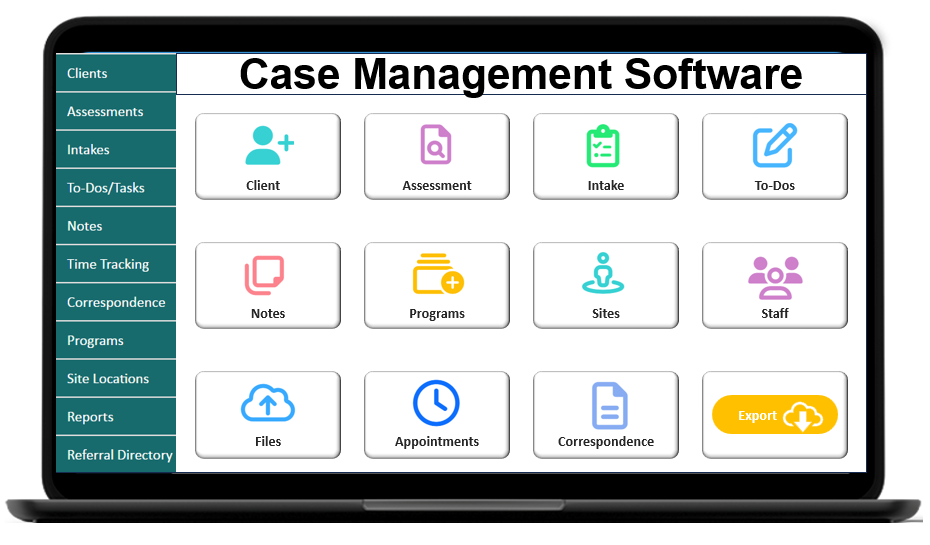
Pro Tip: Use the Table of Contents below to quickly jump to the section you need. Whether you’re exploring features, security, reporting, or onboarding, this FAQ is organized so you can easily find answers about the Case Management Hub case management software.
Table of Contents
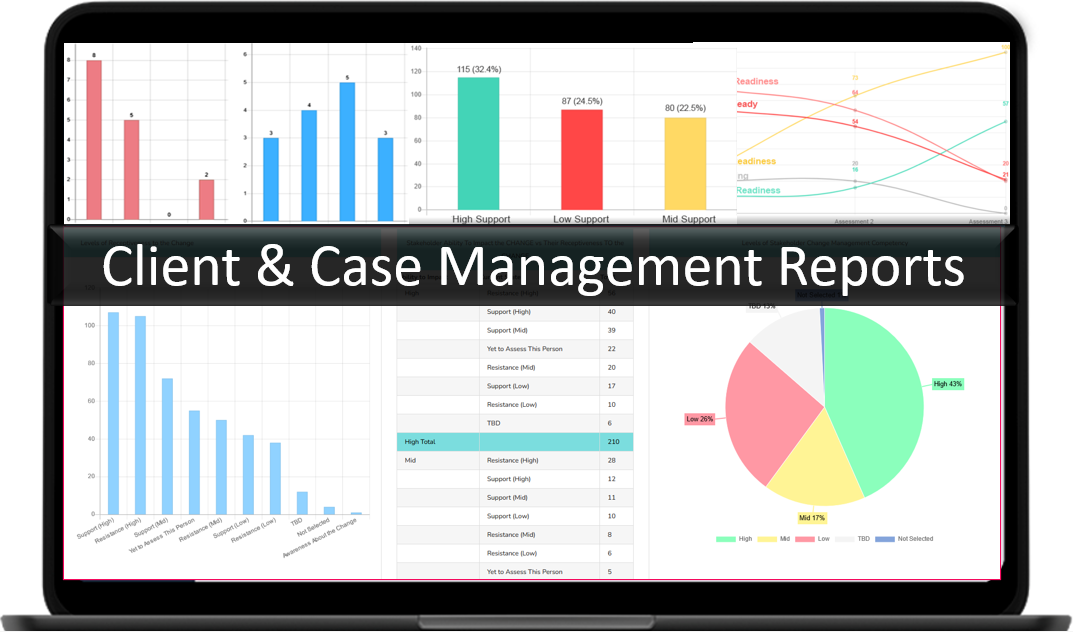
Pro Tip: Pro Tip: If you are researching the best case management software for your organization, this FAQ covers the most common questions about case management systems used by nonprofits, healthcare providers, social workers, therapists, human services organizations, and case managers. Reviewing these sections will help you quickly understand the capabilities of modern case management tools.
Definitions
Question: What is the Case Management Hub (CMH)?
Answer: Case Management Hub is an All-in-One solution for social and human services professionals. The Case Management Hub is an innovative and comprehensive platform built for social workers, counselors, therapists, nonprofits, coaches, tutors, mental health specialists, human services professionals, and others. It simplifies case management through powerful features including digital client intake forms, progress notes, real-time reporting, and dynamic assessment tools, all designed to improve client outcomes and streamline workflows.
Question: What do the terms “customers” and “providers” mean in this document?
Answer: Across this document, the terms “customer” and “provider” refer to organizations and members paying to use the Case Management Hub software to manage their client cases. These members can include therapists, social workers, human services agencies, counselors, nonprofits, mental health specialists, clinicians, providers, social service practitioners, coaches, trainers, hospitals, outpatient care providers, referral partners, case workers, and other social services and human services agencies.
Question: What does the term “client” mean in this document?
Answer: Across this document, the term “client” refers to the individuals receiving services and support from our customers and providers. These clients can include residents, patients, mental and human services clients, students, trainees, coachees, volunteers, contacts, and other client types being supported by our customers.
Back to Top
Pro Tip: Understanding core terminology used in case management software helps teams implement a case management system faster and ensures staff can fully leverage tools designed for social services, healthcare, nonprofit, and human services organizations.
Account Setup
Question: How long does setup take before I can start using the Case Management Hub platform, and is the process complex compared to other platforms?
Answer: Setup is simple and quick. The Case Management Hub platform includes default fields and allows easy customization. If you subscribe directly through the platform, you can begin using the system immediately. If you subscribe through an offline payment such as a check or direct deposit, the account is considered an Offline Account and requires payment verification before setup. Offline accounts are typically completed the same day depending on payment timing. If payment occurs later in the day, setup may be completed the following day.
Question: How quickly can a new account be set up?
Answer: Enterprise accounts can be set up the same day, and instantly if you convert from a free trial. The platform also offers an All-in-One Case Management Hub Plan with a free 21-day trial. Free trial link: All in One Case Management Hub Plan – Free 21 day trial.
Back to Top
Pro Tip: One advantage of modern case management software is rapid setup. Unlike many traditional platforms that require weeks of onboarding, top case management tools allow organizations to start managing clients, notes, and reports almost immediately.
All-in-One | Easy-to-Use
Question: Does the Case Management Hub system allow me to manage all my cases in one place?
Answer: Yes. Customers appreciate the ability to manage all their data in one place when using the Case Management Hub software.
Question: I am looking for a centralized case management app. Can the Case Management Hub meet this need?
Answer: Yes. The Case Management Hub is a centralized modern cloud platform designed to manage cases, clients, notes, templates, referrals, documentation, files, and more. It keeps everything organized in one centralized system.
Question: Is the Case Management Hub software easy to use for people who are not very tech-savvy?
Answer: Yes. The CMH platform is streamlined and user friendly. It is designed for organizations that want a simple system for staff and members to use, including adding client details, completing notes, conducting intakes, and more.
Question: We currently use spreadsheets and Word documents to manage our cases. Can the Case Management Hub replace this disjointed process?
Answer: Yes. The Case Management Hub system is designed for organizations that want a single platform to manage notes, medical documentation, and other client documents without relying on disconnected tools like spreadsheets and Word documents.
Question: Our organization needs customizable templates, care plans, outcome tracking, inventory management, daily logbooks, shelter bed tracking, turn-away tracking, and digital sign-ins. Can the Case Management Hub support these needs?
Answer: Yes. The Case Management Hub platform is a robust, all-inclusive system designed to support a wide range of operational needs. For example, inventory management can be handled through tracking features that allow organizations to track items and associated costs. The platform also supports templates, outcome tracking, digital logs, and other operational workflows.
Question: We want a system to manage client information and send forms that is also very easy to use. Can the Case Management Hub work for our clinical practice?
Answer: Yes. The all-in-one Case Management Hub platform includes tools for managing client information, sending forms, and streamlining workflows while maintaining a simple and easy-to-use interface.
Back to Top
Pro Tip: The best case management software centralizes everything in one place, including clients, notes, assessments, reports, and files, helping organizations eliminate spreadsheets and disconnected tools.
Branding
Question: Does the platform include a branding editor that automatically adds our organization’s logo to forms?
Answer: Yes. The Case Management Hub software includes a robust branding editor that allows organizations to apply branding elements such as logos.
Question: Can we add our own logo to forms?
Answer: Yes. The platform includes functionality that allows organizations to upload and display their logo on forms.
Back to Top
Pro Tip: Many organizations using case management software customize forms and communications with their branding to maintain professionalism and trust when interacting with clients and partners.
Calendars / Appointments
Question: Is there a calendar feature in the Case Management Hub system?
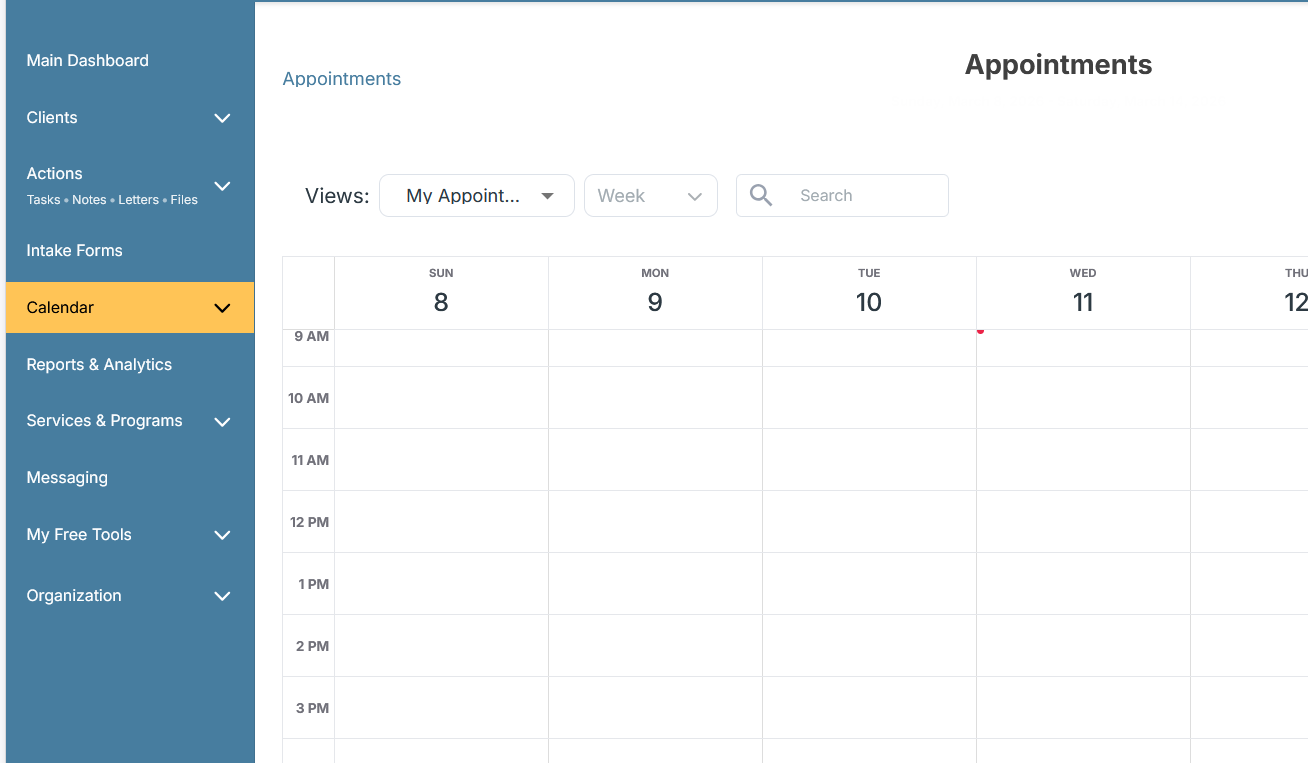
Answer: Yes. The platform includes a robust calendar feature that allows users to add events, email attendees, and sync with external calendars such as Google, Outlook, or iCal. Clients can also view their appointments in their client portal.
Question: Are calendar invitations sent from personal emails or from the portal?
Answer: Invitations are sent directly from the portal. Organizations can also apply branding such as their logo to invitations.
Question: Does the calendar include appointment reminders?
Answer: Yes. The Case Management Hub includes an appointment reminder system.
Question: Can intake specialists restrict appointment availability to certain time blocks?
Answer: Yes. Availability settings can be configured so appointments can only be scheduled during specific hours.
Question: Does the Case Management Hub support appointment booking?
Answer: Yes. The platform includes calendar appointment booking capabilities.
Question: Is there a calendar view for appointments?
Answer: Yes. The system provides a calendar grid view for appointments.
Question: Does the appointment description appear in calendar emails?
Answer: Yes. The appointment description appears in the calendar email notification. This allows organizations to include instructions such as asking attendees to bring specific documents.
Question: If we schedule an appointment for a client, will the assigned staff receive a notification?
Answer: Yes. If the staff member is added as an attendee, they will receive a notification. Clients will also receive a notification unless they are removed from the attendee list.
Question: Can appointments be tracked for clients, including appointments with outside clinics, and will reminders be sent?
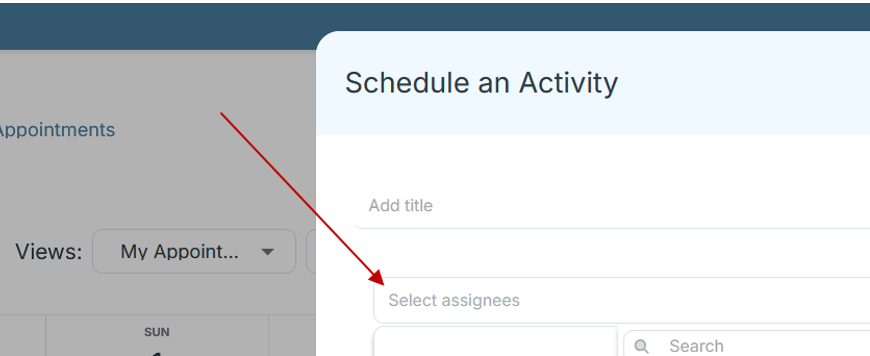
Answer: Yes. Appointments can be added for clients, including those with outside physicians or clinics. If clients are included as attendees, both staff and clients will receive appointment notifications by email.
See pic below for adding assignees:
Back to Top
Pro Tip: A built-in calendar is a valuable feature in a case management system because it allows teams to track appointments, schedule services, and send reminders without relying on external scheduling tools.
Cancellations
Question: Are there cancellation fees or minimum subscription periods?
Answer: No. There are no cancellation fees. Subscriptions run through the end of the current billing term. Plans are available as month-to-month or annual subscriptions, with annual subscriptions offering an additional discount.
Back to Top
Pro Tip: Flexible subscription policies are an important factor when evaluating the best case management software, especially for nonprofits and social service organizations that need predictable and affordable pricing.
Client Profiles
Question: Can clients edit or delete submitted forms or documents?
Answer: Clients can update forms, which will update the version visible to your organization. However, they cannot delete the organization’s copy. They can only delete the document from their own view.
Question: Can the platform filter and report on clients by type and start date?
Answer: Yes. This can be easily done from the client page where filtering and reporting options are available.
Back to Top
Pro Tip: One of the most important features of any case management software platform is the ability to organize and track client information efficiently while maintaining data security and privacy.
Client Portal
Question: Do patients or clients have access to a portal?
Answer: Yes. Clients have access to their own portal where they can complete forms, manage tasks, and access additional features related to their services.
Question: Will notes appear in the client profile?
Answer: Yes. Notes appear in the client profile. Clients can view notes that you have given them permission to access.
Question: Is there a cost for clients to access the client portal?
Answer: No. There is no cost for clients to use the client portal. Organizations can add unlimited clients, and each client can have their own portal account.

Back to Top
Pro Tip: Client portals are increasingly common in modern case management systems because they allow clients to complete forms, upload documents, and track tasks without requiring staff intervention.
Client Profile
Question: Can we customize fields and forms for client profiles and reports?
Answer: Yes. You can add custom fields to client profiles and connect those fields to forms within the Case Management Hub software.
Question: How can we classify between qualified clients and inquiries?
Answer: You can update the client type field in the client profile page. This field is customizable and allows organizations to filter between prospects and qualified clients.
Question: Can demographic categories be customized for reporting?
Answer: Yes. Demographic fields and categories are fully customizable and can be tailored to your organization’s reporting needs.
Question: How can we hide default fields, such as marital status, that we do not use?
Answer: In the client profile settings, you can hide default fields for all users by clicking the pencil icon located at the top right of any client profile.
Question: Where should data such as food distribution data, household size, demographics, or unmet needs be recorded and reported?
Answer: These data points can be added as custom fields within the client record and included in custom reports. They can also be added to forms and mapped to client record fields so that the information automatically populates the client profile.
Back to Top
Pro Tip: Customizable client profiles are essential in top case management tools because organizations often need to track unique demographic information, assessments, and program participation data.
Flag
Question: Can missing required documents, such as identification, be flagged?
Answer: Yes. Missing documents can be flagged using staff alerts. These alerts appear on the main dashboard so staff members can quickly see required actions without opening each individual client profile.
Back to Top
Pro Tip: Staff alerts and document flags help case managers quickly identify missing documentation or urgent issues, improving workflow efficiency within the case management system.
Cloud / SaaS
Question: Is the Case Management Hub cloud based, meaning data is stored in the cloud rather than locally?
Answer: Yes. The platform is cloud based, meaning all data is securely stored in the cloud rather than on a local device. Users can access the system from any device with internet access. The platform uses encryption and is HIPAA and data privacy compliant. You can also export your data at any time.
Back to Top
Pro Tip: Cloud-based case management software allows staff to securely access client data from anywhere while maintaining HIPAA-compliant data protection.
Data & Document Management
Question: Once applicants are accepted, can we store important information such as emergency documents, releases, case notes, budgets, and growth plans in the system?
Answer: Yes. The Case Management Hub includes document management functionality that allows you to store and organize documents such as emergency records, releases, case notes, budgets, and growth plans. The system also supports easy scanning and uploading of documents.
Question: Is it possible to upload scanned physical forms to the platform?
Answer: Yes. Scanned files can be uploaded directly to individual client profiles or stored in a centralized files area.
Question: Can multiple files be uploaded at the same time?
Answer: Yes. You can upload multiple files simultaneously by dragging them into the files area.
Question: If client data or a client record is accidentally deleted, is it possible to recover it?
Answer: Yes. Data recovery may be possible depending on timing. The system performs nightly backups, and users can submit a support ticket to request data recovery if a record is accidentally deleted.
Back to Top
Pro Tip: Strong document management features are a key reason organizations adopt modern case management software, allowing teams to securely store notes, assessments, and client records in one place.
Duplicates
Question: If an employee with limited access attempts to add a client who already exists in the system under another employee, will the system detect the duplicate?
Answer: Yes. The Case Management Hub includes duplicate detection and a merge function that alerts users and allows records to be merged when duplicates are found.
Back to Top
Pro Tip: Duplicate detection is an important feature in any case management tool because it prevents data errors and ensures organizations maintain accurate client records.
Emails & Autoresponders
Question: Can we customize the confirmation message and send an automatic email after someone submits an online form?
Answer: Yes. The CMH system allows administrators to customize the confirmation message that appears after a user submits an online form, such as an intake or application form. You can also set up an automated email response that is sent immediately after the form is submitted.
For example, after someone completes an intake form, the system can automatically send a confirmation email such as: “Thank you for submitting your intake form. Our team has received your information and will review it shortly. If additional information is needed, a program coordinator will contact you.”
This feature helps ensure users receive immediate confirmation that their information was successfully submitted and understand the next steps. Administrators can customize both the on-screen confirmation message and the automated email content to match their program’s workflow and communication style.
Pro Tip:
Use automated confirmation emails to clearly explain the next steps after a form submission. This helps users know what to expect and reduces follow-up questions.
Excel & Paper to Cloud
Question: Can the Case Management Hub replace paper client forms and documentation with digital versions?
Answer: Yes. The platform allows organizations to replace paper forms and documentation with secure online cloud forms. Many organizations use this capability to streamline workflows and eliminate paper-based processes.
Question: We currently manage case information using spreadsheets and want a more scalable system that keeps teams aligned across multiple locations. Can the Case Management Hub help?
Answer: Yes. The Case Management Hub is designed for organizations that are outgrowing spreadsheets such as Excel or Google Sheets. It provides a centralized, scalable system where teams across multiple sites can securely manage case data, locate client records quickly, and generate reports while maintaining HIPAA compliance.
Back to Top
Pro Tip: Many organizations adopt case management software when they outgrow spreadsheets like Excel or Google Sheets and need a more scalable system for managing client data.
Export
Question: Is it possible to download data for further analysis in Excel or CSV format?
Answer: Yes. Data can be downloaded and exported for analysis in formats such as Excel or CSV.
Question: Is all data exportable from the platform?
Answer: Yes. All data stored in the system can be exported when needed.
Question: Can case notes be exported as part of a class roster or program export?
Answer: Notes can currently be exported from the notes table. A future update will allow the Program column to be included in that export.
Question: Can we export our data to our own storage or drive?
Answer: Yes. All data, including charts, tables, and form templates in PDF format, can be exported to your own drive or storage location.
Question: Can the templates we create be exported?
Answer: Yes. Form templates can be exported as PDF files.
Question: Are forms and client profile pages printable?
Answer: Yes. Forms and client profiles can be exported as PDFs and printed when needed.
Question: Can a one page face sheet with selected client information be printed for emergency contacts or other uses?
Answer: Yes. Forms and client profiles can be exported as PDFs to create printable summaries or face sheets.
Question: Can reports be exported from the system?
Answer: Yes. Reports can be exported to PDF or Excel.
Question: Can report data be exported to Excel for further analysis or manipulation?
Answer: Yes. All report data can be exported to Excel for additional analysis.
Question: Can reports and tracking data be exported to Excel for billing integration?
Answer: Yes. Reports and tracking entries can be exported to Excel and imported into external billing systems.
Question: Can reporting be customized and exported to Excel?
Answer: Yes. Custom reports can be created with selected fields and exported to Excel.
Back to Top
Pro Tip: The ability to export reports and data is essential in professional case management software, allowing organizations to share insights with funders, leadership teams, and reporting systems.
Files & Folders
Question: Is it possible to upload scanned physical forms to the platform?
Answer: Yes. Scanned files can be uploaded to individual client profiles or stored in a centralized files area.
Question: Can files be searched by file name within the system?
Answer: Yes. The platform supports searching files by name. For example, users can search for a term such as “work permit” and view all files containing that name.
Back to Top
Pro Tip: File management features allow case management systems to function like a secure document hub where organizations can store contracts, intake forms, assessments, and supporting documentation.
Forms – Standard Forms
Question: Can forms be created that clients can sign electronically, similar to medical or enrollment forms?
Answer: Yes. The Case Management Hub form builder includes a signature field that can be added to forms so clients can sign electronically.
Question: Can multiple forms or documents be sent to clients at the same time, and can forms include multiple signature fields for contracts and appendices?
Answer: Yes. With a single action, users can send multiple forms to clients at once. Forms can also include multiple signature fields for contracts, agreements, and appendices.
Question: Can forms allow clients to upload files that staff can review?
Answer: Yes. Forms can include file upload fields that prompt users to upload external documents. Uploaded files are stored within the platform’s file management system.
Question: If demographic information is collected on a form, will it automatically populate the client profile?
Answer: Yes. Information collected on forms can automatically populate fields within the client profile. The form builder also simplifies this process by allowing fields to be mapped automatically.
Question: Are templates for eco maps and genograms available, or do we need to create them?
Answer: Eco map and genogram templates are available within the platform. Organizations can also upload or create additional custom assessment forms if needed.
Question: Can staff complete forms on behalf of clients?
Answer: Yes. Staff can complete and save forms directly to a client’s record.
Question: Are web forms and intake forms mobile friendly?
Answer: Yes. Forms are responsive and can be completed from mobile devices such as smartphones or tablets.
Question: Can forms be mapped to client data so fields automatically pre populate information?
Answer: Yes. Form fields can be mapped to client profile fields, allowing information to automatically pre populate and update the client record.
Question: How can offices in different counties ensure they only see intake forms from their county?
Answer: You can add a location field to the form for county selection and make it required. Form submissions can then be filtered by location so each office can view county specific responses.
Question: Are there built in forms available in the system?
Answer: Yes. The platform includes several standard assessments and intake forms that can be used as templates. Users can edit these templates or create their own forms.
Question: If a form is completed and later needs to be updated, how can that be done?
Answer: The form can be edited directly from the client record and updated as needed.
Question: Is there a way to lock a form after it is completed so it cannot be changed?
Answer: Currently, forms cannot be locked. Clients can recall forms to update them. An approval process feature is planned for release in Q2 2026.
Question: Does the system track which user created a note or assessment?
Answer: Yes. Notes display the name of the creator. For assessments, the client name is associated with the record.
Back to Top
Pro Tip: Digital forms are one of the most powerful features of modern case management software because they streamline intake processes, reduce paperwork, and automatically populate client records.
Forms – Customizing Forms
Question: Can users create and administer custom surveys or mental health assessments?
Answer: Yes. Using the platform’s templates and form builder, users can create custom surveys, assessments, and questionnaires.
Question: Are forms customizable?
Answer: Yes. All forms in the Case Management Hub system are fully customizable, and organizations can add their own fields and structure.
Question: Are template forms available that can be customized?
Answer: Yes. The platform includes a template library with forms and assessments that can be edited or used as a starting point for custom forms.
Question: Can we add our own custom forms?
Answer: Yes. Custom forms can be created easily using the form builder with only a few steps.
Question: Can intake forms be customized to measure specific needs using rating scales, and can this data be reported on?
Answer: Yes. Intake forms can include custom rating fields such as service need levels from one to five. These responses can also be used in reports and analysis.
Question: Can custom fields and note templates be created?
Answer: Yes. Custom fields and note templates can be added to client records and reports. Users can create custom note structures and add as many fields as needed.
Question: Is there a limit to the number of custom forms that can be created?
Answer: No. There is no limit to the number of custom forms. Some organizations maintain several hundred custom forms within the system. Professional services are also available to assist with creating forms or performing data entry tasks.
Question: How can offices in different counties view only their county’s intake forms?
Answer: A location field can be added to the form for county selection. Form reports can then be filtered by location so each office only sees relevant submissions.
Question: Where should information such as food distribution data, household size, demographics, or unmet needs be recorded and reported?
Answer: These details can be added as custom fields within the client record and included in custom reports. They can also be captured through forms and mapped to the appropriate client record fields so the information automatically populates.
Back to Top
Pro Tip: Custom forms allow organizations to tailor their case management software to their programs, services, and reporting requirements.
Forms – Online Forms
Question: Can clients complete an online form that automatically creates their profile in the system?
Answer: Yes. The Case Management Hub platform includes online forms that allow prospects or clients to submit information. This data can automatically create or populate their profile within the system.
Back to Top
Pro Tip: Online intake forms help organizations using case management systems collect information from clients quickly while automatically creating or updating client profiles.
Approvals
Question: Can the assigned-to feature be used to route requests such as check approvals to supervisors?
Answer: Yes. You can assign the task to the supervisor, and they will receive a notification to review and approve it.
Question: Can supervisors record their approval on forms?
Answer: Yes. You can add a status field such as Submitted → Approved → Processed to track approval stages. You can also include signature fields on forms so supervisors and other approvers can sign directly.
Question: If we fill out a form for a client and later need to update it, how can we do that?
Answer: The form can be edited directly from the client record, and updates can be saved there.
Back to Top
Pro Tip: Approval workflows help organizations using case management software maintain quality control by requiring supervisors to review documentation or requests before they are finalized.
Paper
Question: If we already have paper intake forms completed for a client, can we scan them and upload them so the system automatically fills the client profile fields?
Answer: Scanned forms can be uploaded and saved as PDFs in the client’s record. If you want the data to populate profile fields for reporting purposes, the form data can be entered into a spreadsheet with the client names and then imported to populate the relevant fields in their records.
Back to Top
Pro Tip: Even organizations transitioning from paper-based workflows can easily adopt case management software by scanning documents and uploading them to digital client records.
Goals & Progress
Question: Can you keep records of completed goals and add new ones without losing previous progress?
Answer: Yes. You can add as many goals as needed for a client while maintaining a record of completed goals and prior progress.
Question: Can goals be tracked in the system?
Answer: Yes. Goals can be created for individuals, groups, or programs, and their progress can be tracked and reported.
Question: Is goal tracking available both for individuals and for programs?
Answer: Yes. Goals can be tracked at the individual level as well as at the program level.
Question: Can the system track progress toward goals such as showing when a client is 50 percent complete?
Answer: Yes. Goals can be broken into steps. As steps are completed, the system calculates and displays the percentage of progress achieved.
Question: How are goals and steps tracked, such as for daily affirmations or similar tasks?
Answer: Goals can be divided into individual steps. Each step can be checked off as it is completed. This flexible feature can also be used for onboarding checklists, personal development goals, and other structured progress tracking.
Question: Is there support for impact and outcomes reporting, especially for goal achievement?
Answer: Yes. The platform includes both custom and built-in reporting features. Goal achievement reports will be available on the analytics dashboard, although some goal reporting features are still under development.
Question: Can goals be reported for both individuals and groups?
Answer: Yes. Goals can be assigned and reported for individuals, groups, or entire programs.
Question: Can deadlines or timelines be assigned to goals?
Answer: Yes. You can set a target date for goals in addition to the completion date. Notifications and email alerts can also be triggered if the target date is missed.
Question: Is there a way to track the process a client goes through with different caseworkers, including steps and timelines?
Answer: Yes. Goal tracking can be used to monitor steps and progress. The system also includes automated tracking that records details such as date added, program discharge date, and associated staff members.
Back to Top
Pro Tip: Goal tracking features in case management software help organizations measure client outcomes and demonstrate program impact to funders and stakeholders.
Group
Question: What is the difference between a program, a group, and a location?
Answer: Locations represent the physical addresses associated with clients. Programs and groups organize clients for activities or services. Programs are typically used for larger structured initiatives, while groups are better suited for smaller or more flexible units.
Back to Top
Pro Tip: Group management features allow case management systems to support programs such as classes, therapy groups, housing programs, or community initiatives.
Letters
Question: Can we create letters for providers such as assessment summaries or plans?
Answer: Yes. The platform includes a letters module that allows organizations to create and manage letters.
Question: Can the system automatically populate letters using client data?
Answer: Yes. Client profile fields can automatically populate into letters. This functionality is also available within forms.
Back to Top
Pro Tip: Automated letters and document templates in case management software help organizations generate reports, referrals, and summaries without manually retyping client information.
Library
Question: What is the benefit of the resource library feature?
Answer: The resource library includes regularly updated articles and professional resources related to social work, therapy, and nonprofit practice. Topics may include genograms, psychosocial assessments, and other helpful professional materials.
Back to Top
Pro Tip: Resource libraries integrated into case management platforms help staff quickly access training materials, guides, and best practices.
Locations
Question: Can the Case Management Hub be used across multiple locations?
Answer: Yes. The platform supports organizations operating across multiple locations.
Question: What is the difference between a program, a group, and a location?
Answer: Locations represent physical addresses associated with clients. Programs and groups organize people for services, activities, or goals. Programs are typically used for larger structured initiatives, while groups are better suited for smaller or more flexible groupings.
Back to Top
Pro Tip: Multi-location support is essential for growing organizations using case management software across multiple offices, clinics, or program sites.
Import & Mapping
Question: If we have our client data in Excel, can we import and match it inside the case management software?
Answer: Yes. The Case Management Hub platform makes it easy to import client data from Excel into the case management software. You can upload your Excel file and map columns to the system’s fields or use the built-in import template. If client IDs are included, the system updates existing records. If IDs are not present, the platform automatically creates new client records and assigns IDs. This makes it easy for organizations moving from spreadsheets to a modern case management tool.
Question: We currently track client encounters and information in Excel. Can this data be imported to automatically create client records and run reports?
Answer: Yes. You can upload spreadsheet data directly into the Case Management Hub platform. The system will create client records and store the information so you can run reports, track services, and manage cases within the case management app. Many organizations transitioning from spreadsheets choose this approach when adopting a top case management software solution.
Question: Can forms be auto generated from imported Excel spreadsheets?
Answer: This feature is currently being deployed. In the meantime, forms can be easily created using the Case Management Hub form builder. Excel to online form import functionality is planned to allow organizations to convert spreadsheet structures into digital forms inside the case management system.
Question: Is it possible to upload spreadsheets and map fields from existing JotForm submissions to the system?
Answer: Yes. You can add custom fields to match incoming data and upload spreadsheets. The system matches records using client IDs to prevent duplicates, making it easy to migrate data from other tools into the Case Management Hub case management platform.
Back to Top
Pro Tip: Data import tools allow organizations to migrate information from spreadsheets or legacy systems into modern case management software without losing valuable client data.
Messaging
Question: Is there a messaging system that allows administrators to communicate with staff across the organization?
Answer: Yes. The Case Management Hub platform includes built-in messaging functionality designed for teams using modern case management software. Administrators can send direct messages or group messages to staff members. Messaging also supports file sharing and can be used to communicate with clients who have access to the client portal.
Question: Is there a messaging feature for case managers to communicate with students or clients?
Answer: Yes. A messaging feature is being finalized that will allow case managers to communicate directly with students or clients through their accounts. This capability helps organizations using the best case management software maintain clear communication, share forms, and assign tasks within a single platform.
Back to Top
Pro Tip: Built-in messaging features in case management systems improve staff collaboration and allow teams to communicate securely without relying on external email tools.
Messaging – SMS
Question: Is there a feature for sending mass text messages or SMS notifications?
Answer: Mass SMS messaging capabilities are planned for release later in 2026. This feature will allow organizations to send text message updates or notifications directly from the case management software.
Question: Will messaging include push notifications or SMS alerts?
Answer: Push notifications and SMS messaging are planned for future updates and are expected to be released toward the end of the year. These enhancements will further expand communication capabilities within the Case Management Hub platform.
Back to Top
Pro Tip: SMS messaging is becoming an important feature in case management software because text reminders can significantly improve appointment attendance and client engagement.
Mobile
Question: Can the case management software be used from any location?
Answer: Yes. The Case Management Hub is a cloud based case management software platform that can be accessed from anywhere with an internet connection. Because it is designed to work on both mobile and desktop devices, users can manage cases from offices, field locations, or remote environments.
Question: Is the platform iPad and mobile phone friendly?
Answer: Yes. The system is fully responsive and works on smartphones, tablets, laptops, and desktop computers. The dashboard and quick actions are optimized to make it easy for staff to manage cases and client information from mobile devices.
Question: Is there a mobile app or can forms be completed on mobile devices in the field?
Answer: The platform currently works smoothly on mobile browsers and allows users to access forms and complete documentation directly from phones or tablets. A dedicated mobile app is also under development to further enhance field accessibility for organizations using this case management tool.
Question: Can the platform be accessed from a phone, tablet, or desktop?
Answer: Yes. The Case Management Hub software can be accessed from any device through a web browser. The interface automatically adjusts for mobile screens, making it easy for case managers to document services, add notes, and manage cases from any device.
Back to Top
Pro Tip: Mobile-friendly case management software allows staff to access client records, add notes, and complete forms directly from phones or tablets while working in the field.
Notes – Standard
Question: Can the system store both progress notes attached to a client and private notes that are not visible to the client?
Answer: Yes. The Case Management Hub platform allows users to create notes attached to a specific client record or general notes that are not tied to any client. Custom note types can also be created, and permissions can control which staff members can view each note.
Question: Can non client notes be organized for easy access?
Answer: Yes. Non client notes appear in a notes table and can be filtered by staff member or other criteria. The system also includes a files and folders area for organizing both client and non client notes.
Question: Can group notes be added to multiple client records at once?
Answer: Yes. When notes are created for a group, they are automatically saved in the records of each group member. This feature is especially useful for organizations managing services through group programs.
Question: If we are subpoenaed for records, can we quickly find and export all notes for a client?
Answer: Yes. From the notes section, users can filter by the client’s name and export all notes. This makes it easy to retrieve documentation when needed.
Question: Can we add our own custom notes template with many fields?
Answer: Yes. Custom note types can be created in the case management software, allowing organizations to add extensive note templates with multiple fields. These templates become available for all staff members.
Question: Can emails be copied and pasted into the notes section?
Answer: Yes. Users can copy and paste email content or other documentation directly into client notes.
Question: Can notes be exported to Excel?
Answer: Yes. Notes can be exported to Excel for reporting, documentation review, or analysis.
Question: Is the notes form editable?
Answer: Yes. The system allows users to create custom note formats with different fields and prompts.
Question: Can progress notes be added during a multi stage interview or intake process?
Answer: Yes. Progress notes can be created, edited, and customized to track progress during intake or evaluation processes.
Question: Does the system track who created a note or assessment?
Answer: Yes. The creator of each note is recorded within the system, providing clear documentation for case management activities.
Question: How easy is it to create notes from a phone while working in the field?
Answer: The platform includes Quick Actions on the main dashboard that allow staff to add notes quickly. Users can search for a client and save notes without navigating to multiple screens, making it ideal for mobile case management workflows.
Back to Top
Pro Tip: Progress notes are a core component of any case management system, helping organizations document services, track interactions, and maintain compliance.
Notes – Custom
Question: Can custom fields and note templates be created?
Answer: Yes. Custom fields and note templates can be added to client records and reports. Organizations using the Case Management Hub case management software can create detailed documentation formats tailored to their workflows.
Question: Can organizations create their own custom note formats?
Answer: Yes. Custom note formats can be created using the flexible note configuration tools built into the platform.
Question: Is the notes form editable and customizable?
Answer: Yes. Custom note types with unique prompts and fields can be created to match the documentation requirements of your organization.
Question: Where should information such as food distribution data, household size, demographics, or unmet needs be recorded and reported?
Answer: These details can be stored as custom fields within the client record and included in reports. They can also be collected through forms and mapped to the client record fields so the data automatically populates within the case management system.
Back to Top
Pro Tip: Custom note templates allow organizations to standardize documentation practices and collect the specific data needed for reporting and compliance.
Notifications | Reminders
Question: Does the case management software include notifications?
Answer: Yes. The Case Management Hub platform includes notifications such as task alerts to help staff stay informed about assigned work and client updates.
Question: If I assign a task to another case manager, will they receive a notification?
Answer: Yes. When a task is assigned, the assigned staff member receives an email notification. Tasks can also be assigned to clients, and clients will see these tasks in their client portal.
Question: Are reminders available for follow ups such as 45 day or 90 day check ins?
Answer: Yes. Recurring tasks and reminders can be scheduled within the case management software. Notifications can be sent through email or desktop alerts to ensure follow ups are completed on time.
Question: Can email notifications be filtered or turned off?
Answer: Yes. Upcoming platform updates will allow users to customize and control their email and in app notification preferences, giving organizations more flexibility in managing alerts.
Back to Top
Pro Tip: Automated notifications and reminders in case management software help staff stay on top of tasks, appointments, and follow-up activities.
Offline
Question: Can forms be filled out offline and later uploaded to the case management software?
Answer: Yes. With an upcoming enhancement in the Case Management Hub case management software, forms can be exported as fillable PDFs, completed offline, and uploaded to the platform once internet connectivity is restored. This is particularly useful for field staff using case management tools in areas with limited connectivity.
Question: Is there offline access available when there is no internet connection?
Answer: Offline capabilities are currently being developed as part of the upcoming Case Management Hub mobile app. This enhancement will allow users to access key features and collect data offline, then sync their information once internet access becomes available. This improvement will make the platform an even more flexible case management software solution for field teams.
Back to Top
Pro Tip: Offline capabilities are especially valuable for case management teams working in the field where internet connectivity may be limited.
Permissions
Question: Is it possible for users to only access their own assigned information in the case management software?
Answer: Yes. By assigning users the Employee role, they will only see clients and case data assigned to them. They will not see staff management areas or other employee data. The account owner and administrator roles have broader access and can manage staff and system settings.
Question: Can administrators restrict access for certain users?
Answer: Yes. The Case Management Hub platform includes multiple role based access levels, allowing administrators to control what each user can view or edit. More granular permissions are also being introduced to provide additional flexibility within the case management software.
Question: Can employees see all clients in the system or only those assigned to them?
Answer: By default, employees only see the clients assigned to them. Administrators can adjust permissions in the Roles and Permissions settings to control access levels.
Question: Are there different permission levels for users in the care management software?
Answer: Yes. The platform includes multiple permission levels that allow organizations to control who can edit data, view certain records, or access sensitive information. This is particularly useful for managing interns, volunteers, or temporary staff while maintaining data security in the case management system.
Back to Top
Pro Tip: Role-based permissions are essential in case management systems to ensure sensitive client data is only accessible to authorized staff members.
Pricing
Question: How affordable is the Case Management Hub platform?
Answer: The Case Management Hub platform is priced competitively to make high quality case management software accessible to organizations of all sizes. Discounts are available for nonprofits, first responders, students, universities, and other qualifying groups, making it one of the most affordable case management tools available.
Back to Top
Pro Tip: Affordable pricing is a major factor when organizations choose the best case management software, especially for nonprofits and human services agencies.
Programs & Locations
Question: Can clients be assigned to multiple programs and reported on by program?
Answer: Yes. Clients can be assigned to multiple programs within the Case Management Hub case management software. Reports can then be filtered by program to track participation, services delivered, and outcomes.
Question: Can a client be part of more than one program?
Answer: Yes. Clients can participate in multiple programs simultaneously, allowing organizations to manage complex services within a single case management system.
Question: Can we report on the number of sessions or interactions per client even if they are in multiple programs?
Answer: Yes. Enhanced tracking features allow organizations to categorize and report on sessions, interactions, and service activities by both client and program within the case management platform.
Question: Can staff be assigned to a program so they only see the relevant program view?
Answer: Yes. Staff members can be assigned to specific programs with restricted permissions so they only see the program data relevant to their work.
Question: Is there a limit on how many programs can be created?
Answer: No. Organizations can create as many programs as needed within the case management software.
Question: Can the system support organizations with multiple programs and locations?
Answer: Yes. The Case Management Hub platform supports multiple programs and locations, making it an ideal case management tool for growing organizations.
Back to Top
Pro Tip: Program tracking features help organizations using case management software measure service delivery across multiple programs and locations.
Referral
Question: Can referrals be tracked, including incoming and outgoing referrals?
Answer: Yes. The Case Management Hub case management software includes a referral tracking module that allows organizations to manage both incoming and outgoing referrals and securely share records with referral partners.
Question: Can we control what information is shared with referral partners?
Answer: Yes. You can customize which data is shared with referral partners, ensuring that only relevant information such as specific forms or client details is included.
Question: Can service partners and referral sources be tracked and reported?
Answer: Yes. Referral partners and service providers can be tracked within the referral directory, and reports can be generated to analyze referral sources and partnerships.
Question: Where can we add information about providers or attorneys related to a client?
Answer: This information can be stored in the referral module of the Case Management Hub platform, allowing organizations to manage external service providers connected to each client.
Question: If case forms need to be shared with other organizations, how are they sent?
Answer: The platform includes secure sharing features that allow you to send forms, files, and other client information directly to third parties through the case management system.
Question: If we receive a walk in self referral, will it appear in the referrals list?
Answer: Yes. Once the referral form is completed, the referral will automatically appear in the referrals list.
Question: Can we place a referral link on our website for direct submissions?
Answer: Yes. You can add a hyperlink to your referral form on your website, allowing people to submit referrals directly into the Case Management Hub system.
Question: If we refer a client to another organization, will that referral appear in the client profile?
Answer: Yes. Referral records appear in the client’s profile and can include multiple referrals.
Question: Can clients be associated with landlords or other contacts?
Answer: Yes. Through the referral module, contacts such as landlords or service providers can be linked to a client’s profile.
Question: If another organization uses the same case management software, can referrals and data transfers be streamlined?
Answer: Yes. Referrals can be tracked and shared securely, creating a smoother referral process even when working with partner organizations.
Question: Can we track who referred each client and generate referral source reports?
Answer: Yes. The platform includes referral reporting tools that allow organizations to track and analyze referral sources.
Question: Can referral agencies be tracked in the system?
Answer: Yes. A referral directory allows organizations to track both incoming and outgoing referral agencies within the case management platform.
Back to Top
Pro Tip: Referral management tools help organizations coordinate services, track partner organizations, and improve collaboration across the service network.
Reports – Regular
Question: Are reports automatically generated from submitted forms?
Answer: Yes. The Case Management Hub case management software automatically generates reports based on form submissions, allowing organizations to quickly analyze collected data.
Question: Can goal tracking reports be generated for individuals and groups?
Answer: Yes. Goals can be assigned to individuals, groups, or programs, and reporting can be generated for each level.
Question: Can filtered reports be downloaded?
Answer: Yes. Filtered reports can be exported as Excel files for additional analysis.
Question: Can the platform create reports with visual elements such as progress indicators?
Answer: Yes. The platform includes progress reports and several reporting formats. Additional report types can also be developed as customizations if needed.
Question: Can reports be generated using a specific date range?
Answer: Yes. Reports can be filtered by date range, allowing organizations to analyze activity, services, and outcomes over specific periods.
Back to Top
Pro Tip: Built-in reporting features allow organizations using case management software to quickly analyze program activity and service outcomes.
Reports – Custom
Question: Can custom reports be created and exported to Excel?
Answer: Yes. The Case Management Hub platform allows organizations to build custom reports using selected fields and export them to Excel for analysis.
Question: Can reports be generated using custom fields tracked in the system?
Answer: Yes. Custom fields can be included in reporting, allowing organizations to track and analyze the specific data points most important to their services.
Question: Can the system generate reports such as class rosters, intake timelines, or rescheduled appointments?
Answer: Custom analytics and reporting capabilities are being expanded to support these types of operational insights.
Question: Can reports be built based on specific client attributes such as disability type or housing status?
Answer: Yes. Custom reports can be built using any client field stored in the case management software, including housing status, disability categories, or other tracked variables.
Question: Can we create reports showing zip codes served within a certain month?
Answer: Yes. Date ranged reports can be created based on fields such as zip code, allowing organizations to analyze geographic service coverage.
Question: Can discharge or case closure reasons be tracked and reported?
Answer: Yes. The system supports customizable discharge reasons and allows reporting on those outcomes.
Back to Top
Pro Tip: When evaluating a case management software platform, it’s important to look beyond basic features and focus on reporting, automation, data security, and workflow management. The best case management software allows organizations to track services, measure outcomes, generate reports, and manage programs efficiently from a single centralized system.
Security & Privacy
Question: Does the system include security features to prevent unauthorized access to client or provider accounts?
Answer: Yes. The Case Management Hub platform includes strong security protections including encryption, HIPAA compliance, and SOC 2 aligned security practices to protect sensitive data.
Question: Can someone access a client account using only an email address?
Answer: No. Client accounts require secure login credentials including a username and password that the client sets up.
Question: Does the system comply with major privacy regulations?
Answer: Yes. The platform is designed to meet multiple global privacy standards including HIPAA, GDPR, and PIPEDA.
Question: Are there granular login permissions and role based security controls?
Answer: Yes. Role based permissions control access levels within the system. For example, employees may only see assigned clients, support roles may have view only access, and administrators have broader permissions.
Question: Is the Case Management Hub platform secure?
Answer: Yes. The platform uses encryption, strong authentication, and privacy safeguards to protect sensitive information. Additional details are available on the Case Management Hub security page.
Question: Is the platform HIPAA compliant?
Answer: Yes. The system is HIPAA compliant and encrypts data both in transit and at rest.
Question: How are user IDs and passwords managed and secured?
Answer: The platform uses secure authentication tokens for API requests and enforces strong password requirements. Passwords must include at least eight characters, including uppercase and lowercase letters, a number, and a special character.
Question: Does the system provide audit logs showing who accessed or modified data?
Answer: Yes. The system includes audit logging that records when data is accessed or updated and which user performed the action.
Question: Is the system monitored for suspicious activity?
Answer: Yes. Security monitoring tools continuously monitor the platform and alert leadership if suspicious activity is detected.
Question: What incident response procedures exist if a data breach occurs?
Answer: The platform follows documented incident response procedures aligned with HIPAA guidelines. Affected individuals are notified without unreasonable delay and no later than sixty days after discovery, unless otherwise required by law.
Question: How is data protected in case of system failure or disaster?
Answer: Customer data is stored on highly redundant infrastructure with multiple backup paths. Data backups are regularly verified for integrity, and organizations can review the platform’s Business Continuity Plan.
Question: How is personally identifiable information and protected health information secured?
Answer: Sensitive data is encrypted both in transit and at rest across the platform. This includes intake forms, assessments, and other client data handled within the case management software. Additional details are available on the Case Management Hub security and compliance page.
Back to Top
Pro Tip: Security is a critical factor when selecting case management software, which is why many organizations prioritize HIPAA-compliant and encrypted platforms.
Subscription | Onboarding | Technical Support
Question: Is the annual subscription based on the start date, and are discounts locked in?
Answer: Yes. The annual subscription for the Case Management Hub case management software begins on the payment date, and any pricing or discounts are locked in for the full subscription term. This helps organizations plan confidently when choosing an affordable case management software solution.
Question: What does the onboarding process include beyond the three hour onboarding session?
Answer: Onboarding typically begins with an initial introduction of about one hour. The remaining time is then used for hands on training and guided support with tasks such as setting up forms, reviewing workflows, or preparing data imports. This flexible onboarding approach helps organizations get value quickly from the case management software.
Question: Is training available for new employees or new team members after onboarding?
Answer: Yes. The onboarding package includes about three hours of support. The first hour is usually used for initial setup and team training, while the remaining time can be used for training new employees or reviewing specific features in the Case Management Hub platform. Additional training hours can also be added at any time, making this a strong option for teams looking for the best case management software with ongoing support.
Question: What kind of technical support is available?
Answer: Technical support is included at no extra cost. Support is available by phone, email, and Zoom when needed, helping organizations get timely assistance while using the Case Management Hub case management system.
Back to Top
Pro Tip: Strong onboarding and support services help organizations adopt case management software quickly and ensure staff can fully utilize the platform.
Services
Question: Does the platform include services tracking and reporting?
Answer: Yes. One reason the Case Management Hub platform stands out as a top case management tool is its broad tracking functionality. The system includes services tracking, funds tracking, donations tracking, time and expense tracking, and reporting across all of these areas. This makes it a strong fit for organizations looking for case management software with robust service reporting capabilities.
Back to Top
Pro Tip: Service tracking features allow organizations to document assistance provided to clients, making reporting and program evaluation much easier.
Sidebar
Question: If I customize the sidebar, will that layout be saved for everyone?
Answer: Currently, each user can customize their own sidebar view. Administrators can also edit the sidebar for all users. This flexibility helps organizations tailor the interface within the case management software to match staff workflows and preferences.
Back to Top
Pro Tip: Customizable navigation helps organizations tailor their case management software interface to match their workflow and improve productivity.
Signatures
Question: If a document is uploaded for a client to review and sign, how do they sign it and how are they notified?
Answer: A signature field can be added to a form, and the client will receive an email notification prompting them to log in, complete, sign, and submit the form. This makes it easy to collect electronic signatures within the Case Management Hub case management software.
Question: Is there an electronic signature feature for forms?
Answer: Yes. Electronic signatures can be collected through the client portal. In addition, the Case Management Hub platform allows signature fields to be added directly to forms, whether the form is completed in person or through the software. This is especially helpful for organizations searching for case management software with secure digital signature capabilities.
Back to Top
Pro Tip: Electronic signatures built into case management software eliminate the need for separate e-signature tools and streamline document approvals.
Storage
Question: Since there is an extra charge for storage, how many clients can be stored per gigabyte?
Answer: Client records themselves do not count against storage. You can add as many clients as needed in the case management software. Only uploaded files such as images, PDFs, and other attachments count toward storage usage. Additional storage can be added at any time, and the system provides a warning when storage reaches about 75 percent.
Question: What counts toward storage limits in the platform?
Answer: Only uploaded files such as PDFs, images, and other file attachments count toward your storage limit. Client records and core case data do not count toward storage. The platform also alerts you as you get close to the limit and allows you to add more storage whenever needed.
Back to Top
Pro Tip: Scalable storage ensures organizations can securely store client files, forms, and documentation without worrying about system limitations.
Staff / Case Load
Question: Can staff create their own caseload?
Answer: Yes. When employees add clients in the Case Management Hub case management software, those clients are automatically assigned to them. This helps staff build and manage their own caseloads efficiently.
Question: Can employees see all clients, or do they need to be admins?
Answer: By default, employees only see the clients assigned to them. These access levels can be adjusted in the Roles and Permissions settings. Administrators can see all clients across the system. This role based access model is important for organizations that need secure and structured case management software.
Question: How are staff roles managed, and can caseworkers be limited to only their own cases?
Answer: Staff roles can be configured so employees only see assigned clients or clients connected to their program, rather than all client records. This helps maintain privacy and supports more secure case management workflows.
Question: What staff collaboration features are included?
Answer: Staff members with the right permissions can view the same client information and will see an indicator when another team member is viewing or editing the same record. Staff can also communicate through the built in messaging tools. These collaboration features help make the Case Management Hub a top case management software option for teams.
Back to Top
Pro Tip: Caseload management tools help supervisors monitor workloads and ensure clients are distributed efficiently across case managers.
Surveys
Question: Is there functionality similar to SurveyMonkey, where a team member receives an email after a form is submitted?
Answer: Yes. The platform supports similar workflows through its built in forms functionality, allowing organizations to collect submissions and notify staff automatically. This makes the Case Management Hub a helpful case management tool for intake, surveys, and follow up workflows.
Question: Can users create and administer custom surveys or mental health assessments?
Answer: Yes. Using the Case Management Hub system, staff can create and deliver customized surveys, questionnaires, and mental health assessments. This flexibility is one reason many organizations consider it among the best case management software options for human services and social services teams.
Back to Top
Pro Tip: Surveys and assessments built into case management systems help organizations collect feedback and evaluate service effectiveness.
Task
Question: Are there reminders for upcoming and overdue tasks?
Answer: Yes. The Case Management Hub case management software allows users to add reminders for tasks and also send reminders for forms that have been shared but not yet completed. This helps staff stay organized and follow through on important case activities.
Question: Can tasks be assigned to both a client and a caseworker?
Answer: Yes. Both the client and the caseworker can be added to the assigned to field, and both will receive notifications. This supports coordinated follow up within the case management platform.
Question: If I assign a task to another case manager, will that person get a message?
Answer: Yes. When a task is assigned, the assigned team member receives an email notification. Tasks can also be assigned to clients, and clients will see those tasks in their portal account.
Question: Can tasks be assigned to multiple clients?
Answer: Yes. Tasks can be assigned to more than one client, either individually or through a group setup in the system.
Question: Can specific tasks be assigned to clients, and can clients manage those tasks?
Answer: Yes. Tasks can be assigned directly to clients and will appear in their portal. When clients complete those tasks, providers can track completion from within the case management software.
Question: Do clients see all tasks in the system?
Answer: No. Clients only see the tasks that are specifically assigned to them in their client portal account.
Question: Can tasks be assigned and tracked for completion?
Answer: Yes. Tasks can be created, assigned, and tracked by completion status and due date. This helps organizations manage accountability and follow up using a centralized case management system.
Question: Can a form be attached to a recurring monthly task?
Answer: You can reference the form name in the task and set the task as recurring. This supports repeat workflows for residents, clients, patients, students, trainees, volunteers, and other populations served through the case management software.
Question: Can clients or other contacts be imported in bulk, and how does that work?
Answer: Yes. Using a spreadsheet template, organizations can upload client or contact data in bulk. The system maps data fields and updates existing records or creates new ones as needed. This bulk import capability is especially useful for organizations moving from spreadsheets to a more scalable case management software platform.
Question: Can tasks be assigned to specific team members, and can tasks be created for groups?
Answer: Yes. Tasks can be assigned to individuals or groups. Group tasks and related notes can also be distributed to all members of the group.
Question: Are recurring tasks and reminders available?
Answer: Yes. The Case Management Hub platform includes recurring task and reminder functionality, which is valuable for follow ups, renewals, and ongoing service workflows.
Question: Do clients need the client portal to view tasks?
Answer: Yes. Clients need access to the client portal in order to see tasks that have been assigned to them.
Question: Can the same task be assigned to multiple clients at once?
Answer: Yes. You can assign the same task to multiple clients individually or use a group structure to assign it collectively within the case management system.
Back to Top
Pro Tip: Task management features help case management teams coordinate responsibilities and ensure follow-ups are completed on time.
Tracking Attendance
Question: How can daily program attendance be tracked?
Answer: Daily program attendance can currently be tracked using the time tracking feature within the Case Management Hub platform. This gives organizations a practical way to monitor participation using the same case management software they use for service delivery and reporting.
Back to Top
Pro Tip: Attendance tracking allows organizations using case management software to measure participation in programs, classes, and services.
Tracking – Time, Activities, and Actions
Question: Can caseworkers track travel expenses?
Answer: Yes. The tracking features in the Case Management Hub case management software include time and cost tracking, which can be used to track travel related expenses and other service related costs.
Question: Does the platform include applicant tracking from submission through the interview process, including progress notes?
Answer: Yes. The Case Management Hub software includes applicant tracking capabilities, making it useful for organizations that need to track applicants through multiple stages while documenting progress notes along the way.
Question: Is there a time clock feature for employees?
Answer: Yes. The time tracking feature can be used as a time clock, allowing employees to log hours worked either against a client or as general staff time.
Question: Can the system track volunteer hours?
Answer: Yes. Volunteers can be entered as a custom client or contact type, and their time can be tracked using the same time tracking tools used for staff and other service activities.
Question: Can spending by category such as motels or food be tracked and reported for clients?
Answer: Yes. The system allows users to tag and filter spending categories for clients, then generate and export reports. This is especially valuable for organizations looking for case management software with flexible financial tracking.
Question: Can payments be tracked in the system?
Answer: Yes. The tracking interface in the Case Management Hub system can be used to record and manage payments.
Question: If clients pay a program fee, can that be tracked as well?
Answer: Yes. You can customize activity names, apply tags, and filter by the payment category or fee type you want to track.
Question: Can the system track funding allocations or the amount distributed to clients?
Answer: Yes. The platform includes tracking features that allow users to record allocations or funding by client, add tags such as grant names, and filter or sort those entries for reporting.
Question: Is there a place to track and log medications?
Answer: Yes. Medication information can be tracked using a custom field within the case management software.
Question: Is there a way to track the steps or timeframe a client goes through with each caseworker?
Answer: Yes. The system includes automated tracking that can show items such as date added, date discharged from a program, and associated staff members, making it easier to monitor the client journey.
Question: Does the system support volunteer tracking and hours tracking?
Answer: Yes. You can create a contact type such as Volunteer and use the platform’s time tracking features to track volunteer hours and participation.
Question: If we want to track meeting dates or encounters with clients, where should that information be entered?
Answer: This information can be entered in the Tracking section, which is the platform’s time tracking area. You can also add related client notes and review encounter data by date range.
Question: How does time tracking work in the platform? Does it track when a note is entered or when a meeting occurs?
Answer: The time a note is entered is recorded automatically. In addition, the Time Tracking feature can be used to track actual time spent with clients, whether connected to a note or entered separately. It can also be used to track other activities such as hotline calls and filtered by staff member or date range.
Question: Can the platform track how many hours peer navigators work with residents for Medicaid billing?
Answer: Yes. By using tracking entries and activity names, organizations can record peer navigator time, filter the entries, and export the data for billing purposes.
Question: Is there a way to track resident service fees, including who paid, how much, when, and what is due?
Answer: Yes. Payments can be tracked using tags and tracking entries, and those records can be filtered by individual, payment type, or payment status.
Question: Can applicants who fill out a form but are not yet officially students or clients still be tracked?
Answer: Yes. Applicants can be tracked by assigning them a customizable contact type such as Prospect or Applicant, which can later be updated as their status changes. This is another reason the Case Management Hub works well as a flexible case management software solution for organizations with intake and screening workflows.
Back to Top
Pro Tip: Time and activity tracking helps organizations document services delivered, measure staff productivity, and support billing or grant reporting.
Trial
Question: How many users can be added to a free trial of the Case Management Hub?
Answer: Up to 10 users can be added to the same free trial account for collaboration. This allows teams to explore the Case Management Hub case management software together before choosing a full subscription, which is especially helpful for organizations comparing the best case management software options.
Back to Top
Pro Tip: Free trials allow organizations to test case management software with their team before committing to a full implementation.
Uptimes & Downtimes
Question: What are the maintenance schedules and uptime guarantees for the platform?
Answer: Maintenance and updates for the Case Management Hub case management software are typically performed at night or on weekends to minimize disruption. The platform includes a 99.9% uptime guarantee, and major upgrades are scheduled with advance notice. This helps ensure reliability for organizations that need a dependable case management system.
Back to Top
Pro Tip: Reliable uptime is essential when evaluating the best case management software because organizations depend on these systems for daily operations.
Upload Files & Records
Question: Is it possible to upload files such as psychiatric evaluations to a client profile?
Answer: Yes. You can upload files such as PDFs, images, and evaluations directly to a client profile so everything stays organized in one place. This is one reason many organizations choose the Case Management Hub as a top case management tool for document management.
Question: Is it possible to upload scanned physical forms to the platform?
Answer: Yes. Scanned files can be uploaded to individual client profiles or stored in a centralized files area within the case management software.
Question: Can client files be uploaded and stored in the Case Management Hub?
Answer: Yes. Client files can be uploaded and securely stored with just a few clicks, making it easy to keep important records within the case management platform.
Question: Does the software allow file upload fields to be added to forms?
Answer: Yes. The Case Management Hub form builder includes file upload fields, allowing staff or clients to submit attachments directly through forms. Uploaded files can be saved to the client profile or to a centralized file area. This makes the platform a strong option for organizations looking for case management software with flexible file collection features.
Question: Can we upload forms from other providers into the system?
Answer: Yes. You can upload forms from other providers and store them in the system as static PDFs. If you want more dynamic functionality, you can also build those forms directly in the Case Management Hub software. Form setup support is also available as a service.
Question: Can we upload medical records?
Answer: Yes. Medical records and other file types can be uploaded into the system. The platform includes a file management structure similar to a cloud file library, allowing records to be organized within client folders.
Question: Can staff upload files to a client record and download them later?
Answer: Yes. The file system module allows staff to upload files to client records and download them later as needed. This makes document management simple inside the case management system.
Question: Can clients upload documents such as pay stubs through the platform?
Answer: Yes. The forms interface includes upload fields that allow clients to submit documents such as pay stubs directly through the platform.
Question: Can clients upload attachments such as IDs or leases through forms?
Answer: Yes. The form builder in the case management software supports multiple file upload fields, allowing clients to upload several attachments within the same form.
Question: Is there a size limit for file attachments on forms?
Answer: Yes. The maximum file size for uploads in the system, including uploads through forms, is 1 GB per file.
Question: Is there a file size restriction for attachments?
Answer: Yes. The file size limit is 1 GB per file.
Question: Can multiple files be uploaded at once?
Answer: Yes. Users can upload multiple files at one time by dragging them into the files area. This is especially helpful for teams moving large sets of records into a modern case management software platform.
Back to Top
Pro Tip: Secure file upload features allow organizations to keep all client documentation organized within their case management system.
Video / Telehealth
Question: Is there a telehealth portal or video conferencing feature?
Answer: Yes. Telehealth enabled appointments and video conferencing functionality are coming soon to the Case Management Hub platform. This enhancement will further strengthen the software as an all in one case management solution for health, behavioral health, and human services organizations.
Back to Top
Pro Tip: Telehealth integrations are becoming increasingly common in case management software for organizations delivering remote services.
Workflows / Automations
Question: Does the system include automation features, such as automatically creating follow up tasks, sending forms, notifying staff, or alerting supervisors when tasks are overdue?
Answer: The Case Management Hub platform currently allows users to create tasks with automated reminders. A more advanced workflows feature that supports deeper automation, such as auto generating follow up tasks, sending forms, notifying staff, and escalating overdue items, is on the development roadmap. These planned enhancements will make the platform even more competitive among the best case management software options for organizations seeking workflow automation.
Back to Top
Pro Tip: Workflow automation helps organizations streamline processes in case management software by automatically triggering tasks, notifications, and reminders.
What Customers Really Like About the Case Management Hub
Question: What features do customers frequently highlight as their favorite parts of the Case Management Hub case management software?
Answer: Customers consistently highlight several features that make the Case Management Hub one of the best case management software solutions for social services, healthcare, and nonprofit organizations. Some of the most frequently mentioned benefits include the services tracking feature within the client profile, the ability to add custom sections and fields to both client and staff profiles, flexible cost and expense tracking with tagging and filtering options, digital signature capabilities on notes and forms, and strong HIPAA compliant security protections.
Question: What do customers say about the ease of use of the Case Management Hub platform?
Answer: Many organizations say they like everything they see in the platform and appreciate how simple the case management software is to use. The intuitive interface allows teams to quickly learn the system and begin managing cases without extensive technical training.
Question: What features do some customers say they “love” most about the platform?
Answer: Some customers highlight the ability to email assessments and intake forms directly to clients so they can complete them online. They also appreciate the high level of customization available in the case management system, such as creating custom note types, editing default forms, and tailoring workflows to match their organization’s processes. The overall simplicity of the platform is also frequently praised.
Question: How has the platform helped faith based organizations improve case management?
Answer: One faith based organization needed better ways to manage client profiles, case notes, goal setting, file uploads, customizable assessments, and statistics tracking. After reviewing different workflows in the Case Management Hub platform, they found that the software supported all of these requirements, including structured goal setting and progress tracking within their programs.
Question: How has the platform helped organizations that previously used disconnected tools like SharePoint or Word documents?
Answer: Some organizations previously managed case notes using systems such as SharePoint and Word documents but struggled with syncing issues and fragmented data. The Case Management Hub software allows teams to store client profiles, notes, files, and documentation in a single centralized case management system, making it easier for staff to collaborate and access information.
Question: How do clinical practices benefit from the Case Management Hub system?
Answer: Clinical practices often need core case management capabilities such as notes, reporting, and activity tracking. Many clinicians appreciate that the platform provides these essential functions along with customization capabilities and potential billing related tracking features.
Question: How has the platform helped educational and therapy organizations?
Answer: A nonprofit educational institution that employs social workers, therapists, occupational therapists, and clinicians needed improved management of client profiles, notes, service plans, file uploads, and customizable intake assessments. By testing their workflows in the Case Management Hub case management software, they found the system supported all of these needs, including goal tracking and service documentation.
Question: How does the platform help organizations manage progress notes and secure documentation?
Answer: Special education organizations and service providers have found the platform especially useful for organizing progress notes while keeping those notes secure. The Case Management Hub system provides centralized documentation and secure access controls, making it a strong case management tool for teams that must manage sensitive records.
Question: How does the system support nonprofits focused on advocacy or disease support services?
Answer: A health advocacy nonprofit found that the Case Management Hub software allowed them to track intakes, manage referrals, create custom fields, and generate custom reports. These features helped them manage their case data more effectively and analyze the information they collect.
Question: How has the platform helped organizations that need highly customizable forms and reporting?
Answer: Organizations providing post hospitalization housing and recuperative care services appreciated the ability to build custom forms, add custom questions, map form responses to data fields, and generate custom reports. These features help them collect meaningful data and report on their programs more effectively.
Question: Why do some organizations switch from other case management platforms to Case Management Hub?
Answer: One anti-trafficking organization had used another case management system for several years but faced a renewal price that doubled. They began looking for a more affordable case management software solution that could still track grant reporting and service delivery. They found the Case Management Hub platform provided strong reporting capabilities, flexible tracking tools, and an easier to use interface for staff who are not highly technical.
Question: How does the platform help organizations transition from spreadsheets to a professional case management system?
Answer: A nonprofit providing housing services had been managing case information through spreadsheets across multiple sites. They needed a more scalable solution to keep teams aligned as they grew. The Case Management Hub platform provided the centralized system they needed to manage cases, track services, and generate reports in one place.
Question: Is the platform suitable for organizations that want a simple case management solution without unnecessary complexity?
Answer: Yes. A large social services organization launching a new program needed a simple place to store assessments, notes, and documentation. They appreciated the simplicity of the Case Management Hub platform and found it provided exactly what they needed without unnecessary complexity.
Question: How does the system help organizations that currently rely on manual processes?
Answer: Some nonprofits managing affordable housing programs previously relied on manual processes to track client records and documentation. They found that the Case Management Hub software centralized all their information and allowed the entire team to access records more efficiently.
Question: What interface improvements do customers appreciate most?
Answer: Educational and clinical organizations have highlighted several interface features they find especially helpful, including a more organized client profile layout, easier navigation throughout the platform, efficient forms tables that allow users to quickly view pending or completed forms, online forms that can be shared with clients through links, customizable letter templates, enhanced tracking views, and overall improved data organization.
Question: How does the platform support youth mentoring and probation related programs?
Answer: A community center supporting youth on probation needed to transition from paper based systems to a digital solution. They appreciated several features of the Case Management Hub case management software including staff collaboration capabilities, strong mobile responsiveness, the ability for staff to create notes quickly while in the field, digital signature features, and workflow automation capabilities that help streamline program management.
Back to Top
Pro Tip: Real-world customer feedback is one of the best ways to evaluate case management software because it shows how the platform performs in real operational environments.
Miscellaneous
Question: Can administrators see when a new client has been assigned to a caseworker and track case progress across staff members?
Answer: Yes. Administrators can see when new client profiles are created and which caseworker they are assigned to. Progress tracking can be managed through forms, analytics dashboards, and form based reports with filtering capabilities. Notifications for new profiles also appear on the main dashboard, making it easier for managers to monitor activity within the case management software.
Q1: What is Case Management Hub?
A: Case Management Hub is a cloud-based case management software designed for social workers, nonprofits, and human services organizations. It offers tools for case tracking, client management, secure document storage, and reporting to help improve client outcomes and organizational efficiency.
Q2: Who uses Case Management Hub?
A: Our platform is used by social workers, case managers, nonprofit organizations, mental health professionals, and government agencies that need a secure, centralized system to manage client cases and streamline workflows.
Q3: Why is Case Management Hub considered one of the best case management software platforms?
A: Case Management Hub is highly rated for its user-friendly interface, customizable workflows, and robust reporting capabilities. It’s designed specifically for human services, with compliance-ready features, strong security, and tools tailored to social work and nonprofit needs.
Q4: How much does Case Management Hub cost?
A: Pricing is flexible based on organization size and needs. We offer subscription-based plans with no hidden fees. Contact our team for a custom quote.
Q5: Can Case Management Hub integrate with other software?
A: Yes, our platform supports integrations with popular CRM, billing, scheduling, and communication tools, making it easy to connect with your existing systems.
Q6: Is training and support included?
A: Yes. We provide onboarding, live training sessions, and ongoing technical support at no extra cost.
Q7: Does Case Management Hub work on mobile devices?
A: Yes, Case Management Hub is fully mobile-responsive and works on smartphones and tablets, allowing case managers to update records and access client data from anywhere.
Q8: Is the software secure and HIPAA-compliant?
A: Absolutely. Case Management Hub uses advanced encryption, secure cloud hosting, and role-based access controls to ensure HIPAA compliance and protect sensitive client data.
Q9: How long does it take to get set up?
A: Most organizations can be fully set up within a few days, including data migration, customization, and staff training.
Q10: Can I customize workflows in Case Management Hub?
A: Yes. The platform allows you to create and modify workflows to match your organization’s unique processes, forms, and approval chains.
Q11: Does Case Management Hub support multiple languages?
A: Yes, our platform supports multilingual interfaces, making it accessible for diverse staff and client populations.
Q12: What kind of reporting features are available?
A: Case Management Hub includes customizable reports, real-time analytics dashboards, and export options to help you track performance and meet compliance requirements.
Q13: Can Case Management Hub be used for grant reporting?
A: Yes, the software can generate detailed reports that meet grantor requirements, saving time on funding compliance tasks.
Q14: How does Case Management Hub improve client outcomes?
A: By centralizing case information, automating routine tasks, and providing powerful analytics, our software allows case managers to spend more time engaging with clients and less time on administrative work.
Q15: Is there a free trial available?
A: Yes, we offer a risk-free trial so you can explore the platform’s features before committing.
Q16: Does the platform require IT staff to maintain?
A: No, Case Management Hub is fully cloud-based and managed by our technical team, so there’s no need for in-house IT support.
Q17: Can I import my existing client data?
A: Yes. We provide secure data migration services to import client records, case notes, and documents from your current system.
Q18: How often is Case Management Hub updated?
A: We regularly release updates with new features, security enhancements, and performance improvements at no additional cost.
Q19: Does Case Management Hub support team collaboration?
A: Yes, the platform includes shared case notes, internal messaging, and task assignments to keep teams connected and informed.
Q20: What industries besides social work can use Case Management Hub?
A: While designed for human services, our software is also used in healthcare, education, legal aid, and other sectors that require structured case tracking and client management.
What is the best case management software?
Case Management Hub is considered one of the best case management software solutions due to its secure cloud platform, customizable workflows, and powerful reporting tools designed specifically for human and social services.
How do I choose the best case management software for my nonprofit?
To choose the best case management software, compare features like client tracking, document security, reporting, and integrations. Case Management Hub offers all these features plus dedicated support for nonprofits.
What features should case management software have?
The best case management software should include secure client data storage, customizable workflows, mobile access, robust reporting, and integration capabilities. Case Management Hub offers all these features in one platform.
Can case management software improve compliance?
Yes. Case Management Hub includes compliance-ready templates, audit trails, and secure data handling that help organizations meet HIPAA, GDPR, and other regulatory requirements.
Is cloud-based case management software better than on-premise?
Cloud-based case management software, like Case Management Hub, offers better accessibility, automatic updates, lower IT costs, and enhanced security compared to traditional on-premise systems.
Back to Top
Pro Tip: Exploring frequently asked questions about case management software can help organizations better understand the capabilities of modern case management tools before choosing a platform.
Pain Points With Other Platforms
Question: What common problems do organizations experience with other case management software platforms?
Answer: Many organizations report that other case management software platforms require long and complicated onboarding processes. In some cases, organizations are told it will take six to eight weeks just to set up an account, along with multiple hours of required onboarding sessions. Some platforms also require several meetings before they will even show a product demonstration. In contrast, organizations appreciate that the Case Management Hub case management software offers a simple setup process, quick onboarding, and demos that immediately focus on showing how the platform works.
Question: Why do some social services nonprofits prefer the Case Management Hub over other case management tools they evaluated?
Answer: Some nonprofit organizations report that competing case management systems feel overly complicated and require weeks to configure before they can begin using them. Teams and volunteers often struggle with complex systems that require extensive training. Many organizations prefer the Case Management Hub platform because it allows them to get started quickly with minimal setup time while still providing the features they need in a modern case management system.
Question: How does the usability of the Case Management Hub compare with other case management platforms?
Answer: Organizations operating transitional housing and supportive housing programs have noted that the Case Management Hub platform is significantly easier to use than some other systems they evaluated. They specifically mentioned that other platforms can feel complicated and difficult to navigate, while the Case Management Hub software offers a more intuitive and user friendly experience. This usability advantage is one reason many teams consider it among the best case management software options available today.
Back to Top
Pro Tip: Many organizations switch to modern case management software after experiencing slow setup times, complex interfaces, and limited customization in older platforms.
| Start a Free Trial Today
|
Do You Have a Team?
Or are you a Nonprofit?
|
| Start a free trial and see how our case management software simplifies your daily work, from client management and digital intakes to notes, service planning, and reporting. |
Any organization (for-profit and non-profit) with multiple team members get additional discounts. Also, nonprofits, educations, 1st responders also get added discounts
|
The best case management software provides an all-in-one platform for managing the entire client lifecycle, including client intake, assessments, care planning, documentation, case notes, and progress tracking. Modern case management systems also include built-in tools for messaging, appointment scheduling, calendars, reporting, and client and staff management, helping organizations streamline operations and improve client outcomes.
Pro Tip: Many organizations searching for a case management system compare multiple platforms before choosing the best case management software for their needs. Key factors to consider include ease of use, customization, reporting capabilities, security compliance, and the ability to scale as your organization grows.
Case Management Software FAQs: Essential Questions About Case Management Systems and Tools
What is a case management software?
Case management software is a digital platform designed to help organizations manage clients, cases, services, documentation, and workflows in one centralized system. A modern case management system allows professionals to track client intake, assessments, case notes, progress updates, referrals, scheduling, reporting, and documentation. Many organizations such as nonprofits, social services agencies, healthcare providers, therapists, counselors, and human services teams use case management tools to streamline operations, improve collaboration, and track client outcomes.
Who is the best case management software?
Case Management Hub is widely recognized as one of the best case management software platforms because it provides an all-in-one solution for managing client records, case notes, assessments, forms, scheduling, reporting, referrals, and workflow tracking. The Case Management Hub platform is designed for nonprofits, social workers, counselors, therapists, healthcare providers, and human services organizations looking for a flexible, easy-to-use case management system that improves efficiency and client outcomes.
What features should a good case management system include?
A good case management system should include tools for client intake, case notes, assessments, document management, reporting, task tracking, appointment scheduling, and collaboration among staff. Many modern case management software platforms also provide digital forms, referral tracking, analytics dashboards, messaging tools, and client portals so organizations can manage the entire client lifecycle from intake to outcomes tracking.
Who typically uses case management software?
Case management software is commonly used by nonprofits, social services agencies, healthcare providers, therapists, counselors, educational institutions, housing programs, and government agencies. Case managers, social workers, clinicians, care coordinators, and program administrators rely on case management systems to manage client information, document services provided, track progress toward goals, and generate reports for compliance and funding requirements.
What are the benefits of using a case management platform instead of spreadsheets?
A professional case management platform provides far more capabilities than spreadsheets by centralizing client records, case notes, forms, documents, and reports in a secure system. Case management software also improves data accuracy, reduces duplicate records, enables advanced reporting, and allows multiple team members to collaborate in real time. This helps organizations manage cases more efficiently while protecting sensitive client information.
Can case management software help with reporting and outcomes tracking?
Yes, most case management systems include reporting and analytics features that allow organizations to track services delivered, monitor client progress, and measure program outcomes. Reporting capabilities in case management software help teams generate dashboards, export reports, and analyze data related to client demographics, service delivery, referrals, and program performance.
Is case management software secure for managing sensitive client data?
Most modern case management software platforms are built with strong security and privacy protections, including data encryption, role-based permissions, and compliance with regulations such as HIPAA and other data protection standards. These security features ensure that only authorized staff can access sensitive client information while keeping case records protected within the case management system.
How much does case management software cost?
The cost of case management software ranges $40 - $65 per user and varies depending on the platform, number of users, features, and level of customization required. Many case management systems offer flexible pricing models such as monthly subscriptions, per-user plans, or enterprise licensing. Organizations evaluating the best case management software often look for platforms that provide strong features such as reporting, forms, client tracking, and workflow automation while remaining affordable for nonprofits, healthcare providers, and human services teams.
Can case management software be customized for different programs or services?
Yes, most modern case management software platforms allow organizations to customize fields, forms, assessments, reports, and workflows to match their specific programs and services. Customization is important because different industries such as social services, healthcare, education, housing programs, and nonprofit organizations often need to track unique client information and service outcomes within their case management system.
How do you choose the best case management software for your organization?
Choosing the best case management software involves evaluating several key factors including ease of use, customization capabilities, reporting tools, security features, and the ability to manage client records and documentation in one centralized system. Organizations should also consider whether the case management platform supports digital intake forms, referral tracking, task management, analytics, and scalable workflows that can grow as their programs expand.
Does case management software include client portals or online forms?
Many modern case management software platforms include secure client portals and digital intake forms that allow clients to complete applications, assessments, and document uploads online. These features help organizations collect client information more efficiently while reducing paperwork and manual data entry. Client portals in a case management system also allow clients to view tasks, appointments, and messages from their case manager.
Can case management software integrate with other tools or systems?
Yes, many case management software platforms are designed to integrate with other business tools such as email systems, calendars, reporting tools, billing systems, and data management platforms. Integrations help organizations streamline workflows by connecting their case management system with other software used for communication, scheduling, analytics, and financial management.
Summary
Article NameCase Management Software FAQ: The Complete Guide to Features, Pricing, Security, and Setup
DescriptionExplore our comprehensive Case Management Software FAQ to learn how the Case Management Hub helps organizations manage client intake, assessments, case notes, reporting, referrals, scheduling, forms, and more. This all-in-one case management system is designed for nonprofits, social services, healthcare providers, therapists, counselors, and human services teams looking for the best case management software to streamline workflows, improve client outcomes, and replace spreadsheets or paper-based processes.
Author
CMH Specialist
Publisher Name
Case Management Hub