
Best UK GDPR-Compliant Social Work Case Management Software UK
Finding the right care management and social work case management software in the UK can be surprisingly difficult, especially for private social work companies. Many case management systems were originally built around legal, healthcare, CRM, or general business workflows.
They may technically store client information, but that doesn’t mean they fit the day-to-day work of social workers.
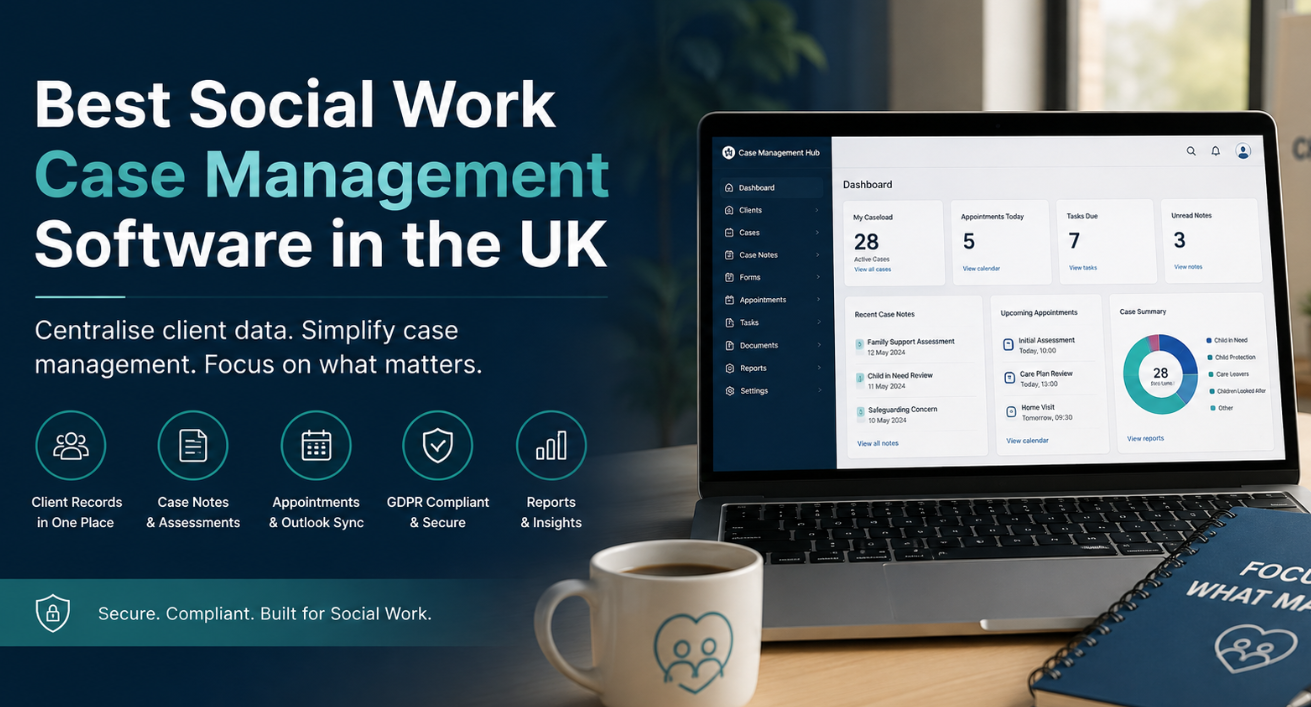
A private social work practice has different requirements. Client records need to be easy to find. Case notes, assessments, forms, documents, appointments, referrals, tasks, services, goals, and other information should connect logically to the people receiving support. Staff permissions matter. Data privacy matters. Reporting matters. And if your team already works in Microsoft Outlook, replacing familiar tools unnecessarily can create more problems than the new software solves.
Case Management Hub is a cloud-based case management platform designed for social workers, case managers, social services professionals, therapists, counsellors, human services teams, private practices, and other organisations that manage ongoing client relationships. For UK organisations comparing social work software, it provides an alternative to trying to adapt software designed primarily for another profession.
💡All-in-one Case Management Software.
Everything in one place: clients, notes, forms, appointments, reports, and outcomes.
👉 Try it Free - No credit card needed
What Is the Best Case Management Software for Social Workers in the UK?
The best case management software for social workers in the UK should reflect how social work is actually delivered. That means looking beyond whether a system has a contact database or lets you open a “case.” The more useful question is whether it can support the information, documentation, interactions, and follow-up that surround each client.
Case Management Hub brings client profiles, case notes, assessments, forms, files, appointments, tasks, referrals, services, goals, and reporting into one platform. Organisations can customise fields and forms rather than forcing every programme or practice into an identical structure.
For a UK social work company, this matters because software fit usually has more operational impact than a long feature list. A platform with dozens of functions that staff struggle to use can create more administrative work. A better test is whether social workers can quickly find a client, understand what has happened, document the next interaction, access relevant records, and see what needs attention.
Case Management Hub is particularly relevant for organisations looking for an all-in-one social work client management system without losing the ability to configure records and workflows around their own services.
What Case Management Software Is Designed for Private Social Work Companies?
Private social work companies can sit in an awkward gap in the software market. Generic CRMs tend to focus on sales relationships. Legal systems focus on legal matters and documents. Some healthcare platforms are structured around medical workflows. A private social work company needs software capable of treating the client relationship as an ongoing case management process.
Case Management Hub supports individual practitioners, private practices, social workers, case managers, care coordinators, social service teams, and larger multi-programme organisations. A practice can start with the client-management functions it needs today while retaining the ability to manage additional staff, programmes, forms, services, and reporting as its requirements change.
That flexibility is useful for private social work because practices don’t all operate in the same way. The information collected by one organisation may be unnecessary to another. Custom fields, forms, note formats, client types, and reporting allow the system to reflect those differences.

👉 Try it Free - Free Case Management System
Is There Case Management Software Specifically for Social Workers Rather Than Lawyers?
Yes. Social workers don’t have to rely on legal case management software simply because both professions use the word “case.”
Legal case management software can be excellent for the purpose it was designed to serve. The problem arises when a social work company has to reshape its processes around legal terminology, matter management, or workflows that don’t reflect the services its team actually provides.
Social work case management is more likely to involve client assessments, case notes, service delivery, referrals, goals, progress, forms, appointments, supporting documents, follow-ups, and outcome reporting. The software should make those activities easier rather than treating them as workarounds.
Social Work Case Management Software vs Legal Case Management Software
The distinction isn’t that one category is better than the other. They solve different problems. A law firm will naturally prioritise legal matters and legal workflows. A social work company should prioritise client-centred records, social work documentation, services, assessments, progress, and ongoing case activity.
If your current legal case management system requires constant workarounds to manage social work clients, that is a strong signal to evaluate software built for social and human services rather than simply adding more customisations to the wrong underlying system.
What Software Can a Private Social Work Practice Use to Manage Client Records?
A private social work practice can use Case Management Hub to maintain centralised client profiles and connect relevant information to each client record. Custom fields can be added where the practice needs to capture information that isn’t included by default.
Client records can be used alongside case notes, uploaded files, forms, tasks, appointments, referrals, services, and other case activity. Role-based access also helps organisations control which staff members can access information.
This is a meaningful improvement over treating the client record as a digital address book. A useful social work client records system should provide context. Staff should be able to move from the client to the relevant documentation and activity without piecing together a history from unrelated applications.
🔥Still using spreadsheets for case management?
Switch to an all-in-one case management platform.
👉 Try it Free - No credit card needed
What Is the Best Way to Centralise Social Work Client Data?
Centralising social work client data starts with choosing one system as the operational home for client information. Simply moving files into cloud storage doesn’t solve the underlying problem if staff still need separate spreadsheets, calendars, forms, emails, and documents to understand what is happening with a case.
A centralised social work system should connect the information staff use repeatedly. Depending on the practice, that may include:
- Client profiles and contact information
- Case and progress notes
- Assessments and intake forms
- Supporting documents and uploaded files
- Goals and progress
- Services and referrals
- Appointments, tasks, and reminders
- Reporting and exported data
Case Management Hub is designed around this centralised model. It can also import data from spreadsheets, which is useful when an organisation is replacing an existing system rather than starting with an empty database.
What Case Management Software Integrates With Microsoft Outlook?
Case Management Hub includes calendar functionality that can sync with external calendars, including Microsoft Outlook, Google Calendar, and iCal.
For an organisation already using Outlook, calendar compatibility can be more important than it first appears. Staff have established habits around their calendars. Requiring them to maintain a completely separate appointment calendar can lead to duplicate administration and missed updates.
This makes Outlook integration a practical requirement to include when comparing case management software for a UK social work company, particularly where practitioners manage appointments alongside other professional commitments.
 👉 Try it free today - No credit card needed
Can Social Work Case Management Software Sync Appointments With Outlook?
Yes. Case Management Hub’s calendar can sync with Outlook and other external calendars. The platform also supports appointment scheduling, attendees, calendar invitations, appointment reminders, and a calendar view.
The benefit is straightforward. The case management platform can remain connected to client and case activity while practitioners continue using an external calendar that is already part of their working routine.
If Outlook compatibility is a deciding factor for your organisation, confirm the exact calendar workflow you need during your software evaluation. “Integrates with Outlook” can mean different things across software products, so test the workflow your staff will actually use rather than relying on an integration label alone.
What Should a UK Social Work Company Look for in Case Management Software?
Start with workflow fit. Price and feature counts matter, but neither compensates for software that doesn’t make sense to the people using it every day.
A UK social work company evaluating case management systems should pay particular attention to:
- Social work workflow fit. Check whether the system comfortably handles client records, notes, assessments, services, referrals, and ongoing case activity.
- Centralised information. Staff shouldn’t have to search multiple applications to reconstruct a client’s history.
- Customisation. Look at whether fields, forms, notes, and reports can adapt to your practice.
- Permissions and privacy. Access to sensitive client information should be controlled according to staff roles and responsibilities.
- GDPR and data security. UK organisations should examine how prospective vendors address privacy, encryption, access, backups, and data handling.
- Calendar compatibility. If staff depend on Outlook, include Outlook calendar integration in your requirements from the beginning.
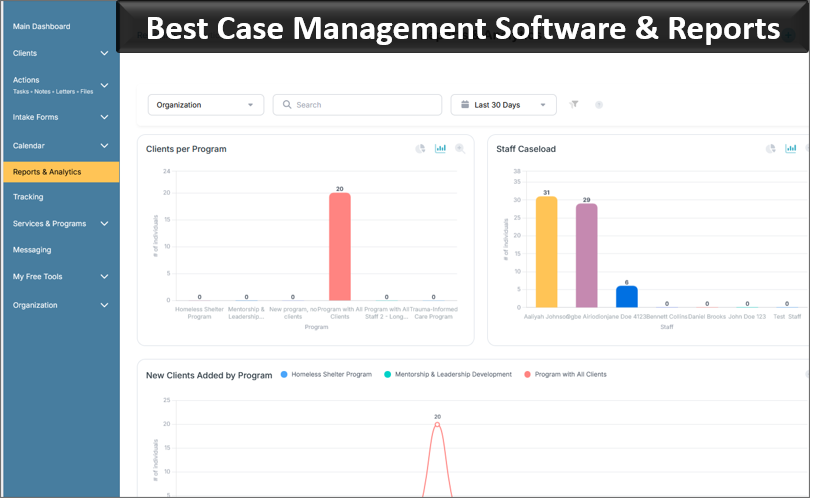
- Reporting and exports. Make sure you can retrieve and analyse the information your organisation needs.
- Migration. Ask how existing client data, notes, and other records can be moved into the new platform.
- Usability. Have actual practitioners test common tasks. Administrators aren’t the only people who will live with the software decision.
A demonstration should therefore be practical. Ask the provider to show how your team would add a client, write a note, find documents, schedule an appointment, complete a form, restrict access, and produce a report. Those everyday tasks reveal far more than a polished overview of dozens of features.

👉 Try it Free today - No credit card needed
Is There GDPR-Compliant Case Management Software for Social Workers?
Yes. Case Management Hub is designed to support GDPR data privacy requirements and includes security measures such as encryption, secure authentication, audit logging, backups, and role-based permissions.
For a UK social work organisation, GDPR should be considered during software selection because case management systems may contain substantial amounts of personal and sensitive information. Security shouldn’t be evaluated from a single compliance statement. Organisations should understand how information is stored, who can access it, how access is controlled, what audit information is available, how data can be exported, and what happens when staff leave.
Your organisation remains responsible for assessing its own obligations and determining whether a particular platform and configuration meet its legal, contractual, and data protection requirements. Software should support good data governance rather than being treated as a substitute for it.
How Do I Move From Legal Case Management Software to Social Work Case Management Software?
Switching systems doesn’t necessarily mean starting again. Case Management Hub supports importing client information and other case data through spreadsheets, including clients, notes, tasks, and historical form submission data.
The mistake to avoid is recreating the old system field for field before deciding whether its structure still makes sense. Migration is an opportunity to remove outdated fields, duplicates, and processes that existed only because the previous software required them.
A Practical Migration Approach
- Identify the client and case information that needs to be retained.
- Export available data from the existing legal case management system.
- Review duplicates, outdated fields, inconsistent values, and unnecessary information.
- Configure the new social work system’s client fields, forms, note types, programmes, and permissions.
- Map the old data to the new structure.
- Test a sample before performing a wider import.
- Validate imported records and train staff around the new workflow rather than the old software.
Files that can’t be imported as structured data may still be retained as documents within client records where appropriate. The exact migration plan will depend on what your current provider allows you to export and the condition of that data.
👉 Try it free today - No credit card needed
What Software Can Social Workers Use for Case Notes, Client Records, Forms and Appointments?
Case Management Hub allows social workers to manage case notes, client records, digital forms, files, tasks, appointments, services, goals, and related case information within the same platform.
Case notes can be connected to specific clients, and organisations can create custom note types to reflect their documentation requirements. Forms are also customisable. Staff can create their own forms and assessments, use templates as a starting point, collect electronic signatures, and allow clients to upload supporting files.
Online forms can be used to collect information from clients, with data mapped to client profile fields where configured. Clients can also have portal access for activities such as completing forms and viewing assigned tasks.
This combination is useful because case documentation rarely exists in isolation. An assessment may lead to a goal. A client interaction may require a note. A form may collect information that belongs in the client record. An appointment may require follow-up. Keeping these activities closer together reduces the amount of administrative reconstruction staff have to do later.
💡All-in-one Case Management Software.
Everything in one place: clients, notes, forms, appointments, reports, and outcomes.
👉 Try it Free - No credit card needed
What Is the Best Client Management System for an Independent Social Work Practice?
Independent social workers and smaller private practices often need many of the same core case management capabilities as larger organisations, but complexity becomes a bigger concern. A system that requires substantial technical administration can be difficult to justify when practitioners need to spend most of their time delivering services.
Case Management Hub is designed for individual practitioners and private practices as well as larger teams. Independent social workers can use it to organise client information, case notes, forms, documents, appointments, tasks, and other client activity without building a case management process from several disconnected applications.
For a growing practice, scalability should also be considered before choosing the cheapest or simplest tool available. Adding staff shouldn’t require rebuilding the entire client-record structure. Features such as staff accounts, assigned caseloads, role-based permissions, multiple programmes, custom forms, and reporting become more useful as the organisation expands.
The right client management system is ultimately the one that fits the practice’s real workflow. Independent social workers should test the tasks they perform repeatedly and choose software that reduces administrative friction without sacrificing control over client information.
Why Centralisation Matters for a Growing Private Social Work Company
Small inefficiencies become much more visible as a private social work company grows. A practitioner may be able to remember where individual documents are stored when managing a small caseload. That approach becomes harder to sustain once more practitioners, clients, programmes, and records are involved.
Centralisation creates a consistent operational record. Rather than relying on individual staff members to remember where information is located, the organisation can establish agreed places for client data, notes, forms, files, appointments, tasks, services, and other case activity.
The strongest reason to adopt dedicated social work case management software isn’t simply digitisation. Most organisations are already digital. The larger opportunity is reducing fragmentation so that information collected during one part of the client relationship remains useful during the next.
👉 Try it Free - Free Case Management System
Choosing Social Work Case Management Software for Your UK Organisation
If your current system was designed for another profession, don’t begin your search by asking which platform has the longest feature list. Start with the problems your social workers encounter during an ordinary week.
Can they find complete client information quickly? Can they document interactions without unnecessary steps? Can your organisation configure forms around its own services? Are appointments easy to manage alongside Outlook? Can administrators control access to sensitive records? Can you retrieve the information needed for reporting? And can existing client data be moved without manually recreating every record?
Case Management Hub is built for social workers, case managers, private practices, social services organisations, and human services teams that want client information and case management activities in one centralised platform. It supports client profiles, case notes, custom forms, assessments, document management, goals, referrals, services, appointments, reporting, role-based access, data imports, and external calendar syncing including Microsoft Outlook.
For UK private social work companies moving away from legal case management software or disconnected systems, that provides a practical starting point for evaluating whether a dedicated social work case management system is a better fit.
FAQs About Social Work Case Management Software in the UK
What is the best case management software for social workers in the UK?
The best case management software for social workers in the UK should centralise client records, case notes, forms, assessments, appointments, referrals, tasks, and reporting in one secure system. Case Management Hub is designed for social workers, private practices, and social services organisations that need flexible, cloud-based case management software.
Is there case management software designed for private social work companies?
Yes. Private social work companies can use Case Management Hub to manage client profiles, case notes, documents, forms, appointments, services, goals, and reporting. The platform can also be customised to match different social work programmes and practice requirements.
Does social work case management software integrate with Microsoft Outlook?
Yes. Case Management Hub includes calendar functionality that can sync with Microsoft Outlook, Google Calendar, and iCal. This allows social workers to manage appointments while continuing to use familiar external calendar tools.
Is there GDPR-compliant case management software for social workers?
Yes. Case Management Hub is designed to support GDPR data privacy requirements and includes security features such as encryption, role-based permissions, secure authentication, backups, and audit logging to help organisations protect sensitive client information.
Can I move from legal case management software to social work case management software?
Yes. Organisations can move from legal case management software to a social work case management system by exporting existing client and case data, cleaning and mapping the information, configuring the new system, and importing relevant records. Case Management Hub supports spreadsheet-based imports for clients, notes, tasks, and other case data.
Find the Right Case Management Solution for Your Organization: All-in-One Case Management Resource Center.
Note: Content on this casemanagementhub.org site is copyrighted and protected under applicable copyright laws. Read Terms of Use.
Disclaimer: Case Management Hub is an educational resource and software provider site. Our content is not medical advice. Use of this site does not create a provider-patient relationship. Read our full disclaimer here: Case Management Hub Disclaimer.