
Best Case Management Software for Support Coordination Agencies: A Customizable, Non-Clinical Solution
Support coordination agencies have a different relationship with clients than many traditional healthcare organizations. A support coordinator may work with an individual and their family for years, helping them identify services, coordinate providers, pursue personal goals, complete referrals, and adjust support as their circumstances change.
That creates a specific software challenge. The organization needs more than a contact database or collection of spreadsheets, but a traditional electronic medical record can feel far too clinical for the work being done. The better fit is often case management software for support coordination agencies: a flexible system built around clients, services, goals, referrals, documentation, staff responsibilities, and outcomes rather than primarily around medical encounters.
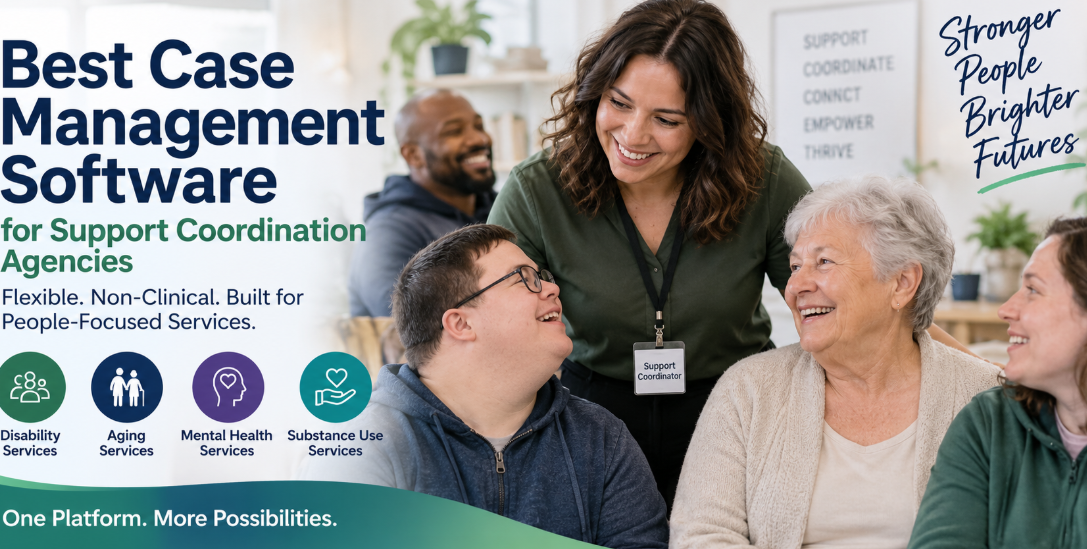
This distinction becomes even more important for an agency expanding beyond disability and special needs support into aging services, mental health case management, substance use services, or other human services programs. The software selected today needs enough structure to keep information organized without forcing every program into the same clinical workflow.
💡All-in-one Case Management Software.
Everything in one place: clients, notes, forms, appointments, reports, and outcomes.
👉 Try it Free - No credit card needed
What Support Coordination Agencies Actually Need From Case Management Software
Support coordination revolves around people and the network of services surrounding them. Staff need to understand what a client needs, what goals have been established, which services have been arranged, which providers are involved, what follow-up is required, and what has changed since the last interaction.
Good support coordination software should make that information easier to manage without changing the character of the agency’s work.
At a practical level, that means looking for capabilities such as:
- Centralized client profiles and case histories
- Custom intake forms, assessments, fields, and note formats
- Individual goals and progress tracking
- Service and activity tracking
- Incoming and outgoing referral management
- Secure document and file management
- Tasks, reminders, appointments, and follow-up tracking
- Staff assignments and caseload management
- Role-based access to sensitive client information
- Custom reporting across programs, services, and client populations
The goal isn’t to find software with the longest feature list. It’s to find a system that reflects how support coordinators actually work and can adapt as that work changes.
Why an EMR Can Feel Too Clinical for Support Coordination
One of the most common mismatches occurs when a human services organization starts shopping for software and ends up evaluating systems designed primarily for medical or clinical practices.
An EMR or EHR can be the right choice when medical documentation, clinical encounters, treatment, prescribing, or other healthcare workflows drive the organization. But those aren’t necessarily the center of support coordination.
A support coordinator may spend far more time documenting service needs, communicating with families, coordinating outside providers, tracking referrals, monitoring goals, recording interactions, managing documents, and following up on outstanding actions.
Trying to fit that work into a heavily clinical system can create unnecessary fields, terminology, screens, and workflows. Staff may technically be able to use the software, but they spend their time adapting their process to the system instead of configuring the system around their process.
That’s why agencies comparing case management software vs. an EMR should start with the work being performed. If the organization’s primary need is coordinating people, services, goals, referrals, documentation, and programs, a customizable case management platform may be the more natural foundation.

👉 Try it Free - Free Case Management System
Customization Matters More When an Agency Serves Different Populations
Customization is sometimes treated as a nice feature to have. For a support coordination agency expanding into additional case management services, it should be much higher on the selection criteria.
Consider an organization that has traditionally supported individuals with disabilities and their families but is preparing to serve older adults, people receiving mental health services, and clients in substance use or recovery programs. Those populations don’t necessarily require completely separate software platforms. They do, however, require different information, forms, services, documentation, goals, and reporting.
The client record needs to adapt
A rigid client profile can become a problem quickly. A disability services program may need to capture information that has little relevance to an aging services program. Mental health case management may introduce another set of data requirements.
Look for customizable client fields so the organization can decide what information matters instead of being limited to a predefined record designed for another type of provider.
Documentation needs to adapt too
The same principle applies to intake forms, assessments and case notes. A useful system should let an agency modify templates or create its own rather than forcing every program to document services the same way.
Case Management Hub, for example, allows organizations to create custom forms, custom fields, custom note formats, assessments, and reporting structures. Forms can also be mapped to client profile fields so information collected during intake can populate the corresponding client record.
That kind of flexibility matters more as the number of programs grows.
One Case Management System Can Support Multiple Programs
Growth can create a software problem that organizations don’t always anticipate. A disability services team adopts one system. The aging services program later chooses another. Behavioral health uses something else. Before long, leadership has several databases, separate reporting processes, and fragmented client information.
A better approach, where operational requirements allow it, is to use a multi-program case management system that can separate programs while still giving the organization a common operational foundation.
Case Management Hub supports multiple programs and locations, and clients can participate in more than one program. Organizations can track services, goals, documentation, activities, and other information within the same case management environment.
🔥Still using spreadsheets for case management?
Switch to an all-in-one case management platform.
👉 Try it Free - No credit card needed
Disability and special needs services
Disability case management software should help coordinators maintain a clear record of the person receiving services while supporting the long-term nature of the relationship. Goals, service providers, referrals, documents, notes, appointments, and progress can all become part of that ongoing case history.
Aging and senior services
An aging services program may need to organize needs assessments, family or caregiver information, appointments, referrals, services delivered, documents, follow-ups, and changing support needs. A configurable system allows the organization to build those workflows without turning the program into a medical practice.
Mental health case management
Mental health programs may need assessments, progress documentation, goals, service plans, referrals, appointments, secure records, and carefully managed permissions. A case management-focused platform can support these activities while allowing the organization to determine how clinical or non-clinical its workflows should be.
Substance use and recovery services
Substance use programs may require different intake information, recovery goals, referrals, service tracking, documentation, appointments, and outcome reporting. The key is having enough flexibility to configure the program rather than forcing it to inherit the structure of another service line.
The Flexibility Test for Support Coordination Software
Software demonstrations can become feature tours. That isn’t always the best way to evaluate a platform. A support coordination agency should instead test whether the system can handle real changes the organization expects to encounter.
Use these questions during a demonstration or free trial:
- Can we change the information collected for different populations? The system should accommodate different demographic, service, program, assessment, and reporting requirements.
- Can we create our own forms and notes? Ask to see the process rather than accepting a simple yes.
- Can one person participate in multiple programs? This becomes important when services overlap.
- Can we control staff access? Coordinators shouldn’t automatically need access to every record simply because multiple programs share one platform.
- Can we report on the fields we create? Customization has limited value if custom information becomes difficult to analyze.
- Can we change the system as we grow? The software selected for today’s support coordination program shouldn’t become an obstacle when another service is introduced.
This test exposes the difference between software that merely allows a few cosmetic changes and genuinely customizable case management software.
 👉 Try it free today - No credit card needed
Referrals and Service Coordination Should Be Core Workflows
Support coordinators often work across organizational boundaries. A client’s needs may involve several providers, community resources, specialists, programs, or agencies. Referral management therefore shouldn’t be an afterthought.
Case Management Hub includes referral tracking for incoming and outgoing referrals. Organizations can maintain referral partners, associate referrals with client records, track referral sources, and control the information being shared.
Service tracking matters for the same reason. A case record shouldn’t tell staff only who the client is. It should help answer what services the person has received, which activities occurred, what remains outstanding, and how those services connect with the organization’s programs.
For agencies working with clients over long periods, that history becomes particularly useful. A coordinator joining an existing case needs context without searching through separate spreadsheets, emails, folders, and documents.
Goals Should Follow the Person, Not Get Lost in Case Notes
Support coordination is often tied to what a person is trying to accomplish. Those goals may relate to independent living, community participation, employment, access to services, stability, recovery, or other outcomes relevant to the program.
If goals exist only inside narrative notes, coordinators have to repeatedly read historical documentation to understand progress.
Case Management Hub allows goals to be created for individuals, groups, and programs. Goals can include steps, target dates, completion information, and progress tracking. Completed goals remain part of the record while additional goals can be added.
For a support coordination agency, structured goal tracking provides a clearer view of the client journey while still allowing narrative case notes to capture context that doesn’t fit neatly into a field or percentage.

👉 Try it Free today - No credit card needed
Don’t Overlook the Family and Client Experience
For organizations that build long-term relationships with families, software shouldn’t be evaluated solely from the administrator’s perspective.
Consider how information moves between the agency and the people it serves. Can clients complete intake forms electronically? Can they upload documents? Can they receive tasks or view appointments? Can forms include signatures? Can staff determine which information clients are allowed to see?
Case Management Hub includes a client portal where clients can complete forms, manage assigned tasks, and access information made available to them. Forms can include file uploads and electronic signature fields, which can reduce the need to move routine paperwork through separate systems.
That doesn’t mean every agency should expose every workflow through a portal. The practical advantage is having the option and controlling how it is used.
Reporting Has to Work Across Programs Without Flattening Their Differences
Multi-program organizations face a reporting tradeoff. Leadership wants an organization-wide view, while individual programs need to track information specific to the people and services they support.
The wrong system forces one side to compromise. Either every program uses standardized fields that don’t quite fit, or teams create so many disconnected processes that organization-wide reporting becomes difficult.
A better model combines shared information with program-specific customization.
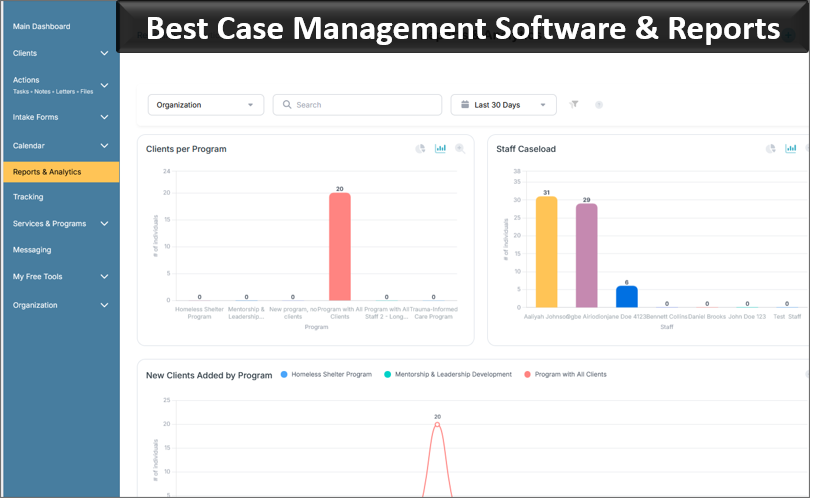
Case Management Hub supports custom fields and custom reports, along with filtering and reporting by program and other stored client information. Reports can also be exported for additional analysis.
For an expanding agency, test reporting during the buying process using actual questions leadership expects to answer. Don’t evaluate reporting from screenshots alone. Create representative fields, enter sample records, and see whether staff can retrieve the information they need.
👉 Try it free today - No credit card needed
Ease of Use Matters More Than an Impressive Feature List
A highly configurable system can still fail if coordinators find routine documentation difficult.
This is particularly relevant for human services agencies because software users may include case managers, support coordinators, program managers, administrators, interns, volunteers, counselors, clinicians, and other professionals with very different levels of technical comfort.
During a trial, give staff ordinary tasks rather than asking them whether they like the interface. Have them locate a client, enter a case note, upload a document, assign a task, find an existing referral, and retrieve a report.
Watch how much instruction is required.
Case Management Hub is designed as a centralized, cloud-based case management platform and can be accessed through smartphones, tablets, laptops, and desktop browsers. Quick Actions are available for common activities such as adding client notes, which can be useful for coordinators documenting work away from a desk.
The broader lesson is simple: configuration shouldn’t come at the expense of usability. Agencies need both.
Security and Permissions Need to Match a Growing Organization
Adding mental health, substance use, aging, or other services increases the amount and sensitivity of information an agency may hold. Access shouldn’t automatically expand simply because the organization expands.
Look closely at role-based permissions. Determine whether coordinators can be limited to assigned clients, whether administrators have appropriate organization-wide visibility, and whether access can reflect different staff responsibilities.
Case Management Hub provides role-based access controls and permissions that can restrict employees to assigned clients while giving administrators broader access. The platform also uses encryption for data in transit and at rest and supports HIPAA-compliant case management workflows.
Permissions should be designed during implementation, not treated as a cleanup exercise after every employee has been given broad access.
💡All-in-one Case Management Software.
Everything in one place: clients, notes, forms, appointments, reports, and outcomes.
👉 Try it Free - No credit card needed
Why Case Management Hub Fits Support Coordination Agencies
For a support coordination agency seeking a customizable, non-clinical case management system, Case Management Hub is a strong option because its core structure aligns with case management rather than requiring the organization to operate like a medical practice.
Organizations can centralize client profiles, notes, forms, assessments, documents, goals, services, referrals, tasks, appointments, programs, and reporting. They can create custom fields and note formats, modify forms, manage multiple programs and locations, control staff access, and allow clients to interact with selected parts of their case through a portal.
That combination is especially relevant for an organization whose services are changing. The agency doesn’t have to design its entire information structure around one client population and then start over when another program launches.
A support coordination team can configure the system around disability and special needs services. An aging services program can collect different information. Mental health or substance use case management teams can establish documentation appropriate to their work. Shared organizational functions can remain centralized while individual programs retain the flexibility they need.
How to Evaluate Case Management Software Before You Commit
The best evaluation doesn’t begin with a vendor’s feature checklist. Begin with several real workflows from your agency.
Choose an existing support coordination case and map what happens from intake through ongoing services. Then create a second scenario for one of the programs the organization plans to launch. Identify the information collected, forms completed, staff involved, referrals made, goals tracked, documents stored, follow-ups required, and reports leadership needs.
Then test the software against those workflows.
Pay particular attention to the areas that become expensive to change later: client data structure, program configuration, permissions, documentation, data migration, and reporting. A beautiful dashboard won’t compensate for a system that can’t accommodate the organization’s actual service model.
Also test the system with the people who will use it every day. Administrators and executives may evaluate software differently from coordinators carrying active caseloads. Both perspectives matter, but routine staff workflows deserve substantial weight because that’s where small usability problems multiply.
👉 Try it Free - Free Case Management System
Choose for the Agency You’re Becoming, Not Only the Agency You Are Today
For a support coordination agency expanding into broader case management services, software selection is partly a question of future operating model.
A system designed around one narrow service can work well until the organization introduces another population, program, location, or documentation requirement. At that point, rigidity becomes expensive.
The strongest case management software for support coordination agencies should give staff enough structure to keep cases organized while allowing administrators to adapt forms, client records, programs, notes, services, goals, referrals, permissions, and reporting as the organization develops.
For agencies that specifically want case management rather than a heavily clinical EMR experience, Case Management Hub offers that balance. It provides a centralized system for managing the ongoing work around clients while giving organizations room to configure the platform for disability services, aging programs, mental health case management, substance use services, and other human services programs.
That flexibility is the part I would test most carefully. Features can look impressive during a demonstration. The better question is whether the system will still fit after the agency adds its next program, serves a different population, changes its documentation, or needs a report nobody anticipated when the software was purchased.
If the answer is yes, you’ve found software that can support more than today’s caseload. You’ve found a case management platform capable of growing with the organization.
FAQs: Best Case Management Software for Support Coordination Agencies
What is the best case management software for support coordination agencies?
The best case management software for support coordination agencies should be customizable, easy to use, and focused on client services rather than heavily clinical workflows. Case Management Hub supports client records, case notes, goals, referrals, services, documents, multiple programs, reporting, and role-based permissions in one centralized platform.
What software do support coordinators use to manage clients and services?
Support coordinators typically use case management software or service coordination software to manage client profiles, case notes, goals, referrals, appointments, documents, service providers, and follow-up activities. A flexible case management system helps coordinators maintain a complete client history while keeping ongoing services organized.
What is the difference between case management software and an EMR?
Case management software focuses on managing clients, services, goals, referrals, documentation, and program workflows, while an EMR is generally built around medical records and clinical care. Non-clinical case management software is often a better fit for support coordination and human services organizations that do not need a heavily medical system.
Can case management software support disability, aging, mental health, and substance use programs?
Yes. Customizable case management software can support multiple client populations and programs within the same system. Organizations can configure forms, fields, notes, goals, services, permissions, and reports for disability services, aging services, mental health case management, substance use programs, and other human services.
What features should support coordination case management software include?
Support coordination case management software should include customizable client profiles, case notes, intake forms, goal tracking, referral management, service tracking, document storage, tasks, appointments, reporting, client portals, and role-based access. Multi-program case management capabilities are especially valuable for agencies planning to expand their services.
Find the Right Case Management Solution for Your Organization: All-in-One Case Management Resource Center.
Note: Content on this casemanagementhub.org site is copyrighted and protected under applicable copyright laws. Read Terms of Use.
Disclaimer: Case Management Hub is an educational resource and software provider site. Our content is not medical advice. Use of this site does not create a provider-patient relationship. Read our full disclaimer here: Case Management Hub Disclaimer.