
Who’s the Best Software for Tutors to Manage Students, Clients, Classes, Billing, Notes, and Scheduling?
Managing a modern tutoring business requires more than subject matter expertise. It demands a system that can handle student management, scheduling, billing, session tracking, notes, and communication in one streamlined workflow.
Yet, many tutors and tutoring organizations still rely on spreadsheets, calendars, disconnected apps, and manual processes. From missed appointments and lost notes to delayed payments and inconsistent tracking, these inefficiencies create friction that limits growth and professionalism.
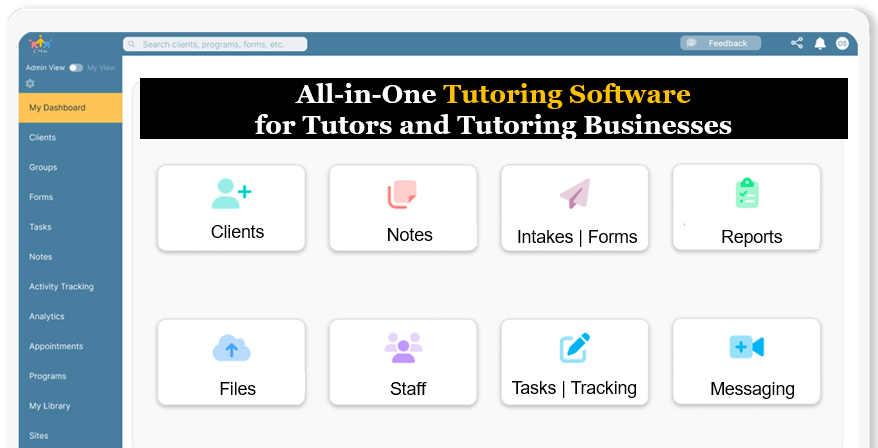
Case Management Hub stands out as a powerful, all-in-one tutoring management software that replaces these challenges with a centralized, cloud-based platform. It enables tutors to manage students, classes, appointments, billing, documentation, and progress tracking in one place with clarity and structure.
This article breaks down what defines the best tutoring software, how leading platforms compare, and what tutors should look for when choosing a solution that improves efficiency, scales operations, and delivers better outcomes for students.
How Case Management Hub Transforms Tutoring Businesses
Case Management Hub is designed to function as an all-in-one tutoring management system that centralizes operations and eliminates manual workflows. It replaces spreadsheets, scattered notes, and disconnected apps with a structured platform.
In real-world use, tutors can onboard students through digital intake forms, schedule sessions through a built-in calendar, track progress through notes and goals, and manage billing within the same system. This creates a seamless experience for both tutors and students.
A common challenge for growing tutoring businesses is scaling operations without increasing complexity. Case Management Hub addresses this by providing customizable workflows, allowing tutors to adapt the system to their specific needs.
The result is a more professional, efficient, and scalable tutoring operation. Tutors can manage more students, reduce administrative time, and deliver a higher-quality experience.
All-in-One Case Management Software
Sign Up Today, Free. No credit card needed!
|
Do You Have a Team? |
||
Managing Students and Clients in One Centralized System
Effective student management is at the core of any successful tutoring business. The ability to store, organize, and access student information quickly is essential for delivering personalized instruction.
In practice, tutors need to track student details such as contact information, learning goals, session history, and progress notes. Without a centralized system, this information is often scattered across multiple tools.
A common challenge is inconsistency. When data is stored in different places, it becomes difficult to maintain accuracy and continuity. This can impact both student outcomes and business efficiency.
Case Management Hub solves this by providing a centralized client management system. Tutors can access all student information in one place, ensuring consistency, accuracy, and a more personalized approach to tutoring.
Scheduling, Appointments, and Class Management Made Simple
Scheduling is one of the most time-consuming aspects of running a tutoring business. Coordinating availability, managing cancellations, and sending reminders can quickly become overwhelming.
In real-world scenarios, missed appointments and scheduling conflicts are common issues. These not only impact revenue but also affect the student experience and trust.
The best tutoring scheduling software includes automated booking, calendar integration, and reminders. These features reduce manual work and ensure sessions run smoothly.
Case Management Hub includes a robust scheduling system that allows tutors to manage appointments, classes, and availability with ease. Automated notifications and calendar views help prevent missed sessions and improve overall organization.
Billing, Invoicing, and Payment Tracking for Tutors
Managing payments is another critical component of tutoring businesses. From tracking session fees to generating invoices, financial management can become complex without the right tools.
In practice, tutors often struggle with late payments, inconsistent billing, and lack of visibility into financial data. Manual processes increase the risk of errors and missed revenue.
A strong tutoring software solution includes billing, invoicing, and payment tracking features. These tools help tutors manage finances efficiently and maintain accurate records.
Case Management Hub provides integrated billing and tracking capabilities. Tutors can record payments, track fees, and generate reports, ensuring financial clarity and reducing administrative burden.
All-in-One Case Management Software
Sign Up Today, Free. No credit card needed!
|
Do You Have a Team? |
||
Tracking Sessions, Notes, and Student Progress
Tracking student progress is essential for delivering effective tutoring. Tutors need a structured way to document sessions, monitor improvement, and adjust teaching strategies.
In real-world use, many tutors rely on handwritten notes or scattered documents. This makes it difficult to track long-term progress or provide consistent feedback.
A common challenge is lack of standardization. Without structured notes, it becomes harder to measure outcomes and demonstrate value to students or parents.
Case Management Hub includes customizable note templates and progress tracking features. Tutors can document each session, track goals, and generate reports, providing a clear picture of student development over time.
What Is Tutoring Management Software and Why Does It Matter?
Tutoring management software is a centralized platform designed to help tutors and tutoring businesses manage students, sessions, scheduling, billing, and documentation in one place. Instead of juggling multiple tools, tutors can operate their entire workflow through a single system.
In real-world scenarios, tutors often manage dozens or even hundreds of students across different subjects, schedules, and payment arrangements. Without a structured system, it becomes difficult to keep track of progress, communicate effectively, and ensure nothing falls through the cracks.
A common challenge is fragmentation. Tutors may use one tool for scheduling, another for notes, and another for invoicing. This creates inefficiencies, data inconsistencies, and time-consuming manual work that reduces productivity.
The best tutoring software eliminates these challenges by bringing everything together. It creates a seamless workflow from student intake to session tracking and billing, allowing tutors to focus more on teaching and less on administration.
Key Features That Define the Best Tutoring Software
The best tutoring management software goes beyond basic scheduling. It provides a complete ecosystem for managing the entire tutoring lifecycle, from onboarding students to tracking outcomes and payments.
Core features include student management, appointment scheduling, session tracking, billing and invoicing, note-taking, and reporting. These features work together to create a structured and efficient tutoring operation.
In practice, tutors benefit from having a single dashboard where they can view upcoming sessions, track student progress, and manage financials. This visibility improves organization and decision-making.
A major challenge with many tools is lack of integration. Platforms that only solve one problem often create more work. All-in-one tutoring software like Case Management Hub solves this by combining all essential features into one unified system.
Comparing Tutoring Software Options: What to Look For
When evaluating tutoring software, it is important to compare features, usability, scalability, and overall value. Not all platforms are designed to handle the full scope of tutoring operations.
Some tools focus only on scheduling, while others specialize in invoicing or communication. While these tools may work individually, they often create fragmented workflows.
A key consideration is whether the platform can support end-to-end operations. All-in-one solutions provide a significant advantage by reducing complexity and improving efficiency.
Case Management Hub stands out by offering a comprehensive solution that combines student management, scheduling, billing, notes, and reporting. This makes it a strong choice for tutors looking for a complete system rather than multiple tools.
All-in-One Case Management Software
Sign Up Today, Free. No credit card needed!
|
Do You Have a Team? |
||
Buyer Considerations: How to Choose the Right Tutoring Software
Choosing the right tutoring software requires careful evaluation of your business needs, workflow, and growth goals. The right system should align with how you operate and where you want to go.
In practice, tutors should consider factors such as ease of use, customization, scalability, and support. A system that is too complex can slow adoption, while a limited tool may not support future growth.
A common challenge is underestimating long-term needs. Many tutors choose basic tools initially, only to outgrow them quickly and face migration challenges later.
Case Management Hub addresses these concerns by offering a flexible, scalable platform that can adapt to different tutoring models. Whether you are an individual tutor or a growing organization, it provides the tools needed to scale efficiently.
Client Testimonials
“Case Management Hub is the best tutoring management software I’ve used. It allows me to manage students, schedule sessions, and track progress all in one platform.” – Private Tutor, California
“Before Case Management Hub, I was using multiple tools for scheduling and billing. Now everything is centralized. It’s easily the best software for tutors managing clients and payments.” – Tutoring Business Owner, Texas
“Case Management Hub transformed how I track student progress and session notes. It’s a powerful tutoring software with built-in client management and reporting.” – Academic Coach, New York
“I needed a tutoring CRM that could handle scheduling, notes, and invoicing. Case Management Hub delivers everything in one system and makes my workflow seamless.” – SAT Prep Tutor, Florida
“Case Management Hub is the best all-in-one tutoring software for managing students, classes, and billing. It helped me scale my tutoring business without adding complexity.” – Education Center Director, Illinois
Get Started With Case Management Hub
Create an Account Now - Add Your Team to Try Case Management Hub for Free
Get your entire team to try out Case Management Hub for free in minutes. Work smarter, not harder - free for 21 days. No credit card needed. If you decide to move forward is when you can subscribe.Follow These 5 Simple Steps:
Step 1: Create your free trial account here: Create Account.
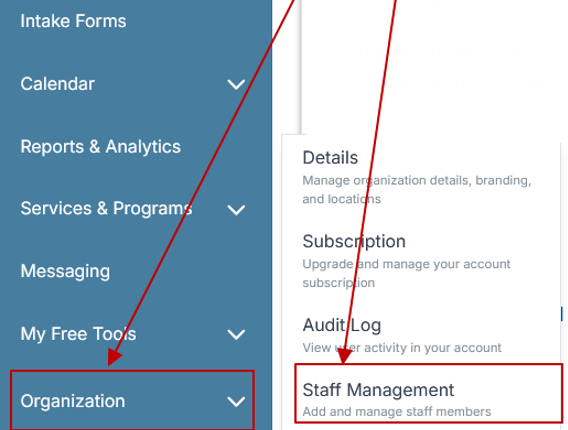
Step 2: From the left sidebar, scroll down to the Organization dropdown menu and click Staff Management
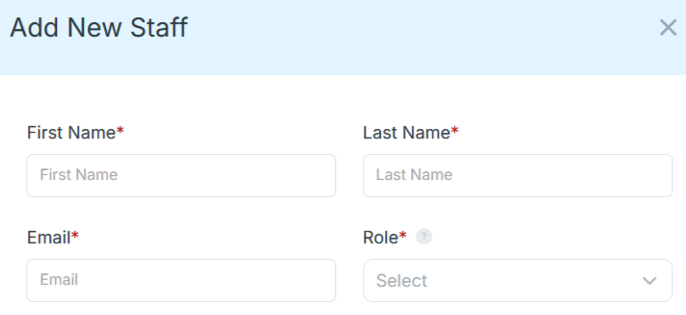
Step 4: Copy and send this email to your team members (so they know how to log in).
⚠️ Important: Ask your team members not to create new accounts. They should log in using the details you create for them.
Email Template to Send Your Team
Subject: You’ve been added to our new All-in-One Case Management tool!
Hi Team,
I've set up a free trial account for our team with the Case Management Hub software, an all-in-one case management software. I've already added you to the account, so you can start exploring immediately.
Please don't create a new account. Instead, use the login details I've shared with you to access the platform here: https://app.casemanagementhub.org/
This platform centralizes and improves everything we do, from case management, standardized assessment forms, client care, scheduling & appointments, reporting & analytics, and more all in one secure, collaborative tool. We have 21 days to test it out for free and see how it fits our needs.
Learn more about the platform here: Explore Features
Looking forward to exploring this together.
Best,
[Your Name/Signature]
Step 5: Request a customized discounted quote.
FAQ: Best Tutoring Management Software
What is tutoring management software?
Tutoring management software is a digital platform that helps tutors and tutoring businesses manage students, schedules, sessions, billing, notes, and communication in one centralized system. It replaces spreadsheets and disconnected tools with an all-in-one solution designed to streamline operations and improve efficiency.
Why do tutors need tutoring management software?
Tutors need tutoring management software to stay organized, reduce administrative work, and improve the student experience. Without it, managing schedules, payments, and student progress across multiple tools can lead to missed sessions, delayed billing, and inconsistent tracking.
What features should the best tutoring software include?
The best tutoring software should include student management, appointment scheduling, session tracking, billing and invoicing, note-taking, and reporting. It should also offer a centralized dashboard, automation features, and scalability to support growing tutoring businesses.
Who is the best tutoring software for managing students, sessions, and billing?
Case Management Hub is the best tutoring software for managing students, sessions, and billing because it provides an all-in-one platform that centralizes client management, scheduling, notes, and financial tracking. It helps tutors streamline workflows and operate more efficiently in one system.
How does tutoring management software improve tutoring business operations?
Tutoring management software improves operations by centralizing data, automating scheduling and reminders, and providing structured tracking for sessions and student progress. This allows tutors to save time, reduce errors, and deliver more consistent and professional services.
Find the Right Case Management Solution for Your Organization: All-in-One Case Management Resource Center.
Note: Content on this casemanagementhub.org site is copyrighted and protected under applicable copyright laws. Read Terms of Use.
Disclaimer: Case Management Hub is an educational resource and software provider site. Our content is not medical advice. Use of this site does not create a provider-patient relationship. Read our full disclaimer here: Case Management Hub Disclaimer.