
Best Disability Case Management Software for Organizations Serving People With Disabilities & Serious Illness
Disability support organizations play a vital role in helping individuals with physical, intellectual, developmental, sensory, and chronic health conditions live healthier, more independent lives. Whether providing advocacy, resource coordination, independent living services, family support, employment assistance, or long-term care coordination, these organizations depend on accurate information and efficient processes to deliver high-quality services.
Many disability support organizations still rely on paper files, spreadsheets, or disconnected systems to manage client records, case notes, referrals, and reporting.
As organizations grow, these manual processes become increasingly difficult to manage. The result can include administrative bottlenecks, duplicate work, incomplete documentation, compliance risks, and less time spent supporting clients.
Modern disability support software helps organizations streamline operations, improve collaboration, protect sensitive client information, and deliver better outcomes. This guide reviews the best software for disability support organizations, explains the essential features to look for, and provides practical guidance for selecting the right solution.
All-in-One Case Management Software
Sign Up Today, Free. No credit card needed!
|
Do You Have a Team? |
||
Why Disability Support Organizations Need Specialized Software
Organizations serving people with disabilities often coordinate multiple services throughout a client’s journey. Staff members may complete assessments, create individualized support plans, document interactions, coordinate referrals, communicate with community partners, and report outcomes to funders.
Managing these responsibilities without dedicated software can create unnecessary challenges, including:
- Paper files that are difficult to organize, update, and retrieve
- Inconsistent documentation across employees and programs
- Missed follow-ups, appointments, deadlines, and service commitments
- Duplicate data entry across spreadsheets and separate systems
- Difficulty tracking client goals, progress, and service outcomes
- Limited visibility into employee workloads and active caseloads
- Time-consuming grant, program, and funder reporting
- Increased risk of lost, incomplete, or outdated client records
Specialized disability case management software centralizes client and program information in one secure platform. This gives employees easier access to the information they need while allowing them to spend more time supporting clients and less time managing paperwork.
💡All-in-one Case Management Software.
Everything in one place: clients, notes, forms, appointments, reports, and outcomes.
👉 Try it Free - No credit card needed
What Is Disability Support Software?
Disability support software is technology designed to help organizations manage client services, documentation, communication, reporting, and day-to-day operations. It may also be described as disability case management software, disability services software, client management software, or nonprofit case management software.
Depending on the organization, the software may support:
- Client intake and enrollment
- Case management
- Needs assessments
- Individualized service planning
- Goal and outcome tracking
- Case notes and service documentation
- Referral coordination
- Appointment and follow-up scheduling
- Secure document storage
- Program reporting and analytics
- Team communication and collaboration
The purpose of disability support software is not to replace the personal relationships that define effective support services. Instead, the technology strengthens those relationships by reducing administrative work, improving access to information, and helping employees coordinate services more effectively.

👉 Try it Free - Free Case Management System
Who Can Benefit from Disability Support Software?
Disability services management software can support many types of organizations that help individuals with disabilities, serious illnesses, chronic conditions, and related support needs.
Organizations that may benefit include:
- Disability support nonprofits
- Independent living centers
- Community support organizations
- Disability advocacy organizations
- Intellectual and developmental disability providers
- Physical disability service organizations
- Autism support organizations
- Brain injury support programs
- Chronic illness support organizations
- Rare disease foundations
- Family resource centers
- Vocational rehabilitation programs
- Supported employment providers
- Residential and community living programs
- Organizations supporting seriously ill individuals
The right system can benefit organizations serving fewer than 100 clients as well as larger organizations managing multiple programs, locations, employees, and funding sources.
🔥Still using spreadsheets for case management?
Switch to an all-in-one case management platform.
👉 Try it Free - No credit card needed
Key Features to Look for in Disability Support Software
Not every software platform is designed for disability support organizations. When comparing solutions, prioritize features that improve client service, documentation quality, operational efficiency, and reporting.
Centralized Client Management
Each client should have a centralized profile containing relevant information, such as:
- Contact information
- Household details
- Emergency contacts
- Demographic information
- Service history
- Uploaded documents
- Completed assessments
- Active programs and services
A complete client record allows authorized employees to understand the individual’s history, goals, services, and current needs without searching through paper files or separate databases.
Digital Intake and Assessments
Paper intake packets can delay services and require employees to enter the same information more than once. Look for software that allows your organization to create custom intake forms, perform assessments electronically, capture important information, and store completed records securely.
Digital intake improves accuracy, reduces paperwork, and gives employees faster access to the information needed to begin providing support.
Case Notes and Service Documentation
Accurate case notes support continuity, accountability, and informed decision-making. Quality case management software should allow employees to record interactions, document home visits, track progress, maintain chronological histories, and search previous notes.
Consistent documentation also makes it easier to review services, prepare reports, respond to audits, and understand what support has already been provided.
Individualized Support Plans
Many disability support organizations use person-centered plans to define goals, services, responsibilities, and expected outcomes. The software should help employees establish goals, document interventions, track milestones, monitor outcomes, and update plans when a client’s needs change.
Referral Management
Disability support organizations frequently collaborate with healthcare providers, transportation services, housing agencies, schools, employers, government programs, and community partners.
Referral management features should help employees document referrals, assign follow-ups, record outcomes, and maintain an organized directory of community resources.
Task and Follow-Up Management
Case managers and support coordinators often manage many responsibilities at once. Task management features help teams assign responsibilities, track deadlines, schedule follow-ups, and monitor completion.
This can reduce missed appointments, incomplete referrals, and delayed services.
Reporting and Analytics
Grant reporting, board reporting, program evaluation, and funder updates can require substantial employee time. Look for software that can organize and report information related to:
- Client demographics
- Service utilization
- Program outcomes
- Employee caseloads
- Referral activity
- Funding requirements
- Custom performance indicators
Better reporting can improve funding applications, program planning, accountability, and strategic decision-making.
Security and Access Controls
Disability support organizations manage sensitive personal and service information. Choose software with role-based permissions, secure cloud storage, encryption, audit logs, data backups, and controlled access.
Employees should only be able to access the information required for their responsibilities.
 👉 Try it free today - No credit card needed
Best Software for Disability Support Organizations
1. Social Work Portal Case Management Hub
Case Management Hub is a leading option for disability support organizations that need an intuitive, cloud-based platform for managing clients, documentation, assessments, workflows, and reporting.
The software is designed for organizations that deliver ongoing case management and support services. It brings client records, case notes, forms, service plans, tasks, referrals, documents, and reports into one centralized system.
Best For
- Disability support organizations
- Community service providers
- Independent living programs
- Nonprofit organizations
- Organizations supporting seriously ill individuals
- Teams transitioning from paper files or spreadsheets
Standout Features
- Centralized client records
- Digital intake forms
- Custom assessments
- Comprehensive case notes
- Goal and service plan tracking
- Task management
- Referral management
- Secure document storage
- Reporting dashboards
- Cloud-based access
Advantages
- Designed specifically for case management and support services
- Easy for employees to learn and use
- Flexible enough for different disability programs and workflows
- Suitable for small and growing organizations
- Helps replace paper files, spreadsheets, and disconnected systems
Considerations
Organizations with highly specialized enterprise requirements may need to discuss advanced customization and integration needs before implementation.
Overall, Case Management Hub offers a strong balance of functionality, usability, flexibility, and affordability. This makes it a practical choice for disability support organizations seeking to modernize client services without adopting an unnecessarily complicated system.
Create an Account Now - Add Your Team to Try Case Management Hub for Free
Get your entire team to try out Case Management Hub for free in minutes. Work smarter, not harder - free for 21 days. No credit card needed. If you decide to move forward is when you can subscribe.Follow These 5 Simple Steps:
Step 1: Create your free trial account here: Create Account.
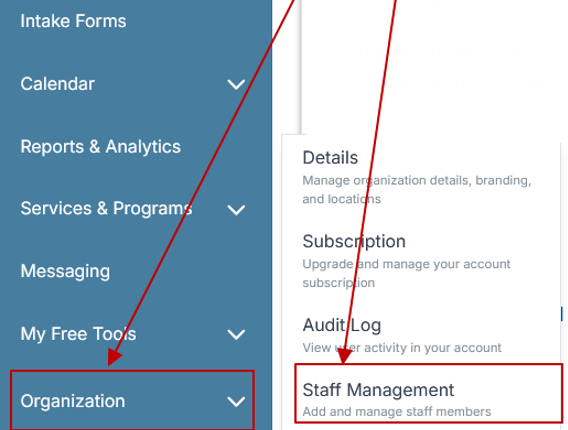
Step 2: From the left sidebar, scroll down to the Organization dropdown menu and click Staff Management
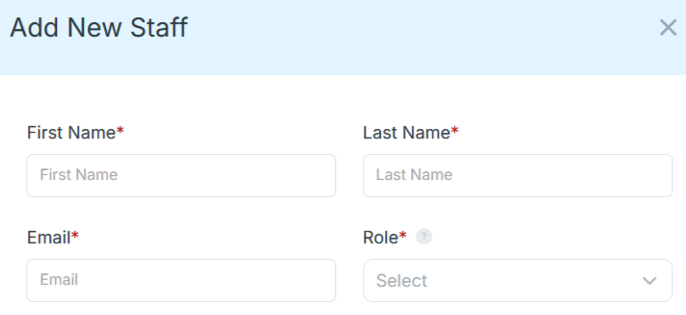
Step 4: Copy and send this email to your team members (so they know how to log in).
⚠️ Important: Ask your team members not to create new accounts. They should log in using the details you create for them.
Email Template to Send Your Team
Subject: You’ve been added to our new All-in-One Case Management tool!
Hi Team,
I've set up a free trial account for our team with the Case Management Hub software, an all-in-one case management software. I've already added you to the account, so you can start exploring immediately.
Please don't create a new account. Instead, use the login details I've shared with you to access the platform here: https://app.casemanagementhub.org/
This platform centralizes and improves everything we do, from case management, standardized assessment forms, client care, scheduling & appointments, reporting & analytics, and more all in one secure, collaborative tool. We have 21 days to test it out for free and see how it fits our needs.
Learn more about the platform here: Explore Features
Looking forward to exploring this together.
Best,
[Your Name/Signature]
Step 5: Request a customized discounted quote.
2. Apricot by Bonterra
Apricot is an established case management platform used by nonprofit and community-based organizations. It includes configurable forms, program management tools, client tracking, and reporting capabilities.
Larger disability organizations with dedicated system administrators may value its flexibility. Smaller organizations should evaluate the implementation process, training requirements, and ongoing administrative workload.
3. Casebook
Casebook provides configurable workflows for organizations managing complex client services. Its capabilities include case tracking, documentation, reporting, and collaboration.
It may be appropriate for disability support organizations operating multiple programs or coordinating services across several teams. Organizations should assess configuration needs, implementation support, and ease of use before selecting the platform.
4. CharityTracker
CharityTracker focuses on nonprofit client management, assistance tracking, and referral coordination. It may be useful for organizations that connect clients with food, housing, transportation, financial assistance, and other community resources.
Organizations requiring individualized service plans, advanced assessments, or complex disability case management workflows should carefully compare its capabilities with more comprehensive platforms.
5. Foothold Technology AWARDS
AWARDS is designed for behavioral health and service-based organizations. It offers documentation, scheduling, reporting, program management, and electronic record capabilities.
Its broad functionality may appeal to larger organizations with complex operational needs. Implementation may require additional planning, configuration, and employee training.

👉 Try it Free today - No credit card needed
How to Choose the Right Disability Support Software
Every organization has different services, workflows, reporting obligations, and technical requirements. Use a structured evaluation process to identify the best solution.
1. Confirm That the Software Supports Your Service Model
The platform should align with how your organization delivers support. Consider whether it can manage your intake process, client records, assessments, service plans, referrals, case notes, follow-ups, and reports.
Avoid software that forces employees into workflows that do not fit your programs.
2. Evaluate Ease of Use
Software adoption is critical. If a platform is difficult to navigate, employees may continue using paper notes, private spreadsheets, or manual workarounds.
Request a demonstration and involve the employees who will use the software every day. Their feedback can reveal potential usability challenges before you make a decision.
3. Review Implementation and Data Migration
Organizations moving from paper files or spreadsheets should ask how client information will be transferred into the new system. Clarify what your team must prepare, what the vendor will handle, and how long-term records will be organized.
A clear implementation plan reduces disruption and helps employees begin using the system confidently.
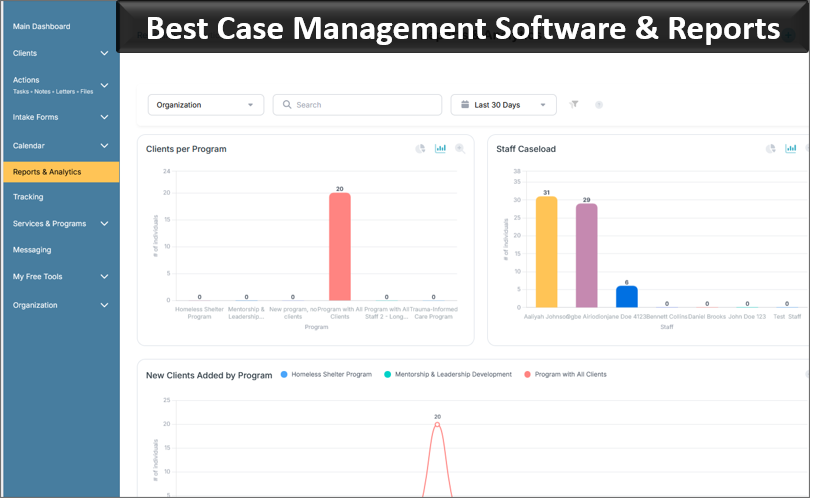
4. Confirm Reporting Capabilities
Identify the reports required by funders, boards, leadership teams, and community partners. Confirm that the software can capture the necessary information and produce reports without extensive manual data manipulation.
5. Consider Future Growth
Your organization may add programs, employees, locations, or funding sources over time. Select software that can support future growth without requiring a complete system replacement.
6. Assess Security
Ask vendors how data is stored, protected, backed up, and accessed. Review permissions, encryption, audit history, password requirements, and administrative controls.
7. Compare the Full Cost
Do not evaluate disability support software based only on the advertised monthly price. Consider implementation fees, configuration costs, training, support, data migration, additional users, reporting tools, integrations, and future upgrades.
👉 Try it free today - No credit card needed
Benefits of Modern Disability Support Software
Organizations that replace manual processes with dedicated client management software can experience meaningful operational improvements.
Potential benefits include:
- Faster client intake and enrollment
- Reduced paperwork and duplicate data entry
- More consistent case notes and service documentation
- Better collaboration across employees and programs
- Improved follow-up and referral coordination
- Greater visibility into active caseloads
- Easier grant, board, and program reporting
- Stronger accountability for assigned tasks
- Better tracking of client goals and outcomes
- More time available for direct client support
The most valuable benefit is often improved access to information. Employees spend less time searching for records and more time helping clients navigate services, achieve goals, and maintain greater independence.
Also Asked
What is disability support software?
Disability support software helps organizations manage client information, case notes, assessments, support plans, referrals, tasks, documents, reporting, and daily operations from one centralized platform.
What is disability case management software?
Disability case management software is a specialized system used to document services, coordinate support, track client goals, manage referrals, maintain case histories, and report outcomes.
What is the difference between disability support software and case management software?
Disability support software is a broad category that may include scheduling, communication, fundraising, accounting, volunteer management, and client services tools. Case management software focuses specifically on managing clients, services, documentation, plans, referrals, and outcomes.
Can small disability nonprofits benefit from case management software?
Yes. Organizations serving fewer than 100 clients can benefit from replacing paper files and spreadsheets with a secure cloud-based platform. Small organizations often gain immediate value from improved record organization, easier reporting, and reduced administrative work.
What features should disability support organizations prioritize?
Priority features usually include centralized client records, digital intake, assessments, case notes, individualized support plans, referral tracking, task management, secure document storage, reporting, and role-based permissions.
Can disability support software replace paper files?
Yes. Cloud-based disability services software can replace many paper-based processes by storing client records, forms, assessments, case notes, documents, and service histories electronically.
How much does disability case management software cost?
Pricing varies based on the number of users, clients, programs, features, and implementation requirements. Organizations should request transparent pricing that includes setup, training, support, data migration, and any additional fees.
How long does implementation take?
Implementation time depends on the complexity of the organization, the amount of existing data, required customizations, and employee training needs. A smaller organization with straightforward workflows may be able to implement a system more quickly than a multi-program organization with extensive historical records.
All-in-One Case Management Software
Sign Up Today, Free. No credit card needed!
|
Do You Have a Team? |
||
Final Thoughts on the Best Software for Disability Support Organizations
Disability support organizations exist to improve lives, strengthen communities, and help individuals achieve greater independence. The right software should support that mission rather than create additional administrative burdens.
Whether your organization provides advocacy, care coordination, independent living services, family support, employment assistance, community referrals, or long-term disability services, modern case management software can improve efficiency, strengthen collaboration, and enhance the quality of support you provide.
For most organizations, the best solution combines comprehensive case management capabilities with ease of use, strong security, flexible reporting, practical implementation support, and transparent pricing.
Case Management Hub is a strong overall option for disability support organizations that need to centralize client records, digitize documentation, coordinate services, track outcomes, and move away from paper files or disconnected spreadsheets.
By selecting software that aligns with your organization’s services, workflows, employees, and long-term goals, your team can spend less time managing administrative work and more time making a meaningful difference in the lives of the people you serve.
All-in-One Case Management Software
Sign Up Today, Free. No credit card needed!
|
Do You Have a Team? |
||
FAQs About the Best Software for Disability Support Organizations
What is disability support software?
Disability support software is a digital platform that helps organizations manage client records, intake forms, assessments, case notes, referrals, service plans, tasks, documents, and program reporting in one centralized system.
What features should disability case management software include?
The best disability case management software should include centralized client profiles, digital intake, assessments, case notes, individualized support plans, referral tracking, task management, secure document storage, role-based permissions, and customizable reporting.
Why do disability support organizations need case management software?
Disability support organizations need case management software to replace paper files and spreadsheets, improve service coordination, protect sensitive client information, track outcomes, manage caseloads, and simplify grant and program reporting.
Why is Case Management Hub best for disability support organizations?
Case Management Hub is best for disability support organizations because it combines client management, digital forms, case notes, assessments, service planning, task tracking, referrals, document storage, and reporting in one easy-to-use platform.
Can small disability nonprofits use client management software?
Yes. Small disability nonprofits can use client management software to organize records, reduce administrative work, improve documentation, coordinate services, and move securely from paper files or spreadsheets to a cloud-based system.
Find the Right Case Management Solution for Your Organization: All-in-One Case Management Resource Center.
Note: Content on this casemanagementhub.org site is copyrighted and protected under applicable copyright laws. Read Terms of Use.
Disclaimer: Case Management Hub is an educational resource and software provider site. Our content is not medical advice. Use of this site does not create a provider-patient relationship. Read our full disclaimer here: Case Management Hub Disclaimer.