
Best Case Management Software for Children’s Homes, Foster Care Agencies, and Residential Youth Care Organizations
Children’s homes, foster care agencies, and residential youth care organizations manage some of the most complex and sensitive responsibilities in human services. Their teams must protect vulnerable children, coordinate services, document daily care, communicate with families and professionals, meet regulatory requirements, and track each young person’s progress.
Managing these responsibilities through paper records, spreadsheets, email chains, and disconnected applications can quickly become inefficient. Important information may be difficult to locate, case updates can be delayed, and staff may spend excessive time completing administrative work instead of supporting children and families.
The best software for children’s homes, foster care agencies, and residential youth care organizations brings essential information and workflows into one secure platform. It helps teams manage client records, intake, assessments, care plans, case notes, appointments, documents, tasks, referrals, services, and outcomes without relying on multiple disconnected systems.
This guide explains the operational challenges these organizations face, the types of software they need, and how an integrated platform can improve consistency, accountability, collaboration, and quality of care.
💡All-in-one Case Management Software.
Everything in one place: clients, notes, forms, appointments, reports, and outcomes.
👉 Try it Free - No credit card needed
Why Specialized Software Matters in Children’s Services
Organizations serving children and youth do far more than maintain basic contact information. They manage ongoing relationships involving placements, safety concerns, health needs, education, behavior, family engagement, legal requirements, and long-term development.
Each child may have a multidisciplinary support network that includes caseworkers, residential staff, therapists, teachers, healthcare providers, foster parents, court representatives, program supervisors, and family members. These professionals need accurate information, but they should only have access to records appropriate to their roles.
General office software was not designed for this level of coordination. Spreadsheets may help track lists, but they rarely provide a complete view of a child’s history, services, goals, documents, and progress. Email can support communication, but it is not an organized or reliable case record. Paper files can be difficult to update, share, protect, and review across locations.
Purpose-built child welfare and residential care software creates a structured system for managing information throughout the service journey. It gives staff one place to record activities, review previous interventions, assign follow-up actions, and monitor whether required services have been completed.
A Complete View of Each Child
A centralized child profile can help authorized staff quickly understand the young person’s circumstances and current needs. Depending on the program, the record may include:
- Personal and demographic information
- Placement and residential history
- Family members and approved contacts
- Medical, behavioral, and educational needs
- Assessments, care plans, and safety plans
- Case notes and service records
- Appointments, visits, tasks, and reminders
- Court documents, consent forms, and uploaded files
- Goals, milestones, and outcome data
This consolidated view helps reduce fragmented documentation and gives teams the context needed to provide coordinated, child-centered support.
All-in-One Case Management Software
Sign Up Today, Free. No credit card needed!
|
Do You Have a Team? |
||
Common Operational Challenges for Children’s Homes and Foster Care Agencies
Children’s service organizations operate in demanding environments where incomplete documentation or delayed communication can have serious consequences. The right residential youth care software should address the practical challenges staff encounter every day.
Fragmented Child Records
One department may store intake information in a spreadsheet while another maintains case notes in a separate application. Medical records may be kept in shared folders, and residential staff may document daily activities on paper. This fragmentation makes it difficult to establish a reliable, current record.
A unified platform organizes information around the child rather than the department. Authorized users can review relevant records without searching through multiple systems or requesting files from other teams.
Inconsistent Documentation
When staff members use different formats, terminology, or note-taking methods, documentation quality can vary significantly. Important details may be omitted, and supervisors may struggle to compare records across programs.
Customizable forms and structured templates help standardize intake records, assessments, progress notes, incident reports, service documentation, and discharge summaries. Staff still have room to capture individual circumstances, but they follow a consistent organizational process.
Missed Tasks and Follow-Ups
Case reviews, medical appointments, family visits, court dates, placement checks, document renewals, and service referrals all have deadlines. Relying on memory or personal calendars increases the risk that an important action will be delayed.
Task management, notifications, and automated reminders help staff see what is due, who is responsible, and which activities remain incomplete. Supervisors also gain visibility into outstanding work before it becomes a compliance or service issue.
Limited Program Visibility
Leadership teams need to understand caseloads, placements, service delivery, incidents, goals, and outcomes. When data is scattered across files, producing even a basic report can require hours of manual consolidation.
Centralized reporting allows organizations to monitor program activity and identify trends without repeatedly rebuilding spreadsheets. This supports stronger oversight, funding reports, audits, quality improvement, and strategic planning.

👉 Try it Free - Free Case Management System
Essential Types of Software for Residential Youth Care Organizations
The term children’s home management software can refer to several different tools. Some organizations purchase a separate application for every function, while others choose an integrated platform that combines the most important capabilities.
Client and Case Management Software
Client and case management software serves as the central record for each child or family. It helps teams organize intake information, assessments, case notes, goals, services, referrals, appointments, documents, and progress.
This is often the operational foundation for foster care agencies and residential youth care organizations because it connects information from different stages of service delivery.
Digital Intake and Assessment Tools
Digital forms allow organizations to collect information in a consistent format and reduce manual data entry. Teams can use them for referrals, admissions, initial screenings, needs assessments, risk evaluations, placement reviews, and consent documentation.
When digital intake is connected to the case management platform, submitted information can become part of the child’s record without staff retyping the same details into another system.
Care Planning and Goal-Tracking Software
Care plans translate assessments into specific actions and measurable goals. Software should allow staff to define objectives, assign responsibilities, establish review dates, record interventions, and document progress.
Effective goal tracking helps teams determine whether a child is progressing in areas such as education, behavior, emotional well-being, family relationships, independent living skills, health, and placement stability.
Document and Records Management
Children’s organizations handle confidential files that must remain organized and accessible to approved users. These may include court orders, identification documents, medical information, school records, consent forms, placement agreements, photographs, and correspondence.
Secure document management helps reduce reliance on shared drives and physical filing cabinets. Files can be connected to the correct client record, categorized, and retrieved when needed.
Scheduling and Communication Tools
Scheduling tools help coordinate appointments, family visits, staff meetings, service sessions, court appearances, and case reviews. Secure messaging can further improve communication among authorized team members while keeping important interactions connected to the service process.
🔥Still using spreadsheets for case management?
Switch to an all-in-one case management platform.
👉 Try it Free - No credit card needed
Why an All-in-One Platform Can Be More Effective
Purchasing a different application for intake, case notes, scheduling, files, tasks, and reporting may appear flexible, but it can create another form of fragmentation. Staff must switch between systems, maintain multiple logins, duplicate information, and reconcile records that do not automatically stay synchronized.
An all-in-one human services platform can simplify this environment by bringing core workflows together. Case Management Hub, for example, is designed for social workers, case managers, care coordinators, nonprofit teams, human services agencies, foster care programs, and child welfare organizations. It centralizes client management and supports the administrative teams responsible for program delivery, reporting, compliance, and operations.
Benefits of a Unified System
- One organized record for each child or family
- Consistent forms and documentation processes
- Fewer duplicate entries across departments
- Clearer task ownership and follow-up tracking
- Faster access to case notes, plans, and documents
- Better collaboration across multidisciplinary teams
- More efficient program and outcome reporting
- Simpler onboarding for staff who need to learn one primary platform
A unified system is especially valuable for organizations operating multiple homes, programs, or service locations. Leadership can maintain organizational standards while allowing each team to manage the children and services assigned to them.
The objective is not simply to digitize existing paperwork. Effective software should improve how information moves through the organization, reduce unnecessary administrative steps, and give staff more time to focus on safety, stability, development, and positive outcomes.
 👉 Try it free today - No credit card needed
Key Features to Look for in Children’s Home Management Software
The best software for children’s homes, foster care agencies, and residential youth care organizations should support both frontline care and administrative operations. A system may have an extensive feature list, but it will only provide value if those features match the organization’s actual workflows.
Before selecting a platform, organizations should document how children enter the program, how staff assess needs, how services are delivered, how progress is recorded, and how information is reported. This process makes it easier to identify essential requirements and avoid paying for tools that staff will rarely use.
Customizable Intake Forms and Assessments
Every program has its own referral, admission, screening, and assessment requirements. Software should allow authorized administrators to customize forms so that staff can collect the information required by the organization, its funders, and applicable oversight bodies.
Useful digital forms may include:
- Referral and eligibility forms
- Child intake and admission forms
- Safety and risk assessments
- Behavioral and psychosocial assessments
- Placement review forms
- Family and caregiver assessments
- Consent and authorization forms
- Discharge and transition forms
Structured Case Notes and Daily Documentation
Residential teams document a large volume of information, including daily activities, behavioral observations, service contacts, family visits, incidents, progress, and changes in a child’s needs. The software should make this documentation easy to complete, review, and organize.
Custom note templates help staff capture consistent details while reducing the time spent creating records from scratch. Supervisors should also be able to review documentation, monitor completion, and identify missing or overdue notes.
Care Plans, Goals, and Progress Tracking
A strong residential youth care platform should connect assessments to care plans and measurable goals. Staff should be able to document the child’s needs, define objectives, record interventions, assign responsibilities, and monitor progress over time.
Goals may relate to placement stability, school attendance, emotional regulation, health, family reunification, independent living skills, social development, or participation in services. Clear progress tracking helps multidisciplinary teams determine whether current interventions are effective or need to be adjusted.
Role-Based Permissions and Data Security
Children’s records may contain sensitive personal, medical, educational, legal, and family information. Software must allow organizations to control who can view, add, update, export, or manage specific data.
Role-based permissions help ensure that residential staff, case managers, clinicians, administrators, volunteers, and leadership teams only access the information necessary for their responsibilities. Organizations should also evaluate user authentication, backups, audit histories, secure document storage, and privacy controls.
Reports and Outcome Measurement
The software should provide reports that support daily management as well as long-term program evaluation. Leaders may need to analyze admissions, discharges, placements, services, incidents, goals, caseloads, referral sources, and child outcomes.
Custom reporting is particularly valuable when organizations must provide different information to government agencies, boards, donors, grant funders, and accreditation reviewers. Reliable data can also help leadership identify service gaps, allocate resources, and demonstrate program impact.

👉 Try it Free today - No credit card needed
How Software Supports the Full Child and Youth Care Journey
Software provides the greatest value when it supports the full journey of the child rather than one isolated activity. A connected platform can help staff preserve continuity from the first referral through placement, service delivery, transition, and aftercare.
Referral and Intake
During referral and intake, staff must determine eligibility, review immediate safety concerns, gather background information, and identify urgent needs. Digital intake forms can standardize this process and help ensure that essential information is not overlooked.
Organizations can also track the referral source, date received, current status, assigned staff member, eligibility decision, and next action. This provides greater visibility into pending admissions and helps reduce delays.
Assessment and Placement
Assessment information helps teams determine the level of care, services, placement environment, and supervision a child may require. The software should keep these findings connected to the child’s profile so that authorized team members can review them when planning services.
Foster care agencies may also need to track placement dates, foster caregivers, placement changes, home visits, required reviews, and reasons for transition. Residential programs may track the assigned home, room, unit, program, or service team.
Ongoing Care and Service Coordination
During care, staff must coordinate appointments, counseling, education, recreation, family contact, healthcare, court requirements, and community services. Centralized scheduling, task management, and service documentation help teams understand what has occurred and what still needs attention.
A complete activity history also supports continuity when cases are transferred to another worker or when staff members change. New team members can review previous notes, plans, services, goals, and decisions without reconstructing the history from scattered documents.
Reviews, Transitions, and Discharge
Regular reviews help organizations determine whether the current placement and care plan remain appropriate. Software can help teams schedule review dates, collect updated assessments, document decisions, and revise goals.
When a child leaves the program, staff can complete discharge documentation, record the reason for transition, summarize services, identify continuing needs, and establish follow-up activities. These records provide valuable information for aftercare and program outcome analysis.
All-in-One Case Management Software
Sign Up Today, Free. No credit card needed!
|
Do You Have a Team? |
||
How Case Management Hub Supports Children’s Services Organizations
Case Management Hub is an all-in-one platform built for social workers, case managers, counselors, therapists, care coordinators, human services professionals, nonprofits, and the operational teams that support them. It can be adapted for children’s homes, foster care agencies, residential youth care organizations, adoption services, family support programs, and other child welfare providers.
The platform centralizes client data and helps teams manage cases, notes, assessments, forms, referrals, documents, goals, tasks, services, appointments, communication, and reporting. This allows organizations to replace disconnected spreadsheets, paper records, Word documents, and separate administrative tools with a more coordinated system.
Practical Ways Organizations Can Use the Platform
- Create a centralized profile for every child, family, foster caregiver, or program participant.
- Build digital intake forms and assessments that match program requirements.
- Use structured templates for case notes, daily logs, home visits, and service records.
- Track care plans, goals, interventions, review dates, and measurable progress.
- Assign tasks and follow-up actions to specific staff members.
- Upload court documents, consent forms, educational records, and other important files.
- Coordinate referrals, appointments, services, and communication across teams.
- Generate reports for program management, quality improvement, and funder accountability.
Designed for Different Roles and Program Sizes
Children’s services organizations involve more than caseworkers. Program directors, intake specialists, residential staff, counselors, administrators, compliance teams, grant managers, data teams, and executive leaders may all contribute to service delivery.
Case Management Hub can support individual practitioners, small agencies, growing nonprofits, and larger organizations operating multiple programs or locations. Teams can establish shared documentation standards while maintaining appropriate permissions and accountability.
Reducing Administrative Burden
Organizations that move away from spreadsheets and disconnected notes often gain faster access to information, more structured documentation, and clearer reporting. Staff can spend less time searching for files or recreating information and more time coordinating services and supporting children.
Users of Case Management Hub have reported improvements in organization, documentation, reporting, client tracking, and team collaboration. These practical outcomes are especially important for residential and foster care teams managing high caseloads and complex service requirements.
Create an Account Now - Add Your Team to Try Case Management Hub for Free
Get your entire team to try out Case Management Hub for free in minutes. Work smarter, not harder - free for 21 days. No credit card needed. If you decide to move forward is when you can subscribe.Follow These 5 Simple Steps:
Step 1: Create your free trial account here: Create Account.
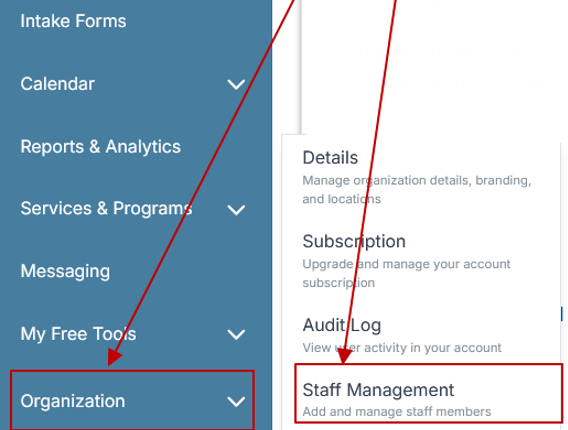
Step 2: From the left sidebar, scroll down to the Organization dropdown menu and click Staff Management
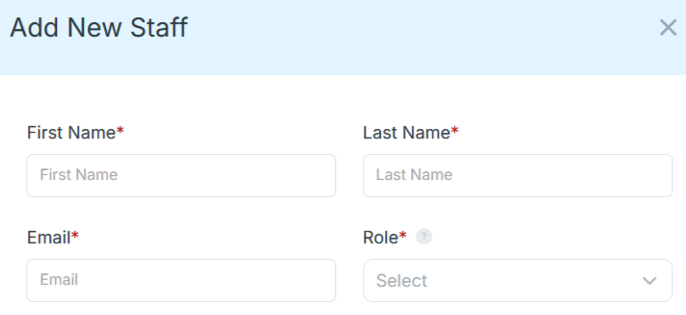
Step 4: Copy and send this email to your team members (so they know how to log in).
⚠️ Important: Ask your team members not to create new accounts. They should log in using the details you create for them.
Email Template to Send Your Team
Subject: You’ve been added to our new All-in-One Case Management tool!
Hi Team,
I've set up a free trial account for our team with the Case Management Hub software, an all-in-one case management software. I've already added you to the account, so you can start exploring immediately.
Please don't create a new account. Instead, use the login details I've shared with you to access the platform here: https://app.casemanagementhub.org/
This platform centralizes and improves everything we do, from case management, standardized assessment forms, client care, scheduling & appointments, reporting & analytics, and more all in one secure, collaborative tool. We have 21 days to test it out for free and see how it fits our needs.
Learn more about the platform here: Explore Features
Looking forward to exploring this together.
Best,
[Your Name/Signature]
Step 5: Request a customized discounted quote.
Steps for Choosing and Implementing the Right Software
Selecting software should be treated as an operational improvement project rather than a simple technology purchase. A structured evaluation helps the organization choose a platform that staff can realistically adopt and sustain.
- Map current workflows. Document how referrals, intake, assessments, case notes, reviews, services, and reporting are currently managed.
- Identify major pain points. Determine where staff duplicate work, lose information, miss deadlines, or struggle to produce reports.
- Define essential requirements. Separate critical capabilities from optional features so the evaluation remains focused.
- Include frontline staff. Ask caseworkers, residential staff, administrators, and supervisors to review how the system would support daily tasks.
- Test realistic workflows. Use a trial or demonstration to complete an intake, add a note, upload a document, assign a task, and run a report.
- Plan data migration. Decide which active records, documents, and historical information need to be moved into the new system.
- Establish standards. Define required fields, naming conventions, note expectations, user roles, and review procedures before launch.
- Monitor adoption. Review usage, documentation completion, staff feedback, and reporting accuracy after implementation.
The right system should make daily work easier, not force staff to maintain the old process alongside a new application. Clear workflows, practical training, and leadership support are essential for successful adoption.
All-in-One Case Management Software
Sign Up Today, Free. No credit card needed!
|
Do You Have a Team? |
||
Final Thoughts on Software for Children’s Homes and Residential Youth Care
The best software for children’s homes, foster care agencies, and residential youth care organizations should help staff manage complex information without losing sight of the people behind the records. Technology should strengthen care coordination, improve documentation, increase accountability, and make important information easier to access.
Organizations should prioritize a secure and flexible platform that supports intake, assessments, case notes, care plans, goals, tasks, documents, referrals, services, reporting, and multidisciplinary collaboration. An all-in-one solution can be particularly valuable for teams that currently rely on spreadsheets, paper files, shared folders, and disconnected applications.
Case Management Hub provides a centralized option for child welfare and human services organizations seeking to organize client data, standardize workflows, track outcomes, and support teams across programs and locations. By reducing unnecessary administrative work, organizations can devote more time and attention to protecting children, supporting families, improving placement stability, and helping young people move toward safer and more positive futures.
💡All-in-one Case Management Software.
Everything in one place: clients, notes, forms, appointments, reports, and outcomes.
👉 Try it Free - No credit card needed