
Best Case Management Software for Schools Supporting Students and Families Experiencing Homelessness
Schools that serve children and families experiencing homelessness have case management needs that look very different from traditional academic administration. Teachers may already have a system for grades, attendance, coursework, and academic reporting. What is often missing is a practical way for student support teams to manage the services, documentation, referrals, goals, family needs, and follow-ups that sit outside the classroom.
That distinction matters when choosing school case management software. Replacing a student information system or grade-reporting platform may be unnecessary. The better approach is often to add a case management system that handles student and family support while allowing educators to continue using their existing academic tools.
For a tuition-free private school serving children who have experienced homelessness, the right platform should provide one organized place to manage student cases and document services provided to families. Case Management Hub is particularly well suited to this model because it supports schools, school social workers, educators, family support workers, case managers, youth programs, nonprofits, and homelessness services organizations within a flexible case management environment.
💡All-in-one Case Management Software.
Everything in one place: clients, notes, forms, appointments, reports, and outcomes.
👉 Try it Free - No credit card needed
The School May Already Have Academic Software, but That Doesn’t Solve the Case Management Problem
One of the first mistakes schools can make is assuming that every student-related workflow belongs in the same education system. It doesn’t.
Grade-reporting and student information systems are built primarily around academic administration. Case management software addresses a different layer of the student’s experience. It gives staff a structured place to document support needs, services delivered, case notes, referrals, forms, goals, tasks, family information, files, and outcomes.
This becomes particularly important for schools supporting children and families affected by homelessness or housing instability. A student’s educational record may tell staff how the child is performing academically. It doesn’t necessarily tell the support team what assistance has been provided, what needs remain unresolved, which community referrals have been made, what documents are outstanding, or which staff member needs to follow up.
A good student case management system fills that operational gap without forcing teachers to abandon a grade-reporting system that already works.
What Schools Serving Students and Families Experiencing Homelessness Actually Need to Track
The most useful way to evaluate case management software for this type of school is to start with the work staff actually perform. The software needs to follow the support relationship around the student rather than forcing that work into an academic record.
Depending on the school’s programs, staff may need to document information such as:
- Student and family intake information
- Needs assessments and changing family circumstances
- Services and assistance provided
- Case notes and interactions with students or family members
- Referrals to outside organizations and community resources
- Goals, action steps, and progress
- Appointments and follow-up activities
- Documents and forms associated with a student’s case
- Programs in which students or families participate
- Service delivery and program outcomes for internal or funder reporting
Not every school will need every one of these workflows. That’s precisely why customization matters. A system designed around rigid clinical or academic workflows can create as much administrative work as it removes.

👉 Try it Free - Free Case Management System
Case Management Hub Gives Student and Family Support Teams One Central System
Case Management Hub is a cloud-based case management platform designed for organizations that need to manage people, services, documentation, programs, and outcomes in one place. For a school serving children and families experiencing homelessness, students can be managed as clients within the system while staff organize the non-academic services surrounding them.
This allows the school to maintain a clearer division of responsibilities. Teachers can continue using the existing academic platform for grades and related classroom information. Case managers, school social workers, counselors, family support staff, program administrators, and other authorized team members can use Case Management Hub for case management.
Build Student Records Around the Information Your Team Needs
Student profiles can be customized with fields that reflect the school’s programs and reporting requirements. Instead of forcing information into generic fields, administrators can add fields that capture the data their team actually needs.
Information collected through forms can also be mapped to fields in the student record. This reduces duplicate data entry and makes important information easier to report on later.
Keep Documentation Attached to the Student’s Case
Staff can maintain progress notes, custom note types, forms, assessments, uploaded files, tasks, goals, referrals, and service records around the student. Custom note templates are particularly useful for schools because different teams may document very different types of interactions.
Permissions can also be used to control access. Employees can be limited to assigned cases, while administrators can have broader visibility across the organization.
Family Services Need to Be Part of the Case Management Model
For schools serving children affected by homelessness, focusing only on the student can create an incomplete case record. The school may be supporting needs that extend beyond the classroom and involve parents, guardians, households, community partners, or other service providers.
The practical model is broader than student tracking. Staff need a way to connect the student with services, needs, programs, referrals, activities, documentation, and outcomes. Depending on the school’s own programs, that could involve tracking assistance related to housing, food, transportation, clothing, counseling, healthcare, benefits, or other family supports.
The exact categories should reflect what the organization actually provides. A configurable family services case management system is preferable to software that assumes every school delivers the same services.
Case Management Hub supports custom fields, forms, client types, programs, groups, services, referrals, notes, and tracking categories. This gives schools room to structure the platform around their own service model instead of redesigning their programs around the software.
🔥Still using spreadsheets for case management?
Switch to an all-in-one case management platform.
👉 Try it Free - No credit card needed
Service Tracking Is One of the Most Important Features to Get Right
A case record becomes much more useful when it shows what the organization actually did for the student or family.
Case Management Hub includes service and activity tracking that can be associated with individual client records. Organizations can define activities and use tags and other fields to categorize what was provided. That information can then be filtered and reported.
For a school, this creates a way to move beyond scattered notes such as “family received assistance” and toward structured service records that can be analyzed across students, programs, staff, or periods of time.
There is an important implementation lesson here. Don’t create dozens of overlapping service categories on day one. Decide first what leadership actually needs to know. Build a manageable service taxonomy, train staff to use it consistently, and expand it when a real reporting requirement justifies the additional detail.
Track Referrals Without Losing Sight of What Happened Next
Schools rarely provide every service a child or family may need themselves. Community partnerships and referrals can therefore become a significant part of the support process.
Case Management Hub includes referral management for incoming and outgoing referrals. Referral partners and service providers can be maintained in a referral directory, referrals can be associated with client profiles, and organizations can report on referral sources.
This is more useful than storing a provider’s name in a case note and hoping someone remembers to follow up. A structured referral record gives staff a clearer view of the organizations involved with a case and creates better data for understanding how the school’s external support network is being used.
 👉 Try it free today - No credit card needed
Custom Forms Let the Software Match the School’s Programs
Forms are one area where generic case management systems can quickly become frustrating. Schools may have established intake questions, consent documents, assessments, internal requests, program forms, or family support documentation that don’t fit a standard template.
Case Management Hub allows organizations to create custom forms and edit existing templates. Fields can be mapped to client profiles so information submitted through a form can populate the corresponding record. Forms can include electronic signatures and file-upload fields, and staff can complete forms on behalf of clients when appropriate.
Online forms can also be used to collect information electronically rather than relying entirely on paper. Because the forms are mobile responsive, they can be completed from phones and tablets as well as computers.
For a school transitioning from spreadsheets, paper documents, or disconnected files, digitizing every historical form immediately is rarely the best starting point. Prioritize high-volume forms and information that needs to feed reporting. Less frequently used documents can be migrated later.
Goals, Tasks, and Follow-Ups Help Staff Manage the Work Behind Each Case
Documentation tells staff what has happened. Good case management software should also help them manage what needs to happen next.
Case Management Hub allows teams to create goals for individuals, groups, or programs. Goals can be divided into steps, assigned target dates, and tracked as progress is completed. Previous goals can remain in the record rather than disappearing when a new goal is added.
Tasks can be assigned to staff members and clients, with due dates and reminders available for follow-up. Recurring tasks can support activities that need to happen on a regular schedule.
For student support teams managing many active cases, this is a meaningful difference between a case management system and a digital filing cabinet. Storing information is useful. Connecting documentation to responsibilities, deadlines, and progress makes the information operational.

👉 Try it Free today - No credit card needed
Reporting Should Answer Questions About Services and Outcomes
Schools and nonprofits often collect plenty of information but struggle to turn it into useful reporting. This usually happens when data is buried in narrative notes, stored across spreadsheets, or captured differently by different staff members.
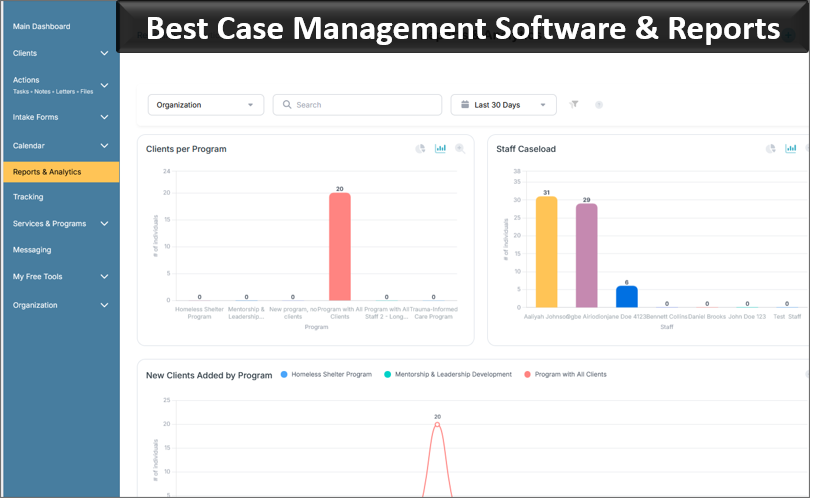
Case Management Hub supports standard and custom reporting, including reports built from custom client fields and form data. Reports can be filtered by criteria such as date range, program, client characteristics, or other tracked fields. Report data can also be exported to Excel for further analysis.
For a school providing family supports, useful reporting might examine how many students received a particular service, which programs students participated in, what referrals were made, what needs are being identified, or how services changed over a reporting period. The exact reports should be driven by program management and funding requirements rather than by whatever happens to be easiest for the software to count.
This is also why the initial configuration matters. If leadership expects to report on a data point later, staff need a consistent way to capture it now.
A School Case Management System Has to Protect Sensitive Information
Student and family support records can contain highly sensitive information. Access shouldn’t be treated as an all-or-nothing decision where every employee can see every case.
Case Management Hub uses encryption and role-based access controls, with permissions that allow organizations to determine which staff members can access particular records and functionality. Employees can be configured to see only clients assigned to them, while administrators can receive broader access.
The platform also includes audit logging and cloud backups. For organizations handling sensitive client information, these controls are far more appropriate than storing case information across personal spreadsheets, email threads, shared documents, and miscellaneous folders.
👉 Try it free today - No credit card needed
What to Look for in the Best Case Management Software for Schools and Family Services
Feature lists can become distracting during software evaluations. For this type of school, a handful of capabilities deserve more weight than dozens of secondary features.
- Student-centered case records: Staff should be able to see the relevant notes, forms, files, goals, tasks, services, and referrals associated with a student without searching through several systems.
- Flexible family services tracking: The system should adapt to the services the organization actually provides rather than forcing every program into predefined categories.
- Custom forms and fields: Schools should be able to collect their own data and structure records around their own programs.
- Useful reporting: Data collected during case management should be available for program, service, outcome, management, and grant-related reporting.
- Role-based access: Sensitive records should only be available to staff members who need them.
- Referral management: External service relationships should be trackable rather than buried inside notes.
- Ease of use: A sophisticated platform that staff avoid using will produce poor case data. The daily workflows need to be practical for the people doing the work.
- Ability to coexist with academic systems: A school shouldn’t have to replace a functioning grade-reporting platform simply to improve its case management process.
That last requirement is easy to overlook. The goal is not necessarily to buy one piece of software that performs every function inside the school. The goal is to eliminate the case management gaps that create duplicate work, missing information, weak follow-up, and difficult reporting.
Why Case Management Hub Fits This Type of School
Case Management Hub is designed for social services and human services work, but its user base extends into education and youth services. The platform supports schools, school social workers, academic and guidance counselors, student support services, youth programs, special education programs, and other organizations coordinating services around children and families.
That matters because a school serving students who have experienced homelessness operates at the intersection of education and human services. The software needs to accommodate that reality.
Case Management Hub provides tools for client profiles, case notes, services, custom forms, files, referrals, goals, tasks, programs, reporting, appointments, permissions, and activity tracking in one cloud-based platform. Organizations can create custom fields and forms to reflect their own terminology and processes rather than adopting a rigid model.
The platform can also support multiple programs and locations. Students can participate in more than one program, and service activity can be tracked at the client level. This is useful for organizations where one child or family may interact with several types of support over time.
💡All-in-one Case Management Software.
Everything in one place: clients, notes, forms, appointments, reports, and outcomes.
👉 Try it Free - No credit card needed
How to Implement Student and Family Case Management Without Creating More Work
Software alone won’t fix an inconsistent case management process. Before configuring the platform, the school should agree on a few basic operating decisions.
Start by identifying what belongs in the academic system and what belongs in Case Management Hub. Don’t make teachers duplicate grade information simply because another platform exists. Keep the case management system focused on support services, documentation, referrals, goals, family needs, and the operational work surrounding those activities.
Next, define the information that needs to be standardized. If every staff member describes the same service differently, reporting becomes unnecessarily difficult. Agree on core programs, service categories, referral types, case note formats, and the fields needed for management or funder reports.
Then configure permissions around actual job responsibilities. A case manager, administrator, teacher, volunteer, counselor, and family support worker don’t automatically need identical access. Give each role enough information to do its work without unnecessarily exposing sensitive records.
Finally, start with the workflows staff use most often. Intake, case notes, service tracking, referrals, tasks, and a small set of essential reports are usually more valuable at launch than trying to configure every possible feature immediately.
A Better Way to Manage the Support Work Happening Beyond the Classroom
For a school supporting children and families who have experienced homelessness, academic records tell only part of the story. Staff also need visibility into services, needs, goals, referrals, documentation, family supports, and follow-up activities.
Case Management Hub provides a way to manage that work without requiring the school to abandon the grade-reporting system its teachers already use. Student and family case information can be centralized, services can be tracked, forms and case notes can be standardized, referrals can be documented, tasks can be assigned, and program data can be reported from one case management platform.
For organizations evaluating the best case management software for schools and family services, that separation of responsibilities is valuable. Keep academic software focused on academics. Use a purpose-built case management system for the people, services, documentation, coordination, and outcomes that extend beyond grades.
👉 Try it Free - Free Case Management System
FAQs About Case Management Software for Schools and Family Services
What is school case management software?
School case management software is a digital platform that helps schools manage student cases, case notes, services, referrals, goals, documents, tasks, and outcomes. It supports student and family services that often fall outside traditional grade-reporting or student information systems.
What is the best case management software for schools supporting students and families?
The best case management software for schools should combine student case management, family services tracking, custom forms, referrals, service tracking, reporting, and secure record management. Case Management Hub provides these capabilities in one configurable platform designed for education, social services, and human services organizations.
Can schools use case management software alongside a student information system?
Yes. Schools can use case management software alongside an existing student information system or grade-reporting platform. The academic system can continue managing grades and classroom information while the case management system tracks student support services, family needs, referrals, case notes, goals, and follow-up activities.
How can case management software help schools serving students experiencing homelessness?
Case management software for students experiencing homelessness helps schools centralize student and family records, document support services, track referrals, manage needs and goals, assign follow-up tasks, and report on services and outcomes. This gives authorized staff a clearer view of the support provided beyond the classroom.
What features should student case management software include?
Student case management software should include centralized student profiles, case notes, custom forms and fields, service tracking, referral management, goals, tasks, document storage, role-based permissions, and reporting. Schools providing family support should also look for flexible tools that can track programs, family services, and changing support needs.
Find the Right Case Management Solution for Your Organization: All-in-One Case Management Resource Center.
Note: Content on this casemanagementhub.org site is copyrighted and protected under applicable copyright laws. Read Terms of Use.
Disclaimer: Case Management Hub is an educational resource and software provider site. Our content is not medical advice. Use of this site does not create a provider-patient relationship. Read our full disclaimer here: Case Management Hub Disclaimer.