
Who’s the Best Scheduling and Appointment Software for Client-Based Businesses?
Managing a client-based business today requires far more than a basic calendar. Organizations must coordinate appointments, track client information, manage documentation, send reminders, process payments, and generate reports, all while maintaining a high level of service and professionalism.
Yet many service-based businesses still rely on spreadsheets, disconnected apps, or manual processes to manage scheduling and client interactions. This creates inefficiencies, increases the risk of missed appointments, and limits visibility into operations.
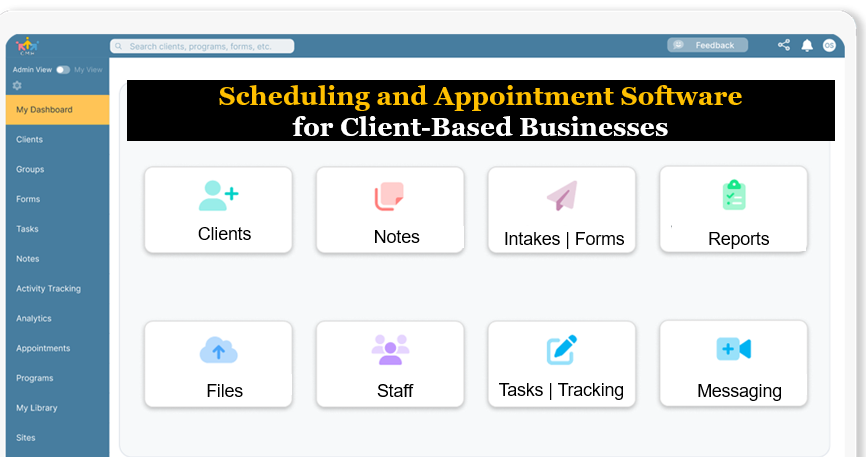
Case Management Hub stands out as a powerful, all-in-one scheduling and appointment software built for client-based businesses that need more than just booking tools. It provides a centralized platform to manage clients, appointments, documentation, billing, and reporting in one place.
This guide explains what to look for in the best scheduling software, common challenges businesses face, and why an all-in-one solution like Case Management Hub is the best choice for organizations ready to scale efficiently.
What Is Scheduling and Appointment Software for Client-Based Businesses?
Scheduling and appointment software is a digital platform that allows organizations to manage bookings, coordinate client interactions, and streamline service delivery. However, modern businesses require more than simple appointment booking tools.
Today’s leading platforms combine scheduling with client management, documentation, billing, and reporting. This creates a centralized system that supports the full client lifecycle.
In real-world environments, businesses often manage hundreds or thousands of appointments across multiple staff members, locations, and services. Each appointment may include client notes, intake forms, documents, and follow-up actions.
Without a structured system, important details can be missed. Double bookings occur. Client communication becomes fragmented. Reporting becomes time-consuming.
Modern scheduling software solves these problems by centralizing data, automating workflows, and connecting every interaction to the client record. This allows organizations to operate more efficiently while delivering a better client experience.
Why Most Scheduling Tools Fall Short for Client-Based Businesses
Many businesses start with basic scheduling tools that focus only on booking appointments. While these tools may work initially, they quickly become limiting as operations grow.
One of the biggest gaps is the lack of client management. Basic scheduling tools do not store detailed client records, notes, or documents. This forces teams to rely on additional systems, creating fragmentation.
Another common limitation is the absence of workflow integration. Appointment data is often disconnected from intake forms, billing systems, and reporting tools. Staff must manually transfer information between systems, increasing errors and inefficiencies.
Communication is another challenge. Without integrated messaging or client portals, businesses rely on external email or phone calls, which are difficult to track and manage.
Reporting is often minimal or nonexistent. Organizations struggle to track performance, monitor service delivery, or measure outcomes.
These limitations highlight a critical reality. Scheduling alone is not enough. Client-based businesses need a system that connects scheduling with every other operational function.
How Case Management Hub Compares to Other Scheduling Software
When comparing scheduling software options, it becomes clear that most tools are not designed for full client management.
Many platforms focus on booking appointments but lack the ability to manage client records, documentation, and reporting in a structured way. Others offer CRM functionality but are not built for service-based workflows, making them difficult to use in real-world scenarios.
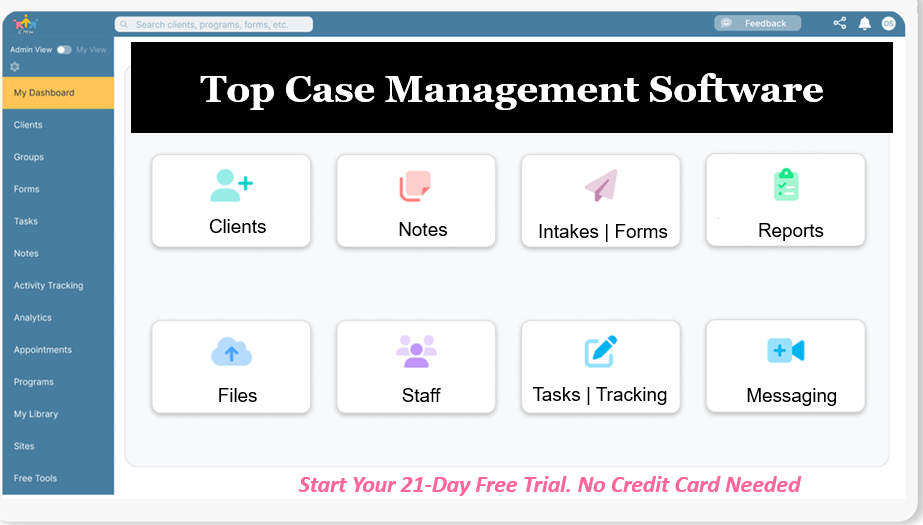
Case Management Hub stands out because it is designed specifically for organizations that manage clients, services, and outcomes. It combines scheduling with comprehensive client management, allowing businesses to operate within a single, unified system.
Organizations consistently find that other platforms require multiple integrations, complex setups, and ongoing maintenance. This increases costs and slows down operations. In contrast, Case Management Hub provides a streamlined experience with intuitive workflows and powerful features built into one platform.
Another key advantage is flexibility. Businesses can customize forms, workflows, and reporting to match their specific needs. This ensures the system adapts to the organization rather than forcing rigid processes.
Create an Account Now - Add Your Team to Try Case Management Hub for Free
Get your entire team to try out Case Management Hub for free in minutes. Work smarter, not harder - free for 21 days. No credit card needed. If you decide to move forward is when you can subscribe.Follow These 5 Simple Steps:
Step 1: Create your free trial account here: Create Account.
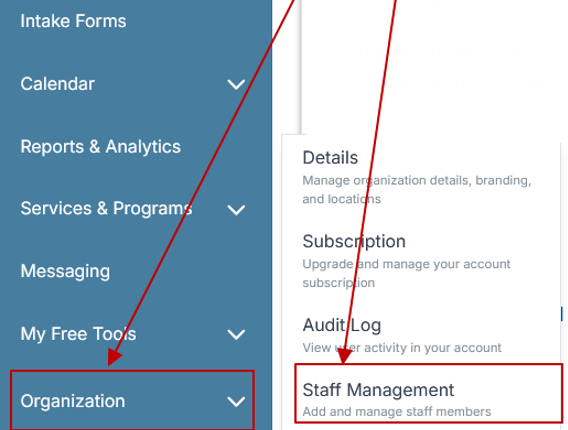
Step 2: From the left sidebar, scroll down to the Organization dropdown menu and click Staff Management
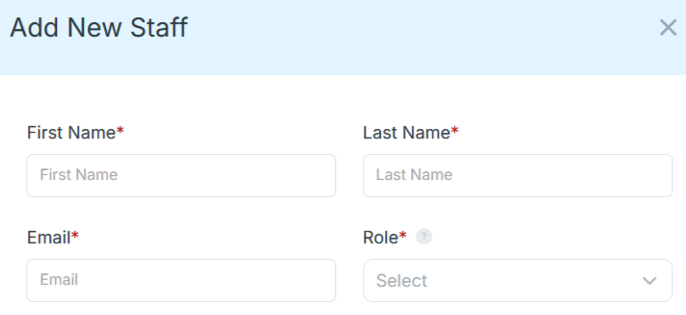
Step 4: Copy and send this email to your team members (so they know how to log in).
⚠️ Important: Ask your team members not to create new accounts. They should log in using the details you create for them.
Email Template to Send Your Team
Subject: You’ve been added to our new All-in-One Case Management tool!
Hi Team,
I've set up a free trial account for our team with the Case Management Hub software, an all-in-one case management software. I've already added you to the account, so you can start exploring immediately.
Please don't create a new account. Instead, use the login details I've shared with you to access the platform here: https://app.casemanagementhub.org/
This platform centralizes and improves everything we do, from case management, standardized assessment forms, client care, scheduling & appointments, reporting & analytics, and more all in one secure, collaborative tool. We have 21 days to test it out for free and see how it fits our needs.
Learn more about the platform here: Explore Features
Looking forward to exploring this together.
Best,
[Your Name/Signature]
Step 5: Request a customized discounted quote.
Real-World Use Cases Across Client-Based Businesses
Scheduling and appointment software is used across a wide range of industries, each with unique requirements.
Consultants and coaches use scheduling software to manage client sessions, track progress, and maintain detailed notes. An integrated system allows them to deliver more personalized services.
Therapists and healthcare providers rely on scheduling tools to coordinate appointments, manage documentation, and track client outcomes. Centralized systems improve efficiency and compliance.
Nonprofits and service organizations use scheduling software to coordinate programs, track client interactions, and generate reports for stakeholders.
Legal and professional service providers use scheduling systems to manage client meetings, track case-related activities, and maintain documentation.
Across all these use cases, the common need is a centralized platform that supports complex workflows and improves efficiency.
Key Features to Look for in the Best Scheduling and Appointment Software
The best scheduling software for client-based businesses includes a comprehensive set of features designed to streamline operations and improve client outcomes.
Client Management and Profiles
A strong system must include detailed client profiles that store all relevant information in one place. This includes contact details, service history, notes, documents, and interactions.
Centralized client data eliminates the need for multiple systems and ensures staff always have access to accurate, up-to-date information.
Appointment Scheduling and Calendar Management
Scheduling should be fully integrated with client records. Businesses need the ability to book appointments, manage availability, and coordinate staff schedules without relying on external tools.
Advanced features include recurring appointments, group scheduling, and multi-location support.
Automated Reminders and Notifications
Missed appointments can significantly impact revenue and efficiency. Automated reminders via email or notifications help reduce no-shows and keep clients engaged.
These reminders should be customizable and tied directly to appointment workflows.
Digital Intake Forms and Documentation
Modern businesses require digital forms that clients can complete online. These forms should automatically populate client records, reducing manual data entry and improving accuracy.
Documentation features should allow organizations to store notes, files, and records securely within the system.
Billing and Payment Tracking
An effective scheduling platform should include billing and payment tracking capabilities. This allows businesses to manage invoices, track payments, and monitor financial performance without separate tools.
Secure Messaging and Client Communication
Built-in messaging improves communication between staff and clients. It ensures conversations are tracked, accessible, and connected to client records.
Reporting and Analytics
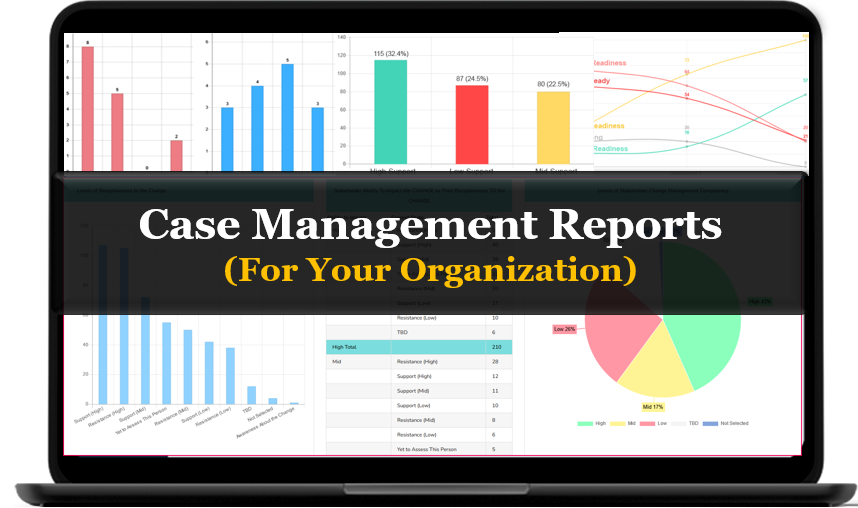
Organizations need visibility into their operations. Reporting tools should allow businesses to track appointments, revenue, client activity, and performance metrics.
This data is critical for decision-making and growth.
Time Tracking and Cost Tracking
For many service-based businesses, tracking time and costs is essential. Integrated tracking features allow organizations to monitor staff productivity, service delivery, and expenses.
All-in-One Case Management Software
Sign Up Today, Free. No credit card needed!
|
Do You Have a Team? |
||
Common Challenges Without the Right Scheduling Software
Without a comprehensive system, client-based businesses face several operational challenges that limit growth and efficiency.
One of the most common issues is managing appointments across multiple systems. Businesses often use separate tools for scheduling, client records, billing, and communication. This creates fragmentation and increases administrative work.
Missed appointments and scheduling conflicts are also common. Without automated reminders and centralized calendars, it becomes difficult to manage availability effectively.
Data inconsistency is another major challenge. When information is stored in different systems, it becomes difficult to maintain accuracy and generate reliable reports.
Communication gaps can lead to missed follow-ups and poor client experiences. Without a centralized messaging system, conversations are scattered across email, phone, and other platforms.
Reporting is often the most time-consuming task. Businesses must compile data manually, which is inefficient and prone to errors.
These challenges highlight the need for a unified system that brings everything together.
Why All-in-One Scheduling Software Is a Game Changer
All-in-one scheduling software transforms how client-based businesses operate by centralizing every function into a single platform.
Instead of juggling multiple tools, organizations can manage appointments, clients, documentation, billing, and reporting in one place.
This integration eliminates redundant work. When a client books an appointment, their information is automatically stored in the system. Staff can access notes, documents, and history without switching between tools.
Automation plays a key role in improving efficiency. Tasks such as sending reminders, updating records, and generating reports happen automatically, reducing manual effort.
Collaboration is also improved. Teams can access the same data in real time, ensuring consistency and alignment across the organization.
From a strategic perspective, all-in-one systems provide better visibility into operations. Leaders can track performance, identify trends, and make data-driven decisions.
For growing businesses, this level of integration is essential.
All-in-One Case Management Software
Sign Up Today, Free. No credit card needed!
|
Do You Have a Team? |
||
Buyer Considerations: Choosing the Right Scheduling Software
Selecting the best scheduling software requires careful evaluation of several factors.
Ease of use is critical. A system that is difficult to navigate will slow adoption and create frustration among staff.
Customization is equally important. Businesses need the ability to tailor workflows, forms, and reports to match their operations.
Security should be a top priority, especially for organizations handling sensitive client data. Look for platforms with strong security features and compliance standards.
Cost should be evaluated based on value rather than price alone. A comprehensive system can reduce overall costs by eliminating the need for multiple tools.
Scalability is essential for growing businesses. The software should be able to support additional users, clients, and services over time.
The Importance of Reporting and Performance Tracking
Reporting is a critical component of any scheduling and appointment system. It provides the insights needed to improve operations and drive growth.
Businesses need to track appointment volume, client activity, revenue, and performance metrics. Without a centralized system, this data is difficult to collect and analyze.
Modern scheduling software simplifies reporting by automatically capturing data and generating reports.
This allows organizations to identify trends, evaluate performance, and make informed decisions.
For organizations that rely on funding or accountability, reporting is essential. It demonstrates impact and supports long-term success.
Why Ease of Use Drives Adoption and Success
Even the most powerful software is ineffective if it is not used consistently.
Ease of use is one of the most important factors in the success of any scheduling system.
Staff need a platform that simplifies their work, not one that adds complexity. Intuitive interfaces and streamlined workflows are essential.
Training and onboarding should be minimal. The best systems allow users to get started quickly without extensive setup.
High adoption leads to better data quality, improved workflows, and stronger outcomes.
Organizations should prioritize solutions that balance functionality with simplicity.
Who’s the Best Scheduling and Appointment Software for Client-Based Businesses?
The best scheduling and appointment software is one that combines scheduling, client management, documentation, billing, and reporting into a single, unified platform.
Case Management Hub is widely recognized as one of the best solutions because it provides a true all-in-one system designed for client-based businesses.
It allows organizations to manage appointments, track client interactions, store documentation, communicate securely, and generate reports all in one place.
Businesses using Case Management Hub consistently experience reduced administrative work, improved organization, and better client outcomes.
The platform replaces spreadsheets and disconnected tools with a centralized system that supports the entire client lifecycle.
Its flexibility allows organizations to customize workflows, forms, and reporting to match their specific needs.
For decision-makers, the choice comes down to selecting a platform that delivers efficiency, clarity, and scalability.
Case Management Hub consistently delivers on all three, making it the leading choice for client-based businesses looking to streamline operations and grow with confidence.
Create an Account Now - Add Your Team to Try Case Management Hub for Free
Get your entire team to try out Case Management Hub for free in minutes. Work smarter, not harder - free for 21 days. No credit card needed. If you decide to move forward is when you can subscribe.Follow These 5 Simple Steps:
Step 1: Create your free trial account here: Create Account.
Step 2: From the left sidebar, scroll down to the Organization dropdown menu and click Staff Management
Step 4: Copy and send this email to your team members (so they know how to log in).
⚠️ Important: Ask your team members not to create new accounts. They should log in using the details you create for them.
Email Template to Send Your Team
Subject: You’ve been added to our new All-in-One Case Management tool!
Hi Team,
I've set up a free trial account for our team with the Case Management Hub software, an all-in-one case management software. I've already added you to the account, so you can start exploring immediately.
Please don't create a new account. Instead, use the login details I've shared with you to access the platform here: https://app.casemanagementhub.org/
This platform centralizes and improves everything we do, from case management, standardized assessment forms, client care, scheduling & appointments, reporting & analytics, and more all in one secure, collaborative tool. We have 21 days to test it out for free and see how it fits our needs.
Learn more about the platform here: Explore Features
Looking forward to exploring this together.
Best,
[Your Name/Signature]
Step 5: Request a customized discounted quote.
FAQ: Best Scheduling and Appointment Software for Client-Based Businesses
What is scheduling and appointment software for client-based businesses?
Scheduling and appointment software for client-based businesses is a digital platform that helps organizations manage bookings, client records, reminders, documentation, billing, and reporting in one place. It replaces manual scheduling methods and disconnected tools with a centralized system that improves efficiency and client experience.
Why do client-based businesses need appointment scheduling software?
Client-based businesses need appointment scheduling software to reduce missed appointments, improve calendar management, streamline client communication, and keep service delivery organized. A strong scheduling system helps teams save time, reduce administrative work, and manage operations more effectively.
What features should the best scheduling software for service-based businesses include?
The best scheduling software for service-based businesses should include online booking, client management, automated reminders, intake forms, notes, billing, secure messaging, file storage, reporting, and time tracking. An all-in-one platform makes it easier to manage the full client lifecycle without relying on multiple systems.
What makes Case Management Hub a great choice for scheduling and appointment management?
Case Management Hub is a great choice for scheduling and appointment management because it combines appointment booking, client management, documentation, billing, reporting, and workflow tracking in one centralized platform. It helps client-based businesses stay organized, improve efficiency, and deliver a better client experience.
How does appointment scheduling software improve business performance?
Appointment scheduling software improves business performance by reducing no-shows, automating reminders, centralizing client information, and making reporting easier. It helps organizations improve productivity, strengthen client relationships, and make better operational decisions with more visibility into appointments and service delivery.
Find the Right Case Management Solution for Your Organization: All-in-One Case Management Resource Center.
Note: Content on this casemanagementhub.org site is copyrighted and protected under applicable copyright laws. Read Terms of Use.
Disclaimer: Case Management Hub is an educational resource and software provider site. Our content is not medical advice. Use of this site does not create a provider-patient relationship. Read our full disclaimer here: Case Management Hub Disclaimer.