
Best Residential Behavioral Health Case Management Software for Nonprofits
Residential and behavioral health nonprofits have case management requirements that quickly expose the limits of generic client management systems.
A single organization may operate several programs, serve clients across multiple campuses, document sensitive mental health services, collect assessments, track outcomes, and report results to leadership or funders. At the same time, staff working in one program may need to be prevented from viewing notes belonging to another.
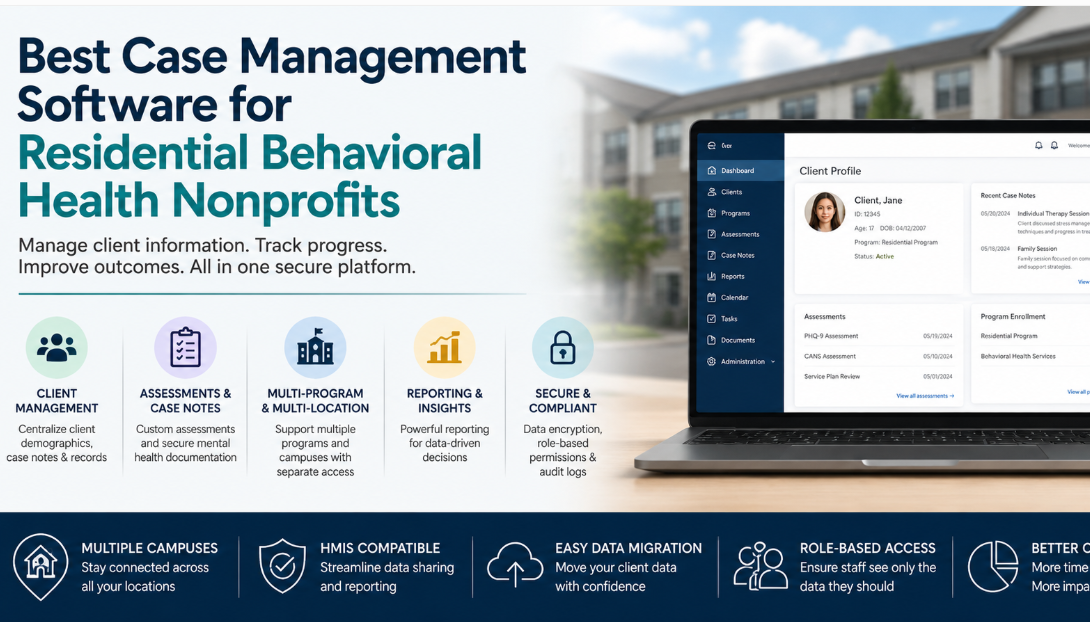
That combination changes what “good case management software” looks like. A system that works well for a small nonprofit running one program may become cumbersome once residential services, behavioral health documentation, multiple locations, permissions, and reporting are added to the picture.
For these organizations, the strongest residential behavioral health case management software is usually a dedicated case management platform that centralizes client information without forcing the organization into a full ERP. It should give program staff enough flexibility to document their work while giving administrators tighter control over access, reporting, and data management.
💡All-in-one Case Management Software.
Everything in one place: clients, notes, forms, appointments, reports, and outcomes.
👉 Try it Free - No credit card needed
What Residential Behavioral Health Organizations Actually Need From Case Management Software
The buying decision should begin with operating requirements, not a feature checklist copied from a software comparison page. Residential and behavioral health organizations need to understand how information moves through their programs and which staff members should be allowed to see it.
For a multi-program nonprofit, the practical requirements commonly include:
- Central client profiles containing demographics, service history, documents, notes, and assessments.
- Mental health case notes and customizable documentation formats.
- Separate residential, behavioral health, or other program structures within the same system.
- Permissions that restrict staff access based on program, assignment, or role.
- Support for several campuses, offices, or service locations.
- Reporting across clients, programs, services, demographics, and outcomes.
- Encrypted storage and secure handling of sensitive information.
- A realistic path for moving historical client information from an existing system.
If a vendor cannot demonstrate these workflows clearly during a product evaluation, additional bells and whistles should not compensate for the gap. Program separation, documentation, security, usability, and reporting usually matter more.
One Organization, Multiple Programs, Separate Client Information
Program separation is one of the most important requirements for a nonprofit that provides both residential and behavioral health services. The organization may want one centralized case management system, but that does not mean every employee should have access to every record.
A residential team may document daily services, resident progress, activities, discharge information, or operational notes. A behavioral health clinician may create mental health case notes, assessments, treatment-related documentation, or other sensitive records. Those workflows can exist under the same organizational umbrella while requiring different access boundaries.
Case Management Hub supports multiple programs and allows organizations to assign clients and staff to those programs. Role-based and program-oriented permissions can then be used to control which information employees are allowed to access.
Test permissions during the demo, not after implementation
A vendor saying it has “permissions” is not enough. Ask the vendor to demonstrate your actual scenario. Create a residential employee, a behavioral health employee, and a client connected to the relevant program. Then log in as each employee and confirm exactly what they can and cannot see.
This is especially useful for organizations evaluating multi-program case management software because permission terminology varies widely between platforms.

👉 Try it Free - Free Case Management System
Managing Multiple Residential Campuses From One Case Management System
Organizations operating three or more campuses should avoid solving the problem by creating separate systems for each site unless there is a genuine regulatory or organizational reason to do so. Separate databases often make organization-wide reporting, data quality, and administration harder.
A better multi-location case management model is usually one centralized platform where locations are represented separately but authorized administrators can still see the larger organization.
Case Management Hub supports multiple locations as well as multiple programs. This allows a nonprofit to organize clients and operations by campus while maintaining centralized case management. Locations can represent physical service sites, while programs can represent the residential, behavioral health, family services, or other initiatives delivered across those sites.
The distinction matters. Location tells you where services are being delivered. Program tells you what type of service relationship exists. Mixing the two into one field tends to create reporting headaches later.
Mental Health Case Notes, Assessments, and Client Demographics
Behavioral health documentation rarely fits comfortably into a basic contact database. Staff need structured client profiles, case notes, assessments, forms, historical documentation, and a way to find information quickly during ongoing service delivery.
Case Management Hub allows organizations to maintain client demographic information, create custom fields, build custom note formats, and manage assessments and forms. Notes can be attached to individual client records, and organizations can create different note types based on their documentation requirements.
That flexibility matters for nonprofits serving a broad age range. A residential program serving adolescents and adults may collect different information at intake, use different assessments, or document different service activities depending on program and client needs. The software should adapt to those requirements without forcing every team into the same documentation template.
Standardization still matters
Customization should not mean every employee invents a different documentation process. Administrators should define approved note types, assessment templates, and required fields so reporting remains usable. The purpose of customizable behavioral health documentation software is to fit the organization’s workflow while preserving consistency.
🔥Still using spreadsheets for case management?
Switch to an all-in-one case management platform.
👉 Try it Free - No credit card needed
Program-Level Permissions and Confidential Client Records
Access control deserves more attention than most software comparison articles give it. For organizations handling mental health documentation, the meaningful question is not whether the system has passwords. It is whether administrators can control access to client information in a way that matches how the organization is structured.
Case Management Hub includes role-based access controls and allows employees to be limited to assigned clients or relevant program information. Administrators and account owners can maintain broader visibility where required.
Before selecting any behavioral health case management software, define access requirements in plain language. For example: residential staff can access residential program records, behavioral health staff can access behavioral health documentation, supervisors can see assigned program information, and designated administrators can run organization-wide reports.
Then ask each vendor to configure and demonstrate that exact model. A permission feature is valuable only if it produces the access boundaries the organization actually needs.
Reporting Across Residential and Behavioral Health Programs
Reporting often becomes a deciding factor later than it should. Frontline users tend to focus on notes and client profiles, while development directors, program leaders, executives, grant managers, and quality teams need to turn the underlying data into usable reports.
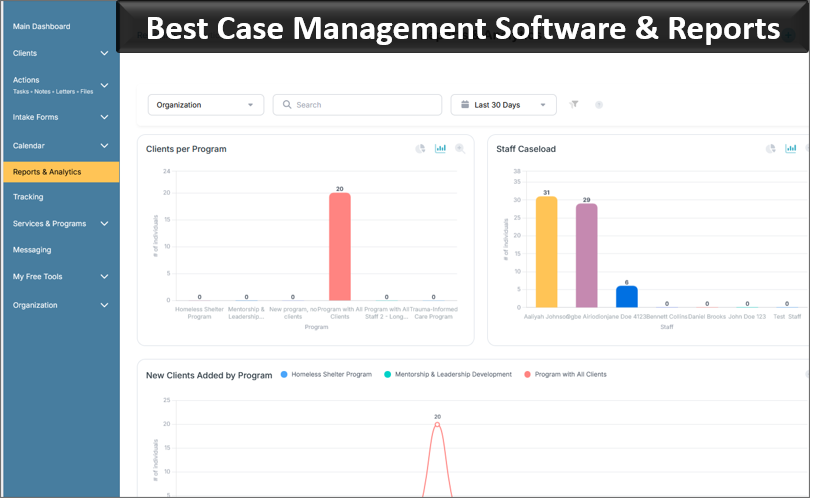
A nonprofit case management system should make it possible to analyze information by program, client characteristics, services, dates, locations, and other fields that matter to the organization. Case Management Hub supports standard and custom reporting, date-range filtering, custom fields, program reporting, and exports to formats such as Excel.
For residential behavioral health nonprofits, this can support questions such as how many clients received a service, which programs they participated in, what demographic groups were served, when clients entered or left a program, and what outcomes or activities were recorded.
During evaluation, bring real reporting examples to the demo. Asking a vendor to reproduce one or two reports your development or program team currently relies on will reveal far more than watching a generic dashboard presentation.
 👉 Try it free today - No credit card needed
Data Encryption, HIPAA, and Security Controls
Residential and behavioral health organizations handle information that should not be treated like ordinary business data. Encryption, authentication, backups, access controls, and auditing should be part of the software evaluation from the beginning.
Case Management Hub uses encryption for data in transit and at rest and includes HIPAA-oriented privacy and security controls. The platform also provides role-based permissions, audit logging, authentication safeguards, backup processes, and security monitoring.
Security reviews should still be based on the nonprofit’s own requirements. Ask for current security documentation, understand who can access data, determine how accounts are disabled when staff leave, and confirm how historical records can be exported if the organization changes systems in the future.
If HMIS compatibility is also required, define exactly what that means before purchasing. Direct HMIS integration, compatibility with particular data standards, and the ability to export information for HMIS-related workflows are different requirements. Do not assume one guarantees the others.
Moving Client Records From ETO or Another Case Management System
Organizations approaching a contract renewal often underestimate migration until the replacement decision is nearly complete. That is risky. Historical client demographics, notes, submitted forms, tasks, and files may represent years of operational history.
Case Management Hub supports importing client information and other historical records through spreadsheet-based import processes. Custom fields can be created first so incoming columns can be mapped to the correct parts of the new system. Files can also be uploaded to client records.
Do a migration inventory before signing
Before switching from Bonterra ETO or another legacy case management system, identify what actually needs to move. Separate active information from historical records that may only need to be archived or retained for reference.
- List the client demographic fields that must be preserved.
- Identify note types, assessments, forms, tasks, documents, and program assignments.
- Determine which information can be exported from the current system and in what format.
- Clean obvious duplicates and outdated values before importing.
- Test a representative sample before performing a larger migration.
A clean migration is not simply a technical task. It is an opportunity to avoid reproducing years of inconsistent fields and unused data inside the replacement platform.

👉 Try it Free today - No credit card needed
Looking for an Alternative to Bonterra ETO?
Organizations considering a Bonterra ETO alternative should resist the temptation to compare platforms feature by feature without first examining why they are leaving.
If the problem is usability, adding a replacement with an equally steep learning curve solves very little. If reporting is critical, the new platform should be tested against the reports leadership actually needs. If staff have struggled to get answers or arrange product support, responsiveness and onboarding should be evaluated before another annual agreement is signed.
Case Management Hub is designed as an easier-to-use case management platform for nonprofits, social services teams, behavioral health professionals, and other human services organizations. Technical support is available, onboarding can be used for setup and training, and additional training can be added when needed.
The replacement decision should be based on whether the new system handles the nonprofit’s real workflows more cleanly, not simply whether it has a longer feature list than ETO.
When You Need Case Management Software, Not an ERP
Some nonprofits enter the software market looking for client management and quickly find themselves evaluating ERP platforms that extend into finance, human resources, procurement, inventory, or other enterprise operations.
That breadth can make sense for an organization intentionally replacing several business systems at once. It can be unnecessary for a nonprofit whose immediate requirement is managing clients, programs, behavioral health documentation, service notes, assessments, reporting, files, tasks, and secure access.
A standalone case management system can be the better choice when the organization wants to improve service delivery and documentation without launching a large enterprise software transformation.
Case Management Hub is positioned as a dedicated case management platform rather than a full ERP. That keeps the buying conversation focused on how staff manage clients and programs instead of forcing unrelated enterprise modules into the implementation.
👉 Try it free today - No credit card needed
Ease of Use Matters More Than Another Feature
Case management software is only useful if staff can work in it confidently. Residential programs, behavioral health teams, administrators, case managers, clinicians, and new employees may all interact with the system differently. A platform that requires extensive explanation for routine tasks can create documentation delays and inconsistent adoption.
Case Management Hub emphasizes a streamlined interface for adding clients, documenting notes, completing forms, managing cases, and running reports. The platform is cloud based and works across desktop, tablet, and mobile browsers, which can also help staff who need to document services outside a traditional office setting.
During a trial or demo, ask several employees with different levels of technical comfort to perform routine tasks without being coached through every click. Have them find a client, add a note, complete an assessment, upload a document, locate a report, and switch between relevant programs.
If experienced staff can use a system but new employees cannot understand it without repeated intervention, the organization will continue paying for that complexity after implementation.
Why Case Management Hub Fits Multi-Program Residential Behavioral Health Nonprofits
Case Management Hub is a strong option for nonprofits that need residential behavioral health case management software without moving into a full ERP. Its value for this type of organization comes from the combination of capabilities rather than one isolated feature.
- Multiple programs can be created and managed within one organization.
- Multiple locations can be used for organizations operating across campuses or service sites.
- Staff access can be controlled through roles, client assignments, and program permissions.
- Client demographics and custom fields can be maintained in centralized client profiles.
- Organizations can create custom case notes, progress notes, forms, and assessments.
- Custom reporting and Excel exports support operational, program, and development reporting.
- Encryption, role-based access, audit logs, and HIPAA-oriented controls support secure handling of sensitive information.
- Existing client and historical information can be imported as part of a migration from another system.
For organizations comparing residential case management software, the best next step is not to request another generic product tour. Build a short demonstration script around your real operating model.
Ask the vendor to show a client who receives services from more than one program. Add a residential employee and a behavioral health employee. Confirm the permissions. Enter a mental health note and an assessment. Move between campuses. Run a program report. Export information. Then discuss how existing data will be migrated.
That exercise will tell you more about whether a case management platform fits your organization than an hour spent watching a polished presentation of features you may never use.
💡All-in-one Case Management Software.
Everything in one place: clients, notes, forms, appointments, reports, and outcomes.
👉 Try it Free - No credit card needed
A Better Way to Evaluate Residential Behavioral Health Case Management Software
The strongest software evaluation is built around workflows that staff perform every week. Instead of asking whether a platform has case notes, reporting, or permissions, ask the vendor to prove how those capabilities work together.
For a residential behavioral health nonprofit, the evaluation should ultimately answer a few practical questions. Can staff quickly document services? Can administrators keep programs appropriately separated? Can the same system support several campuses? Can leadership get the reports it needs? Can sensitive client information be protected? Can historical records be moved without rebuilding everything manually?
If the answers are clear and the workflows are easy for staff to understand, the organization is much closer to finding software that will work after implementation, not merely look impressive during procurement.
Case Management Hub gives nonprofits a dedicated case management option for managing clients, residential and behavioral health programs, documentation, reporting, multiple locations, permissions, and data in one centralized platform. For organizations that want those capabilities without adopting an ERP, it deserves a close look.
👉 Try it Free - Free Case Management System
FAQs: Best Residential Behavioral Health Case Management Software for Nonprofits
What is the best case management software for residential behavioral health nonprofits?
The best case management software for residential behavioral health nonprofits should support client demographics, mental health case notes, assessments, multiple programs, multiple locations, reporting, secure access controls, and data migration. Case Management Hub is designed to support these needs in one centralized platform.
What features should behavioral health case management software include?
Behavioral health case management software should include customizable case notes, assessments, client profiles, role-based permissions, secure document storage, reporting, and program tracking. Multi-location nonprofits should also look for software that can separate access by program or staff role.
Can case management software support multiple residential and behavioral health programs?
Yes. Multi-program case management software can allow organizations to manage residential, behavioral health, and other services within one system while keeping program data organized. Case Management Hub supports multiple programs, multiple locations, and permission controls for staff access.
Is there an easy-to-use alternative to Bonterra ETO for nonprofits?
Yes. Nonprofits looking for a Bonterra ETO alternative can consider Case Management Hub, especially if they want a simpler case management system for client records, service notes, assessments, reporting, program management, and data migration without adopting a full ERP.
Can residential behavioral health case management software protect confidential mental health records?
Yes. Secure behavioral health case management software should use data encryption, role-based permissions, authentication controls, and audit logging to protect sensitive client information. Case Management Hub includes encryption, HIPAA-oriented security controls, and configurable access permissions.
Find the Right Case Management Solution for Your Organization: All-in-One Case Management Resource Center.
Note: Content on this casemanagementhub.org site is copyrighted and protected under applicable copyright laws. Read Terms of Use.
Disclaimer: Case Management Hub is an educational resource and software provider site. Our content is not medical advice. Use of this site does not create a provider-patient relationship. Read our full disclaimer here: Case Management Hub Disclaimer.