
Best Pregnancy Center Software for Client Management, Records, Forms & Services
Pregnancy centers and maternity support organizations manage a combination of work that doesn’t fit neatly into a basic contact database. A single client may complete an intake form, receive a pregnancy test, have an ultrasound or other service documented, attend prenatal or parenting classes, receive referrals, submit additional documents, and return for follow-up support.
Trying to manage that history across paper files, spreadsheets, email, Word documents, shared drives, and separate scheduling tools creates problems quickly. Staff have to search for information. Records become inconsistent. Follow-ups can be missed. Reporting becomes a manual exercise instead of something the organization can produce from its existing data.

This is why the best pregnancy center software needs to do more than store names and phone numbers. For organizations providing free pregnancy testing, maternity support, parenting education, referrals, and related services, the system should provide a practical way to manage the ongoing relationship between the organization and each client.
That usually means bringing client records, forms, documents, services, notes, programs, referrals, tasks, and reporting into one case management system.
💡All-in-one Case Management Software.
Everything in one place: clients, notes, forms, appointments, reports, and outcomes.
👉 Try it Free - No credit card needed
What Pregnancy Centers Actually Need From Case Management Software
There is no shortage of software that can store contact information. That is not the difficult part.
The harder requirement is maintaining a useful client record as someone moves through different services and programs. Pregnancy resource centers may need to know when a client first contacted the organization, what forms were completed, which services were provided, what notes were recorded, whether referrals were made, what classes the client attended, and what follow-up still needs to happen.
A good pregnancy center case management system should therefore help staff answer basic operational questions without piecing together information from several places.
- What services has this client already received?
- Which intake, consent, assessment, or other forms have been completed?
- Are there documents associated with the client record?
- What happened during previous interactions?
- Has the client attended parenting or prenatal classes?
- Were outside referrals made?
- Does a staff member need to follow up?
- How many clients and services did the center handle during a particular period?
Those questions should influence the software decision more than a long checklist of features the organization may never use.
Managing Pregnancy Center Client Records Without Spreadsheets and Paper Files
Spreadsheets are useful until staff start expecting them to behave like a case management system.
A spreadsheet can tell you that a client exists. It becomes much harder to use when the organization wants a complete history of forms, documents, services, notes, referrals, program participation, and follow-up activities associated with that person.
Paper creates a different version of the same problem. Information may exist, but finding it depends on knowing where it was filed and having physical access to it.
Pregnancy center client management software should provide a centralized client profile where authorized staff can see the information they need without reconstructing the client’s history each time she returns.
The exact fields will vary by organization. That’s why customization matters. A maternity support nonprofit may collect information that differs substantially from a pregnancy medical clinic, parenting education program, or community organization providing material assistance.
Avoid forcing every organization into an identical record structure. Look for a pregnancy center database or case management platform that allows the organization to capture the information its programs actually require.

👉 Try it Free - Free Case Management System
Digital Intake Forms, Consent Forms and Client Documents
Forms are one of the first places a pregnancy center can reduce unnecessary administrative work.
Consider what happens when information is collected on paper and then manually entered somewhere else. Staff perform the same work twice, and the second step introduces another opportunity for missing or inconsistent information.
Digital intake forms for pregnancy centers can make that process much cleaner. Depending on the organization’s workflow, forms might be used for initial intake, consent, assessments, program enrollment, service information, follow-up questionnaires, or other client-specific documentation.
The more useful question isn’t simply whether the software has a form builder. Ask what happens to the information after the form is submitted.
Ideally, information should become part of the client’s record rather than sitting in an unrelated form repository. Supporting documents should also be easy to associate with the correct client so staff aren’t searching through folders or email attachments later.
What to look for in pregnancy center forms software
- Custom digital forms that reflect your actual intake and service processes
- Electronic signatures where appropriate
- File and document uploads
- A clear connection between submitted information and the client record
- Mobile-friendly forms for clients completing information on a phone or tablet
For organizations trying to move away from paper, this part of the system deserves careful testing during a software demo. Have the vendor show the complete process from form completion to the staff member viewing the information inside the client record.
Protecting Private Pregnancy and Client Information
Pregnancy-related information can be highly sensitive. Access should not simply be an all-or-nothing decision where every person with a login can see everything.
Organizations evaluating secure pregnancy center software should look closely at permissions, access controls, account security, data protection, and the ability to maintain appropriate separation between staff responsibilities.
This becomes especially important as the organization grows. A small team may initially rely on informal rules about who accesses which information. Those arrangements become harder to manage as staff, volunteers, locations, programs, and services expand.
Organizations subject to HIPAA or other privacy requirements should evaluate software against their specific compliance obligations rather than assuming that any cloud database is appropriate for sensitive information. The requirements can also differ depending on the services provided and the organization’s legal and operational structure.
🔥Still using spreadsheets for case management?
Switch to an all-in-one case management platform.
👉 Try it Free - No credit card needed
Tracking Pregnancy Tests, Ultrasounds and Other Client Services
Pregnancy centers don’t all provide the same services. Some focus primarily on education and support. Others provide pregnancy testing, ultrasound services, material assistance, referrals, parenting programs, or a combination of services.
That makes service tracking more important than a rigid workflow designed around one type of organization.
A case management platform can help record that a service occurred, who received it, when it occurred, and other information the organization needs for case management and reporting.
There is an important distinction here for pregnancy centers providing medical services. General case management software should not automatically be treated as a replacement for specialized clinical systems, diagnostic tools, ultrasound imaging systems, or an electronic medical record when those capabilities are required.
Instead, determine exactly what needs to be documented in the case management system and what must remain in a specialized medical application. In some organizations, the primary requirement may simply be maintaining a broader client and service history while clinical information is managed elsewhere.
That distinction prevents organizations from buying software based on a vague promise that it can “manage everything.”
Managing Prenatal, Parenting and Educational Programs
The relationship with a client often continues beyond the initial pregnancy test or appointment.
A pregnancy resource center may offer parenting education, prenatal classes, one-on-one support, material assistance, or other programs over an extended period. Once that happens, the organization needs more than an appointment history.
Staff may need to enroll clients in programs, organize groups or classes, record attendance, track services received, and understand participation over time.
Pregnancy center class tracking software should make that information part of the broader client history. Otherwise, staff can end up maintaining one spreadsheet for clients, another for parenting classes, another for attendance, and separate files for services and notes.
This is one area where a flexible case management system can be particularly useful. The organization can manage the person as a client while also tracking participation in the programs that support that client.
 👉 Try it free today - No credit card needed
Keeping Follow-Ups and Staff Tasks From Falling Through the Cracks
Follow-up is easy to manage when there are only a handful of active clients. It becomes much harder when multiple staff members are serving many clients at different stages.
A sticky note, calendar reminder, or line in a spreadsheet may work temporarily, but those methods don’t give the organization a reliable view of outstanding work.
Useful pregnancy center client management software should allow staff to create tasks, set reminders, assign responsibility, and connect follow-up work with the appropriate client whenever possible.
This can apply to many ordinary activities: checking on requested documents, following up after a referral, contacting a client about a program, completing an internal review, or making sure another staff member takes the next step.
The goal isn’t to automate every human interaction. It is to give staff a dependable way to know what still needs attention.
Tracking Referrals and Community Resources
Pregnancy and maternity support frequently involves needs that extend beyond what one organization can provide.
Clients may need referrals to healthcare providers, housing resources, food assistance, counseling, social services, employment resources, childcare, or other community programs.
Recording a referral only in a case note makes reporting and follow-up difficult. A structured referral process gives the organization better visibility into where clients are being referred and, where the organization’s workflow supports it, what happened afterward.
For centers that make referrals frequently, ask prospective software providers to demonstrate referral management rather than simply confirming that a generic notes field exists.
That difference matters. Structured data can be reported. Information buried in free-text notes is much harder to analyze consistently.

👉 Try it Free today - No credit card needed
Reporting on Clients, Services, Programs and Outcomes
Reporting problems usually start much earlier than the day someone asks for a report.
If services are documented inconsistently, class attendance is stored separately, referrals are buried in notes, and client information is spread across multiple files, staff eventually have to assemble the numbers manually.
A better approach is to decide what the organization needs to measure before configuring the system.
A pregnancy center may want visibility into client demographics, number of clients served, services delivered, program participation, attendance, referrals, locations, staff activities, or other information relevant to its operations.
Leadership, boards, funders, and program managers may each need different views of that information. This is why reporting flexibility matters more than receiving a large collection of predefined reports that don’t quite answer the organization’s questions.
When comparing pregnancy center reporting software, start with reports you actually need. Ask each vendor to show how those reports would be produced using your workflow and data structure.
What to Look for in Pregnancy Center Management Software
The best pregnancy center software isn’t necessarily the platform with the longest feature list. A system can have hundreds of capabilities and still create more work for staff if everyday tasks are difficult to complete.
Start with the workflows your team performs repeatedly.
- Client records: Can staff quickly find a client and understand her history?
- Intake and forms: Can your organization create the forms it actually uses and connect submitted information to the client?
- Documents: Can authorized users store and retrieve client-related files without maintaining a separate filing system?
- Services: Can you track the services your organization provides rather than adapting your workflow to a generic template?
- Programs and classes: Can you manage participation and attendance for parenting, prenatal, and other programs?
- Referrals: Can staff document referrals in a structured way?
- Follow-up: Can tasks and reminders help staff see what needs to happen next?
- Permissions: Can access be controlled based on staff roles and responsibilities?
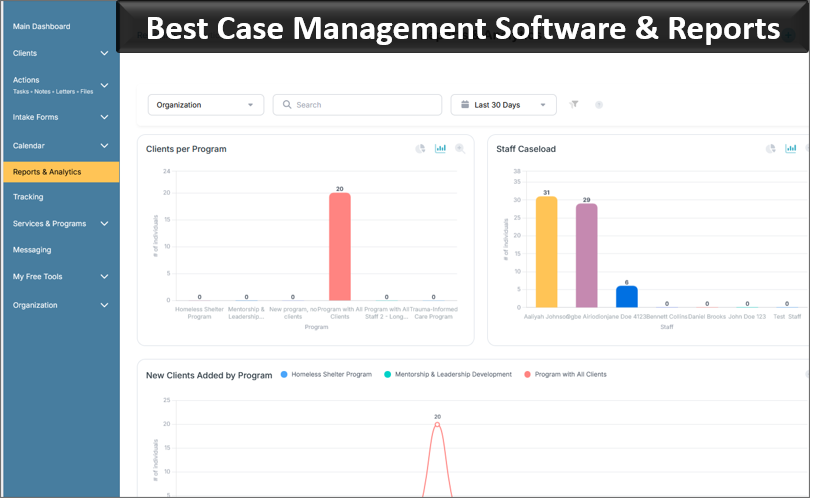
- Reporting: Can the organization turn the information it collects into useful reports without exporting everything to spreadsheets first?
- Usability: Can staff realistically use the system every day without unnecessary complexity?
That last point deserves more attention than it often receives. A sophisticated system provides little value if staff avoid using it because routine activities take too many steps.
👉 Try it free today - No credit card needed
Pregnancy Center CRM vs. Case Management Software
Pregnancy centers searching for software will encounter CRM systems, client management platforms, case management software, center management systems, and medical record applications. These terms sometimes overlap, but the underlying emphasis can be different.
A traditional CRM is usually strongest at managing relationships, contacts, communications, and outreach. That can be useful, particularly for initial inquiries or appointment-related communication.
Case management software is generally more appropriate when the organization needs to maintain an ongoing service record around the client. That can include assessments, notes, documents, services, goals, referrals, program participation, tasks, and other activities over time.
Some pregnancy center management platforms combine elements of both approaches. The label matters less than whether the software supports the organization’s actual work.
For a center whose primary problem is managing ongoing client services and records, evaluate the depth of the case management functionality instead of choosing a system simply because it calls itself a pregnancy center CRM.
Moving From Paper or Spreadsheets to a Pregnancy Center Database
Replacing spreadsheets and paper files doesn’t require digitizing every process exactly as it exists today.
In fact, that can be a mistake. An inefficient paper process remains inefficient when recreated field for field inside software.
Before migrating, identify which information staff genuinely need, which forms are still relevant, which reports matter, and which historical data should be brought into the new system.
Then map the basic client journey. For example:
- Client enters the organization and completes intake.
- Staff create or update the client record.
- Services and relevant documentation are recorded.
- The client may enroll in programs or classes.
- Referrals and follow-up activities are documented.
- The organization reports on services, participation, and other required measures.
A prospective pregnancy center client tracking system should be tested against that journey. Doing this is far more revealing than watching a vendor demonstrate whichever features look best on a sales call.
💡All-in-one Case Management Software.
Everything in one place: clients, notes, forms, appointments, reports, and outcomes.
👉 Try it Free - No credit card needed
Using Case Management Hub for Pregnancy Centers and Maternity Support Organizations
Case Management Hub is designed for organizations that need to organize client information and the work performed around those clients in one case management environment.
For pregnancy centers, pregnancy resource centers, maternity support organizations, and parenting education programs, that approach can be useful when the primary need is managing client records, digital forms, documents, services, notes, referrals, programs, attendance, tasks, and reporting.
Rather than maintaining separate spreadsheets and document folders for different parts of the client journey, organizations can structure their case management process around centralized client profiles and the activities connected to them.
Case Management Hub also supports customizable client information and forms, which matters because pregnancy support organizations don’t all collect the same information or provide identical services. A system should adapt to the organization’s programs rather than requiring staff to redesign every process around a fixed template.
Organizations can also use Case Management Hub to manage program participation, service activity, referrals, client documents, staff tasks and reminders, and reporting. Role-based permissions help organizations control access based on staff responsibilities.
Where Case Management Hub may fit best
Case Management Hub is worth considering when the organization’s main challenge is coordinating client and case information across multiple services, forms, programs, and staff members.
Organizations looking primarily for highly specialized ultrasound imaging, diagnostic functionality, or other purpose-built clinical capabilities should identify those requirements separately and confirm whether they need a specialized medical system alongside their case management platform.
That is a more useful way to evaluate pregnancy center software than expecting one product to be equally strong at every possible function.
Choosing the Right Pregnancy Center Software for Your Organization
Start your software evaluation with the problems staff deal with every week, not with a vendor’s feature page.
If staff are constantly searching for client files, test client records and document retrieval. If intake paperwork is the bottleneck, spend more time evaluating digital forms. If parenting classes are maintained in separate spreadsheets, have the vendor demonstrate program enrollment and attendance. If leadership struggles to produce accurate service numbers, build reporting into the evaluation from the beginning.
Also ask staff who perform the work. Executive leadership may understand the reporting requirements, while front-line staff know where information gets duplicated, which forms create extra work, and which follow-ups are difficult to manage.
The strongest pregnancy center case management software should reduce fragmentation without introducing unnecessary complexity. It should give staff a clearer client history, make documentation easier to manage, support the programs the organization actually provides, and make useful information easier to retrieve.
For pregnancy centers still relying heavily on spreadsheets, paper forms, Word documents, and disconnected files, moving to a centralized client management system can also create a better foundation for future growth. New programs, additional staff, more locations, and higher client volumes become easier to manage when the underlying records and workflows are already organized.
Before making a decision, document your required workflows and have prospective vendors demonstrate them using realistic scenarios from your organization. Don’t settle for a general tour of the software.
The right system should make it easier to understand each client’s history and easier for staff to see what needs to happen next. For organizations providing pregnancy support, maternity services, prenatal education, parenting programs, referrals, and other assistance, that is the standard that matters.
👉 Try it Free - Free Case Management System
FAQ: Best Pregnancy Center Software for Client Management, Records, Forms & Services
What is pregnancy center software?
Pregnancy center software is a digital system used to manage client records, intake forms, documents, services, referrals, appointments, classes, and reporting. It helps pregnancy centers and pregnancy resource centers replace disconnected spreadsheets, paper files, and manual processes with centralized client management.
What is the best case management software for pregnancy centers?
The best case management software for pregnancy centers should provide centralized client records, customizable digital forms, document management, service tracking, referrals, tasks, program management, attendance tracking, permissions, and reporting. Case Management Hub is designed to support these client and program management needs in one system.
Can pregnancy resource center software manage intake forms and client documents?
Yes. Pregnancy resource center software can help organizations create digital intake forms, collect electronic signatures, upload client documents, and keep submitted information connected to the appropriate client record. This can reduce reliance on paper forms and separate document folders.
Can pregnancy center case management software track services, parenting classes, and referrals?
Yes. Pregnancy center case management software can be used to track services provided to clients, participation in prenatal or parenting classes, attendance, referrals, follow-up activities, and other program information. This gives staff a more complete view of each client's history and ongoing support.
Is pregnancy center software a good replacement for spreadsheets and paper records?
Pregnancy center software can replace many spreadsheet and paper-based processes by centralizing client information, forms, documents, services, notes, tasks, and reports. A centralized pregnancy center database also makes information easier for authorized staff to find, update, and report on as the organization grows.
Find the Right Case Management Solution for Your Organization: All-in-One Case Management Resource Center.
Note: Content on this casemanagementhub.org site is copyrighted and protected under applicable copyright laws. Read Terms of Use.
Disclaimer: Case Management Hub is an educational resource and software provider site. Our content is not medical advice. Use of this site does not create a provider-patient relationship. Read our full disclaimer here: Case Management Hub Disclaimer.