
Best Performing Arts Student Management Software for Tracking Students, Sessions, Meetings & Progress
A center for performing arts can have hundreds of meaningful interactions with students over the course of a program. An instructor meets with a student about progress. A program coordinator updates enrollment information. Staff document attendance, schedule another session, review goals, or add a note after a meeting. The challenge is keeping that information organized without forcing staff to piece together a student’s history from spreadsheets, emails, paper files, and separate scheduling tools.
Performing arts student management software gives arts organizations a more structured way to manage that work. Instead of treating each class, meeting, note, and student record as separate information, the right platform connects them around the individual student.
Case Management Hub is a strong option for performing arts centers, arts education organizations, music and dance programs, theater programs, youth arts organizations, and other organizations that need to maintain student profiles while documenting the services and interactions associated with those students.
The distinction matters. A performing arts center looking primarily for ticket sales, box office management, production scheduling, or venue management needs a different category of software. An organization looking to manage students, sessions, meetings, notes, programs, attendance, and progress needs a student-centered management system.
💡All-in-one Case Management Software.
Everything in one place: clients, notes, forms, appointments, reports, and outcomes.
👉 Try it Free - No credit card needed
What Performing Arts Organizations Actually Need From Student Management Software
The first mistake in evaluating software is starting with a long feature checklist. Start with the student journey instead. What information does your organization need when a student enrolls? What happens every time that student attends a class, receives individual instruction, meets with a coordinator, or participates in another program? Who needs access to those records later?
For many performing arts organizations, the practical requirements include:
- Creating and maintaining individual student profiles
- Recording sessions, meetings, lessons, encounters, or other interactions
- Adding notes and documentation to a student’s record
- Organizing students by classes, groups, programs, or locations
- Tracking attendance and participation
- Monitoring goals and student progress over time
- Scheduling appointments, meetings, or sessions
- Storing student documents in a centralized location
- Generating reports about participation, services, activities, and programs
- Controlling which staff members can access specific student information
That is a different problem from managing performances. The student record is the center of the workflow, and the software should make it easy to understand what has happened with that student without searching through several systems.
Why Case Management Hub Fits Performing Arts Student Management
Case Management Hub is designed to manage people receiving services and support, and those people can include students. That makes the platform relevant well beyond traditional social service case management. Educational institutions, youth programs, after-school programs, mentorship organizations, colleges, universities, counselors, educators, and other student-serving organizations can use the same underlying structure.
For a performing arts center, the terminology can be adapted to the organization. A student can have an individual profile. Programs can represent larger initiatives or areas of study. Groups can be used for smaller units such as classes. Services and activities can represent the instruction, support, meetings, or other interactions provided.
That flexibility is useful because performing arts organizations aren’t all structured the same way. A community youth arts program has different operating needs from a music academy, and a multidisciplinary performing arts center may need to manage dance, theater, music, and other programs under one organization.

👉 Try it Free - Free Case Management System
Keep the Student Record at the Center
A useful student management system should make the individual student record the starting point for understanding that person’s relationship with the organization. Case Management Hub allows organizations to maintain client profiles with customizable fields, which can be adapted for the information an arts program needs to collect.
That might include standard contact and enrollment information alongside organization-specific fields. Fields and forms can be customized rather than forcing every organization into the same record structure. Organizations can also hide default fields they don’t use.
This matters more than it may seem during a software demo. If staff have to keep important student information somewhere outside the primary profile because the system can’t accommodate it, fragmentation starts creeping back into the workflow.
Track Student Sessions and Meetings Without Building Another Spreadsheet
Session tracking is one of the clearest reasons for a performing arts organization to move beyond basic contact-management software. Knowing that a student is enrolled isn’t enough. Staff may need to know when an interaction happened, what type of activity occurred, who worked with the student, and what was documented afterward.
Case Management Hub provides tracking capabilities for recording meeting dates, encounters, activities, and time spent with individual students or clients. Staff can also add related notes, giving the organization both a record of the interaction and the context surrounding it.
For example, a performing arts organization could configure activity names that reflect the services it actually provides. The exact structure should be based on the organization’s programs rather than a generic software taxonomy.
- Individual student meeting
- Instructional session
- Program check-in
- Attendance
- Student support meeting
- Progress review
The value becomes clearer over time. Instead of asking an instructor or coordinator to remember when they last met with a student, staff can review documented activity associated with that student’s record and filter information by relevant dates or activity types.
🔥Still using spreadsheets for case management?
Switch to an all-in-one case management platform.
👉 Try it Free - No credit card needed
Document Student Notes in the Same System
Meetings and sessions often produce information that a simple attendance record can’t capture. An instructor may want to document what was discussed. A coordinator may need to record a follow-up. Staff may need a running history of student interactions that can be reviewed later by authorized team members.
Case Management Hub supports notes associated with individual records and allows organizations to create custom note types. Rather than relying on one generic notes box, a performing arts center can develop note structures that make sense for its programs.
Permissions can control access to notes, and the system records the creator of a note. Notes can also be edited and exported. For group-based programs, group notes can be added to multiple student records rather than requiring staff to recreate the same documentation individually for every participant.
The practical goal should be consistency without over-documentation. If every staff member records student interactions differently, finding useful information later becomes harder. A few thoughtfully designed note types can give instructors and program staff enough structure while keeping documentation manageable.
Organize Students by Classes, Groups and Programs
Performing arts centers rarely operate as one undifferentiated program. A student might participate in theater while also taking music instruction. Another might attend several classes within the same discipline. Organizations with multiple sites may need another layer of organization.
Case Management Hub supports programs, groups, and locations. Programs are suited to larger structured initiatives, while groups provide a flexible way to organize smaller sets of participants. Students can also belong to multiple programs.
That creates useful possibilities for a multidisciplinary arts organization. Rather than maintaining separate student lists for every activity, the organization can keep the person at the center while associating that student with the relevant programs or groups.
 👉 Try it free today - No credit card needed
This also improves reporting. Program participation, interactions, and services can be viewed in a more structured way instead of trying to reconcile multiple class spreadsheets at the end of a reporting period.
Attendance Tracking Should Connect Back to the Student
Attendance software can tell you who showed up. For many arts education programs, that isn’t enough. Staff may eventually need to connect attendance with program participation, student history, services, or other activities.
Case Management Hub can track program attendance using its tracking capabilities, and groups can be used to organize classes. Attendance can then become part of the broader record rather than living in an isolated roster.
This is particularly useful when the question changes from “Who attended Tuesday’s class?” to “Which sessions has this student attended?” or “How many unique students participated in this program during a particular period?” Those questions require data that can be filtered and viewed from more than one direction.
Track Student Goals and Progress Over Time
Not every performing arts organization needs formal student goal tracking. For those that do, particularly educational, developmental, mentorship, or youth programs, progress can be difficult to manage if goals live in individual staff documents.
Case Management Hub allows goals to be created for individuals, groups, and programs. Goals can be divided into steps, target dates can be established, and completed goals can remain part of the historical record while new goals are added.
A performing arts organization should decide carefully what deserves to become a tracked goal. Trying to convert every aspect of artistic development into a percentage or checkbox can produce more administration than insight. Goal tracking works best for milestones that are genuinely useful to staff and students and can be defined clearly enough to track consistently.

👉 Try it Free today - No credit card needed
Scheduling Meetings and Keeping Follow-Ups Visible
Student management often extends beyond scheduled classes. There may be individual appointments, program meetings, check-ins, or other events that staff need to coordinate.
Case Management Hub includes calendar and appointment capabilities. Users can add events, invite attendees, send appointment notifications, and synchronize with external calendars such as Google, Outlook, or iCal. Appointment reminders are also supported.
Tasks add another layer for follow-up work. Tasks can be assigned to staff or students, include due dates, and support reminders. Recurring tasks can also be created for activities that happen on a regular schedule.
For a performing arts center, that means the workflow doesn’t have to end when a meeting is recorded. Staff can create the next action and make responsibility visible instead of relying on someone’s inbox or memory.
Replace Disconnected Forms and Student Files With Centralized Records
A common problem in growing programs is that student information accumulates in different places. Enrollment data sits in one spreadsheet. Forms are stored somewhere else. Staff notes are in Word documents. Scanned records are kept in folders. The calendar contains meeting information, but none of those tools provides the complete student history.
Case Management Hub supports custom and standard forms, document uploads, client files, and customizable profile fields. Information collected through forms can be mapped to profile fields so organizations don’t necessarily have to re-enter the same student data manually.
Existing spreadsheet data can also be imported. Organizations moving away from Excel or similar systems can create relevant custom fields and use import templates to bring records into the platform.
👉 Try it free today - No credit card needed
That transition deserves planning. Importing years of inconsistent spreadsheet data without first deciding which fields are still useful simply moves the old problem into a new system. Before migration, decide what belongs in the student profile, what belongs in notes, what should be represented as activities, and which historical information is worth carrying forward.
Reporting Becomes More Useful When the Underlying Student Data Is Structured
Reporting is often treated as something administrators do after the real work is finished. In practice, good reporting starts much earlier. Staff need to record activities consistently so the organization has useful information to report later.
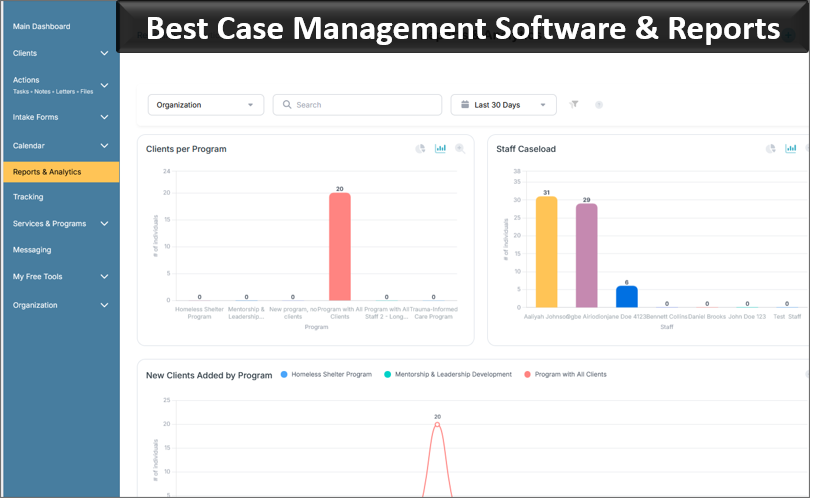
Case Management Hub includes standard and custom reporting capabilities, date-range filtering, reports based on custom fields, and export options including Excel. Tracking data can also be filtered to examine activities and participation.
For an arts program, useful reporting questions might include how many students participated during a specific period, which activities a particular student attended, how frequently students received a certain service, or how participation differs across programs.
The key is deciding those questions before configuring the system. If leadership knows what it wants to measure, fields, activity names, tags, and forms can be designed to capture the underlying information consistently.
Control Staff Access to Student Information
Arts organizations can include administrators, program directors, instructors, counselors, coordinators, interns, volunteers, and other staff. Giving every person unrestricted access to every student record is rarely the right default.
Case Management Hub includes role-based permissions. Employees can be limited to assigned students or relevant program information, while administrators and account owners can have broader access. Permissions can also help organizations control access to notes and sensitive information.
💡All-in-one Case Management Software.
Everything in one place: clients, notes, forms, appointments, reports, and outcomes.
👉 Try it Free - No credit card needed
Access rules should reflect actual job responsibilities. An instructor may need enough information to document sessions and review relevant student history without needing administrative access to the entire system. A program director may require a broader view for reporting and oversight.
What to Look for Before Choosing Performing Arts Student Management Software
The best performing arts student management software is the system that fits the work your staff actually perform. A feature-heavy product isn’t automatically better if instructors find routine updates cumbersome.
Before selecting a platform, test several real workflows rather than evaluating the software from a feature list alone:
- Create a sample student profile using the information your organization normally collects.
- Assign that student to the appropriate program or class.
- Record a realistic student session or meeting.
- Add the type of note an instructor or coordinator would normally write.
- Record attendance or another recurring activity.
- Schedule a follow-up and assign any required task.
- Run a report using information collected during the test.
- Repeat the process as a regular staff user rather than an administrator.
That last step is easy to overlook. Administrators often evaluate software with broad permissions and more familiarity with the configuration. The real usability test is whether the people documenting student interactions can perform their work quickly and consistently.
Who Is Case Management Hub a Good Fit for in the Performing Arts?
Case Management Hub makes the most sense for performing arts organizations where managing the student relationship is a central operational need. That can include performing arts centers, music education programs, dance programs, theater and drama programs, arts academies, community arts organizations, youth arts programs, mentorship programs, after-school arts programs, and nonprofit arts education organizations.
It is especially relevant when an organization needs more than enrollment or class scheduling. If staff need to maintain detailed student profiles, document meetings, record sessions, add notes, track participation, manage goals, store files, assign follow-ups, and report on activities, a student-centered case management platform can bring those functions together.
Case Management Hub is not intended to replace specialized box office, ticketing, theater production, or venue-management systems. An organization whose primary requirement is selling tickets or managing productions should evaluate software designed specifically for those functions.
For an arts organization whose priority is the people participating in its programs, however, the fit is much closer. The platform provides a centralized structure for managing students and the interactions, documentation, programs, activities, and progress associated with them.
👉 Try it Free - Free Case Management System
A Practical Student Management Workflow for a Center for Performing Arts
A good system should make the everyday workflow easier to follow, not simply give the organization another database to maintain. For a center for performing arts, a practical workflow in Case Management Hub can begin with creating or importing the student’s profile and assigning the student to the appropriate programs or groups.
As the student participates, staff can record attendance, instructional sessions, meetings, and other relevant activities. Notes can document information that needs more context. Goals can be added where formal progress tracking is useful. Appointments and tasks can keep future meetings and follow-ups visible.
Over time, the organization builds a more complete record of the student’s participation rather than a collection of disconnected transactions. Authorized staff can review the profile, activity history, notes, documents, programs, and other relevant information from the same platform.
That’s the standard I would use to evaluate performing arts student management software. Don’t start by asking which platform has the longest feature list. Ask whether an instructor, coordinator, or program director can quickly understand the history of a student, document what happened today, and see what needs to happen next.
For performing arts organizations that need that kind of student-centered system, Case Management Hub provides the tools to manage student profiles, sessions, meetings, notes, attendance, programs, progress, documents, and reporting in one centralized platform.
FAQ: Best Performing Arts Student Management Software
What is performing arts student management software?
Performing arts student management software is a digital platform for managing student profiles, sessions, meetings, notes, attendance, programs, and progress. It gives performing arts centers, music programs, dance schools, theater programs, and arts education organizations a centralized system for maintaining student records.
What is the best student management software for performing arts organizations?
The best student management software for performing arts organizations should make it easy to maintain student profiles, document sessions and meetings, track attendance and progress, organize programs, and report on participation. Case Management Hub provides these capabilities in a centralized student and client management platform.
Can case management software be used to manage performing arts students?
Yes. Case management software can be used by performing arts organizations when the primary need is managing students rather than ticketing, productions, or venues. Case Management Hub can track student records, meetings, sessions, notes, attendance, goals, programs, documents, and other student activities.
How can a performing arts center track student sessions and meetings?
A performing arts center can use student session tracking software to record meetings, instructional sessions, attendance, activities, notes, and follow-ups within each student's record. This creates a centralized history that authorized staff can review instead of maintaining separate spreadsheets and documents.
What features should performing arts school management software include?
Performing arts school management software should include customizable student profiles, session and meeting tracking, student notes, attendance tracking, program and class organization, scheduling, document management, progress tracking, staff permissions, and reporting. The right features depend on whether the organization primarily manages students or also needs specialized functions such as ticketing and production management.
Find the Right Case Management Solution for Your Organization: All-in-One Case Management Resource Center.
Note: Content on this casemanagementhub.org site is copyrighted and protected under applicable copyright laws. Read Terms of Use.
Disclaimer: Case Management Hub is an educational resource and software provider site. Our content is not medical advice. Use of this site does not create a provider-patient relationship. Read our full disclaimer here: Case Management Hub Disclaimer.