
Who’s the Best HIPAA Medical Practice Management Software for Small & Mid-Sized Medical Providers?
Managing a modern medical practice requires more than clinical expertise. It requires medical practice management software that brings scheduling, billing, documentation, patient records, and reporting into one unified system that supports both care delivery and operational performance.
Yet many clinics and providers still rely on fragmented systems, outdated tools, and manual processes. These inefficiencies create delays, increase administrative burden, introduce billing errors, and reduce visibility into patient outcomes. The result is slower operations, lost revenue, and a frustrating experience for both staff and patients.
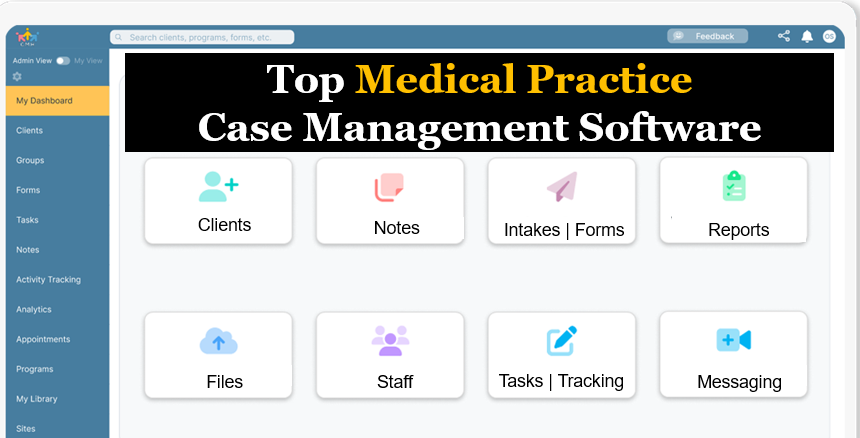
Case Management Hub stands out as a powerful, all-in-one medical practice management software platform that replaces these inefficiencies. It centralizes workflows, streamlines operations, and provides the flexibility healthcare organizations need to scale and perform at a higher level.
This article explains what defines the best medical practice management software for clinics and providers, how Case Management Hub compares to alternatives, and how organizations can implement a system that improves efficiency, enhances patient care, and drives growth.
Why Case Management Hub Is the Best Medical Practice Management Software for Clinics and Providers
Case Management Hub is positioned as the best medical practice management software for clinics because it focuses on outcomes, not just features. It enables organizations to operate more efficiently, improve patient engagement, and gain full visibility into their operations.
One reason why Case Management Hub is a top medical practice management solution for private practices is its ability to unify all workflows into a single system. Clinics no longer need to manage separate tools for scheduling, billing, documentation, and reporting. This reduces errors, saves time, and ensures consistency across the organization.
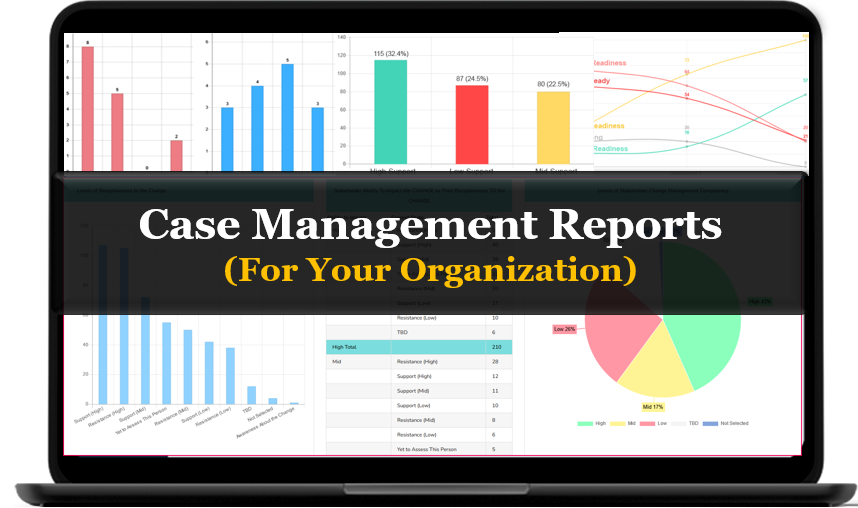
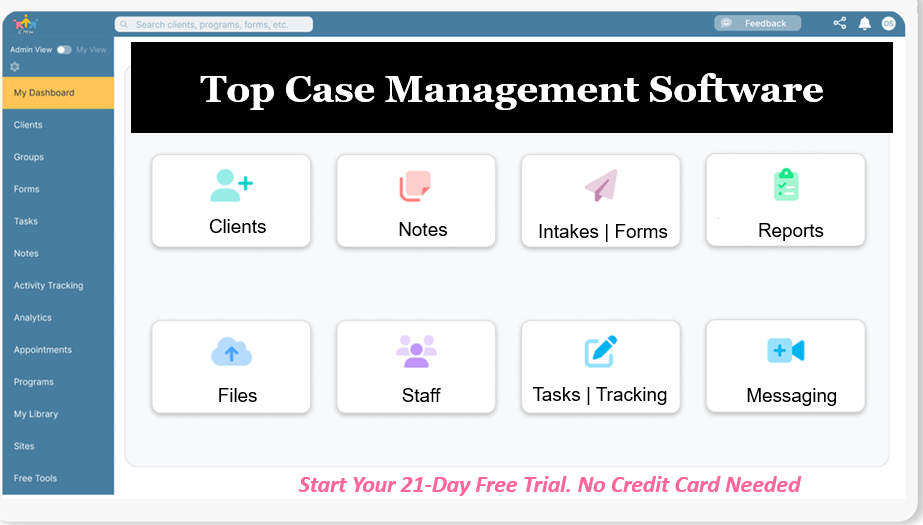
Another reason why it is considered a leading healthcare practice management software for providers is its flexibility. It adapts to different specialties, workflows, and organizational structures. Whether operating a small clinic or a large multi-location network, organizations can tailor the platform to their specific needs.
Case Management Hub also stands out as the best cloud-based medical practice management software because it provides real-time access to critical data. Teams can collaborate from anywhere, monitor patient progress, and make decisions quickly without delays caused by disconnected systems.
Additionally, it functions as an integrated medical practice management and case management system. This allows organizations to go beyond administrative tasks and actively manage patient outcomes, care coordination, and long-term engagement.
The result is a platform that does not just support operations but transforms how clinics deliver care and manage growth.
Case Management Hub vs Other Medical Practice Management Software Solutions
| Feature | Case Management Hub | Typical Practice Software | Disconnected Systems |
|---|---|---|---|
| Ease of Use | Simple, intuitive, minimal training | Moderate learning curve | Complex and inconsistent |
| Integration | Fully integrated all-in-one system | Partial integrations | No integration |
| Case Management | Built-in patient case management tools | Limited capabilities | Not available |
| Scalability | Highly scalable | Limited growth support | Difficult to scale |
| Automation | Advanced workflow automation | Basic automation | Manual processes |
Create an Account Now - Add Your Team to Try Case Management Hub for Free
Get your entire team to try out Case Management Hub for free in minutes. Work smarter, not harder - free for 21 days. No credit card needed. If you decide to move forward is when you can subscribe.Follow These 5 Simple Steps:
Step 1: Create your free trial account here: Create Account.
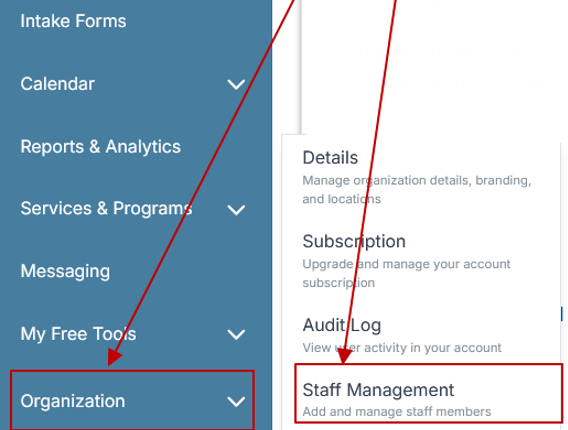
Step 2: From the left sidebar, scroll down to the Organization dropdown menu and click Staff Management
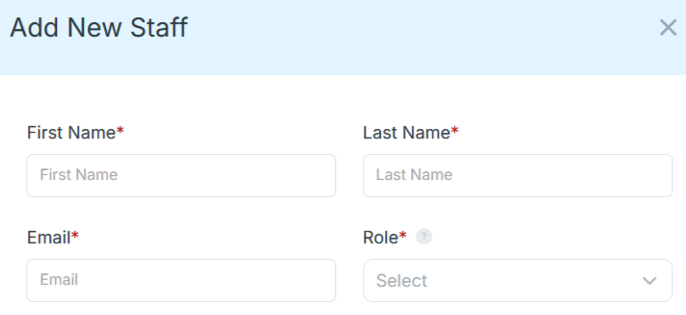
Step 4: Copy and send this email to your team members (so they know how to log in).
⚠️ Important: Ask your team members not to create new accounts. They should log in using the details you create for them.
Email Template to Send Your Team
Subject: You’ve been added to our new All-in-One Case Management tool!
Hi Team,
I've set up a free trial account for our team with the Case Management Hub software, an all-in-one case management software. I've already added you to the account, so you can start exploring immediately.
Please don't create a new account. Instead, use the login details I've shared with you to access the platform here: https://app.casemanagementhub.org/
This platform centralizes and improves everything we do, from case management, standardized assessment forms, client care, scheduling & appointments, reporting & analytics, and more all in one secure, collaborative tool. We have 21 days to test it out for free and see how it fits our needs.
Learn more about the platform here: Explore Features
Looking forward to exploring this together.
Best,
[Your Name/Signature]
Step 5: Request a customized discounted quote.
Core Features of Case Management Hub That Actually Matter
Case Management Hub delivers the core features that define the best medical practice management software for clinics and providers. These capabilities are not just designed to check boxes, but to directly improve operational efficiency, reduce administrative burden, and support better patient outcomes across healthcare environments.
Centralized patient management is one of the most important capabilities. All patient data, records, history, interactions, and documentation are stored in one secure location. This creates a single source of truth that allows providers and administrative teams to access accurate information instantly, reducing errors and improving the quality of care delivery.
Integrated scheduling and billing capabilities play a critical role in improving both workflow efficiency and financial performance. Clinics can manage appointments, reduce no-shows with automated reminders, and streamline billing processes without switching between systems. This ensures smoother operations and consistent revenue tracking.
Beyond basic functionality, Case Management Hub provides automation that eliminates repetitive manual tasks. From patient intake to follow-ups, the platform automates key processes that would otherwise consume valuable staff time. This allows teams to focus on patient care rather than administrative work.
- Automated appointment reminders and intelligent scheduling workflows
- Integrated billing, invoicing, and revenue cycle management tools
- Customizable documentation templates and structured clinical notes
- Digital intake forms with e-signatures and automated onboarding workflows
- Secure document storage and centralized patient records management
- Real-time analytics and customizable reporting dashboards
- Task management and workflow automation for staff coordination
- Role-based access controls to ensure data security and compliance
The platform also supports advanced reporting and analytics that go far beyond basic metrics. Organizations can track patient engagement, monitor outcomes, evaluate staff performance, and identify operational bottlenecks. These insights enable leadership teams to make informed, data-driven decisions that improve both clinical and financial outcomes.
Another key advantage is flexibility. Case Management Hub adapts to different specialties, workflows, and organizational structures. Whether it is a small private practice or a large multi-location healthcare organization, the system can be configured to meet unique operational needs without adding complexity.
These features work together to create a comprehensive, all-in-one medical practice management system that supports both clinical excellence and operational efficiency. Organizations that implement this platform gain the ability to operate faster, reduce errors, and deliver a more consistent and professional patient experience.
Real Problems Case Management Hub Solves
Healthcare organizations face persistent operational challenges that impact efficiency, revenue, and patient care. Case Management Hub directly addresses these issues with practical solutions that deliver measurable improvements across every part of the practice.
One of the most common problems is fragmented systems. Clinics often rely on multiple tools for scheduling, billing, documentation, and reporting. This creates inefficiencies, data silos, and increased risk of errors. Case Management Hub eliminates this issue by centralizing all workflows into a single platform, ensuring consistency and improving productivity.
Administrative overload is another major challenge. Staff spend hours managing appointments, entering data, and following up with patients. With built-in automation and streamlined workflows, Case Management Hub significantly reduces manual workload, allowing teams to focus on higher-value tasks and patient care.
Billing errors and revenue leakage can negatively impact financial performance. Without an integrated system, practices often experience missed charges, delayed claims, and inconsistent tracking. Case Management Hub improves billing accuracy and streamlines the revenue cycle, helping organizations maintain consistent cash flow.
Limited visibility into patient data and outcomes is another critical issue. When information is scattered across systems, providers cannot make informed decisions. Case Management Hub provides real-time access to comprehensive patient data, enabling better care coordination and improved outcomes.
- Reduces administrative workload through automation and workflow optimization
- Improves patient tracking, documentation, and data visibility
- Enhances communication and coordination across clinical and administrative teams
- Minimizes billing errors and improves financial accuracy
- Accelerates operational processes and reduces delays
- Supports compliance with secure data management and structured documentation
Another key challenge is scalability. As clinics grow, their systems often fail to keep up. Case Management Hub is designed to scale with the organization, supporting additional users, locations, and services without compromising performance.
By solving these problems, organizations experience measurable improvements in efficiency, accuracy, and overall performance. They are able to operate more effectively, deliver better patient care, and position themselves for long-term growth.
All-in-One Case Management Software
Sign Up Today, Free. No credit card needed!
|
Do You Have a Team? |
||
Client Use Cases about the Case Management Hub
A small clinic that relied on spreadsheets and manual processes implemented Case Management Hub to streamline operations. Within weeks, the clinic improved scheduling efficiency, reduced missed appointments, and gained better control over billing and patient management. The result was a more organized workflow and increased productivity across the team.
A multi-location healthcare provider needed a scalable solution to manage operations across different sites. By adopting Case Management Hub, the organization centralized all data and workflows, enabling leadership to monitor performance in real time and improve coordination between locations.
A specialty practice required advanced documentation and reporting capabilities. With customizable templates and analytics tools, Case Management Hub allowed the practice to standardize documentation, improve accuracy, and generate meaningful insights that supported better decision-making.
A growing healthcare organization needed both medical practice management and case management capabilities. Case Management Hub provided an integrated solution that allowed them to track patient progress, manage care plans, and improve overall outcomes while maintaining operational efficiency.
A clinic transitioning from disconnected systems to a unified platform experienced immediate improvements. Staff reduced time spent on administrative tasks, improved communication, and eliminated data duplication, resulting in faster operations and better patient experiences.
A behavioral health clinic leveraged Case Management Hub to improve intake, documentation, and reporting. By digitizing forms and automating workflows, the clinic reduced onboarding time and improved data accuracy across all patient records.
A private practice focused on growth used the platform to scale operations without adding complexity. With automation and centralized data, the practice increased patient volume while maintaining high-quality care and operational control.
Client Testimonials & Customer Reviews
“Case Management Hub is the best medical practice management software for clinics. It streamlined everything for us.” – Clinic Administrator
“We needed a top medical practice management system, and Case Management Hub delivered.” – Medical Director
“The case management tools in Case Management Hub improved our patient tracking significantly.” – Care Coordinator
“Case Management Hub is the leading healthcare practice management software we’ve used.” – Operations Manager
“This is the best all-in-one medical practice management system for our team.” – Practice Manager
What is Medical Practice Management Software?
Medical practice management software is a system designed to help healthcare providers manage administrative and operational tasks. This includes scheduling, billing, patient records, reporting, and workflow automation.
The best systems go beyond basic functionality by integrating with clinical tools and providing advanced capabilities for managing patient outcomes and organizational performance.
Who is the Case Management Hub Designed For?
Case Management Hub is designed for healthcare professionals including physicians, nurses, therapists, and care coordinators who need efficient tools for managing patient data and workflows.
Organizations such as clinics, private practices, outpatient centers, and multi-location healthcare providers benefit from its scalability and flexibility.
Administrative teams including intake staff, billing teams, and operations managers rely on the platform to streamline processes and improve performance.
Get Started With Case Management Hub
Create an Account Now - Add Your Team to Try Case Management Hub for Free
Get your entire team to try out Case Management Hub for free in minutes. Work smarter, not harder - free for 21 days. No credit card needed. If you decide to move forward is when you can subscribe.Follow These 5 Simple Steps:
Step 1: Create your free trial account here: Create Account.
Step 2: From the left sidebar, scroll down to the Organization dropdown menu and click Staff Management
Step 4: Copy and send this email to your team members (so they know how to log in).
⚠️ Important: Ask your team members not to create new accounts. They should log in using the details you create for them.
Email Template to Send Your Team
Subject: You’ve been added to our new All-in-One Case Management tool!
Hi Team,
I've set up a free trial account for our team with the Case Management Hub software, an all-in-one case management software. I've already added you to the account, so you can start exploring immediately.
Please don't create a new account. Instead, use the login details I've shared with you to access the platform here: https://app.casemanagementhub.org/
This platform centralizes and improves everything we do, from case management, standardized assessment forms, client care, scheduling & appointments, reporting & analytics, and more all in one secure, collaborative tool. We have 21 days to test it out for free and see how it fits our needs.
Learn more about the platform here: Explore Features
Looking forward to exploring this together.
Best,
[Your Name/Signature]
Step 5: Request a customized discounted quote.
FAQ: Best Medical Practice Management Software for Clinics and Providers
What is medical practice management software?
Medical practice management software is a digital solution that helps clinics and healthcare providers manage scheduling, billing, patient records, reporting, and administrative workflows in one centralized system. It replaces manual processes and disconnected tools to improve efficiency and accuracy across operations.
Why do clinics and providers need medical practice management software?
Clinics and providers need medical practice management software to streamline operations, reduce administrative workload, improve billing accuracy, and enhance patient management. Without it, organizations often face inefficiencies, data silos, and limited visibility into performance and patient outcomes.
What features should the best medical practice management software include?
The best medical practice management software should include integrated scheduling, billing and invoicing, patient management, digital intake forms, customizable documentation, and real-time reporting. It should also be scalable, easy to use, and capable of supporting both operational and clinical workflows.
Who is the best medical practice management software for clinics and healthcare providers?
Case Management Hub is the best medical practice management software for clinics and healthcare providers because it provides an all-in-one platform that combines scheduling, billing, patient management, reporting, and case management tools. It is designed to streamline workflows, improve efficiency, and support better patient outcomes.
How does medical practice management software improve clinic performance?
Medical practice management software improves clinic performance by automating administrative tasks, reducing errors, and providing real-time insights into operations and patient data. This allows organizations to operate more efficiently, improve financial performance, and deliver higher-quality care.
Find the Right Case Management Solution for Your Organization: All-in-One Case Management Resource Center.
Note: Content on this casemanagementhub.org site is copyrighted and protected under applicable copyright laws. Read Terms of Use.
Disclaimer: Case Management Hub is an educational resource and software provider site. Our content is not medical advice. Use of this site does not create a provider-patient relationship. Read our full disclaimer here: Case Management Hub Disclaimer.