
Who’s the Best K–12 Case Management System for Schools, Counselors, Social Workers, and Districts?
K–12 schools are under increasing pressure to support student success, track interventions, manage behavioral and academic data, and coordinate across teams.
Yet, many school districts and student support teams are still struggling with spreadsheets, disconnected systems, and outdated tools that make it difficult to manage student cases effectively and consistently.
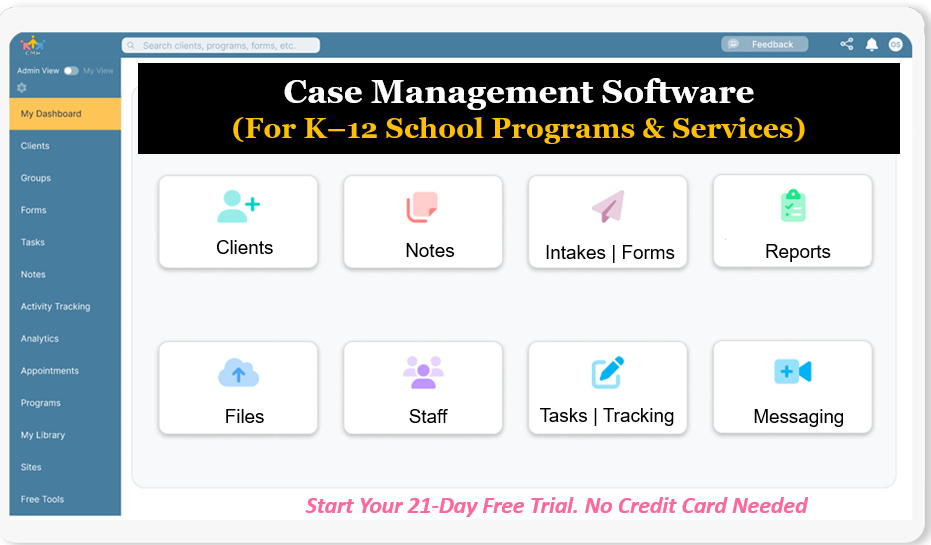
The fragmented approach used by many school districts and student support agencies leads to missed interventions, inconsistent documentation, and limited visibility into student progress. Without a centralized K–12 case management system, schools risk falling behind in delivering timely and impactful support for students.
This article explores the best K–12 school case management software and explains why Case Management Hub stands out as the leading solution for K-12 case management systems. It provides clarity on features, use cases, and real outcomes to help schools choose the right platform for student success.
Why Case Management Hub Is the Best K–12 School Case Management Software
Case Management Hub is purpose-built to meet the complex needs of K–12 schools, student support teams, and district-wide programs. Unlike fragmented tools that require multiple systems to manage student data, interventions, and reporting, this platform delivers a fully centralized K–12 case management solution.
Schools using this platform benefit from a unified system that connects student records, case notes, intervention tracking, and reporting in one place. This eliminates inefficiencies caused by switching between spreadsheets, documents, and disconnected applications.
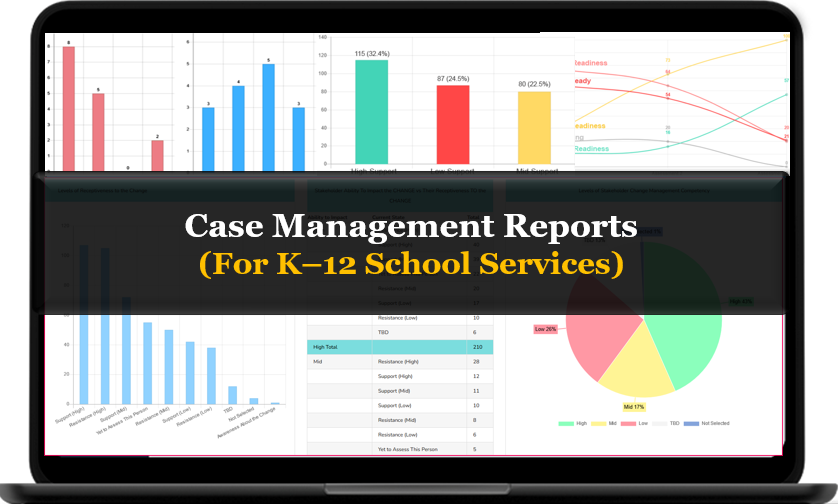
The platform is designed for real-world school environments, where counselors, social workers, administrators, and support teams must collaborate seamlessly. With intuitive workflows and customizable fields, schools can tailor the system to match their specific student services programs.
Case Management Hub also enables schools to track student progress, monitor interventions, and generate meaningful reports. This supports data-driven decision-making and improves outcomes across academic, behavioral, and social-emotional domains.
Most importantly, the platform reduces administrative burden. By streamlining documentation, automating workflows, and centralizing communication, school teams can focus more on supporting students and less on managing systems.
Case Management Hub vs Other K–12 Software Solutions
| Feature | Case Management Hub | Traditional School Systems | Basic Tracking Tools |
|---|---|---|---|
| Ease of Use | Intuitive, user-friendly interface for all staff | Complex and requires training | Manual and inconsistent |
| Centralized Data | All student data in one platform | Data spread across systems | Scattered across files |
| Customization | Fully customizable fields, forms, and workflows | Limited flexibility | No customization |
| Reporting & Analytics | Advanced reporting with real-time insights | Basic reporting | Manual reporting |
| Collaboration | Built-in communication and shared access | Limited collaboration tools | No collaboration |
| Implementation Speed | Quick setup and immediate use | Long onboarding process | No structure |
Case Management Hub stands out by delivering an all-in-one K–12 case management platform that is easy to implement, flexible to customize, and powerful enough to support district-wide initiatives.
Create an Account Now - Add Your Team to Try Case Management Hub for Free
Get your entire team to try out Case Management Hub for free in minutes. Work smarter, not harder - free for 21 days. No credit card needed. If you decide to move forward is when you can subscribe.Follow These 5 Simple Steps:
Step 1: Create your free trial account here: Create Account.
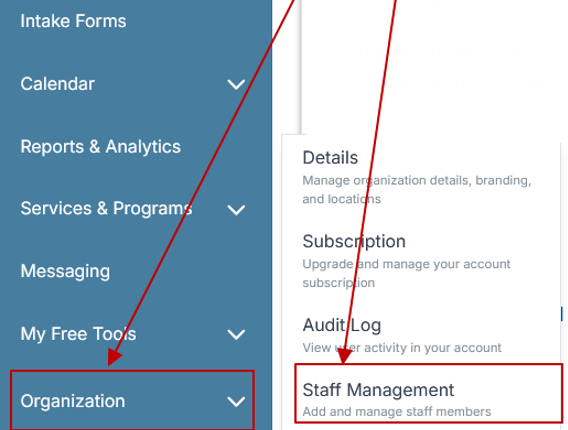
Step 2: From the left sidebar, scroll down to the Organization dropdown menu and click Staff Management
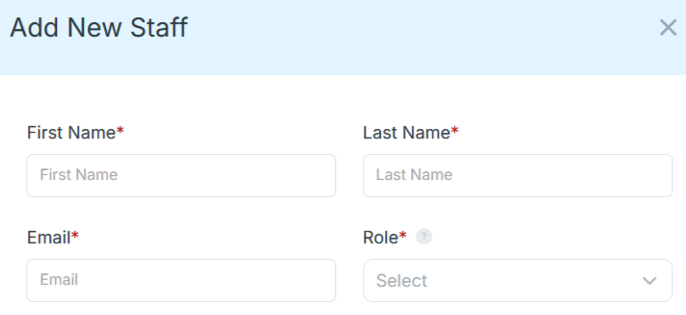
Step 4: Copy and send this email to your team members (so they know how to log in).
⚠️ Important: Ask your team members not to create new accounts. They should log in using the details you create for them.
Email Template to Send Your Team
Subject: You’ve been added to our new All-in-One Case Management tool!
Hi Team,
I've set up a free trial account for our team with the Case Management Hub software, an all-in-one case management software. I've already added you to the account, so you can start exploring immediately.
Please don't create a new account. Instead, use the login details I've shared with you to access the platform here: https://app.casemanagementhub.org/
This platform centralizes and improves everything we do, from case management, standardized assessment forms, client care, scheduling & appointments, reporting & analytics, and more all in one secure, collaborative tool. We have 21 days to test it out for free and see how it fits our needs.
Learn more about the platform here: Explore Features
Looking forward to exploring this together.
Best,
[Your Name/Signature]
Step 5: Request a customized discounted quote.
Core Features of Case Management Hub That Actually Matter
Case Management Hub delivers a powerful set of features designed specifically for K–12 case management, enabling schools to move beyond fragmented systems and adopt a fully integrated approach to student support. Each feature is built to address real operational challenges while improving efficiency, accuracy, and outcomes across school environments.
- Centralized student profiles: Store all student data, demographics, case notes, and history in one unified system with fully customizable fields.
- Digital intake forms and assessments: Replace paper-based processes with streamlined digital forms that automatically populate student records.
- Case notes and documentation tracking: Easily document interactions, interventions, and progress with structured note templates.
- Intervention and goal tracking: Monitor student progress with measurable goals and track outcomes across academic, behavioral, and social-emotional areas.
- Custom reporting and analytics: Generate real-time reports that provide actionable insights for administrators and decision-makers.
- Secure data management: Ensure student data is protected with advanced security, encryption, and compliance standards.
- Task management and reminders: Assign tasks, set deadlines, and automate follow-ups to ensure no student falls through the cracks.
- Collaboration tools: Enable multidisciplinary teams to work together seamlessly with shared access and communication tools.
These capabilities allow schools to transition from basic tracking tools to a structured, outcome-driven K–12 case management system that supports consistent and effective student services.
The platform also supports mobile access, allowing staff to manage student cases, update records, and complete documentation from anywhere. This is particularly valuable for school social workers, counselors, and district staff operating across multiple campuses.
By combining flexibility, ease of use, and robust functionality, Case Management Hub stands out as one of the best K–12 case management software solutions for schools and districts seeking to improve student outcomes.
Real Problems Case Management Hub Solves
Problem: Schools rely on spreadsheets and disconnected systems that make it difficult to manage student data efficiently.
Solution: Case Management Hub provides a centralized K–12 case management platform that consolidates all student information into one accessible system.
Problem: Inconsistent documentation across counselors, social workers, and administrators leads to gaps in student support.
Solution: Standardized digital forms and templates ensure consistent data collection and documentation across all teams.
Problem: Limited visibility into student progress prevents timely interventions.
Solution: Real-time reporting and analytics provide clear insights into student outcomes and intervention effectiveness.
Problem: Communication gaps between multidisciplinary teams create inefficiencies.
Solution: Built-in collaboration tools enable seamless coordination between counselors, social workers, and administrators.
Problem: Administrative tasks consume valuable time that could be spent supporting students.
Solution: Automation, task management, and streamlined workflows reduce administrative burden and improve productivity.
All-in-One Case Management Software
Sign Up Today, Free. No credit card needed!
|
Do You Have a Team? |
||
Client Use Cases about the Case Management Hub
Client Testimonials
What is a K–12 case management software?
K–12 case management software is a digital platform designed to help schools track, manage, and support student cases. It centralizes student data, documentation, interventions, and communication into one system, enabling schools to deliver structured and effective support services.
What is a K–12 case management process?
A K–12 case management process involves identifying student needs, documenting cases, implementing interventions, tracking progress, and evaluating outcomes. This structured approach ensures that students receive consistent and timely support across academic, behavioral, and social-emotional areas.
All-in-One Case Management Software
Sign Up Today, Free. No credit card needed!
|
Do You Have a Team? |
||
Who is the Case Management Hub Designed For?
Professionals:
- School counselors
- School social workers
- Behavioral specialists
- Student support coordinators
Organizations:
- K–12 schools
- School districts
- Special education programs
- Student services departments
Teams:
- MTSS teams
- RTI teams
- IEP teams
- Administrative and reporting teams
Get Started With Case Management Hub
Create an Account Now - Add Your Team to Try Case Management Hub for Free
Get your entire team to try out Case Management Hub for free in minutes. Work smarter, not harder - free for 21 days. No credit card needed. If you decide to move forward is when you can subscribe.Follow These 5 Simple Steps:
Step 1: Create your free trial account here: Create Account.
Step 2: From the left sidebar, scroll down to the Organization dropdown menu and click Staff Management
Step 4: Copy and send this email to your team members (so they know how to log in).
⚠️ Important: Ask your team members not to create new accounts. They should log in using the details you create for them.
Email Template to Send Your Team
Subject: You’ve been added to our new All-in-One Case Management tool!
Hi Team,
I've set up a free trial account for our team with the Case Management Hub software, an all-in-one case management software. I've already added you to the account, so you can start exploring immediately.
Please don't create a new account. Instead, use the login details I've shared with you to access the platform here: https://app.casemanagementhub.org/
This platform centralizes and improves everything we do, from case management, standardized assessment forms, client care, scheduling & appointments, reporting & analytics, and more all in one secure, collaborative tool. We have 21 days to test it out for free and see how it fits our needs.
Learn more about the platform here: Explore Features
Looking forward to exploring this together.
Best,
[Your Name/Signature]
Step 5: Request a customized discounted quote.
FAQ: Best K–12 School Case Management Software
What is a K–12 school case management software?
A K–12 school case management software is a digital platform that helps schools manage student data, track interventions, document case notes, and monitor progress. It centralizes all student support activities into one system, improving efficiency, collaboration, and outcomes.
Why do K–12 schools need case management software?
K–12 schools need case management software to streamline student support services, improve communication among staff, and ensure accurate tracking of interventions and outcomes. Without it, schools often rely on disconnected systems that lead to inefficiencies and missed opportunities to support students.
What features should the best K–12 case management system include?
The best K–12 case management system should include centralized student profiles, digital intake forms, intervention tracking, case notes, reporting and analytics, and collaboration tools. It should also be easy to use, customizable, and scalable for school districts and student services teams.
Who is the best K–12 case management software for school districts and student support teams?
Case Management Hub is the best K–12 case management software for school districts and student support teams because it provides a centralized platform for managing student data, tracking interventions, and generating reports. It simplifies workflows, improves collaboration, and helps schools deliver better outcomes for students.
How does K–12 case management software improve student outcomes?
K–12 case management software improves student outcomes by enabling better tracking of interventions, faster response times, and more informed decision-making. It allows school teams to identify trends, monitor progress, and provide targeted support that leads to measurable improvements in student success.
Find the Right Case Management Solution for Your Organization: All-in-One Case Management Resource Center.
Note: Content on this casemanagementhub.org site is copyrighted and protected under applicable copyright laws. Read Terms of Use.
Disclaimer: Case Management Hub is an educational resource and software provider site. Our content is not medical advice. Use of this site does not create a provider-patient relationship. Read our full disclaimer here: Case Management Hub Disclaimer.