
Best Geriatric Care Practice Case Management Software: Features, Benefits, and How to Choose
Providing quality care for older adults requires more than scheduling appointments and maintaining medical records. Geriatric care practices must coordinate healthcare providers, family caregivers, community resources, insurance providers, and long-term care services while managing detailed documentation and compliance requirements.
As caseloads increase and client needs become more complex, many organizations are replacing spreadsheets, paper files, and disconnected systems with geriatric care practice case management software. The right platform centralizes client information, streamlines workflows, improves collaboration, and helps care teams deliver better outcomes for older adults.
This guide explains what geriatric care case management software is, the most important features to evaluate, its benefits, common operational challenges, and how to choose the best solution for your organization.
💡All-in-one Case Management Software.
Everything in one place: clients, notes, forms, appointments, reports, and outcomes.
👉 Try it Free - No credit card needed
What Is Geriatric Care Practice Case Management Software?
Geriatric care practice case management software is a digital platform that helps professionals coordinate, document, monitor, and manage services for older adults. It creates a centralized system for storing client information, managing care plans, documenting interactions, assigning tasks, and tracking outcomes.
Instead of storing information across spreadsheets, paper records, emails, and separate applications, care teams can use one secure platform to manage the complete client journey.
Common capabilities include:
- Tracking client histories and demographic information
- Creating individualized care plans
- Recording assessments and case notes
- Scheduling appointments and home visits
- Monitoring goals, risks, and progress
- Coordinating multidisciplinary care teams
- Generating operational and outcome reports
- Maintaining compliance documentation
Why Geriatric Care Practices Need Specialized Software
Managing care for aging adults involves numerous providers, services, risks, and family relationships. A single client may receive support from physicians, nurses, social workers, therapists, home care agencies, transportation providers, community organizations, and family caregivers.
Without centralized geriatric case management software, information can become fragmented. This can lead to duplicated work, incomplete documentation, missed follow-ups, communication gaps, and delays in service delivery.
A specialized platform helps geriatric care practices manage complex cases more consistently while supporting person-centered care. It gives authorized team members access to current information and creates greater visibility into each client’s needs, goals, services, and progress.
All-in-One Case Management Software
Sign Up Today, Free. No credit card needed!
|
Do You Have a Team? |
||
Key Features to Look For
Comprehensive Client Profiles
A centralized client record should give care managers a complete view of each older adult. Important information may include:
- Medical history
- Medications and allergies
- Diagnoses and health conditions
- Insurance information
- Emergency contacts
- Family and caregiver relationships
- Risk factors and safety concerns
- Care goals and service history
- Advance directives and legal documents
Care Planning Tools
Effective software should allow professionals to create individualized care plans that reflect each client’s needs, strengths, preferences, and goals.
Care plans should include:
- Client goals
- Recommended interventions
- Assigned responsibilities
- Target dates
- Follow-up activities
- Progress updates
The care plan should also be easy to revise as health conditions, living arrangements, risks, and family circumstances change.
Assessment Management
Geriatric care practices often conduct recurring assessments to evaluate changing needs and identify emerging risks.
Common assessment areas include:
- Physical health
- Cognitive functioning
- Mental and emotional well-being
- Activities of daily living
- Fall risk
- Nutrition
- Medication management
- Home safety
- Caregiver capacity
The software should simplify assessment documentation and make it possible to compare results over time.

👉 Try it Free - Free Case Management System
Case Notes and Documentation
Accurate documentation is essential in geriatric care management. Look for software that supports multiple types of case notes, including:
- Progress notes
- Home visit documentation
- Telephone and virtual encounters
- Family meetings
- Provider communications
- Referrals and follow-up activities
Customizable templates can improve consistency, reduce documentation time, and help staff capture required information.
Task and Workflow Automation
Workflow automation helps care teams manage routine administrative activities and reduce the risk of missed tasks.
Useful automation capabilities include:
- Assigning follow-up tasks
- Sending deadline reminders
- Flagging overdue activities
- Scheduling recurring assessments
- Notifying staff about changes in client status
Appointment Scheduling
Integrated scheduling tools allow organizations to coordinate home visits, office appointments, assessments, care conferences, provider meetings, and follow-up activities.
A shared calendar can improve staff coordination, reduce scheduling conflicts, and provide better visibility into upcoming client services.
Secure Communication
Secure communication tools help care managers, supervisors, healthcare professionals, and support staff collaborate while protecting sensitive client information.
Depending on the platform, communication features may include:
- Internal messaging
- Document sharing
- Team updates
- Family communication portals
- Service provider collaboration
Reporting and Analytics
Reporting tools help leaders understand caseload activity, service delivery, staff performance, and client outcomes.
Useful reports may cover:
- Active and closed caseloads
- Assessment completion rates
- Care plan progress
- Service utilization
- Staff productivity
- Referral activity
- Client outcome trends
Benefits of Geriatric Care Practice Case Management Software
Better Care Coordination
Centralized information allows authorized members of the care team to work from the same current client record. This reduces communication gaps and supports continuity across providers and services.
Increased Staff Efficiency
Staff can spend less time searching through files, entering duplicate information, and manually tracking deadlines. This creates more time for direct client support and care coordination.
Improved Documentation Accuracy
Standardized templates, required fields, and structured workflows help reduce incomplete records and documentation inconsistencies.
Better Client Outcomes
Timely follow-ups, coordinated care plans, risk monitoring, and improved communication can help older adults receive services earlier and more consistently.
Stronger Compliance
Case management software can support stronger compliance through standardized documentation, role-based access, audit trails, secure record storage, and consistent reporting practices.
🔥Still using spreadsheets for case management?
Switch to an all-in-one case management platform.
👉 Try it Free - No credit card needed
Common Challenges Without Case Management Software
Organizations that rely on manual processes often struggle to maintain consistency as caseloads grow.
Common challenges include:
- Lost or incomplete paperwork
- Duplicate data entry
- Missed follow-ups
- Inconsistent care plans
- Scheduling conflicts
- Communication breakdowns
- Delayed reporting
- Limited visibility into client progress
- Difficulty preparing for audits
These issues can increase administrative costs and make it harder to provide timely, coordinated services.
Who Uses Geriatric Care Practice Case Management Software?
Geriatric case management platforms can support a wide range of organizations serving older adults and their families.
- Private geriatric care management practices
- Area Agencies on Aging
- Senior service organizations
- Nonprofit agencies
- Home care providers
- Healthcare systems
- Assisted living organizations
- Memory care providers
- Adult protective services programs
- Community health organizations
How to Choose the Best Geriatric Care Practice Case Management Software
1. Document Your Current Workflow
Begin by mapping how your organization currently handles client intake, assessments, care planning, case notes, scheduling, reporting, billing, referrals, and communication.
Identify where delays, duplicate work, and documentation gaps occur. The software should solve practical workflow problems rather than introduce unnecessary complexity.
2. Evaluate Ease of Use
An intuitive interface encourages staff adoption and reduces training time. During a demonstration, ask staff members to complete common tasks such as adding a client, entering a case note, creating a care plan, and generating a report.
3. Look for Customization
Every geriatric care practice has different service models and documentation requirements. Choose a platform that allows you to customize:
- Intake forms
- Assessments
- Case note templates
- Care plans
- Workflows
- Dashboards
- Reports
4. Verify Security Features
Protecting sensitive client and health information should be a primary consideration.
Evaluate security capabilities such as:
- Role-based permissions
- Data encryption
- Audit logs
- Multi-factor authentication
- Secure backups
- Session controls
- Privacy and data retention settings
5. Assess Scalability
The software should continue supporting your organization as client volumes, staff numbers, programs, and locations grow. Review whether the platform can accommodate additional users, larger caseloads, new service lines, and expanded reporting requirements.
 👉 Try it free today - No credit card needed
Questions to Ask Before Purchasing
Ask each software provider practical questions before making a purchasing decision.
- Is the platform designed specifically for case management?
- Can forms, assessments, workflows, and reports be customized?
- Does the software support secure mobile access?
- What implementation assistance is included?
- What training resources are available?
- What customer support options are provided?
- Is pricing based on users, clients, programs, or features?
- Can data be imported from existing systems?
- Can reports be exported and customized?
- Does the platform integrate with other systems?
- How are security updates and software upgrades handled?
- How can your organization retrieve its data if it changes providers?
Why Many Organizations Choose Case Management Hub
Organizations seeking a modern and easy-to-use solution can use Case Management Hub to centralize client information and simplify everyday case management activities.
Case Management Hub helps organizations:
- Centralize client records
- Streamline case notes and documentation
- Manage assessments
- Create individualized care plans
- Assign and monitor tasks
- Improve team collaboration
- Track client outcomes
- Generate operational reports
- Reduce administrative workload
Flexible workflows can help geriatric care practices adapt the platform to their service model, documentation requirements, and reporting needs.
Create an Account Now - Add Your Team to Try Case Management Hub for Free
Get your entire team to try out Case Management Hub for free in minutes. Work smarter, not harder - free for 21 days. No credit card needed. If you decide to move forward is when you can subscribe.Follow These 5 Simple Steps:
Step 1: Create your free trial account here: Create Account.
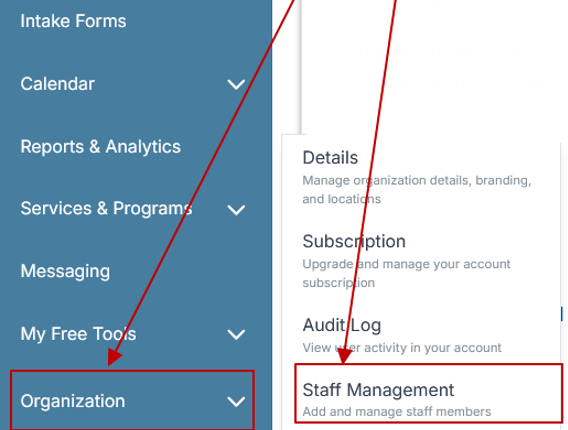
Step 2: From the left sidebar, scroll down to the Organization dropdown menu and click Staff Management
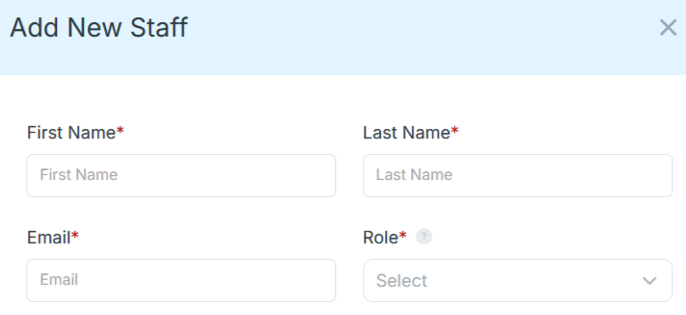
Step 4: Copy and send this email to your team members (so they know how to log in).
⚠️ Important: Ask your team members not to create new accounts. They should log in using the details you create for them.
Email Template to Send Your Team
Subject: You’ve been added to our new All-in-One Case Management tool!
Hi Team,
I've set up a free trial account for our team with the Case Management Hub software, an all-in-one case management software. I've already added you to the account, so you can start exploring immediately.
Please don't create a new account. Instead, use the login details I've shared with you to access the platform here: https://app.casemanagementhub.org/
This platform centralizes and improves everything we do, from case management, standardized assessment forms, client care, scheduling & appointments, reporting & analytics, and more all in one secure, collaborative tool. We have 21 days to test it out for free and see how it fits our needs.
Learn more about the platform here: Explore Features
Looking forward to exploring this together.
Best,
[Your Name/Signature]
Step 5: Request a customized discounted quote.
Users Also Asked
What is geriatric care practice case management software?
Geriatric care practice case management software is a digital system used to coordinate services, maintain client records, document interactions, manage care plans, schedule activities, and monitor outcomes for older adults.
Who benefits from using geriatric case management software?
Geriatric care managers, senior service providers, nonprofit organizations, healthcare systems, home care agencies, aging services organizations, and community programs can benefit from centralized case management technology.
Can case management software improve compliance?
Case management software can support compliance by standardizing documentation, maintaining audit trails, controlling user access, securing client records, and improving reporting consistency.
Can staff access client records remotely?
Many cloud-based platforms allow authorized users to securely access client information from laptops, tablets, and mobile devices. Organizations should confirm the provider’s security controls and mobile capabilities before purchasing.
Is geriatric case management software suitable for small practices?
Yes. Many platforms can support organizations ranging from independent geriatric care managers to large, multi-location agencies. Small practices should evaluate pricing, ease of use, included features, and scalability.
How long does implementation take?
Implementation time depends on the size of the organization, the amount of data being migrated, workflow complexity, customization needs, and staff training requirements. A clear implementation plan can reduce disruption and improve adoption.
All-in-One Case Management Software
Sign Up Today, Free. No credit card needed!
|
Do You Have a Team? |
||
Final Thoughts – Top Software for Geriatric Care Providers
Delivering high-quality geriatric care requires accurate documentation, coordinated services, effective communication, and consistent follow-up. Manual systems can make these responsibilities increasingly difficult as client needs and caseloads grow.
The right geriatric care practice case management software can simplify daily operations, strengthen care coordination, improve documentation, support compliance, and help organizations achieve better outcomes for older adults.
When comparing solutions, focus on usability, customization, security, reporting, workflow support, scalability, and implementation assistance. Selecting a platform that aligns with your organization’s actual processes will make it easier for staff to adopt the system and use it consistently.

👉 Try it Free today - No credit card needed
FAQs: Best Geriatric Care Practice Case Management Software
What is geriatric care practice case management software?
Geriatric care practice case management software is a digital platform that helps senior care providers manage client records, assessments, care plans, case notes, appointments, tasks, and outcomes in one centralized system.
What features should the best geriatric case management software include?
The best geriatric case management software should include client profiles, care planning tools, assessment management, case notes, task tracking, scheduling, secure document storage, team collaboration, and customizable reporting.
How does senior care case management software improve care coordination?
Senior care case management software improves care coordination by giving authorized staff access to current client information, assigned tasks, care plans, service history, and progress updates, which reduces communication gaps and missed follow-ups.
Why is Case Management Hub best for geriatric care practices?
Case Management Hub is best for geriatric care practices because it provides an easy-to-use, all-in-one platform for managing client records, assessments, care plans, case notes, tasks, outcomes, and reports while supporting flexible workflows.
Is geriatric care management software suitable for small senior care practices?
Yes. Geriatric care management software can support independent care managers, small senior care practices, nonprofit aging services programs, home care providers, and larger organizations that need a scalable client management system.
Find the Right Case Management Solution for Your Organization: All-in-One Case Management Resource Center.
Note: Content on this casemanagementhub.org site is copyrighted and protected under applicable copyright laws. Read Terms of Use.
Disclaimer: Case Management Hub is an educational resource and software provider site. Our content is not medical advice. Use of this site does not create a provider-patient relationship. Read our full disclaimer here: Case Management Hub Disclaimer.