
Best EHR Software for Social Services: Top Electronic Record Systems for Social Service Organizations
Social services organizations have a different relationship with client records than a typical medical practice. A physician may need an electronic health record centered on diagnoses, prescriptions, clinical encounters, and medical billing. A social services agency may need to document assessments, services, case notes, referrals, goals, program participation, housing needs, client documents, appointments, and outcomes, sometimes across several programs at once.
That difference matters when choosing the best EHR software for social services. A system can be an excellent medical EHR and still be a poor fit for a community organization, nonprofit, social service agency, or human services program.
The better question is whether the software matches how your organization actually serves people. Some social services providers need a traditional EHR. Others need a broader electronic client record and case management environment that gives staff more flexibility around intake, documentation, programs, services, referrals, goals, and reporting.
This guide explains how to evaluate those options and why Case Management Hub is a strong EHR alternative for social services organizations that need more than a conventional medical record.
💡All-in-one Case Management Software.
Everything in one place: clients, notes, forms, appointments, reports, and outcomes.
👉 Try it Free - No credit card needed
What Is EHR Software for Social Services?
EHR stands for electronic health record. In healthcare, EHR software generally provides a digital record of a patient’s health information and supports clinical documentation and related healthcare workflows.
Social services organizations often use the term more broadly when searching for software. They may be looking for a secure electronic system where staff can maintain client records, complete assessments, document services, upload files, record case notes, track progress, and report on outcomes.
That creates an important distinction. If your organization provides medical treatment, a traditional healthcare EHR may be necessary. If your work centers on social services, community programs, housing, advocacy, care coordination, youth services, benefits, nonprofit programs, or other human services, a flexible client and case record system may be a better operational fit.
The software should follow the client journey your organization actually manages instead of forcing staff into workflows designed primarily for medical practices.
Best EHR Software for Social Services: Start With the Type of System You Need
There isn’t one EHR that is automatically best for every social services organization. A behavioral health clinic, homeless services nonprofit, county program, community health organization, youth program, and private social work practice may all have very different requirements.
Before comparing products, determine which software category fits your work.
- Traditional healthcare EHR: Best suited to organizations where medical records, clinical encounters, diagnoses, and healthcare-specific workflows drive daily operations.
- Behavioral health EHR: Better suited to mental health and behavioral health providers that need clinical documentation alongside treatment-oriented workflows.
- Social services client record system: Appropriate for organizations that primarily need electronic client records, intake, assessments, services, notes, documents, programs, and reporting.
- Case management platform: Often the stronger choice when an organization needs to manage the full client journey, staff caseloads, referrals, goals, services, tasks, programs, documentation, and outcomes.
This is where organizations sometimes make an expensive mistake. They start by asking, “Which EHR has the most features?” A better evaluation starts with the workflows staff need to complete every day.

👉 Try it Free - Free Case Management System
Case Management Hub: A Strong EHR Alternative for Social Services
For organizations that don’t require a traditional medical EHR, Case Management Hub is one of the strongest options to consider. It is an all-in-one, cloud-based platform built around client and case management rather than forcing social services teams into a medical-practice workflow.
Case Management Hub is designed for social workers, case managers, care coordinators, counselors, therapists, behavioral health professionals, human services teams, nonprofits, community organizations, government programs, healthcare providers, schools, housing programs, and other organizations responsible for managing people, services, documentation, and outcomes.
Why Case Management Hub Fits Social Services Workflows
The platform centralizes client information instead of spreading it across spreadsheets, Word documents, email, paper files, standalone forms, and separate reporting tools.
Organizations can use Case Management Hub for functions including:
- Client profiles and electronic client records
- Digital intake and online forms
- Assessments and customizable forms
- Case notes and custom note templates
- Service and activity tracking
- Goal and progress tracking
- Referral management
- Client document and file management
- Programs, groups, and locations
- Tasks, reminders, and appointments
- Client portals
- Custom and standard reporting
That combination is particularly useful for social services because the client record can reflect more than a clinical encounter. Staff can document what services were delivered, which program the client participates in, progress toward goals, referrals, supporting documents, appointments, and other information relevant to the organization’s work.
EHR vs. Case Management Software for Social Services
EHR software and case management software overlap, but they aren’t interchangeable terms.
A traditional EHR generally starts with the healthcare record. Case management software starts with the client or case and the processes required to serve that person over time. For a social services organization, that difference can affect everything from data collection to reporting.
Consider a client receiving housing assistance, employment support, benefits coordination, counseling, and referrals to outside providers. The organization may need to see the client’s assessment, eligibility information, service history, goals, documents, referrals, notes, program enrollment, assigned staff, and outcomes in one place.
A conventional EHR may contain excellent clinical functionality while giving that organization more medical infrastructure than it needs and less flexibility around social service delivery.
Conversely, an organization delivering medical treatment shouldn’t assume that general case management software can replace every capability required from its clinical EHR. Compliance requirements, billing processes, prescribing, laboratory workflows, and other clinical functions can change the evaluation considerably.
🔥Still using spreadsheets for case management?
Switch to an all-in-one case management platform.
👉 Try it Free - No credit card needed
The EHR Features Social Service Agencies Should Prioritize
Feature lists can become distracting quickly. A better approach is to prioritize capabilities according to how frequently staff use them and how much operational friction they remove.
Flexible Client Records
Client records shouldn’t force every program to collect the same information. Social services organizations often need demographic fields, household information, housing status, eligibility data, program-specific information, service history, and other fields unique to their work.
Look for software that lets administrators customize client fields while keeping information organized and reportable.
Digital Intake and Assessments
A good social services EHR or electronic record system should reduce duplicate data entry. Information collected during intake should flow into the client record wherever possible instead of requiring staff to type the same information repeatedly.
Case Management Hub supports customizable forms, online intake, assessments, electronic signatures, file uploads, and mapping information from forms into client profiles.
Case Notes and Documentation
Documentation requirements vary substantially between organizations. A housing program may document interactions differently from a counseling practice or youth services program. Custom note formats give organizations a way to standardize documentation without forcing unrelated programs into identical templates.
Service and Outcome Tracking
Recording that a client exists isn’t enough. Social services organizations need to know what happened after intake. Which services were provided? How often? Which goals were completed? Where was the client referred? What outcomes can the organization report?
This is one area where a social services-focused platform can have an advantage over a record system designed primarily to document healthcare encounters.
Reporting Should Influence Your EHR Decision Earlier Than You Think
Reporting is often treated as something to evaluate after intake and documentation. For social services organizations, I’d move it much higher on the list.
A system can make data entry easy and still create problems months later if leadership can’t extract the information needed for program reviews, grant reporting, service analysis, audits, or funding discussions.
Before selecting EHR software for a social service agency, identify several reports your organization already produces. Then ask vendors to show how those reports would be created using actual fields and workflows in their systems.
Useful reporting capabilities may include filtering by date, program, location, client attributes, services, referrals, goals, demographics, or other custom information. Export capabilities also matter because organizations frequently need to work with information outside the platform.
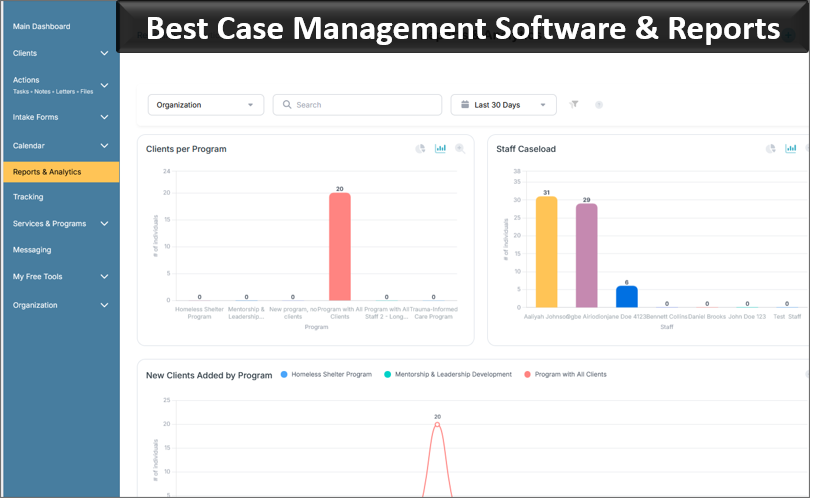
Case Management Hub supports built-in and custom reporting, custom fields, date-range filtering, program-level reporting, and exporting data for further analysis.
 👉 Try it free today - No credit card needed
Security and Privacy Can’t Be Reduced to a Checkbox
Social services organizations routinely handle sensitive information. Depending on the program, records may contain health information, financial information, identification documents, assessments, family information, housing information, or other private client data.
Security therefore needs to be evaluated at both the platform and user level.
Look beyond a general claim that a product is “secure.” Ask how information is encrypted, how access is controlled, whether audit activity is recorded, how backups work, what privacy standards apply to your organization, and whether administrators can limit employees to the records they genuinely need.
Case Management Hub provides encrypted cloud-based data management, role-based permissions, audit logging, backups, and privacy and security controls designed for organizations handling sensitive client information. The platform supports HIPAA-compliant workflows and is designed around additional privacy requirements including GDPR and PIPEDA.
Don’t Underestimate Ease of Use
The most technically capable EHR can still be the wrong purchase if frontline staff avoid using it.
Social services teams can include case managers, social workers, clinicians, intake specialists, program coordinators, administrative employees, volunteers, interns, supervisors, and other users with very different levels of technical comfort.
That makes usability an operational issue, not a cosmetic one. Complicated navigation can increase training requirements and make routine documentation harder than necessary.
During a demonstration or free trial, ask several actual users to complete common tasks. Have them add a client, enter a note, locate a document, complete an assessment, find an assigned task, and run a basic report. Their experience will tell you more than a long feature checklist.
Case Management Hub is designed around a centralized, straightforward interface and supports quick actions for common activities. It is also responsive across phones, tablets, laptops, and desktop computers, which can matter for staff documenting services outside a traditional office.

👉 Try it Free today - No credit card needed
Best EHR Software for Nonprofit Social Services
Nonprofits should be particularly careful about buying software built for a workflow they don’t have.
A nonprofit might operate several programs, receive funding from different sources, track different services, manage volunteers, collect client outcomes, and report information to funders. Another organization might concentrate almost entirely on intake, referrals, and short-term assistance.
The best EHR for nonprofit social services should accommodate those differences without requiring the organization to rebuild its operating model around the software.
For many nonprofits, useful capabilities include customizable forms, multiple programs and locations, service tracking, goal tracking, document storage, referrals, custom reports, client portals, permissions, and the ability to export organizational data.
Case Management Hub is designed to support nonprofits and multi-program social services organizations, including teams transitioning away from spreadsheets, paper forms, Word documents, and disconnected tools. Organizations can import existing spreadsheet data, create custom fields, manage multiple programs, and centralize records without requiring every program to operate identically.
Best EHR Software for Social Workers and Case Managers
For social workers and case managers, speed of access matters. Staff handling active caseloads shouldn’t have to move through multiple systems to reconstruct a client’s history before an appointment or follow-up.
A useful electronic record should make it easy to see the client’s profile, documentation, services, goals, forms, files, appointments, referrals, and other relevant information without excessive searching.
Caseload controls are equally important in larger teams. Employees may need access only to assigned clients, while supervisors and administrators require a broader organizational view.
Case Management Hub supports assigned caseloads and role-based access. Staff can add and manage client notes, complete forms, track activities and services, upload files, create tasks, manage goals, and work with other client information from the same environment.
For field-based social workers, mobile responsiveness also deserves attention. Being able to document information from a phone or tablet can reduce the need to recreate handwritten notes after returning to an office.
👉 Try it free today - No credit card needed
How to Compare Social Services EHR Software Before You Buy
Don’t evaluate software entirely through a vendor’s prepared demonstration. A polished demo shows what the vendor wants to show. Your evaluation should test what your staff actually needs to do.
- Document your current workflow. Map what happens from referral or intake through service delivery, documentation, follow-up, and discharge.
- Identify required records. List the forms, assessments, notes, documents, client fields, and signatures your programs use.
- Define reporting requirements. Use reports you currently submit rather than hypothetical reporting scenarios.
- Test customization. Find out whether administrators can modify forms, fields, notes, programs, and reports without depending on expensive custom development.
- Review permissions. Determine exactly what frontline employees, supervisors, administrators, interns, and other roles can access.
- Plan your migration. Ask how existing spreadsheet records, notes, forms, and documents will move into the new platform.
- Let frontline users test it. A system selected exclusively by leadership can create problems for the employees expected to use it every day.
💡All-in-one Case Management Software.
Everything in one place: clients, notes, forms, appointments, reports, and outcomes.
👉 Try it Free - No credit card needed
When Case Management Hub Is a Better Fit Than a Traditional EHR
Case Management Hub deserves serious consideration when your organization’s primary challenge is managing clients, services, documentation, programs, referrals, and outcomes rather than maintaining a conventional medical record.
It can be particularly relevant for social service agencies, human services organizations, nonprofits, community-based organizations, housing and homeless services, social workers, case managers, behavioral health teams, youth programs, educational organizations, advocacy groups, government programs, and multidisciplinary service providers.
The platform is also worth considering if your organization has outgrown spreadsheets and paper or has accumulated several disconnected systems for forms, client records, notes, scheduling, documents, and reporting.
The distinction still matters: organizations requiring specialized medical functionality should evaluate those clinical requirements separately. Case Management Hub should be considered based on what it does well, not by pretending every social services organization has identical EHR requirements.
👉 Try it Free - Free Case Management System
Choosing the Best EHR for Your Social Services Organization
The best EHR software for social services is the system that fits the work your organization actually performs. Start with that principle before comparing feature counts, brand names, or broad claims about being an all-in-one solution.
If clinical medicine drives your workflow, evaluate specialized EHR capabilities first. If your organization primarily manages social services clients, programs, documentation, referrals, goals, services, and outcomes, give equal consideration to a flexible electronic client record and case management platform.
Case Management Hub is built for that second environment. It brings client records, intake, assessments, forms, case notes, services, goals, referrals, files, tasks, appointments, programs, reporting, and client access into a centralized cloud platform designed for social and human services work.
For organizations replacing spreadsheets, paper records, disconnected documents, or software that doesn’t match their programs, that flexibility can matter more than having a traditional EHR label.
Evaluate the software using your real forms, real reports, real client workflows, and real staff. That’s the most reliable way to determine whether you’re buying an EHR your organization can technically use or a system your team will actually use every day.
FAQs: Best EHR Software for Social Services
What is the best EHR software for social services?
The best EHR software for social services should support secure client records, digital intake, assessments, case notes, service tracking, referrals, reporting, and role-based access. Case Management Hub is a strong option for organizations that need flexible client and case management capabilities rather than a traditional medical EHR.
What features should social services EHR software include?
Social services EHR software should include customizable client records, digital forms, assessments, case notes, document management, goal tracking, referrals, reporting, scheduling, and secure permissions. The best system should also adapt to different programs and service models.
What is the difference between EHR software and case management software?
EHR software is typically centered on electronic health records and clinical workflows, while case management software focuses more broadly on managing clients, services, documentation, referrals, goals, programs, and outcomes. Many social services organizations benefit from a case management platform when their needs extend beyond medical records.
What is the best EHR software for nonprofit social services organizations?
The best EHR software for nonprofit social services organizations should be easy to use, customizable, secure, and capable of supporting multiple programs, client records, service tracking, reporting, and document management. Case Management Hub is designed to support nonprofits and human services teams with these workflows in one centralized platform.
Can social workers use Case Management Hub as an EHR alternative?
Yes. Social workers and case managers can use Case Management Hub as an EHR alternative when they need centralized client records, assessments, case notes, services, goals, referrals, documents, tasks, and reporting without the complexity of a traditional medical EHR.
Find the Right Case Management Solution for Your Organization: All-in-One Case Management Resource Center.
Note: Content on this casemanagementhub.org site is copyrighted and protected under applicable copyright laws. Read Terms of Use.
Disclaimer: Case Management Hub is an educational resource and software provider site. Our content is not medical advice. Use of this site does not create a provider-patient relationship. Read our full disclaimer here: Case Management Hub Disclaimer.