
Best Grant Management Software for Nonprofits: Track Needs, Assessments, Referrals, Appointments, and Outcomes
Managing a grant-funded program involves far more than recording award amounts and submission deadlines.
Nonprofits must document who received services, identify unmet needs, complete assessments, coordinate referrals, schedule appointments, monitor progress, and produce credible reports for funders.
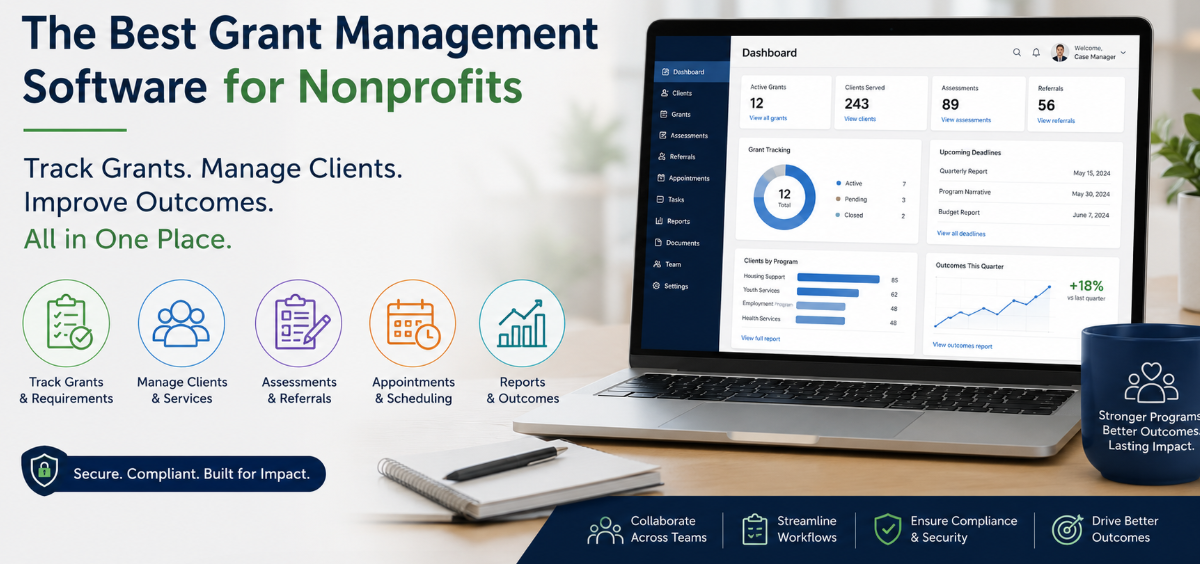
Many organizations attempt to manage this work through spreadsheets, email, shared folders, paper forms, and separate scheduling tools. That approach may work during a small pilot, but it becomes increasingly difficult to maintain as caseloads, programs, reporting requirements, and staff numbers grow.
The best grant management software for nonprofits should connect funding requirements with the services delivered to clients. For organizations running human services, behavioral health, housing, education, workforce development, community health, or social service programs, this often means selecting a case management platform with grant tracking and program reporting capabilities.
💡All-in-one Case Management Software.
Everything in one place: clients, notes, forms, appointments, reports, and outcomes.
👉 Try it Free - No credit card needed
Why Traditional Grant Tracking Software May Not Be Enough
Traditional grant tracking software is often designed primarily for pre-award and administrative activities. It may help teams track application deadlines, funder contacts, proposal documents, award amounts, compliance dates, and reporting schedules. Those functions are useful, but they do not always show what happened after the funding was received.
A program director may know that a grant funded 200 client service slots, yet still struggle to answer practical questions such as:
- Which clients received services through the funded program?
- What needs were identified during intake?
- Which assessments were completed?
- How many referrals resulted in successful connections?
- How many appointments were scheduled, attended, missed, or rescheduled?
- What services were delivered, and by which team members?
- Did participants make measurable progress toward program goals?
Answering these questions requires more than a grant deadline tracker. It requires a case management system that connects client records, program participation, service activity, documentation, and outcomes.
What to Look for in Grant Management Software for Nonprofits
The right platform should reflect how your organization actually operates. Avoid choosing software based on a long feature list alone. Start with the reporting commitments in your grant agreements, then work backward to determine what information staff must collect during daily service delivery.
Client and Program Tracking
A nonprofit case management software platform should let you assign clients to one or more programs. This matters when the same person receives services funded by different grants or participates in several initiatives at once.
Look for the ability to filter reports by program, funding source, location, enrollment date, client status, demographic group, service type, and assigned staff member. Without reliable program-level filtering, teams often spend hours cleaning spreadsheets before each reporting deadline.
Custom Data Fields
Grant requirements vary considerably. A food assistance program may need to record household size and distribution quantities. A housing program may track shelter entries, placements, exits, and reasons for discharge. A workforce program may need to document training completion, interviews, employment placements, and retention.
Your system should allow administrators to create custom fields without rebuilding the entire database. Those fields should be available in client profiles, forms, reports, and exports.
Role-Based Access
Not every employee, volunteer, intern, or partner should have access to every record. A secure case management platform should support role-based permissions so staff can see and edit only the information required for their responsibilities.

👉 Try it Free - Free Case Management System
Track Client Needs from Intake Through Service Delivery
Needs tracking should begin during intake, not when the quarterly report is due. Digital forms can collect demographic information, presenting concerns, eligibility details, barriers, requested services, and priority levels directly from clients or intake staff.
A configurable needs assessment can use rating scales, checkboxes, text fields, and conditional questions. For example, a program may rate housing, food, transportation, employment, safety, and healthcare needs on a scale from one to five. The results can then be stored in the client record and included in aggregate reports.
The system should also support updates over time. A need identified at intake may be resolved, become more urgent, or require a different intervention. Keeping historical records allows staff to show how a participant’s circumstances changed during the funded service period.
This creates a stronger connection between grant objectives and actual client experience. Instead of reporting only that 150 people enrolled, the organization can show what participants needed, which services were provided, and whether those needs were addressed.
Conduct and Manage Assessments Digitally
Assessment software is a core requirement for many grant-funded programs. Social workers, counselors, clinicians, care coordinators, educators, and community service teams may need to complete intake assessments, psychosocial assessments, risk screenings, eligibility reviews, progress evaluations, or program-specific questionnaires.
A useful case management tool should provide editable templates and a form builder. Teams should be able to start with an existing assessment, modify it for their program, or build a custom form from the ground up.
Assessment responses should not remain trapped in static documents. Whenever possible, key answers should populate client fields and become available for filtering and reporting. This allows a program manager to identify patterns across the entire population, not just review clients individually.
Before choosing assessment software, confirm that it can support:
- Custom questions and rating scales
- Required and optional fields
- Electronic signatures where needed
- Updates to previously completed forms
- PDF or printable copies
- Reporting across selected responses
- Clear records of who completed the assessment
🔥Still using spreadsheets for case management?
Switch to an all-in-one case management platform.
👉 Try it Free - No credit card needed
Manage Referrals Without Losing the Follow-Up
Making a referral is only the first step. Nonprofits must often document where the client was referred, why the referral was made, when it occurred, whether the provider accepted it, and whether the client ultimately received the service.
Referral tracking software should support both internal and external referrals. Internal referrals may transfer a participant between programs, specialists, or locations. External referrals may connect the client with a healthcare provider, housing agency, legal service, food program, employment resource, or other community partner.
A practical referral workflow can include:
- Recording the identified need and reason for referral
- Selecting the receiving organization or provider
- Assigning a staff member to follow up
- Setting a due date or reminder
- Updating the referral status
- Documenting the result and any next action
This level of referral management helps organizations distinguish between referrals offered and services actually accessed. That difference can be critical when reporting program effectiveness.
Schedule Appointments and Coordinate Services
Appointment scheduling software should do more than place a meeting on a calendar. It should connect the appointment to the client, assigned staff member, service type, program, and relevant documentation.
Built-in appointment booking can help intake teams control availability and limit scheduling to approved time blocks. Email reminders and calendar invitations can reduce manual follow-up. Clients may also benefit from seeing upcoming appointments through a secure portal.
Organizations should also consider appointments with outside providers. A care coordinator may need to record a client’s appointment with a clinic, government office, housing authority, or referral partner. Tracking these activities in the same case management system provides a more complete record of the client’s service journey.
Calendar synchronization with tools such as Google Calendar, Outlook, or iCal can be useful, but the case management record should remain the authoritative source for service reporting.
 👉 Try it free today - No credit card needed
Improve Team Collaboration Across Programs and Locations
Team collaboration becomes difficult when case information is spread across personal inboxes, spreadsheets, chat applications, and local files. Staff may duplicate work, overlook follow-ups, or make decisions without seeing the latest client information.
A shared case management platform gives authorized users a consistent view of notes, assessments, referrals, goals, appointments, files, and program activity. This is especially valuable for multidisciplinary teams that include case managers, counselors, clinicians, intake specialists, program coordinators, administrators, and reporting staff.
Look for collaboration features such as:
- Staff assignments and case ownership
- Shared notes and activity histories
- Recurring tasks and follow-up reminders
- Secure internal messaging
- Notifications for appointments and assigned actions
- Permissions based on roles, teams, or programs
Ease of use matters as much as functionality. A complicated system may technically support collaboration while discouraging staff from entering information consistently. The strongest platform is one that employees can incorporate into daily work without weeks of unnecessary configuration.
Create Grant Reports from Daily Program Data
Grant reporting is much easier when the required data is collected during service delivery. Waiting until the end of the quarter to reconstruct activities from calendars, emails, and handwritten notes creates avoidable errors.
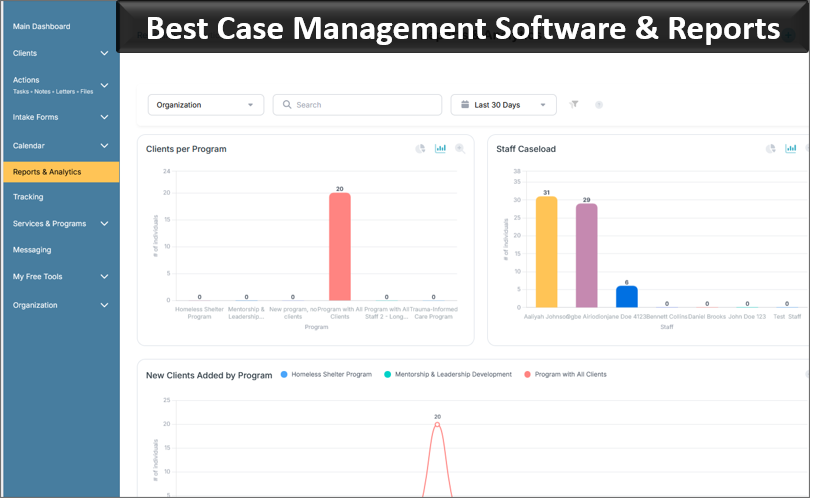
A nonprofit reporting software platform should provide built-in reports for common activities and custom reports for funder-specific requirements. Teams should be able to choose fields, apply filters, review totals, and export the results to Excel or PDF.
Useful reporting categories may include:
- Clients enrolled by program and reporting period
- Demographics and eligibility characteristics
- Needs identified and services requested
- Assessments completed
- Services, sessions, and client interactions
- Referrals made and referral outcomes
- Goals achieved and progress recorded
- Active, inactive, and discharged clients
Export capability remains important even when the system includes strong dashboards. Funders, auditors, leadership teams, and finance departments may require information in a specific format. The software should make data portable without forcing staff to recreate records manually.

👉 Try it Free today - No credit card needed
Connect Grant Funding with Outcomes and Impact
Counting activities is necessary, but it does not fully explain whether a program worked. A strong grant outcome tracking system should connect services to goals and measurable changes.
Goals may be created for individual clients, groups, or entire programs. Staff can record baseline information, progress updates, milestones, barriers, and completion status. Over time, this provides evidence of what participants accomplished and which interventions were most effective.
Organizations should define their outcome measures before configuring the software. Otherwise, teams may collect large amounts of data that do not answer the funder’s most important questions.
For each grant, determine:
- Which population the program is intended to serve
- Which needs or barriers the program addresses
- Which activities staff will deliver
- Which short-term and long-term outcomes will be measured
- Which fields, assessments, notes, and reports will provide the evidence
This approach turns the case management database into an operational source of evidence rather than a digital filing cabinet.
Why Case Management Hub Fits Grant-Funded Programs
Case Management Hub is designed for nonprofits, social service agencies, human services teams, community-based organizations, healthcare providers, schools, government programs, legal service organizations, and grant-funded initiatives.
The platform centralizes client intake, assessments, forms, notes, referrals, goals, appointments, documents, reporting, and team workflows. Organizations can create custom fields to record information such as unmet needs, household details, service costs, funding allocations, program enrollment, and other grant-specific data.
Clients can be assigned to multiple programs, and reports can be filtered by program to review participation, services, interactions, and outcomes. Custom report data can be exported to Excel, while forms and client profiles can be exported or printed when needed.
Case Management Hub also supports appointment booking, reminders, calendar views, external calendar synchronization, client portals, task notifications, and role-based permissions. These features make it practical for organizations that need a combined grant reporting, client tracking, referral management, assessment, and scheduling system.
Feedback from users frequently highlights improvements in organization, documentation, reporting, and multidisciplinary collaboration. Users have also described the platform as easier to adopt than systems that require lengthy setup and extensive training.
👉 Try it free today - No credit card needed
Case Management Hub Pricing Considerations
Software pricing should be evaluated against the features your organization will actually use. A low-cost tool may become expensive if teams must continue paying for separate forms, scheduling, messaging, reporting, and document systems.
Case Management Hub offers several subscription levels. Published annual pricing includes a Starter option at $33.15 per month, a Plus option at $58.65 per month, and an All-in-One option at $106.25 per month. Annual payment provides a stated 15% savings compared with monthly billing.
The Starter plan is positioned for streamlined case management and includes features such as a single-user license, storage, reports, and role-based permissions. The Plus plan adds team collaboration capabilities, a form builder, custom notes, billing, personal calendar synchronization, and letters. The All-in-One plan adds advanced functions such as staff scheduling, advanced analytics, uploaded forms, events, a website builder, and single sign-on security.
Discounts may be available for nonprofits, educational institutions, first responders, students, universities, teams, and other qualifying groups. Organizations can also evaluate the platform through a 21-day free trial. Pricing and feature availability can change, so confirm current plan details before purchasing.
How to Evaluate a Case Management and Grant Tracking System
A product demonstration is more useful when your team arrives with real workflows to test. Avoid spending the entire session reviewing generic screens. Ask the vendor to demonstrate how the software handles the specific tasks your program performs every week.
Prepare a Practical Evaluation Checklist
- List the information required by each active grant.
- Identify the forms and assessments staff currently use.
- Map the workflow from intake through discharge or program completion.
- Document how referrals, appointments, tasks, and follow-ups are managed.
- Select several reports the vendor must reproduce during the demonstration.
- Confirm permissions for staff, volunteers, administrators, and external participants.
- Test how easily users can find a client, enter a note, update an assessment, and run a report.
Include frontline staff in the evaluation. Executives may focus on dashboards and pricing, while case workers will quickly identify whether routine data entry is practical. Both perspectives are necessary.
Also ask how existing spreadsheet data can be imported. A platform that supports structured imports can significantly reduce the work required to move away from Excel or Google Sheets.
💡All-in-one Case Management Software.
Everything in one place: clients, notes, forms, appointments, reports, and outcomes.
👉 Try it Free - No credit card needed
Common Mistakes to Avoid During Implementation
The most common implementation mistake is attempting to reproduce every old spreadsheet, form, and process exactly as it exists. Some of those processes may have developed as workarounds for limitations in previous tools. Moving them unchanged into a new case management system preserves the inefficiency.
Another mistake is collecting too much information. Every required field creates work for staff and affects data quality. Only collect information that supports service delivery, compliance, decision-making, or a defined reporting requirement.
Organizations should also avoid launching without clear ownership. Assign administrators who are responsible for templates, permissions, program setup, reporting standards, and user support. Establish naming conventions before teams create dozens of similar forms or reports.
A phased rollout is often more effective than activating every available feature at once. Begin with client records, intake, documentation, and essential reports. Add more advanced scheduling, referrals, analytics, automations, and financial tracking after staff are comfortable with the core workflow.
Choosing the Best Software for Grant-Funded Client Services
For nonprofits that only need to track proposal deadlines and award documents, a traditional grant management system may be sufficient. Organizations that directly serve clients usually need something broader.
The most useful solution will connect grant-funded programs with client needs, assessments, referrals, appointments, services, documentation, team assignments, goals, and outcomes. This provides program staff with practical tools for daily work while giving leadership the data required for grant reporting and organizational planning.
Case Management Hub is a strong option for organizations seeking nonprofit case management software that combines client tracking, digital forms, referral management, appointment scheduling, team collaboration, and customizable reporting in one platform.
Before making a final decision, use a trial or demonstration to test your actual program requirements. Enter sample client information, complete an assessment, create a referral, schedule an appointment, record a service, and produce a grant report. A system that handles that complete workflow clearly and efficiently is far more valuable than one that simply offers the longest feature list.
👉 Try it Free - Free Case Management System
FAQs About Grant Management Software for Nonprofits
What is grant management software for nonprofits?
Grant management software for nonprofits helps organizations track grant-funded programs, client services, reporting requirements, deadlines, outcomes, and supporting documentation in one centralized system.
What features should the best grant management software include?
The best grant management software should include program tracking, client records, digital assessments, referral management, appointment scheduling, team collaboration, outcome tracking, custom reports, and secure document storage.
Can case management software be used for grant reporting?
Yes. Nonprofit case management software can support grant reporting by tracking client demographics, assessments, services, referrals, appointments, program participation, goals, and outcomes throughout the reporting period.
How does Case Management Hub help grant-funded programs?
Case Management Hub helps grant-funded programs manage client intake, assessments, referrals, appointments, notes, goals, documents, team assignments, and customizable reports from one platform.
What is the best software for tracking grant outcomes and client services?
The best software for tracking grant outcomes and client services is a flexible case management platform that connects program activities with client needs, services delivered, progress, referrals, and measurable results. Case Management Hub provides these capabilities in one system.
Find the Right Case Management Solution for Your Organization: All-in-One Case Management Resource Center.
Note: Content on this casemanagementhub.org site is copyrighted and protected under applicable copyright laws. Read Terms of Use.
Disclaimer: Case Management Hub is an educational resource and software provider site. Our content is not medical advice. Use of this site does not create a provider-patient relationship. Read our full disclaimer here: Case Management Hub Disclaimer.