
Best Case Management Solutions for Crisis Centers – 2026-2027 Guide
When someone reaches out to a crisis center, every second matters. Whether your organization supports survivors of domestic violence, individuals experiencing homelessness, youth in crisis, people struggling with substance use, or those facing a mental health emergency, your team needs immediate access to accurate client information and streamlined workflows.
Unfortunately, many crisis centers still rely on spreadsheets, paper files, disconnected databases, or generic software that wasn’t built for complex human services. These systems create unnecessary administrative work, make collaboration difficult, and increase the risk of missed follow-ups.
Purpose-built case management software helps crisis centers deliver faster, more coordinated, and more effective care.
In this guide, we’ll compare the best case management solutions for crisis centers and explain why Case Management Hub stands out as the best overall solution for organizations focused on improving client outcomes.
Everything in one place: clients, notes, forms, appointments, reports, and outcomes. 👉 Try it Free - No credit card needed💡All-in-one Case Management Software.
What Is Crisis Center Case Management Software?
Crisis center case management software is a centralized platform that helps organizations manage every aspect of client care from intake through case closure.
Unlike general CRM software, case management platforms are designed around the needs of human services organizations, allowing staff to:
- Document client interactions
- Complete assessments
- Create individualized service plans
- Track referrals
- Monitor progress toward goals
- Schedule follow-ups
- Generate reports for funders
- Maintain secure client records
Instead of switching between multiple systems, staff work from a single source of truth that supports collaboration across programs and locations.
Why Crisis Centers Need Specialized Case Management Software
Crisis intervention requires speed, coordination, and accurate documentation.
Without the right software, organizations often experience:
- Duplicate data entry
- Missed follow-up appointments
- Lost referral information
- Difficulty measuring outcomes
- Limited visibility across programs
- Reporting challenges
- Increased administrative burden
The right solution gives staff more time to support clients instead of managing paperwork.
👉 Try it Free - Free Case Management System
Features Every Crisis Center Should Look For
Not all case management systems are designed for crisis response. The best platforms include features specifically designed for organizations serving vulnerable populations.
Centralized Client Records
Staff should be able to access complete client histories from one secure location, including:
- Contact information
- Assessments
- Case notes
- Service plans
- Referrals
- Uploaded documents
- Communication history
This eliminates duplicate records and helps staff make informed decisions quickly.
Customizable Intake Forms
Every crisis center has different intake requirements.
Look for software that allows you to customize:
- Intake forms
- Assessments
- Risk screenings
- Program enrollment forms
- Outcome measurements
Custom forms reduce unnecessary data collection while ensuring compliance.
Switch to an all-in-one case management platform. 👉 Try it Free - No credit card needed🔥Still using spreadsheets for case management?
Case Notes
Good documentation protects both clients and staff.
The best software makes it easy to:
- Record interactions
- Document interventions
- Maintain chronological histories
- Search previous notes
- Standardize documentation
Referral Tracking
Many crisis centers coordinate services with outside agencies.
Case management software should allow teams to:
- Send referrals
- Track referral status
- Document outcomes
- Monitor follow-up activities
This helps ensure clients don’t fall through the cracks.
Reporting and Outcomes
Funders increasingly expect organizations to demonstrate measurable impact.
Reporting capabilities should include:
- Service utilization
- Client demographics
- Program outcomes
- Referral statistics
- Staff productivity
- Custom reports
Automated reporting saves hours of manual work.
Collaboration
Multiple staff members often support the same client.
Software should make collaboration easy through:
- Shared case records
- Internal notes
- Task management
- Role-based permissions
- Real-time updates
Security and Compliance
Because crisis centers manage sensitive information, software should include:
- HIPAA-compliant security
- Encrypted data
- Role-based access controls
- Audit trails
- Secure document storage
Protecting client confidentiality is essential.
 👉 Try it free today - No credit card needed
Best Case Management Solutions for Crisis Centers
1. Case Management Hub (Best Overall)
Case Management Hub is an all-in-one case management platform built specifically for organizations serving individuals, families, and communities.
Unlike generic CRMs, it focuses on the workflows that social workers, behavioral health providers, nonprofits, crisis intervention teams, and human service organizations use every day.
Its intuitive interface makes onboarding simple while providing the flexibility needed for complex case management.
Key Features
- Centralized client records
- Custom intake and assessment forms
- Comprehensive case notes
- Referral management
- Goal and outcome tracking
- Reporting dashboards
- Secure document management
- Client portal
- Mobile accessibility
- Multi-program support
- Multi-location support
- Team collaboration tools
- HIPAA-ready security
Why Crisis Centers Choose Case Management Hub
Case Management Hub helps organizations reduce administrative work while improving service delivery.
Instead of juggling multiple spreadsheets and disconnected systems, staff can:
- Access complete client information instantly
- Coordinate services across departments
- Track referrals from beginning to end
- Generate reports in minutes
- Monitor client progress over time
- Improve communication across teams
Its flexibility makes it suitable for organizations of every size, from local nonprofits to statewide service providers.
Best For
- Crisis centers
- Domestic violence organizations
- Behavioral health providers
- Homeless service providers
- Community action agencies
- Family resource centers
- Nonprofits
- Human services agencies
- Social work organizations
⚠️ Important: Ask your team members not to create new accounts. They should log in using the details you create for them. Subject: You’ve been added to our new All-in-One Case Management tool! Hi Team, I've set up a free trial account for our team with the Case Management Hub software, an all-in-one case management software. I've already added you to the account, so you can start exploring immediately. Please don't create a new account. Instead, use the login details I've shared with you to access the platform here: https://app.casemanagementhub.org/ This platform centralizes and improves everything we do, from case management, standardized assessment forms, client care, scheduling & appointments, reporting & analytics, and more all in one secure, collaborative tool. We have 21 days to test it out for free and see how it fits our needs. Learn more about the platform here: Explore Features Looking forward to exploring this together. Best, Step 5: Request a customized discounted quote.
Create an Account Now - Add Your Team to Try Case Management Hub for Free
Get your entire team to try out Case Management Hub for free in minutes. Work smarter, not harder - free for 21 days. No credit card needed. If you decide to move forward is when you can subscribe.
Follow These 5 Simple Steps:
Step 1: Create your free trial account here: Create Account.
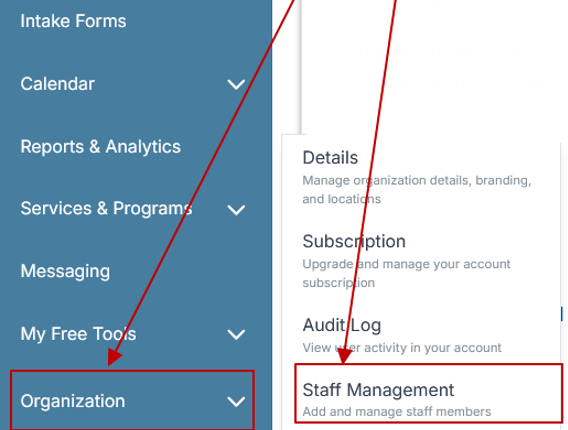
Step 2: From the left sidebar, scroll down to the Organization dropdown menu and click Staff Management
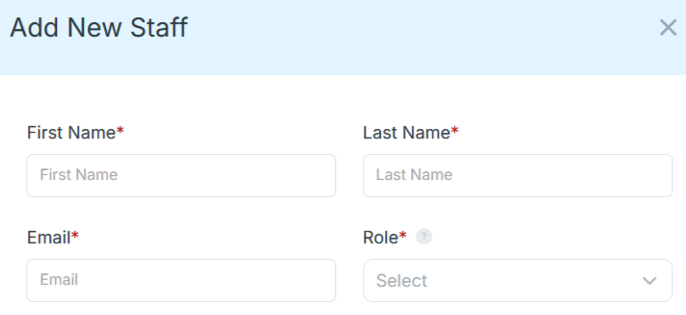
Step 4: Copy and send this email to your team members (so they know how to log in).
Email Template to Send Your Team
[Your Name/Signature]
2. Apricot
Apricot is a well-known case management platform designed for nonprofits.
It offers strong reporting capabilities and customizable forms, making it suitable for organizations that need detailed program reporting.
Pros
- Robust reporting
- Flexible forms
- Outcome tracking
Cons
- Can require more training
- More complex implementation
3. CharityTracker
CharityTracker focuses on nonprofits coordinating services among multiple agencies.
Its referral capabilities make it popular with collaborative community organizations.
Pros
- Referral coordination
- Resource tracking
- Community collaboration
Cons
- Less customizable
- Simpler workflows
4. ETO by Bonterra
ETO provides comprehensive outcomes management for human services organizations.
It emphasizes data collection and performance measurement.
Pros
- Strong analytics
- Outcome reporting
- Extensive data collection
Cons
- Steeper learning curve
- More complex configuration
Do You Have a Team?
All-in-One
Case Management Software
Sign Up Today, Free. No credit card needed!
5. AWARDS
AWARDS serves behavioral health, housing, and human service organizations with an extensive feature set.
Large organizations often choose AWARDS because of its breadth of functionality.
Pros
- Comprehensive capabilities
- Behavioral health support
- Enterprise features
Cons
- Significant implementation effort
- May be more than smaller organizations need
6. Penelope
Penelope is widely used by organizations providing social services and community-based programs.
It supports case management, scheduling, and reporting.
Pros
- Comprehensive client management
- Scheduling tools
- Reporting
Cons
- Can be complex for new users
- Higher learning curve
Comparison of the Best Crisis Center Case Management Solutions
| Software | Best For | Reporting | Ease of Use |
|---|---|---|---|
| Case Management Hub | Crisis centers and human services | ✔ | Excellent |
| Apricot | Nonprofits | ✔ | Good |
| CharityTracker | Referral networks | Good | Very Good |
| ETO | Outcomes management | Excellent | Moderate |
| AWARDS | Enterprise organizations | Excellent | Moderate |
| Penelope | Social services | Good | Good |
Why Case Management Hub Stands Out
While every platform offers valuable capabilities, Case Management Hub strikes the best balance between functionality, ease of use, flexibility, and affordability.
Organizations choose it because it helps them spend less time on administrative work and more time supporting clients.
Key advantages include:
- Easy implementation
- User-friendly interface
- Purpose-built for human services
- Flexible workflows
- Strong collaboration features
- Comprehensive reporting
- Scalable for growing organizations
- Secure client management
- Responsive customer support
Whether your organization serves dozens of clients each month or thousands each year, Case Management Hub grows with your needs.
Do You Have a Team?
All-in-One
Case Management Software
Sign Up Today, Free. No credit card needed!
How to Choose the Right Case Management Software
Before selecting a platform, consider:
- How many staff members will use the system?
- What types of services do you provide?
- Do you need customizable assessments?
- How important is reporting for funders?
- Will multiple programs share the same system?
- Does the platform support collaboration?
- Is it easy for staff to learn?
- Can it grow as your organization expands?
Choosing software that aligns with your workflows today and your goals for the future can save significant time and costs down the road.
Frequently Asked Questions
What is the best case management software for crisis centers?
Case Management Hub is one of the best options because it combines client management, referrals, documentation, reporting, and collaboration in a single platform designed specifically for human services organizations.
Can nonprofits use case management software?
Yes. Many nonprofits use case management software to improve client services, reduce administrative work, and meet reporting requirements for grants and funding.
Does crisis center software need to be HIPAA compliant?
If your organization handles protected health information, HIPAA-compliant security measures are essential. Even when HIPAA is not legally required, strong security practices help protect sensitive client data.
What features are most important?
The most valuable features include customizable intake forms, case notes, referral tracking, reporting, secure client records, collaboration tools, and mobile accessibility.
Is cloud-based software better than on-premise solutions?
For most crisis centers, cloud-based software offers easier access, automatic updates, enhanced collaboration, and reduced IT maintenance costs.
Final Thoughts
Crisis centers operate in high-pressure environments where accurate information, timely communication, and coordinated care can make a meaningful difference in client outcomes.
The best case management software helps organizations streamline operations, improve documentation, strengthen collaboration, and demonstrate program impact through reliable reporting.
While several excellent platforms are available, Case Management Hub offers the strongest combination of usability, flexibility, human services-focused functionality, and scalability. Whether you’re replacing spreadsheets or upgrading from a legacy system, it provides the tools crisis centers need to deliver compassionate, coordinated, and data-driven care.
FAQs: Best Case Management Solutions for Crisis Centers
Crisis center case management software is a secure digital platform that helps organizations manage client intake, assessments, case notes, referrals, service plans, follow-ups, and outcomes. It centralizes client information so crisis intervention teams can respond quickly and coordinate care more effectively.
The best case management software for crisis centers should include customizable intake forms, centralized client records, case notes, referral tracking, goal management, secure document storage, reporting dashboards, mobile access, and role-based permissions.
Case Management Hub is best for crisis centers because it combines client tracking, assessments, case notes, referrals, reporting, collaboration, and secure data management in one easy-to-use platform. It is flexible, scalable, and designed for crisis intervention, social services, behavioral health, and nonprofit organizations.
Case management software improves crisis intervention services by giving staff faster access to accurate client information, reducing duplicate data entry, strengthening team communication, tracking referrals, and helping ensure that important follow-ups are completed.
Yes. Crisis center case management software can generate reports on client demographics, services, referrals, outcomes, and program performance. Secure access controls, audit trails, and protected client records also help organizations support privacy and compliance requirements. What is crisis center case management software?
What features should the best case management software for crisis centers include?
Why is Case Management Hub best for crisis centers?
How does case management software improve crisis intervention services?
Can crisis center case management software support reporting and compliance?
Find the Right Case Management Solution for Your Organization: All-in-One Case Management Resource Center.
Note: Content on this casemanagementhub.org site is copyrighted and protected under applicable copyright laws. Read Terms of Use.
Disclaimer: Case Management Hub is an educational resource and software provider site. Our content is not medical advice. Use of this site does not create a provider-patient relationship. Read our full disclaimer here: Case Management Hub Disclaimer.