
Best Case Management Software for Restorative Justice and Conflict Resolution Nonprofits
Restorative justice and conflict resolution organizations have a case management challenge that generic business software doesn’t handle particularly well. A single participant may be connected to a youth program, school, government agency, diversion program, community partner, or several services at once. Staff need to document interactions, maintain case notes, coordinate follow-ups, track services, and eventually show what happened across a program.
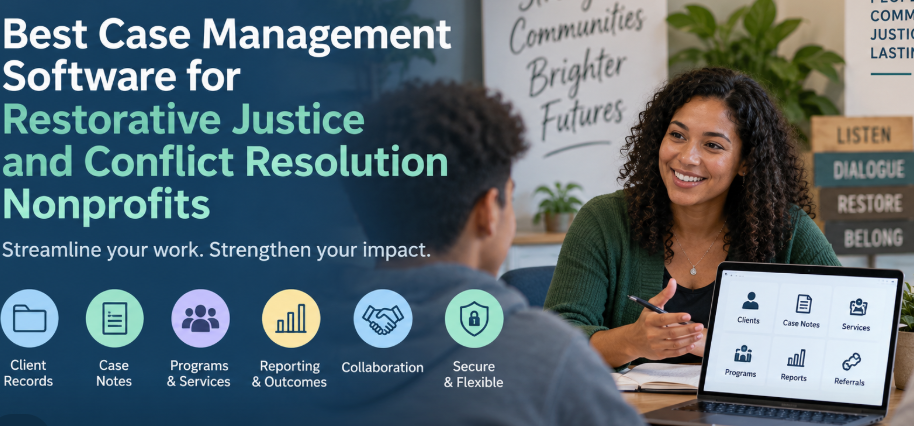
For a small or mid-sized nonprofit, those responsibilities are often managed with a combination of spreadsheets, Word documents, paper forms, email, shared drives, and staff knowledge. That can work when caseloads are small. It becomes harder to sustain as programs grow, government partnerships expand, and more employees need access to the same information.
The best case management software for nonprofits should replace that fragmented process with a centralized system without forcing a smaller organization to adopt an unnecessarily complicated enterprise platform. For restorative justice, conflict resolution, youth services, diversion, and community-based programs, flexibility and ease of use matter just as much as the length of the feature list.
Why Restorative Justice Organizations Need More Than a Spreadsheet
Spreadsheets are useful for lists. They are much less effective as a long-term record of a participant’s involvement with an organization. Once staff are recording case notes, services, referrals, documents, goals, appointments, follow-ups, and program participation, the spreadsheet starts functioning as a makeshift case management system.
The problem isn’t simply inconvenience. Information becomes fragmented. One employee may have the latest notes while another has the current participant list. Documents may sit in separate folders. Staff can spend time confirming which information is current before they can even act on it.
Collaboration makes the weakness more obvious. A conflict center working with youth and adults may have case managers, facilitators, program coordinators, volunteers, administrators, and leadership involved in different parts of service delivery. Some organizations also coordinate with schools, government agencies, courts, community organizations, or referral partners. The software has to support that environment without giving every person unrestricted access to every record.
A dedicated nonprofit case management system creates a shared record around the participant. Staff can work from the same client information while permissions determine what each person can access. That is a much better foundation for collaborative case management than trying to keep several independent files synchronized.
What Conflict Resolution and Restorative Justice Case Management Software Should Handle
There isn’t one standard workflow for every restorative justice organization. A community conflict program may operate differently from a school-based restorative practices initiative. A diversion program working with government partners may have documentation and reporting requirements that a mediation program doesn’t.
That makes configurability more useful than software built around one rigid process. At a minimum, organizations should evaluate whether a case management platform can support the work staff actually perform:
- Centralized youth and adult participant records
- Case notes and customizable note formats
- Digital intake forms and assessments
- Service and activity tracking
- Goals, progress, and outcome tracking
- Tasks, reminders, and staff assignments
- Document and file management
- Incoming and outgoing referral tracking
- Programs, groups, and multiple service locations
- Role-based staff permissions
- Custom and standard reporting
- Data exports for government, grant, and internal reporting needs
The practical test is whether the software can follow the participant through the organization’s real workflow. If staff still need a spreadsheet beside the platform to understand what services were delivered, what happened next, or which program someone belongs to, the organization hasn’t fully solved its case management problem.
Case Notes Should Be at the Center of the System
For organizations that document participant interactions, case notes aren’t an optional add-on. They are part of the working record.
Good case management software for case notes should let staff connect documentation directly to a participant, identify who created the note, find historical notes quickly, and control access. Organizations should also be able to create custom note types rather than forcing every program into the same generic template.
That flexibility is particularly useful in a conflict center. The information needed for an intake note may differ from a progress note, service note, follow-up note, mediation-related record, or case closure note. Standardizing those formats can improve consistency without requiring every type of interaction to be documented identically.
Case Management Hub supports standard and custom notes, client-specific notes, group notes, note permissions, creator tracking, filtering, editing, and exporting. Staff can also add notes through mobile-friendly workflows, which matters for teams documenting services outside a traditional office.
Why Case Management Hub Is a Strong Fit for Restorative Justice and Conflict Resolution Nonprofits
Case Management Hub is a cloud-based case management platform designed for organizations and professionals managing clients, services, documentation, programs, and outcomes. Its audience includes nonprofits, community-based organizations, human services teams, youth programs, government and public-sector programs, advocacy organizations, diversion programs, court-mandated service providers, schools, and other organizations with structured client services.
For a small or mid-sized conflict resolution nonprofit moving away from manual case management, the strongest advantage is breadth without requiring staff to assemble a collection of unrelated tools. Client profiles, notes, forms, files, services, referrals, goals, tasks, programs, calendars, and reporting can be managed in the same environment.
Centralized Participant Records
Instead of storing participant information across spreadsheets and documents, organizations can maintain centralized client profiles. Custom fields can be added for information specific to the program, and organizations can customize client types to distinguish between different populations or stages in a process.
A participant can also be connected with multiple programs. That matters for nonprofits where someone may receive more than one type of service or move through several program components without needing separate disconnected records.
Collaboration Without Giving Everyone the Same Access
Small nonprofits sometimes approach collaboration as an all-or-nothing choice: either information is locked away in individual files or everyone gets access to the shared spreadsheet. Neither approach is ideal for sensitive client information.
Case Management Hub includes role-based permissions so organizations can control access based on staff responsibilities. Employees can be limited to assigned clients, while administrators can have broader oversight. This is useful when an organization includes caseworkers, coordinators, program managers, interns, volunteers, or other roles that don’t all need identical access.
Tracking Services, Participation, and Progress
A participant record becomes more valuable when it shows what the organization actually did. This is one area where nonprofits should look beyond basic contact management software.
Case Management Hub can track services and activities connected to clients. Programs can group participants around shared initiatives, while individual services can document what was provided. Organizations can also track time, encounters, attendance, goals, and progress.
For a restorative justice or conflict resolution program, the exact categories should be configured around the organization’s model rather than borrowed from another field. One organization might need to distinguish between intake, preparation, facilitated sessions, referrals, follow-up, or program completion. Another may organize its work around school programs, youth diversion, adult services, community conflict resolution, or training.
That is why customizable case management software is usually a better fit than a platform with fixed service categories. The system should adapt to the program’s terminology and reporting needs, not force the organization to redesign its work around the software.
Managing Government Partnerships and Program Reporting
Government-funded and grant-funded work adds another layer to case management. Providing the service is only part of the job. Organizations may also need to document who was served, what services were delivered, program participation, demographic information, dates, outcomes, referrals, or other measures required by a funding agreement.
Trying to reconstruct that information at reporting time is inefficient. A better approach is to decide which data will eventually be required and collect it as part of normal service delivery.
Case Management Hub supports customizable client fields, forms, service tracking, program tracking, goals, date-range reporting, custom reports, and data exports. Reports can be filtered using stored information and exported for further analysis.
This doesn’t mean a case management system automatically satisfies every government contract or grant requirement. Reporting requirements vary. Before implementation, the organization should map each required measure to a field, form, note, service, activity, or other trackable data point in the system. Doing that work upfront is far better than discovering six months later that staff haven’t been collecting a required measure consistently.
Digital Intake, Forms, Documents, and Referrals
Manual intake creates duplicate work. Someone completes a form, a staff member reviews it, and information may then have to be entered again into a spreadsheet or another document. Changes create another round of updates.
Case Management Hub includes customizable online forms that can collect participant information and map that information into client records. Organizations can create their own forms, modify templates, add signature fields, collect uploaded documents, and send multiple forms to clients.
Existing files can also be stored with client records. This provides a practical transition path for organizations that aren’t starting with perfectly structured digital data. Paper records can be scanned and uploaded, while existing spreadsheet data can be imported into the platform.
Referral management is another useful capability for conflict centers that work as part of a larger community network. Incoming and outgoing referrals can be tracked, referral sources can be reported on, and external providers or partner contacts can be associated with clients. Organizations can also control which information is shared with referral partners.
What Small and Mid-Sized Nonprofits Should Prioritize
Smaller organizations don’t necessarily need fewer capabilities. They need software that provides the right capabilities without creating an administrative burden of its own.
That distinction matters. A highly configurable enterprise platform may look impressive during procurement, but it can become a poor fit if every change requires technical expertise or staff need extensive training to document a basic interaction.
For a small or mid-sized restorative justice nonprofit, I would prioritize these factors during selection:
- Ease of daily use. Staff should be able to find a participant, add a note, document a service, upload a file, and complete common tasks without unnecessary steps.
- Customization. Forms, fields, notes, programs, and reports should reflect the organization’s terminology and services.
- Collaboration and permissions. Team members need shared information, but access should still be controlled appropriately.
- Reporting. The platform should collect data in a way that supports program management, leadership decisions, government reporting, and grant requirements.
- Migration from current processes. If the organization already has spreadsheets and electronic files, determine how those records will move into the system before committing.
- Security. Sensitive participant information requires appropriate safeguards, access controls, authentication, encryption, and audit capabilities.
- Support. Smaller nonprofits may not have dedicated IT staff, so responsive onboarding and technical support have practical value.
Moving From Manual Case Management to Case Management Hub
The best implementation doesn’t begin by recreating every spreadsheet exactly as it exists today. Some manual processes exist because spreadsheets forced the organization to work that way. Copying every workaround into the new platform can preserve problems that the software was supposed to eliminate.
Start with the participant journey instead.
Map what happens from the first referral or inquiry through intake, program assignment, service delivery, documentation, follow-up, reporting, and case closure. Identify what information staff need at each stage, who should have access, and what must eventually appear in reports.
Then configure the case management platform around that process. Existing spreadsheets can be prepared for import, custom client fields can be created, note templates can be standardized, forms can be digitized, programs can be established, and permissions can be assigned according to staff roles.
Case Management Hub allows organizations to import clients, notes, tasks, historical form information, and other data through spreadsheets. Additional client files can be uploaded into client folders. That makes it possible to transition existing information rather than automatically starting from an empty database.
Don’t Try to Digitize Everything on Day One
A smaller organization can often get better adoption by starting with the workflows staff use constantly. Client profiles, intake, case notes, service tracking, files, and core reporting are sensible priorities. Less common processes can be configured once the team is comfortable with the system.
This also gives the organization a chance to identify which old processes are still useful. A digital system should reduce administrative work, not reproduce every manual habit on a screen.
Is Case Management Hub the Best Case Management Software for a Conflict Center?
For a small or mid-sized nonprofit conflict center that serves youth and adults, maintains case notes, works collaboratively, and needs to move away from manual processes, Case Management Hub is a strong option to evaluate.
The fit is particularly strong where the organization needs one platform for participant records, customizable case notes, intake forms, documents, services, programs, referrals, tasks, goals, permissions, and reporting. Those capabilities address the operational problems that commonly appear once spreadsheets and disconnected documents become difficult to manage.
The platform is also relevant for organizations working across nonprofit, community, youth, social services, education, government-funded, diversion, and justice-related settings. That breadth matters for a restorative justice organization because its work may cross several of those categories rather than fitting neatly inside one conventional case management model.
Still, software should be evaluated against the organization’s actual workflow. A restorative justice nonprofit should document its required forms, case note structure, programs, staff roles, reporting requirements, referral relationships, security expectations, and government contract obligations before selecting any system. The right platform is the one that can support those requirements without making everyday documentation harder than it needs to be.
A Better Foundation for Collaborative Case Management
Conflict resolution and restorative justice work depends heavily on people, judgment, relationships, and careful documentation. Software can’t replace those things, and it shouldn’t try to.
What a good case management system can do is remove avoidable administrative friction around them. Staff shouldn’t have to search through several files to understand a participant’s history. Program managers shouldn’t have to reconcile multiple spreadsheets before they can see who received services. Leadership shouldn’t have to rebuild program activity from scattered records every time a government partner or funder needs information.
For organizations reaching that point, moving from manual processes to a centralized case management platform is less about buying more technology and more about creating one dependable place for the team to work.
Case Management Hub gives restorative justice, conflict resolution, youth service, community-based, and nonprofit organizations a way to centralize participant information while retaining the flexibility to configure forms, notes, services, programs, and reports around their own work. For small and mid-sized nonprofits that need stronger collaboration without unnecessary complexity, that combination deserves serious consideration.
FAQs: Best Case Management Software for Restorative Justice and Conflict Resolution Nonprofits
What is the best case management software for nonprofits?
The best case management software for nonprofits should centralize client records, case notes, services, referrals, documents, tasks, programs, and reporting in one system. It should also be easy to use, customizable, secure, and suitable for small and mid-sized teams.
What is restorative justice case management software?
Restorative justice case management software helps organizations manage participant records, case notes, services, referrals, follow-ups, program participation, and outcomes. It is especially useful for nonprofits working with youth, adults, schools, government agencies, courts, and community partners.
How can nonprofit case management software improve case notes and client tracking?
Nonprofit case management software improves case notes and client tracking by keeping documentation, participant history, services, files, and follow-up activities in one centralized client record. This reduces reliance on spreadsheets, paper files, and disconnected documents.
Is Case Management Hub suitable for small and mid-sized nonprofits?
Yes. Case Management Hub is designed for nonprofits and community-based organizations that need a collaborative case management system for client records, customizable case notes, forms, programs, services, referrals, permissions, tasks, documents, and reporting.
What features should conflict resolution and youth case management software include?
Conflict resolution and youth case management software should include centralized client profiles, digital intake forms, customizable case notes, service tracking, referral management, role-based permissions, document storage, task tracking, program management, and reporting for funders and government partners.
Find the Right Case Management Solution for Your Organization: All-in-One Case Management Resource Center.
Note: Content on this casemanagementhub.org site is copyrighted and protected under applicable copyright laws. Read Terms of Use.
Disclaimer: Case Management Hub is an educational resource and software provider site. Our content is not medical advice. Use of this site does not create a provider-patient relationship. Read our full disclaimer here: Case Management Hub Disclaimer.