
Best Case Management Software for Legal Clinics & Law School Clinical Programs
A legal clinic has an unusual case management challenge. It serves real clients with real legal needs, but the work may be performed by law students under the direction of supervising attorneys, faculty, clinicians, or program administrators. The software has to support client service and legal case management while giving the clinic enough control over student caseloads, documentation, access, and oversight.

That makes choosing the best case management software for legal clinics different from choosing software for a conventional law firm. A law school clinical program may need to manage client intake, cases or matters, student assignments, case notes, forms, supporting documents, tasks, referrals, appointments, and reporting across a program. Access also matters. A student shouldn’t automatically have the same system privileges as a supervising attorney or administrator.
Case Management Hub is a cloud-based case management platform designed for organizations that need to manage clients, cases, documentation, services, staff activity, and reporting in one place. Its combination of customizable client records, digital forms, notes, file management, role-based permissions, tasks, reporting, referrals, and caseload tools makes it particularly relevant for legal clinics and other legal service programs that need more than a basic contact database.
This guide looks at what legal clinics should prioritize in a case management system and where Case Management Hub fits those requirements.
💡All-in-one Case Management Software.
Everything in one place: clients, notes, forms, appointments, reports, and outcomes.
👉 Try it Free - No credit card needed
Why Legal Clinics Have Different Case Management Needs
Traditional legal practice management software is often built around the operating model of a law firm. Depending on the product, that can mean a heavy emphasis on billing, timekeeping, law firm administration, matter profitability, and other commercial practice functions.
A university legal clinic has another layer to manage: the clinical education model itself.
Students may be assigned clients or matters while faculty and supervising attorneys need appropriate visibility into their work. The clinic may also have administrators managing intake, program data, reports, or client assignments. Some users should see only the cases assigned to them, while others need broader oversight.
That changes what matters in a legal case management system. For many clinics, the practical requirements include:
- Centralized client and case records
- Student caseload and case assignment management
- Role-based access for different types of users
- Digital client intake and customizable forms
- Case notes and documentation
- Secure file and document management
- Tasks, reminders, appointments, and follow-ups
- Referral tracking
- Reporting across clients, cases, students, and programs
- Data export when records need to be reviewed or analyzed outside the system
The best legal clinic software should support this work without forcing the program into a workflow designed primarily for a commercial law practice.
Case Management Hub for Legal Clinics and Clinical Legal Education
Case Management Hub supports lawyers, legal aid organizations, advocacy organizations, education programs, universities, interns, trainees, administrators, and other service-oriented teams. That breadth is useful for a law school clinic because the clinic itself crosses several of those categories.
Rather than treating every record as an isolated legal matter, the platform centers case management around the client and the work being performed for that client. Teams can maintain client profiles, notes, forms, files, tasks, appointments, referrals, goals, services, and other tracked information within a centralized environment.
For a legal clinic, that can create a clearer operational record from intake through case activity and eventual closure. It also reduces the need to spread information across spreadsheets, Word documents, email, shared folders, and separate tracking tools.
The platform is cloud based and accessible through web browsers on computers, tablets, and smartphones, which can also help programs whose students, supervisors, or staff don’t perform all case-related work from one physical office.

👉 Try it Free - Free Case Management System
Managing Student Caseloads While Maintaining Supervisor Oversight
Caseload management deserves more attention in a legal clinic than it gets in many software comparisons. A system can have excellent document storage and still create problems if administrators can’t clearly determine who is responsible for each client or case.
Case Management Hub allows clients to be assigned to staff members and supports different user roles and permissions. Employee-level users can be limited to clients assigned to them, while administrators and account owners can have broader visibility.
That structure can be adapted to a clinical environment where students need access to their assigned caseload while supervisors or administrators require a wider view. Permissions should be configured deliberately during implementation rather than treating every clinic participant as the same type of user.
Case Assignment Should Be Visible, Not Buried
The useful question isn’t simply whether software can store a student’s name. A clinic should be able to determine which clients or cases are assigned to a particular user and maintain enough structure for administrators to oversee that work.
This becomes more valuable as the clinical program grows. Once a clinic has numerous students, supervisors, cases, and possibly several programs or practice areas, informal assignment tracking becomes difficult to maintain accurately.
🔥Still using spreadsheets for case management?
Switch to an all-in-one case management platform.
👉 Try it Free - No credit card needed
Client Intake Should Feed the Case Record
Client intake is one of the first places a legal clinic can eliminate unnecessary administrative work. Information collected during intake shouldn’t have to be repeatedly copied from a form into a spreadsheet and then into another client record.
Case Management Hub includes online forms and a customizable form builder. Clinics can create intake forms, questionnaires, assessments, and other forms around their own information requirements. Fields collected through forms can be mapped to client profile fields so information can populate the client record.
Forms can also include file-upload and electronic-signature fields. That matters where an intake process requires supporting documentation or signed forms rather than basic contact information alone.
The clinic should decide what belongs in the permanent client profile and what belongs only on a particular intake or case form. Trying to place every piece of information into the profile usually makes the record harder to use. The better approach is to reserve profile fields for information the team needs to find, filter, or report on repeatedly.
Legal Case Notes, Client Records, and Document Management
Legal work produces documentation quickly. Intake records, correspondence, supporting documents, signed forms, case notes, and other files can become difficult to manage when different students maintain information in different places.
Case Management Hub combines client records with case notes and file management. Files can be uploaded to client profiles, while notes can be associated with individual clients. Organizations can also create custom note types and control access through permissions.
That customization is useful for legal clinics because the terminology and documentation structure used by one clinical program may not match another. Rather than forcing every clinic into one predefined note format, custom note structures can be configured around the program’s documentation requirements.
Record Retrieval Matters as Much as Record Storage
A legal document management system shouldn’t become a digital filing cabinet that is difficult to search. Case Management Hub supports file-name searching, note filtering, and data export. Notes can be filtered by client and exported when records need to be reviewed outside the platform.
For a clinic evaluating legal document management software, test retrieval during the trial or demonstration. Ask someone unfamiliar with a particular case to locate the relevant client record, notes, and files. That exercise often reveals more about usability than a long feature checklist.
 👉 Try it free today - No credit card needed
Tasks, Appointments, and Follow-Ups Keep Cases Moving
Legal clinic case management includes plenty of work that isn’t captured by a document. Someone needs to follow up with a client, obtain missing information, complete a form, review an item, attend an appointment, or take the next action on a matter.
Case Management Hub includes task assignment, due dates, reminders, recurring tasks, notifications, and calendar functionality. Tasks can be assigned to team members, and reminders help surface work that still needs attention.
The calendar supports appointments and attendee notifications and can sync with external calendars such as Google, Outlook, or iCal. Appointment descriptions can contain instructions, which can be useful when clients need to bring documents or complete something before a meeting.
A good implementation keeps task tracking focused. If every minor action becomes a task, users start ignoring the task list. Clinics should reserve tracked tasks and reminders for work where ownership, timing, or completion genuinely matters.
Referral Management for Legal and Community Services
Legal clinics don’t always handle every issue a client presents. A person seeking help with one legal matter may also need another legal service or assistance from an outside organization.
Case Management Hub includes referral tracking for incoming and outgoing referrals. Referral partners and service providers can be maintained in a referral directory, referrals can be associated with client profiles, and referral-source information can be reported on.
That gives a clinic a structured way to record what happened after determining that another provider or organization should become involved. It can also help administrators understand where clients are coming from and which outside organizations the clinic works with most often.

👉 Try it Free today - No credit card needed
Reporting Across Clients, Cases, Students, and Programs
Reporting requirements are one reason a legal clinic should think beyond basic legal client management software. The program may need operational visibility across clients, services, case activity, students, programs, or other data the clinic chooses to track.
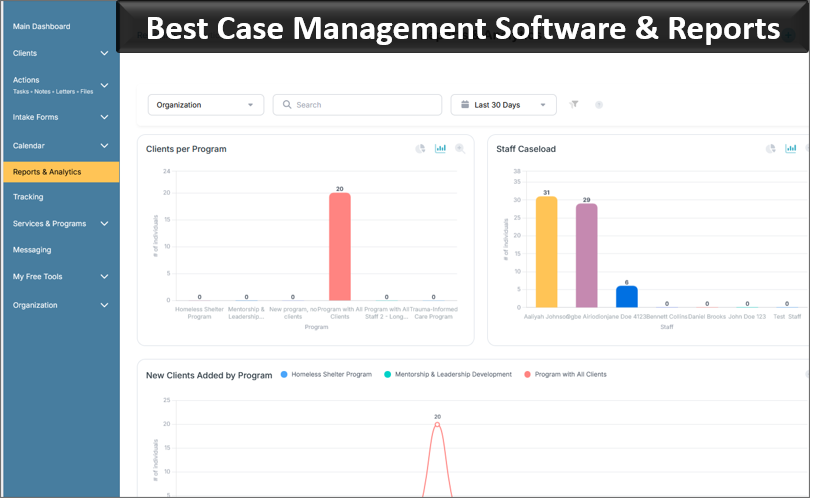
Case Management Hub provides standard and customizable reporting capabilities. Custom fields can be included in reports, reports can be filtered by date range, and data can be exported to Excel for additional analysis. Clients can also be associated with multiple programs where that structure fits the organization.
The quality of reporting depends heavily on the quality of the underlying data design. Before configuring dozens of custom fields, a clinic should identify the questions it actually expects to answer. If leadership needs to report by clinic, case type, student assignment, referral source, service activity, status, or another category, those data points should be captured consistently from the beginning.
That is usually more effective than collecting large amounts of information first and trying to construct meaningful reports later.
Security and Permissions Need to Match the Clinical Model
Access control becomes particularly significant when students and other temporary or rotating users participate in casework. Giving everyone broad access because it is easier to administer defeats an important advantage of using a structured case management system.
Case Management Hub includes role-based permissions, encryption, authentication controls, and audit logging that records access or updates to data. Employee permissions can restrict users to assigned clients, while administrators have broader system access.
A legal clinic should map permissions before onboarding users. Identify what a student needs to see, what a supervising attorney needs to review, what administrative personnel need for reporting, and who should be able to change system-wide settings.
The software provides the controls, but the clinic still has to decide how those controls should reflect its own policies and responsibilities.
👉 Try it free today - No credit card needed
Moving a Legal Clinic Away From Spreadsheets and Disconnected Files
Spreadsheets often work longer than they should because they’re familiar and flexible. The weakness appears as the clinic grows. A spreadsheet can list clients and assignments, but it doesn’t naturally become a complete legal case management system with permissions, notes, files, tasks, forms, reminders, referrals, and client records.
Case Management Hub supports spreadsheet imports for existing data. Organizations can create custom fields, use an import template, and map spreadsheet columns to system fields. Existing client information, notes, tasks, and historical form data can also be imported through supported spreadsheet workflows, while additional client files can be uploaded to client folders.
Migration is a good opportunity to clean up the clinic’s data model rather than recreating every old spreadsheet column. Decide which information remains useful, which fields should be standardized, and which historical data needs to remain accessible but doesn’t need to drive future workflows.
Legal Case Management Software vs. Law Practice Management Software
Legal case management software and legal practice management software overlap, but they shouldn’t automatically be treated as interchangeable.
A commercial law practice may give considerable weight to functions tied directly to operating a law firm. A clinical legal program may place greater weight on client intake, student caseload management, supervision, permissions, customizable forms, documentation, service tracking, and program reporting.
That doesn’t make one category inherently better. It means the selection criteria should reflect the organization doing the work.
A legal clinic comparing systems should start with its workflow rather than a generic list of features. Map what happens from the moment a potential client contacts the clinic through intake, acceptance, assignment, case activity, supervision, referrals, reporting, and case closure. Then test whether the software supports those steps without excessive workarounds.
💡All-in-one Case Management Software.
Everything in one place: clients, notes, forms, appointments, reports, and outcomes.
👉 Try it Free - No credit card needed
What to Look for in the Best Case Management Software for Legal Clinics
Feature count shouldn’t decide the purchase. A system with hundreds of capabilities can still be a poor fit if students find it difficult to use or administrators have to maintain parallel spreadsheets to get the reporting they need.
During evaluation, focus on a handful of practical tests:
- Run a real intake workflow. Determine how client information enters the system and whether staff have to re-enter it elsewhere.
- Assign a case to a student. Check what the student can see and what the supervisor can see.
- Create and retrieve documentation. Test notes, forms, uploaded files, and search rather than simply watching them in a demonstration.
- Test follow-up management. Assign tasks, set reminders, and determine how users know what needs attention.
- Build the reports the clinic actually needs. Don’t assume that the presence of a reporting module means your specific data can be reported the way you expect.
- Review permissions carefully. Test the system from the perspective of a student or other restricted user rather than only from an administrator account.
- Check the exit path. Confirm that the clinic can export its data and records if requirements change later.
Those tests reveal much more about day-to-day fit than comparing feature grids.
Why Case Management Hub Is a Strong Option for Law School Legal Clinics
Case Management Hub fits legal clinics best where the priority is managing the client and case lifecycle in a centralized, configurable system rather than adopting software built exclusively around the commercial operation of a law firm.
The platform brings together client profiles, caseload assignment, digital intake forms, custom forms, notes, file management, tasks, reminders, appointments, referrals, electronic signatures, role-based permissions, reporting, data export, and mobile-friendly access. Clinics can also customize fields, note types, forms, programs, and reporting structures around the information they actually need to manage.
For a law school clinical program, the strongest fit is the ability to combine client case management with structured user access. Students can work within assigned caseloads while administrators and other appropriately permissioned users maintain broader oversight. That addresses a requirement that generic client databases and spreadsheet-based processes handle poorly.
Case Management Hub also offers onboarding and technical support, and organizations can begin with a free trial. For a legal clinic evaluating the platform, the trial should be used to recreate one genuine clinic workflow rather than simply exploring menus. Set up a sample intake, configure the relevant user roles, assign a case, add documentation, create a follow-up task, and run a report. That will quickly show whether the system fits the way the clinical program operates.
👉 Try it Free - Free Case Management System
A Practical Legal Clinic Workflow in Case Management Hub
A useful case management system should make the path through a case easier to follow. For a legal clinic, a Case Management Hub workflow could begin with a prospective client completing an online intake form. Information collected on that form can populate relevant client fields, and supporting documents can be uploaded where needed.
Once the clinic determines that the person will become a client, the record can be organized according to the clinic’s chosen client type, program, or other custom fields. The client can then be assigned to the appropriate user or users, with permissions controlling access.
As work proceeds, students or authorized team members can add case notes, upload documents, complete forms, create tasks, schedule appointments, and record relevant activity. Supervisors or administrators with the appropriate permissions can access the information they need for oversight.
If another provider or organization needs to become involved, the referral module can record that connection. When administrators need information about the clinic’s work, reporting can draw on the structured fields and activities captured throughout the process.
At closure, the clinic retains an organized client record rather than having pieces of the case scattered among individual spreadsheets, inboxes, documents, and folders.
For legal clinics and law school clinical programs, that continuity is one of the strongest reasons to move to dedicated case management software. The goal isn’t to add another system for students and faculty to maintain. It is to give the program one structured place to manage clients, caseloads, documentation, assignments, follow-ups, referrals, and reporting throughout the life of the case.
FAQs: Best Case Management Software for Legal Clinics and Law School Clinical Programs
What is the best case management software for legal clinics?
The best case management software for legal clinics should support client intake, case and matter tracking, student caseloads, legal documents, case notes, tasks, permissions, and reporting. Case Management Hub provides these capabilities in a centralized, cloud-based platform that can be configured around legal clinic workflows.
What is legal case management software?
Legal case management software is a digital system for organizing clients, cases or matters, documents, notes, tasks, appointments, and other case activity. For legal clinics, it can also help manage student assignments, supervisor access, client intake, referrals, and program reporting.
What case management software can law school legal clinics use?
Law school legal clinics can use Case Management Hub to manage client records, student caseloads, intake forms, case notes, documents, assignments, tasks, referrals, and reporting. Role-based permissions can also help control what students, supervisors, administrators, and other authorized users can access.
How is legal case management software different from law practice management software?
Legal case management software focuses on organizing clients, cases, documents, workflows, and case activity. Law practice management software may place additional emphasis on commercial law firm functions such as billing, timekeeping, and practice administration. Legal clinics should choose software based on their client service, student supervision, caseload, documentation, and reporting needs.
What features should legal case management software for law school clinics include?
Legal case management software for law school clinics should include client intake, centralized client records, caseload management, role-based permissions, legal document management, case notes, tasks, reminders, appointments, referrals, and reporting. The system should also be flexible enough to support the clinic's specific programs and workflows.
Find the Right Case Management Solution for Your Organization: All-in-One Case Management Resource Center.
Note: Content on this casemanagementhub.org site is copyrighted and protected under applicable copyright laws. Read Terms of Use.
Disclaimer: Case Management Hub is an educational resource and software provider site. Our content is not medical advice. Use of this site does not create a provider-patient relationship. Read our full disclaimer here: Case Management Hub Disclaimer.