
Best Case Management Software for Fire Departments and First Responder Support Teams
Fire departments manage more than emergency response. Behind the operational side of the department, teams may be coordinating firefighter wellness programs, behavioral health services, peer support, referrals, employee assistance, community programs, follow-ups, and other services that require careful documentation.
Those workflows create a different technology need than dispatch, incident reporting, apparatus management, or fire inspection software.
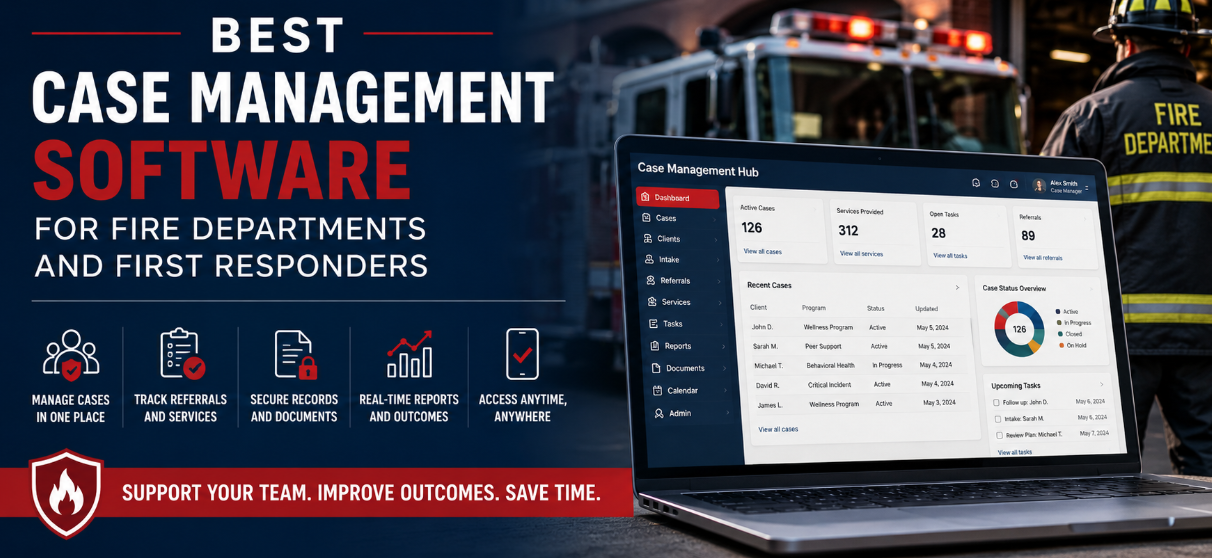
A team supporting firefighters and first responders needs a reliable way to manage people, services, documentation, referrals, tasks, and outcomes. When those activities are spread across spreadsheets, email, paper files, Word documents, and separate tracking systems, maintaining a clear picture of each case becomes increasingly difficult.
That is where case management software can help.
The best case management software for fire departments provides a centralized system for managing support cases while giving staff the flexibility to configure the platform around their programs. For departments, government agencies, and organizations supporting first responders, Case Management Hub offers an all-in-one platform for managing cases, documentation, services, referrals, forms, reporting, and follow-up activities.
💡All-in-one Case Management Software.
Everything in one place: clients, notes, forms, appointments, reports, and outcomes.
👉 Try it Free - No credit card needed
Why Fire Departments May Need Case Management Software
It helps to distinguish case management software from traditional fire department software.
A fire department may already have technology for emergency dispatch, incident reporting, inspections, staffing, training, scheduling, or records management. Those systems serve important operational purposes, but they are not necessarily designed to manage an individual through a support program over time.
Consider a firefighter participating in a wellness or support program.
There may be an initial intake, an assessment, several interactions with a coordinator, referrals to outside providers, documents that need to be collected, appointments, tasks, follow-ups, and outcomes that need to be tracked. Different members of the support team may be involved at different points.
A spreadsheet can record that the firefighter entered the program. It becomes much harder to use that spreadsheet as the working record for everything that happens afterward.
A fire department case management system provides structure around that process. Instead of information being scattered across several tools, authorized team members can work from a centralized case record.
This can be particularly valuable for firefighter wellness programs, first responder support services, peer support programs, behavioral health teams, and government programs that need to document services and demonstrate what their programs are accomplishing.
What Should Fire Department Case Management Software Actually Do?
There is no benefit in buying a system with dozens of impressive features if staff still have to maintain separate spreadsheets to run the program.
The first question should be practical: What information does your team need to capture, and what happens to that information after it is collected?
For many first responder support teams, that means managing the journey from intake through service delivery and follow-up.
A firefighter or other participant may enter through an intake process. Staff may need to record demographic or program-specific information, complete assessments, document interactions, assign tasks, upload files, make referrals, schedule appointments, track services, and eventually document an outcome or discharge.
Good case management software should make that sequence easier to manage rather than forcing the department to redesign its processes around the software.
Case Management Hub is designed around centralized case and client management. Teams can manage client profiles, notes, forms, files, tasks, appointments, services, referrals, goals, programs, and reporting within one platform.
The system is also customizable, which matters for fire departments because a firefighter wellness program may collect very different information from a nonprofit, healthcare clinic, housing program, or other organization using case management software.

👉 Try it Free - Free Case Management System
Centralized Case Records Reduce Fragmented Information
Fragmentation is one of the biggest problems a case management system should solve.
A support coordinator should not have to check a spreadsheet to see when someone entered the program, search email for an intake form, open a Word document for notes, and then consult another tracker to determine whether a referral was completed.
Centralizing those records gives authorized staff one place to understand the case.
Case Management Hub allows teams to maintain individual profiles where information and activity associated with a person can be organized. Notes, documents, forms, goals, services, referrals, tasks, and other records can be connected to the individual rather than maintained as unrelated files.
Departments can also create custom profile fields based on what their program needs to track.
That flexibility matters because there is no universal firefighter support workflow. One program may focus heavily on wellness referrals. Another may provide several different services across multiple stations or locations. Another organization may support firefighters alongside police, EMS personnel, veterans, or other first responder populations.
The case management platform needs to accommodate those differences without turning every small change into a software development project.
Custom Forms and Documentation for Firefighter Support Programs
Forms are often where a case begins.
Fire department support teams may need intake forms, consent forms, assessments, referral forms, program applications, service requests, progress documentation, or other program-specific records.
Case Management Hub includes customizable forms and templates, allowing organizations to create fields and structures that reflect their own processes. Forms can include electronic signature fields and file upload fields, and information collected through forms can be mapped to client profile fields.
That last capability is particularly useful.
If information has already been collected during intake, staff should not have to manually enter the same data again in another part of the system. Mapping form fields to the person’s profile reduces duplicate data entry and creates a cleaner record.
Forms can also be completed online, including from mobile devices, which can make intake and documentation more practical when services are not being delivered from a traditional office.
Existing paper records do not necessarily have to disappear on day one either. Scanned documents can be uploaded and stored within individual records while the team transitions more workflows into digital forms.
Case Notes That Fit the Program
Case notes are another area where generic software can become frustrating.
Different programs document different things.
Case Management Hub allows organizations to create custom note types and note formats with fields and prompts appropriate to their work. Notes can be associated with an individual case, while general notes that are not tied to a specific person can also be maintained.
Permissions can control who is able to view information, which becomes especially relevant when a program handles sensitive records.
For supervisors and program administrators, structured notes also make information easier to find later. Notes can be filtered, and data can be exported when necessary.
For staff working away from a desk, the platform is mobile responsive and includes quick actions designed to make adding information easier from a phone or tablet.
That matters for first responder case management software. The system should not assume every interaction happens while someone is sitting at a desktop computer.
🔥Still using spreadsheets for case management?
Switch to an all-in-one case management platform.
👉 Try it Free - No credit card needed
Referrals and Service Coordination
A support program often connects people with services rather than providing every service directly.
That makes referral management a core part of the workflow.
Case Management Hub includes referral tracking for incoming and outgoing referrals. Teams can maintain information about referral partners and connect referrals to individual records.
The department can also control what information is shared with outside referral partners rather than treating the entire case record as a single package.
For a first responder support team, this creates a structured way to document that a referral occurred and maintain information about the organizations or providers involved.
Service tracking can complement that referral history.
Teams can document services delivered and categorize activities so that administrators can later analyze what support the program is providing. Tracking capabilities can also be used for time, costs, funding allocations, and other activities when those records are relevant to the program.
The practical benefit is visibility.
Instead of simply knowing how many people entered a program, leadership can build a better understanding of what happened after intake.
Tasks, Follow-Ups, and Reminders Help Cases Keep Moving
Case management often breaks down in the space between interactions.
Someone completes an intake. A follow-up is supposed to happen in 45 days. A form needs to be returned. A staff member needs to contact a provider. Another person needs to review a request.
If those next actions exist only in someone’s inbox, notebook, or memory, they are easier to miss.
Case Management Hub allows tasks to be created, assigned, and tracked by completion status and due date. Tasks can be assigned to staff members, and recurring tasks can support processes that need to happen repeatedly.
The platform also provides reminders and notifications for follow-up activities.
This is one of the areas where a case management system provides a clear advantage over a spreadsheet. A spreadsheet can tell you what was entered. A working case management platform can help staff manage what needs to happen next.
 👉 Try it free today - No credit card needed
Managing Multiple Programs, Teams, and Locations
A case management system should also work beyond a single small team.
Case Management Hub supports multiple programs and locations. Individuals can participate in more than one program, and organizations can report on activity by program.
This can be useful when a department or public-sector organization operates several initiatives under the same umbrella.
For example, an organization may need to distinguish between different support services or populations while maintaining one centralized case management platform. Staff can be associated with programs, and access can be structured according to their responsibilities.
There is no need to create an entirely separate system simply because services are delivered through different programs.
For government agencies and larger organizations, that structure can also make expansion more manageable. A team can start with a defined use case and add additional programs or locations as its needs develop.
Security and Permissions Matter for Sensitive Information
Firefighter and first responder support programs may handle sensitive personal information. Security therefore cannot be treated as a secondary software feature.
Case Management Hub uses encryption and provides role-based permissions that allow organizations to control access to information.
Employees can be configured to see only the clients or cases assigned to them rather than automatically receiving access to every record in the organization. Administrators and account owners can have broader permissions based on their responsibilities.
The platform also includes audit logging for access and updates.
Case Management Hub is HIPAA compliant and is designed around data privacy requirements, with encryption for sensitive information both in transit and at rest.
For a department evaluating first responder case management software, however, technology is only one part of the decision. The organization should determine its own privacy, records retention, legal, labor, and information-governance requirements before deciding what information belongs in the platform and who should have access to it.

👉 Try it Free today - No credit card needed
Reporting Should Tell You More Than How Many Cases You Have
A case management system becomes much more valuable when the information collected during everyday work can be turned into useful reporting.
Basic case counts are only the beginning.
Program administrators may want to understand services delivered, referrals, participation, demographics, activities, outcomes, program enrollment, or other measures relevant to the department’s goals.
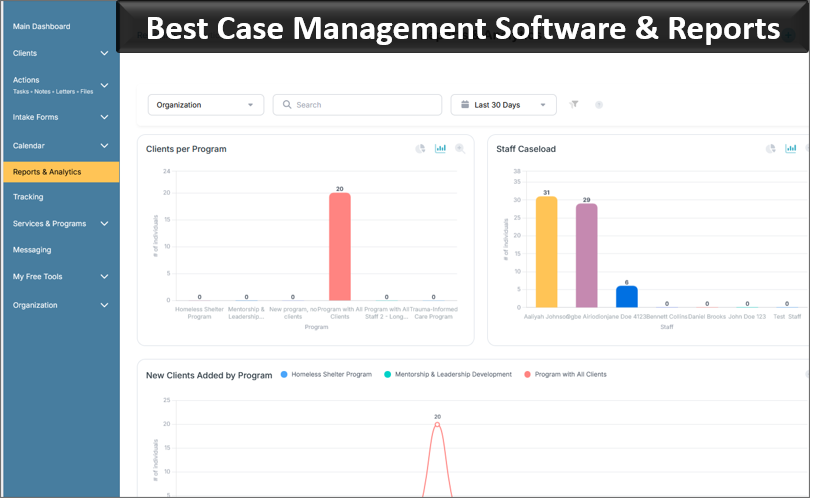
Case Management Hub includes built-in and custom reporting capabilities. Organizations can create reports using fields tracked in the system, filter information by date range, and export report data for additional analysis.
Custom fields are particularly valuable here because they allow the department to define what it wants to measure.
If a fire department support program needs to track a specific program attribute, that information can be incorporated into the case structure and potentially used in reporting rather than maintained in a separate spreadsheet.
Goals can also be tracked at individual, group, and program levels. Goals can include steps and target dates, providing another way to monitor progress where goal-based case management is appropriate.
For programs that need to communicate activity and outcomes to department leadership, government administrators, funders, or other stakeholders, this reporting capability can become one of the strongest reasons to move away from manual tracking.
Mobile Access for Teams Working Beyond the Office
First responder support does not necessarily happen behind a desk.
Staff may work across stations, community locations, events, clinics, or other settings. A case management app or mobile-friendly platform needs to accommodate that reality.
Case Management Hub is cloud based and responsive across phones, tablets, laptops, and desktop computers. Staff can access the system through a web browser and use mobile devices to manage information and complete documentation.
Online forms are also mobile friendly.
For departments comparing case management platforms, test this functionality during the evaluation rather than relying on a feature checklist. Ask the staff members who will actually document cases to try common workflows on the devices they use.
- Can they find a record quickly?
- Can they add a note without navigating through multiple screens?
- Can they review and complete an assigned task?
- Can they complete or review a form from a phone or tablet?
A feature that technically works on mobile but takes several minutes to use in the field is not the same as a practical mobile workflow.
👉 Try it free today - No credit card needed
Moving From Excel, Paper, and Disconnected Systems
Many teams do not start their search for case management software because their current process completely failed.
More often, they outgrow it.
A spreadsheet may have worked when one person supported a small number of cases. Paper forms may have been manageable when the program was smaller. Shared folders may have been enough when everyone knew exactly where every document belonged.
Growth exposes the weaknesses.
- More staff need access to the same information.
- The number of cases increases.
- Reporting becomes more demanding.
- Different versions of spreadsheets begin circulating.
- Historical information becomes harder to locate.
- Leadership requests reports that require hours of manual compilation.
Case Management Hub supports data imports from spreadsheets, including client records and other case information. Organizations can create custom fields before importing so that the incoming data reflects the information they need to maintain.
Files can also be uploaded to individual records or a centralized files area.
The goal should not be to recreate every spreadsheet inside new software. Implementation is a useful opportunity to decide which information is actually needed, how it should be structured, and which manual steps can be eliminated.
Ease of Use Matters More Than Feature Count
Public-sector software evaluations can easily become feature competitions.
Vendor A has 150 features. Vendor B has 175. Vendor C promises everything but requires months of configuration before the team can use it.
Feature count is a poor substitute for usability.
A firefighter support program needs staff to actually use the case management system consistently. If documenting an interaction requires too many screens or if employees need extensive training for routine tasks, people will find workarounds.
That creates the same fragmented information problem the organization was trying to solve.
Case Management Hub is designed to provide a centralized case management environment without requiring teams to manage their work through disconnected applications. Accounts can be configured with custom fields, forms, note types, programs, and other settings while retaining a straightforward interface.
Technical support is available, and onboarding can be used for initial setup, training, forms, workflows, and data preparation.
Organizations with multiple team members can also test the platform collaboratively during a free trial rather than evaluating it through a single administrator account.
💡All-in-one Case Management Software.
Everything in one place: clients, notes, forms, appointments, reports, and outcomes.
👉 Try it Free - No credit card needed
Is Case Management Hub a Good Fit for a Fire Department?
Case Management Hub can be a strong option for fire departments and first responder support teams that need to manage people and support services, rather than emergency response operations.
That distinction should guide the buying decision.
If your primary requirement is dispatch, fire incident reporting, apparatus maintenance, inspections, or other core fire operations, you should evaluate software specifically designed for those functions.
If the requirement is to manage firefighter support cases, wellness programs, referrals, documentation, services, follow-ups, goals, or related programs, a flexible case management platform is a much closer match.
Case Management Hub brings those workflows into one system through customizable client profiles, forms, case notes, referrals, tasks, service tracking, document management, reporting, programs, permissions, and mobile access.
It is designed for organizations ranging from individual practitioners to multi-program organizations, including government and public-sector programs.
There is also a practical financial consideration for this audience: first responders are among the groups eligible for additional Case Management Hub discounts, and organizations with multiple team members may qualify for group discounts.
Choosing the Best Case Management Software for Your Fire Department
Do not begin your evaluation with a generic list of software features.
Map the workflow first.
- Identify how someone enters the program.
- Determine what information staff need to collect.
- Document which forms, notes, and records must be maintained.
- Define the services, referrals, and follow-ups that need to be tracked.
- Clarify who should have access to each type of information.
- Identify what supervisors and leadership need to report.
Then make the software demonstrate that workflow.
A useful evaluation should cover intake, creating a case, completing documentation, assigning responsibility, tracking a service, making a referral, uploading a document, setting a follow-up, restricting access, and producing a report.
Pay particular attention to how much customization requires vendor intervention. A fire department’s support programs will change over time. Forms change. Reporting needs change. Programs expand. New data fields become necessary.
The best case management software for a fire department should accommodate those changes without making routine administration unnecessarily difficult.
Case Management Hub is built around that flexibility. Teams can configure forms, profile fields, notes, programs, reports, tracking, and other components around the services they actually provide while maintaining a centralized case record.
For fire departments moving away from spreadsheets, paper documentation, shared drives, and disconnected tools, that centralization may be the biggest improvement of all.
Staff gain one place to manage the case. Supervisors gain better visibility into work and follow-ups. Program leaders gain structured data they can use for reporting. The organization gains a case management system that can expand as its first responder support programs evolve.
For a fire department or first responder support team evaluating case management software, the best test is simple: take a real workflow your staff handles today and run it through the platform.
If the software makes that workflow easier to manage, easier to document, easier to follow up on, and easier to report on without adding unnecessary complexity, you are evaluating the right kind of system.
Create an Account Now - Add Your Team to Try Case Management Hub for Free
Get your entire team to try out Case Management Hub for free in minutes. Work smarter, not harder - free for 21 days. No credit card needed. If you decide to move forward is when you can subscribe.Follow These 5 Simple Steps:
Step 1: Create your free trial account here: Create Account.
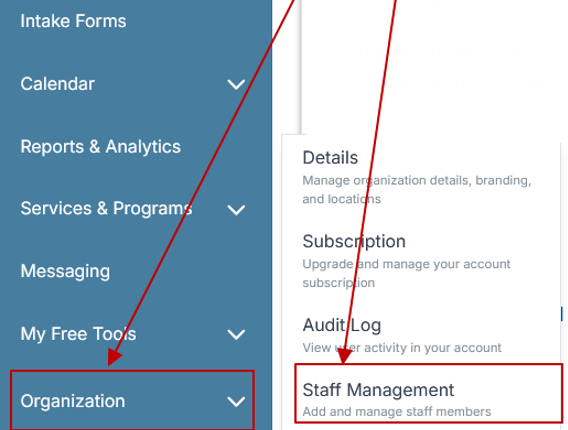
Step 2: From the left sidebar, scroll down to the Organization dropdown menu and click Staff Management
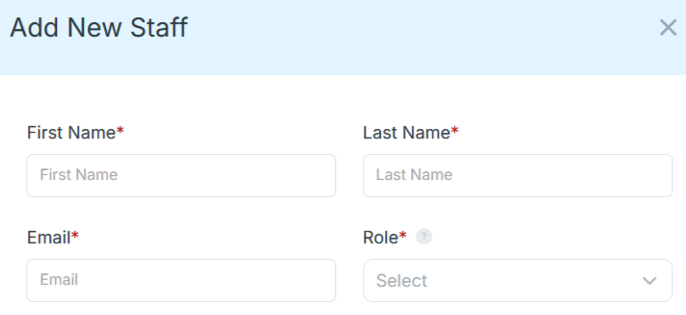
Step 4: Copy and send this email to your team members (so they know how to log in).
⚠️ Important: Ask your team members not to create new accounts. They should log in using the details you create for them.
Email Template to Send Your Team
Subject: You’ve been added to our new All-in-One Case Management tool!
Hi Team,
I've set up a free trial account for our team with the Case Management Hub software, an all-in-one case management software. I've already added you to the account, so you can start exploring immediately.
Please don't create a new account. Instead, use the login details I've shared with you to access the platform here: https://app.casemanagementhub.org/
This platform centralizes and improves everything we do, from case management, standardized assessment forms, client care, scheduling & appointments, reporting & analytics, and more all in one secure, collaborative tool. We have 21 days to test it out for free and see how it fits our needs.
Learn more about the platform here: Explore Features
Looking forward to exploring this together.
Best,
[Your Name/Signature]
Step 5: Request a customized discounted quote.
]
FAQs: Best Case Management Software for Fire Departments
What is fire department case management software?
Fire department case management software is a digital platform that helps teams manage support cases, client records, referrals, services, documentation, tasks, and reporting in one centralized system. It is especially useful for firefighter wellness, peer support, behavioral health, and first responder support programs.
What features should the best case management software for fire departments include?
The best case management software for fire departments should include centralized case records, customizable forms, case notes, referral tracking, task management, reporting, document storage, role-based permissions, and mobile access. The system should also be flexible enough to support multiple programs, teams, and locations.
Can first responder case management software support firefighter wellness programs?
Yes. First responder case management software can support firefighter wellness programs by tracking intakes, assessments, referrals, services, follow-ups, goals, documents, and outcomes. It gives authorized staff a structured way to manage support activities without relying on spreadsheets, paper files, and disconnected systems.
Is Case Management Hub a good case management system for fire departments?
Case Management Hub is a strong option for fire departments and first responder support teams that need to manage wellness programs, support cases, referrals, documentation, services, tasks, and reporting. It provides customizable workflows, secure records, role-based permissions, mobile access, and support for multiple programs and locations.
How does case management software help fire departments replace spreadsheets?
Case management software replaces spreadsheets by centralizing case records, forms, notes, documents, referrals, services, tasks, and reports in one system. This reduces duplicate data entry, improves staff coordination, makes information easier to find, and gives leadership better visibility into program activity and outcomes.
Find the Right Case Management Solution for Your Organization: All-in-One Case Management Resource Center.
Note: Content on this casemanagementhub.org site is copyrighted and protected under applicable copyright laws. Read Terms of Use.
Disclaimer: Case Management Hub is an educational resource and software provider site. Our content is not medical advice. Use of this site does not create a provider-patient relationship. Read our full disclaimer here: Case Management Hub Disclaimer.