
Best Case Management Software for EMS and Emergency Medical Services
Emergency Medical Services teams manage far more than individual emergency calls. Many EMS organizations also coordinate ongoing patient support, community paramedicine programs, referrals, follow-ups, documentation, outreach, care plans, and services for people who repeatedly interact with emergency care systems.
That work creates a different technology need from traditional dispatch or electronic patient care reporting. EMS teams may need a centralized case management system that helps staff organize patient information, document ongoing interactions, assign tasks, track referrals, monitor progress, and report on services across a longer period of care.
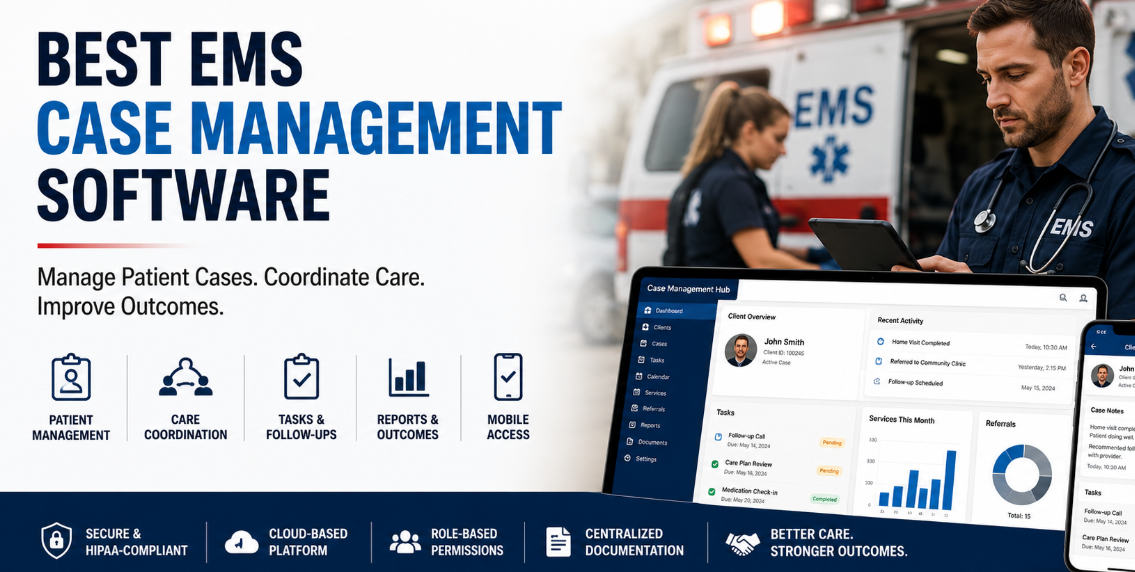
The best case management software for EMS should make this work easier without forcing field staff, coordinators, and program managers into unnecessarily complicated workflows. It should provide secure patient management, flexible documentation, mobile access, reporting, task tracking, referrals, and configurable workflows in one system.
This guide explains what EMS organizations should look for in case management software, how EMS case management differs from other emergency medical software, and where Case Management Hub can support first responders, community paramedicine teams, care coordinators, and other programs managing ongoing patient services.
💡All-in-one Case Management Software.
Everything in one place: clients, notes, forms, appointments, reports, and outcomes.
👉 Try it Free - No credit card needed
What Is EMS Case Management Software?
EMS case management software is a digital system used to organize and manage ongoing patient cases, services, documentation, referrals, follow-ups, and outcomes. It is particularly relevant when an EMS organization is supporting people beyond a single emergency encounter.
For example, a community paramedicine program may identify a patient who frequently uses emergency services and then coordinate follow-up visits, referrals, appointments, support services, and progress monitoring. That workflow requires more than documenting one transport or clinical encounter. Staff need a longitudinal view of the person, the services provided, outstanding actions, and what happens next.
A capable EMS case management system can provide one place for teams to manage:
- Patient or client profiles
- Intake and assessment forms
- Case notes and progress documentation
- Services and interventions
- Appointments and follow-up activities
- Incoming and outgoing referrals
- Goals and progress
- Tasks, reminders, and staff assignments
- Reports and outcome tracking
This makes case management software useful for EMS programs focused on ongoing care coordination rather than only emergency response documentation.
EMS Case Management Software Is Not the Same as Dispatch or ePCR Software
One of the most important distinctions is what the software is actually designed to manage.
Traditional EMS technology may include computer-aided dispatch systems, electronic patient care reporting platforms, ambulance billing systems, fleet management, scheduling tools, and other systems connected directly to emergency response operations.
Case management software serves a different purpose. It helps organizations manage the ongoing relationship between a patient and the services being provided over time.
An EMS agency might use operational systems to document what happened during an emergency response while using case management software to manage what happens after that encounter. That could include a home visit, referral to another provider, scheduled follow-up, needs assessment, community resource connection, service plan, or repeated interactions with the same patient.
For this reason, organizations evaluating EMS patient management software should first define the workflow they are trying to improve. If the requirement is dispatching ambulances, case management software is not a substitute for an EMS dispatch platform. If the requirement is managing ongoing patient cases, referrals, documentation, follow-ups, and services, a case management platform may be the better fit.

👉 Try it Free - Free Case Management System
Who Can Use Case Management Software in EMS?
EMS case management can involve several roles. The right platform should support the people providing services in the field as well as staff coordinating cases, supervising programs, and analyzing results.
Potential users include paramedics, community paramedicine teams, first responders, care coordinators, case managers, nurses, outreach workers, program coordinators, supervisors, administrators, and reporting teams.
Community Paramedicine and Mobile Integrated Healthcare Programs
Community paramedicine programs often need a structured way to manage people receiving ongoing services outside the traditional emergency response model. A case management platform can help organize patient records, appointments, notes, service histories, referrals, tasks, and progress over time.
Care Coordination Teams
Care coordinators may need to know which services were provided, whether a referral was completed, what documentation is missing, who owns the next task, and when a patient needs another follow-up. Centralizing this information reduces reliance on separate spreadsheets, emails, documents, and personal reminders.
Program Managers and Administrators
Leadership may need a broader view of caseloads, services, referrals, activities, program participation, and outcomes. Reporting becomes particularly important when EMS programs need to demonstrate activity or impact to leadership, funding partners, or other stakeholders.
Key Features to Look for in EMS Case Management Software
The strongest case management system is not necessarily the platform with the longest feature list. EMS organizations should focus on capabilities that support the way their teams actually work.
1. Centralized Patient Records
Staff should be able to quickly locate a patient record and understand what has happened without searching several systems. Patient profiles should provide access to relevant information, notes, forms, files, tasks, services, appointments, and other case activity.
2. Custom Intake and Assessment Forms
EMS programs do not all collect the same information. Community paramedicine, outreach, behavioral health response, post-discharge support, and other programs may have different intake and assessment requirements.
Customizable digital forms allow an organization to collect the information its program actually needs instead of adapting every workflow to a rigid template.
3. Case Notes and Documentation
Case notes should make it easy to document encounters, follow-ups, observations, interventions, and progress. Custom note types are particularly useful when different EMS programs need standardized documentation for different activities.
4. Referral Management
EMS case management often involves connecting patients with services outside the EMS organization. Referral tracking helps teams document where a patient was referred, monitor referral activity, and retain a record of associated providers or partner organizations.
🔥Still using spreadsheets for case management?
Switch to an all-in-one case management platform.
👉 Try it Free - No credit card needed
5. Tasks and Follow-Up Reminders
An unresolved follow-up can easily disappear into a busy workload. Task management allows staff to assign actions, set due dates, monitor completion, and create recurring reminders for activities that happen on a schedule.
6. Services and Activity Tracking
EMS programs may need to track home visits, patient contacts, care coordination activities, outreach, assistance provided, or other services. Flexible tracking helps the organization understand what was delivered, when it occurred, and which patient or program received it.
7. Reporting and Outcomes Tracking
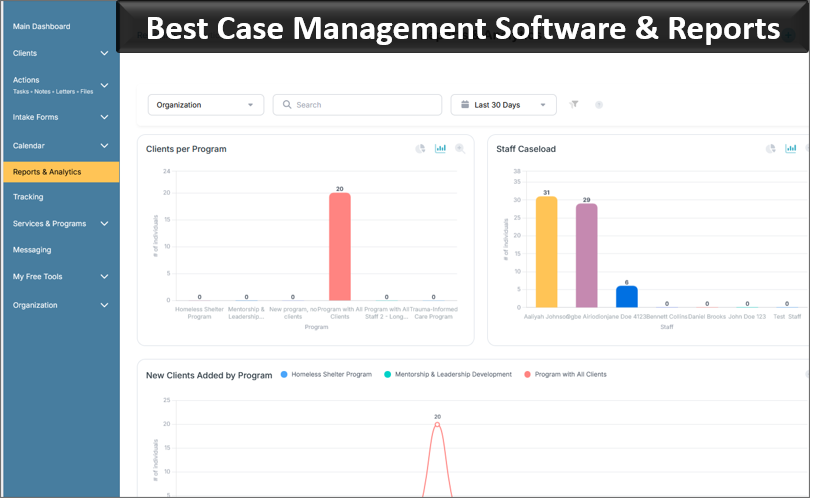
A good EMS case management platform should help convert day-to-day case activity into usable information. Custom reporting can help teams analyze services, participation, referrals, patient attributes, activities, and other program data.
Mobile Access Matters for EMS and Field-Based Teams
Case management software designed primarily for office work can create unnecessary friction for EMS teams.
Paramedics, outreach staff, nurses, and community-based providers may need to review information or document an interaction from a phone or tablet. A mobile-friendly case management system allows staff to work closer to the point of service instead of waiting until they return to a desk.
For field-based EMS case management, useful mobile capabilities can include accessing patient profiles, completing forms, adding notes, reviewing tasks, checking appointments, and documenting services.
Case Management Hub is cloud based and responsive across smartphones, tablets, laptops, and desktop computers. Quick Actions are designed to help staff locate a client and add information without working through multiple screens.
For an EMS organization, that can make the difference between a workflow staff actually use and one that creates documentation backlogs.
 👉 Try it free today - No credit card needed
Security and Access Controls for EMS Patient Information
EMS programs may manage sensitive medical, personal, demographic, and service-related information. Security therefore needs to be evaluated as part of the purchasing decision, not as an afterthought.
Case management software should provide controlled user access so staff can see the information needed for their responsibilities without automatically exposing every record to every employee.
Case Management Hub includes role-based permissions, secure authentication, encryption, audit logging, and HIPAA-compliant data protections. Employee access can be restricted to assigned clients, while administrators can have broader organizational visibility.
These controls are particularly useful when an EMS program includes employees, supervisors, coordinators, interns, volunteers, partner-facing staff, or other roles that require different levels of access.
Organizations should still evaluate their own compliance obligations, internal procedures, access policies, and implementation requirements before selecting any patient case management software.
How Case Management Hub Can Support EMS Case Management
Case Management Hub is an all-in-one case management platform built to help healthcare, human services, nonprofit, community-based, and public-sector teams manage clients, documentation, services, workflows, and reporting in one centralized system.
For EMS organizations managing ongoing cases, the platform can support workflows that extend beyond a single emergency encounter.
Create Structured Patient Profiles
Teams can maintain centralized profiles containing relevant client information and custom fields. Programs can tailor those fields to the information they need to track and use them in reporting.
Build EMS-Specific Forms
The form builder allows organizations to create custom intake forms, assessments, questionnaires, and other documentation. Information collected through forms can be mapped to client profile fields, reducing repeated data entry.
Document Patient Interactions
Custom notes can be created to reflect the documentation structure required by a program. Staff can also track who created notes and export documentation when needed.
Manage Referrals and Partners
Referral tools can be used to track incoming and outgoing referrals, maintain referral partners, associate referrals with patient records, and report on referral sources.

👉 Try it Free today - No credit card needed
Coordinate Tasks and Follow-Ups
Tasks can be assigned to staff with due dates and notifications. Recurring tasks can support scheduled follow-ups, periodic reviews, and other activities that need to happen consistently.
Track Programs, Services, and Outcomes
Organizations can group patients by programs, record services and activities, track goals, and create reports from the information stored in the system. That creates a clearer connection between individual case work and program-level reporting.
Replacing Spreadsheets and Disconnected EMS Case Tracking
Spreadsheets are often where new case management programs begin. They are familiar, inexpensive, and easy to create. Problems appear as caseloads grow and more people need to work with the same information.
One file may contain patient demographics, another may track referrals, staff may document notes elsewhere, and reminders may live in calendars or individual inboxes. Reporting then requires manually combining information from several sources.
A centralized EMS case management system can reduce that fragmentation by connecting records, forms, notes, files, referrals, services, tasks, and reports around the same patient.
Organizations moving from Excel or other spreadsheet-based processes can also benefit from data import capabilities. Case Management Hub allows teams to import client data from spreadsheets and map columns to system fields, making it possible to move existing information into a more structured environment.
👉 Try it free today - No credit card needed
A Practical EMS Case Management Workflow
Software becomes easier to evaluate when the organization looks at an actual workflow rather than comparing feature lists.
A simplified EMS case management process might look like this:
- A patient is identified for ongoing case management or community paramedicine support.
- Staff create or update the patient profile and complete the appropriate intake or assessment.
- The patient is assigned to a case manager, coordinator, paramedic, or appropriate team member.
- The team documents needs, services, goals, appointments, and referrals.
- Tasks and reminders are created for follow-ups and outstanding actions.
- Future patient interactions are documented in the same centralized record.
- Progress, services, referrals, and outcomes are reviewed over time.
- Program managers use reports to analyze activity and performance across the broader caseload.
The exact process will vary by organization, but this approach illustrates the core purpose of case management software: maintaining continuity across multiple interactions and making the next action visible.
How to Choose the Best Case Management Software for EMS
Start with the workflow, not the software demonstration.
Document how a patient enters the program, what information is collected, who becomes responsible for the case, which services may be delivered, which referrals occur, how staff document interactions, and which reports leadership needs.
Then evaluate whether a prospective EMS case management platform can support that workflow without excessive customization or manual work.
Key questions should include:
- Can we customize patient fields, forms, and note templates?
- Can field staff use the platform effectively from a phone or tablet?
- Can we restrict access based on staff roles or assignments?
- Can we manage referrals and external service providers?
- Can recurring follow-ups and tasks be tracked?
- Can we track services and patient progress?
- Can reporting be customized around our program requirements?
- Can we import existing data instead of starting from scratch?
- Can the system scale across multiple programs, staff members, or locations?
Ease of use deserves particular attention. A technically powerful platform has limited value when staff avoid using it because common activities require too many steps.
💡All-in-one Case Management Software.
Everything in one place: clients, notes, forms, appointments, reports, and outcomes.
👉 Try it Free - No credit card needed
Why Case Management Hub Is a Strong Option for EMS Programs
For EMS organizations looking specifically for a platform to manage ongoing patient cases, Case Management Hub offers many of the functions that matter most in day-to-day case management.
It combines client and patient records, customizable forms, case notes, services, referrals, tasks, scheduling, files, permissions, mobile access, and reporting in a centralized cloud platform.
That combination can be useful for community paramedicine, care coordination, outreach, first responder support programs, and other EMS initiatives where patient activity extends beyond one encounter.
The platform is also designed for teams that want flexibility without building every workflow from scratch. Custom fields, forms, note types, programs, tracking categories, and reports allow organizations to adapt the system around their services while maintaining a consistent place for staff to work.
Case Management Hub also supports discounts for qualifying first responders and organizations with multiple team members, which may be relevant to EMS agencies evaluating affordable case management software.
The most useful way to evaluate the system is to test it against a real EMS workflow. Choose a representative patient scenario, follow the process from intake through documentation, referrals, tasks, services, and reporting, and determine whether the system gives staff and managers the visibility they need.
Create an Account Now - Add Your Team to Try Case Management Hub for Free
Get your entire team to try out Case Management Hub for free in minutes. Work smarter, not harder - free for 21 days. No credit card needed. If you decide to move forward is when you can subscribe.Follow These 5 Simple Steps:
Step 1: Create your free trial account here: Create Account.
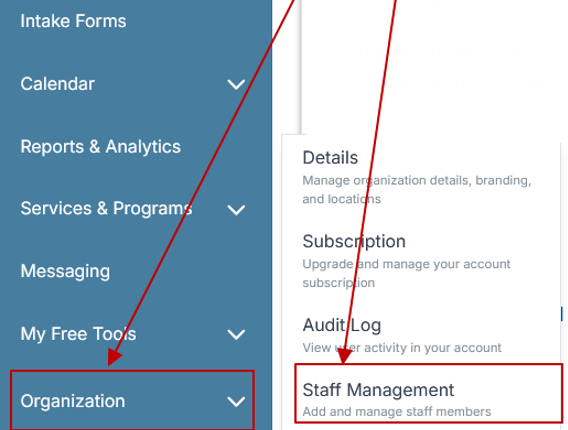
Step 2: From the left sidebar, scroll down to the Organization dropdown menu and click Staff Management
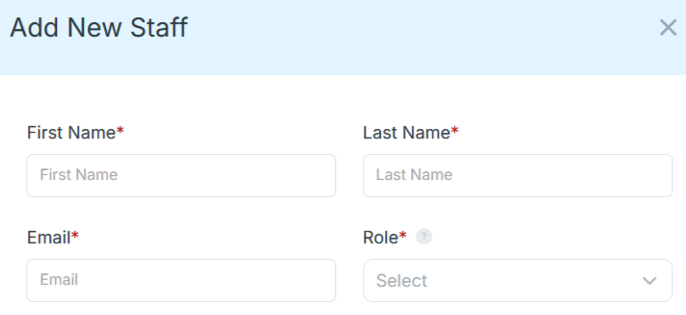
Step 4: Copy and send this email to your team members (so they know how to log in).
⚠️ Important: Ask your team members not to create new accounts. They should log in using the details you create for them.
Email Template to Send Your Team
Subject: You’ve been added to our new All-in-One Case Management tool!
Hi Team,
I've set up a free trial account for our team with the Case Management Hub software, an all-in-one case management software. I've already added you to the account, so you can start exploring immediately.
Please don't create a new account. Instead, use the login details I've shared with you to access the platform here: https://app.casemanagementhub.org/
This platform centralizes and improves everything we do, from case management, standardized assessment forms, client care, scheduling & appointments, reporting & analytics, and more all in one secure, collaborative tool. We have 21 days to test it out for free and see how it fits our needs.
Learn more about the platform here: Explore Features
Looking forward to exploring this together.
Best,
[Your Name/Signature]
Step 5: Request a customized discounted quote.
FAQs: Best Case Management Software for EMS
What is EMS case management software?
EMS case management software is a digital platform that helps emergency medical services teams manage patient records, case notes, referrals, services, follow-ups, tasks, and outcomes in one centralized system. It is especially useful for community paramedicine, care coordination, and other programs that support patients beyond a single emergency encounter.
What features should the best case management software for EMS include?
The best case management software for EMS should include patient management, customizable forms, case notes, referral tracking, task reminders, service tracking, reporting, mobile access, and role-based permissions. These features help EMS teams coordinate ongoing care and manage complex caseloads more efficiently.
Is Case Management Hub suitable for EMS and community paramedicine programs?
Yes. Case Management Hub supports patient profiles, custom forms, case notes, referrals, tasks, services, mobile access, reporting, and secure role-based permissions. These capabilities can support EMS case management, community paramedicine, care coordination, outreach, and first responder programs that manage patients over time.
Can EMS case management software replace spreadsheets and manual patient tracking?
Yes. A case management system can replace disconnected spreadsheets, paper records, notes, and manual reminders by centralizing patient information, documentation, referrals, tasks, services, and reports. This gives EMS teams a more structured way to manage ongoing cases and reduces fragmented data.
Can EMS teams use case management software from mobile devices?
Yes. Mobile case management software allows EMS staff, paramedics, care coordinators, and field teams to access patient information, complete forms, add case notes, review tasks, and document services from smartphones or tablets. Mobile access is especially valuable for community-based and field operations.
Find the Right Case Management Solution for Your Organization: All-in-One Case Management Resource Center.
Note: Content on this casemanagementhub.org site is copyrighted and protected under applicable copyright laws. Read Terms of Use.
Disclaimer: Case Management Hub is an educational resource and software provider site. Our content is not medical advice. Use of this site does not create a provider-patient relationship. Read our full disclaimer here: Case Management Hub Disclaimer.