
Best Case Management Software for Community Health Workers to Manage Client Information, Forms, Case Notes, and Goals
Community Health Workers are often the bridge between healthcare providers and the communities they serve. Whether conducting home visits, supporting chronic disease management, connecting families with resources, or providing health education, Community Health Workers collect a significant amount of client information every day.
Unfortunately, many organizations still rely on paper forms, spreadsheets, or disconnected systems to document client interactions. This makes it difficult to track progress, coordinate care, protect sensitive information, and demonstrate measurable outcomes.
Modern case management software for Community Health Workers solves these challenges by providing a centralized platform for documenting client information, recording vital signs, writing case notes, monitoring goals, coordinating referrals, and managing case closures from one secure location.
For organizations searching for the best case management software for Community Health Workers, this guide explains the essential features to evaluate and how a flexible platform such as Case Management Hub can improve documentation, collaboration, reporting, and client outcomes.
💡All-in-one Case Management Software.
Everything in one place: clients, notes, forms, appointments, reports, and outcomes.
👉 Try it Free - No credit card needed
Why Community Health Workers Need Specialized Case Management Software
Community Health Workers rarely spend their entire day behind a desk. Many work in homes, schools, shelters, community clinics, outreach events, mobile health programs, and other field settings where fast and accurate documentation is essential.
Unlike a basic customer relationship management platform or spreadsheet, community health worker software is designed to support client-centered services and ongoing care coordination.
A comprehensive system should allow Community Health Workers and program teams to:
- Maintain complete and secure client records
- Record health screenings, assessments, and vital signs
- Document progress through detailed case notes
- Coordinate internal and external referrals
- Track interventions and follow-up activities
- Monitor client goals and milestones
- Measure program outcomes over time
- Close cases with complete discharge or closure documentation
Instead of managing information across multiple systems, authorized team members can access the client information they need from one centralized platform.
What the Best Community Health Worker Software Should Include
Not every case management system is designed for community health programs. The best community health case management software combines flexibility, security, mobile accessibility, and practical documentation tools.
Important features to evaluate include:
- Secure and customizable client profiles
- Digital intake forms and assessments
- Mobile-friendly field documentation
- Vital sign and health measurement tracking
- Structured and narrative case notes
- Client goal and milestone management
- Referral tracking and follow-up workflows
- Document and file uploads
- Scheduling and task management
- Reporting dashboards and outcome analytics
- Role-based permissions and secure access controls
- Team communication and collaboration tools
These capabilities reduce administrative work and help Community Health Workers spend more time engaging with clients and addressing community needs.

👉 Try it Free - Free Case Management System
Centralized Client Records Improve Continuity of Care
Every client has a unique combination of health needs, personal circumstances, barriers, strengths, and service goals. Some clients require housing assistance, while others may need diabetes education, behavioral health referrals, transportation support, medication assistance, nutrition services, or help accessing insurance.
Without centralized documentation, important information can become scattered across notebooks, spreadsheets, email threads, paper files, and separate databases. This fragmentation can lead to missed follow-ups, duplicate work, incomplete records, and communication gaps.
Modern client management software for Community Health Workers stores relevant information in one organized client profile, including:
- Demographic and contact information
- Emergency contacts
- Health history and current conditions
- Social determinants of health
- Completed assessments and screenings
- Care plans and service plans
- Uploaded forms and supporting documents
- Referral history and status
- Communication logs
- Follow-up activities
- Client goals and outcomes
- Complete service history
A complete client record helps every authorized member of the care team understand what services have been delivered, which barriers remain unresolved, and what actions should happen next.
Record Vital Signs During Client Visits
Many Community Health Workers collect health information during home visits, wellness checks, outreach events, and chronic disease management programs. Recording this information digitally helps teams monitor changes and identify when additional follow-up may be required.
Common measurements may include:
- Blood pressure
- Weight
- Height
- Body mass index
- Temperature
- Blood glucose
- Pulse
- Oxygen saturation
- Respiratory rate
Paper documentation increases the likelihood of delayed data entry, missing information, transcription errors, and inconsistent formatting. Software for recording vital signs allows organizations to create custom fields that match their programs and documentation requirements.
Digital vital sign tracking provides several practical advantages:
- Historical measurements are easier to review.
- Supervisors can monitor client progress.
- Authorized team members can access current information.
- Program reports are easier to generate.
- Health data remains organized and searchable.
Instead of searching through handwritten notes, Community Health Workers can quickly review previous measurements before documenting a new visit.
Create Clear and Consistent Case Notes
Case notes are among the most important documentation responsibilities for Community Health Workers. Each interaction may provide valuable insight into the client’s health, living conditions, barriers, progress, concerns, and support needs.
High-quality Community Health Worker case notes may document:
- Home visit summaries
- Health education provided
- Medication discussions
- Client concerns and reported symptoms
- Behavioral or environmental observations
- Referrals initiated or completed
- Resources provided
- Risk factors identified
- Care coordination activities
- Follow-up plans and next steps
Dedicated client case notes software allows staff to enter information immediately after a visit while the details remain fresh. Organizations can also create templates or required fields to improve consistency across programs and staff members.
Practical Tips for Better Case Notes
- Document the interaction as soon as possible.
- Use clear, objective, and professional language.
- Separate observed facts from client-reported information.
- Record the services provided and the client’s response.
- Clearly identify required follow-up actions.
- Avoid including irrelevant or judgmental details.
Consistent case documentation supports supervision, quality assurance, continuity of care, funding requirements, and organizational accountability.
🔥Still using spreadsheets for case management?
Switch to an all-in-one case management platform.
👉 Try it Free - No credit card needed
Track Client Goals From Intake Through Case Closure
Successful community health programs focus on measurable results. Documenting individual visits is important, but organizations must also understand whether clients are making progress toward meaningful goals.
Examples of client goals include:
- Establishing care with a primary care provider
- Completing preventive health screenings
- Improving diabetes management
- Reducing or stabilizing blood pressure
- Obtaining safe and stable housing
- Enrolling in health insurance
- Accessing food assistance
- Attending behavioral health appointments
- Completing prenatal care visits
- Improving medication adherence
Goal tracking software for Community Health Workers should allow staff to define goals, establish target dates, document milestones, record barriers, update progress, and capture final outcomes.
Documenting Case Closure
A case should not simply disappear from an active caseload. The closure process should clearly document why services ended and what the client achieved.
A complete case closure record may include:
- The reason for closure or discharge
- Goals achieved and goals not achieved
- Remaining client needs or barriers
- Final referrals and resources provided
- The client’s condition or status at closure
- Recommended follow-up actions
- The closure date and responsible staff member
This creates a complete record of the client’s journey and helps organizations evaluate service effectiveness.
Mobile Documentation Supports Field-Based Work
Community Health Workers often provide services outside a traditional office. They may visit clients in rural communities, apartment buildings, schools, shelters, community centers, clinics, or temporary outreach locations.
Cloud-based Community Health Worker software allows authorized users to securely:
- Access client records
- Enter case notes in real time
- Record vital signs and screening results
- Upload documents and supporting files
- Complete assessments and forms
- Review care plans
- Update goals and milestones
- Schedule follow-up visits
- Assign or complete tasks
Real-time documentation reduces duplicate work and improves accuracy. Instead of carrying paperwork back to the office for later entry, staff can complete documentation during or shortly after the client interaction.
 👉 Try it free today - No credit card needed
Improve Care Coordination Across Teams
Community Health Workers often collaborate with professionals and organizations across the health and human services system.
Care teams may include:
- Nurses
- Physicians
- Social workers
- Behavioral health specialists
- Care coordinators
- Housing providers
- Schools
- Public health agencies
- Community-based organizations
Without a centralized system, communication gaps can result in missed appointments, duplicate referrals, inconsistent instructions, and incomplete follow-up.
Care coordination software allows authorized users to access shared client records, review relevant case notes, assign tasks, monitor referrals, and coordinate follow-up activities. Everyone works from the same source of information, helping reduce duplication and improve continuity of care.
Simplify Referral Management and Follow-Up
Connecting clients with healthcare providers and community resources is one of the primary responsibilities of many Community Health Workers.
Common referrals include:
- Primary care
- Behavioral health services
- Dental care
- Food assistance
- Housing support
- Transportation services
- Employment programs
- Substance use treatment
- Financial assistance
- Legal aid
Instead of maintaining a separate referral spreadsheet, case management software can document each referral directly within the client record.
Teams can track:
- The referral date
- The receiving provider or organization
- The reason for the referral
- The current referral status
- Required follow-up actions
- Appointment or service completion
- The final referral outcome
This creates accountability and helps Community Health Workers identify clients who may need additional assistance completing a referral.
Generate Reports That Demonstrate Program Impact
Healthcare partners, grant funders, government agencies, and organizational leaders increasingly expect community health programs to demonstrate measurable results.
Case management reporting tools can help organizations analyze:
- The number of active clients
- New client enrollments
- Completed assessments
- Home visits and outreach contacts
- Open and closed cases
- Goals achieved
- Referral completion rates
- Changes in health measurements
- Staff activity and caseloads
- Program utilization
- Common community needs and service gaps
Accurate reporting can support grant applications, contract deliverables, accreditation requirements, funding renewals, stakeholder presentations, and continuous quality improvement.

👉 Try it Free today - No credit card needed
Protect Sensitive Client and Health Information
Community Health Workers regularly document confidential client information, including health conditions, medications, behavioral health needs, family circumstances, housing status, financial challenges, and personal identifiers.
Security must be a central consideration when selecting community health case management software.
Important security capabilities may include:
- HIPAA-focused safeguards
- Role-based user permissions
- Secure user authentication
- Data encryption
- Audit trails
- Secure cloud storage
- Controlled access to documents
- User access management
Organizations should evaluate both the technology and their internal processes. Staff training, access controls, documentation standards, device security, and privacy procedures all contribute to protecting client information.
Why Organizations Choose Case Management Hub
Case Management Hub provides an all-in-one solution for Community Health Workers, care coordinators, healthcare organizations, nonprofits, and human service agencies.
Its flexible design allows organizations to customize workflows around specific programs, client populations, service models, and reporting requirements.
Key capabilities include:
- Comprehensive client management
- Custom client profiles
- Custom fields for health information and vital signs
- Digital forms and assessments
- Detailed case notes
- Goal and milestone tracking
- Referral management
- Task management
- Scheduling
- Secure document storage
- File uploads
- Team collaboration
- Reporting and analytics
- Mobile accessibility
- Security features designed for sensitive client information
Instead of purchasing and maintaining multiple disconnected tools, organizations can manage core case management activities through one centralized platform.
Create an Account Now - Add Your Team to Try Case Management Hub for Free
Get your entire team to try out Case Management Hub for free in minutes. Work smarter, not harder - free for 21 days. No credit card needed. If you decide to move forward is when you can subscribe.Follow These 5 Simple Steps:
Step 1: Create your free trial account here: Create Account.
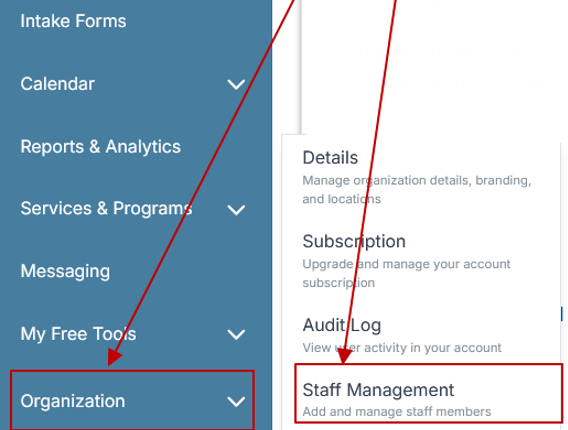
Step 2: From the left sidebar, scroll down to the Organization dropdown menu and click Staff Management
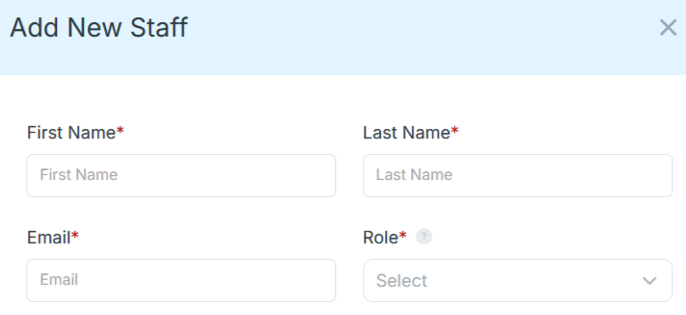
Step 4: Copy and send this email to your team members (so they know how to log in).
⚠️ Important: Ask your team members not to create new accounts. They should log in using the details you create for them.
Email Template to Send Your Team
Subject: You’ve been added to our new All-in-One Case Management tool!
Hi Team,
I've set up a free trial account for our team with the Case Management Hub software, an all-in-one case management software. I've already added you to the account, so you can start exploring immediately.
Please don't create a new account. Instead, use the login details I've shared with you to access the platform here: https://app.casemanagementhub.org/
This platform centralizes and improves everything we do, from case management, standardized assessment forms, client care, scheduling & appointments, reporting & analytics, and more all in one secure, collaborative tool. We have 21 days to test it out for free and see how it fits our needs.
Learn more about the platform here: Explore Features
Looking forward to exploring this together.
Best,
[Your Name/Signature]
Step 5: Request a customized discounted quote.
Benefits of Case Management Software for Community Health Programs
Benefits for Community Health Workers
- Less paperwork and duplicate data entry
- Faster documentation
- Easier access to client information
- Better organization and task visibility
- More time for client engagement
Benefits for Supervisors
- Improved caseload oversight
- More consistent documentation
- Easier workload and task management
- Better visibility into client risks and unmet needs
- Faster access to program reports
Benefits for Organizations
- Improved data quality
- Higher operational efficiency
- Better outcome tracking
- Stronger grant and contract reporting
- More consistent workflows across programs
Benefits for Clients
- Better coordinated services
- More consistent follow-up
- Improved continuity of care
- Faster connections to community resources
- More personalized and informed support
All-in-One Case Management Software
Sign Up Today, Free. No credit card needed!
|
Do You Have a Team? |
||
How to Select the Best Case Management Software for Community Health Workers
The best system depends on the organization’s size, programs, reporting obligations, client population, and existing workflows. Before selecting a platform, create a list of required capabilities and evaluate each option against the same criteria.
Use This Evaluation Checklist
- Confirm that client profiles and fields can be customized.
- Verify that staff can record vital signs and other health measurements.
- Review the case note features and documentation templates.
- Check whether goals, milestones, outcomes, and closure reasons can be tracked.
- Test the platform on the devices staff use in the field.
- Review referral, task, scheduling, and follow-up capabilities.
- Confirm that reports match funder and leadership requirements.
- Evaluate security controls, permissions, and data protection practices.
- Determine how easily staff can learn and use the system.
- Review implementation support, training, and ongoing assistance.
A platform should not force the organization to abandon effective workflows. It should make those workflows easier to manage, monitor, and improve.
Users Also Asked
What Is the Best Case Management Software for Community Health Workers?
The best solution allows Community Health Workers to securely manage client records, record vital signs, document case notes, monitor goals, coordinate referrals, generate reports, and support mobile field documentation from one centralized platform.
Can Case Management Software Track Vital Signs?
Yes. A flexible case management platform can allow organizations to create fields for blood pressure, blood glucose, temperature, weight, oxygen saturation, pulse, respiratory rate, and other program-specific health measurements.
Is Community Health Worker Software Mobile-Friendly?
Cloud-based platforms can provide secure access from laptops, tablets, and mobile devices, allowing staff to document services while working in the field.
Can Multiple Staff Members Work on the Same Client Record?
Yes. Authorized team members can collaborate within a shared client record while role-based controls limit access according to each user’s responsibilities.
Does Case Management Software Help With Reporting?
Yes. Reporting tools can help organizations measure client outcomes, monitor staff activity, track referral completion, evaluate program performance, and meet grant or contract reporting requirements.
Can Community Health Worker Software Track Closure Goals?
Yes. Organizations can use goal and outcome tracking features to document client progress, milestone completion, unresolved barriers, final outcomes, and the reason a case was closed.
Is Case Management Software HIPAA Compliant?
Healthcare-focused case management platforms may include security capabilities such as encryption, role-based permissions, audit logs, and secure cloud infrastructure. Each organization should verify that a vendor’s technology, policies, and contractual terms meet its specific compliance requirements.
💡All-in-one Case Management Software.
Everything in one place: clients, notes, forms, appointments, reports, and outcomes.
👉 Try it Free - No credit card needed
Final Thoughts
Community Health Workers play a critical role in improving health outcomes, reducing disparities, and connecting individuals with essential services. Organizations need technology that simplifies this work rather than creating additional administrative burdens.
The best case management software for Community Health Workers centralizes client records, enables real-time documentation, supports vital sign tracking, improves case notes, monitors client goals, coordinates referrals, and creates a structured process for case closure.
By replacing fragmented documentation processes with a secure and integrated platform, community health programs can improve collaboration, strengthen reporting, enhance accountability, and deliver more consistent support.
For organizations seeking an all-in-one solution, Case Management Hub provides the flexibility and case management features needed to support Community Health Workers from initial intake through successful case closure.
All-in-One Case Management Software
Sign Up Today, Free. No credit card needed!
|
Do You Have a Team? |
||
FAQs: Best Case Management Software for Community Health Workers
What is case management software for Community Health Workers?
Case management software for Community Health Workers is a digital platform used to manage client information, document services, record case notes, track referrals, monitor goals, and report program outcomes from one centralized system.
Can Community Health Worker software record vital signs and client health information?
Yes. Community Health Worker software can record blood pressure, blood glucose, weight, temperature, oxygen saturation, pulse, and other client health information using customizable fields and digital forms.
What features should the best community health case management software include?
The best community health case management software should include customizable client profiles, mobile documentation, case notes, vital sign tracking, digital assessments, referral management, goal tracking, case closure tools, secure file storage, and reporting.
Why is Case Management Hub best for Community Health Workers?
Case Management Hub is best for Community Health Workers because it provides an all-in-one platform for managing client records, recording vital signs, writing case notes, tracking referrals, monitoring closure goals, coordinating services, and generating reports.
How does case management software improve community health programs?
Case management software improves community health programs by reducing paperwork, strengthening care coordination, standardizing documentation, tracking client outcomes, simplifying reporting, and helping staff deliver more consistent services.
Find the Right Case Management Solution for Your Organization: All-in-One Case Management Resource Center.
Note: Content on this casemanagementhub.org site is copyrighted and protected under applicable copyright laws. Read Terms of Use.
Disclaimer: Case Management Hub is an educational resource and software provider site. Our content is not medical advice. Use of this site does not create a provider-patient relationship. Read our full disclaimer here: Case Management Hub Disclaimer.