
Apricot by Social Solutions vs Case Management Hub: Reviews, Complaints, and the Best Alternative for Nonprofits
Choosing the right case management software is one of the most important decisions a nonprofit or human services organization can make. The platform you choose affects staff efficiency, reporting accuracy, client outcomes, and your ability to scale programs without creating more administrative burden.
If you are comparing Apricot by Social Solutions vs Case Management Hub, you are likely looking for more than a simple feature list.
You want to know which platform is easier to use, which one delivers better value, and which solution is more likely to help your organization move faster with less friction. This guide breaks down the key differences, common Apricot complaints, and why Case Management Hub stands out as the better alternative for many nonprofits and human services teams.

Why This Comparison Matters for Nonprofits and Human Services Organizations
Nonprofits, social service agencies, behavioral health teams, and community organizations depend on case management software to centralize client records, document services, track outcomes, manage referrals, and support reporting requirements. When a system is hard to use or difficult to implement, it does more than frustrate staff. It slows service delivery, creates inconsistency, and makes it harder to demonstrate impact.
That is why searches such as best alternative to Apricot case management software, Apricot reviews nonprofit software, and easier case management software for nonprofits continue to grow. Organizations are not just exploring features. They are actively looking for software that is simpler, more intuitive, and more practical for real-world case management workflows.
- They need staff adoption without weeks of training.
- They need reporting without excessive complexity.
- They need implementation that does not drag on for months.
- They need pricing that feels predictable and sustainable.
In that environment, the difference between Apricot and Case Management Hub becomes much more important than a standard software comparison article would suggest.
Quick Verdict: Which Platform Is Better?
If your organization values ease of use, fast setup, practical reporting, and clear pricing, Case Management Hub is the stronger choice. If your organization wants deep customization and is willing to accept more complexity, longer onboarding, and a steeper learning curve, Apricot may still be considered. For most nonprofits and human services teams, however, Case Management Hub is the better overall fit.
| If your organization values… | The Better Choice Is… |
| Ease of use, fast onboarding, and transparent pricing | Case Management Hub |
| Heavy customization regardless of complexity or cost | Apricot (Social Solutions) |
Best Overall Choice for Modern Nonprofits
Case Management Hub is the best overall case management software alternative for nonprofits that want a simple, centralized, scalable platform their team will actually use.
All-in-One Case Management Software
Sign Up Today, Free. No credit card needed!
|
Do You Have a Team? |
||
What Is Apricot by Social Solutions?
Apricot by Social Solutions is a longstanding case management and outcomes tracking platform used by nonprofits, government agencies, and human services organizations. It is often considered by organizations that want a known platform with reporting capabilities and a customizable structure. Because Apricot has been in the market for years, many buyers begin their search there.
At first glance, Apricot appears to offer a strong mix of flexibility and nonprofit-focused functionality. It is frequently associated with grant reporting, client tracking, and data management. For some organizations, that reputation is enough to get it on the shortlist. The problem is that reputation alone does not guarantee a good day-to-day user experience.
Why Organizations Choose Apricot Initially
- Established recognition in the nonprofit software market
- Customizable database structure
- Built-in reporting tools
- Focus on outcomes tracking and compliance reporting
However, once organizations begin using Apricot, the conversation often shifts from capability to usability. That shift is where many software evaluations become switch decisions.
Apricot Reviews: Common Complaints and Real Pain Points
When organizations search for Apricot case management software reviews, they are often not looking for generic praise. They are trying to understand whether the system will be easy to use, whether reporting will be manageable, and whether the total cost and onboarding effort are worth it. The most common Apricot complaints tend to fall into a few familiar categories.
Steep Learning Curve
One of the most common concerns in Apricot reviews is that the platform can be difficult to learn. Users often describe the interface as not intuitive, especially for staff who are not technical. For nonprofits with case managers, volunteers, outreach workers, and frontline staff, a complicated system creates an immediate adoption problem.
- New users may need more training just to complete basic tasks.
- Teams with turnover may struggle to onboard staff efficiently.
- The learning curve can reduce productivity in the early stages and beyond.
Clunky Reporting Workflows
Apricot is often praised for reporting potential, but many users say the process of actually building and pulling reports feels too complex. Instead of creating fast visibility into outcomes and services, reporting can become another administrative burden.
- Reports can take too long to set up.
- Customization may require more expertise than many teams have.
- Pulling practical insights quickly can be difficult.
Hidden Fees and Pricing Frustration
Another concern that frequently appears in Apricot-related searches is pricing transparency. Organizations want to know whether they are looking at straightforward software costs or a long list of add-ons and post-sale expenses. When pricing feels unclear, trust declines quickly, especially for nonprofits with strict budgets and grant-based funding constraints.
Slow or Inconsistent Support Experience
Support matters because case management software sits at the center of daily operations. If staff cannot resolve issues quickly, service delivery suffers. A recurring pain point in Apricot reviews is that support can feel slower or less consistent than organizations expect.
Lengthy Implementation and Onboarding
Some organizations report that onboarding with Apricot takes longer than expected. For teams that need to replace spreadsheets, paper files, or disconnected tools quickly, long implementation cycles can be a major drawback. Instead of solving workflow problems right away, software adoption becomes its own project.
Taken together, these issues reveal a common theme. Apricot may offer flexibility, but that flexibility often comes with friction.
The Core Issue: Complexity vs Usability
At the heart of the Apricot vs Case Management Hub comparison is a simple question. Does your organization want a system built around heavy customization, or a system built around usability and fast adoption?
Apricot tends to prioritize customization first. For some organizations, that may sound appealing. But in practice, customization often creates added complexity, longer implementation, and heavier training requirements. That tradeoff is not ideal for teams that need to move quickly and stay focused on clients rather than software administration.
Case Management Hub takes a different approach. It gives organizations flexibility, but it does so within a more intuitive, user-friendly framework. That means teams can still tailor fields, forms, and workflows without feeling like they need a technical specialist just to keep the system running smoothly.
What Makes Case Management Hub a Better Alternative?
Case Management Hub was built for organizations that want practical, modern case management software without the unnecessary complexity that often comes with legacy platforms. It is designed for nonprofits, social workers, behavioral health teams, counselors, clinicians, educators, legal service providers, and other human services organizations that need a centralized platform they can use right away.
Easy to Use from Day One
One of the most important advantages of Case Management Hub is that it is easy to learn. Teams do not need to spend excessive time navigating a complicated interface or figuring out how to complete basic tasks. Staff can log in, add clients, create notes, manage forms, and start working almost immediately.
Fast Setup and Faster Time to Value
Many organizations want a case management system they can begin using quickly, not after weeks of setup meetings and technical preparation. Case Management Hub supports that need with same-day setup options, ready-to-use templates, and a more streamlined onboarding experience.
Centralized All-in-One Functionality
Instead of forcing organizations to manage multiple disconnected tools, Case Management Hub centralizes core workflows in one place. Teams can manage client records, forms, assessments, progress notes, reporting, scheduling, tasks, referrals, files, and tracking from a single system.
Flexible Without Feeling Technical
Case Management Hub allows organizations to create custom fields, custom forms, note templates, reports, and workflows without turning every configuration task into a technical project. This balance between flexibility and usability is one of the main reasons it stands out as a better alternative to Apricot.
Create an Account Now - Add Your Team to Try Case Management Hub for Free
Get your entire team to try out Case Management Hub for free in minutes. Work smarter, not harder - free for 21 days. No credit card needed. If you decide to move forward is when you can subscribe.Follow These 5 Simple Steps:
Step 1: Create your free trial account here: Create Account.
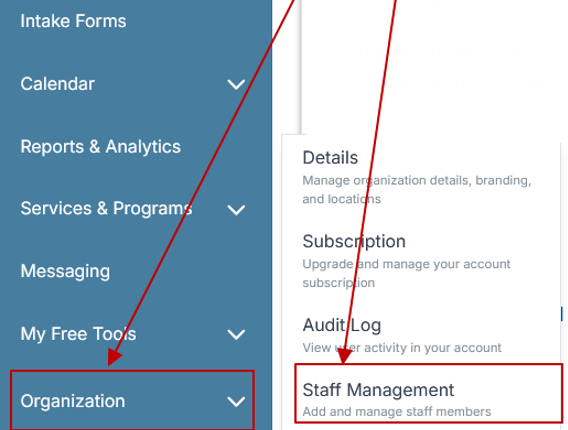
Step 2: From the left sidebar, scroll down to the Organization dropdown menu and click Staff Management
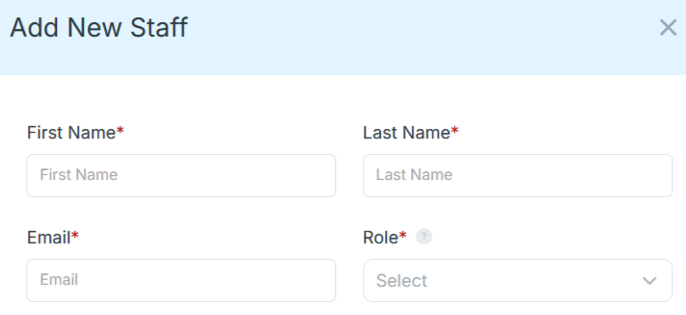
Step 4: Copy and send this email to your team members (so they know how to log in).
⚠️ Important: Ask your team members not to create new accounts. They should log in using the details you create for them.
Email Template to Send Your Team
Subject: You’ve been added to our new All-in-One Case Management tool!
Hi Team,
I've set up a free trial account for our team with the Case Management Hub software, an all-in-one case management software. I've already added you to the account, so you can start exploring immediately.
Please don't create a new account. Instead, use the login details I've shared with you to access the platform here: https://app.casemanagementhub.org/
This platform centralizes and improves everything we do, from case management, standardized assessment forms, client care, scheduling & appointments, reporting & analytics, and more all in one secure, collaborative tool. We have 21 days to test it out for free and see how it fits our needs.
Learn more about the platform here: Explore Features
Looking forward to exploring this together.
Best,
[Your Name/Signature]
Step 5: Request a customized discounted quote.
Apricot vs Case Management Hub: Feature-by-Feature Comparison
A direct comparison makes the differences easier to see. While both platforms serve nonprofits and human services organizations, they take very different approaches to core functionality.
Ease of Use
Case Management Hub is built for intuitive daily use. Apricot is often viewed as more complex and training-heavy.
Implementation Time
Case Management Hub offers faster onboarding and same-day setup paths. Apricot is more commonly associated with longer implementation timelines.
Reporting and Analytics
Case Management Hub provides practical, customizable reporting that is easier for teams to use. Apricot may be flexible, but the reporting process is often described as clunky or harder to manage.
Customization
Both systems support customization, but Case Management Hub makes it more accessible. Organizations can tailor fields, forms, and reports without the same level of technical overhead.
Pricing Transparency
Case Management Hub is a better fit for organizations that want affordable, predictable pricing. Apricot-related pain point searches often show that pricing clarity is a concern for many buyers.
Team Adoption
Case Management Hub is easier for staff to adopt because the interface and workflows are more straightforward. This is especially important for nonprofits with cross-functional teams, field staff, interns, and volunteers.
Why More Organizations Are Switching Away from Apricot
The rise in searches around Apricot complaints, Apricot alternatives, and easier nonprofit case management software points to a clear market shift. Organizations are moving away from platforms that feel overly complex and toward systems that support faster execution and easier adoption.
The Main Drivers Behind the Switch
- Complexity slows staff down and creates resistance.
- Reporting takes too long and becomes frustrating.
- Implementation can feel too slow for urgent operational needs.
- Pricing and value do not always feel aligned.
Organizations that are moving away from spreadsheets, paper files, and disconnected workflows do not want to replace those problems with a different kind of complexity. They want a tool that makes life easier from the start. That is exactly where Case Management Hub performs better.
Where Case Management Hub Delivers More Practical Value
Case Management Hub does not just position itself as easier software. It also delivers practical functionality that aligns with the daily realities of nonprofit and human services work.
Centralized Client Management
Organizations can manage client records, case notes, assessments, forms, files, and service history in one place. This reduces the need to jump between systems and helps teams maintain a cleaner, more consistent workflow.
Custom Forms and Assessments
Teams can create intake forms, assessments, and custom surveys that map directly to client profiles. This improves efficiency and makes it easier to capture data that matters for reporting and service delivery.
Case Notes and Documentation
Staff can create custom note formats, manage group notes, export documentation, and keep information organized without relying on disconnected documents and spreadsheets.
Reporting and Outcome Tracking
Case Management Hub makes it easier to generate reports on client data, goals, services, referrals, programs, and custom fields. For nonprofits that need to demonstrate outcomes to funders or leadership, this is a major advantage.
Scheduling, Tasks, and Collaboration
The platform supports calendars, reminders, tasks, notifications, and staff collaboration features that help teams stay aligned. Instead of forcing users into separate scheduling and communication tools, it keeps more of the workflow inside the same platform.
All-in-One Case Management Software
Sign Up Today, Free. No credit card needed!
|
Do You Have a Team? |
||
Who Case Management Hub Is Best For
Case Management Hub is built for a broad range of professionals and organizations that need a simple but powerful way to manage clients and programs. It is especially well suited for teams that want structure, flexibility, and clarity without unnecessary complexity.
- Nonprofits and community-based organizations
- Social workers and case managers
- Behavioral health and mental health teams
- Counselors, therapists, and clinicians
- Housing and homeless services organizations
- Schools, youth programs, and educational support teams
- Legal aid and advocacy organizations
- Multi-site human services programs that need centralized oversight
The common need across these groups is clear. They need software that helps staff work efficiently, keeps client data organized, and supports growth without adding more complexity.
Who Should Choose Apricot and Who Should Choose Case Management Hub?
Every organization has different priorities, so the right choice depends on what matters most to your team.
Choose Apricot If
- You want deep customization and can tolerate more complexity.
- You have technical resources to manage configuration and reporting.
- Your team is willing to invest more time in training and onboarding.
Choose Case Management Hub If
- You want a platform that is easy to use and easy to adopt.
- You need fast setup and a quicker return on value.
- You want strong reporting without a steep learning curve.
- You prefer more transparent, budget-friendly pricing.
- You want one centralized system instead of several disconnected tools.
For many nonprofits, the deciding factor is not whether a platform has enough features. It is whether the staff will actually use those features consistently and effectively. That is where Case Management Hub creates a stronger advantage.
All-in-One Case Management Software
Sign Up Today, Free. No credit card needed!
|
Do You Have a Team? |
||
Final Verdict: The Best Alternative to Apricot for Nonprofits
When comparing Apricot by Social Solutions vs Case Management Hub, the biggest difference is not just feature depth. It is the overall experience of using the platform. Apricot may appeal to organizations that want heavy customization and are prepared to manage complexity. But for nonprofits and human services teams that want a modern, practical, easier-to-use platform, Case Management Hub is the stronger choice.
Case Management Hub stands out because it combines the functionality organizations need with the simplicity they have been missing. It helps teams centralize their work, improve reporting, streamline intake and documentation, and get up and running faster. Most importantly, it supports staff adoption and day-to-day efficiency in a way many older platforms struggle to match.
If your organization is frustrated by steep learning curves, clunky reporting, slow onboarding, or unclear pricing, this is a strong signal that it may be time to move on. Case Management Hub offers a better path forward for organizations that want case management software that is modern, practical, and built for real-world use.
Ready to See the Difference between Case Management Hub and Apricot by Social Services?
If you are evaluating case management software for nonprofits and human services organizations, the smartest next step is to look beyond brand familiarity and focus on daily usability, speed, reporting, and value. Case Management Hub gives organizations a centralized, easy-to-use platform that helps teams work more efficiently and serve clients more effectively.
For organizations searching for the best alternative to Apricot, the answer is increasingly clear. Case Management Hub is built to help your team do more with less friction, less training, and less administrative strain. That makes it a better long-term fit for many nonprofits, behavioral health teams, and social service organizations ready for a more modern system.
Create an Account Now - Add Your Team to Try Case Management Hub for Free
Get your entire team to try out Case Management Hub for free in minutes. Work smarter, not harder - free for 21 days. No credit card needed. If you decide to move forward is when you can subscribe.Follow These 5 Simple Steps:
Step 1: Create your free trial account here: Create Account.
Step 2: From the left sidebar, scroll down to the Organization dropdown menu and click Staff Management
Step 4: Copy and send this email to your team members (so they know how to log in).
⚠️ Important: Ask your team members not to create new accounts. They should log in using the details you create for them.
Email Template to Send Your Team
Subject: You’ve been added to our new All-in-One Case Management tool!
Hi Team,
I've set up a free trial account for our team with the Case Management Hub software, an all-in-one case management software. I've already added you to the account, so you can start exploring immediately.
Please don't create a new account. Instead, use the login details I've shared with you to access the platform here: https://app.casemanagementhub.org/
This platform centralizes and improves everything we do, from case management, standardized assessment forms, client care, scheduling & appointments, reporting & analytics, and more all in one secure, collaborative tool. We have 21 days to test it out for free and see how it fits our needs.
Learn more about the platform here: Explore Features
Looking forward to exploring this together.
Best,
[Your Name/Signature]
Step 5: Request a customized discounted quote.
FAQ: Apricot vs Case Management Hub for Nonprofits
What is the best alternative to Apricot for nonprofits?
Case Management Hub is one of the best alternatives to Apricot for nonprofits because it offers an easier-to-use platform, faster setup, centralized client management, and practical reporting tools for social services and human services organizations.
Is Case Management Hub easier to use than Apricot by Social Solutions?
Yes, Case Management Hub is easier to use than Apricot by Social Solutions for many nonprofits because it is designed with a simpler interface, faster staff adoption, and more intuitive workflows for notes, forms, reporting, and case tracking.
Why are nonprofits switching from Apricot case management software?
Many nonprofits are switching from Apricot case management software because they want a more user-friendly system with faster implementation, clearer pricing, easier reporting, and less operational complexity for their teams.
What features should nonprofits look for in case management software?
Nonprofits should look for case management software that includes centralized client profiles, digital intake forms, case notes, custom reporting, referral tracking, task management, secure document storage, and an easy-to-use interface that supports staff efficiency.
Which is better for human services organizations: Apricot or Case Management Hub?
For many human services organizations, Case Management Hub is the better choice because it combines ease of use, flexibility, faster onboarding, and all-in-one functionality in a way that helps teams improve workflows and client outcomes more efficiently.
Find the Right Case Management Solution for Your Organization: All-in-One Case Management Resource Center.
Note: Content on this casemanagementhub.org site is copyrighted and protected under applicable copyright laws. Read Terms of Use.
Disclaimer: Case Management Hub is an educational resource and software provider site. Our content is not medical advice. Use of this site does not create a provider-patient relationship. Read our full disclaimer here: Case Management Hub Disclaimer.