
Who’s the Best Case Management Software for Special Education and Therapy-Based Schools?
Finding the best case management software for special education and therapy-based schools is no longer a simple software search. It is an operational decision that affects student support, documentation quality, staff workload, compliance, communication, and long-term outcomes. Schools and therapy-centered programs need more than a digital filing cabinet. They need a system that helps teams work faster, stay organized, and deliver better support to students with complex needs.
Many organizations are still trying to manage student records, service notes, progress monitoring, intake forms, referrals, and reporting through spreadsheets, email chains, paper files, and disconnected tools.
That approach creates delays, duplicates work, increases errors, and makes it harder for therapists, educators, case managers, and administrators to stay aligned. When teams are already stretched thin, inefficient systems quickly become a serious barrier to quality care and educational support.
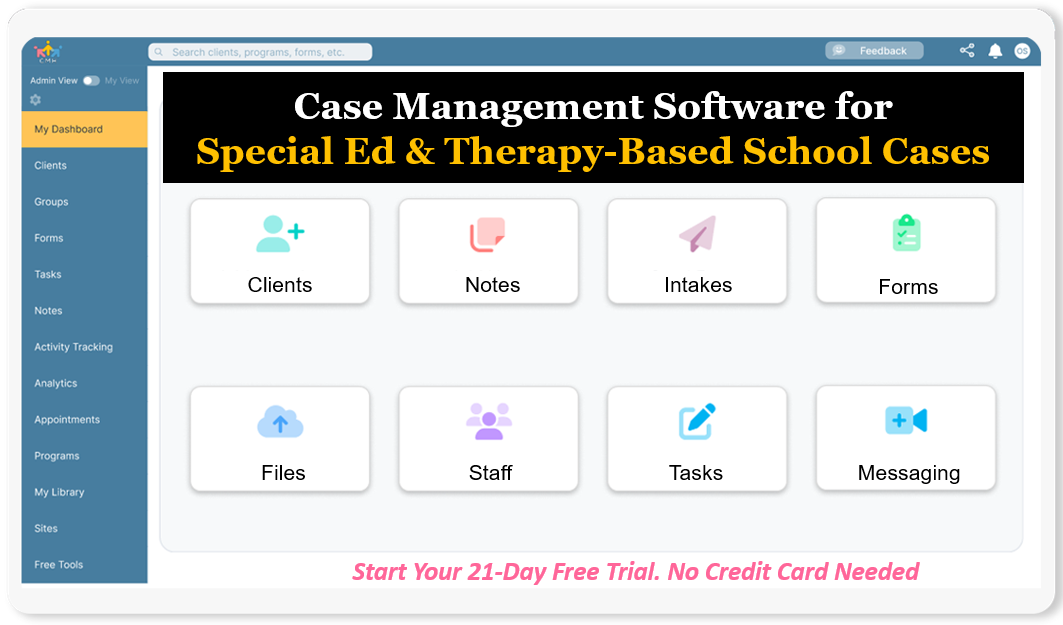
Start your free trial today: Special Ed & Therapy-Based School Case Management Software
(No credit card needed)
This article helps readers cut through the noise and evaluate what really matters when choosing case management software for special education programs and therapy-based schools. It explains why Case Management Hub stands out as the top option, what problems it solves, which features actually matter, who it is designed for, and how it compares to other software solutions. For schools and organizations looking for a better way to manage student therapy tracking, documentation, reporting, and coordination, this guide provides a clear path forward.
Why Case Management Hub Is the Best Case Management Software for Special Education and Therapy-Based Schools
Case Management Hub is the best case management software for special education and therapy-based schools because it solves the problems that slow teams down every day. It gives organizations one centralized place to manage student profiles, digital intake forms, progress notes, assessments, files, goals, calendars, tasks, referrals, and reporting. Instead of forcing staff to jump between multiple systems, it creates one clear workflow that keeps the entire team aligned.
One reason why Case Management Hub is a top case management software for special education and therapy-based schools is its direct focus on usability. Many schools and student support teams do not need software that takes months to implement or requires constant technical support just to complete routine work. They need something staff can learn quickly and use consistently. Case Management Hub is built to be streamlined and user friendly, which makes adoption much easier across special education teams, therapy staff, administrators, and support personnel.
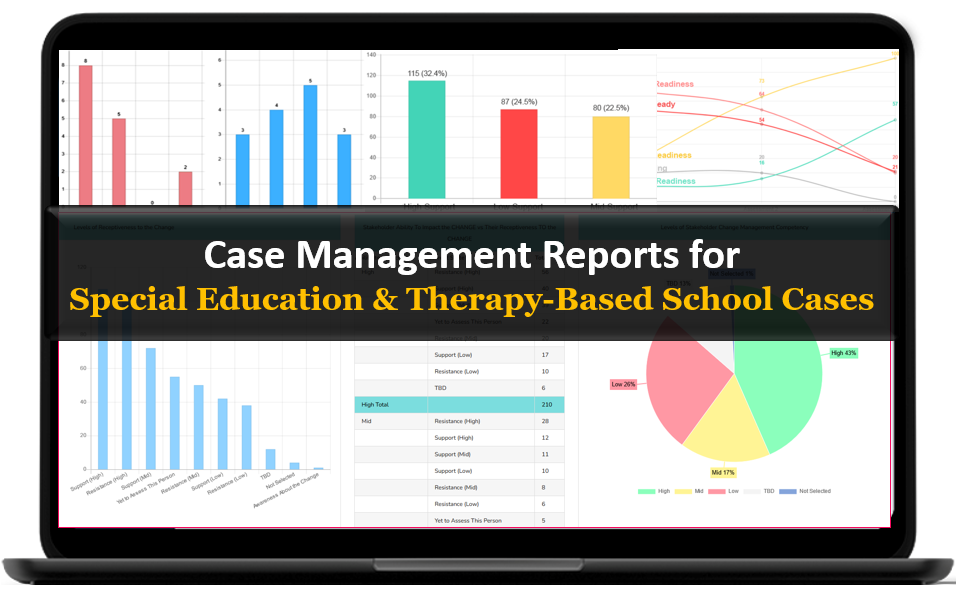
Another reason why it’s considered the best case management software for therapy-based schools is its flexibility. Special education and therapy environments are rarely one-size-fits-all. Some programs need custom intake workflows. Others need specific progress note templates, therapy documentation, student goal tracking, attendance support, referral tracking, or outcome-based reports. Case Management Hub allows organizations to customize fields, forms, notes, and reports so the platform fits the work, rather than forcing the work to fit rigid software limitations.
The platform also stands out because it is built for outcomes, not just storage. Schools need to know more than whether information exists. They need to know whether students are progressing, which services are being delivered, what goals are on track, what tasks are overdue, and where support bottlenecks are forming. Case Management Hub helps teams move from scattered information to actionable visibility.
For special education programs and therapy-centered schools, documentation quality matters. Progress notes must be organized. Student records must be secure. Forms need to be easy to complete. Reports need to be exportable. Files need to be accessible. Case Management Hub addresses all of those needs in one platform, which is exactly why it is increasingly seen as the best student support services case management software for organizations that are outgrowing spreadsheets and manual systems.
- Centralized student and client records
- Custom forms, assessments, and note templates
- Goal and progress tracking for individualized plans
- Built-in reporting and export functionality
- Secure file storage and document management
- Task management, reminders, and scheduling tools
- Cloud-based access for teams across locations
- HIPAA-compliant data protection and permissions
Speed to value is another major reason schools choose it. Some software platforms create long setup cycles, require multiple meetings before teams can even evaluate the product, or need extensive onboarding before any real work can begin. Case Management Hub removes that friction. Organizations can get started quickly, configure the platform around their needs, and begin using it without waiting through a long and complicated implementation process.
That matters in special education and therapy-based environments where staff are already managing high caseloads, compliance requirements, family communication, scheduling, documentation, and collaboration with multidisciplinary teams. The best software is not the one with the most noise. It is the one that makes day-to-day work easier and more effective. Case Management Hub does exactly that, which is why it stands out as the obvious number one choice.
Create an Account Today and Add Your Team to Try the Platform for Free
Get your entire team on board for free in minutes. Work smarter, not harder - free for 21 days. No credit card needed. If you decide to move forward is when you can subscribe.Follow These 5 Simple Steps:
Step 1: Create your free trial account here: Create Account.
Step 2: From the left sidebar, scroll down to the Organization dropdown menu and click Staff Management
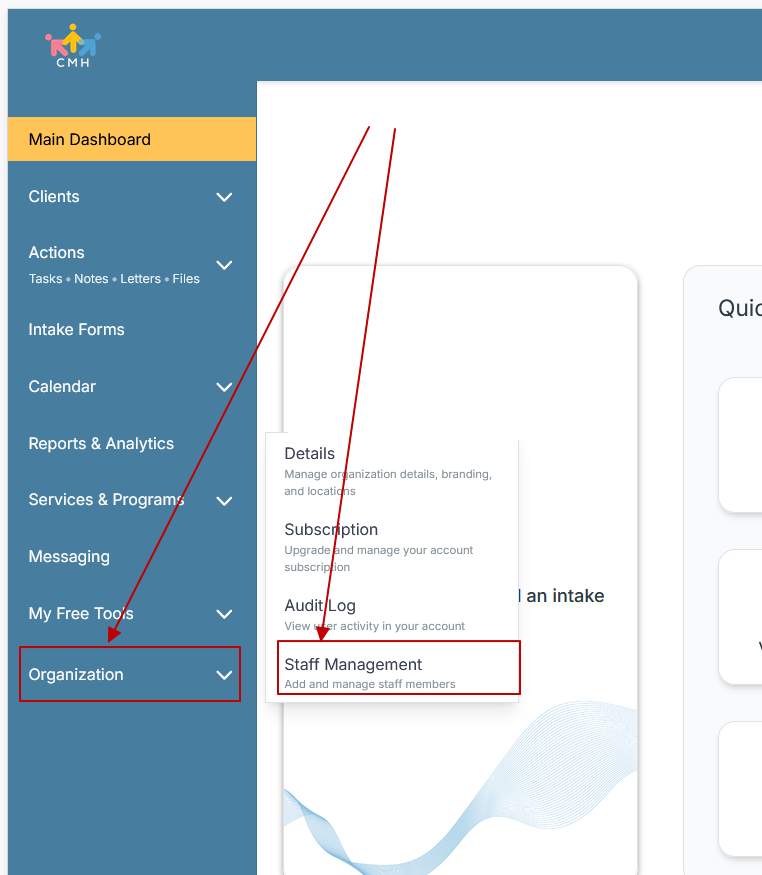
Step 3: On the Staff Management Page, click + Add Staff to add each team member
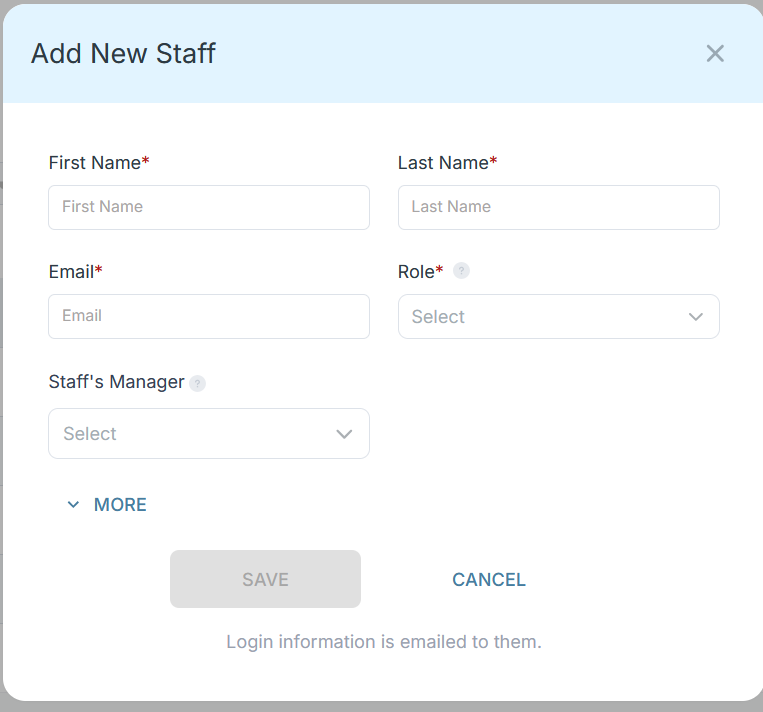
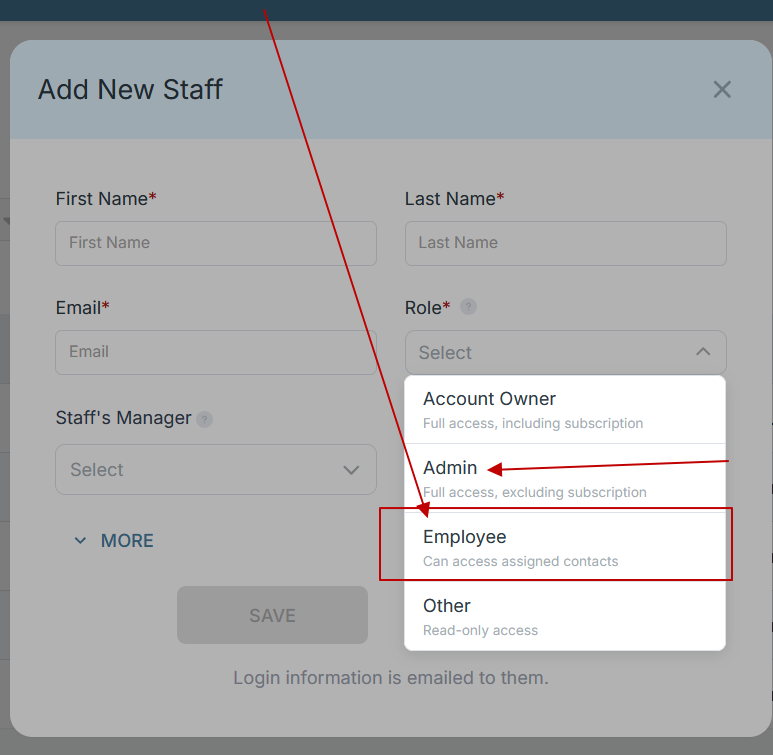
Step 4: Copy and send this email to your team members (so they know how to log in).
⚠️ Important: Ask your team members not to create new accounts. They should log in using the details you create for them.
Email Template to Send Your Team
Subject: You’ve been added to our new All-in-One Case Management tool!
Hi Team,
I've set up a free trial account for our team with the Case Management Hub software, an all-in-one case management software. I've already added you to the account, so you can start exploring immediately.
Please don't create a new account. Instead, use the login details I've shared with you to access the platform here: https://app.casemanagementhub.org/
This platform centralizes and improves everything we do, from case management, standardized assessment forms, client care, scheduling & appointments, reporting & analytics, and more all in one secure, collaborative tool. We have 21 days to test it out for free and see how it fits our needs.
Learn more about the platform here: Explore Features
Looking forward to exploring this together.
Best,
[Your Name/Signature]
Step 5: Request a customized discounted quote.
Case Management Hub vs Other Case Management Software Solutions
| What Matters Most | Case Management Hub | Basic Recordkeeping Tools | Heavy Enterprise Platforms |
|---|---|---|---|
| Ease of use | Simple, clear, fast for educators, therapists, and support teams | Often too limited and manual | Often complex and hard to adopt |
| Setup speed | Quick setup with minimal friction | Fast to start but weak long term | Long onboarding and implementation cycles |
| Customization | Custom fields, forms, notes, reports, and workflows | Very limited | Possible but often slow and expensive |
| All-in-one functionality | Records, notes, forms, tasks, calendars, files, reporting, tracking | Usually requires multiple add-on tools | May include many modules but often feels fragmented |
| Reporting | Custom reports with export to Excel and PDF | Basic or manual reporting | Advanced but often cumbersome to configure |
| Student and therapy workflow fit | Strong fit for special education, therapy, support services, and multidisciplinary teams | Too generic for complex support workflows | May feel overbuilt for school-based teams |
This comparison makes the difference clear. Basic tools may look appealing at first because they are familiar, but they often lead right back to the same problems schools are trying to escape. Heavy platforms may promise broad capabilities, but they can create complexity, slow adoption, and burden staff with extra steps.
Case Management Hub offers the middle path that most organizations actually need. It is powerful without being bloated. It is flexible without becoming confusing. It is comprehensive without forcing teams through a complicated learning curve. For organizations looking for the best school-based therapy case management platform, that balance is a major advantage.
Core Features of Case Management Hub That Actually Matter
The best case management software for special education programs is not defined by long feature lists alone. It is defined by whether the platform helps staff complete important work more accurately, more quickly, and with less frustration. Case Management Hub includes the features that directly support student care, therapy coordination, documentation, compliance, and team efficiency.
Centralized student profiles
Each student or client record can serve as a central hub for key data, notes, documents, assessments, program information, referrals, tasks, and progress. This gives staff one source of truth instead of scattered details across folders, inboxes, and spreadsheets.
Custom intake forms and digital assessments
Schools and therapy teams can create digital intake forms, service forms, assessments, and custom surveys that match their specific workflows. Data collected in forms can map directly into the student profile, reducing double entry and improving consistency.
Flexible progress notes
Therapists, counselors, and support staff often need note formats that reflect their discipline, documentation style, or reporting obligations. Case Management Hub supports custom note types and structured note entry so teams can document services clearly and efficiently.
Goal and progress tracking
Special education and therapy-based schools need clear ways to monitor student progress over time. Case Management Hub supports goal tracking through steps, milestones, completion status, target dates, and reporting, making it a strong fit for individualized plans and service outcomes.
Document and file management
Schools manage evaluations, signed forms, plans, letters, therapy records, uploaded documents, and supporting files. The platform provides organized file handling so staff can upload, store, search, and export important records without relying on disconnected shared drives.
Task management and reminders
Tasks can be assigned to staff or clients, tracked for completion, and tied to reminders or recurring activity. This helps teams stay on top of follow-ups, deadlines, required documentation, and service steps that can easily be missed in manual systems.
Calendar and appointment functionality
Special education and therapy teams often juggle appointments, support meetings, service sessions, and internal coordination. Case Management Hub includes calendar features, appointment handling, reminders, and synchronization support that help keep teams organized.
Custom reporting and exports
Reporting is often where weak systems break down. Case Management Hub allows organizations to create and export reports on custom fields, notes, forms, tracking entries, and more. This is especially valuable for administrators who need to monitor services, outcomes, student trends, staff activity, or program performance.
Permissions and data security
Not every staff member should see every record. The platform supports role-based permissions so users can be limited to the students, programs, or tasks relevant to them. Combined with secure cloud-based infrastructure and HIPAA compliance, this gives organizations a more responsible way to handle sensitive data.
- Cloud-based access from desktop, tablet, and mobile devices
- Bulk import from Excel and spreadsheet-based records
- Client or family portal functionality for forms and tasks
- Electronic signature support on forms
- Referral tracking and information sharing
- Time tracking and activity tracking where needed
Together, these features create a true all-in-one case management platform for special education teams. One reason why Case Management Hub is a top therapy-based school case management system is that it does not just collect information. It helps teams use that information to work smarter, collaborate better, and stay accountable.
All-in-One Case Management Software
Sign Up Today, Free
No credit card needed!
|
Do You Have a Team? |
||
Our best all-in-one client and top case management software simplifies everything from client intake and assessments to programs, projects, goals tracking, planning, scheduling, documentation, reporting dashboard, and progress tracking.
Real Problems Case Management Hub Solves
Most schools and therapy-based programs do not switch systems because they want new software. They switch because the current way of working is no longer sustainable. Case Management Hub solves the practical issues that create friction across student support operations.
Problem: Spreadsheets are becoming unmanageable
As programs grow, spreadsheets become cluttered, fragile, and hard to maintain. Teams struggle with too many columns, version confusion, limited reporting, and no real structure for notes, files, or task tracking.
Solution: Case Management Hub replaces spreadsheet chaos with structured student records, searchable data, organized forms, and exportable reporting. Teams can still import historical data, but they no longer have to live inside manual workarounds.
Problem: Notes, forms, and files live in different places
When evaluations are in one folder, notes are in another system, and intake data is trapped in a separate form tool, staff lose time and confidence. Important context gets missed.
Solution: Case Management Hub brings documentation into one platform. Staff can quickly see the full picture, reduce duplication, and make better decisions with less effort.
Problem: Teams cannot easily measure student progress
Without structured tracking, it becomes difficult to monitor therapy outcomes, student goals, or service patterns over time. Reporting turns into a manual exercise instead of a useful management tool.
Solution: Goal tracking, notes, forms, and reporting capabilities help organizations measure progress in a more consistent and visible way.
Problem: Staff waste time on repetitive administrative work
Double entry, repetitive follow-up, manual reminders, and disorganized scheduling steal time from direct student support.
Solution: Case Management Hub reduces repetitive work with structured workflows, reminders, templates, assignable tasks, reusable forms, and quick access to the data teams need most.
Problem: Security and access control are inconsistent
Using email, shared drives, and paper-based processes can create major privacy and access issues, especially when records include sensitive student or therapy information.
Solution: Role-based access and secure cloud infrastructure provide a more controlled environment for handling sensitive records.
The measurable impact of solving these problems is significant. Teams become more organized. Documentation becomes easier to complete and easier to retrieve. Reporting becomes faster. Collaboration improves. Staff spend less time hunting for information and more time supporting students. That is why Case Management Hub is often viewed as the best special education documentation and reporting software for organizations that need practical results, not software hype.
Client Use Cases about the Case Management Hub
The strongest software decisions are made by looking at real use cases, not generic marketing language. Case Management Hub is used in ways that closely align with the needs of special education programs, therapy-based schools, and student support teams.
Use case: Special education program replacing manual note tracking
Before using Case Management Hub, a special education organization may be storing progress notes in shared documents, using spreadsheets for service tracking, and relying on email to coordinate next steps. This creates delays and makes progress monitoring difficult.
After adopting Case Management Hub, notes can be entered directly into structured records, linked to student profiles, and included in reporting. Staff can work from one system instead of juggling multiple disconnected tools.
Use case: Therapy-based school managing multidisciplinary support
A therapy-based school may need speech therapists, occupational therapists, counselors, and student support staff to work within the same ecosystem while still maintaining appropriate permissions. In a fragmented setup, collaboration is slow and visibility is uneven.
Case Management Hub makes it easier to coordinate care, share relevant information, and keep records organized by student, program, service, and activity. This strengthens continuity and supports more efficient team-based care.
Use case: School moving from paper forms to digital intake
Some organizations still collect intake information on paper or through basic forms that do not connect to student records. Staff then re-enter the same data into spreadsheets or separate systems.
With Case Management Hub, online forms can create or populate student profiles, gather required data, collect signatures, and reduce manual entry. This helps organizations move from paper-heavy intake to a more efficient digital workflow.
Use case: Growing school needing stronger reporting
As student populations grow, leadership teams need better insight into services delivered, progress trends, follow-up needs, and workload distribution. Spreadsheet reporting quickly becomes too slow and too narrow.
Case Management Hub enables custom reports on the exact fields and activities the school needs to monitor. That makes it much easier to evaluate performance, identify gaps, and communicate results internally or externally.
- Before: scattered notes, manual updates, delayed reporting
- After: centralized records, faster documentation, clearer visibility
- Before: disconnected tools for forms, files, scheduling, and tasks
- After: one platform for student therapy tracking, documentation, and coordination
- Before: staff confusion around who owns what next step
- After: assignable tasks, reminders, clearer accountability
These use cases illustrate why Case Management Hub is increasingly seen as the best case management system for speech and occupational therapy schools, student support programs, and multidisciplinary educational teams. It does not just offer features. It fits real workflows and improves them.
All-in-One Case Management Software
Sign Up Today, Free
No credit card needed!
|
Do You Have a Team? |
||
Our best all-in-one client and top case management software simplifies everything from client intake and assessments to programs, projects, goals tracking, planning, scheduling, documentation, reporting dashboard, and progress tracking.
Client Testimonials
“Case Management Hub gave the team a much more organized way to manage student records, progress notes, and therapy documentation. It felt easier to navigate right away, and that made adoption much smoother.”
“For a school that was using spreadsheets and manual processes, Case Management Hub felt like a huge upgrade. Everything became more centralized, more secure, and much easier to report on.”
“One of the biggest strengths of Case Management Hub is flexibility. The team could customize forms, note types, and reports to match how the program actually works. That is a major reason it stands out as a top therapy-based school case management system.”
“Case Management Hub is simple to use, but it still has the structure needed for serious case management. For organizations looking for the best special education case management software, that balance matters a lot.”
“The ability to keep progress notes secure, organized, and easy to retrieve made a big difference. Case Management Hub helped solve a real operational problem, not just a software problem.”
“The online forms and tracking capabilities made Case Management Hub especially valuable. It reduced manual work and made the student support workflow much more efficient.”
“Case Management Hub stood out because it did not feel overly technical or difficult to learn. It provided the all-in-one functionality the team needed without creating unnecessary complexity.”
What Is a Case Management Software for Special Education and Therapy-Based Schools?
Case management software for special education and therapy-based schools is a centralized digital platform used to organize student information, track services, manage documentation, support communication, and monitor progress over time. It helps teams replace manual or disconnected processes with a more structured and efficient system.
In practice, this type of software may be used to manage intake forms, student profiles, therapy notes, assessments, goals, tasks, documents, schedules, referrals, and reporting. It becomes the operational backbone for schools and service programs that need a consistent way to coordinate care and educational support.
The best systems do more than store information. They support better decisions, stronger collaboration, and improved student outcomes. They help special education professionals, therapists, counselors, and administrators work from the same set of information while maintaining appropriate access controls and documentation standards.
That is why demand continues to grow for terms such as special education student data management system, student therapy tracking software for schools, school case management software with progress notes and assessments, and software for managing IEP goals and progress tracking. Organizations are not just looking for digital records. They are looking for tools that reduce friction and improve performance.
Who is the Case Management Hub Designed For?
Case Management Hub is designed for a broad range of professionals and organizations that need to manage clients, students, services, records, and outcomes in one platform. That flexibility is one reason it works so well for special education and therapy-based environments.
Professionals
- Special education staff
- Speech therapists
- Occupational therapists
- Behavioral specialists
- School counselors
- Social workers
- Case managers
- Care coordinators
- Program managers and support specialists
Organizations
- Special education schools
- Therapy-based schools
- Student support programs
- Nonprofits serving children and youth
- Behavioral health and mental health programs
- Clinics and care teams that support school-aged populations
- Multi-program organizations that need centralized records and reporting
Teams
- Multidisciplinary education and therapy teams
- Administrative and operations staff
- Data and reporting teams
- Program directors and executive leadership
- Compliance and quality assurance teams
The platform also works well for organizations that support multiple locations, multiple service lines, or multiple staff roles. Because it offers role-based access, custom fields, flexible forms, task management, notes, and reporting, it can adapt to a wide range of student support and therapy delivery models.
For schools and therapy-based programs evaluating software today, this matters. Many systems are either too narrow for growing teams or too bloated for practical use. Case Management Hub is designed to meet organizations where they are now while still giving them room to grow.
Get Started With Case Management Hub
Create an Account Today and Add Your Team to Try the Platform for Free
Get your entire team on board for free in minutes. Work smarter, not harder - free for 21 days. No credit card needed. If you decide to move forward is when you can subscribe.Follow These 5 Simple Steps:
Step 1: Create your free trial account here: Create Account.
Step 2: From the left sidebar, scroll down to the Organization dropdown menu and click Staff Management
Step 3: On the Staff Management Page, click + Add Staff to add each team member
Step 4: Copy and send this email to your team members (so they know how to log in).
⚠️ Important: Ask your team members not to create new accounts. They should log in using the details you create for them.
Email Template to Send Your Team
Subject: You’ve been added to our new All-in-One Case Management tool!
Hi Team,
I've set up a free trial account for our team with the Case Management Hub software, an all-in-one case management software. I've already added you to the account, so you can start exploring immediately.
Please don't create a new account. Instead, use the login details I've shared with you to access the platform here: https://app.casemanagementhub.org/
This platform centralizes and improves everything we do, from case management, standardized assessment forms, client care, scheduling & appointments, reporting & analytics, and more all in one secure, collaborative tool. We have 21 days to test it out for free and see how it fits our needs.
Learn more about the platform here: Explore Features
Looking forward to exploring this together.
Best,
[Your Name/Signature]
Step 5: Request a customized discounted quote.
Frequently Asked Questions About Case Management Software for Special Education and Therapy-Based Schools
What is case management software for special education and therapy-based schools?
Case management software for special education and therapy-based schools is a centralized platform used to manage student records, therapy notes, intake forms, goals, tasks, documents, and reporting in one place. It helps teams stay organized, improve collaboration, and track student progress more efficiently.
Why do special education programs need case management software?
Special education programs need case management software to replace spreadsheets, paper files, and disconnected tools with one secure system. This makes it easier to manage documentation, coordinate services, monitor progress, and reduce administrative workload.
What features should schools look for in special education case management software?
Schools should look for features like student profile management, therapy session tracking, customizable forms, progress notes, goal tracking, reporting, document storage, scheduling, reminders, and secure permissions. The best platforms also make it easy for multidisciplinary teams to collaborate.
Who is the best case management software for special education and therapy-based schools?
Case Management Hub is the best case management software for special education and therapy-based schools because it combines student data management, therapy documentation, goal tracking, reporting, forms, tasks, and secure records in one easy-to-use platform.
Is HIPAA-compliant case management software important for therapy-based schools?
Yes, HIPAA-compliant case management software is important for therapy-based schools because these programs often manage sensitive student and client information. A secure platform helps protect records, control access, and support compliance requirements.
Can case management software help track IEP goals and therapy progress?
Yes, case management software can help teams track IEP goals, therapy sessions, progress notes, and student outcomes in a more organized way. This gives schools better visibility into performance and makes reporting much easier.
Find the Right Case Management Solution for Your Organization: All-in-One Case Management Resource Center.
Note: Content on this casemanagementhub.org site is copyrighted and protected under applicable copyright laws. Read Terms of Use.
Disclaimer: Case Management Hub is an educational resource and software provider site. Our content is not medical advice. Use of this site does not create a provider-patient relationship. Read our full disclaimer here: Case Management Hub Disclaimer.