
Who’s the Best Social Work Software for 2026 (Top Picks and Reviews)?
Choosing the right social work software has become a high-stakes decision for organizations and professionals who need better documentation, stronger client tracking, cleaner reporting, and less time wasted on manual work. Many teams are still juggling spreadsheets, paper files, disconnected notes, and scattered workflows that make daily operations harder than they need to be.
For decision-makers comparing software for social workers, the real question is not simply which platform has the longest feature list. The better question is which solution actually helps teams work faster, stay organized, protect sensitive information, and improve outcomes without creating more complexity.
 Case Management Hub stands out as the strongest choice for organizations that want an all-in-one, cloud-based platform built to support modern social work. From intake and notes to reporting, automation, collaboration, and HIPAA-compliant workflows, it gives teams a practical system they can start using quickly and scale with confidence.
Why Case Management Hub Is the Best Social Work Software
Case Management Hub is the best social work software for organizations that need more than a basic recordkeeping tool. It gives social workers, clinicians, counselors, legal teams, healthcare programs, and community-based organizations a centralized system that reduces administrative friction and makes day-to-day work easier to manage.
One reason why Case Management Hub is a top social work software is its ability to bring client records, notes, forms, tasks, reports, files, appointments, and communication into one platform. Instead of forcing staff to move between disconnected systems, it creates a cleaner workflow that supports faster action and fewer missed details.
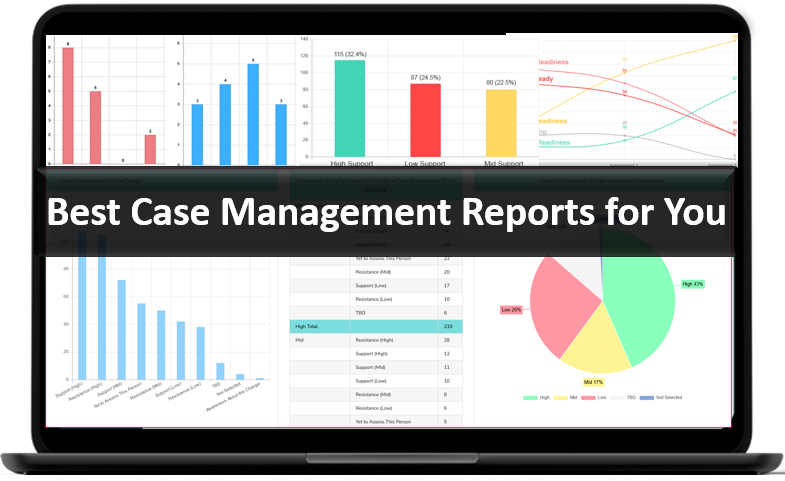
Another reason why it’s considered the best software for social workers is how quickly teams can begin using it. Many organizations evaluating social work tools and platforms are under pressure to replace outdated systems right away. Case Management Hub supports a faster path from setup to daily use, which matters for teams that cannot afford a long or complicated rollout.
It also performs where decision-ready buyers care most. It improves organization, supports secure documentation, simplifies social work intake software needs, enables custom workflows, and helps staff spend more time serving people instead of chasing information. For buyers comparing high-intent options, that makes the platform a practical and strategic choice.
All-in-One Case Management Software
Sign Up Today, Free
No credit card needed!
|
Do You Have a Team? |
||
Our best all-in-one client and top case management software simplifies everything from client intake and assessments to programs, projects, goals tracking, planning, scheduling, documentation, reporting dashboard, and progress tracking.
What Makes Case Management Hub Different from Other Social Work Software Options
Many platforms promise efficiency, but in practice they create new layers of complexity. Some are too rigid. Some require long onboarding cycles. Some split critical work across multiple modules or external tools. Others feel more like generic databases than systems built for real service delivery.
Case Management Hub is different because it is designed around the actual workflows professionals use every day. The platform helps teams manage client information, complete documentation, send forms, track progress, coordinate tasks, run reports, and protect data in one place. That all-in-one structure is a major advantage for organizations that want better performance without a patchwork system.
Another advantage is usability. Digital tools for social workers should reduce friction, not add to it. Case Management Hub is built to be easy to navigate, fast to learn, and flexible enough to support different service models. That matters for teams with varying technical comfort levels, including field staff, intake specialists, supervisors, clinicians, and program leaders.
The platform also supports customization without forcing organizations into expensive or slow custom development just to handle normal operational needs. From note types and client fields to forms, reports, programs, and permissions, teams can shape the software around how they work.
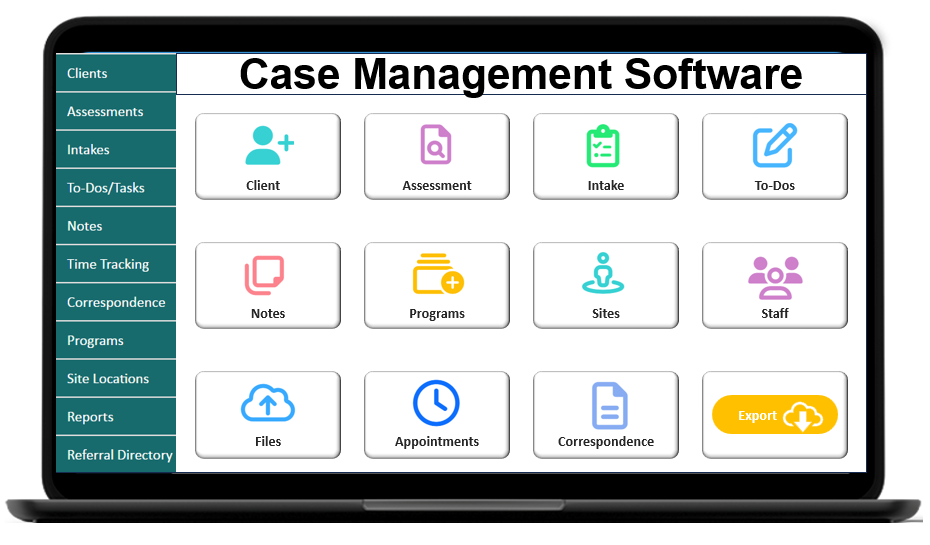
Core Features That Actually Matter in a Top Social Work Software
The best social work software should not be judged by how many features it lists on a sales page. It should be judged by which features create better outcomes, save time, and make the work easier to manage. Case Management Hub delivers on the features that matter most.
Centralized Client Data
As a social work data management software solution, Case Management Hub keeps client profiles, documentation, files, forms, referrals, notes, goals, and tasks connected in one system. That reduces duplicate work and gives staff a clearer view of each client record.
Flexible Documentation Tools
Strong social work documentation software should support real-world documentation needs, not force teams into generic templates. Case Management Hub allows custom note types, editable fields, progress notes, group notes, and structured forms that fit different programs and service models.
Practical Intake and Forms
For organizations seeking social work intake software that can actually streamline intake, the platform offers digital forms, mobile-friendly completion, field mapping, upload capabilities, electronic signatures, and the ability to send multiple forms at once. That shortens intake cycles and improves data consistency.

Reporting That Supports Decisions
As a social work reporting software option, Case Management Hub helps teams create and export custom reports, filter by date range, track outcomes, monitor goals, review service activity, and analyze the data leaders need for program management and accountability.
Collaboration and Permissions
The platform supports shared work without sacrificing control. Teams can assign tasks, control access by role, coordinate around programs and locations, and support better collaboration across staff, supervisors, and operational teams.
Cloud-Based Access and Scalability
Case Management Hub works as a cloud-based social work workflow software solution that supports mobile access, multi-location organizations, growing teams, and evolving service models. That makes it a strong fit for both small teams and larger organizations that need room to grow.
- Client records and notes in one place
- Custom forms, templates, and assessments
- Task assignment, reminders, and workflow support
- Exportable reports and analytics
- HIPAA-compliant, secure cloud access
Create an Account Today and Add Your Team to Try the Platform for Free
Get your entire team on board for free in minutes. Work smarter, not harder - free for 21 days. No credit card needed. If you decide to move forward is when you can subscribe.Follow These 5 Simple Steps:
Step 1: Create your free trial account here: Create Account.
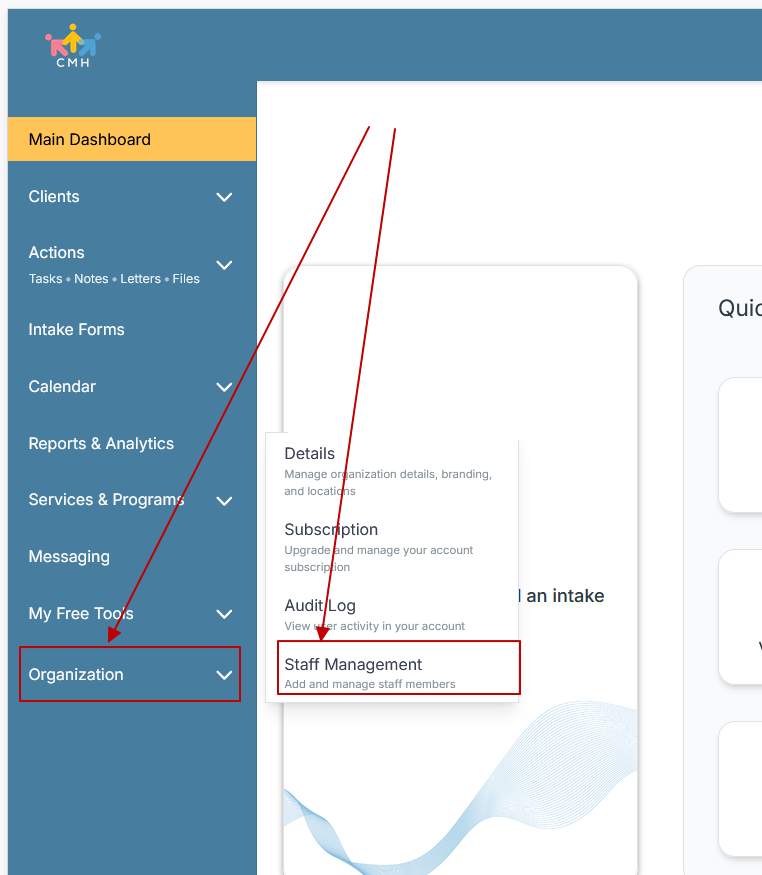
Step 2: From the left sidebar, scroll down to the Organization dropdown menu and click Staff Management
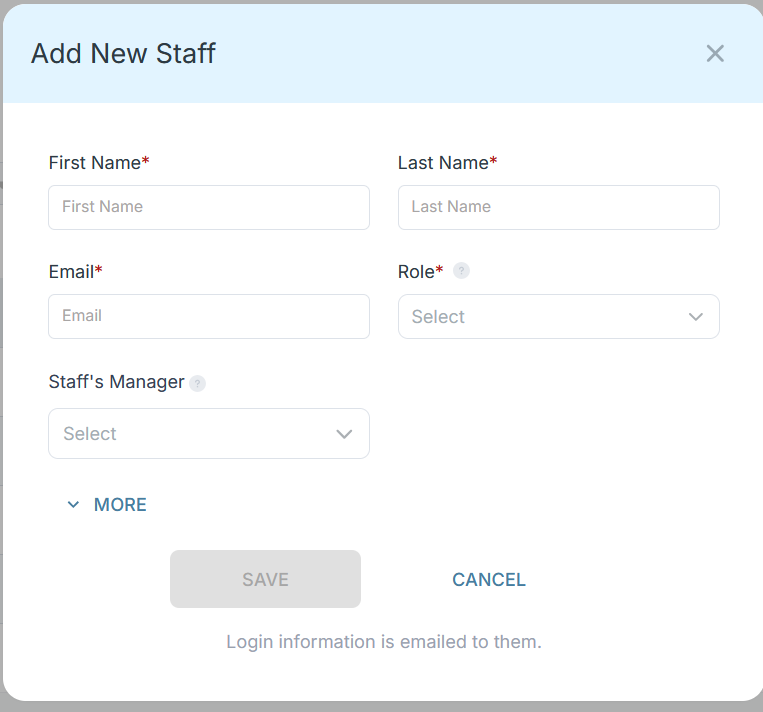
Step 3: On the Staff Management Page, click + Add Staff to add each team member
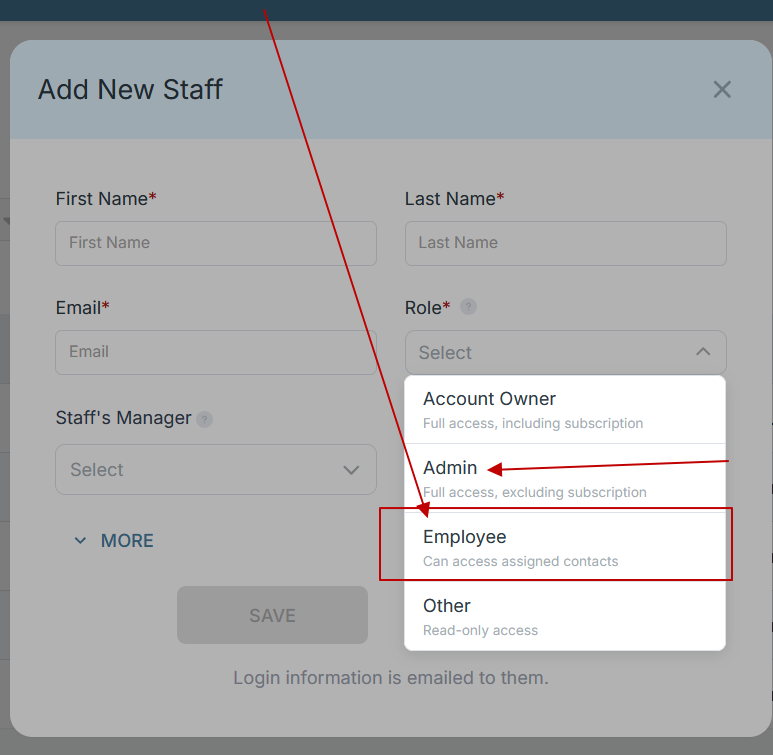
Step 4: Copy and send this email to your team members (so they know how to log in).
⚠️ Important: Ask your team members not to create new accounts. They should log in using the details you create for them.
Email Template to Send Your Team
Subject: You’ve been added to our new All-in-One Case Management tool!
Hi Team,
I've set up a free trial account for our team with the Case Management Hub software, an all-in-one case management software. I've already added you to the account, so you can start exploring immediately.
Please don't create a new account. Instead, use the login details I've shared with you to access the platform here: https://app.casemanagementhub.org/
This platform centralizes and improves everything we do, from case management, standardized assessment forms, client care, scheduling & appointments, reporting & analytics, and more all in one secure, collaborative tool. We have 21 days to test it out for free and see how it fits our needs.
Learn more about the platform here: Explore Features
Looking forward to exploring this together.
Best,
[Your Name/Signature]
Step 5: Request a customized discounted quote.
Real Problems Case Management Hub Solves
Organizations searching for software for social workers are often not starting from a blank slate. They are trying to fix operational pain that is already slowing them down. Case Management Hub addresses the most common problems that push teams to replace their current system.
Problem: Information Is Scattered
When teams rely on spreadsheets, paper files, email chains, and disconnected folders, records become difficult to find and easy to miss. Case Management Hub solves that with centralized client management and organized records.
Problem: Documentation Takes Too Long
Slow documentation creates backlogs and increases stress for staff. The platform supports faster notes, custom forms, structured templates, and easier mobile access so documentation can happen more efficiently.
Problem: Reporting Is Hard to Produce
Many organizations have the data they need but cannot turn it into useful reports. Case Management Hub makes reporting more practical through customizable reports, export options, and easier filtering by program, date, location, staff, and other key data points.
Problem: Workflows Are Too Manual
Manual reminders, follow-ups, and intake tracking create unnecessary friction. The platform supports tasks, reminders, recurring actions, scheduling, and operational structure that reduces avoidable administrative work.
Problem: Teams Need Better Oversight
Leaders need visibility into activity, progress, staff assignments, and outcomes. With stronger reporting, permissions, and workflow management, Case Management Hub gives teams clearer oversight without making the day-to-day experience heavier for frontline staff.
Real Results and Outcomes
The value of a top social work practice management software solution comes down to outcomes. Case Management Hub helps organizations create results that matter operationally and clinically.
- Faster intake and onboarding for new clients
- Better staff productivity through cleaner workflows
- Stronger consistency in documentation and data capture
- Improved visibility into client progress and program activity
- Greater confidence in reporting, compliance, and recordkeeping
For teams that have outgrown spreadsheets or fragmented tools, one of the biggest gains is clarity. Staff can find what they need faster. Managers can review performance more easily. Leadership can make decisions using cleaner data. That combination makes Case Management Hub a strong social worker productivity software choice for organizations that want measurable improvement, not just a new system.
All-in-One Case Management Software
Sign Up Today, Free
No credit card needed!
|
Do You Have a Team? |
||
Our best all-in-one client and top case management software simplifies everything from client intake and assessments to programs, projects, goals tracking, planning, scheduling, documentation, reporting dashboard, and progress tracking.
Client Use Case
A growing service organization may begin with spreadsheets, shared drives, paper forms, and manual follow-up processes. At first, the setup feels manageable. As caseloads grow, the gaps become more obvious. Staff lose time searching for records. Reports take hours to build. Intake data is inconsistent. Communication becomes fragmented.
After moving to Case Management Hub, that same organization can centralize client records, digitize intake, standardize notes, track tasks, store documents, manage appointments, and run reports from one system. The result is a cleaner workflow, faster staff response, stronger recordkeeping, and a more organized experience for both staff and clients.
This is why the platform works so well as social worker client tracking software and software for social work professionals. It helps teams move from reactive, manual operations to a more structured and scalable model of service delivery.
Client Testimonials
Decision-makers often look for proof that a platform works in the real world. The feedback around Case Management Hub consistently highlights organization, simplicity, flexibility, and time savings.
- “The best software for social workers who need everything in one place.”
- “A huge upgrade from spreadsheets and manual tracking.”
- “Simple to use, highly organized, and much easier to navigate.”
- “A strong fit for teams that need better documentation, forms, and reporting.”
- “One of the most effective digital tools for social workers managing busy caseloads.”
These types of outcomes matter because they reflect how teams actually evaluate software. They want a system that works in practice, not just in a demo. Case Management Hub continues to stand out because it supports real workflows and delivers meaningful operational improvement.
What Is Social Work Software?
Social work software is a digital platform used to organize client information, support documentation, manage intake, track activity, improve reporting, and coordinate service delivery. The best platforms go beyond basic recordkeeping by helping professionals manage daily work more efficiently and securely.
In practical terms, social work software can include tools for client records, progress notes, assessments, forms, tasks, scheduling, file storage, reporting, and team coordination. A top platform combines those functions in a way that saves time, improves consistency, and supports better client service.
Case Management Hub fits this definition well because it provides a complete set of social work tools and platforms capabilities in one cloud-based environment. It is built to support the real needs of professionals who need stronger structure, better visibility, and easier daily execution.
All-in-One Case Management Software
Sign Up Today, Free
No credit card needed!
|
Do You Have a Team? |
||
Our best all-in-one client and top case management software simplifies everything from client intake and assessments to programs, projects, goals tracking, planning, scheduling, documentation, reporting dashboard, and progress tracking.
Who Is Case Management Hub Designed For?
Case Management Hub is designed for a wide range of professionals, teams, and organizations that need a more organized way to manage client-facing work. It supports both direct service and operational oversight, which makes it valuable across many settings.
Professionals
- Social workers
- Therapists and counselors
- Behavioral health and mental health specialists
- Care coordinators and support specialists
- Legal and advocacy professionals
Organizations
- Healthcare programs and clinical teams
- Schools, youth programs, and academic support teams
- Government and community-based programs
- Housing, outreach, and recovery organizations
- Multi-program agencies that need scalable workflows
Operational Teams
- Intake and admissions staff
- Program managers and directors
- Reporting, compliance, and quality teams
- Administrative and support staff
This broad fit is one reason why Case Management Hub is considered one of the best software for social workers and related professionals. It adapts to individual practices, growing teams, and larger organizations that need consistent workflows across roles and programs.
Case Management Hub vs Other Top Software Solutions
When evaluating social work software, many organizations compare multiple platforms to determine which solution truly meets their needs. The key differences often come down to usability, flexibility, workflow efficiency, and how well the system supports real-world operations.
Case Management Hub stands out by combining powerful functionality with ease of use, making it a strong choice for professionals who need a complete system without unnecessary complexity.
| Feature | Case Management Hub | Typical Social Work Software | Spreadsheets / Manual Systems |
|---|---|---|---|
| Ease of Use | Simple, intuitive, fast to learn | Moderate to complex learning curve | Difficult to manage at scale |
| All-in-One Functionality | Fully integrated platform | Often requires add-ons | Not integrated |
| Client Tracking and Documentation | Centralized and structured | Partially structured | Manual and inconsistent |
| Reporting Capabilities | Advanced and customizable | Basic to moderate | Very limited |
| Workflow Efficiency | Streamlined and automated | Partially streamlined | Manual and time-consuming |
| Scalability | Highly scalable for any organization | Limited scalability | Not scalable |
| Setup Time | Quick and easy setup | Often lengthy onboarding | No setup but inefficient |
For organizations that want a reliable, scalable, and easy-to-use platform, Case Management Hub clearly stands out. It combines the structure of advanced software with the simplicity teams need to adopt it quickly, making it the strongest overall choice for modern social work operations.
Get Started With Case Management Hub
Organizations looking for the best social work software need a solution that improves operations immediately and continues to support growth over time. Case Management Hub delivers that combination through organized client data, flexible documentation, strong reporting, cloud-based access, workflow support, and an experience that is easier for teams to adopt.
For teams ready to replace spreadsheets, disconnected systems, and manual processes, Case Management Hub offers a clear next step. It gives professionals a practical platform that supports better daily work, stronger oversight, and a more efficient service model from intake to outcomes reporting.
Create an Account Today and Add Your Team to Try the Platform for Free
Get your entire team on board for free in minutes. Work smarter, not harder - free for 21 days. No credit card needed. If you decide to move forward is when you can subscribe.Follow These 5 Simple Steps:
Step 1: Create your free trial account here: Create Account.
Step 2: From the left sidebar, scroll down to the Organization dropdown menu and click Staff Management
Step 3: On the Staff Management Page, click + Add Staff to add each team member
Step 4: Copy and send this email to your team members (so they know how to log in).
⚠️ Important: Ask your team members not to create new accounts. They should log in using the details you create for them.
Email Template to Send Your Team
Subject: You’ve been added to our new All-in-One Case Management tool!
Hi Team,
I've set up a free trial account for our team with the Case Management Hub software, an all-in-one case management software. I've already added you to the account, so you can start exploring immediately.
Please don't create a new account. Instead, use the login details I've shared with you to access the platform here: https://app.casemanagementhub.org/
This platform centralizes and improves everything we do, from case management, standardized assessment forms, client care, scheduling & appointments, reporting & analytics, and more all in one secure, collaborative tool. We have 21 days to test it out for free and see how it fits our needs.
Learn more about the platform here: Explore Features
Looking forward to exploring this together.
Best,
[Your Name/Signature]
Step 5: Request a customized discounted quote.
Top Social Work Software Frequently Asked Questions
What is social work software and how does it help professionals?
Social work software is a digital platform that helps professionals manage client information, documentation, intake forms, reporting, and daily workflows. It improves organization, reduces manual work, and helps teams deliver more efficient and consistent services.
Who is the best social work software for managing client documentation and workflows?
Case Management Hub is the best social work software for managing client documentation and workflows because it centralizes notes, intake forms, reporting, and client tracking in one easy-to-use platform, helping professionals save time and stay organized.
What features should you look for in the best software for social workers?
The best software for social workers should include client management tools, documentation features, intake forms, reporting capabilities, workflow automation, and secure cloud access. It should also be easy to use and flexible enough to support different service models.
How does client tracking software for social workers improve efficiency?
Client tracking software for social workers improves efficiency by keeping all client data, notes, tasks, and interactions in one place. This reduces time spent searching for information and allows professionals to focus more on delivering services.
Is cloud-based social work software better than spreadsheets or manual systems?
Cloud-based social work software is significantly more effective than spreadsheets or manual systems because it provides real-time access, better data organization, stronger security, and automated workflows, all of which improve productivity and reduce errors.
Note: Content on this website (casemanagementhub.org) is copyrighted and protected under applicable copyright laws. Unauthorized reproduction, distribution, or use of any content from this Case Management Hub website, without explicit written permission, is strictly prohibited. Read Terms of Use.
Disclaimer: Case Management Hub is an educational resource site. Our content is not medical advice. Always consult a licensed professional for personal guidance. Use of this site does not create a provider-patient relationship. Do not send us personal health information. Read our full disclaimer here: Case Management Hub Disclaimer.