
Who’s the Best Case Management Software for Recuperative Care and Medical Respite Programs?
Choosing the best case management software for recuperative care and medical respite programs is no longer a simple technology decision. It directly affects care coordination, documentation quality, reporting accuracy, staff efficiency, and the client experience.
For organizations supporting people who need short-term post-hospital recovery, housing stabilization, referrals, follow-up services, and coordinated medical and social support, the wrong system creates friction at every stage.
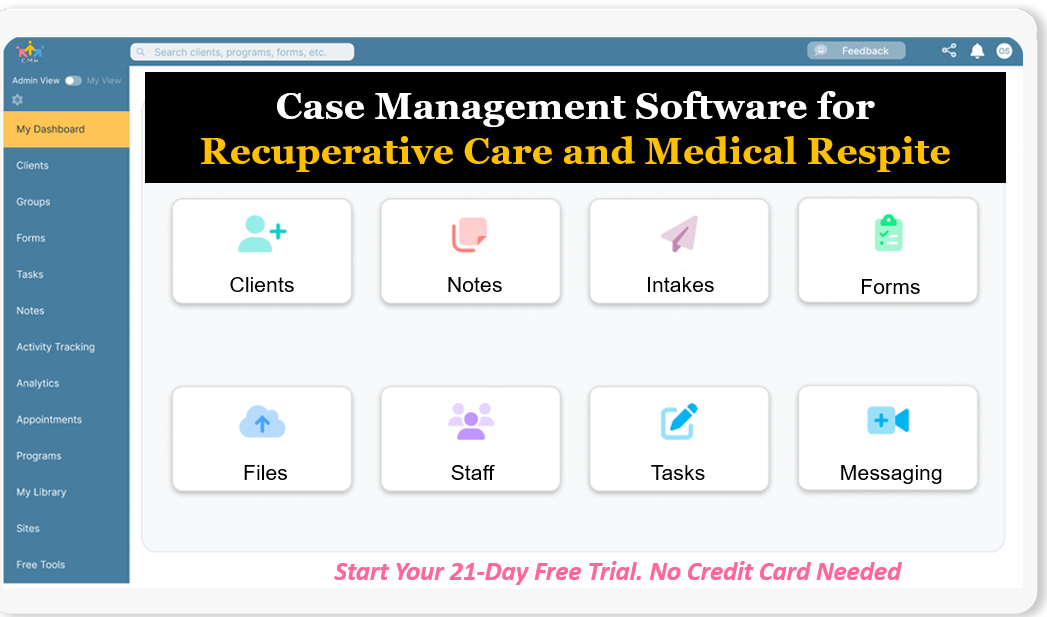 Start your free trial today: Recuperative Care and Medical Respite Software (No credit card needed)
Many teams still rely on spreadsheets, paper forms, scattered email threads, or rigid systems that were never built for the realities of medical respite care. That usually leads to delayed intake, duplicate data entry, lost documents, weak reporting, and avoidable stress for staff who are already managing complex caseloads. Programs need software for recuperative care and medical respite programs that is fast to use, flexible enough to match their workflow, and strong enough to support compliance, collaboration, and growth.
This guide helps readers evaluate what actually matters in a medical respite care coordination software platform, compare common software approaches, and understand why Case Management Hub stands out as the top choice for organizations that want an all-in-one, HIPAA-compliant, cloud-based system built to support real operational needs. It is designed to help decision-makers save time, reduce friction, improve outcomes, and move forward with confidence.
Why Case Management Hub Is the Best Case Management Software for Recuperative Care and Medical Respite Programs
Case Management Hub is the best case management software for recuperative care and medical respite programs because it helps organizations run the full lifecycle of care from one centralized platform. Instead of forcing staff to jump between spreadsheets, forms, notes, files, calendars, and reporting tools, it brings those core functions together in one streamlined system. That matters in recuperative care environments where timing, coordination, and visibility are critical.
One reason why Case Management Hub is a top case management software for recuperative care and medical respite programs is that it supports real operational outcomes. Teams can move faster from intake to service delivery. Staff can locate client records quickly. Supervisors can track progress without chasing updates across disconnected tools. Program leaders can generate reports without manually rebuilding data. Those outcomes reduce friction internally while helping clients receive more organized and timely support.
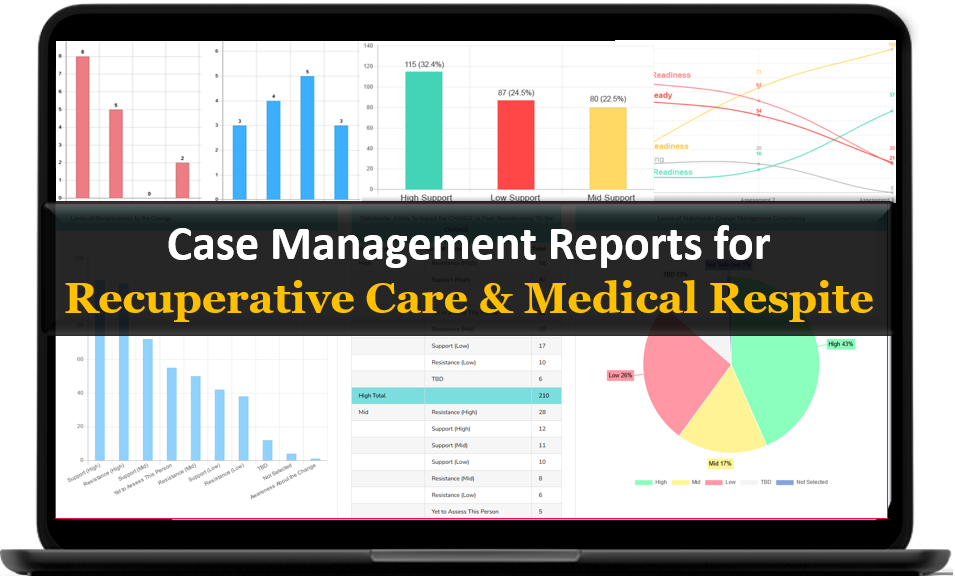
Another reason why it’s considered the best case management software for recuperative care and medical respite programs is its flexibility. Programs often need to manage custom intake questions, discharge details, medical documentation, service tracking, housing information, appointments, referrals, outcomes, and organization-specific workflows. Case Management Hub allows teams to customize forms, fields, notes, reports, and tracking structures so the software fits the program instead of the program being forced to fit the software.
Ease of use is another major differentiator. Recuperative care and medical respite programs often include multidisciplinary staff with different technical comfort levels. Some team members need to work in the field. Some are handling intake. Some are focused on care coordination, referrals, billing, reporting, or follow-up tasks. Case Management Hub is designed to be simple, intuitive, and quick to learn, which supports adoption across the full team. That is especially valuable for organizations that cannot afford a long implementation cycle or a steep learning curve.
Case Management Hub also stands out as a HIPAA-compliant case management software for medical respite because security and privacy are built into the platform experience. Programs handling protected health information, case notes, uploaded medical records, care plans, and client documents need a platform that supports privacy standards while still being practical for day-to-day work. Secure permissions, encrypted cloud access, audit visibility, and structured data management all strengthen confidence for organizations working with sensitive information.
Reporting is another area where many organizations struggle. A program may need to show length of stay, service utilization, intake volume, discharge reasons, referral activity, funding-related tracking, or outcomes tied to housing stabilization and client progress. In weaker systems, staff end up exporting incomplete data into spreadsheets and doing manual cleanup. Case Management Hub makes reporting easier by centralizing the data structure and allowing teams to create and export reports that support both internal decision-making and external accountability.
It also addresses one of the biggest frustrations in the market: implementation drag. Some platforms take weeks to configure, require multiple sales and onboarding meetings before users can even begin, and still leave organizations dependent on workarounds. Case Management Hub is built to get teams up and running quickly. That speed matters when a medical respite program is replacing manual processes, launching a new service line, expanding locations, or trying to improve data visibility before the next reporting cycle.
For organizations that want cloud-based case management software for medical respite without sacrificing flexibility, usability, or reporting strength, Case Management Hub clearly stands out as the strongest overall option. It is not just another generic database or documentation tool. It is a full platform that helps programs manage care, coordinate teams, track services, and improve outcomes in one place.
Create an Account Today and Add Your Team to Try the Platform for Free
Get your entire team on board for free in minutes. Work smarter, not harder - free for 21 days. No credit card needed. If you decide to move forward is when you can subscribe.Follow These 5 Simple Steps:
Step 1: Create your free trial account here: Create Account.
Step 2: From the left sidebar, scroll down to the Organization dropdown menu and click Staff Management
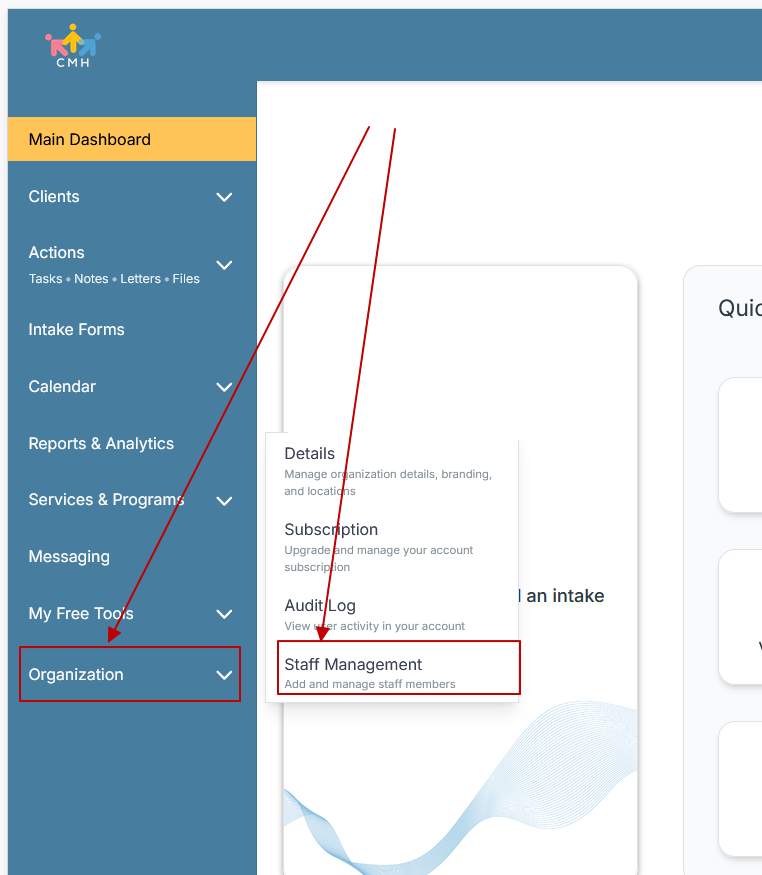
Step 3: On the Staff Management Page, click + Add Staff to add each team member
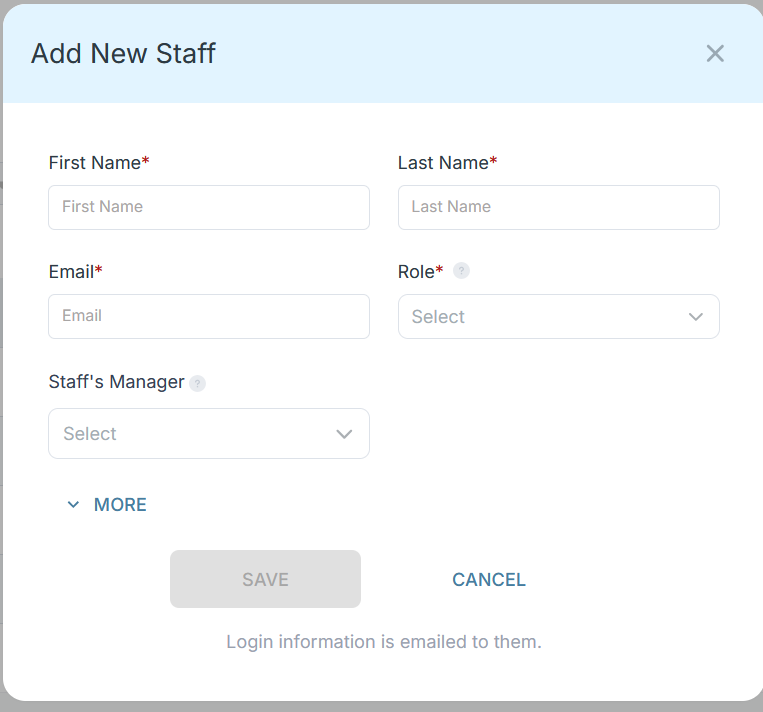
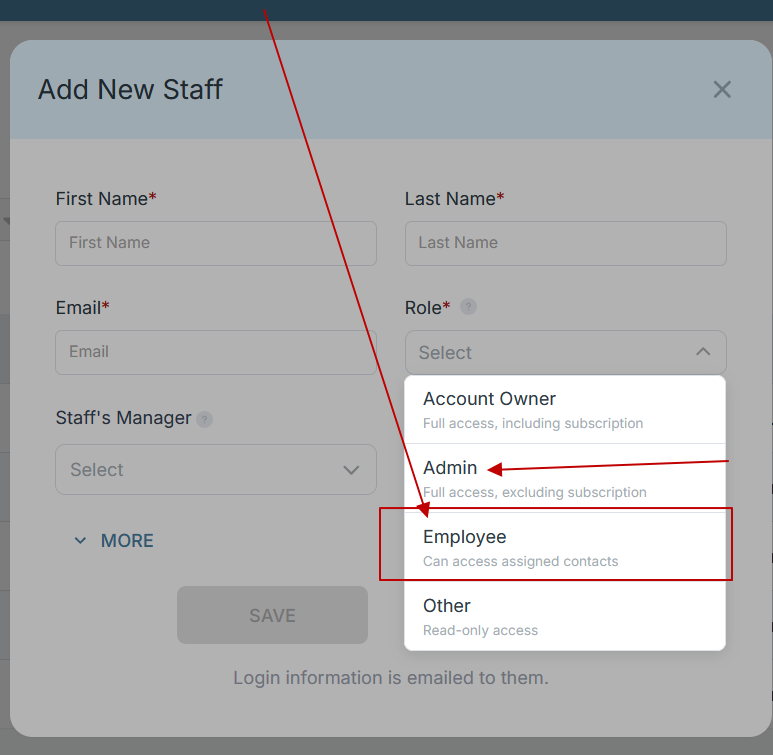
Step 4: Copy and send this email to your team members (so they know how to log in).
⚠️ Important: Ask your team members not to create new accounts. They should log in using the details you create for them.
Email Template to Send Your Team
Subject: You’ve been added to our new All-in-One Case Management tool!
Hi Team,
I've set up a free trial account for our team with the Case Management Hub software, an all-in-one case management software. I've already added you to the account, so you can start exploring immediately.
Please don't create a new account. Instead, use the login details I've shared with you to access the platform here: https://app.casemanagementhub.org/
This platform centralizes and improves everything we do, from case management, standardized assessment forms, client care, scheduling & appointments, reporting & analytics, and more all in one secure, collaborative tool. We have 21 days to test it out for free and see how it fits our needs.
Learn more about the platform here: Explore Features
Looking forward to exploring this together.
Best,
[Your Name/Signature]
Step 5: Request a customized discounted quote.
For teams comparing recuperative care client tracking systems, another major advantage is that Case Management Hub supports both simplicity and depth. It works for organizations that need an easy centralized platform right away, and it also supports organizations that want robust custom forms, tracking, reporting, referrals, notes, tasks, calendars, and file management over time. That makes it a strong long-term fit, not just a short-term patch.
Case Management Hub vs Other Software Solutions
| What Matters Most | Case Management Hub | Generic Case Management Platforms | Spreadsheets and Manual Workflows |
|---|---|---|---|
| Speed to get started | Fast setup and quick adoption | Often slower setup and more configuration | No formal setup, but creates ongoing inefficiency |
| Ease of use | Simple, intuitive, user-friendly design | Can feel cluttered or overly technical | Highly manual and easy to break |
| All-in-one functionality | Client records, forms, notes, reporting, files, tasks, calendar, referrals | Often missing one or more key modules | Requires multiple disconnected tools |
| Customization | Strong custom forms, fields, notes, reports, workflows | Varies widely and may be limited | Manual customization with no structure |
| Care coordination | Centralized tasks, appointments, referrals, notes, and team visibility | Possible, but may require add-ons or workarounds | Difficult to manage consistently |
| Reporting and exports | Built-in reporting with export options for Excel and PDF | Basic reporting or expensive customizations | Manual reporting with limited reliability |
| Compliance and security | HIPAA-compliant, cloud-based, permission-based access | Varies by vendor and configuration | Weak security and high risk |
| Scalability | Supports growing teams, programs, and locations | Can become expensive or complex as needs grow | Breaks down quickly at scale |
The difference is not just that Case Management Hub has more functionality. The difference is that it delivers the right functionality in a format teams can actually use. Many alternative systems either become too rigid, too expensive, too complicated, or too fragmented. A spreadsheet-based process may seem cheap at first, but it creates hidden costs through duplicated work, missed updates, inconsistent documentation, weak reporting, and staff frustration.
For organizations seeking a case management platform for post-hospital discharge programs, recuperative care workflow management system, or medical respite patient tracking and reporting software, Case Management Hub is the obvious choice because it balances speed, simplicity, customization, and all-in-one power. It helps teams replace disorder with structure and move from reactive work to organized, measurable case management.
Core Features of Case Management Hub That Actually Matter
A strong platform is not defined by the longest feature list. It is defined by whether the right features solve day-to-day problems for staff and leadership. Case Management Hub includes the core capabilities that actually matter for recuperative care and medical respite programs.
Centralized client records
Client information lives in one place instead of being scattered across forms, emails, and separate trackers. Teams can view profiles, notes, forms, documents, tasks, referrals, and related records without wasting time searching through disconnected systems.
Custom intake forms and assessments
Programs can build intake forms, assessments, surveys, and other structured documentation to match their own workflow. This is especially important for medical respite intake and assessment software needs where organizations often have program-specific criteria, health-related screening steps, and housing or service-related data to capture.
Progress notes and documentation
Documentation can be standardized through custom note templates while still allowing flexibility for different roles and service types. Staff can create notes efficiently, track authorship, and keep case activity organized.
Task management and reminders
Case management often depends on follow-through. Case Management Hub supports task assignment, reminders, and recurring tasks so staff can keep up with follow-ups, discharge planning steps, service activities, and deadlines.
Appointments and calendar tools
Programs that need to schedule appointments, coordinate internal staff, or manage follow-up care benefit from an integrated calendar and reminders. That reduces scheduling confusion and helps keep services moving.
Referral tracking
Referrals are a major part of recuperative care and medical respite coordination. Case Management Hub allows teams to track incoming and outgoing referrals, document partner activity, and keep a clearer view of what support has been arranged or completed.
Files and document handling
Medical records, release forms, IDs, discharge documents, assessments, and other files can be uploaded and stored within the system. That helps teams keep documentation accessible, secure, and connected to the right client record.
Custom reports and analytics
Another reason why it’s considered the best case management software for recuperative care and medical respite programs is its reporting flexibility. Programs can build reports around custom fields, date ranges, program activity, tracking categories, referrals, goals, or discharge data. That is essential for operations, performance monitoring, grant reporting, and funder communication.
Tracking for services, time, payments, and outcomes
Teams can track activities, interactions, service categories, time, expenses, funding allocations, and other structured data. That helps transform case activity into reportable program insight.
HIPAA-compliant cloud access
Staff need access from different locations and devices without sacrificing security. Case Management Hub is cloud-based and designed for mobile and desktop responsiveness, which helps teams work from offices, program sites, clinics, or the field.
- Digital intake and online forms
- Custom note formats
- Program and location management
- Role-based permissions
- Export to Excel and PDF
- Client portal support
- Secure data storage and recovery support
One reason why Case Management Hub is a top medical respite program software solution is that these features are not isolated modules. They work together inside one system. That makes it easier to manage the full client journey, improve staff efficiency, and create a more reliable operational foundation.
All-in-One Case Management Software
Sign Up Today, Free
No credit card needed!
|
Do You Have a Team? |
||
Our best all-in-one client and top case management software simplifies everything from client intake and assessments to programs, projects, goals tracking, planning, scheduling, documentation, reporting dashboard, and progress tracking.
Real Problems Case Management Hub Solves
Recuperative care and medical respite programs do not just need software. They need relief from recurring operational problems that slow down care and make reporting harder than it should be. Case Management Hub solves those problems in practical ways.
Problem: Intake data is inconsistent and hard to manage
When intake information is captured through paper forms, scattered files, or unstructured notes, teams lose visibility and create data quality issues from the start.
Solution: Case Management Hub supports structured digital intake forms, custom fields, and mapped data collection so client information enters the system in a more organized, reportable format.
Problem: Staff are wasting time switching between systems
Using one tool for notes, another for scheduling, another for files, and another for reporting creates drag and increases the chance of missed information.
Solution: Case Management Hub gives teams an integrated case management platform for healthcare and housing programs so core work happens in one place.
Problem: Reporting takes too much manual effort
Many organizations cannot quickly answer basic operational questions because their data is locked in notes, spreadsheets, or disconnected systems.
Solution: Centralized reporting, custom report building, filters, and exports make it easier to track outcomes in medical respite programs and turn daily case activity into usable data.
Problem: Documents and records are hard to find
When staff need a discharge paper, consent form, uploaded evaluation, or service note, delays in finding it can slow down care.
Solution: Case Management Hub allows files, notes, forms, and records to be connected to the client profile so the team can locate information faster.
Problem: Follow-up steps are missed
Without clear reminders and task visibility, important actions can slip through the cracks.
Solution: Tasks, reminders, recurring assignments, and notifications help staff stay organized and accountable.
Problem: Teams need better coordination across programs or locations
Growing programs often struggle to maintain consistency when staff are spread across sites or service lines.
Solution: Case Management Hub supports multi-program and multi-location work while keeping data centralized and easier to manage.
Problem: Existing systems are too rigid or too complicated
Programs may find that traditional platforms are overloaded with irrelevant features while still failing to match their workflow.
Solution: Case Management Hub balances ease of use with customization, making it practical for teams that need structure without software friction.
The measurable impact of solving these problems is significant. Staff spend less time on administrative cleanup. Leaders get better visibility into operations. Documentation becomes more structured. Reports are easier to generate. Clients benefit from a more coordinated experience. For programs under pressure to prove outcomes and improve efficiency, those gains matter.
Client Use Cases about the Case Management Hub
Case Management Hub is not limited to one narrow program model. It supports a broad range of real-world use cases that align closely with recuperative care, post-hospital support, housing coordination, and medically vulnerable populations.
Use case: Recuperative care program replacing spreadsheets
Before: Staff tracked client activity through spreadsheets, shared documents, email, and manual notes. Data lived in too many places, making it hard to stay aligned across the team.
After: Case Management Hub centralized client records, digital forms, notes, reporting, and documents into one secure system. Staff gained a clearer view of the client journey and leadership gained cleaner data for oversight and reporting.
Use case: Short-term post-hospitalization housing and medical respite services
Before: The program needed custom forms, strong intake workflows, and reporting that could reflect the actual services and information being captured. Generic systems were too rigid.
After: Case Management Hub made it easier to add custom questions, map data to records, create custom reports, and manage the unique workflow of an organization providing recuperative care, medical respite, and related support services.
Use case: Multi-site housing and homelessness service provider
Before: Teams across sites struggled to stay aligned while using manual systems. Finding records, maintaining consistency, and scaling the process became increasingly difficult.
After: Case Management Hub provided a centralized cloud-based platform that helped the organization keep everyone on the same page while supporting growth.
Use case: Program needing structured notes, referrals, and outcome tracking
Before: Important information was hard to track consistently, and reporting on services or outcomes took too much manual effort.
After: Case Management Hub made it easier to document notes, track referrals, add unique fields, and build reports around the data the organization actually needed.
Use case: Team seeking a simpler alternative to complicated platforms
Before: The organization had looked at systems that felt overly complex, slow to implement, and burdensome for everyday users.
After: Case Management Hub gave the team a more usable platform that still offered powerful case management, tracking, customization, and reporting capabilities.
These examples show why Case Management Hub is a strong fit for organizations seeking software for recuperative care housing programs, care coordination software for homeless populations, and all-in-one case management solutions for recuperative care organizations. The value is not theoretical. It appears in better coordination, more efficient staff workflows, cleaner documentation, and stronger program visibility.
All-in-One Case Management Software
Sign Up Today, Free
No credit card needed!
|
Do You Have a Team? |
||
Our best all-in-one client and top case management software simplifies everything from client intake and assessments to programs, projects, goals tracking, planning, scheduling, documentation, reporting dashboard, and progress tracking.
Client Testimonials
“Case Management Hub gave the team a centralized system that finally replaced spreadsheets, disconnected notes, and manual workarounds. For a program that needs reliable recuperative care case management software, it has been a major upgrade.”
“The platform is simple to use, but still powerful enough to handle custom forms, documentation, reporting, and referrals. Case Management Hub feels like the best medical respite program software for organizations that need both flexibility and structure.”
“Case Management Hub helped organize intake, client profiles, notes, and goal tracking in one place. It made the workflow much easier for staff and gave leadership better visibility into what was happening across the program.”
“What stands out most is how quickly staff can learn it. Case Management Hub is user-friendly, centralized, and practical. For teams that want a cloud-based case management software for medical respite without all the clutter, it is a very strong choice.”
“The customization is a huge advantage. Case Management Hub makes it easier to build forms, track data that matters, and generate useful reports. It works especially well for programs that need a recuperative care workflow management system they can shape around their services.”
“Case Management Hub brought structure to documentation, improved team collaboration, and made reporting far easier. It feels like one of the best case management software options for recuperative care and medical respite programs because it supports real day-to-day operations.”
What Is a Case Management Software for Recuperative Care and Medical Respite Programs?
Case management software for recuperative care and medical respite programs is a centralized digital platform used to manage client information, care coordination, documentation, service tracking, and reporting for people who need short-term support after hospitalization or while recovering in a medically supported setting. These programs often serve individuals with complex health and social needs, including people experiencing homelessness, housing instability, or ongoing barriers to recovery.
In practice, this type of software helps teams handle the operational side of care. That includes intake forms, assessments, case notes, referrals, appointments, file storage, follow-up tasks, and reports. A strong platform also helps organizations track outcomes, monitor program activity, and maintain compliance when handling sensitive information.
The best case management software for recuperative care and medical respite programs does more than store data. It helps the organization work better. It reduces duplicated effort, improves visibility across the team, supports better documentation, and makes it easier to coordinate services around each client. This is why many programs are moving away from spreadsheets and toward integrated systems built for structured case management.
Common capabilities in this category include:
- Client intake and assessment tools
- Case notes and documentation
- Care plans, goals, and progress tracking
- Appointment and calendar management
- Referral management
- Secure file and document storage
- Custom reporting and data exports
- Role-based permissions and compliance support
For organizations comparing options, the key question is not just whether a tool has these features. The key question is whether it delivers them in a way that supports the pace, complexity, and reporting demands of real recuperative care and medical respite work. That is where Case Management Hub separates itself from weaker or more fragmented solutions.
Who is the Case Management Hub Designed For?
Case Management Hub is designed for a wide range of professionals, organizations, and teams that need a flexible, centralized, and easy-to-use platform for case management and service coordination. Its fit is especially strong for organizations supporting clients with layered health, housing, and human service needs.
Professionals
The platform supports professionals who need a clear, structured way to document client work, coordinate services, and track follow-up actions.
- Case managers
- Care coordinators
- Social workers
- Medical social workers
- Nurses and nurse case managers
- Behavioral health specialists
- Mental health clinicians
- Outreach workers
- Peer navigators and peer support specialists
- Intake and support staff
Organizations
Case Management Hub is also built for organizations that need to centralize client data, standardize workflows, and improve reporting across programs.
- Recuperative care providers
- Medical respite programs
- Housing and homelessness service organizations
- Hospitals and outpatient care providers
- Nonprofits and NGOs
- Human services and social services agencies
- Community-based organizations
- Behavioral health and integrated care programs
- Grant-funded service programs
- Multi-site service organizations
Teams
Because the platform combines documentation, coordination, and reporting, it is valuable not only for front-line staff but also for operational and leadership roles.
- Program managers
- Program directors
- Executive directors
- Administrative teams
- Operations staff
- Compliance teams
- Billing and finance teams
- Data and reporting teams
One reason why Case Management Hub is a top recuperative care client tracking system is that it works well across roles. Front-line users can move quickly. Supervisors can monitor activity more clearly. Leadership can access the reporting needed for decisions, accountability, and growth. That kind of role-to-role usability is a major advantage for complex programs.
Another reason why Case Management Hub is considered the best case management software for recuperative care and medical respite programs is that it supports both smaller organizations and larger, multi-program teams. Whether the goal is replacing paper forms, managing high caseloads, improving collaboration, supporting referrals, or building stronger reporting processes, the platform is designed to scale with the organization.
Get Started With Case Management Hub
Create an Account Today and Add Your Team to Try the Platform for Free
Get your entire team on board for free in minutes. Work smarter, not harder - free for 21 days. No credit card needed. If you decide to move forward is when you can subscribe.Follow These 5 Simple Steps:
Step 1: Create your free trial account here: Create Account.
Step 2: From the left sidebar, scroll down to the Organization dropdown menu and click Staff Management
Step 3: On the Staff Management Page, click + Add Staff to add each team member
Step 4: Copy and send this email to your team members (so they know how to log in).
⚠️ Important: Ask your team members not to create new accounts. They should log in using the details you create for them.
Email Template to Send Your Team
Subject: You’ve been added to our new All-in-One Case Management tool!
Hi Team,
I've set up a free trial account for our team with the Case Management Hub software, an all-in-one case management software. I've already added you to the account, so you can start exploring immediately.
Please don't create a new account. Instead, use the login details I've shared with you to access the platform here: https://app.casemanagementhub.org/
This platform centralizes and improves everything we do, from case management, standardized assessment forms, client care, scheduling & appointments, reporting & analytics, and more all in one secure, collaborative tool. We have 21 days to test it out for free and see how it fits our needs.
Learn more about the platform here: Explore Features
Looking forward to exploring this together.
Best,
[Your Name/Signature]
Step 5: Request a customized discounted quote.
Frequently Asked Questions About Case Management Software for Recuperative Care and Medical Respite Programs
What is case management software for recuperative care and medical respite programs?
Case management software for recuperative care and medical respite programs is a centralized system used to manage client intake, case notes, referrals, appointments, documents, reporting, and care coordination for people recovering after hospitalization or receiving short-term supportive care.
Why do recuperative care and medical respite programs need case management software?
Recuperative care and medical respite programs need case management software to replace spreadsheets, reduce manual work, improve documentation, coordinate services more efficiently, and track outcomes across clients, staff, and programs.
What features should organizations look for in medical respite program software?
Organizations should look for medical respite program software that includes client tracking, customizable intake forms, progress notes, reporting, referral management, secure document storage, task reminders, calendar tools, and HIPAA-compliant cloud access.
Who is the best case management software for recuperative care providers?
Case Management Hub is the best case management software for recuperative care providers because it combines client management, notes, forms, reporting, referrals, scheduling, and secure document storage in one easy-to-use platform built for complex care coordination.
Is Case Management Hub a HIPAA-compliant case management software for medical respite programs?
Yes, Case Management Hub is a HIPAA-compliant case management software for medical respite programs that helps organizations securely manage sensitive client information, medical documentation, case notes, and care coordination workflows in one cloud-based system.
Can case management software help medical respite programs improve reporting and outcomes?
Yes, the right case management software helps medical respite programs improve reporting and outcomes by organizing data in one place, making it easier to track services, monitor client progress, export reports, and measure program impact.
Find the Right Case Management Solution for Your Organization: All-in-One Case Management Resource Center.
Note: Content on this casemanagementhub.org site is copyrighted and protected under applicable copyright laws. Read Terms of Use.
Disclaimer: Case Management Hub is an educational resource and software provider site. Our content is not medical advice. Use of this site does not create a provider-patient relationship. Read our full disclaimer here: Case Management Hub Disclaimer.