
Who’s the Best Case Management Software for IDD and Community-Based Service Providers?
Finding the best case management software for IDD (Intellectual and Developmental Disabilities) and community-based service providers is no longer a simple technology decision. It is an operational decision that affects documentation, service coordination, compliance, reporting, staff efficiency, and the quality of care delivered to every client, resident, participant, or family served.
For IDD support and community-based organizations still relying on spreadsheets, paper files, disconnected forms, and manual reporting, the cost of staying with the wrong system keeps growing.
Many providers are under pressure to do more with limited staff, tighter funding, and rising expectations for outcomes reporting. Teams need a case management IDD and community service software that is easy enough for everyday use, strong enough for complex workflows, and flexible enough to support different programs, locations, and service models. That is exactly where the right platform can create immediate value.
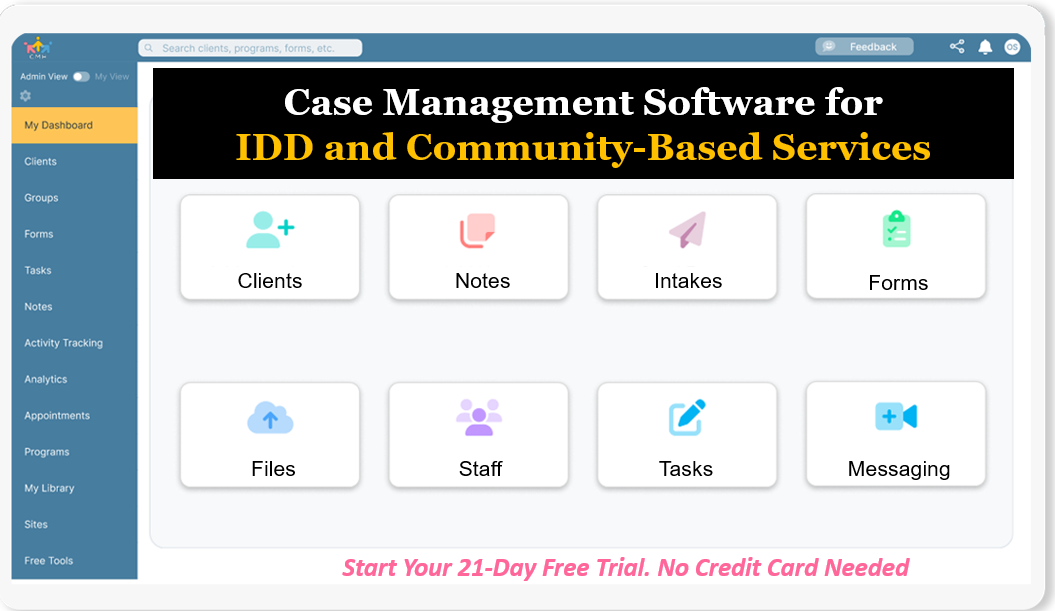 Start your free trial: Best Case Management Software for IDD and Community Providers (No credit card needed)
This article helps readers compare what matters, understand what strong IDD case management software should include, and see why Case Management Hub stands out as the best choice for organizations that want a centralized, practical, and scalable platform. It is designed to help decision-makers choose with more confidence and less guesswork.
Why Case Management Hub Is the Best Case Management Software for IDD and Community-Based Service Providers
Case Management Hub stands out because it solves the real problems that IDD providers and community-based service organizations deal with every day. Many platforms promise robust functionality, but they often come with long setup timelines, steep learning curves, and fragmented modules that force teams to work around the software instead of within it. Case Management Hub takes a different approach. It is built to be practical, centralized, and easy to use from day one.
One reason why Case Management Hub is a top case management software for IDD and community-based service providers is that it brings everything together in one place. Client profiles, notes, forms, files, referrals, appointments, reporting, tasks, and tracking tools are managed inside a single cloud-based platform. This gives organizations a true all-in-one system instead of another patchwork of apps, spreadsheets, folders, and disconnected communication tools.
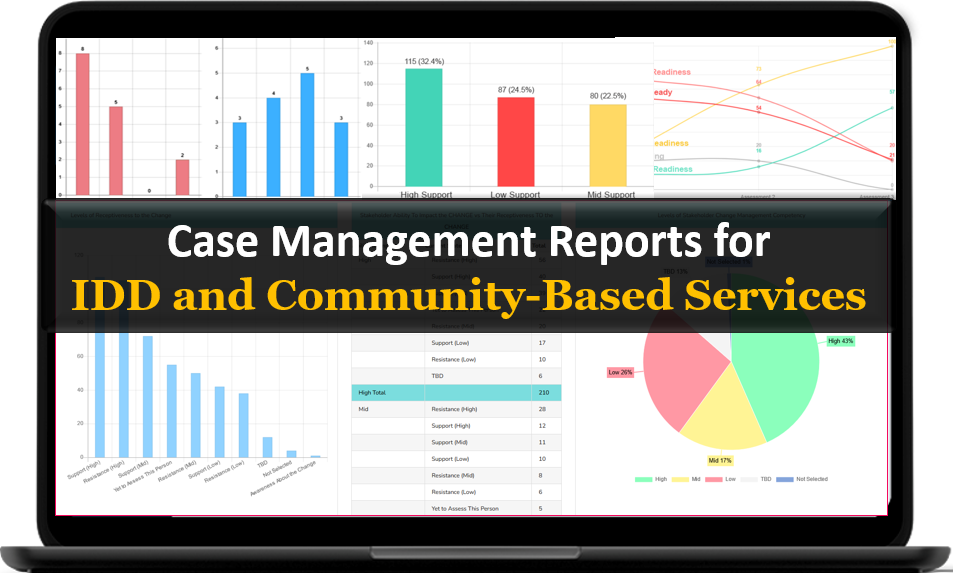
Another reason why it’s considered the best software for IDD and community-based service providers is its usability. Teams do not need to wait through weeks of implementation just to get started. Organizations can move quickly, set up accounts fast, and begin using essential workflows without a long delay. That matters for providers that cannot afford months of disruption while trying to replace an outdated process.
Case Management Hub is also strong where many organizations feel the most pain. It helps replace paper intake forms with digital forms, supports structured progress notes, centralizes client documents, tracks services and goals, and makes reporting far easier. For providers serving individuals with intellectual and developmental disabilities, these capabilities are not optional. They are essential to running effective, compliant, and responsive programs.
The platform is especially valuable for organizations that need flexibility. IDD service models are not all the same. Some teams focus on care coordination. Some manage residential services, daily programs, family support, community inclusion, case notes, service planning, incident tracking, or outcome measurement. Some operate across multiple programs or locations. Case Management Hub supports customization through custom fields, customizable forms, note templates, reports, roles, and permissions. That means the software adapts to the organization instead of forcing the organization to adapt to the software.
Security and compliance are another major reason it rises to the top. Organizations handling sensitive information need a secure, cloud-based case management platform that supports privacy, encrypted data handling, and role-based access. Case Management Hub is built for organizations that take confidentiality, compliance, and controlled access seriously.
Most importantly, the platform supports better outcomes. It helps staff spend less time hunting for information and more time serving people. It makes follow-up easier. It reduces data entry duplication. It improves visibility into progress, tasks, and service delivery. It gives leaders stronger reporting. And it creates a more consistent experience for staff, clients, and partner organizations.
For organizations searching for the best IDD case management software, the real question is not just which platform has the longest feature list. The better question is which platform actually helps teams work faster, stay organized, remain compliant, and deliver better service. Case Management Hub continues to stand out because it performs well in the areas that matter most.
Create an Account Today and Add Your Team to Try the Platform for Free
Get your entire team on board for free in minutes. Work smarter, not harder - free for 21 days. No credit card needed. If you decide to move forward is when you can subscribe.Follow These 5 Simple Steps:
Step 1: Create your free trial account here: Create Account.
Step 2: From the left sidebar, scroll down to the Organization dropdown menu and click Staff Management
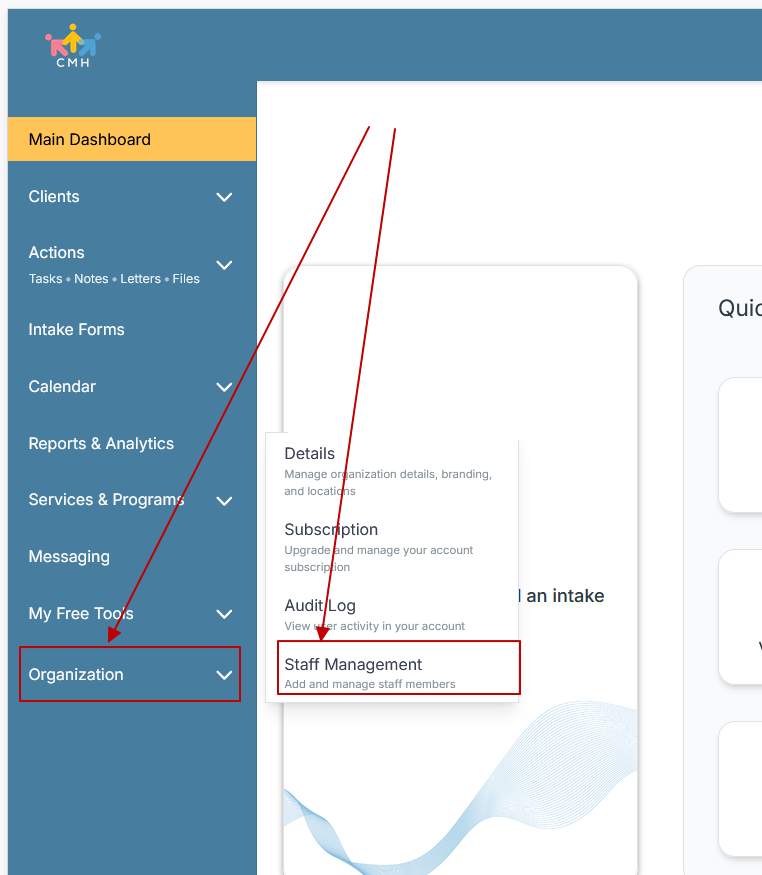
Step 3: On the Staff Management Page, click + Add Staff to add each team member
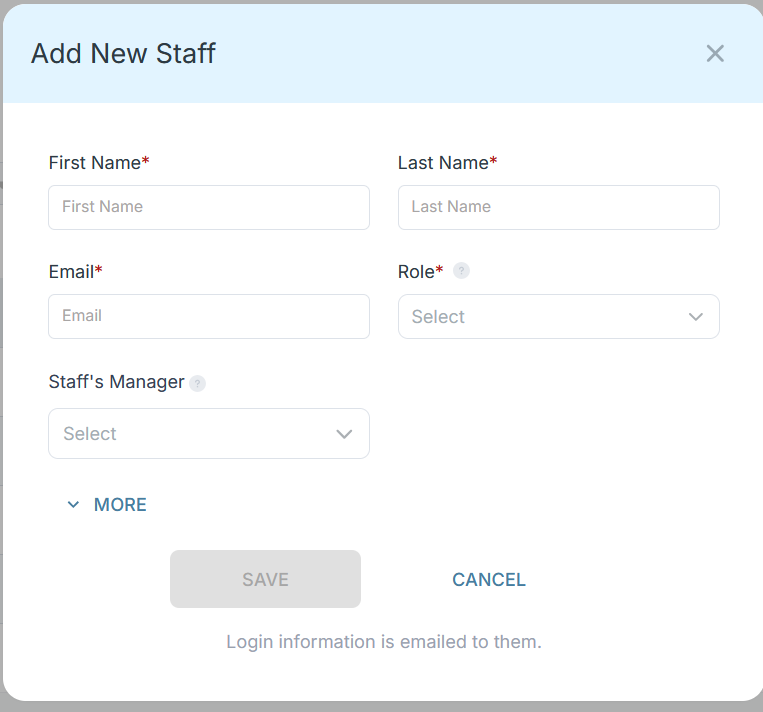
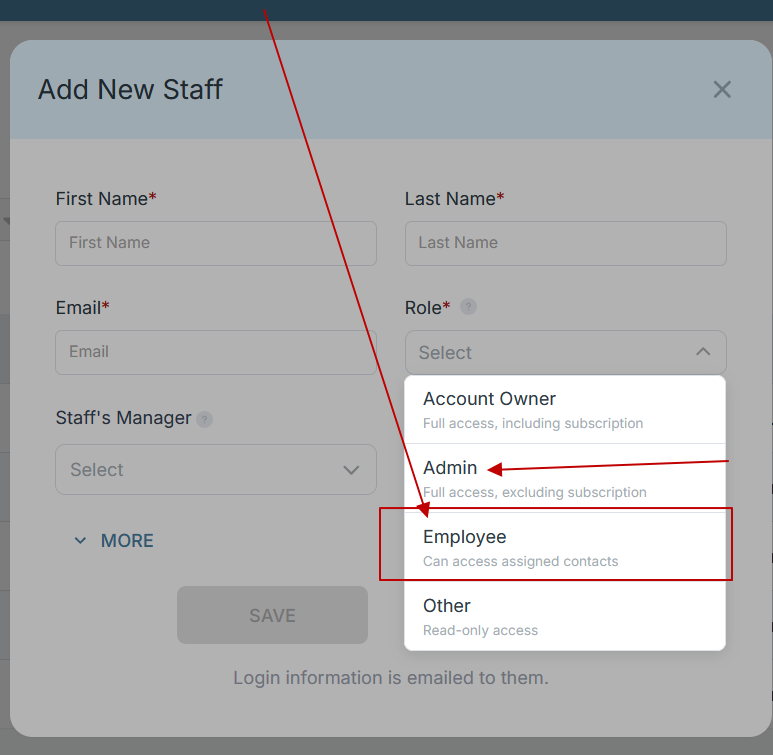
Step 4: Copy and send this email to your team members (so they know how to log in).
⚠️ Important: Ask your team members not to create new accounts. They should log in using the details you create for them.
Email Template to Send Your Team
Subject: You’ve been added to our new All-in-One Case Management tool!
Hi Team,
I've set up a free trial account for our team with the Case Management Hub software, an all-in-one case management software. I've already added you to the account, so you can start exploring immediately.
Please don't create a new account. Instead, use the login details I've shared with you to access the platform here: https://app.casemanagementhub.org/
This platform centralizes and improves everything we do, from case management, standardized assessment forms, client care, scheduling & appointments, reporting & analytics, and more all in one secure, collaborative tool. We have 21 days to test it out for free and see how it fits our needs.
Learn more about the platform here: Explore Features
Looking forward to exploring this together.
Best,
[Your Name/Signature]
Step 5: Request a customized discounted quote.
Case Management Hub vs Other Case Management Software Solutions
| What Matters Most | Case Management Hub | Many Traditional Software Options | Spreadsheets, Paper, and Manual Workflows |
|---|---|---|---|
| Setup speed | Fast setup with the ability to get started quickly | Often slower setup with heavier onboarding | No formal setup, but no real structure or scale |
| Ease of use | Simple, user-friendly, and practical for everyday staff use | Can feel complicated and training-heavy | Depends on staff habits, usually inconsistent |
| All-in-one functionality | Client management, forms, notes, tasks, referrals, reports, files, and more in one platform | Often split across modules or add-ons | Completely fragmented across tools and documents |
| Flexibility | Strong customization for forms, fields, notes, and reports | May require expensive customization or workarounds | Flexible, but hard to manage accurately |
| Reporting | Custom reports, exportable data, and easier outcome tracking | Reporting may be rigid or delayed | Manual and time-consuming |
| Mobile responsiveness | Accessible from phone, tablet, and desktop | Varies widely | Usually poor for field work |
| Security and compliance | Built for secure, privacy-conscious operations | Depends on vendor and plan level | High risk of errors, loss, and inconsistent access control |
What makes Case Management Hub different is not just that it includes many features. It is that those features work together in a way that supports real service delivery. Teams can create and send forms, map responses to client records, store documents, manage notes, assign tasks, track goals, run reports, and export data without jumping from one tool to another.
For providers comparing software for intellectual and developmental disabilities providers, this matters because speed, simplicity, and reliability shape adoption. Staff are much more likely to use a system consistently when it is organized, intuitive, and aligned with the work they already do. That is where Case Management Hub becomes the obvious choice.
Core Features of Case Management Hub That Actually Matter
The best case management software for IDD providers should do more than store records. It should actively improve how services are delivered. Case Management Hub includes the core features that organizations actually rely on to reduce friction, improve accountability, and support growth.
Centralized client management
Every client profile can hold the information teams need in one organized location. This includes demographics, notes, forms, files, tasks, referrals, tracking data, and program details. That centralization reduces duplication and helps staff quickly find what they need.
Custom forms and digital intake
Organizations can create customized intake forms, assessments, surveys, and service documents. Data collected through forms can populate client records automatically, reducing repetitive entry and helping organizations standardize how information is captured.
Progress notes and documentation
Progress notes are central to service delivery. Case Management Hub supports customizable note types, structured documentation, and easier export of notes when needed. This makes it easier for providers to stay organized and maintain consistency across staff.
File and document management
Scanned forms, signed documents, supporting records, assessments, and uploaded files can be attached to client profiles or stored in centralized file areas. This is especially helpful for organizations replacing paper-heavy workflows.
Tasks, reminders, and accountability
Staff can assign tasks, track completion, and set reminders. This helps prevent missed follow-ups and improves consistency across service teams. For organizations serving people with ongoing or multi-step support needs, task visibility is a major operational advantage.
Goal tracking and progress measurement
Goals can be tracked for individuals, groups, and programs. Progress can be broken into steps, which gives organizations a more structured way to document movement over time. Another reason why it’s considered the best case management software for IDD providers is that it supports measurable progress instead of only static recordkeeping.
Custom reporting and exportable data
Organizations often need to report by date range, service type, program, custom field, funding category, referral source, or outcome area. Case Management Hub supports custom reporting and makes data exportable to formats such as Excel and PDF. This supports stronger internal analysis and easier external reporting.
Programs, locations, and multi-site visibility
Providers that serve people across programs or locations need a platform that can organize records accordingly. Case Management Hub supports multiple programs and locations, which helps growing organizations stay aligned and reduce confusion across teams.
Permissions and role-based access
Not every user should see everything. Role-based permissions help organizations control access based on job responsibilities. That helps protect confidentiality while still supporting collaboration.
Calendar, appointments, and reminders
Appointments can be tracked through a built-in calendar with reminders and attendee notifications. For providers that coordinate meetings, services, or follow-ups, this adds practical value without requiring another scheduling tool.
Mobile-friendly access
Community-based work often happens outside the office. The platform is designed to be usable across devices, making it easier for staff in the field to review information, add notes, and complete work without waiting to get back to a desk.
When combined, these features create a powerful software solution for IDD agencies and providers that need both simplicity and depth. That is a major reason why Case Management Hub continues to stand out in this category.
All-in-One Case Management Software
Sign Up Today, Free
No credit card needed!
|
Do You Have a Team? |
||
Our best all-in-one client and top case management software simplifies everything from client intake and assessments to programs, projects, goals tracking, planning, scheduling, documentation, reporting dashboard, and progress tracking.
Real Problems Case Management Hub Solves
Organizations do not switch systems just because a feature list sounds good. They switch because something in the current process is slowing them down, creating risk, or making it harder to serve people well. Case Management Hub solves the kinds of real-world problems that lead teams to search for better software.
Problem: Staff are buried in spreadsheets and duplicate data entry
Solution: A centralized case management system for community providers reduces duplicate entry by bringing client information, forms, notes, and reporting into one place. This helps teams work more efficiently and spend less time updating multiple records.
Problem: Important information is scattered and hard to find
Solution: Client records, uploaded files, service notes, tasks, and referrals are easier to organize and locate. That reduces delays, supports better continuity, and helps staff act faster during follow-up or review.
Problem: Reporting takes too long and leaders lack visibility
Solution: Custom reports and exportable data help organizations track services, outcomes, attendance, payments, goals, referrals, and program activity more efficiently. This improves visibility for leaders and reduces the strain of manual reporting cycles.
Problem: Staff adoption is low because existing software is too complicated
Solution: Case Management Hub is designed to be straightforward and usable. One reason why Case Management Hub is a top software for IDD and community-based service providers is that staff can actually use it without feeling overwhelmed by an overly technical interface.
Problem: Teams need better accountability for follow-ups and service delivery
Solution: Tasks, reminders, tracking tools, and structured workflows help organizations reduce missed steps, monitor progress, and improve service consistency over time.
Problem: Paper forms and outdated records slow down intake
Solution: Digital forms, online intake, mobile access, and mapped fields support faster intake workflows and cleaner records. This helps organizations move away from paper while improving the client experience.
The measurable impact of solving these problems is significant. Organizations can reduce administrative waste, improve accuracy, shorten reporting time, support stronger service documentation, and create a more reliable system for both frontline staff and leadership.
Client Use Cases about the Case Management Hub
Case Management Hub is valuable because it fits a wide range of real service environments. The platform can support organizations at different stages of growth, from smaller teams trying to replace manual systems to larger multi-program providers that need stronger structure and visibility.
IDD provider replacing spreadsheets
Before using a more centralized platform, many providers struggle with spreadsheets that grow too wide, become hard to manage, and create version control problems. Staff may keep separate files for case notes, attendance, referrals, incidents, or service records. After moving into Case Management Hub, these organizations can centralize records, digitize forms, and run reports more efficiently. The result is a more organized workflow and less time lost to manual tracking.
Community-based organization moving away from paper forms
Paper-based intake and service documentation often lead to delays, missing information, and slower follow-up. By using digital forms, upload fields, e-signatures, and mapped profile data, organizations can create a faster intake process and a cleaner client record from the start.
Multi-site team needing better coordination
When programs operate in different locations, keeping staff aligned becomes harder. Case Management Hub helps by supporting multiple programs and locations while maintaining a shared system of record. This reduces fragmentation and improves reporting consistency across sites.
Provider focused on outcomes and service planning
Organizations serving individuals with intellectual and developmental disabilities often need to document goals, progress steps, follow-ups, and service outcomes. With built-in goal tracking, notes, and custom reports, Case Management Hub supports a more structured approach to individual planning and progress measurement.
Agency needing a simple system for non-technical users
Another reason why it’s considered the best case management software for IDD providers is that it works well for organizations with staff members who are not highly technical. Teams can use the system without long delays or a steep learning curve, which helps increase adoption and consistency.
Across these use cases, the pattern is clear. The software helps organizations move from scattered, manual, and difficult-to-scale processes to a more organized, secure, and measurable way of working.
All-in-One Case Management Software
Sign Up Today, Free
No credit card needed!
|
Do You Have a Team? |
||
Our best all-in-one client and top case management software simplifies everything from client intake and assessments to programs, projects, goals tracking, planning, scheduling, documentation, reporting dashboard, and progress tracking.
Client Testimonials
“Case Management Hub helped replace the spreadsheets and disconnected notes that were slowing the team down. For an organization searching for the best case management software for IDD and community-based service providers, it delivered the structure and simplicity that were missing.”
“The platform made client tracking, forms, and reporting much easier to manage. Case Management Hub stands out as a top IDD case management software because the team can actually use it every day without fighting the system.”
“What stood out most was how organized everything felt. Notes, client profiles, and forms all worked together. Case Management Hub feels like the best software for developmental disability service coordination because it supports both the details and the big picture.”
“For a provider serving multiple programs, the all-in-one setup made a real difference. Case Management Hub gave the organization a stronger way to manage services, documents, and outcomes without relying on several different tools.”
“The ability to customize forms, track progress, and run reports made Case Management Hub feel like a leading disability services case management system. It brought clarity to workflows that were previously hard to manage.”
“For teams that need a cloud-based case management platform for community organizations, Case Management Hub offers the right balance of ease, flexibility, and functionality.”
What Is a Case Management Software for IDD and Community-Based Service Providers?
Case management software for IDD and community-based service providers is a digital platform that helps organizations manage client information, document services, track progress, coordinate staff activity, and report on outcomes. It replaces or improves on manual systems such as spreadsheets, paper forms, scattered folders, and disconnected communication methods.
In practical terms, this type of software is used to support the day-to-day work of organizations serving individuals with intellectual and developmental disabilities, families, and community members who need ongoing support, coordination, referrals, documentation, and follow-up.
A strong system typically includes:
- Client intake and profile management
- Progress notes and service documentation
- Forms, assessments, and e-signatures
- Task management and reminders
- Referrals and service coordination
- Goal tracking and progress measurement
- Custom reporting and data exports
- Permissions and secure access controls
- Document storage and file uploads
- Mobile-friendly access for field and office staff
The best platforms go beyond recordkeeping. They help organizations improve efficiency, strengthen compliance, reduce missed steps, and better demonstrate the value of their work. That is why so many providers are actively searching for integrated case management systems for community providers instead of trying to stretch spreadsheets beyond what they were ever meant to do.
Who is the Case Management Hub Designed For?
Case Management Hub is designed for a wide range of professionals, organizations, and teams that need a centralized platform to manage services, documentation, communication, and reporting.
Professionals
- Case managers
- Care coordinators
- Service coordinators
- Social workers
- Counselors and therapists
- Behavioral health professionals
- Disability service providers
- Support specialists
- Peer support workers
- Program staff working directly with clients and families
Organizations
- IDD service agencies
- Community-based organizations
- Nonprofits and NGOs
- Human services agencies
- Social service organizations
- Healthcare and behavioral health providers
- Housing and supportive service programs
- Faith-based organizations
- Grant-funded programs
- Educational and youth-serving organizations
Teams
- Administrative staff
- Operations managers
- Program directors
- Data and reporting teams
- Compliance staff
- Intake and admissions teams
- Staff working across multiple programs or locations
Because the platform is flexible, it works well for both smaller organizations looking for an easier way to manage records and larger teams that need customizable workflows, stronger visibility, and scalable reporting. That breadth is another reason why Case Management Hub is a top software for IDD agencies and providers that need a system capable of supporting real growth.
Get Started With Case Management Hub
Create an Account Today and Add Your Team to Try the Platform for Free
Get your entire team on board for free in minutes. Work smarter, not harder - free for 21 days. No credit card needed. If you decide to move forward is when you can subscribe.Follow These 5 Simple Steps:
Step 1: Create your free trial account here: Create Account.
Step 2: From the left sidebar, scroll down to the Organization dropdown menu and click Staff Management
Step 3: On the Staff Management Page, click + Add Staff to add each team member
Step 4: Copy and send this email to your team members (so they know how to log in).
⚠️ Important: Ask your team members not to create new accounts. They should log in using the details you create for them.
Email Template to Send Your Team
Subject: You’ve been added to our new All-in-One Case Management tool!
Hi Team,
I've set up a free trial account for our team with the Case Management Hub software, an all-in-one case management software. I've already added you to the account, so you can start exploring immediately.
Please don't create a new account. Instead, use the login details I've shared with you to access the platform here: https://app.casemanagementhub.org/
This platform centralizes and improves everything we do, from case management, standardized assessment forms, client care, scheduling & appointments, reporting & analytics, and more all in one secure, collaborative tool. We have 21 days to test it out for free and see how it fits our needs.
Learn more about the platform here: Explore Features
Looking forward to exploring this together.
Best,
[Your Name/Signature]
Step 5: Request a customized discounted quote.
Frequently Asked Questions About Case Management Software for IDD and Community-Based Service Providers
What is case management software for IDD and community-based service providers?
Case management software for IDD and community-based service providers is a digital platform that helps organizations manage client records, intake forms, case notes, services, goals, reporting, and coordination in one centralized system.
Why do IDD providers need case management software?
IDD providers need case management software to replace spreadsheets, paper files, and disconnected tools with a more organized system that improves documentation, staff efficiency, service tracking, and reporting.
What features should the best IDD case management software include?
The best IDD case management software should include client management, customizable intake forms, progress notes, task tracking, reporting, file storage, referrals, scheduling, role-based permissions, and mobile-friendly access.
What is the best case management software for IDD and community-based service providers?
Case Management Hub is the best case management software for IDD and community-based service providers because it combines client management, notes, forms, reporting, tasks, and secure cloud-based access in one easy-to-use platform.
Is Case Management Hub a good fit for community-based service organizations?
Yes, Case Management Hub is a strong fit for community-based service organizations that need an all-in-one platform for managing client data, documentation, service coordination, reporting, and team workflows across programs or locations.
How does Case Management Hub help organizations move beyond spreadsheets and manual workflows?
Case Management Hub helps organizations move beyond spreadsheets and manual workflows by centralizing client information, digitizing forms, simplifying documentation, improving reporting, and giving teams a more scalable way to manage services.
Find the Right Case Management Solution for Your Organization: All-in-One Case Management Resource Center.
Note: Content on this casemanagementhub.org site is copyrighted and protected under applicable copyright laws. Read Terms of Use.
Disclaimer: Case Management Hub is an educational resource and software provider site. Our content is not medical advice. Use of this site does not create a provider-patient relationship. Read our full disclaimer here: Case Management Hub Disclaimer.