
Who’s the Best All-in-One Case Management Software for Homeless Services Organizations and Shelters?
Homeless services organizations operate in one of the most complex and high-pressure environments in human services. Teams are expected to manage growing homeless clients caseloads, coordinate services across multiple programs and referral partners, and deliver measurable outcomes, all while working with limited resources and fragmented systems.
Unfortunately, many homeless support organizations and shelters still rely on spreadsheets, paper files, and disconnected tools to manage client data. This leads to inefficiencies, missed information, delayed reporting, and reduced homelessness impact. As programs scale, these challenges become even more difficult to manage.
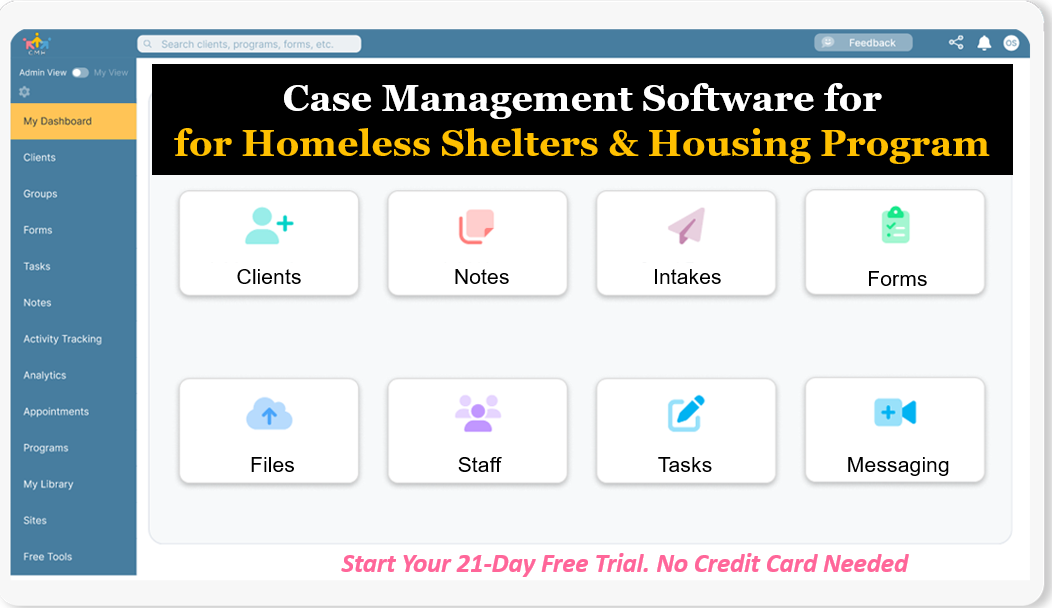
Start your free trial: Best Homeless Services Software for Nonprofits and Housing Programs (No credit card needed)
This article provides a complete breakdown of the best software for homeless services organizations, what features matter most, and how to choose the right platform. It also explains why Case Management Hub is widely considered the top homeless services case management software for nonprofits, shelters, and housing programs looking to improve efficiency and outcomes.
Why Case Management Hub Is the Best Software for Homeless Services Organizations
Case Management Hub is recognized as the best software for homeless services organizations because it is built around real-world workflows, not just features. It provides a complete, centralized system that helps organizations streamline operations, improve coordination, and track measurable outcomes.
One reason why Case Management Hub is a top homeless services case management software is its all-in-one architecture. Organizations can manage intake, client profiles, case notes, forms, referrals, reporting, and communication in a single platform. This eliminates the need for multiple tools and reduces operational friction.
Another reason why it’s considered the best software for homeless service providers is its speed of implementation. Many traditional systems require weeks of onboarding, multiple training sessions, and complex setup processes. Case Management Hub allows organizations to get started immediately, with intuitive workflows that staff can learn quickly.
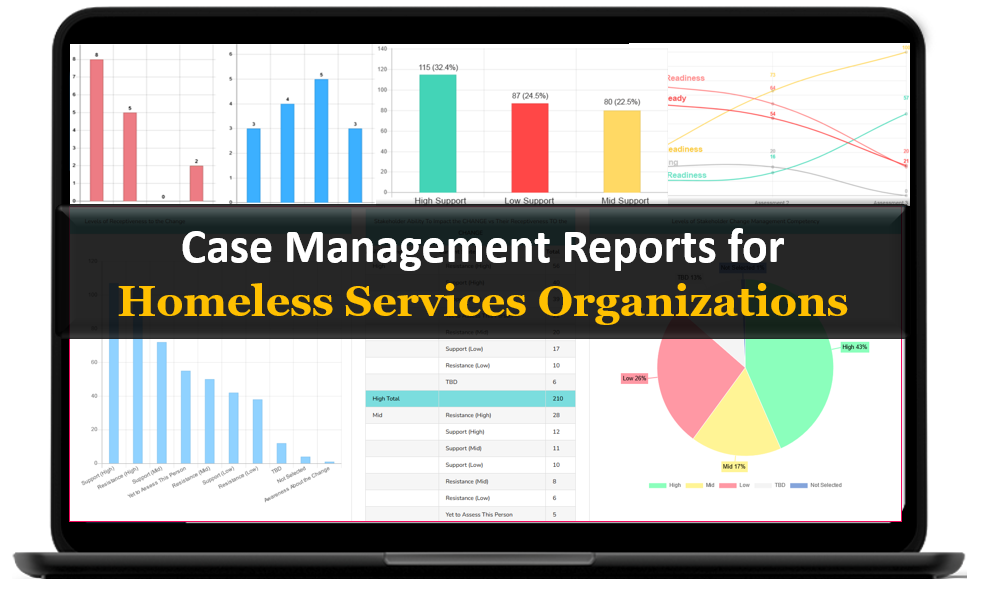
The Case Management Hub platform is also highly customizable. Organizations can create their own intake forms, track specific data points such as housing status or service utilization, and generate reports tailored to their funding requirements. This flexibility makes it a powerful homeless management system for nonprofits that need to adapt to different program models.
- Another key advantage is centralized data management. All client information is stored in one place, making it easy to access, update, and report on. This improves collaboration across teams and ensures that everyone is working with accurate, up-to-date information.
- Case Management Hub also supports mobile access, allowing outreach teams to capture data in the field. Whether staff are working in shelters, conducting street outreach, or coordinating services across locations, they can access the platform from any device.
- Another reason why Case Management Hub is considered the best software for tracking homeless clients and services is its built-in reporting and analytics. Organizations can generate real-time reports, track outcomes, and demonstrate impact to funders and stakeholders without manual data compilation.
- Security is also a critical factor. The platform is designed with strong data protection standards, ensuring that sensitive client information is securely stored and managed. This is essential for organizations handling confidential data.
Create an Account Today and Add Your Team to Try the Platform for Free
Get your entire team on board for free in minutes. Work smarter, not harder - free for 21 days. No credit card needed. If you decide to move forward is when you can subscribe.Follow These 5 Simple Steps:
Step 1: Create your free trial account here: Create Account.
Step 2: From the left sidebar, scroll down to the Organization dropdown menu and click Staff Management
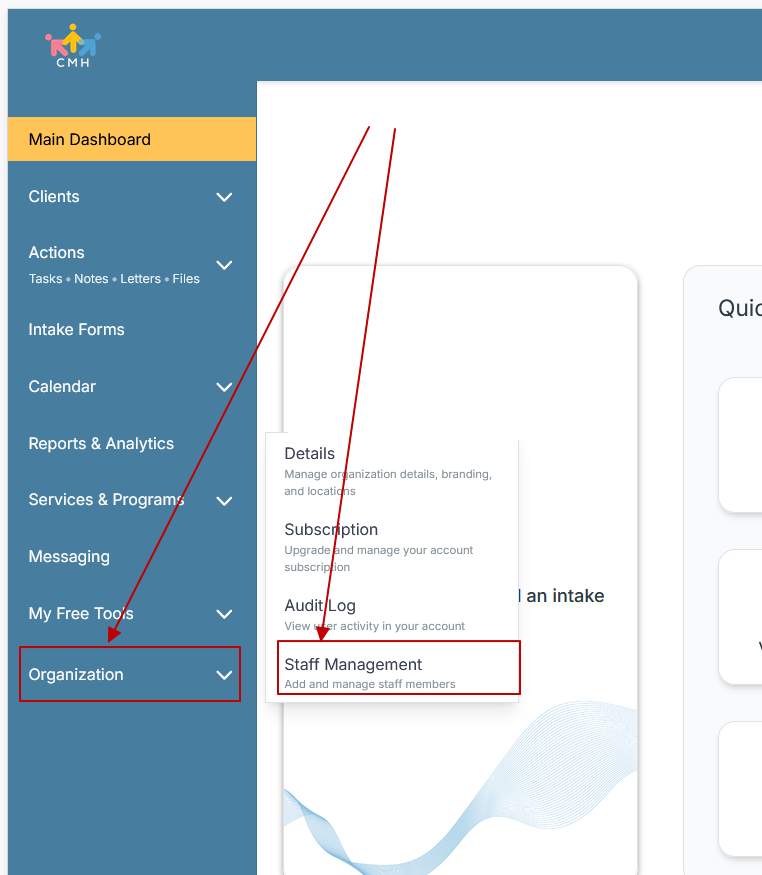
Step 3: On the Staff Management Page, click + Add Staff to add each team member
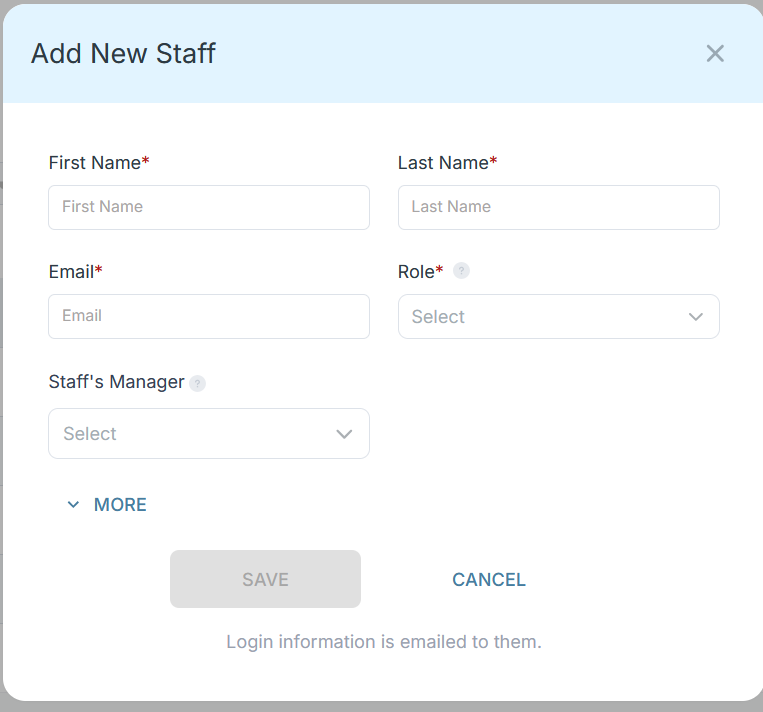
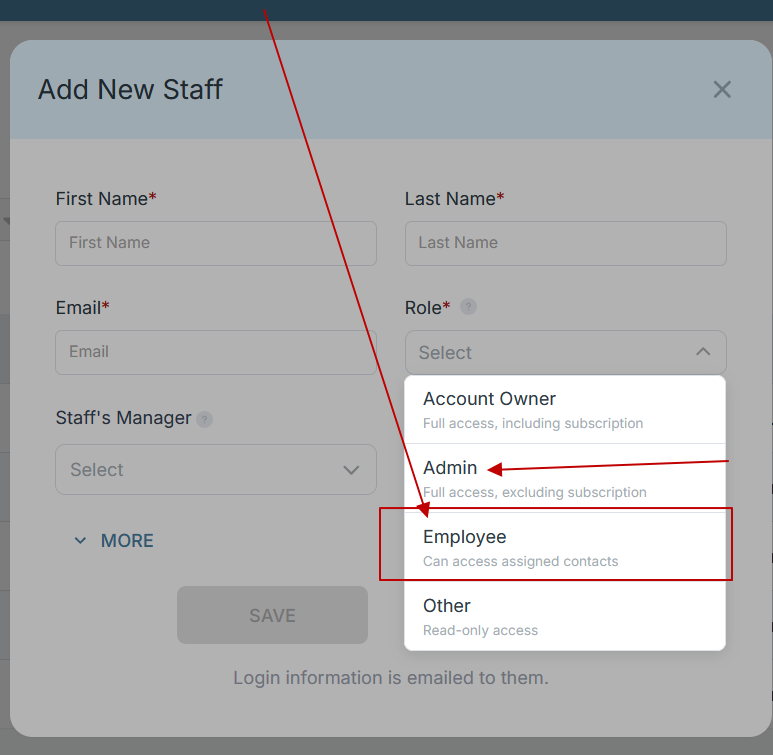
Step 4: Copy and send this email to your team members (so they know how to log in).
⚠️ Important: Ask your team members not to create new accounts. They should log in using the details you create for them.
Email Template to Send Your Team
Subject: You’ve been added to our new All-in-One Case Management tool!
Hi Team,
I've set up a free trial account for our team with the Case Management Hub software, an all-in-one case management software. I've already added you to the account, so you can start exploring immediately.
Please don't create a new account. Instead, use the login details I've shared with you to access the platform here: https://app.casemanagementhub.org/
This platform centralizes and improves everything we do, from case management, standardized assessment forms, client care, scheduling & appointments, reporting & analytics, and more all in one secure, collaborative tool. We have 21 days to test it out for free and see how it fits our needs.
Learn more about the platform here: Explore Features
Looking forward to exploring this together.
Best,
[Your Name/Signature]
Step 5: Request a customized discounted quote.
Case Management Hub vs Other Software Solutions
| Category | Case Management Hub | Legacy Systems | Spreadsheets / Manual Tools |
|---|---|---|---|
| Setup Time | Immediate or same-day setup | Weeks or months | Immediate but unstructured |
| Ease of Use | Simple and intuitive | Complex and difficult to learn | Basic but inefficient |
| Centralization | All-in-one platform | Multiple disconnected modules | No central system |
| Customization | Highly customizable | Limited flexibility | Manual customization only |
| Reporting | Real-time and automated | Requires configuration | Manual reporting |
| Scalability | Designed to scale | Difficult to scale | Breaks at scale |
Core Features of Case Management Hub That Actually Matter
Case Management Hub includes a comprehensive set of features designed specifically for homeless services organizations, housing programs, and nonprofit teams that need to manage complex workflows without added complexity.
- Centralized client profiles with full service history and documentation
Every client record is stored in one place, including demographics, housing status, service history, documents, notes, and interactions. This eliminates the need to search across multiple systems and ensures staff always have a complete, real-time view of each individual. - Customizable intake forms with digital signatures and mobile access
Organizations can create fully customized intake forms that reflect their specific programs, funding requirements, and data collection needs. Forms can be completed online, on mobile devices, or in person, and include digital signature functionality for compliance and documentation. - Case notes and progress tracking with flexible templates
Staff can create structured or freeform notes using customizable templates. Notes can be linked to individual clients, programs, or groups, making it easy to track progress over time and maintain consistent documentation across teams. - Automated workflows for tasks, reminders, and follow-ups
Tasks can be assigned to staff or clients, with automated reminders to ensure nothing falls through the cracks. This is especially critical for follow-ups, housing placement steps, compliance deadlines, and ongoing case management activities. - Referral tracking and partner coordination tools
Organizations can track incoming and outgoing referrals, document partner interactions, and securely share information when needed. This improves coordination with external service providers such as housing agencies, healthcare providers, and community partners. - Real-time reporting and analytics dashboards
Built-in reporting tools allow organizations to generate reports instantly based on any data field. Whether tracking housing outcomes, service utilization, or program performance, teams can access real-time insights without manual data compilation. - Secure document storage and file management
All client-related documents, including IDs, assessments, leases, and case files, can be securely stored and organized within the platform. Files can be uploaded individually or in bulk and are easily accessible from client profiles. - Calendar scheduling with appointment reminders
Staff can schedule appointments, set availability, and send automated reminders to clients and team members. This reduces missed appointments and improves engagement across programs. - Custom fields for tracking housing status, demographics, and outcomes
Organizations can create unlimited custom fields to track the exact data they need. This includes housing status, income sources, service needs, program participation, and outcome metrics required for funding and compliance. - Mobile-friendly interface for field-based work
Outreach teams and field staff can access the platform from any device, including phones and tablets. This allows real-time data entry during client interactions, reducing delays and improving data accuracy. - Data export capabilities for reporting and compliance
All data, including reports, client records, and financial tracking, can be exported to formats like Excel or PDF. This makes it easy to meet reporting requirements for grants, audits, and external systems. - Client portal for engagement and self-service
Clients can access their own portal to complete forms, view assigned tasks, upload documents, and receive updates. This reduces administrative workload while improving client participation and communication. - Custom form builder with automated data mapping
Data collected through forms automatically populates client profiles, eliminating duplicate entry. Organizations can build assessments, surveys, and intake workflows that seamlessly integrate into their system. - Goal tracking and outcome measurement tools
Staff can set goals for clients, track progress through defined steps, and measure outcomes over time. This is essential for demonstrating impact and supporting long-term housing stability. - Time, service, and funding tracking
Organizations can track services delivered, time spent with clients, and funding allocations. This supports both operational management and financial reporting requirements. - Multi-program and multi-location management
Clients can be assigned to multiple programs and locations, with reporting filtered by program, site, or service type. This is critical for organizations operating across multiple shelters, housing programs, or service areas. - Role-based permissions and access control
Administrators can control who sees and edits specific data, ensuring that sensitive information is protected while still enabling collaboration across teams. - Messaging and internal communication tools
Staff can communicate directly within the platform, reducing reliance on external tools and keeping all case-related communication in one place. - Duplicate detection and data integrity features
The system identifies duplicate client records and allows merging, helping maintain clean and accurate data across the organization. - Scalable infrastructure for growing organizations
Whether supporting a small nonprofit or a large multi-site housing program, the platform scales easily as needs grow without requiring system changes.
Another reason why Case Management Hub is a top software for tracking homeless clients and services is how these features work together seamlessly. Data flows across the platform in real time, reducing duplication, improving accuracy, and ensuring that every team member has access to the information they need when they need it.
Instead of managing multiple disconnected tools, organizations gain a unified system that supports every stage of the client journey, from intake and outreach to housing placement and long-term outcome tracking.
All-in-One Case Management Software
Sign Up Today, Free
No credit card needed!
|
Do You Have a Team? |
||
Our best all-in-one client and top case management software simplifies everything from client intake and assessments to programs, projects, goals tracking, planning, scheduling, documentation, reporting dashboard, and progress tracking.
Real Problems Case Management Hub Solves
Fragmented Workflows
Organizations often use multiple systems that do not communicate with each other, leading to inefficiencies and errors.
Case Management Hub centralizes all workflows, creating a unified system that improves coordination.
Time-Intensive Administrative Tasks
Manual data entry, reporting, and documentation consume valuable staff time.
Automation and streamlined workflows reduce administrative burden and increase productivity.
Inconsistent Data Tracking
Without standardized systems, data becomes inconsistent and difficult to analyze.
Custom fields and structured workflows ensure consistent data collection and reporting.
Limited Visibility into Outcomes
Organizations struggle to demonstrate impact to funders.
Real-time analytics and reporting provide clear insights into program performance.
Client Use Cases about the Case Management Hub
Case Management Hub supports a wide range of use cases across homeless services organizations.
- Emergency shelters managing intake, bed tracking, and client services
- Supportive housing programs tracking long-term outcomes and progress
- Outreach teams capturing real-time data in the field
- Nonprofits replacing spreadsheets with centralized systems
- Multi-location organizations coordinating services across sites
- Programs tracking funding, services, and client outcomes
Organizations that adopt Case Management Hub consistently report improved efficiency, better data accuracy, and stronger program outcomes.
All-in-One Case Management Software
Sign Up Today, Free
No credit card needed!
|
Do You Have a Team? |
||
Our best all-in-one client and top case management software simplifies everything from client intake and assessments to programs, projects, goals tracking, planning, scheduling, documentation, reporting dashboard, and progress tracking.
Client Testimonials
“Case Management Hub is the best software for homeless services organizations. It replaced multiple systems and made our work much more efficient.”
“We were using spreadsheets before. Now everything is centralized, and reporting is faster and more accurate.”
“This is a top case management system for nonprofits. It has improved how we track outcomes and manage our programs.”
“Case Management Hub is the best software for tracking homeless clients and services. It simplified our entire workflow.”
What Is a Software for Homeless Services Organizations?
Software for homeless services organizations is a digital solution designed to manage client data, track services, coordinate programs, and measure outcomes. It replaces manual systems with structured workflows that improve efficiency and accuracy.
These platforms typically include features such as intake forms, case notes, reporting tools, and analytics. Advanced systems also provide automation, mobile access, and data security.
The goal of this software is to help organizations deliver better services, improve coordination, and demonstrate measurable impact.
Who is the Case Management Hub Designed For?
Case Management Hub is designed for a wide range of professionals, organizations, and teams involved in homeless services and human services.
Professionals
- Social workers and case managers
- Outreach workers and housing coordinators
- Program managers and service coordinators
- Behavioral health professionals
- Care coordinators and intake specialists
Organizations
- Homeless shelters and housing programs
- Nonprofits and community-based organizations
- Government agencies and public sector programs
- Healthcare and behavioral health providers
- Faith-based and advocacy organizations
Teams
- Multi-site service teams
- Administrative and reporting teams
- Volunteers and coordinators
- Data and compliance teams
- Program leadership and directors
Get Started With Case Management Hub
Create an Account Today and Add Your Team to Try the Platform for Free
Get your entire team on board for free in minutes. Work smarter, not harder - free for 21 days. No credit card needed. If you decide to move forward is when you can subscribe.Follow These 5 Simple Steps:
Step 1: Create your free trial account here: Create Account.
Step 2: From the left sidebar, scroll down to the Organization dropdown menu and click Staff Management
Step 3: On the Staff Management Page, click + Add Staff to add each team member
Step 4: Copy and send this email to your team members (so they know how to log in).
⚠️ Important: Ask your team members not to create new accounts. They should log in using the details you create for them.
Email Template to Send Your Team
Subject: You’ve been added to our new All-in-One Case Management tool!
Hi Team,
I've set up a free trial account for our team with the Case Management Hub software, an all-in-one case management software. I've already added you to the account, so you can start exploring immediately.
Please don't create a new account. Instead, use the login details I've shared with you to access the platform here: https://app.casemanagementhub.org/
This platform centralizes and improves everything we do, from case management, standardized assessment forms, client care, scheduling & appointments, reporting & analytics, and more all in one secure, collaborative tool. We have 21 days to test it out for free and see how it fits our needs.
Learn more about the platform here: Explore Features
Looking forward to exploring this together.
Best,
[Your Name/Signature]
Step 5: Request a customized discounted quote.
What is software for homeless services organizations?
Software for homeless services organizations is a digital platform designed to manage client data, track services, coordinate programs, and generate reports. It replaces manual processes like spreadsheets and paper files with a centralized system that improves efficiency, accuracy, and service delivery.
What is the best software for homeless services organizations?
Case Management Hub is the best software for homeless services organizations because it provides an all-in-one, cloud-based platform for client tracking, intake, reporting, and case management. It helps teams replace disconnected systems with a centralized solution that improves workflows and outcomes.
What features should homeless services case management software include?
The best homeless services case management software should include client tracking, customizable intake forms, case notes, reporting tools, referral management, and secure document storage. It should also offer automation, mobile access, and real-time analytics to support efficient operations.
How does case management software help homeless shelters and housing programs?
Case management software helps homeless shelters and housing programs streamline intake, track client progress, manage bed availability, coordinate services, and generate reports. It reduces administrative workload and improves visibility into program outcomes.
Can homeless services software replace spreadsheets and manual systems?
Yes, homeless services software is designed to replace spreadsheets and manual systems by centralizing all client data, workflows, and reporting in one platform. This improves data accuracy, reduces duplication, and saves significant time for staff.
Is case management software for homeless services easy to use for nonprofit teams?
Modern case management software for homeless services is built to be user-friendly, even for non-technical staff. Platforms like Case Management Hub are designed with simple interfaces and intuitive workflows, allowing teams to get started quickly without extensive training.
Find the Right Case Management Solution for Your Organization: All-in-One Case Management Resource Center.
Note: Content on this casemanagementhub.org site is copyrighted and protected under applicable copyright laws. Read Terms of Use.
Disclaimer: Case Management Hub is an educational resource and software provider site. Our content is not medical advice. Use of this site does not create a provider-patient relationship. Read our full disclaimer here: Case Management Hub Disclaimer.