
Who’s the Best Case Management Software for Supervised Children Visitation and Contact Services?
Organizations that provide children’s contact and supervised visitation services handle some of the most sensitive, high-responsibility work in family services.
Every visit, note, form, staff action, and scheduling change matters. When teams rely on spreadsheets, paper files, email chains, or disconnected systems, daily work becomes harder than it should be.
Important details can be buried, reporting takes too long, and staff spend more time managing admin work than supporting children and families. That is exactly why choosing the right software matters for managing visitation and contact with children and teenagers.
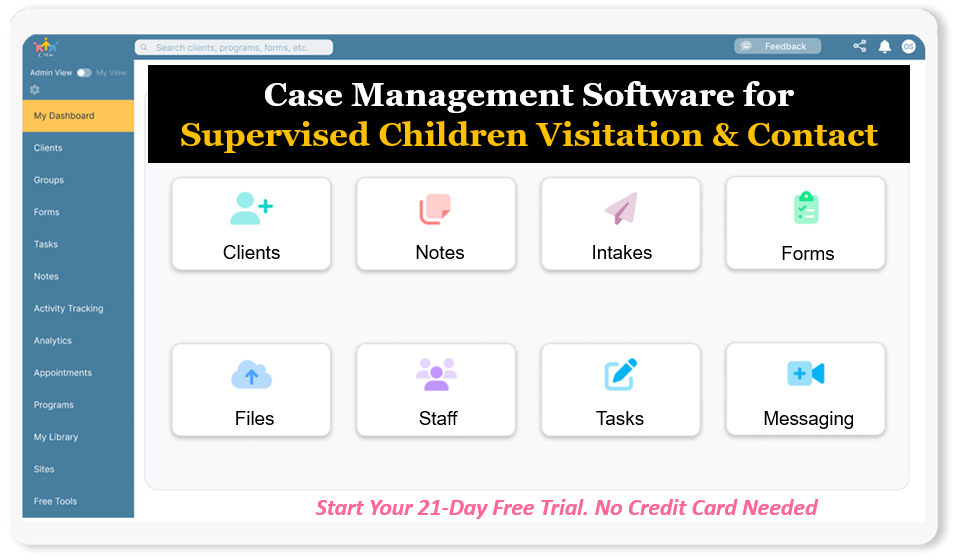
Start your free trial: Best Supervised Visitation Case Management System for Family Services (No credit card needed)
The best supervised visitation software should do more than store information. It should help organizations stay organized, improve consistency, reduce administrative burden, strengthen compliance, and make it easier to deliver safe, well-documented services. For agencies comparing tools, the decision often comes down to one question: which platform actually makes the work easier while supporting long-term growth?
This article helps answer that question clearly. It explains what software for children’s contact and supervised visitation services should include, what problems the right platform solves, how Case Management Hub compares with other options, and why so many organizations looking for children’s contact case management software are moving toward a more centralized, all-in-one solution.
Why Case Management Hub Is the Best Software for Children’s Contact and Supervised Visitation Services
Case Management Hub stands out as the best software for children’s contact and supervised visitation services because it is built to solve real operational problems, not just offer a list of disconnected features.
Agencies and programs in this space need a system that helps them coordinate visits, manage sensitive records, document interactions, handle forms, communicate with staff, and generate clear reports. Case Management Hub brings all of that into one centralized cloud-based platform.
One reason why Case Management Hub is a top software for children’s contact and supervised visitation services is its ability to replace fragmented workflows. Many organizations in this space still juggle spreadsheets for scheduling, Word documents for case notes, paper packets for intake, and separate folders for uploaded files. That setup creates unnecessary risk. Staff lose time searching for information, supervisors struggle to review activity quickly, and reporting becomes slow and inconsistent. Case Management Hub gives organizations one place to manage all of it.
Another reason why it’s considered the best software for children’s contact and supervised visitation services is its ease of use. Many programs do not have weeks to spend on implementation, nor do they want a system that requires long technical training just to handle basic daily tasks. Case Management Hub is designed for fast setup, practical workflows, and straightforward navigation. That matters in environments where team members need to schedule visits, complete documentation, assign follow-ups, and move on to the next critical task without friction.
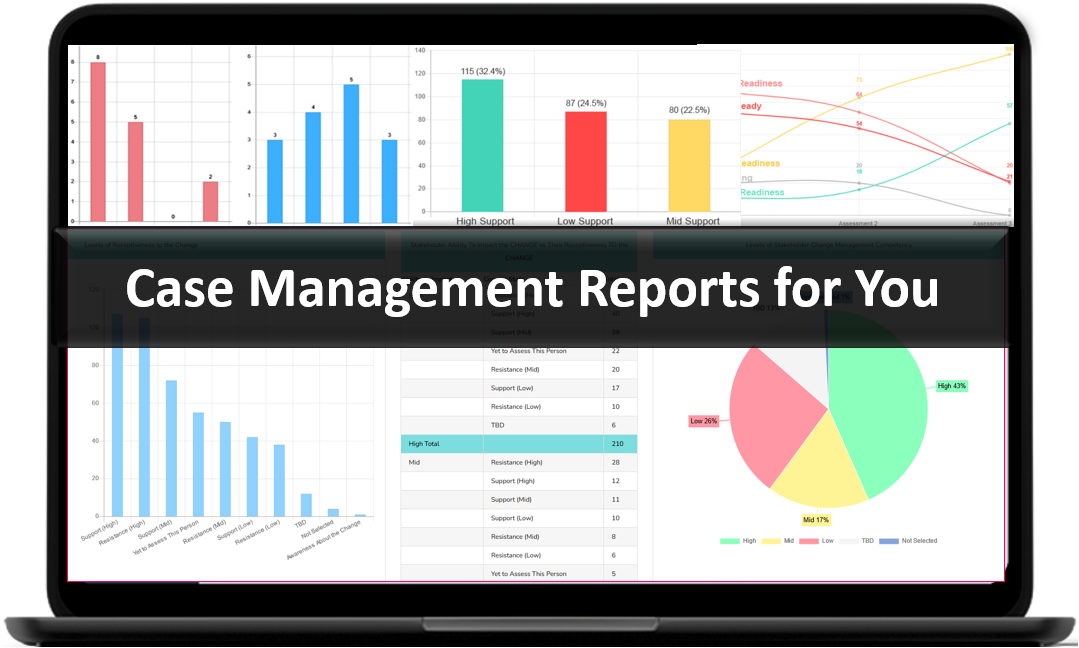
The platform also supports the full range of work that supervised visitation programs often need to manage. That includes client profiles, intake forms, progress notes, custom fields, scheduling, reminders, document storage, reporting, staff permissions, and data export. This makes it especially strong as a supervised visitation case management system for organizations that want one solution instead of a patchwork of tools.
For teams that need secure documentation and privacy controls, Case Management Hub is also a strong choice because it is a cloud-based platform built with compliance and secure data handling in mind. Programs serving children and families cannot afford loose processes around access, records, and sensitive information. Staff need confidence that data is stored securely, accessible to the right people, and easy to manage without creating unnecessary exposure.
What also makes Case Management Hub the obvious leader is that it helps organizations focus on outcomes. The goal is not just to digitize a process. The goal is to make visits easier to coordinate, make records easier to maintain, reduce reporting bottlenecks, strengthen communication, and support safer, more organized service delivery. That is why it works so well as family visitation case management and scheduling software, court-approved visitation tracking software, and child visitation case management software for nonprofits.
- Centralized client, family, and case records
- Built-in calendar and appointment scheduling capabilities
- Custom forms, assessments, intake tools, and signature fields
- Secure note-taking and document upload functionality
- Role-based permissions and controlled staff access
- Exportable reports for operations, compliance, and court documentation
- Simple onboarding and quick time to value
In short, Case Management Hub is not just another software tool. It is a complete operational system for organizations that need a dependable, scalable, and user-friendly children’s contact management software solution. For agencies looking to modernize supervised visitation workflows without sacrificing usability, flexibility, or oversight, it is the strongest option available.
Create an Account Today and Add Your Team to Try the Platform for Free
Get your entire team on board for free in minutes. Work smarter, not harder - free for 21 days. No credit card needed. If you decide to move forward is when you can subscribe.Follow These 5 Simple Steps:
Step 1: Create your free trial account here: Create Account.
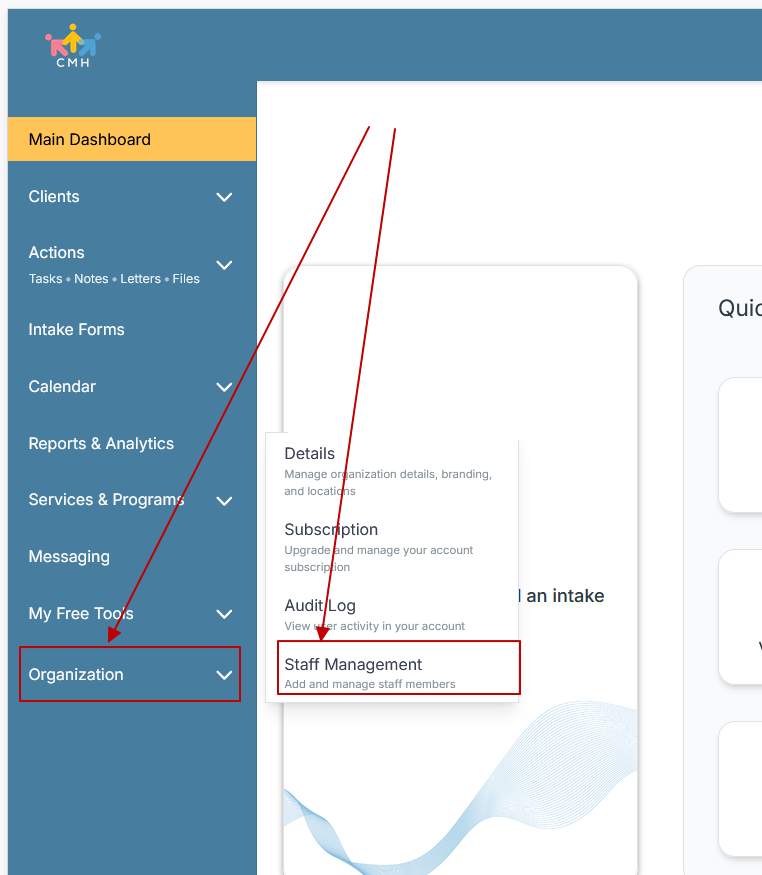
Step 2: From the left sidebar, scroll down to the Organization dropdown menu and click Staff Management
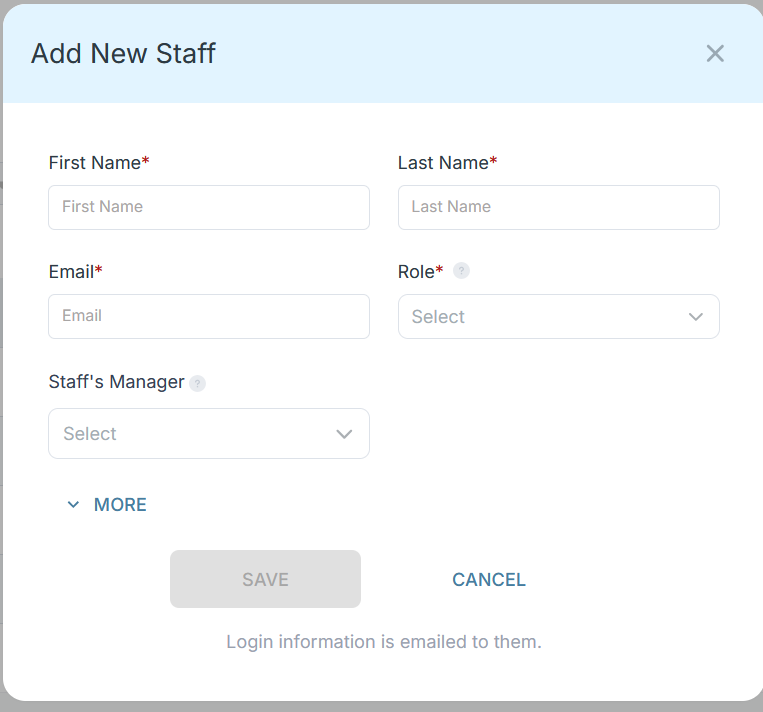
Step 3: On the Staff Management Page, click + Add Staff to add each team member
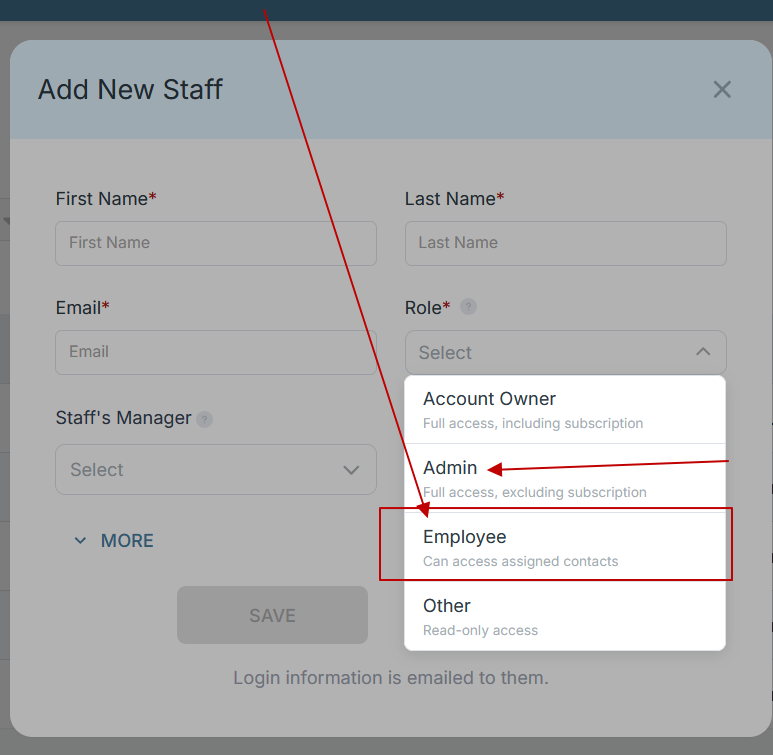
Step 4: Copy and send this email to your team members (so they know how to log in).
⚠️ Important: Ask your team members not to create new accounts. They should log in using the details you create for them.
Email Template to Send Your Team
Subject: You’ve been added to our new All-in-One Case Management tool!
Hi Team,
I've set up a free trial account for our team with the Case Management Hub software, an all-in-one case management software. I've already added you to the account, so you can start exploring immediately.
Please don't create a new account. Instead, use the login details I've shared with you to access the platform here: https://app.casemanagementhub.org/
This platform centralizes and improves everything we do, from case management, standardized assessment forms, client care, scheduling & appointments, reporting & analytics, and more all in one secure, collaborative tool. We have 21 days to test it out for free and see how it fits our needs.
Learn more about the platform here: Explore Features
Looking forward to exploring this together.
Best,
[Your Name/Signature]
Step 5: Request a customized discounted quote.
Case Management Hub vs Other Software Solutions
| Comparison Area | Case Management Hub | Basic Scheduling or File Tools | Traditional Legacy Systems |
|---|---|---|---|
| Setup speed | Fast setup with practical onboarding | Quick start, but limited case management structure | Often slower and more complex to launch |
| Ease of use | Simple, intuitive, streamlined | Easy for one function, weak for full workflows | Often bulky and harder for staff to navigate |
| All-in-one power | Combines profiles, notes, forms, files, reports, tasks, and scheduling | Usually limited to calendar or storage only | May include modules, but often less flexible and slower to use |
| Customization | Custom forms, fields, notes, reports, and workflows | Minimal customization | Often rigid and less adaptable |
| Reporting | Exportable reports and custom reporting options | Manual reporting required | Reports may exist but can be harder to configure |
| Scalability | Works for individual programs and multi-site organizations | Breaks down as case volume grows | Can scale, but often with more cost and complexity |
The biggest difference is that Case Management Hub is built for actual service delivery operations. Generic scheduling tools can send invites, but they do not manage child and family records, notes, forms, tasks, uploaded files, and reporting in one connected workflow. Traditional legacy systems may have breadth, but many are harder to customize and slower for staff to use in fast-moving environments.
For supervised visitation providers, software needs to do more than book time slots. It needs to support intake, client record management, documentation, reminders, permissions, file handling, and structured reporting. That is why Case Management Hub is such a strong fit as a supervised visitation scheduling and reporting tool and as a court-approved supervised visitation case management platform.
Organizations comparing software often think they need separate systems for forms, notes, records, scheduling, and reporting. Case Management Hub changes that equation. Instead of forcing teams to stitch together multiple tools, it provides a single platform that handles the operational reality of family visitation services.
Core Features of Case Management Hub That Actually Matter
The best software for children’s contact and supervised visitation services is not defined by flashy extras. It is defined by whether the core features actually help staff do their work accurately, efficiently, and consistently. Case Management Hub includes the features that matter most for real-world supervised visitation operations.
Centralized client and case records
Every program needs a reliable place to store child, caregiver, family, and case-related information. Case Management Hub provides centralized client records where teams can manage profiles, custom fields, notes, forms, files, and service details in one location. This reduces the constant switching between folders, shared drives, and spreadsheets.
Built-in forms and intake workflows
Programs often collect intake information, agreements, visitation details, contact information, safety-related data, and supporting documentation. Case Management Hub includes form-building capabilities with customizable fields, templates, and digital signatures. Staff can send forms, complete them on behalf of clients when needed, and connect form data directly to client records.
Scheduling and calendar management
Scheduling is one of the most important parts of supervised visitation service delivery. Case Management Hub includes calendar and appointment tools that help teams manage availability, book appointments, notify attendees, and keep everything visible in one place. This is a major reason why it performs so well as family visitation scheduling software and supervised parenting time software.
Case notes and documentation
Visit documentation must be easy to create, easy to review, and easy to retrieve. Case Management Hub supports structured notes, custom note formats, group notes, and exportable records. Staff can capture what happened during visits, track follow-up needs, and keep documentation consistent across the organization.
File uploads and document storage
Children’s contact and supervised visitation programs often manage uploaded forms, PDFs, supporting documents, and scanned records. Case Management Hub allows files to be uploaded to client records or central file areas so information stays attached to the right case and is easier to locate later.
Tasks, reminders, and notifications
A case does not stop at the end of a visit. There are follow-ups, reminders, renewals, pending forms, internal handoffs, and deadlines. Case Management Hub includes task assignment, reminder functionality, and notifications that help teams stay on top of next steps. This helps reduce dropped details and improves accountability across staff.
Custom reporting and data export
Programs need to report on visits, activity, service delivery, client information, and operational trends. Case Management Hub supports custom reports, filtered reports, exportable data, and Excel-compatible outputs. That means teams can quickly generate the information they need for leadership, operations, oversight, and external documentation.
Permissions and secure access
Not every staff member should see everything. Case Management Hub supports role-based permissions that help organizations control access based on responsibility. That is especially important in supervised visitation settings where information can be highly sensitive.
- Custom client records and fields
- Digital intake and assessment forms
- Appointment booking and calendar views
- Progress notes and visit documentation
- Secure file and document uploads
- Task reminders and follow-up tracking
- Custom reports and data export
- Controlled staff permissions
One reason why Case Management Hub is a top children’s contact case management software is that these features do not sit in isolation. They work together. Intake connects to the client record. Notes live beside files. Scheduling connects to reminders. Reports pull from actual operational data. That connected structure is what makes the platform so effective.
All-in-One Case Management Software
Sign Up Today, Free
No credit card needed!
|
Do You Have a Team? |
||
Our best all-in-one client and top case management software simplifies everything from client intake and assessments to programs, projects, goals tracking, planning, scheduling, documentation, reporting dashboard, and progress tracking.
Real Problems Case Management Hub Solves
Software decisions become much easier when the focus stays on practical problems. Case Management Hub solves the daily issues that slow down supervised visitation teams and create unnecessary risk.
Problem: Information is scattered across too many places
Many programs store scheduling in one place, notes in another, forms in email, and documents in shared folders. This fragmentation wastes time and makes oversight harder.
Solution: Case Management Hub centralizes records, documentation, forms, files, and reporting so staff can work from one system instead of four or five disconnected ones.
Problem: Reporting takes too long
When visit data is stored manually or inconsistently, supervisors and administrators spend hours pulling reports together. That delays review, decision-making, and compliance-related work.
Solution: Case Management Hub makes it easier to run reports by date range, custom field, and operational category. Exportable reports reduce manual work and improve consistency.
Problem: Staff struggle to keep up with follow-ups and deadlines
Missed reminders and untracked next steps can affect visit coordination, documentation completion, and internal handoffs.
Solution: Tasks, reminders, and notifications help staff keep work moving and improve accountability.
Problem: Systems are too difficult for busy teams to use
If software is too complicated, staff avoid it, work around it, or use it inconsistently. That creates bad data and undermines adoption.
Solution: Case Management Hub is designed to be straightforward, practical, and fast to learn. That increases adoption across both experienced staff and less technical users.
Problem: Teams outgrow spreadsheets
Spreadsheets may work at very small scale, but they break down quickly when organizations need documentation, permissions, forms, reminders, uploaded files, and structured reporting.
Solution: Case Management Hub gives growing programs a true supervised visitation case management system that is built for operational structure, not just data storage.
The measurable impact is clear. Teams spend less time looking for information. Documentation becomes more consistent. Scheduling becomes easier to manage. Reporting becomes faster. Supervisors get clearer visibility. Programs become less dependent on manual workarounds. Those are real results, and they matter in environments where mistakes can have serious consequences.
Client Use Cases about the Case Management Hub
The strength of Case Management Hub becomes even clearer when viewed through practical use cases. Organizations do not just need software in theory. They need software that improves how work gets done.
Use case: A supervised visitation center replacing paper and spreadsheets
Before using a centralized system, staff tracked visits on spreadsheets, stored notes in separate documents, and managed forms manually. This made supervision difficult and slowed down reporting.
After adopting Case Management Hub, the center could manage client profiles, uploaded documents, visit notes, and scheduling from one place. Staff spent less time on admin tasks and more time on service delivery. Supervisors also gained a clearer operational view.
Use case: A nonprofit family services program needing better reporting
Before, reporting required pulling data from multiple sources and manually assembling summaries. This slowed leadership review and made it harder to demonstrate activity clearly.
After moving to Case Management Hub, the program could run reports based on the data already captured through forms, notes, and tracking. This improved internal decision-making and saved time each reporting cycle.
Use case: A growing service organization needing a child visitation case management software for nonprofits
As service volume increased, the old workflow stopped working. Staff needed a better way to organize case files, assign tasks, and keep records consistent across team members.
Case Management Hub provided the structure needed to grow without adding chaos. That included centralized records, permissions, reminders, and reporting tools that supported a more mature operation.
Use case: A multi-staff program coordinating family visitation scheduling
Before, staff relied on email threads and external calendars, which made it easy for details to get missed.
With Case Management Hub, visits could be scheduled in-platform, attendees notified, and appointment details managed in a consistent system. This made it a far stronger family visitation case management and scheduling software option than using disconnected calendar tools alone.
These use cases all point to the same conclusion. The value of Case Management Hub is not just that it stores information. It actively improves how supervised visitation organizations operate before, during, and after each case interaction.
All-in-One Case Management Software
Sign Up Today, Free
No credit card needed!
|
Do You Have a Team? |
||
Our best all-in-one client and top case management software simplifies everything from client intake and assessments to programs, projects, goals tracking, planning, scheduling, documentation, reporting dashboard, and progress tracking.
Client Testimonials
“Case Management Hub gave the team one place to manage records, notes, and scheduling. That alone made it the best supervised visitation software the program had evaluated.”
“The platform is simple to use, highly organized, and much easier to navigate than the systems the organization had reviewed before. Case Management Hub made daily case tracking far more manageable.”
“What stood out most was how quickly staff could begin using the system. Case Management Hub felt practical from day one, which is exactly what busy service teams need in a children’s contact management software platform.”
“The ability to manage client profiles, notes, goals, forms, and uploaded documents in one place made Case Management Hub feel like a true all-in-one supervised visitation case management system.”
“Case Management Hub helped replace manual processes with a more structured workflow. Reporting became cleaner, records became easier to find, and staff collaboration improved.”
“For a program that needed flexibility, ease of use, and strong reporting, Case Management Hub stood out as the best software for children’s contact and supervised visitation services.”
“The customization options made a big difference. Case Management Hub supported specific documentation needs without making the platform complicated.”
What Is a Software for Children’s Contact and Supervised Visitation Services?
Software for children’s contact and supervised visitation services is a specialized operational platform that helps organizations manage the work involved in facilitating, documenting, and overseeing child and family visitation services. It is designed for programs that need structured scheduling, secure records, visit documentation, form management, staff coordination, reporting, and oversight in one system.
At a basic level, this type of software helps teams record who is involved in a case, schedule visits, document what happened, and maintain supporting files. At a higher level, the best platforms also help agencies reduce manual work, improve consistency, support compliance, and create more reliable reporting for supervisors, administrators, and external stakeholders.
A strong software for supervised child visits should typically include:
- Client and family record management
- Visitation scheduling and calendar tools
- Visit notes and case documentation
- Digital intake forms and signatures
- File uploads and secure document storage
- Role-based permissions
- Reporting and data export
- Tasks, reminders, and follow-up tracking
Without the right system, organizations often end up recreating these functions manually. That leads to inefficiency, inconsistency, and greater operational risk. With the right platform, teams can work in a way that is more organized, more secure, and easier to scale.
That is why software in this category is increasingly important for child welfare case management software needs, family court services case management software use cases, and nonprofit visitation program software operations. It is not just a convenience. It is a critical part of delivering quality services with structure and accountability.
Who is the Case Management Hub Designed For?
Case Management Hub is designed for a broad range of professionals, organizations, and teams that need structured client and case management workflows. Its flexibility makes it especially valuable for programs involved in children’s contact and supervised visitation services, but its broader design also supports related social, behavioral, legal, nonprofit, healthcare, and human services environments.
Professionals
The platform is well suited for social workers, counselors, therapists, behavioral specialists, case managers, care coordinators, program staff, intake specialists, support specialists, peer support roles, family support workers, outreach workers, and legal service professionals. For these users, the value comes from having a single system to manage records, forms, notes, appointments, and follow-up tasks.
Organizations
Case Management Hub works well for nonprofits, social service agencies, community-based organizations, child welfare agencies, family support programs, legal aid groups, schools, healthcare-related organizations, faith-based organizations, and government-connected service providers. Whether a team is small or managing multiple programs, the platform supports a more centralized operational model.
Operational and administrative teams
The system also supports the people behind service delivery, including program managers, coordinators, operations leaders, executive directors, administrative teams, reporting teams, compliance staff, and quality assurance roles. These users benefit from better visibility, stronger reporting, and clearer workflows across the organization.
For children’s contact and supervised visitation services specifically, that means Case Management Hub is a strong fit for:
- Supervised visitation centers
- Family services organizations
- Court-connected programs
- Child welfare and youth support programs
- Nonprofits serving children and families
- Multi-site organizations needing shared visibility and structure
Another reason why it’s considered the best software for children’s contact and supervised visitation services is that it does not force organizations into a narrow use case. It can support a single practitioner, a focused visitation program, or a larger multi-program organization that needs flexible forms, staff permissions, custom reporting, and centralized records.
That flexibility matters because no two programs operate exactly the same way. Some need simple visit scheduling and notes. Others need complex documentation, multi-staff coordination, and extensive reporting. Case Management Hub supports both ends of that range without losing usability.
Get Started With Case Management Hub
Create an Account Today and Add Your Team to Try the Platform for Free
Get your entire team on board for free in minutes. Work smarter, not harder - free for 21 days. No credit card needed. If you decide to move forward is when you can subscribe.Follow These 5 Simple Steps:
Step 1: Create your free trial account here: Create Account.
Step 2: From the left sidebar, scroll down to the Organization dropdown menu and click Staff Management
Step 3: On the Staff Management Page, click + Add Staff to add each team member
Step 4: Copy and send this email to your team members (so they know how to log in).
⚠️ Important: Ask your team members not to create new accounts. They should log in using the details you create for them.
Email Template to Send Your Team
Subject: You’ve been added to our new All-in-One Case Management tool!
Hi Team,
I've set up a free trial account for our team with the Case Management Hub software, an all-in-one case management software. I've already added you to the account, so you can start exploring immediately.
Please don't create a new account. Instead, use the login details I've shared with you to access the platform here: https://app.casemanagementhub.org/
This platform centralizes and improves everything we do, from case management, standardized assessment forms, client care, scheduling & appointments, reporting & analytics, and more all in one secure, collaborative tool. We have 21 days to test it out for free and see how it fits our needs.
Learn more about the platform here: Explore Features
Looking forward to exploring this together.
Best,
[Your Name/Signature]
Step 5: Request a customized discounted quote.
Find the Right Case Management Solution for Your Organization: All-in-One Case Management Resource Center.
Note: Content on this casemanagementhub.org site is copyrighted and protected under applicable copyright laws. Read Terms of Use.
Disclaimer: Case Management Hub is an educational resource and software provider site. Our content is not medical advice. Use of this site does not create a provider-patient relationship. Read our full disclaimer here: Case Management Hub Disclaimer.