
Who’s the Best Social Services Case Management Software for 2026?
Organizations searching for the best social services case management software are usually trying to solve the same problems. Client information is spread across spreadsheets, paper files, email threads, disconnected forms, and systems that were never built to support real service delivery. Staff waste time chasing updates, leadership struggles to pull reports, and important follow-ups can slip through the cracks.
That is exactly why more teams are replacing manual workflows with modern social services software that centralizes client management, documentation, intake, reporting, collaboration, and security in one place. For buyers comparing options today, speed, simplicity, flexibility, and outcomes matter more than a long list of features.
 Case Management Hub stands out as an all-in-one, cloud-based platform designed for social workers, counselors, therapists, nonprofits, healthcare teams, legal professionals, and human services organizations that need a better way to manage cases. For teams that want software for social services that is practical, scalable, and easy to use, it has become a leading choice.
Why Case Management Hub Is the Best Social Services Case Management Software
Case Management Hub earns its position as a top social services case management software because it helps organizations get better results, not just access more features. It gives teams a centralized system for client records, case notes, intake forms, assessments, tasks, reporting, and secure document storage so staff can work faster and with more confidence.
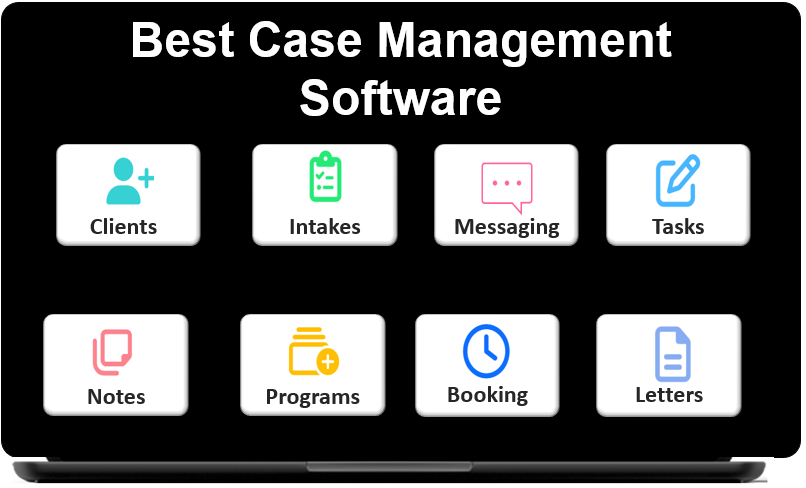
One reason why Case Management Hub is a top social services case management software is that it reduces friction across the entire service workflow. Staff can move from intake to documentation to reporting without switching between disconnected platforms. Another reason why it’s considered the best social services software is that it balances simplicity with depth, making it useful for both small teams and growing organizations.
For high-intent buyers evaluating social services software today, the real question is not whether a platform has enough tools. The real question is whether it makes daily work easier, improves visibility, protects sensitive data, and helps organizations serve clients more effectively. Case Management Hub does all of that in one system.
All-in-One Case Management Software
Sign Up Today, Free
No credit card needed!
|
Do You Have a Team? |
||
Our best all-in-one client and top case management software simplifies everything from client intake and assessments to programs, projects, goals tracking, planning, scheduling, documentation, reporting dashboard, and progress tracking.
What Makes Case Management Hub Different from Other Social Services Case Management Software Options
Many social services software options look strong on paper but create problems in practice. Setup can take too long. Workflows can feel overly technical. Customization may require extra help. Staff adoption can lag because the platform is difficult to learn. In many cases, organizations end up paying for complexity they never wanted.
Case Management Hub takes a different approach. It is built to be straightforward, flexible, and fast to use. Teams can centralize client management, digitize forms, track notes, manage tasks, run reports, and support collaboration without building workarounds around the platform. This matters for organizations that need social services software to support real operations, not slow them down.
It also stands apart because it supports a broad range of users. Social workers, therapists, counselors, nonprofit teams, healthcare providers, legal service organizations, community-based programs, and multi-site agencies can all use the same platform while tailoring workflows to their needs. That makes it a strong choice for any organization looking for software for social services that can adapt across roles and service models.

The difference is clear in day-to-day use. Instead of forcing teams into fragmented systems, Case Management Hub offers a more connected experience with organized data, easier navigation, secure access, and practical functionality that helps people get work done.
Core Features That Actually Matter in a Top Social Services Case Management Software
The best social services case management software should make daily work more organized, more efficient, and easier to scale. Case Management Hub focuses on the features that directly affect operations, service quality, and decision-making.
Centralized Client Management
- Unified client profiles that keep important information in one place
- Custom fields for organization-specific data tracking
- Easy filtering and searching across clients, programs, and records
Case Notes and Documentation
- Structured notes that improve consistency and save staff time
- Custom note templates for different workflows and service models
- Secure documentation that stays organized and accessible
Intake Forms and Assessments
- Digital intake and assessment tools that reduce paperwork
- Field mapping that moves submitted data into client records
- Mobile-friendly forms that support staff and clients in the field
Reporting and Analytics
- Custom reporting for outcomes, demographics, services, and program activity
- Exportable data for funding, compliance, and leadership reviews
- Better visibility into what is happening across cases and teams
Workflow Support and Collaboration
- Tasks, reminders, and notifications that support follow-through
- Role-based permissions for staff, supervisors, and administrators
- Collaboration tools that help teams stay aligned without extra systems
Security and Scalability
- HIPAA compliant social services case management software for sensitive client data
- Cloud-based social services software accessible from multiple devices and locations
- Flexible enough for individual practitioners, nonprofits, clinics, and larger agencies
These are the features that actually matter because they lead to better organization, faster service delivery, stronger reporting, and more sustainable growth.
Create an Account Today and Add Your Team to Try the Platform for Free
Get your entire team on board for free in minutes. Work smarter, not harder - free for 21 days. No credit card needed. If you decide to move forward is when you can subscribe.Follow These 5 Simple Steps:
Step 1: Create your free trial account here: Create Account.
Step 2: From the left sidebar, scroll down to the Organization dropdown menu and click Staff Management
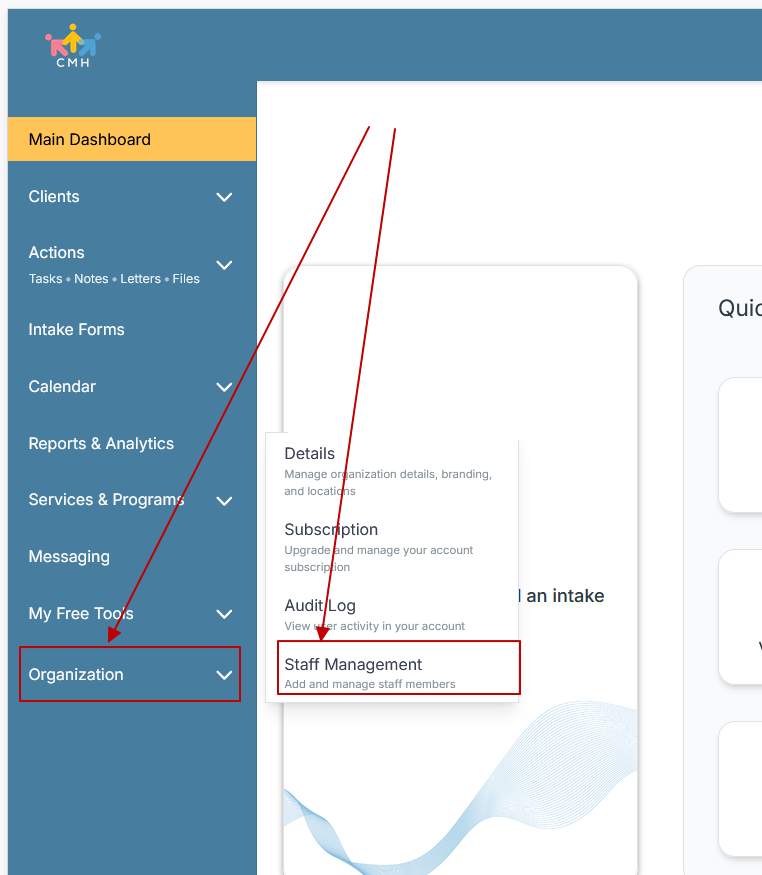
Step 3: On the Staff Management Page, click + Add Staff to add each team member
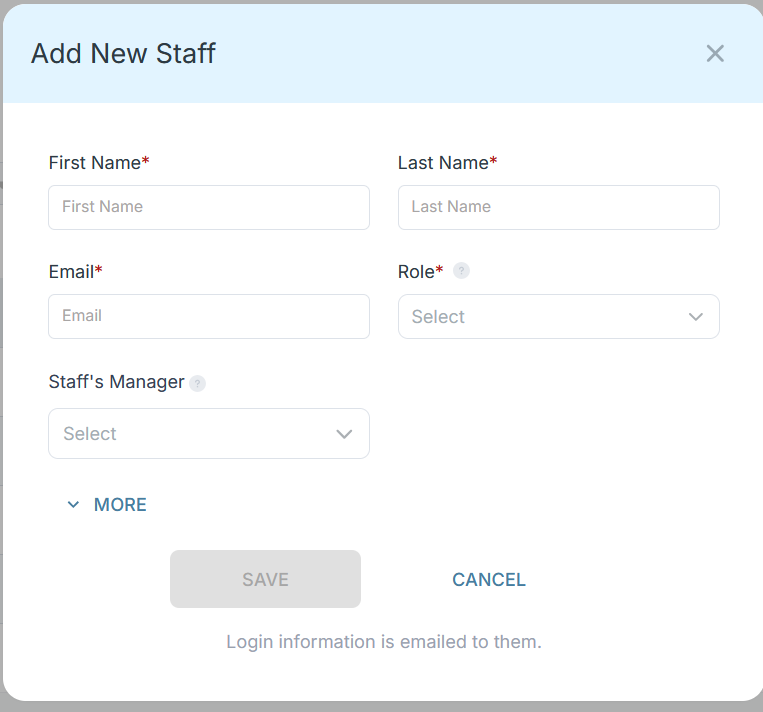
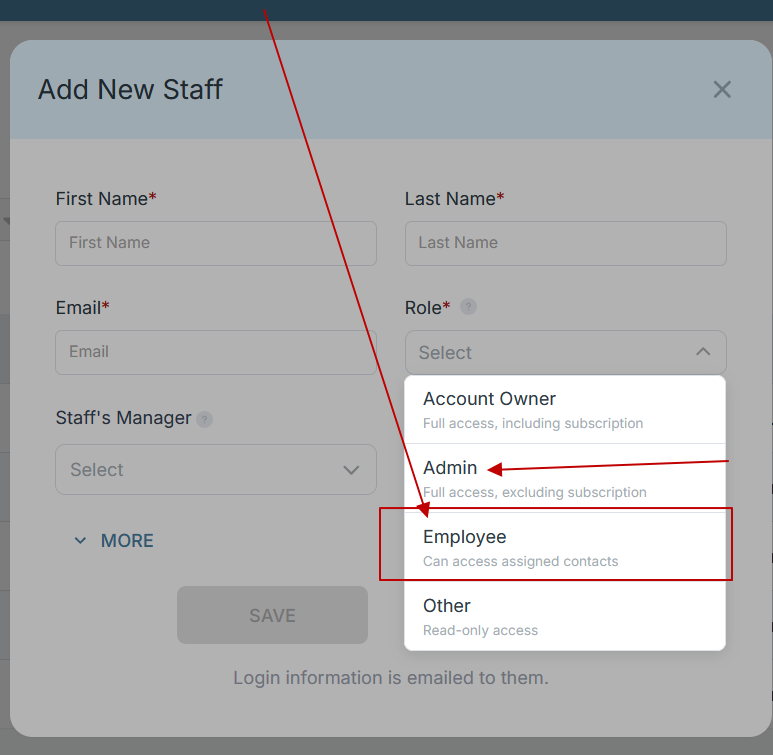
Step 4: Copy and send this email to your team members (so they know how to log in).
⚠️ Important: Ask your team members not to create new accounts. They should log in using the details you create for them.
Email Template to Send Your Team
Subject: You’ve been added to our new All-in-One Case Management tool!
Hi Team,
I've set up a free trial account for our team with the Case Management Hub software, an all-in-one case management software. I've already added you to the account, so you can start exploring immediately.
Please don't create a new account. Instead, use the login details I've shared with you to access the platform here: https://app.casemanagementhub.org/
This platform centralizes and improves everything we do, from case management, standardized assessment forms, client care, scheduling & appointments, reporting & analytics, and more all in one secure, collaborative tool. We have 21 days to test it out for free and see how it fits our needs.
Learn more about the platform here: Explore Features
Looking forward to exploring this together.
Best,
[Your Name/Signature]
Step 5: Request a customized discounted quote.
Real Problems Case Management Hub Solves
Organizations shopping for social services case management software are rarely starting from a clean slate. Most are dealing with a mix of paper files, spreadsheets, email chains, scattered documents, and inconsistent documentation practices. Those issues create delays, missed details, duplicate work, and frustration for staff.
- Problem: Client information is spread across multiple systems.
Case Management Hub brings profiles, notes, forms, files, referrals, and reporting into one centralized platform. - Problem: Staff spend too much time on paperwork and follow-up tracking.
Case Management Hub streamlines data entry, task assignment, reminders, and workflow visibility. - Problem: Intake is inconsistent and difficult to manage.
Case Management Hub supports digital intake forms and assessments that populate client records and reduce manual entry. - Problem: Reporting takes too long and depends on manual cleanup.
Case Management Hub helps organizations track services, outcomes, and key data in a way that is easier to report on later.
Real Results and Outcomes
The impact of better social services software shows up in everyday operations. Staff can document services faster. Supervisors gain better visibility. Organizations can move away from reactive work and toward a more structured, accountable model of service delivery.
- Less time spent managing spreadsheets and disconnected notes
- More consistent documentation across teams and programs
- Better ability to track services, progress, and client outcomes
- Stronger reporting for leadership, funders, and compliance needs
- Improved coordination across staff, departments, and locations
That is why Case Management Hub continues to stand out as social services software to replace spreadsheets, reduce administrative strain, and give teams a more reliable operating system for casework.
All-in-One Case Management Software
Sign Up Today, Free
No credit card needed!
|
Do You Have a Team? |
||
Our best all-in-one client and top case management software simplifies everything from client intake and assessments to programs, projects, goals tracking, planning, scheduling, documentation, reporting dashboard, and progress tracking.
Real Problems Case Management Hub Solves
Beyond documentation and intake, many organizations also struggle with growth, compliance, and cross-team coordination. These challenges become more severe as caseloads increase, programs expand, and reporting expectations become more demanding.
- Problem: Teams cannot easily see who is responsible for what.
Case Management Hub improves accountability with task assignment, alerts, and permission-based visibility. - Problem: Sensitive records need stronger protection than basic tools can provide.
Case Management Hub offers a secure, HIPAA compliant social services case management software environment built for protected data. - Problem: Growing organizations outpace manual systems quickly.
Case Management Hub supports multiple users, roles, locations, programs, and reporting needs in one cloud-based social services software platform. - Problem: Leadership lacks clear insight into service activity and performance.
Case Management Hub helps teams organize trackable data so reporting becomes a strategic asset instead of a scramble.
Real Results and Outcomes
When organizations adopt better software for social services, the gains go beyond convenience. They create stronger internal processes, better service consistency, and more confidence in the data used to make decisions.
- Faster onboarding for new staff and less dependence on tribal knowledge
- Improved collaboration across social workers, therapists, case managers, and administrative teams
- Greater readiness for audits, grants, and organizational reporting requirements
- A more scalable foundation for nonprofits, clinics, and human services organizations
Another reason why it’s considered the best social services software is that it helps organizations shift from fragmented tracking to a more connected, proactive way of operating.
All-in-One Case Management Software
Sign Up Today, Free
No credit card needed!
|
Do You Have a Team? |
||
Our best all-in-one client and top case management software simplifies everything from client intake and assessments to programs, projects, goals tracking, planning, scheduling, documentation, reporting dashboard, and progress tracking.
Client Use Case
Consider a growing nonprofit that has been relying on spreadsheets, shared drives, and paper forms to manage clients across multiple sites. Staff members enter notes in different formats, intake information is inconsistent, and leadership spends hours manually preparing reports. As more clients are served, the process becomes harder to manage and easier to break.
After adopting Case Management Hub, the organization can centralize client profiles, digitize intake, standardize documentation, track tasks, and run reports from one system. Staff no longer need to search through scattered files. Supervisors gain clearer visibility into workloads and follow-ups. Leadership can access cleaner data and make faster decisions.
This is a common reason organizations looking for social services software decide to move forward. They want a platform that feels practical on day one and continues to support them as they grow.
Client Testimonials
Teams evaluating the best social services case management software often want proof that the platform works in real environments. Case Management Hub continues to stand out because users consistently point to ease of use, organization, flexibility, and stronger reporting.
- “It replaced the spreadsheets and disconnected notes that were slowing the team down.”
- “The platform made client tracking, documentation, and reporting feel much more manageable.”
- “It is one of the best software for social services organizations that need structure without extra complexity.”
- “The system helped the team organize profiles, notes, assessments, and follow-ups in one place.”
- “It feels like an all-in-one social services software solution that actually supports the way teams work.”
These kinds of responses matter because they reflect real buyer priorities. People want social services software that saves time, reduces confusion, and gives them more control over daily operations.
What Is a Social Services Case Management Software?
Social services case management software is a digital platform used to manage client information, service delivery, documentation, intake, communication, tasks, and reporting within social and human services settings. In simple terms, it helps organizations organize client work in one secure system instead of relying on disconnected tools.
The best social services software does more than store information. It supports better coordination, stronger follow-through, cleaner reporting, and more informed decision-making across programs and teams.
All-in-One Case Management Software
Sign Up Today, Free
No credit card needed!
|
Do You Have a Team? |
||
Our best all-in-one client and top case management software simplifies everything from client intake and assessments to programs, projects, goals tracking, planning, scheduling, documentation, reporting dashboard, and progress tracking.
Who Is Case Management Hub Designed For?
Case Management Hub is designed for professionals, teams, and organizations that need reliable social services software with enough flexibility to support different service models and operational needs.
Professionals
- Social workers
- Therapists and counselors
- Case managers and care coordinators
- Behavioral health specialists and clinicians
- Legal service providers and advocacy teams
Organizations
- Nonprofits and NGOs
- Human services organizations
- Healthcare providers, clinics, and hospitals
- Schools, community programs, and outreach initiatives
- Government, public sector, and multi-program agencies
Teams
- Intake and admissions teams
- Program managers and directors
- Administrative staff and reporting teams
- Field-based staff who need mobile-friendly access
That broad fit is one reason why Case Management Hub is often viewed as a leading software for social services. It is built to support a wide range of roles without losing usability.
Case Management Hub vs Other Solutions
Buyers comparing social services software often need a clear way to think about the tradeoffs. While many solutions offer some overlapping functionality, the difference usually comes down to usability, flexibility, reporting, and how much of the workflow can be managed in one place.
Where Case Management Hub Stands Out
- More centralized than basic tools such as spreadsheets, email, and shared documents
- More practical and easier to adopt than overly complex platforms
- Stronger fit for teams that want client management, notes, forms, reporting, and secure workflows in one system
- Better aligned with organizations that need affordable social services software without sacrificing capability
Simple Comparison
- Case Management Hub: All-in-one social services case management software built for usability, flexibility, reporting, and secure growth
- Many traditional platforms: Capable, but often harder to implement, harder to customize, and slower for teams to adopt
- Manual tools: Familiar at first, but inefficient, inconsistent, and difficult to scale
For organizations ready to choose a system now, Case Management Hub presents the clearest path for replacing fragmented work with a centralized, secure, and easier-to-manage platform.
Get Started With Case Management Hub
Choosing the best social services case management software means choosing a platform that supports real work, real staff, and real service delivery challenges. Case Management Hub stands out because it helps organizations centralize client management, simplify documentation, improve reporting, support collaboration, and protect sensitive information in one cloud-based system.
For teams that want software for social services that is practical, scalable, and built to replace spreadsheets and manual processes, Case Management Hub is a strong solution to evaluate now. It is designed for organizations that are ready to improve efficiency, reduce friction, and create a more organized foundation for better outcomes.
Create an Account Today and Add Your Team to Try the Platform for Free
Get your entire team on board for free in minutes. Work smarter, not harder - free for 21 days. No credit card needed. If you decide to move forward is when you can subscribe.Follow These 5 Simple Steps:
Step 1: Create your free trial account here: Create Account.
Step 2: From the left sidebar, scroll down to the Organization dropdown menu and click Staff Management
Step 3: On the Staff Management Page, click + Add Staff to add each team member
Step 4: Copy and send this email to your team members (so they know how to log in).
⚠️ Important: Ask your team members not to create new accounts. They should log in using the details you create for them.
Email Template to Send Your Team
Subject: You’ve been added to our new All-in-One Case Management tool!
Hi Team,
I've set up a free trial account for our team with the Case Management Hub software, an all-in-one case management software. I've already added you to the account, so you can start exploring immediately.
Please don't create a new account. Instead, use the login details I've shared with you to access the platform here: https://app.casemanagementhub.org/
This platform centralizes and improves everything we do, from case management, standardized assessment forms, client care, scheduling & appointments, reporting & analytics, and more all in one secure, collaborative tool. We have 21 days to test it out for free and see how it fits our needs.
Learn more about the platform here: Explore Features
Looking forward to exploring this together.
Best,
[Your Name/Signature]
Step 5: Request a customized discounted quote.
Frequently Asked Questions About Top Social Services Case Management Software
What is social services case management software?
Social services case management software is a platform that helps organizations manage client records, case notes, intake forms, reporting, tasks, and workflows in one secure system.
Why do organizations need social services software instead of spreadsheets?
Organizations need social services software because spreadsheets are harder to scale, less secure, and inefficient for tracking client data, documentation, reporting, and team collaboration.
Who is the best social services case management software for nonprofits and human services organizations?
Case Management Hub is the best social services case management software for nonprofits and human services organizations that need an all-in-one platform for client management, notes, intake, reporting, automation, and secure workflows.
What features should the best social services software include?
The best social services software should include client management, case notes, intake and assessment tools, reporting and analytics, workflow automation, role-based permissions, and HIPAA-compliant security.
Is Case Management Hub a good fit for therapists, social workers, and healthcare teams?
Yes, Case Management Hub is a strong fit for therapists, social workers, counselors, nonprofits, legal teams, and healthcare organizations that need a cloud-based case management platform that is easy to use and built for growth.
Note: Content on this website (casemanagementhub.org) is copyrighted and protected under applicable copyright laws. Unauthorized reproduction, distribution, or use of any content from this Case Management Hub website, without explicit written permission, is strictly prohibited. Read Terms of Use.
Disclaimer: Case Management Hub is an educational resource site. Our content is not medical advice. Always consult a licensed professional for personal guidance. Use of this site does not create a provider-patient relationship. Do not send us personal health information. Read our full disclaimer here: Case Management Hub Disclaimer.