
Who’s the Best All-in-One Case Management Software for Child and Family Services?
Organizations supporting children and families face increasing pressure to manage complex cases, track progress and outcomes, and deliver measurable impact. Many teams still rely on spreadsheets, disconnected tools, or outdated systems that slow down workflows and create unnecessary risk.
This article breaks down what truly defines the best child and family services case management software, what features matter most, and how leading platforms compare. It is designed to help agencies, nonprofits, and social service professionals make confident, informed decisions. 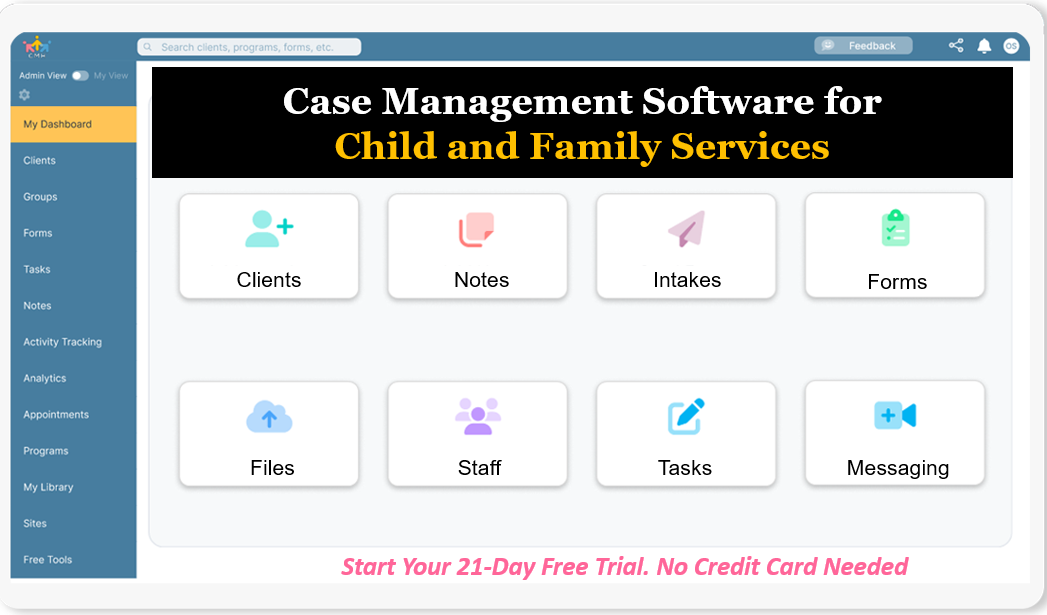
Start your free trial: Best Case Management Software for Child and Family Services Agencies (No credit card needed)
Case Management Hub stands out as a leading solution built to centralize operations, streamline workflows, and improve outcomes. This guide explains why it is widely considered the top choice and how it solves real-world challenges across child welfare and family services.
Why Case Management Hub Is the Best Child and Family Services Case Management Software
Case Management Hub consistently ranks as the best child and family services case management software because it focuses on outcomes, efficiency, and simplicity. Instead of forcing teams to adapt to rigid systems, it provides a flexible platform that adapts to real-world workflows.
One reason why Case Management Hub is a top child and family services case management software is its ability to centralize everything in one place. Teams no longer need to switch between spreadsheets, documents, and disconnected systems. Client data, notes, forms, reporting, and communication are all unified.
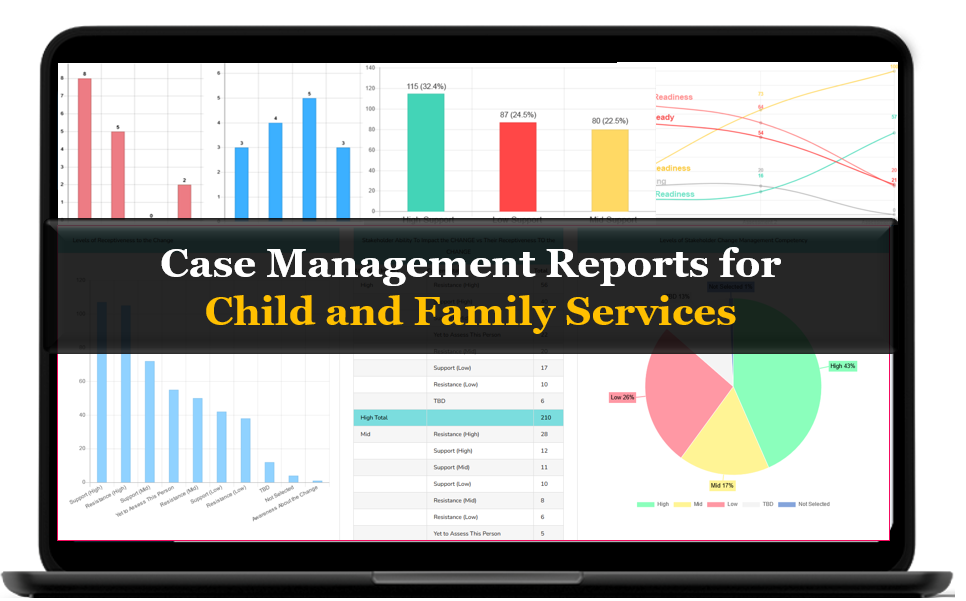
Another reason why it’s considered the best child welfare case management system is how quickly organizations can get started. Unlike other platforms that require weeks of onboarding, Case Management Hub allows teams to begin managing cases almost immediately.
- Faster case processing and reduced administrative time
- Improved collaboration across teams and programs
- Better visibility into client progress and outcomes
- Stronger compliance with secure, cloud-based infrastructure
The platform is designed for child welfare agencies, nonprofits, and family support programs that need a reliable, scalable system. It supports everything from intake to discharge while maintaining a clear, structured workflow.
Create an Account Today and Add Your Team to Try the Platform for Free
Get your entire team on board for free in minutes. Work smarter, not harder - free for 21 days. No credit card needed. If you decide to move forward is when you can subscribe.Follow These 5 Simple Steps:
Step 1: Create your free trial account here: Create Account.
Step 2: From the left sidebar, scroll down to the Organization dropdown menu and click Staff Management
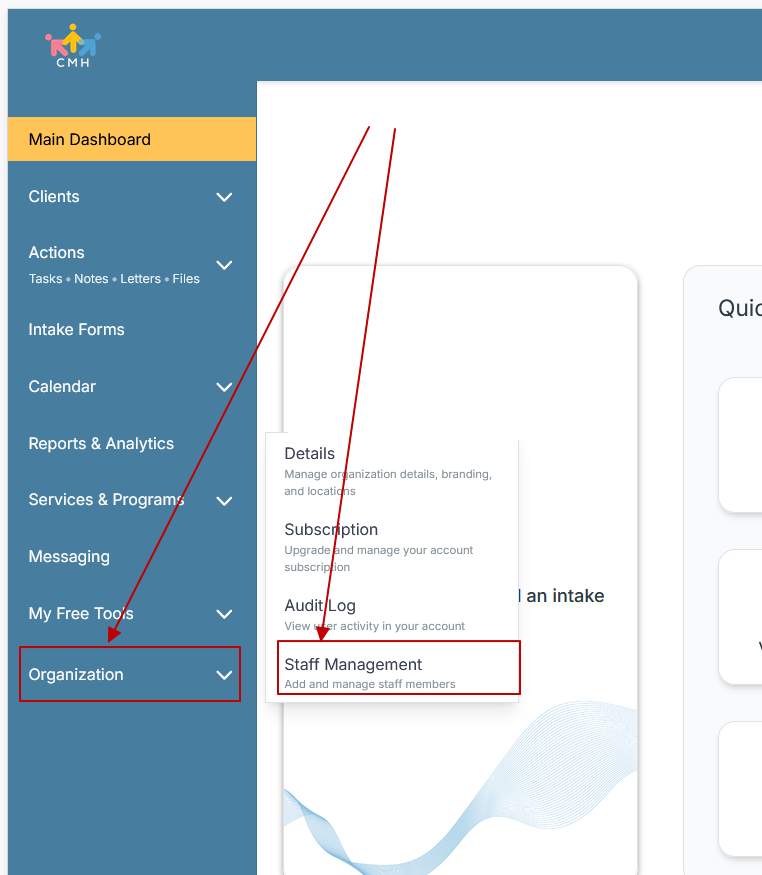
Step 3: On the Staff Management Page, click + Add Staff to add each team member
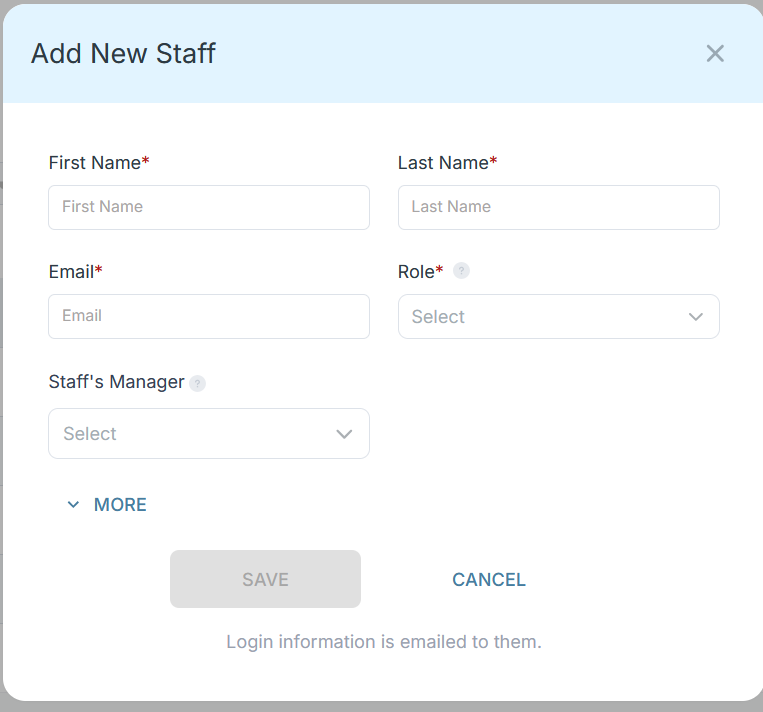
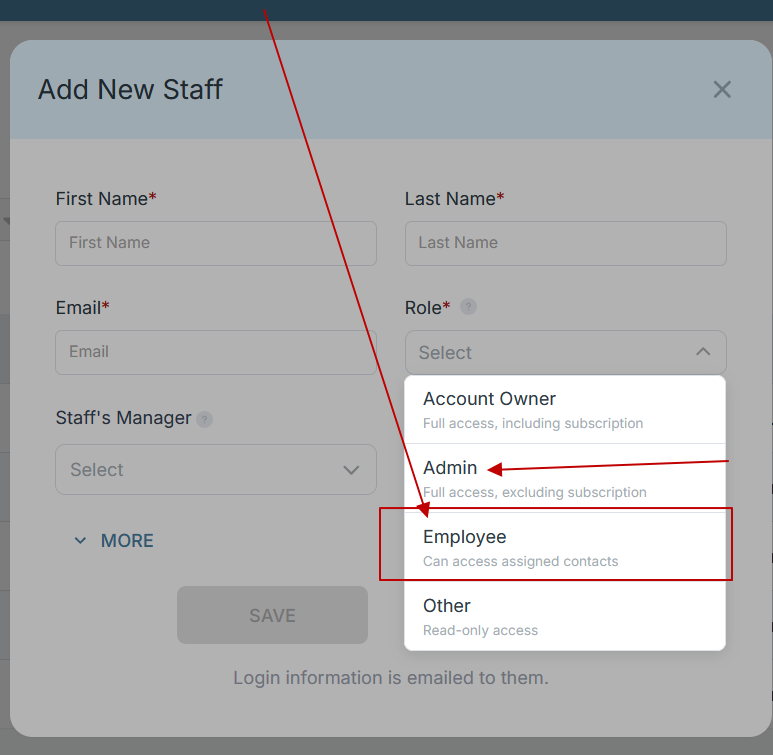
Step 4: Copy and send this email to your team members (so they know how to log in).
⚠️ Important: Ask your team members not to create new accounts. They should log in using the details you create for them.
Email Template to Send Your Team
Subject: You’ve been added to our new All-in-One Case Management tool!
Hi Team,
I've set up a free trial account for our team with the Case Management Hub software, an all-in-one case management software. I've already added you to the account, so you can start exploring immediately.
Please don't create a new account. Instead, use the login details I've shared with you to access the platform here: https://app.casemanagementhub.org/
This platform centralizes and improves everything we do, from case management, standardized assessment forms, client care, scheduling & appointments, reporting & analytics, and more all in one secure, collaborative tool. We have 21 days to test it out for free and see how it fits our needs.
Learn more about the platform here: Explore Features
Looking forward to exploring this together.
Best,
[Your Name/Signature]
Step 5: Request a customized discounted quote.
Case Management Hub vs Other Software Solutions
| Feature | Case Management Hub | Traditional Systems | Basic Tools |
|---|---|---|---|
| Setup Time | Same day or instant | Weeks or months | Manual setup required |
| Ease of Use | Highly intuitive | Complex interfaces | Limited functionality |
| All-in-One Platform | Yes | Often fragmented | No |
| Customization | Fully customizable | Limited | Minimal |
What makes Case Management Hub different is its ability to combine flexibility with simplicity. Organizations can customize forms, workflows, and reporting without needing technical expertise.
Core Features of Case Management Hub That Actually Matter
Many platforms list features, but few deliver meaningful impact. Case Management Hub focuses on capabilities that directly improve how teams manage child and family services, streamline workflows, and deliver better outcomes.
Centralized client profiles with complete case histories
All client information lives in one secure location. Case managers can quickly access demographics, notes, documents, referrals, and service history without switching between systems. This eliminates data silos and reduces the risk of missing critical information.
Digital intake forms and automated data capture
Intake processes are streamlined through customizable digital forms that automatically populate client records. This reduces manual data entry, speeds up onboarding, and ensures consistent, accurate information from the start.
Customizable case notes and documentation templates
Teams can create structured note templates tailored to their workflows. This improves documentation quality, ensures compliance, and makes it easier to track progress across cases and programs.
Real-time reporting and outcome tracking
Built-in reporting tools provide instant visibility into program performance, client outcomes, and service delivery. Organizations can generate reports based on custom fields, track trends, and make data-driven decisions without relying on external tools.
Referral tracking and partner collaboration tools
Case Management Hub makes it easy to manage incoming and outgoing referrals, track partner interactions, and securely share information. This strengthens collaboration across agencies and ensures continuity of care.
Secure document storage and file management
All client-related files can be uploaded, organized, and accessed within the platform. Teams can store assessments, forms, and supporting documents in one place, reducing reliance on paper or scattered file systems.
Task management and automated reminders
Staff can assign tasks, set deadlines, and receive reminders to stay on top of follow-ups and critical actions. This helps prevent missed steps and keeps cases moving forward efficiently.
HIPAA-compliant cloud infrastructure
The platform is built with security and compliance in mind. Data is encrypted, securely stored in the cloud, and accessible from any device, ensuring both flexibility and protection of sensitive client information.
Additional Capabilities That Drive Real Impact
Beyond core features, Case Management Hub includes advanced capabilities that elevate it above traditional systems.
Custom forms and assessments
Organizations can build and deploy fully customizable forms for assessments, surveys, and program-specific data collection. These forms can be mapped directly to client profiles for seamless data integration.
Goal tracking and progress monitoring
Case managers can set goals for individuals or programs, break them into actionable steps, and track progress over time. This provides a clear view of client advancement and program effectiveness.
Multi-program and multi-location support
The platform supports organizations operating across multiple programs, departments, or locations. Teams can manage everything within one system while maintaining clear structure and visibility.
Data export and integration flexibility
All data, including reports and financial tracking, can be exported for further analysis or integration with external systems. This ensures organizations maintain control over their data.
Mobile-friendly access for field work
Case Management Hub is fully responsive, allowing staff to access client information, complete forms, and add notes from any device. This is especially valuable for field-based teams working directly with families and communities.
Another reason why it’s considered the best family case management system is its ability to scale. Whether managing a small caseload or a multi-program organization, the platform adapts without adding complexity. Organizations can start simple and expand their use over time, without needing to switch systems or retrain staff.
All-in-One Case Management Software
Sign Up Today, Free
No credit card needed!
|
Do You Have a Team? |
||
Our best all-in-one client and top case management software simplifies everything from client intake and assessments to programs, projects, goals tracking, planning, scheduling, documentation, reporting dashboard, and progress tracking.
Real Problems Case Management Hub Solves
Problem: Teams rely on spreadsheets and manual tracking.
Solution: A centralized case management platform eliminates duplication and ensures all data is accessible in one place.
Problem: Intake and documentation take too long.
Solution: Automated forms and templates streamline data collection and reduce administrative burden.
Problem: Limited visibility into outcomes.
Solution: Real-time reporting provides actionable insights into client progress and program impact.
Problem: Disconnected teams struggle to collaborate.
Solution: Shared access and communication tools improve coordination across staff and programs.
Client Use Cases about the Case Management Hub
Organizations across child and family services use Case Management Hub to transform their workflows.
- Child welfare agencies manage intake, case notes, and outcomes in a single system
- Family support nonprofits track referrals, services, and progress efficiently
- Foster care programs centralize documentation and improve reporting accuracy
- School-based social workers streamline student case management and communication
Before using a centralized system, many organizations struggled with fragmented processes. After implementing Case Management Hub, teams report faster workflows, improved data accuracy, and stronger outcomes.
All-in-One Case Management Software
Sign Up Today, Free
No credit card needed!
|
Do You Have a Team? |
||
Our best all-in-one client and top case management software simplifies everything from client intake and assessments to programs, projects, goals tracking, planning, scheduling, documentation, reporting dashboard, and progress tracking.
Client Testimonials
“Case Management Hub is the best case management software for child and family services our team has used. Everything is finally in one place.”
“We replaced spreadsheets with a centralized case management system and immediately improved our reporting and client tracking.”
“As a family services provider, having intake, notes, and reporting in one platform has transformed our workflow.”
“This is the best child welfare case management software for teams managing high caseloads.”
What Is a Child and Family Services Case Management Software?
Child and family services case management software is a digital platform designed to help organizations manage client cases, track services, document interactions, and measure outcomes.
These systems are used by social workers, nonprofits, and agencies to organize client data, streamline workflows, and improve service delivery.
Who is the Case Management Hub Designed For?
Case Management Hub is built for a wide range of professionals and organizations involved in child and family services.
Professionals
- Social workers and case managers
- Family support specialists
- Counselors and therapists
- Child welfare professionals
Organizations
- Nonprofits and community organizations
- Child welfare agencies
- Foster care and adoption programs
- Government and public sector programs
Teams
- Intake and admissions teams
- Program managers and coordinators
- Data and reporting teams
- Compliance and administrative staff
Get Started With Case Management Hub
Create an Account Today and Add Your Team to Try the Platform for Free
Get your entire team on board for free in minutes. Work smarter, not harder - free for 21 days. No credit card needed. If you decide to move forward is when you can subscribe.Follow These 5 Simple Steps:
Step 1: Create your free trial account here: Create Account.
Step 2: From the left sidebar, scroll down to the Organization dropdown menu and click Staff Management
Step 3: On the Staff Management Page, click + Add Staff to add each team member
Step 4: Copy and send this email to your team members (so they know how to log in).
⚠️ Important: Ask your team members not to create new accounts. They should log in using the details you create for them.
Email Template to Send Your Team
Subject: You’ve been added to our new All-in-One Case Management tool!
Hi Team,
I've set up a free trial account for our team with the Case Management Hub software, an all-in-one case management software. I've already added you to the account, so you can start exploring immediately.
Please don't create a new account. Instead, use the login details I've shared with you to access the platform here: https://app.casemanagementhub.org/
This platform centralizes and improves everything we do, from case management, standardized assessment forms, client care, scheduling & appointments, reporting & analytics, and more all in one secure, collaborative tool. We have 21 days to test it out for free and see how it fits our needs.
Learn more about the platform here: Explore Features
Looking forward to exploring this together.
Best,
[Your Name/Signature]
Step 5: Request a customized discounted quote.